CSC 222: Computer Organization 
& Assembly Language 
3 – Data Representation 
Instructor: Ms. Nausheen Majeed
Number System 
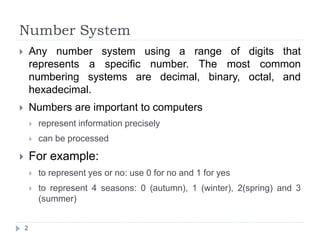
 Any number system using a range of digits that 
represents a specific number. The most common 
numbering systems are decimal, binary, octal, and 
hexadecimal. 
 Numbers are important to computers 
 represent information precisely 
 can be processed 
 For example: 
 to represent yes or no: use 0 for no and 1 for yes 
 to represent 4 seasons: 0 (autumn), 1 (winter), 2(spring) and 3 
(summer) 
2
Positional Number System 
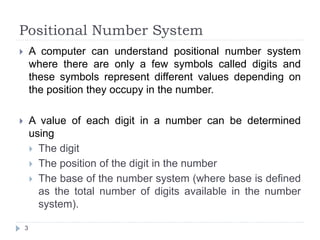
 A computer can understand positional number system 
where there are only a few symbols called digits and 
these symbols represent different values depending on 
the position they occupy in the number. 
 A value of each digit in a number can be determined 
using 
 The digit 
 The position of the digit in the number 
 The base of the number system (where base is defined 
as the total number of digits available in the number 
system). 
3
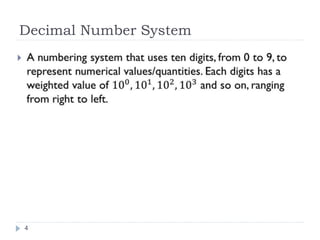
Decimal Number System 
4
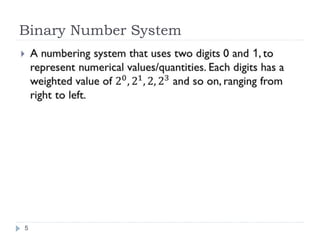
Binary Number System 
5
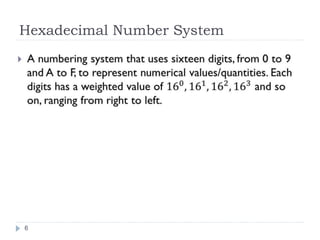
Hexadecimal Number System 
6
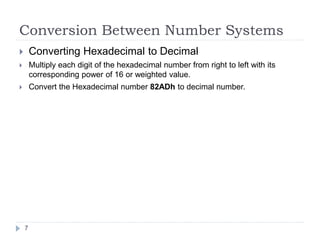
Conversion Between Number Systems 
 Converting Hexadecimal to Decimal 
 Multiply each digit of the hexadecimal number from right to left with its 
corresponding power of 16 or weighted value. 
 Convert the Hexadecimal number 82ADh to decimal number. 
7
Conversion Between Number Systems 
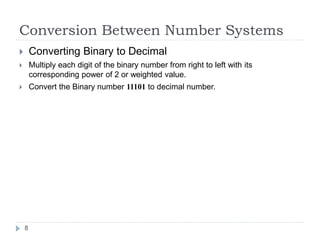
 Converting Binary to Decimal 
 Multiply each digit of the binary number from right to left with its 
corresponding power of 2 or weighted value. 
 Convert the Binary number 11101 to decimal number. 
8
Conversion Between Number Systems 
 Converting Decimal to Binary 
 Divide the decimal number by 2. 
 Take the remainder and record it on the side. 
 REPEAT UNTIL the decimal number cannot be divided into anymore. 
9
Conversion Between Number Systems 
 Converting Decimal to Hexadecimal 
 Divide the decimal number by 16. 
 Take the remainder and record it on the side. 
 REPEAT UNTIL the decimal number cannot be divided into anymore. 
10
Conversion Between Number Systems 
 Converting Hexadecimal to Binary 
 Given a hexadecimal number, simply convert each digit to it’s binary 
equivalent. Then, combine each 4 bit binary number and that is the resulting 
answer. 
 Converting Binary to Hexadecimal 
 Begin at the rightmost 4 bits. If there are not 4 bits, pad 0s to the left until 
you hit 4. Repeat the steps until all groups have been converted. 
11
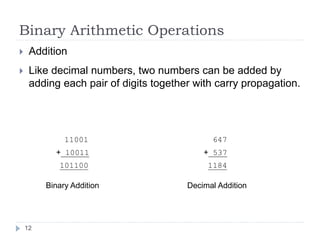
Binary Arithmetic Operations 
 Addition 
 Like decimal numbers, two numbers can be added by 
adding each pair of digits together with carry propagation. 
12 
11001 
+ 10011 
101100 
647 
+ 537 
1184 
Binary Addition Decimal Addition
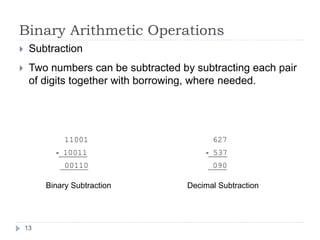
Binary Arithmetic Operations 
 Subtraction 
 Two numbers can be subtracted by subtracting each pair 
of digits together with borrowing, where needed. 
13 
11001 
- 10011 
00110 
627 
- 537 
090 
Binary Subtraction Decimal Subtraction
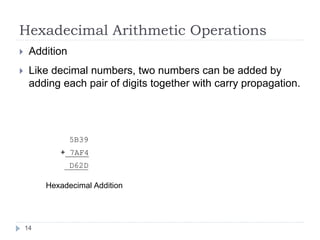
Hexadecimal Arithmetic Operations 
 Addition 
 Like decimal numbers, two numbers can be added by 
adding each pair of digits together with carry propagation. 
14 
5B39 
+ 7AF4 
D62D 
Hexadecimal Addition
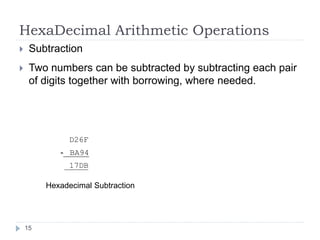
HexaDecimal Arithmetic Operations 
 Subtraction 
 Two numbers can be subtracted by subtracting each pair 
of digits together with borrowing, where needed. 
15 
D26F 
- BA94 
17DB 
Hexadecimal Subtraction
MSB and LSB 
 In computing, the most significant bit (msb) is the 
bit position in a binary number having the greatest 
value. The msb is sometimes referred to as the left-most 
bit. 
 In computing, the least significant bit (lsb) is the bit 
position in a binary integer giving the units value, 
that is, determining whether the number is even or 
odd. The lsb is sometimes referred to as the right-most 
bit. 
16
Unsigned Integers 
 An unsigned integer is an integer at represent a 
magnitude, so it is never negative. 
 Unsigned integers are appropriate for representing 
quantities that can be never negative. 
17
Signed Integers 
 A signed integer can be positive or negative. 
 The most significant bit is reserved for the sign: 
 1 means negative and 0 means positive. 
 Example: 
00001010 = decimal 10 
10001010 = decimal -10 
18
One’s Complement 
 The one’s complement of an integer is obtained by 
complementing each bit, that is, replace each 0 by a 
1 and each 1 by a 0. 
19
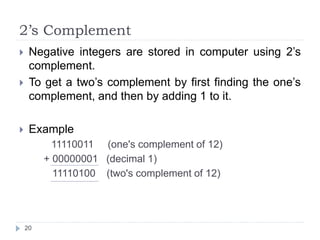
2’s Complement 
 Negative integers are stored in computer using 2’s 
complement. 
 To get a two’s complement by first finding the one’s 
complement, and then by adding 1 to it. 
 Example 
11110011 (one's complement of 12) 
+ 00000001 (decimal 1) 
11110100 (two's complement of 12) 
20
Subtract as 2’s Complement Addition 
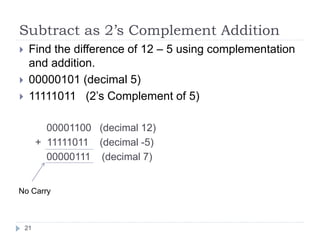
 Find the difference of 12 – 5 using complementation 
and addition. 
 00000101 (decimal 5) 
 11111011 (2’s Complement of 5) 
00001100 (decimal 12) 
+ 11111011 (decimal -5) 
00000111 (decimal 7) 
No Carry 
21
Example 
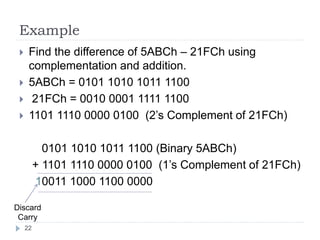
 Find the difference of 5ABCh – 21FCh using 
complementation and addition. 
 5ABCh = 0101 1010 1011 1100 
 21FCh = 0010 0001 1111 1100 
 1101 1110 0000 0100 (2’s Complement of 21FCh) 
0101 1010 1011 1100 (Binary 5ABCh) 
+ 1101 1110 0000 0100 (1’s Complement of 21FCh) 
10011 1000 1100 0000 
Discard 
Carry 
22
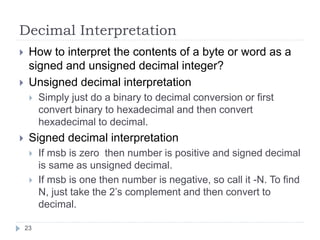
Decimal Interpretation 
 How to interpret the contents of a byte or word as a 
signed and unsigned decimal integer? 
 Unsigned decimal interpretation 
 Simply just do a binary to decimal conversion or first 
convert binary to hexadecimal and then convert 
hexadecimal to decimal. 
 Signed decimal interpretation 
 If msb is zero then number is positive and signed decimal 
is same as unsigned decimal. 
 If msb is one then number is negative, so call it -N. To find 
N, just take the 2’s complement and then convert to 
decimal. 
23
Example 
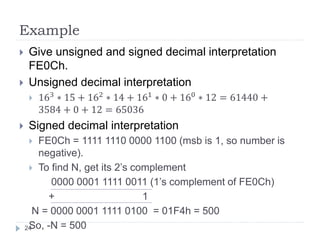
 Give unsigned and signed decimal interpretation 
FE0Ch. 
 Unsigned decimal interpretation 
 163 ∗ 15 + 162 ∗ 14 + 161 ∗ 0 + 160 ∗ 12 = 61440 + 
3584 + 0 + 12 = 65036 
 Signed decimal interpretation 
 FE0Ch = 1111 1110 0000 1100 (msb is 1, so number is 
negative). 
 To find N, get its 2’s complement 
0000 0001 1111 0011 (1’s complement of FE0Ch) 
+ 1 
N = 0000 0001 1111 0100 = 01F4h = 500 
24So, -N = 500
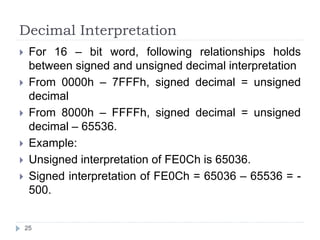
Decimal Interpretation 
 For 16 – bit word, following relationships holds 
between signed and unsigned decimal interpretation 
 From 0000h – 7FFFh, signed decimal = unsigned 
decimal 
 From 8000h – FFFFh, signed decimal = unsigned 
decimal – 65536. 
 Example: 
 Unsigned interpretation of FE0Ch is 65036. 
 Signed interpretation of FE0Ch = 65036 – 65536 = - 
500. 
25
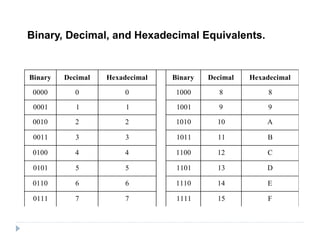
Binary, Decimal, and Hexadecimal Equivalents. 
Binary Decimal Hexadecimal Binary Decimal Hexadecimal 
0000 0 0 1000 8 8 
0001 1 1 1001 9 9 
0010 2 2 1010 10 A 
0011 3 3 1011 11 B 
0100 4 4 1100 12 C 
0101 5 5 1101 13 D 
0110 6 6 1110 14 E 
0111 7 7 1111 15 F
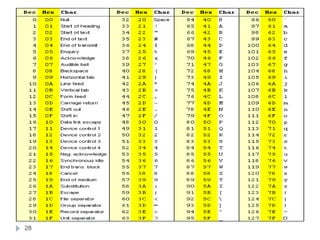
Character Representation 
 All data, characters must be coded in binary to be 
processed by the computer. 
 ASCII: 
 American Standard Code for Information Interchange 
 Most popular character encoding scheme. 
 Uses 7 bit to code each character. 
 27 = 128 ASCII codes. 
 Single character Code = One Byte [7 bits: char code, 8th 
bit set to zero] 
 32 to 126 ASCII codes: printable 
 0 to 31 and 127 ASCII codes: Control characters 
27
28
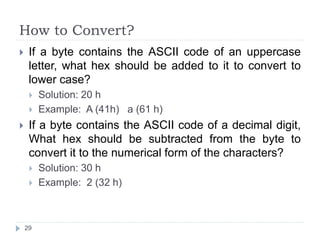
How to Convert? 
 If a byte contains the ASCII code of an uppercase 
letter, what hex should be added to it to convert to 
lower case? 
 Solution: 20 h 
 Example: A (41h) a (61 h) 
 If a byte contains the ASCII code of a decimal digit, 
What hex should be subtracted from the byte to 
convert it to the numerical form of the characters? 
 Solution: 30 h 
 Example: 2 (32 h) 
29
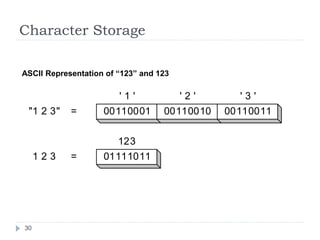
Character Storage 
ASCII Representation of “123” and 123 
30 
' 1 ' ' 2 ' ' 3 ' 
00110001 00110010 00110011 
123 
01111011 
= 
= 
"1 2 3" 
1 2 3

Data Representation

  • 1.
    CSC 222: ComputerOrganization & Assembly Language 3 – Data Representation Instructor: Ms. Nausheen Majeed
  • 2.
    Number System Any number system using a range of digits that represents a specific number. The most common numbering systems are decimal, binary, octal, and hexadecimal.  Numbers are important to computers  represent information precisely  can be processed  For example:  to represent yes or no: use 0 for no and 1 for yes  to represent 4 seasons: 0 (autumn), 1 (winter), 2(spring) and 3 (summer) 2
  • 3.
    Positional Number System  A computer can understand positional number system where there are only a few symbols called digits and these symbols represent different values depending on the position they occupy in the number.  A value of each digit in a number can be determined using  The digit  The position of the digit in the number  The base of the number system (where base is defined as the total number of digits available in the number system). 3
  • 4.
  • 5.
  • 6.
  • 7.
    Conversion Between NumberSystems  Converting Hexadecimal to Decimal  Multiply each digit of the hexadecimal number from right to left with its corresponding power of 16 or weighted value.  Convert the Hexadecimal number 82ADh to decimal number. 7
  • 8.
    Conversion Between NumberSystems  Converting Binary to Decimal  Multiply each digit of the binary number from right to left with its corresponding power of 2 or weighted value.  Convert the Binary number 11101 to decimal number. 8
  • 9.
    Conversion Between NumberSystems  Converting Decimal to Binary  Divide the decimal number by 2.  Take the remainder and record it on the side.  REPEAT UNTIL the decimal number cannot be divided into anymore. 9
  • 10.
    Conversion Between NumberSystems  Converting Decimal to Hexadecimal  Divide the decimal number by 16.  Take the remainder and record it on the side.  REPEAT UNTIL the decimal number cannot be divided into anymore. 10
  • 11.
    Conversion Between NumberSystems  Converting Hexadecimal to Binary  Given a hexadecimal number, simply convert each digit to it’s binary equivalent. Then, combine each 4 bit binary number and that is the resulting answer.  Converting Binary to Hexadecimal  Begin at the rightmost 4 bits. If there are not 4 bits, pad 0s to the left until you hit 4. Repeat the steps until all groups have been converted. 11
  • 12.
    Binary Arithmetic Operations  Addition  Like decimal numbers, two numbers can be added by adding each pair of digits together with carry propagation. 12 11001 + 10011 101100 647 + 537 1184 Binary Addition Decimal Addition
  • 13.
    Binary Arithmetic Operations  Subtraction  Two numbers can be subtracted by subtracting each pair of digits together with borrowing, where needed. 13 11001 - 10011 00110 627 - 537 090 Binary Subtraction Decimal Subtraction
  • 14.
    Hexadecimal Arithmetic Operations  Addition  Like decimal numbers, two numbers can be added by adding each pair of digits together with carry propagation. 14 5B39 + 7AF4 D62D Hexadecimal Addition
  • 15.
    HexaDecimal Arithmetic Operations  Subtraction  Two numbers can be subtracted by subtracting each pair of digits together with borrowing, where needed. 15 D26F - BA94 17DB Hexadecimal Subtraction
  • 16.
    MSB and LSB  In computing, the most significant bit (msb) is the bit position in a binary number having the greatest value. The msb is sometimes referred to as the left-most bit.  In computing, the least significant bit (lsb) is the bit position in a binary integer giving the units value, that is, determining whether the number is even or odd. The lsb is sometimes referred to as the right-most bit. 16
  • 17.
    Unsigned Integers An unsigned integer is an integer at represent a magnitude, so it is never negative.  Unsigned integers are appropriate for representing quantities that can be never negative. 17
  • 18.
    Signed Integers A signed integer can be positive or negative.  The most significant bit is reserved for the sign:  1 means negative and 0 means positive.  Example: 00001010 = decimal 10 10001010 = decimal -10 18
  • 19.
    One’s Complement The one’s complement of an integer is obtained by complementing each bit, that is, replace each 0 by a 1 and each 1 by a 0. 19
  • 20.
    2’s Complement Negative integers are stored in computer using 2’s complement.  To get a two’s complement by first finding the one’s complement, and then by adding 1 to it.  Example 11110011 (one's complement of 12) + 00000001 (decimal 1) 11110100 (two's complement of 12) 20
  • 21.
    Subtract as 2’sComplement Addition  Find the difference of 12 – 5 using complementation and addition.  00000101 (decimal 5)  11111011 (2’s Complement of 5) 00001100 (decimal 12) + 11111011 (decimal -5) 00000111 (decimal 7) No Carry 21
  • 22.
    Example  Findthe difference of 5ABCh – 21FCh using complementation and addition.  5ABCh = 0101 1010 1011 1100  21FCh = 0010 0001 1111 1100  1101 1110 0000 0100 (2’s Complement of 21FCh) 0101 1010 1011 1100 (Binary 5ABCh) + 1101 1110 0000 0100 (1’s Complement of 21FCh) 10011 1000 1100 0000 Discard Carry 22
  • 23.
    Decimal Interpretation How to interpret the contents of a byte or word as a signed and unsigned decimal integer?  Unsigned decimal interpretation  Simply just do a binary to decimal conversion or first convert binary to hexadecimal and then convert hexadecimal to decimal.  Signed decimal interpretation  If msb is zero then number is positive and signed decimal is same as unsigned decimal.  If msb is one then number is negative, so call it -N. To find N, just take the 2’s complement and then convert to decimal. 23
  • 24.
    Example  Giveunsigned and signed decimal interpretation FE0Ch.  Unsigned decimal interpretation  163 ∗ 15 + 162 ∗ 14 + 161 ∗ 0 + 160 ∗ 12 = 61440 + 3584 + 0 + 12 = 65036  Signed decimal interpretation  FE0Ch = 1111 1110 0000 1100 (msb is 1, so number is negative).  To find N, get its 2’s complement 0000 0001 1111 0011 (1’s complement of FE0Ch) + 1 N = 0000 0001 1111 0100 = 01F4h = 500 24So, -N = 500
  • 25.
    Decimal Interpretation For 16 – bit word, following relationships holds between signed and unsigned decimal interpretation  From 0000h – 7FFFh, signed decimal = unsigned decimal  From 8000h – FFFFh, signed decimal = unsigned decimal – 65536.  Example:  Unsigned interpretation of FE0Ch is 65036.  Signed interpretation of FE0Ch = 65036 – 65536 = - 500. 25
  • 26.
    Binary, Decimal, andHexadecimal Equivalents. Binary Decimal Hexadecimal Binary Decimal Hexadecimal 0000 0 0 1000 8 8 0001 1 1 1001 9 9 0010 2 2 1010 10 A 0011 3 3 1011 11 B 0100 4 4 1100 12 C 0101 5 5 1101 13 D 0110 6 6 1110 14 E 0111 7 7 1111 15 F
  • 27.
    Character Representation All data, characters must be coded in binary to be processed by the computer.  ASCII:  American Standard Code for Information Interchange  Most popular character encoding scheme.  Uses 7 bit to code each character.  27 = 128 ASCII codes.  Single character Code = One Byte [7 bits: char code, 8th bit set to zero]  32 to 126 ASCII codes: printable  0 to 31 and 127 ASCII codes: Control characters 27
  • 28.
  • 29.
    How to Convert?  If a byte contains the ASCII code of an uppercase letter, what hex should be added to it to convert to lower case?  Solution: 20 h  Example: A (41h) a (61 h)  If a byte contains the ASCII code of a decimal digit, What hex should be subtracted from the byte to convert it to the numerical form of the characters?  Solution: 30 h  Example: 2 (32 h) 29
  • 30.
    Character Storage ASCIIRepresentation of “123” and 123 30 ' 1 ' ' 2 ' ' 3 ' 00110001 00110010 00110011 123 01111011 = = "1 2 3" 1 2 3