Data Representation
Prepared By
Pabari Shashikant C.
Outline
 Data Type
 Compliments
 Subtraction of Unsigned Numbers
using r’s complement
 How To Represent Signed Numbers
 Floating-Point Representation
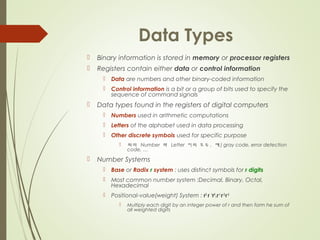
Data Types
 Binary information is stored in memory or processor registers
 Registers contain either data or control information
 Data are numbers and other binary-coded information
 Control information is a bit or a group of bits used to specify the
sequence of command signals
 Data types found in the registers of digital computers
 Numbers used in arithmetic computations
 Letters of the alphabet used in data processing
 Other discrete symbols used for specific purpose
 위의 Number 와 Letter 이외 모두 , 예 ) gray code, error detection
code, …
 Number Systems
 Base or Radix r system : uses distinct symbols for r digits
 Most common number system :Decimal, Binary, Octal,
Hexadecimal
 Positional-value(weight) System : r2
r 1
r0
.r-1
r-2
r-3
 Multiply each digit by an integer power of r and then form he sum of
all weighted digits
 Decimal System/Base-10 System
 Composed of 10 symbols or numerals(0, 1, 2, 3, 4, 5, 6, 7, 8, 9, 0)
 Binary System/Base-2 System
 Composed of 10 symbols or numerals(0, 1)
 Bit = Binary digit
 Hexadecimal System/Base-16 System : Tab. 3-2
 Composed of 16 symbols or numerals(0, 1, 2, 3, 4, 5, 6, 7, 8, 9, A, B, C, D,
E, F)
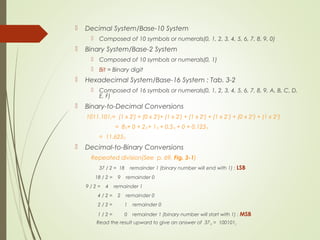
 Binary-to-Decimal Conversions
1011.1012 = (1 x 23
) + (0 x 22
)+ (1 x 21
) + (1 x 2o
) + (1 x 2-1
) + (0 x 2-2
) + (1 x 2-3
)
= 810+ 0 + 210 + 110 + 0.510 + 0 + 0.12510
= 11.62510
 Decimal-to-Binary Conversions
Repeated division(See p. 69, Fig. 3-1)
37 / 2 = 18 remainder 1 (binary number will end with 1) : LSB
18 / 2 = 9 remainder 0
9 / 2 = 4 remainder 1
4 / 2 = 2 remainder 0
2 / 2 = 1 remainder 0
1 / 2 = 0 remainder 1 (binary number will start with 1) : MSB
Read the result upward to give an answer of 3710 = 1001012
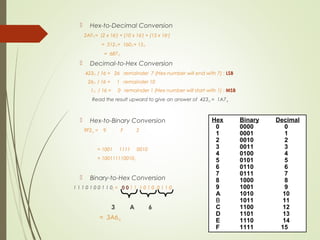
 Hex-to-Decimal Conversion
2AF16 = (2 x 162
) + (10 x 161
) + (15 x 16o
)
= 51210+ 16010+ 1510
= 68710
 Decimal-to-Hex Conversion
42310 / 16 = 26 remainder 7 (Hex number will end with 7) : LSB
2610 / 16 = 1 remainder 10
110 / 16 = 0 remainder 1 (Hex number will start with 1) : MSB
Read the result upward to give an answer of 42310 = 1A716
 Hex-to-Binary Conversion
9F216 = 9 F 2
= 1001 1111 0010
= 1001111100102
 Binary-to-Hex Conversion
1 1 1 0 1 0 0 1 1 02 = 0 00 0 1 1 1 0 1 0 0 1 1 0
3 A 6
= 3A616
Hex Binary Decimal
0 0000 0
1 0001 1
2 0010 2
3 0011 3
4 0100 4
5 0101 5
6 0110 6
7 0111 7
8 1000 8
9 1001 9
A 1010 10
B 1011 11
C 1100 12
D 1101 13
E 1110 14
F 1111 15
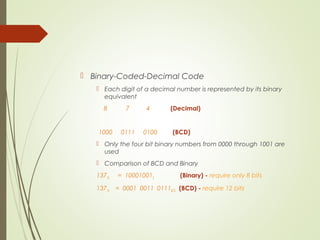
 Binary-Coded-Decimal Code
 Each digit of a decimal number is represented by its binary
equivalent
8 7 4 (Decimal)
1000 0111 0100 (BCD)
 Only the four bit binary numbers from 0000 through 1001 are
used
 Comparison of BCD and Binary
13710 = 100010012 (Binary) - require only 8 bits
13710 = 0001 0011 0111BCD (BCD) - require 12 bits
Complements
 Complements are used in digital computers for simplifying
the subtraction operation and for logical manipulation
 There are two types of complements for base r system
 1) r’s complement 2) (r-1)’s complement
 Binary number : 2’s or 1’s complement
 Decimal number : 10’s or 9’s complement
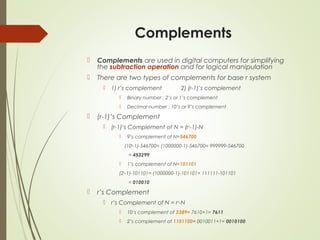
 (r-1)’s Complement
 (r-1)’s Complement of N = (rn
-1)-N
 9’s complement of N=546700
(106
-1)-546700= (1000000-1)-546700= 999999-546700
= 453299
 1’s complement of N=101101
(26
-1)-101101= (1000000-1)-101101= 111111-101101
= 010010
 r’s Complement
 r’s Complement of N = rn
-N
 10’s complement of 2389= 7610+1= 7611
 2’s complement of 1101100= 0010011+1= 0010100
Fixed-Point Representation
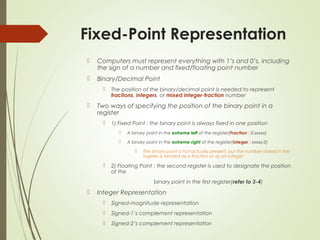
 Computers must represent everything with 1’s and 0’s, including
the sign of a number and fixed/floating point number
 Binary/Decimal Point
 The position of the binary/decimal point is needed to represent
fractions, integers, or mixed integer-fraction number
 Two ways of specifying the position of the binary point in a
register
 1) Fixed Point : the binary point is always fixed in one position
 A binary point in the extreme left of the register(Fraction : 0.xxxxx)
 A binary point in the extreme right of the register(Integer : xxxxx.0)
 The binary point is not actually present, but the number stored in the
register is treated as a fraction or as an integer
 2) Floating Point : the second register is used to designate the position
of the
binary point in the first register(refer to 3-4)
 Integer Representation
 Signed-magnitude representation
 Signed-1’s complement representation
 Signed-2’s complement representation
Floating-Point Representation
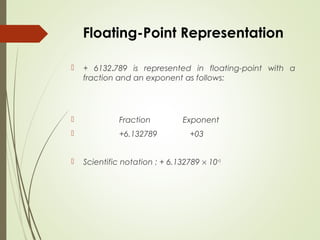
 + 6132.789 is represented in floating-point with a
fraction and an exponent as follows:
 Fraction Exponent
 +6.132789 +03
 Scientific notation : + 6.132789 × 10+3
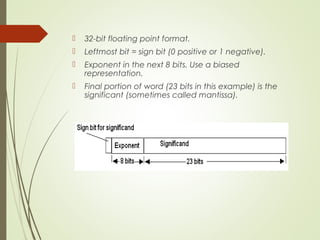
 32-bit floating point format.
 Leftmost bit = sign bit (0 positive or 1 negative).
 Exponent in the next 8 bits. Use a biased
representation.
 Final portion of word (23 bits in this example) is the
significant (sometimes called mantissa).
Example
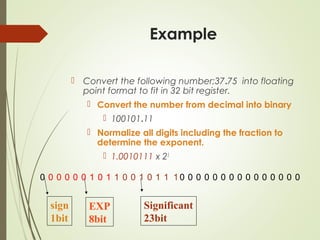
 Convert the following number;37.75 into floating
point format to fit in 32 bit register.
 Convert the number from decimal into binary
 100101.11
 Normalize all digits including the fraction to
determine the exponent.
 1.0010111 x 25
0 0 0 0 0 0 1 0 1 1 0 0 1 0 1 1 1 0 0 0 0 0 0 0 0 0 0 0 0 0 0 0
sign
1bit
EXP
8bit
Significant
23bit

Data representation

  • 1.
  • 2.
    Outline  Data Type Compliments  Subtraction of Unsigned Numbers using r’s complement  How To Represent Signed Numbers  Floating-Point Representation
  • 3.
    Data Types  Binaryinformation is stored in memory or processor registers  Registers contain either data or control information  Data are numbers and other binary-coded information  Control information is a bit or a group of bits used to specify the sequence of command signals  Data types found in the registers of digital computers  Numbers used in arithmetic computations  Letters of the alphabet used in data processing  Other discrete symbols used for specific purpose  위의 Number 와 Letter 이외 모두 , 예 ) gray code, error detection code, …  Number Systems  Base or Radix r system : uses distinct symbols for r digits  Most common number system :Decimal, Binary, Octal, Hexadecimal  Positional-value(weight) System : r2 r 1 r0 .r-1 r-2 r-3  Multiply each digit by an integer power of r and then form he sum of all weighted digits
  • 4.
     Decimal System/Base-10System  Composed of 10 symbols or numerals(0, 1, 2, 3, 4, 5, 6, 7, 8, 9, 0)  Binary System/Base-2 System  Composed of 10 symbols or numerals(0, 1)  Bit = Binary digit  Hexadecimal System/Base-16 System : Tab. 3-2  Composed of 16 symbols or numerals(0, 1, 2, 3, 4, 5, 6, 7, 8, 9, A, B, C, D, E, F)  Binary-to-Decimal Conversions 1011.1012 = (1 x 23 ) + (0 x 22 )+ (1 x 21 ) + (1 x 2o ) + (1 x 2-1 ) + (0 x 2-2 ) + (1 x 2-3 ) = 810+ 0 + 210 + 110 + 0.510 + 0 + 0.12510 = 11.62510  Decimal-to-Binary Conversions Repeated division(See p. 69, Fig. 3-1) 37 / 2 = 18 remainder 1 (binary number will end with 1) : LSB 18 / 2 = 9 remainder 0 9 / 2 = 4 remainder 1 4 / 2 = 2 remainder 0 2 / 2 = 1 remainder 0 1 / 2 = 0 remainder 1 (binary number will start with 1) : MSB Read the result upward to give an answer of 3710 = 1001012
  • 5.
     Hex-to-Decimal Conversion 2AF16= (2 x 162 ) + (10 x 161 ) + (15 x 16o ) = 51210+ 16010+ 1510 = 68710  Decimal-to-Hex Conversion 42310 / 16 = 26 remainder 7 (Hex number will end with 7) : LSB 2610 / 16 = 1 remainder 10 110 / 16 = 0 remainder 1 (Hex number will start with 1) : MSB Read the result upward to give an answer of 42310 = 1A716  Hex-to-Binary Conversion 9F216 = 9 F 2 = 1001 1111 0010 = 1001111100102  Binary-to-Hex Conversion 1 1 1 0 1 0 0 1 1 02 = 0 00 0 1 1 1 0 1 0 0 1 1 0 3 A 6 = 3A616 Hex Binary Decimal 0 0000 0 1 0001 1 2 0010 2 3 0011 3 4 0100 4 5 0101 5 6 0110 6 7 0111 7 8 1000 8 9 1001 9 A 1010 10 B 1011 11 C 1100 12 D 1101 13 E 1110 14 F 1111 15
  • 6.
     Binary-Coded-Decimal Code Each digit of a decimal number is represented by its binary equivalent 8 7 4 (Decimal) 1000 0111 0100 (BCD)  Only the four bit binary numbers from 0000 through 1001 are used  Comparison of BCD and Binary 13710 = 100010012 (Binary) - require only 8 bits 13710 = 0001 0011 0111BCD (BCD) - require 12 bits
  • 7.
    Complements  Complements areused in digital computers for simplifying the subtraction operation and for logical manipulation  There are two types of complements for base r system  1) r’s complement 2) (r-1)’s complement  Binary number : 2’s or 1’s complement  Decimal number : 10’s or 9’s complement  (r-1)’s Complement  (r-1)’s Complement of N = (rn -1)-N  9’s complement of N=546700 (106 -1)-546700= (1000000-1)-546700= 999999-546700 = 453299  1’s complement of N=101101 (26 -1)-101101= (1000000-1)-101101= 111111-101101 = 010010  r’s Complement  r’s Complement of N = rn -N  10’s complement of 2389= 7610+1= 7611  2’s complement of 1101100= 0010011+1= 0010100
  • 8.
    Fixed-Point Representation  Computersmust represent everything with 1’s and 0’s, including the sign of a number and fixed/floating point number  Binary/Decimal Point  The position of the binary/decimal point is needed to represent fractions, integers, or mixed integer-fraction number  Two ways of specifying the position of the binary point in a register  1) Fixed Point : the binary point is always fixed in one position  A binary point in the extreme left of the register(Fraction : 0.xxxxx)  A binary point in the extreme right of the register(Integer : xxxxx.0)  The binary point is not actually present, but the number stored in the register is treated as a fraction or as an integer  2) Floating Point : the second register is used to designate the position of the binary point in the first register(refer to 3-4)  Integer Representation  Signed-magnitude representation  Signed-1’s complement representation  Signed-2’s complement representation
  • 9.
    Floating-Point Representation  +6132.789 is represented in floating-point with a fraction and an exponent as follows:  Fraction Exponent  +6.132789 +03  Scientific notation : + 6.132789 × 10+3
  • 10.
     32-bit floatingpoint format.  Leftmost bit = sign bit (0 positive or 1 negative).  Exponent in the next 8 bits. Use a biased representation.  Final portion of word (23 bits in this example) is the significant (sometimes called mantissa).
  • 11.
    Example  Convert thefollowing number;37.75 into floating point format to fit in 32 bit register.  Convert the number from decimal into binary  100101.11  Normalize all digits including the fraction to determine the exponent.  1.0010111 x 25 0 0 0 0 0 0 1 0 1 1 0 0 1 0 1 1 1 0 0 0 0 0 0 0 0 0 0 0 0 0 0 0 sign 1bit EXP 8bit Significant 23bit