Part 5
XSLT
The Limitations of CSS
When presenting XML data on a browser, we use CSS files,
however CSS files have the following limitations:
● You can only display element values (you cannot display attribute
values).
● You cannot add additional text.
● You cannot control the content of the XML file, you can only display it
as it is.
● Difficult to display images or insert links.
XSL
XSL stands for “Extensible Stylesheet Language”. XSL specifies
how the XML document will be presented. XSL composed in to
two parts with each part acting as a separate language:
1. XSLT (XSL Transformations
2. XSL-FO (XSL- Formatting Objects)
 XSL allows you to transform your XML data into a variety of
formats, including HTML, XHTML, Portable Document Format
(PDF), Rich Text Format (RTF), and even a new XML document.
XSLT
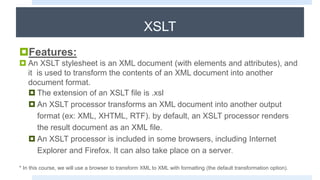
Features:
 An XSLT stylesheet is an XML document (with elements and attributes), and
it is used to transform the contents of an XML document into another
document format.
 The extension of an XSLT file is .xsl
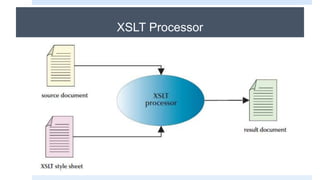
 An XSLT processor transforms an XML document into another output
format (ex: XML, XHTML, RTF). by default, an XSLT processor renders
the result document as an XML file.
 An XSLT processor is included in some browsers, including Internet
Explorer and Firefox. It can also take place on a server.
* In this course, we will use a browser to transform XML to XML with formatting (the default transformation option).
XSLT Processor
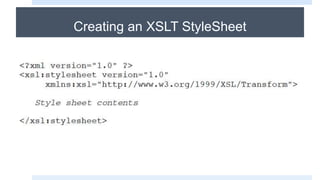
Creating an XSLT StyleSheet
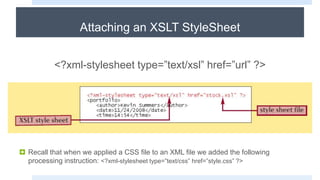
Attaching an XSLT StyleSheet
<?xml-stylesheet type=”text/xsl” href=”url” ?>
 Recall that when we applied a CSS file to an XML file we added the following
processing instruction: <?xml-stylesheet type=”text/css” href=”style.css” ?>
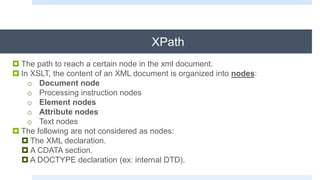
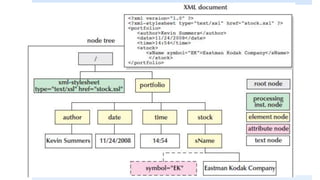
XPath
 The path to reach a certain node in the xml document.
 In XSLT, the content of an XML document is organized into nodes:
o Document node
o Processing instruction nodes
o Element nodes
o Attribute nodes
o Text nodes
 The following are not considered as nodes:
 The XML declaration.
 A CDATA section.
 A DOCTYPE declaration (ex: internal DTD).
XSLT Elements
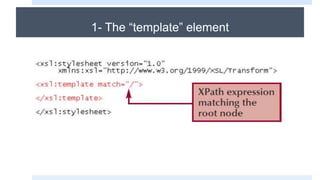
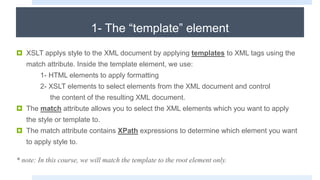
1- The “template” element
 XSLT applys style to the XML document by applying templates to XML tags using the
match attribute. Inside the template element, we use:
1- HTML elements to apply formatting
2- XSLT elements to select elements from the XML document and control
the content of the resulting XML document.
 The match attribute allows you to select the XML elements which you want to apply
the style or template to.
 The match attribute contains XPath expressions to determine which element you want
to apply style to.
* note: In this course, we will match the template to the root element only.
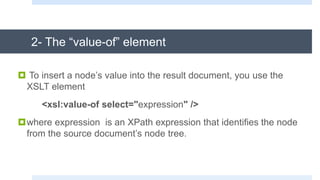
2- The “value-of” element
 To insert a node’s value into the result document, you use the
XSLT element
<xsl:value-of select="expression" />
where expression is an XPath expression that identifies the node
from the source document’s node tree.
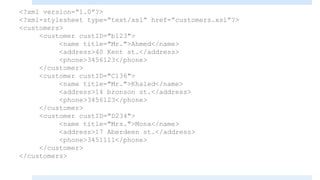
<?xml version=“1.0”?>
<?xml-stylesheet type=“text/xsl” href=“customers.xsl”?>
<customers>
<customer custID="b123">
<name title="Mr.">Ahmed</name>
<address>40 Kent st.</address>
<phone>3456123</phone>
</customer>
<customer custID="C136">
<name title="Mr.">Khaled</name>
<address>14 bronson st.</address>
<phone>3456123</phone>
</customer>
<customer custID="D234">
<name title="Mrs.">Mona</name>
<address>17 Aberdeen st.</address>
<phone>3451111</phone>
</customer>
</customers>
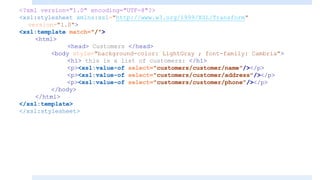
<?xml version="1.0" encoding="UTF-8"?>
<xsl:stylesheet xmlns:xsl="http://www.w3.org/1999/XSL/Transform"
version="1.0">
<xsl:template match="/">
<html>
<head> Customers </head>
<body style="background-color: LightGray ; font-family: Cambria">
<h1> this is a list of customers: </h1>
<p><xsl:value-of select="customers/customer/name"/></p>
<p><xsl:value-of select="customers/customer/address"/></p>
<p><xsl:value-of select="customers/customer/phone"/></p>
</body>
</html>
</xsl:template>
</xsl:stylesheet>
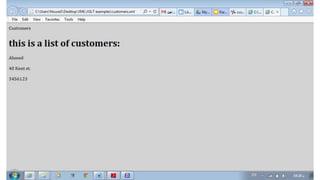
The “value-of” element
The value-of element extracts a value from the XML document. Since we have
3 customers in our example, only the first value was extracted.
If we specifically wanted the second customer, the Xpath expression would be:
customers/customer[2]
<?xml version="1.0" encoding="UTF-8"?>
<xsl:stylesheet xmlns:xsl="http://www.w3.org/1999/XSL/Transform"
version="1.0">
<xsl:template match="/">
<html>
<head> Customers </head>
<body style="background-color: LightGray ; font-family: Cambria">
<h1> this is a list of customers: </h1>
<p><xsl:value-of select="customers/customer[2]/name"/></p>
<p><xsl:value-of select="customers/customer[2]/address"/></p>
<p><xsl:value-of select="customers/customer[2]/phone"/></p>
</body>
</html>
</xsl:template>
</xsl:stylesheet>
3- The “for-each” element
3-The “for-each” element
 The for-each element is like a loop, it allows you to loop through multiple
occurrences of an element.
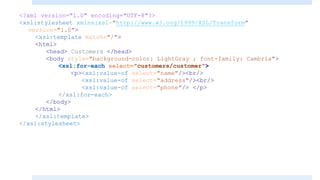
<?xml version="1.0" encoding="UTF-8"?>
<xsl:stylesheet xmlns:xsl="http://www.w3.org/1999/XSL/Transform"
version="1.0">
<xsl:template match="/">
<html>
<head> Customers </head>
<body style="background-color: LightGray ; font-family: Cambria">
<xsl:for-each select="customers/customer">
<p><xsl:value-of select="name"/><br/>
<xsl:value-of select="address"/><br/>
<xsl:value-of select="phone"/> </p>
</xsl:for-each>
</body>
</html>
</xsl:template>
</xsl:stylesheet>
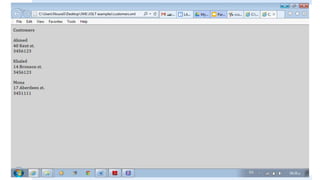
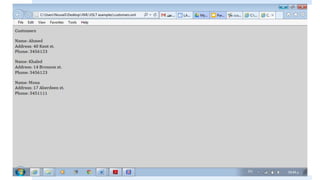
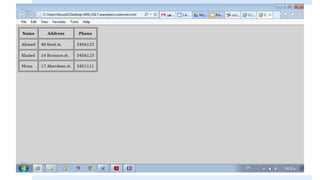
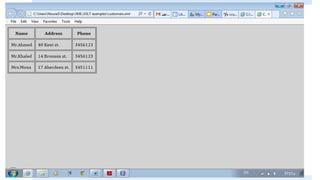
Look at the screen first, then try to guess the
code
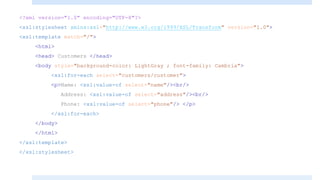
<?xml version="1.0" encoding="UTF-8"?>
<xsl:stylesheet xmlns:xsl="http://www.w3.org/1999/XSL/Transform" version="1.0">
<xsl:template match="/">
<html>
<head> Customers </head>
<body style="background-color: LightGray ; font-family: Cambria">
<xsl:for-each select="customers/customer">
<p>Name: <xsl:value-of select="name"/><br/>
Address: <xsl:value-of select="address"/><br/>
Phone: <xsl:value-of select="phone"/> </p>
</xsl:for-each>
</body>
</html>
</xsl:template>
</xsl:stylesheet>
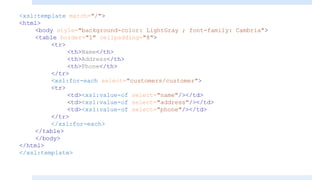
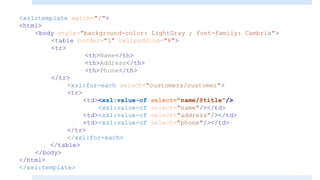
<xsl:template match="/">
<html>
<body style="background-color: LightGray ; font-family: Cambria">
<table border="1" cellpadding="8">
<tr>
<th>Name</th>
<th>Address</th>
<th>Phone</th>
</tr>
<xsl:for-each select="customers/customer">
<tr>
<td><xsl:value-of select="name"/></td>
<td><xsl:value-of select="address"/></td>
<td><xsl:value-of select="phone"/></td>
</tr>
</xsl:for-each>
</table>
</body>
</html>
</xsl:template>
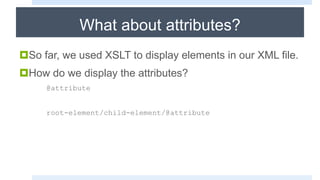
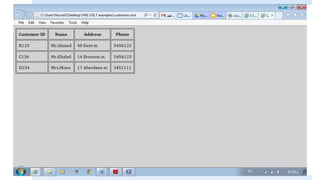
What about attributes?
So far, we used XSLT to display elements in our XML file.
How do we display the attributes?
@attribute
root-element/child-element/@attribute
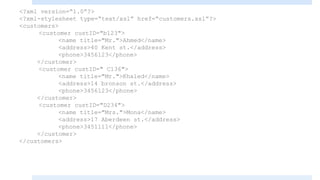
<?xml version=“1.0”?>
<?xml-stylesheet type=“text/xsl” href=“customers.xsl”?>
<customers>
<customer custID="b123">
<name title="Mr.">Ahmed</name>
<address>40 Kent st.</address>
<phone>3456123</phone>
</customer>
<customer custID=" C136">
<name title="Mr.">Khaled</name>
<address>14 bronson st.</address>
<phone>3456123</phone>
</customer>
<customer custID="D234">
<name title="Mrs.">Mona</name>
<address>17 Aberdeen st.</address>
<phone>3451111</phone>
</customer>
</customers>
<xsl:template match="/">
<html>
<body style="background-color: LightGray ; font-family: Cambria">
<table border="1" cellpadding="8">
<tr>
<th>Name</th>
<th>Address</th>
<th>Phone</th>
</tr>
<xsl:for-each select="customers/customer">
<tr>
<td><xsl:value-of select="name/@title"/>
<xsl:value-of select="name"/></td>
<td><xsl:value-of select="address"/></td>
<td><xsl:value-of select="phone"/></td>
</tr>
</xsl:for-each>
</table>
</body>
</html>
</xsl:template>
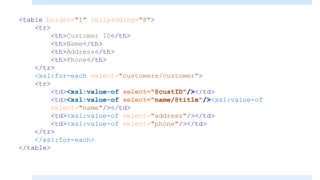
<table border="1" cellpadding="8">
<tr>
<th>Customer ID</th>
<th>Name</th>
<th>Address</th>
<th>Phone</th>
</tr>
<xsl:for-each select="customers/customer">
<tr>
<td><xsl:value-of select="@custID"/></td>
<td><xsl:value-of select="name/@title"/><xsl:value-of
select="name"/></td>
<td><xsl:value-of select="address"/></td>
<td><xsl:value-of select="phone"/></td>
</tr>
</xsl:for-each>
</table>
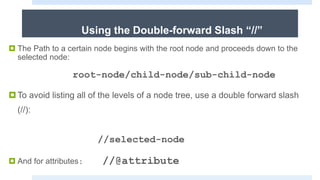
Using the Double-forward Slash “//”
 The Path to a certain node begins with the root node and proceeds down to the
selected node:
root-node/child-node/sub-child-node
To avoid listing all of the levels of a node tree, use a double forward slash
(//):
//selected-node
 And for attributes: //@attribute
Using the Double-forward Slash “//”
When we have more than one occurrence of the same element, XPath
will return the first one it finds.
If we want to specify which occurrence we want, we specify it:
//selected-node[3]
If we want to loop over all occurrences, we use the “for-each” element.
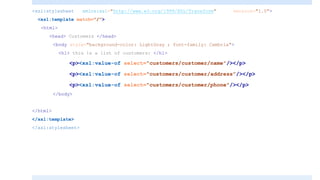
<xsl:stylesheet xmlns:xsl="http://www.w3.org/1999/XSL/Transform" version="1.0">
<xsl:template match="/">
<html>
<head> Customers </head>
<body style="background-color: LightGray ; font-family: Cambria">
<h1> this is a list of customers: </h1>
<p><xsl:value-of select="customers/customer/name"/></p>
<p><xsl:value-of select="customers/customer/address"/></p>
<p><xsl:value-of select="customers/customer/phone"/></p>
</body>
</html>
</xsl:template>
</xsl:stylesheet>
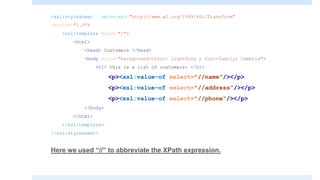
<xsl:stylesheet xmlns:xsl="http://www.w3.org/1999/XSL/Transform"
version="1.0">
<xsl:template match="/">
<html>
<head> Customers </head>
<body style="background-color: LightGray ; font-family: Cambria">
<h1> this is a list of customers: </h1>
<p><xsl:value-of select="//name"/></p>
<p><xsl:value-of select="//address"/></p>
<p><xsl:value-of select="//phone"/></p>
</body>
</html>
</xsl:template>
</xsl:stylesheet>
Here we used “//” to abbreviate the XPath expression.
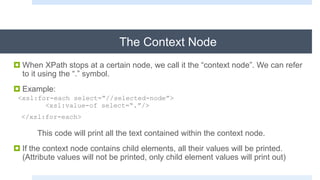
The Context Node
 When XPath stops at a certain node, we call it the “context node”. We can refer
to it using the “.” symbol.
 Example:
<xsl:for-each select=“//selected-node”>
<xsl:value-of select=“.”/>
</xsl:for-each>
This code will print all the text contained within the context node.
 If the context node contains child elements, all their values will be printed.
(Attribute values will not be printed, only child element values will print out)
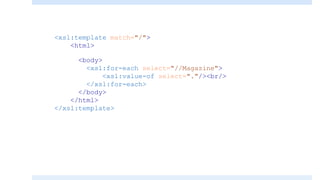
<xsl:template match="/">
<html>
<body>
<xsl:for-each select="//Magazine">
<xsl:value-of select="."/><br/>
</xsl:for-each>
</body>
</html>
</xsl:template>
XSLT Conditional Elements:
“If” and “Choose”
XSLT Conditional Elements: If Element
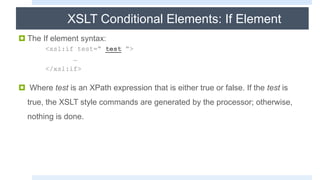
 The If element syntax:
<xsl:if test=“ test “>
…
</xsl:if>
 Where test is an XPath expression that is either true or false. If the test is
true, the XSLT style commands are generated by the processor; otherwise,
nothing is done.
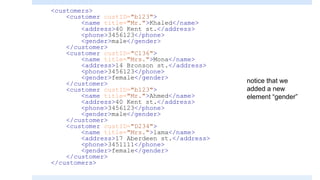
<customers>
<customer custID="b123">
<name title="Mr.">Khaled</name>
<address>40 Kent st.</address>
<phone>3456123</phone>
<gender>male</gender>
</customer>
<customer custID="C136">
<name title="Mrs.">Mona</name>
<address>14 Bronson st.</address>
<phone>3456123</phone>
<gender>female</gender>
</customer>
<customer custID="b123">
<name title="Mr.">Ahmed</name>
<address>40 Kent st.</address>
<phone>3456123</phone>
<gender>male</gender>
</customer>
<customer custID="D234">
<name title="Mrs.">lama</name>
<address>17 Aberdeen st.</address>
<phone>3451111</phone>
<gender>female</gender>
</customer>
</customers>
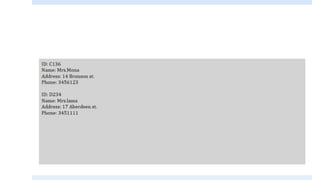
notice that we
added a new
element “gender”
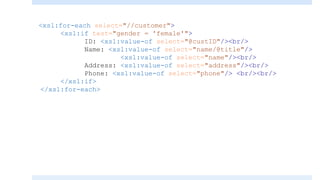
<xsl:for-each select="//customer">
<xsl:if test="gender = 'female'">
ID: <xsl:value-of select="@custID"/><br/>
Name: <xsl:value-of select="name/@title"/>
<xsl:value-of select="name"/><br/>
Address: <xsl:value-of select="address"/><br/>
Phone: <xsl:value-of select="phone"/> <br/><br/>
</xsl:if>
</xsl:for-each>
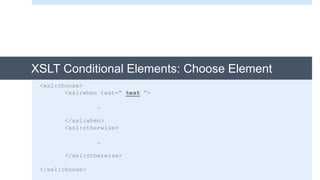
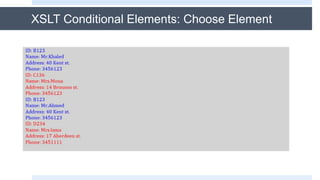
XSLT Conditional Elements: Choose Element
<xsl:choose>
<xsl:when test=“ test “>
…
</xsl:when>
<xsl:otherwise>
…
</xsl:otherwise>
</xsl:choose>
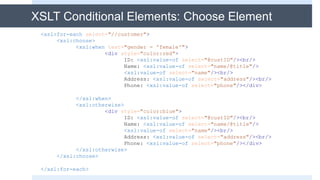
<xsl:for-each select="//customer">
<xsl:choose>
<xsl:when test="gender = 'female'">
<div style="color:red">
ID: <xsl:value-of select="@custID"/><br/>
Name: <xsl:value-of select="name/@title"/>
<xsl:value-of select="name"/><br/>
Address: <xsl:value-of select="address"/><br/>
Phone: <xsl:value-of select="phone"/></div>
</xsl:when>
<xsl:otherwise>
<div style="color:blue">
ID: <xsl:value-of select="@custID"/><br/>
Name: <xsl:value-of select="name/@title"/>
<xsl:value-of select="name"/><br/>
Address: <xsl:value-of select="address"/><br/>
Phone: <xsl:value-of select="phone"/></div>
</xsl:otherwise>
</xsl:choose>
</xsl:for-each>
XSLT Conditional Elements: Choose Element
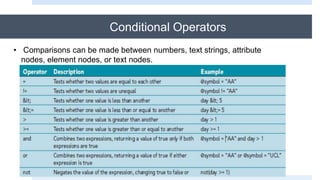
Conditional Operators
• Comparisons can be made between numbers, text strings, attribute
nodes, element nodes, or text nodes.
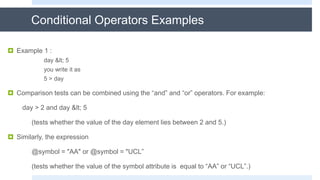
Conditional Operators Examples
 Example 1 :
day &lt; 5
you write it as
5 > day
 Comparison tests can be combined using the “and” and “or” operators. For example:
day > 2 and day &lt; 5
(tests whether the value of the day element lies between 2 and 5.)
 Similarly, the expression
@symbol = "AA" or @symbol = "UCL”
(tests whether the value of the symbol attribute is equal to “AA” or “UCL”.)
Working with Predicates
 A predicate is part of a location path that tests for a condition and references the
node set that fulfills that condition. The general syntax for a predicate is
node [expression]
 Example:
 name[3] Select the third name element in customers.
 name[@title = ‘Mr.’]( match all the name who title is Mr.)
 sName[@symbol = "AA" or @symbol="UCL”] (matches all sName elements
whose symbol attribute is equal to either “AA” or “UCL”.)
Predicates and Using XPath Functions
A predicate can contain XPath functions:
 last() returns the last node in the node tree
Example: book[last()] returns the last book
 position() returns the position value of the node
Example: book[position()>=2 and position()&lt;=5] returns
the second, third, fourth and fifth book
*note: book[position()=2] is equivalent to book[2]
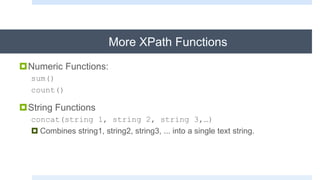
More XPath Functions
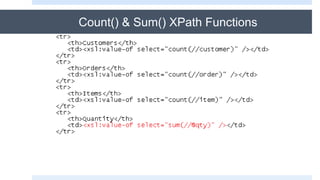
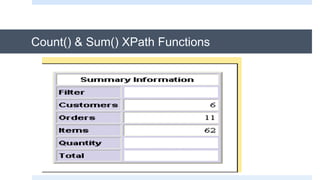
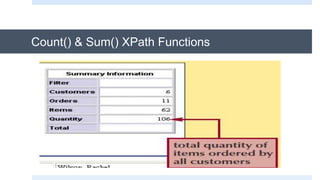
Numeric Functions:
sum()
count()
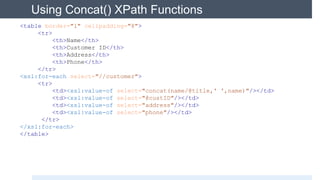
String Functions
concat(string 1, string 2, string 3,…)
 Combines string1, string2, string3, ... into a single text string.
Count() & Sum() XPath Functions
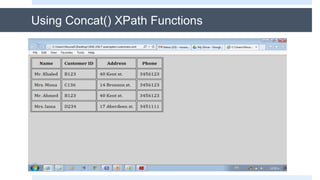
<table border="1" cellpadding="8">
<tr>
<th>Name</th>
<th>Customer ID</th>
<th>Address</th>
<th>Phone</th>
</tr>
<xsl:for-each select="//customer">
<tr>
<td><xsl:value-of select="concat(name/@title,' ',name)"/></td>
<td><xsl:value-of select="@custID"/></td>
<td><xsl:value-of select="address"/></td>
<td><xsl:value-of select="phone"/></td>
</tr>
</xsl:for-each>
</table>
Using Concat() XPath Functions
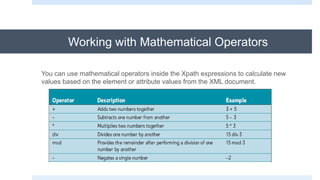
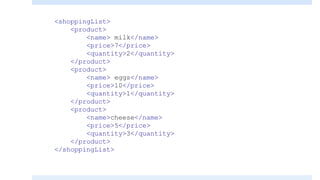
Working with Mathematical Operators
You can use mathematical operators inside the Xpath expressions to calculate new
values based on the element or attribute values from the XML document.
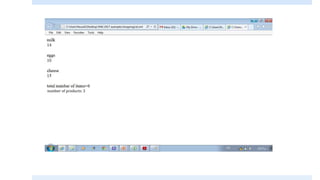
<shoppingList>
<product>
<name> milk</name>
<price>7</price>
<quantity>2</quantity>
</product>
<product>
<name> eggs</name>
<price>10</price>
<quantity>1</quantity>
</product>
<product>
<name>cheese</name>
<price>5</price>
<quantity>3</quantity>
</product>
</shoppingList>
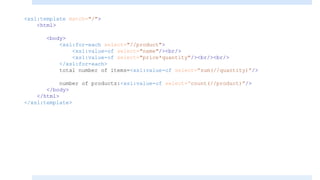
<xsl:template match="/">
<html>
<body>
<xsl:for-each select="//product">
<xsl:value-of select="name"/><br/>
<xsl:value-of select="price*quantity"/><br/><br/>
</xsl:for-each>
total number of items=<xsl:value-of select=“sum(//quantity)”/>
number of products:<xsl:value-of select=“count(//product)”/>
</body>
</html>
</xsl:template>
number of products: 3
Sorting Nodes:
Using the “sort” Element
Sorting Nodes
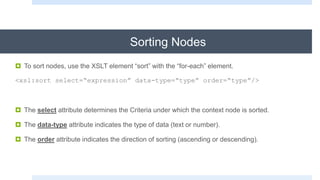
 To sort nodes, use the XSLT element “sort” with the “for-each” element.
<xsl:sort select=“expression” data-type=“type” order=“type”/>
 The select attribute determines the Criteria under which the context node is sorted.
 The data-type attribute indicates the type of data (text or number).
 The order attribute indicates the direction of sorting (ascending or descending).
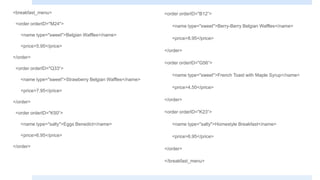
<breakfast_menu>
<order orderID="M24">
<name type="sweet">Belgian Waffles</name>
<price>5.95</price>
</order>
<order orderID="Q33“>
<name type="sweet">Strawberry Belgian Waffles</name>
<price>7.95</price>
</order>
<order orderID="K50“>
<name type="salty">Eggs Benedict</name>
<price>6.95</price>
</order>
<order orderID="B12“>
<name type="sweet">Berry-Berry Belgian Waffles</name>
<price>8.95</price>
</order>
<order orderID="G56“>
<name type="sweet">French Toast with Maple Syrup</name>
<price>4.50</price>
</order>
<order orderID="K23“>
<name type="salty">Homestyle Breakfast</name>
<price>6.95</price>
</order>
</breakfast_menu>
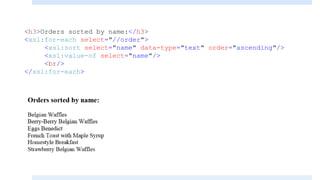
<h3>Orders sorted by name:</h3>
<xsl:for-each select="//order">
<xsl:sort select="name" data-type="text" order="ascending"/>
<xsl:value-of select="name"/>
<br/>
</xsl:for-each>
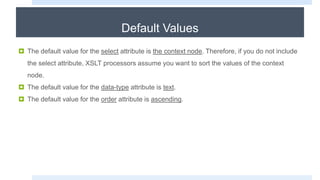
Default Values
 The default value for the select attribute is the context node. Therefore, if you do not include
the select attribute, XSLT processors assume you want to sort the values of the context
node.
 The default value for the data-type attribute is text.
 The default value for the order attribute is ascending.
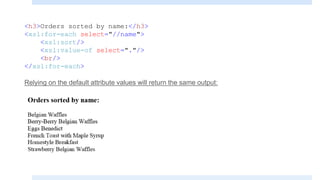
<h3>Orders sorted by name:</h3>
<xsl:for-each select="//name">
<xsl:sort/>
<xsl:value-of select="."/>
<br/>
</xsl:for-each>
Relying on the default attribute values will return the same output:
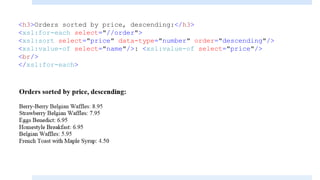
<h3>Orders sorted by price, descending:</h3>
<xsl:for-each select="//order">
<xsl:sort select="price" data-type="number" order="descending"/>
<xsl:value-of select="name"/>: <xsl:value-of select="price"/>
<br/>
</xsl:for-each>
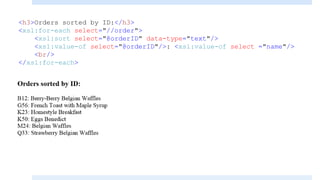
<h3>Orders sorted by ID:</h3>
<xsl:for-each select="//order">
<xsl:sort select="@orderID" data-type="text"/>
<xsl:value-of select="@orderID"/>: <xsl:value-of select ="name"/>
<br/>
</xsl:for-each>
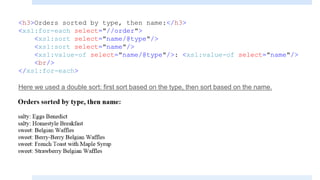
<h3>Orders sorted by type, then name:</h3>
<xsl:for-each select="//order">
<xsl:sort select="name/@type"/>
<xsl:sort select="name"/>
<xsl:value-of select="name/@type"/>: <xsl:value-of select="name"/>
<br/>
</xsl:for-each>
Here we used a double sort: first sort based on the type, then sort based on the name.
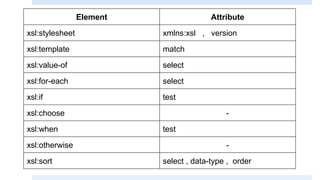
Element Attribute
xsl:stylesheet xmlns:xsl , version
xsl:template match
xsl:value-of select
xsl:for-each select
xsl:if test
xsl:choose -
xsl:when test
xsl:otherwise -
xsl:sort select , data-type , order
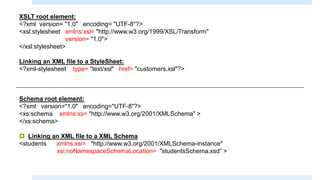
XSLT root element:
<?xml version= "1.0" encoding= "UTF-8"?>
<xsl:stylesheet xmlns:xsl= "http://www.w3.org/1999/XSL/Transform"
version= "1.0">
</xsl:stylesheet>
Linking an XML file to a StyleSheet:
<?xml-stylesheet type= "text/xsl" href= "customers.xsl"?>
Schema root element:
<?xml version="1.0" encoding="UTF-8"?>
<xs:schema xmlns:xs= "http://www.w3.org/2001/XMLSchema" >
</xs:schema>
 Linking an XML file to a XML Schema
<students xmlns:xsi= "http://www.w3.org/2001/XMLSchema-instance"
xsi:noNamespaceSchemaLocation= "studentsSchema.xsd“ >

Xml part5

  • 1.
  • 2.
    The Limitations ofCSS When presenting XML data on a browser, we use CSS files, however CSS files have the following limitations: ● You can only display element values (you cannot display attribute values). ● You cannot add additional text. ● You cannot control the content of the XML file, you can only display it as it is. ● Difficult to display images or insert links.
  • 3.
    XSL XSL stands for“Extensible Stylesheet Language”. XSL specifies how the XML document will be presented. XSL composed in to two parts with each part acting as a separate language: 1. XSLT (XSL Transformations 2. XSL-FO (XSL- Formatting Objects)  XSL allows you to transform your XML data into a variety of formats, including HTML, XHTML, Portable Document Format (PDF), Rich Text Format (RTF), and even a new XML document.
  • 4.
    XSLT Features:  An XSLTstylesheet is an XML document (with elements and attributes), and it is used to transform the contents of an XML document into another document format.  The extension of an XSLT file is .xsl  An XSLT processor transforms an XML document into another output format (ex: XML, XHTML, RTF). by default, an XSLT processor renders the result document as an XML file.  An XSLT processor is included in some browsers, including Internet Explorer and Firefox. It can also take place on a server. * In this course, we will use a browser to transform XML to XML with formatting (the default transformation option).
  • 5.
  • 6.
    Creating an XSLTStyleSheet
  • 7.
    Attaching an XSLTStyleSheet <?xml-stylesheet type=”text/xsl” href=”url” ?>  Recall that when we applied a CSS file to an XML file we added the following processing instruction: <?xml-stylesheet type=”text/css” href=”style.css” ?>
  • 8.
    XPath  The pathto reach a certain node in the xml document.  In XSLT, the content of an XML document is organized into nodes: o Document node o Processing instruction nodes o Element nodes o Attribute nodes o Text nodes  The following are not considered as nodes:  The XML declaration.  A CDATA section.  A DOCTYPE declaration (ex: internal DTD).
  • 10.
  • 11.
  • 12.
    1- The “template”element  XSLT applys style to the XML document by applying templates to XML tags using the match attribute. Inside the template element, we use: 1- HTML elements to apply formatting 2- XSLT elements to select elements from the XML document and control the content of the resulting XML document.  The match attribute allows you to select the XML elements which you want to apply the style or template to.  The match attribute contains XPath expressions to determine which element you want to apply style to. * note: In this course, we will match the template to the root element only.
  • 13.
    2- The “value-of”element  To insert a node’s value into the result document, you use the XSLT element <xsl:value-of select="expression" /> where expression is an XPath expression that identifies the node from the source document’s node tree.
  • 14.
    <?xml version=“1.0”?> <?xml-stylesheet type=“text/xsl”href=“customers.xsl”?> <customers> <customer custID="b123"> <name title="Mr.">Ahmed</name> <address>40 Kent st.</address> <phone>3456123</phone> </customer> <customer custID="C136"> <name title="Mr.">Khaled</name> <address>14 bronson st.</address> <phone>3456123</phone> </customer> <customer custID="D234"> <name title="Mrs.">Mona</name> <address>17 Aberdeen st.</address> <phone>3451111</phone> </customer> </customers>
  • 15.
    <?xml version="1.0" encoding="UTF-8"?> <xsl:stylesheetxmlns:xsl="http://www.w3.org/1999/XSL/Transform" version="1.0"> <xsl:template match="/"> <html> <head> Customers </head> <body style="background-color: LightGray ; font-family: Cambria"> <h1> this is a list of customers: </h1> <p><xsl:value-of select="customers/customer/name"/></p> <p><xsl:value-of select="customers/customer/address"/></p> <p><xsl:value-of select="customers/customer/phone"/></p> </body> </html> </xsl:template> </xsl:stylesheet>
  • 17.
    The “value-of” element Thevalue-of element extracts a value from the XML document. Since we have 3 customers in our example, only the first value was extracted. If we specifically wanted the second customer, the Xpath expression would be: customers/customer[2]
  • 18.
    <?xml version="1.0" encoding="UTF-8"?> <xsl:stylesheetxmlns:xsl="http://www.w3.org/1999/XSL/Transform" version="1.0"> <xsl:template match="/"> <html> <head> Customers </head> <body style="background-color: LightGray ; font-family: Cambria"> <h1> this is a list of customers: </h1> <p><xsl:value-of select="customers/customer[2]/name"/></p> <p><xsl:value-of select="customers/customer[2]/address"/></p> <p><xsl:value-of select="customers/customer[2]/phone"/></p> </body> </html> </xsl:template> </xsl:stylesheet>
  • 19.
  • 20.
    3-The “for-each” element The for-each element is like a loop, it allows you to loop through multiple occurrences of an element.
  • 21.
    <?xml version="1.0" encoding="UTF-8"?> <xsl:stylesheetxmlns:xsl="http://www.w3.org/1999/XSL/Transform" version="1.0"> <xsl:template match="/"> <html> <head> Customers </head> <body style="background-color: LightGray ; font-family: Cambria"> <xsl:for-each select="customers/customer"> <p><xsl:value-of select="name"/><br/> <xsl:value-of select="address"/><br/> <xsl:value-of select="phone"/> </p> </xsl:for-each> </body> </html> </xsl:template> </xsl:stylesheet>
  • 23.
    Look at thescreen first, then try to guess the code
  • 25.
    <?xml version="1.0" encoding="UTF-8"?> <xsl:stylesheetxmlns:xsl="http://www.w3.org/1999/XSL/Transform" version="1.0"> <xsl:template match="/"> <html> <head> Customers </head> <body style="background-color: LightGray ; font-family: Cambria"> <xsl:for-each select="customers/customer"> <p>Name: <xsl:value-of select="name"/><br/> Address: <xsl:value-of select="address"/><br/> Phone: <xsl:value-of select="phone"/> </p> </xsl:for-each> </body> </html> </xsl:template> </xsl:stylesheet>
  • 27.
    <xsl:template match="/"> <html> <body style="background-color:LightGray ; font-family: Cambria"> <table border="1" cellpadding="8"> <tr> <th>Name</th> <th>Address</th> <th>Phone</th> </tr> <xsl:for-each select="customers/customer"> <tr> <td><xsl:value-of select="name"/></td> <td><xsl:value-of select="address"/></td> <td><xsl:value-of select="phone"/></td> </tr> </xsl:for-each> </table> </body> </html> </xsl:template>
  • 28.
    What about attributes? Sofar, we used XSLT to display elements in our XML file. How do we display the attributes? @attribute root-element/child-element/@attribute
  • 29.
    <?xml version=“1.0”?> <?xml-stylesheet type=“text/xsl”href=“customers.xsl”?> <customers> <customer custID="b123"> <name title="Mr.">Ahmed</name> <address>40 Kent st.</address> <phone>3456123</phone> </customer> <customer custID=" C136"> <name title="Mr.">Khaled</name> <address>14 bronson st.</address> <phone>3456123</phone> </customer> <customer custID="D234"> <name title="Mrs.">Mona</name> <address>17 Aberdeen st.</address> <phone>3451111</phone> </customer> </customers>
  • 30.
    <xsl:template match="/"> <html> <body style="background-color:LightGray ; font-family: Cambria"> <table border="1" cellpadding="8"> <tr> <th>Name</th> <th>Address</th> <th>Phone</th> </tr> <xsl:for-each select="customers/customer"> <tr> <td><xsl:value-of select="name/@title"/> <xsl:value-of select="name"/></td> <td><xsl:value-of select="address"/></td> <td><xsl:value-of select="phone"/></td> </tr> </xsl:for-each> </table> </body> </html> </xsl:template>
  • 32.
    <table border="1" cellpadding="8"> <tr> <th>CustomerID</th> <th>Name</th> <th>Address</th> <th>Phone</th> </tr> <xsl:for-each select="customers/customer"> <tr> <td><xsl:value-of select="@custID"/></td> <td><xsl:value-of select="name/@title"/><xsl:value-of select="name"/></td> <td><xsl:value-of select="address"/></td> <td><xsl:value-of select="phone"/></td> </tr> </xsl:for-each> </table>
  • 34.
    Using the Double-forwardSlash “//”  The Path to a certain node begins with the root node and proceeds down to the selected node: root-node/child-node/sub-child-node To avoid listing all of the levels of a node tree, use a double forward slash (//): //selected-node  And for attributes: //@attribute
  • 35.
    Using the Double-forwardSlash “//” When we have more than one occurrence of the same element, XPath will return the first one it finds. If we want to specify which occurrence we want, we specify it: //selected-node[3] If we want to loop over all occurrences, we use the “for-each” element.
  • 36.
    <xsl:stylesheet xmlns:xsl="http://www.w3.org/1999/XSL/Transform" version="1.0"> <xsl:templatematch="/"> <html> <head> Customers </head> <body style="background-color: LightGray ; font-family: Cambria"> <h1> this is a list of customers: </h1> <p><xsl:value-of select="customers/customer/name"/></p> <p><xsl:value-of select="customers/customer/address"/></p> <p><xsl:value-of select="customers/customer/phone"/></p> </body> </html> </xsl:template> </xsl:stylesheet>
  • 37.
    <xsl:stylesheet xmlns:xsl="http://www.w3.org/1999/XSL/Transform" version="1.0"> <xsl:template match="/"> <html> <head>Customers </head> <body style="background-color: LightGray ; font-family: Cambria"> <h1> this is a list of customers: </h1> <p><xsl:value-of select="//name"/></p> <p><xsl:value-of select="//address"/></p> <p><xsl:value-of select="//phone"/></p> </body> </html> </xsl:template> </xsl:stylesheet> Here we used “//” to abbreviate the XPath expression.
  • 38.
    The Context Node When XPath stops at a certain node, we call it the “context node”. We can refer to it using the “.” symbol.  Example: <xsl:for-each select=“//selected-node”> <xsl:value-of select=“.”/> </xsl:for-each> This code will print all the text contained within the context node.  If the context node contains child elements, all their values will be printed. (Attribute values will not be printed, only child element values will print out)
  • 39.
    <xsl:template match="/"> <html> <body> <xsl:for-each select="//Magazine"> <xsl:value-ofselect="."/><br/> </xsl:for-each> </body> </html> </xsl:template>
  • 40.
  • 41.
    XSLT Conditional Elements:If Element  The If element syntax: <xsl:if test=“ test “> … </xsl:if>  Where test is an XPath expression that is either true or false. If the test is true, the XSLT style commands are generated by the processor; otherwise, nothing is done.
  • 42.
    <customers> <customer custID="b123"> <name title="Mr.">Khaled</name> <address>40Kent st.</address> <phone>3456123</phone> <gender>male</gender> </customer> <customer custID="C136"> <name title="Mrs.">Mona</name> <address>14 Bronson st.</address> <phone>3456123</phone> <gender>female</gender> </customer> <customer custID="b123"> <name title="Mr.">Ahmed</name> <address>40 Kent st.</address> <phone>3456123</phone> <gender>male</gender> </customer> <customer custID="D234"> <name title="Mrs.">lama</name> <address>17 Aberdeen st.</address> <phone>3451111</phone> <gender>female</gender> </customer> </customers> notice that we added a new element “gender”
  • 43.
    <xsl:for-each select="//customer"> <xsl:if test="gender= 'female'"> ID: <xsl:value-of select="@custID"/><br/> Name: <xsl:value-of select="name/@title"/> <xsl:value-of select="name"/><br/> Address: <xsl:value-of select="address"/><br/> Phone: <xsl:value-of select="phone"/> <br/><br/> </xsl:if> </xsl:for-each>
  • 45.
    XSLT Conditional Elements:Choose Element <xsl:choose> <xsl:when test=“ test “> … </xsl:when> <xsl:otherwise> … </xsl:otherwise> </xsl:choose>
  • 46.
    <xsl:for-each select="//customer"> <xsl:choose> <xsl:when test="gender= 'female'"> <div style="color:red"> ID: <xsl:value-of select="@custID"/><br/> Name: <xsl:value-of select="name/@title"/> <xsl:value-of select="name"/><br/> Address: <xsl:value-of select="address"/><br/> Phone: <xsl:value-of select="phone"/></div> </xsl:when> <xsl:otherwise> <div style="color:blue"> ID: <xsl:value-of select="@custID"/><br/> Name: <xsl:value-of select="name/@title"/> <xsl:value-of select="name"/><br/> Address: <xsl:value-of select="address"/><br/> Phone: <xsl:value-of select="phone"/></div> </xsl:otherwise> </xsl:choose> </xsl:for-each> XSLT Conditional Elements: Choose Element
  • 47.
  • 48.
    Conditional Operators • Comparisonscan be made between numbers, text strings, attribute nodes, element nodes, or text nodes.
  • 49.
    Conditional Operators Examples Example 1 : day &lt; 5 you write it as 5 > day  Comparison tests can be combined using the “and” and “or” operators. For example: day > 2 and day &lt; 5 (tests whether the value of the day element lies between 2 and 5.)  Similarly, the expression @symbol = "AA" or @symbol = "UCL” (tests whether the value of the symbol attribute is equal to “AA” or “UCL”.)
  • 50.
    Working with Predicates A predicate is part of a location path that tests for a condition and references the node set that fulfills that condition. The general syntax for a predicate is node [expression]  Example:  name[3] Select the third name element in customers.  name[@title = ‘Mr.’]( match all the name who title is Mr.)  sName[@symbol = "AA" or @symbol="UCL”] (matches all sName elements whose symbol attribute is equal to either “AA” or “UCL”.)
  • 51.
    Predicates and UsingXPath Functions A predicate can contain XPath functions:  last() returns the last node in the node tree Example: book[last()] returns the last book  position() returns the position value of the node Example: book[position()>=2 and position()&lt;=5] returns the second, third, fourth and fifth book *note: book[position()=2] is equivalent to book[2]
  • 52.
    More XPath Functions NumericFunctions: sum() count() String Functions concat(string 1, string 2, string 3,…)  Combines string1, string2, string3, ... into a single text string.
  • 53.
    Count() & Sum()XPath Functions
  • 54.
    Count() & Sum()XPath Functions
  • 55.
    Count() & Sum()XPath Functions
  • 56.
    <table border="1" cellpadding="8"> <tr> <th>Name</th> <th>CustomerID</th> <th>Address</th> <th>Phone</th> </tr> <xsl:for-each select="//customer"> <tr> <td><xsl:value-of select="concat(name/@title,' ',name)"/></td> <td><xsl:value-of select="@custID"/></td> <td><xsl:value-of select="address"/></td> <td><xsl:value-of select="phone"/></td> </tr> </xsl:for-each> </table> Using Concat() XPath Functions
  • 57.
  • 58.
    Working with MathematicalOperators You can use mathematical operators inside the Xpath expressions to calculate new values based on the element or attribute values from the XML document.
  • 59.
  • 60.
    <xsl:template match="/"> <html> <body> <xsl:for-each select="//product"> <xsl:value-ofselect="name"/><br/> <xsl:value-of select="price*quantity"/><br/><br/> </xsl:for-each> total number of items=<xsl:value-of select=“sum(//quantity)”/> number of products:<xsl:value-of select=“count(//product)”/> </body> </html> </xsl:template>
  • 61.
  • 62.
    Sorting Nodes: Using the“sort” Element
  • 63.
    Sorting Nodes  Tosort nodes, use the XSLT element “sort” with the “for-each” element. <xsl:sort select=“expression” data-type=“type” order=“type”/>  The select attribute determines the Criteria under which the context node is sorted.  The data-type attribute indicates the type of data (text or number).  The order attribute indicates the direction of sorting (ascending or descending).
  • 64.
    <breakfast_menu> <order orderID="M24"> <name type="sweet">BelgianWaffles</name> <price>5.95</price> </order> <order orderID="Q33“> <name type="sweet">Strawberry Belgian Waffles</name> <price>7.95</price> </order> <order orderID="K50“> <name type="salty">Eggs Benedict</name> <price>6.95</price> </order> <order orderID="B12“> <name type="sweet">Berry-Berry Belgian Waffles</name> <price>8.95</price> </order> <order orderID="G56“> <name type="sweet">French Toast with Maple Syrup</name> <price>4.50</price> </order> <order orderID="K23“> <name type="salty">Homestyle Breakfast</name> <price>6.95</price> </order> </breakfast_menu>
  • 65.
    <h3>Orders sorted byname:</h3> <xsl:for-each select="//order"> <xsl:sort select="name" data-type="text" order="ascending"/> <xsl:value-of select="name"/> <br/> </xsl:for-each>
  • 66.
    Default Values  Thedefault value for the select attribute is the context node. Therefore, if you do not include the select attribute, XSLT processors assume you want to sort the values of the context node.  The default value for the data-type attribute is text.  The default value for the order attribute is ascending.
  • 67.
    <h3>Orders sorted byname:</h3> <xsl:for-each select="//name"> <xsl:sort/> <xsl:value-of select="."/> <br/> </xsl:for-each> Relying on the default attribute values will return the same output:
  • 68.
    <h3>Orders sorted byprice, descending:</h3> <xsl:for-each select="//order"> <xsl:sort select="price" data-type="number" order="descending"/> <xsl:value-of select="name"/>: <xsl:value-of select="price"/> <br/> </xsl:for-each>
  • 69.
    <h3>Orders sorted byID:</h3> <xsl:for-each select="//order"> <xsl:sort select="@orderID" data-type="text"/> <xsl:value-of select="@orderID"/>: <xsl:value-of select ="name"/> <br/> </xsl:for-each>
  • 70.
    <h3>Orders sorted bytype, then name:</h3> <xsl:for-each select="//order"> <xsl:sort select="name/@type"/> <xsl:sort select="name"/> <xsl:value-of select="name/@type"/>: <xsl:value-of select="name"/> <br/> </xsl:for-each> Here we used a double sort: first sort based on the type, then sort based on the name.
  • 71.
    Element Attribute xsl:stylesheet xmlns:xsl, version xsl:template match xsl:value-of select xsl:for-each select xsl:if test xsl:choose - xsl:when test xsl:otherwise - xsl:sort select , data-type , order
  • 72.
    XSLT root element: <?xmlversion= "1.0" encoding= "UTF-8"?> <xsl:stylesheet xmlns:xsl= "http://www.w3.org/1999/XSL/Transform" version= "1.0"> </xsl:stylesheet> Linking an XML file to a StyleSheet: <?xml-stylesheet type= "text/xsl" href= "customers.xsl"?> Schema root element: <?xml version="1.0" encoding="UTF-8"?> <xs:schema xmlns:xs= "http://www.w3.org/2001/XMLSchema" > </xs:schema>  Linking an XML file to a XML Schema <students xmlns:xsi= "http://www.w3.org/2001/XMLSchema-instance" xsi:noNamespaceSchemaLocation= "studentsSchema.xsd“ >