Document Object
Model (DOM)
CCSA 222: XML and Web Services
Part 7 1
Introduction
2
Introduction
3
Introduction
4
1-Javascript
5
Javascript
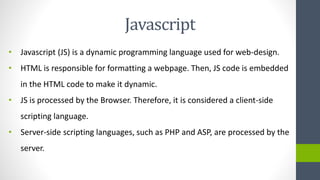
• Javascript (JS) is a dynamic programming language used for web-design.
• HTML is responsible for formatting a webpage. Then, JS code is embedded
in the HTML code to make it dynamic.
• JS is processed by the Browser. Therefore, it is considered a client-side
scripting language.
• Server-side scripting languages, such as PHP and ASP, are processed by the
server.
Javascript
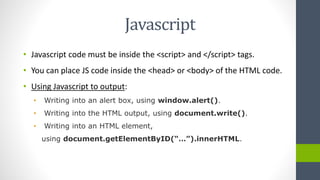
• Javascript code must be inside the <script> and </script> tags.
• You can place JS code inside the <head> or <body> of the HTML code.
• Using Javascript to output:
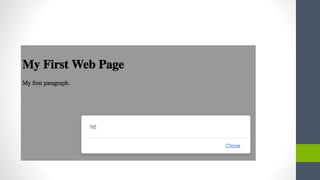
• Writing into an alert box, using window.alert().
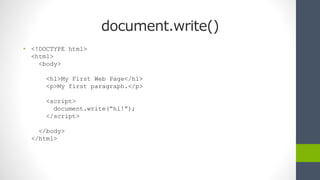
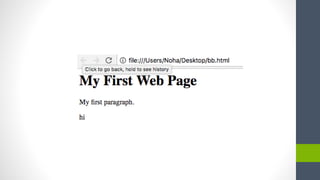
• Writing into the HTML output, using document.write().
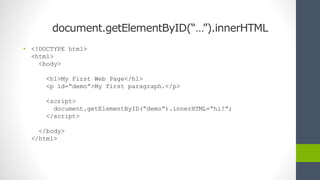
• Writing into an HTML element,
using document.getElementByID(“…”).innerHTML.
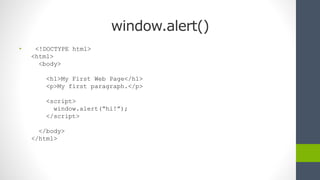
window.alert()
• <!DOCTYPE html>
<html>
<body>
<h1>My First Web Page</h1>
<p>My first paragraph.</p>
<script>
window.alert(“hi!”);
</script>
</body>
</html>
document.write()
• <!DOCTYPE html>
<html>
<body>
<h1>My First Web Page</h1>
<p>My first paragraph.</p>
<script>
document.write(“hi!”);
</script>
</body>
</html>
document.getElementByID(“…”).innerHTML
• <!DOCTYPE html>
<html>
<body>
<h1>My First Web Page</h1>
<p id=“demo”>My first paragraph.</p>
<script>
document.getElementByID(“demo”).innerHTML=“hi!”;
</script>
</body>
</html>
JavaScript Variables
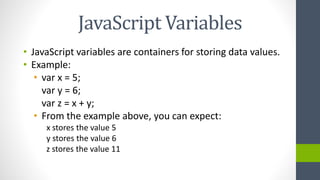
• JavaScript variables are containers for storing data values.
• Example:
• var x = 5;
var y = 6;
var z = x + y;
• From the example above, you can expect:
x stores the value 5
y stores the value 6
z stores the value 11
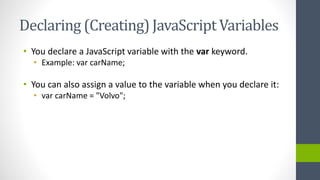
Declaring (Creating) JavaScript Variables
• You declare a JavaScript variable with the var keyword.
• Example: var carName;
• You can also assign a value to the variable when you declare it:
• var carName = "Volvo";
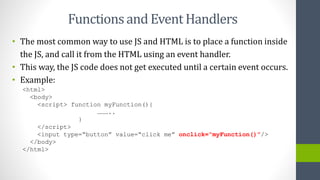
Functionsand EventHandlers
• The most common way to use JS and HTML is to place a function inside
the JS, and call it from the HTML using an event handler.
• This way, the JS code does not get executed until a certain event occurs.
• Example:
<html>
<body>
<script> function myFunction(){
………..
}
</script>
<input type=“button” value=“click me” onclick=“myFunction()”/>
</body>
</html>
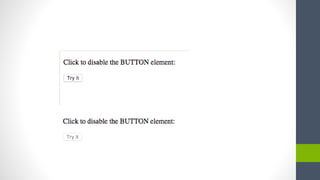
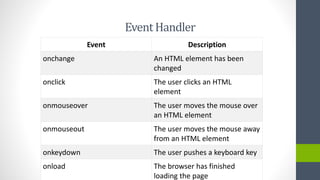
EventHandler
Event Description
onchange An HTML element has been
changed
onclick The user clicks an HTML
element
onmouseover The user moves the mouse over
an HTML element
onmouseout The user moves the mouse away
from an HTML element
onkeydown The user pushes a keyboard key
onload The browser has finished
loading the page
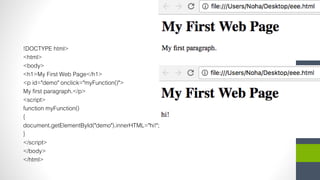
!DOCTYPE html>
<html>
<body>
<h1>My First Web Page</h1>
<p id="demo" onclick="myFunction()">
My first paragraph.</p>
<script>
function myFunction()
{
document.getElementById("demo").innerHTML="hi!";
}
</script>
</body>
</html>
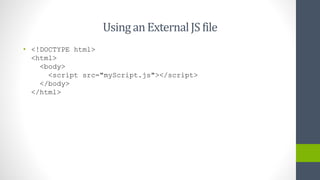
UsinganExternalJS file
• <!DOCTYPE html>
<html>
<body>
<script src="myScript.js"></script>
</body>
</html>
2-Document Object
Model (DOM)
20
What is the DOM?
• The DOM defines a standard for accessing documents like XML
and HTML:
• "The W3C Document Object Model (DOM) is a platform and
language-neutral interface that allows programs and scripts to
dynamically access and update the content, structure, and
style of a document."
21
The XML DOM
• The XML DOM defines a standard way for accessing and
manipulating XML documents.
• All XML elements can be accessed through the XML
DOM.
• The XML DOM defines the objects, properties and
methods of all XML elements.
• In other words: The XML DOM is a standard for how to
get, change, add, or delete XML elements.
22
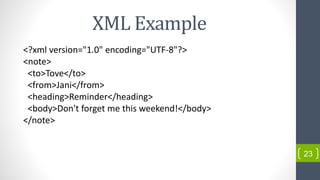
XML Example
<?xml version="1.0" encoding="UTF-8"?>
<note>
<to>Tove</to>
<from>Jani</from>
<heading>Reminder</heading>
<body>Don't forget me this weekend!</body>
</note>
23
Document Object Model (DOM)
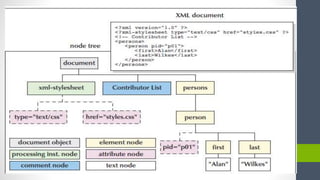
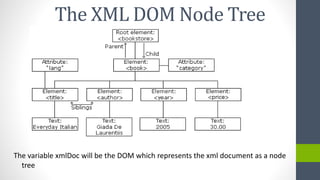
• The XML DOM is an Object that represents the XML file as a node tree.
• This object allows programs and scripts to dynamically access and update
the content of an XML document.
• The XML DOM needs to be created first, then it can be used.
• When we create an XML DOM, we can use all the XML DOM properties
and methods to interact with the object.
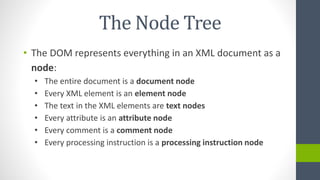
The Node Tree
• The DOM represents everything in an XML document as a
node:
• The entire document is a document node
• Every XML element is an element node
• The text in the XML elements are text nodes
• Every attribute is an attribute node
• Every comment is a comment node
• Every processing instruction is a processing instruction node
Creating the DOM
27
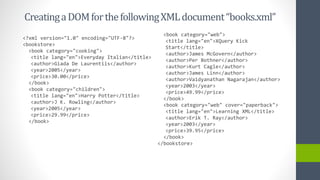
CreatingaDOMforthefollowingXMLdocument“books.xml”
<?xml version="1.0" encoding="UTF-8"?>
<bookstore>
<book category="cooking">
<title lang="en">Everyday Italian</title>
<author>Giada De Laurentiis</author>
<year>2005</year>
<price>30.00</price>
</book>
<book category="children">
<title lang="en">Harry Potter</title>
<author>J K. Rowling</author>
<year>2005</year>
<price>29.99</price>
</book>
<book category="web">
<title lang="en">XQuery Kick
Start</title>
<author>James McGovern</author>
<author>Per Bothner</author>
<author>Kurt Cagle</author>
<author>James Linn</author>
<author>Vaidyanathan Nagarajan</author>
<year>2003</year>
<price>49.99</price>
</book>
<book category="web" cover="paperback">
<title lang="en">Learning XML</title>
<author>Erik T. Ray</author>
<year>2003</year>
<price>39.95</price>
</book>
</bookstore>
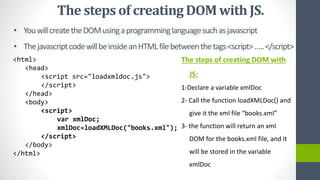
• YouwillcreatetheDOMusingaprogramminglanguagesuchasjavascript
• ThejavascriptcodewillbeinsideanHTMLfilebetweenthetags<script>…..</script>
<html>
<head>
<script src="loadxmldoc.js">
</script>
</head>
<body>
<script>
var xmlDoc;
xmlDoc=loadXMLDoc("books.xml");
</script>
</body>
</html>
The steps of creating DOM with
JS:
1-Declare a variable xmlDoc
2- Call the function loadXMLDoc() and
give it the xml file “books.xml”
3- the function will return an xml
DOM for the books.xml file, and it
will be stored in the variable
xmlDoc
The steps of creatingDOMwith JS.
The variable xmlDoc will be the DOM which represents the xml document as a node
tree
The XML DOM Node Tree
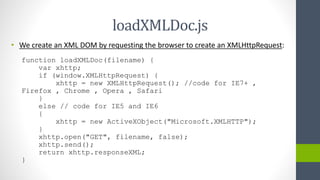
loadXMLDoc.js
• We create an XML DOM by requesting the browser to create an XMLHttpRequest:
function loadXMLDoc(filename) {
var xhttp;
if (window.XMLHttpRequest) {
xhttp = new XMLHttpRequest(); //code for IE7+ ,
Firefox , Chrome , Opera , Safari
}
else // code for IE5 and IE6
{
xhttp = new ActiveXObject("Microsoft.XMLHTTP");
}
xhttp.open("GET", filename, false);
xhttp.send();
return xhttp.responseXML;
}
The XMLHttpRequest Object
• The XMLHttpRequest object can be used to request data from a
web server. It is an object to handle the HTTP requests between
the client and the server.
• All modern browsers have a built-in XMLHttpRequest object to
request data from a server.
References
• Carey, P. (2007). New perspectives on XML: Comprehensive (2nd
ed.). Australia: Thomson/Course Technology.
• XML DOM Tutorial. (n.d.). Retrieved November 7, 2015, from
http://www.w3schools.com/xml/dom_intro.asp

Xml part 6

  • 1.
    Document Object Model (DOM) CCSA222: XML and Web Services Part 7 1
  • 2.
  • 3.
  • 4.
  • 5.
  • 6.
    Javascript • Javascript (JS)is a dynamic programming language used for web-design. • HTML is responsible for formatting a webpage. Then, JS code is embedded in the HTML code to make it dynamic. • JS is processed by the Browser. Therefore, it is considered a client-side scripting language. • Server-side scripting languages, such as PHP and ASP, are processed by the server.
  • 7.
    Javascript • Javascript codemust be inside the <script> and </script> tags. • You can place JS code inside the <head> or <body> of the HTML code. • Using Javascript to output: • Writing into an alert box, using window.alert(). • Writing into the HTML output, using document.write(). • Writing into an HTML element, using document.getElementByID(“…”).innerHTML.
  • 8.
    window.alert() • <!DOCTYPE html> <html> <body> <h1>MyFirst Web Page</h1> <p>My first paragraph.</p> <script> window.alert(“hi!”); </script> </body> </html>
  • 10.
    document.write() • <!DOCTYPE html> <html> <body> <h1>MyFirst Web Page</h1> <p>My first paragraph.</p> <script> document.write(“hi!”); </script> </body> </html>
  • 12.
    document.getElementByID(“…”).innerHTML • <!DOCTYPE html> <html> <body> <h1>MyFirst Web Page</h1> <p id=“demo”>My first paragraph.</p> <script> document.getElementByID(“demo”).innerHTML=“hi!”; </script> </body> </html>
  • 13.
    JavaScript Variables • JavaScriptvariables are containers for storing data values. • Example: • var x = 5; var y = 6; var z = x + y; • From the example above, you can expect: x stores the value 5 y stores the value 6 z stores the value 11
  • 14.
    Declaring (Creating) JavaScriptVariables • You declare a JavaScript variable with the var keyword. • Example: var carName; • You can also assign a value to the variable when you declare it: • var carName = "Volvo";
  • 15.
    Functionsand EventHandlers • Themost common way to use JS and HTML is to place a function inside the JS, and call it from the HTML using an event handler. • This way, the JS code does not get executed until a certain event occurs. • Example: <html> <body> <script> function myFunction(){ ……….. } </script> <input type=“button” value=“click me” onclick=“myFunction()”/> </body> </html>
  • 17.
    EventHandler Event Description onchange AnHTML element has been changed onclick The user clicks an HTML element onmouseover The user moves the mouse over an HTML element onmouseout The user moves the mouse away from an HTML element onkeydown The user pushes a keyboard key onload The browser has finished loading the page
  • 18.
    !DOCTYPE html> <html> <body> <h1>My FirstWeb Page</h1> <p id="demo" onclick="myFunction()"> My first paragraph.</p> <script> function myFunction() { document.getElementById("demo").innerHTML="hi!"; } </script> </body> </html>
  • 19.
    UsinganExternalJS file • <!DOCTYPEhtml> <html> <body> <script src="myScript.js"></script> </body> </html>
  • 20.
  • 21.
    What is theDOM? • The DOM defines a standard for accessing documents like XML and HTML: • "The W3C Document Object Model (DOM) is a platform and language-neutral interface that allows programs and scripts to dynamically access and update the content, structure, and style of a document." 21
  • 22.
    The XML DOM •The XML DOM defines a standard way for accessing and manipulating XML documents. • All XML elements can be accessed through the XML DOM. • The XML DOM defines the objects, properties and methods of all XML elements. • In other words: The XML DOM is a standard for how to get, change, add, or delete XML elements. 22
  • 23.
    XML Example <?xml version="1.0"encoding="UTF-8"?> <note> <to>Tove</to> <from>Jani</from> <heading>Reminder</heading> <body>Don't forget me this weekend!</body> </note> 23
  • 24.
    Document Object Model(DOM) • The XML DOM is an Object that represents the XML file as a node tree. • This object allows programs and scripts to dynamically access and update the content of an XML document. • The XML DOM needs to be created first, then it can be used. • When we create an XML DOM, we can use all the XML DOM properties and methods to interact with the object.
  • 25.
    The Node Tree •The DOM represents everything in an XML document as a node: • The entire document is a document node • Every XML element is an element node • The text in the XML elements are text nodes • Every attribute is an attribute node • Every comment is a comment node • Every processing instruction is a processing instruction node
  • 27.
  • 28.
    CreatingaDOMforthefollowingXMLdocument“books.xml” <?xml version="1.0" encoding="UTF-8"?> <bookstore> <bookcategory="cooking"> <title lang="en">Everyday Italian</title> <author>Giada De Laurentiis</author> <year>2005</year> <price>30.00</price> </book> <book category="children"> <title lang="en">Harry Potter</title> <author>J K. Rowling</author> <year>2005</year> <price>29.99</price> </book> <book category="web"> <title lang="en">XQuery Kick Start</title> <author>James McGovern</author> <author>Per Bothner</author> <author>Kurt Cagle</author> <author>James Linn</author> <author>Vaidyanathan Nagarajan</author> <year>2003</year> <price>49.99</price> </book> <book category="web" cover="paperback"> <title lang="en">Learning XML</title> <author>Erik T. Ray</author> <year>2003</year> <price>39.95</price> </book> </bookstore>
  • 29.
    • YouwillcreatetheDOMusingaprogramminglanguagesuchasjavascript • ThejavascriptcodewillbeinsideanHTMLfilebetweenthetags<script>…..</script> <html> <head> <scriptsrc="loadxmldoc.js"> </script> </head> <body> <script> var xmlDoc; xmlDoc=loadXMLDoc("books.xml"); </script> </body> </html> The steps of creating DOM with JS: 1-Declare a variable xmlDoc 2- Call the function loadXMLDoc() and give it the xml file “books.xml” 3- the function will return an xml DOM for the books.xml file, and it will be stored in the variable xmlDoc The steps of creatingDOMwith JS.
  • 30.
    The variable xmlDocwill be the DOM which represents the xml document as a node tree The XML DOM Node Tree
  • 31.
    loadXMLDoc.js • We createan XML DOM by requesting the browser to create an XMLHttpRequest: function loadXMLDoc(filename) { var xhttp; if (window.XMLHttpRequest) { xhttp = new XMLHttpRequest(); //code for IE7+ , Firefox , Chrome , Opera , Safari } else // code for IE5 and IE6 { xhttp = new ActiveXObject("Microsoft.XMLHTTP"); } xhttp.open("GET", filename, false); xhttp.send(); return xhttp.responseXML; }
  • 32.
    The XMLHttpRequest Object •The XMLHttpRequest object can be used to request data from a web server. It is an object to handle the HTTP requests between the client and the server. • All modern browsers have a built-in XMLHttpRequest object to request data from a server.
  • 33.
    References • Carey, P.(2007). New perspectives on XML: Comprehensive (2nd ed.). Australia: Thomson/Course Technology. • XML DOM Tutorial. (n.d.). Retrieved November 7, 2015, from http://www.w3schools.com/xml/dom_intro.asp