Nguy n Minh Đ oễ ạ
XML Schema
An XML Schema describes the structure of an XML
document.
In this tutorial you will learn how to create XML
Schemas, why XML Schemas are more powerful than
DTDs, and how to use XML Schema in your
application.
2
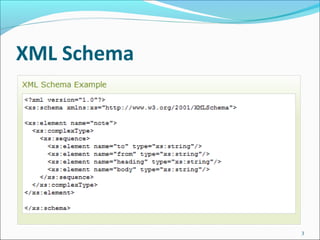
XML Schema
3
Introduction to XML Schema
XML Schema is an XML-based alternative to DTD.
An XML schema describes the structure of an XML
document.
The XML Schema language is also referred to as XML
Schema Definition (XSD).
4
Introduction to XML Schema
What is an XML Schema?
The purpose of an XML Schema is to define the legal
building blocks of an XML document, just like a DTD.
An XML Schema:
 defines elements that can appear in a document
 defines attributes that can appear in a document
 defines which elements are child elements
 defines the order of child elements
 defines the number of child elements
 defines whether an element is empty or can include text
 defines data types for elements and attributes
 defines default and fixed values for elements and attributes
5
XML Schema
XML Schemas are the Successors of DTDs
We think that very soon XML Schemas will be used in
most Web applications as a replacement for DTDs.
Here are some reasons:
XML Schemas are extensible to future additions
XML Schemas are richer and more powerful than DTDs
XML Schemas are written in XML
XML Schemas support data types
XML Schemas support namespaces
6
Why Use XML Schemas?
XML Schemas Support Data Types
One of the greatest strength of XML Schemas is the
support for data types.
With support for data types:
 It is easier to describe allowable document content
 It is easier to validate the correctness of data
 It is easier to work with data from a database
 It is easier to define data facets (restrictions on data)
 It is easier to define data patterns (data formats)
 It is easier to convert data between different data types
7
XML Schemas use XML Syntax
Another great strength about XML Schemas is that
they are written in XML.
Some benefits of that XML Schemas are written in
XML:
You don't have to learn a new language
You can use your XML editor to edit your Schema files
You can use your XML parser to parse your Schema
files
You can manipulate your Schema with the XML DOM
You can transform your Schema with XSLT
8
XML Schemas Secure Data
Communication
When sending data from a sender to a receiver, it is
essential that both parts have the same "expectations"
about the content.
With XML Schemas, the sender can describe the data in a
way that the receiver will understand.
A date like: "03-11-2004" will, in some countries, be
interpreted as 3.November and in other countries as
11.March.
However, an XML element with a data type like this:
<date type="date">2004-03-11</date>
ensures a mutual understanding of the content, because
the XML data type "date" requires the format "YYYY-MM-
DD".
9
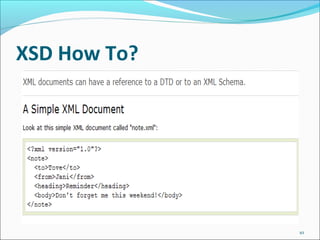
XSD How To?
10
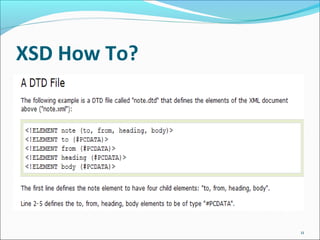
XSD How To?
11
XSD How To?
12
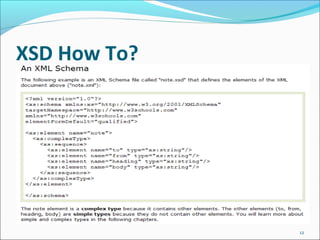
XSD How To?
13
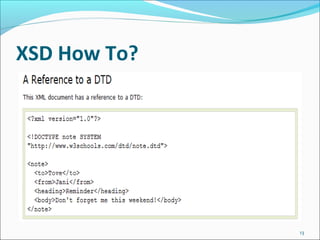
XSD How To?
14
XSD - The <schema> Element
15
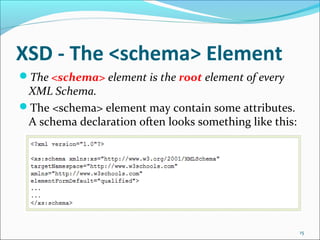
The <schema> element is the root element of every
XML Schema.
The <schema> element may contain some attributes.
A schema declaration often looks something like this:
XSD - The <schema> Element
16
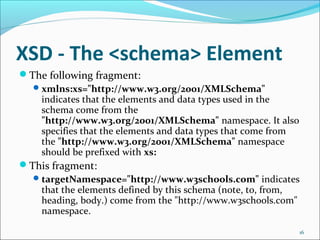
The following fragment:
xmlns:xs="http://www.w3.org/2001/XMLSchema"
indicates that the elements and data types used in the
schema come from the
"http://www.w3.org/2001/XMLSchema" namespace. It also
specifies that the elements and data types that come from
the "http://www.w3.org/2001/XMLSchema" namespace
should be prefixed with xs:
This fragment:
targetNamespace="http://www.w3schools.com" indicates
that the elements defined by this schema (note, to, from,
heading, body.) come from the "http://www.w3schools.com"
namespace.
XSD - The <schema> Element
17
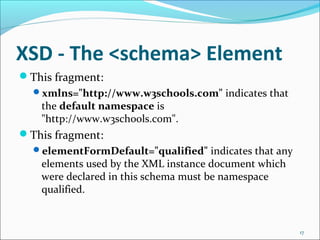
This fragment:
xmlns="http://www.w3schools.com" indicates that
the default namespace is
"http://www.w3schools.com".
This fragment:
elementFormDefault="qualified" indicates that any
elements used by the XML instance document which
were declared in this schema must be namespace
qualified.
XSD - The <schema> Element
18
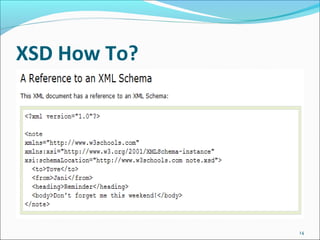
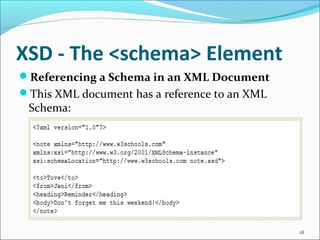
Referencing a Schema in an XML Document
This XML document has a reference to an XML
Schema:
XSD - The <schema> Element
19
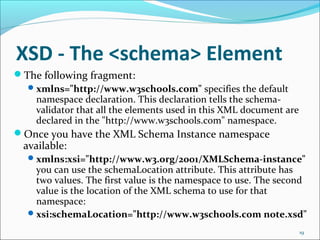
The following fragment:
xmlns="http://www.w3schools.com" specifies the default
namespace declaration. This declaration tells the schema-
validator that all the elements used in this XML document are
declared in the "http://www.w3schools.com" namespace.
Once you have the XML Schema Instance namespace
available:
xmlns:xsi="http://www.w3.org/2001/XMLSchema-instance"
you can use the schemaLocation attribute. This attribute has
two values. The first value is the namespace to use. The second
value is the location of the XML schema to use for that
namespace:
xsi:schemaLocation="http://www.w3schools.com note.xsd"
XSD Simple Elements
20
XML Schemas define the elements of your XML files.
A simple element is an XML element that contains only
text. It cannot contain any other elements or attributes.
Defining a Simple Element
The syntax for defining a simple element is:
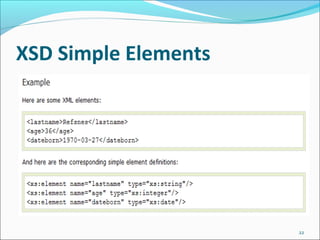
<xs:element name="xxx" type="yyy"/> where xxx is the
name of the element and yyy is the data type of the
element.
XSD Simple Elements
21
XML Schema has a lot of built-in data types. The
most common types are:
xs:string
xs:decimal
xs:integer
xs:boolean
xs:date
xs:time
XSD Simple Elements
22
XSD Simple Elements
23
XSD Attributes
24
All attributes are declared as simple types.
Simple elements cannot have attributes. If an element
has attributes, it is considered to be of a complex
type. But the attribute itself is always declared as a
simple type.
How to Define an Attribute?
The syntax for defining an attribute is:
<xs:attribute name="xxx" type="yyy"/> where xxx is
the name of the attribute and yyy specifies the data
type of the attribute.
XSD Attributes
25
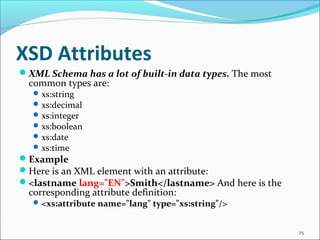
XML Schema has a lot of built-in data types. The most
common types are:
xs:string
xs:decimal
xs:integer
xs:boolean
xs:date
xs:time
Example
Here is an XML element with an attribute:
<lastname lang="EN">Smith</lastname> And here is the
corresponding attribute definition:
<xs:attribute name="lang" type="xs:string"/>
XSD Attributes
26
XSD Attributes
27
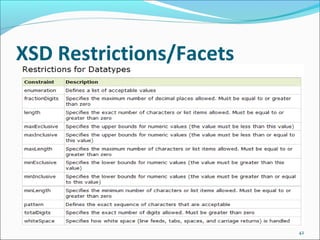
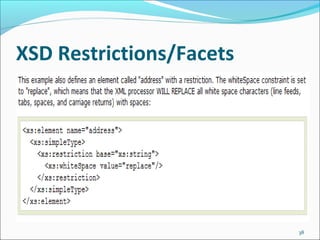
XSD Restrictions/Facets
28
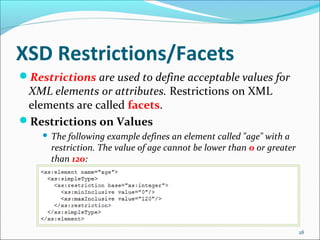
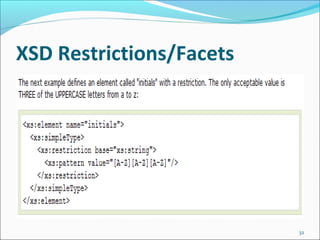
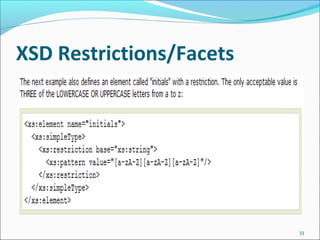
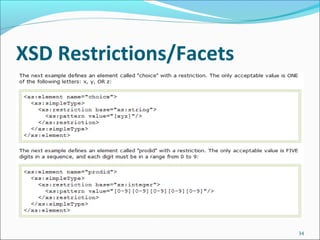
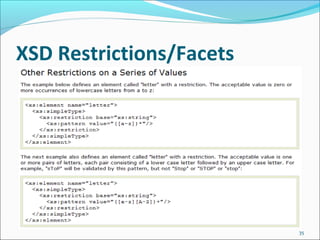
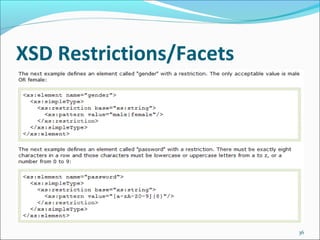
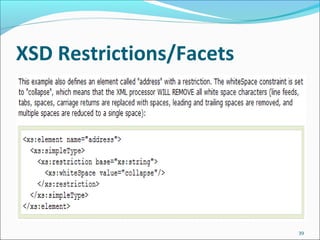
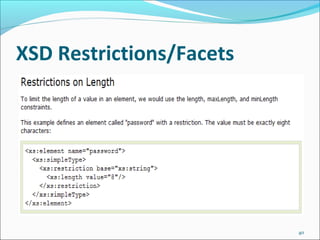
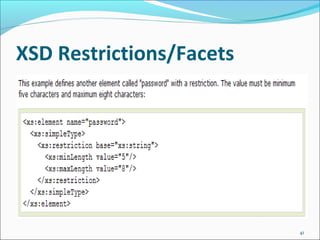
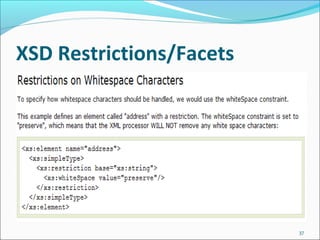
Restrictions are used to define acceptable values for
XML elements or attributes. Restrictions on XML
elements are called facets.
Restrictions on Values
 The following example defines an element called "age" with a
restriction. The value of age cannot be lower than 0 or greater
than 120:
XSD Restrictions/Facets
29
XSD Restrictions/Facets
30
XSD Restrictions/Facets
31
XSD Restrictions/Facets
32
XSD Restrictions/Facets
33
XSD Restrictions/Facets
34
XSD Restrictions/Facets
35
XSD Restrictions/Facets
36
XSD Restrictions/Facets
37
XSD Restrictions/Facets
38
XSD Restrictions/Facets
39
XSD Restrictions/Facets
40
XSD Restrictions/Facets
41
XSD Restrictions/Facets
42
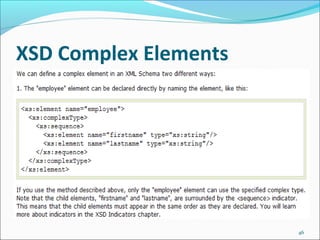
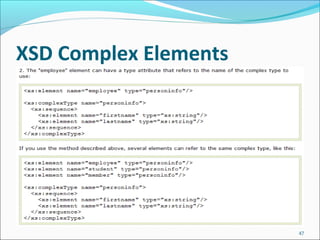
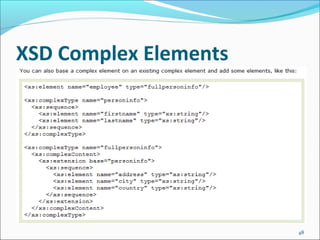
XSD Complex Elements
43
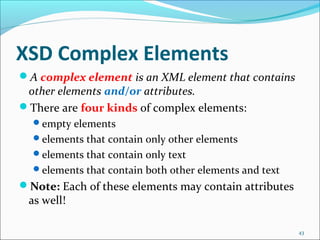
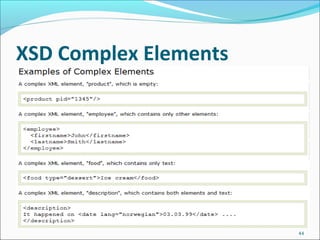
A complex element is an XML element that contains
other elements and/or attributes.
There are four kinds of complex elements:
empty elements
elements that contain only other elements
elements that contain only text
elements that contain both other elements and text
Note: Each of these elements may contain attributes
as well!
XSD Complex Elements
44
XSD Complex Elements
45
XSD Complex Elements
46
XSD Complex Elements
47
XSD Complex Elements
48
XSD Empty Elements
49
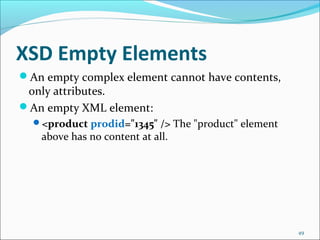
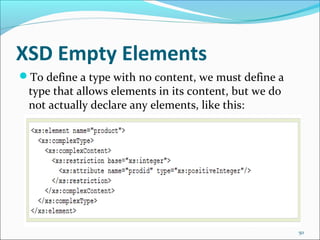
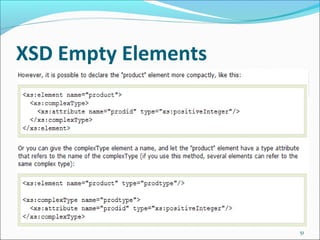
An empty complex element cannot have contents,
only attributes.
An empty XML element:
<product prodid="1345" /> The "product" element
above has no content at all.
XSD Empty Elements
50
To define a type with no content, we must define a
type that allows elements in its content, but we do
not actually declare any elements, like this:
XSD Empty Elements
51
XSD Elements Only
52
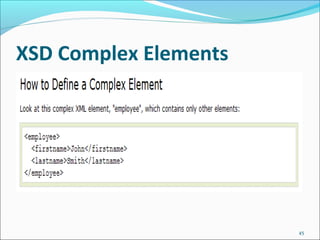
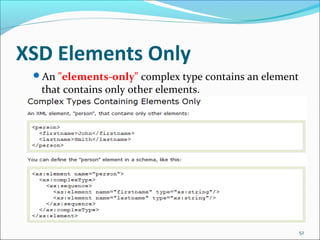
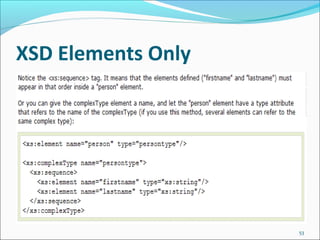
An "elements-only" complex type contains an element
that contains only other elements.
XSD Elements Only
53
XSD Text-Only Elements
54
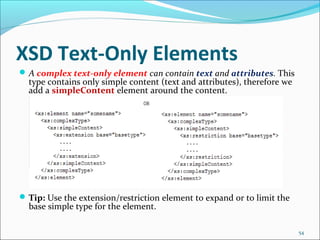
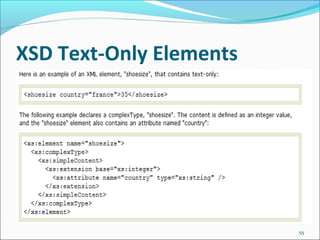
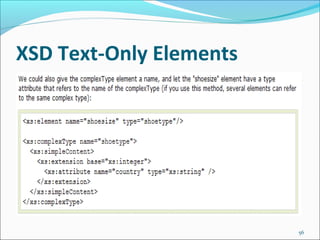
A complex text-only element can contain text and attributes. This
type contains only simple content (text and attributes), therefore we
add a simpleContent element around the content.
Tip: Use the extension/restriction element to expand or to limit the
base simple type for the element.
XSD Text-Only Elements
55
XSD Text-Only Elements
56
XSD Mixed Content
57
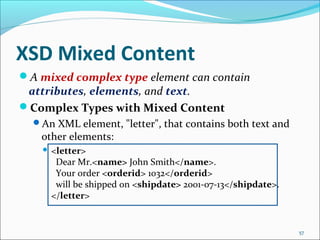
A mixed complex type element can contain
attributes, elements, and text.
Complex Types with Mixed Content
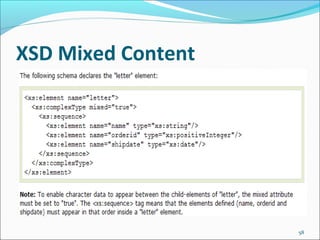
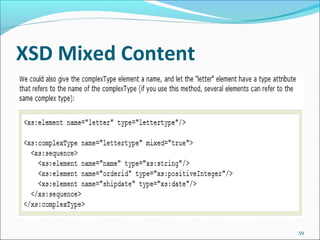
An XML element, "letter", that contains both text and
other elements:
 <letter>
Dear Mr.<name> John Smith</name>.
Your order <orderid> 1032</orderid>
will be shipped on <shipdate> 2001-07-13</shipdate>.
</letter>
XSD Mixed Content
58
XSD Mixed Content
59
XSD Indicators
60
We can control HOW elements are to be used in
documents with indicators.
Indicators
There are seven indicators:
 Order indicators:
 All
 Choice
 Sequence
 Occurrence indicators:
 maxOccurs
 minOccurs
 Group indicators:
 Group name
 attributeGroup name

Xsd examples

  • 1.
    Nguy n MinhĐ oễ ạ
  • 2.
    XML Schema An XMLSchema describes the structure of an XML document. In this tutorial you will learn how to create XML Schemas, why XML Schemas are more powerful than DTDs, and how to use XML Schema in your application. 2
  • 3.
  • 4.
    Introduction to XMLSchema XML Schema is an XML-based alternative to DTD. An XML schema describes the structure of an XML document. The XML Schema language is also referred to as XML Schema Definition (XSD). 4
  • 5.
    Introduction to XMLSchema What is an XML Schema? The purpose of an XML Schema is to define the legal building blocks of an XML document, just like a DTD. An XML Schema:  defines elements that can appear in a document  defines attributes that can appear in a document  defines which elements are child elements  defines the order of child elements  defines the number of child elements  defines whether an element is empty or can include text  defines data types for elements and attributes  defines default and fixed values for elements and attributes 5
  • 6.
    XML Schema XML Schemasare the Successors of DTDs We think that very soon XML Schemas will be used in most Web applications as a replacement for DTDs. Here are some reasons: XML Schemas are extensible to future additions XML Schemas are richer and more powerful than DTDs XML Schemas are written in XML XML Schemas support data types XML Schemas support namespaces 6
  • 7.
    Why Use XMLSchemas? XML Schemas Support Data Types One of the greatest strength of XML Schemas is the support for data types. With support for data types:  It is easier to describe allowable document content  It is easier to validate the correctness of data  It is easier to work with data from a database  It is easier to define data facets (restrictions on data)  It is easier to define data patterns (data formats)  It is easier to convert data between different data types 7
  • 8.
    XML Schemas useXML Syntax Another great strength about XML Schemas is that they are written in XML. Some benefits of that XML Schemas are written in XML: You don't have to learn a new language You can use your XML editor to edit your Schema files You can use your XML parser to parse your Schema files You can manipulate your Schema with the XML DOM You can transform your Schema with XSLT 8
  • 9.
    XML Schemas SecureData Communication When sending data from a sender to a receiver, it is essential that both parts have the same "expectations" about the content. With XML Schemas, the sender can describe the data in a way that the receiver will understand. A date like: "03-11-2004" will, in some countries, be interpreted as 3.November and in other countries as 11.March. However, an XML element with a data type like this: <date type="date">2004-03-11</date> ensures a mutual understanding of the content, because the XML data type "date" requires the format "YYYY-MM- DD". 9
  • 10.
  • 11.
  • 12.
  • 13.
  • 14.
  • 15.
    XSD - The<schema> Element 15 The <schema> element is the root element of every XML Schema. The <schema> element may contain some attributes. A schema declaration often looks something like this:
  • 16.
    XSD - The<schema> Element 16 The following fragment: xmlns:xs="http://www.w3.org/2001/XMLSchema" indicates that the elements and data types used in the schema come from the "http://www.w3.org/2001/XMLSchema" namespace. It also specifies that the elements and data types that come from the "http://www.w3.org/2001/XMLSchema" namespace should be prefixed with xs: This fragment: targetNamespace="http://www.w3schools.com" indicates that the elements defined by this schema (note, to, from, heading, body.) come from the "http://www.w3schools.com" namespace.
  • 17.
    XSD - The<schema> Element 17 This fragment: xmlns="http://www.w3schools.com" indicates that the default namespace is "http://www.w3schools.com". This fragment: elementFormDefault="qualified" indicates that any elements used by the XML instance document which were declared in this schema must be namespace qualified.
  • 18.
    XSD - The<schema> Element 18 Referencing a Schema in an XML Document This XML document has a reference to an XML Schema:
  • 19.
    XSD - The<schema> Element 19 The following fragment: xmlns="http://www.w3schools.com" specifies the default namespace declaration. This declaration tells the schema- validator that all the elements used in this XML document are declared in the "http://www.w3schools.com" namespace. Once you have the XML Schema Instance namespace available: xmlns:xsi="http://www.w3.org/2001/XMLSchema-instance" you can use the schemaLocation attribute. This attribute has two values. The first value is the namespace to use. The second value is the location of the XML schema to use for that namespace: xsi:schemaLocation="http://www.w3schools.com note.xsd"
  • 20.
    XSD Simple Elements 20 XMLSchemas define the elements of your XML files. A simple element is an XML element that contains only text. It cannot contain any other elements or attributes. Defining a Simple Element The syntax for defining a simple element is: <xs:element name="xxx" type="yyy"/> where xxx is the name of the element and yyy is the data type of the element.
  • 21.
    XSD Simple Elements 21 XMLSchema has a lot of built-in data types. The most common types are: xs:string xs:decimal xs:integer xs:boolean xs:date xs:time
  • 22.
  • 23.
  • 24.
    XSD Attributes 24 All attributesare declared as simple types. Simple elements cannot have attributes. If an element has attributes, it is considered to be of a complex type. But the attribute itself is always declared as a simple type. How to Define an Attribute? The syntax for defining an attribute is: <xs:attribute name="xxx" type="yyy"/> where xxx is the name of the attribute and yyy specifies the data type of the attribute.
  • 25.
    XSD Attributes 25 XML Schemahas a lot of built-in data types. The most common types are: xs:string xs:decimal xs:integer xs:boolean xs:date xs:time Example Here is an XML element with an attribute: <lastname lang="EN">Smith</lastname> And here is the corresponding attribute definition: <xs:attribute name="lang" type="xs:string"/>
  • 26.
  • 27.
  • 28.
    XSD Restrictions/Facets 28 Restrictions areused to define acceptable values for XML elements or attributes. Restrictions on XML elements are called facets. Restrictions on Values  The following example defines an element called "age" with a restriction. The value of age cannot be lower than 0 or greater than 120:
  • 29.
  • 30.
  • 31.
  • 32.
  • 33.
  • 34.
  • 35.
  • 36.
  • 37.
  • 38.
  • 39.
  • 40.
  • 41.
  • 42.
  • 43.
    XSD Complex Elements 43 Acomplex element is an XML element that contains other elements and/or attributes. There are four kinds of complex elements: empty elements elements that contain only other elements elements that contain only text elements that contain both other elements and text Note: Each of these elements may contain attributes as well!
  • 44.
  • 45.
  • 46.
  • 47.
  • 48.
  • 49.
    XSD Empty Elements 49 Anempty complex element cannot have contents, only attributes. An empty XML element: <product prodid="1345" /> The "product" element above has no content at all.
  • 50.
    XSD Empty Elements 50 Todefine a type with no content, we must define a type that allows elements in its content, but we do not actually declare any elements, like this:
  • 51.
  • 52.
    XSD Elements Only 52 An"elements-only" complex type contains an element that contains only other elements.
  • 53.
  • 54.
    XSD Text-Only Elements 54 Acomplex text-only element can contain text and attributes. This type contains only simple content (text and attributes), therefore we add a simpleContent element around the content. Tip: Use the extension/restriction element to expand or to limit the base simple type for the element.
  • 55.
  • 56.
  • 57.
    XSD Mixed Content 57 Amixed complex type element can contain attributes, elements, and text. Complex Types with Mixed Content An XML element, "letter", that contains both text and other elements:  <letter> Dear Mr.<name> John Smith</name>. Your order <orderid> 1032</orderid> will be shipped on <shipdate> 2001-07-13</shipdate>. </letter>
  • 58.
  • 59.
  • 60.
    XSD Indicators 60 We cancontrol HOW elements are to be used in documents with indicators. Indicators There are seven indicators:  Order indicators:  All  Choice  Sequence  Occurrence indicators:  maxOccurs  minOccurs  Group indicators:  Group name  attributeGroup name