+
WORKING WITH
NAMESPACES
XML Part 3
+ COMBINING XML VOCABULARIES
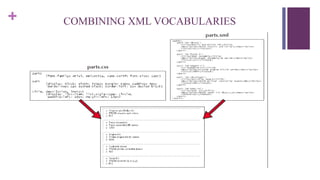
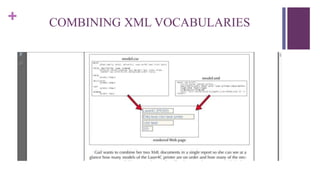
COMBINING XML VOCABULARIES
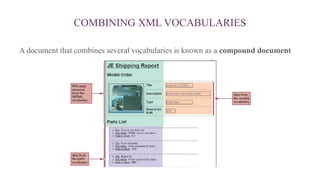
 We needs to include elements from three XML vocabularies:
1. The parts vocabulary.
2. The models vocabulary.
3. The XHTML vocabulary.
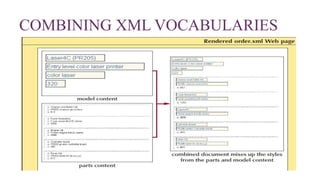
 All of these vocabularies need to combined peacefully in the same
document, and the various style sheets applied to the elements also need to
work together.
COMBINING XML VOCABULARIES
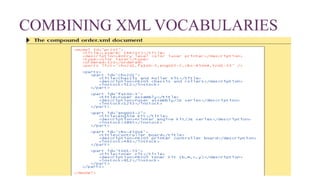
A document that combines several vocabularies is known as a compound document
COMBINING XML VOCABULARIES
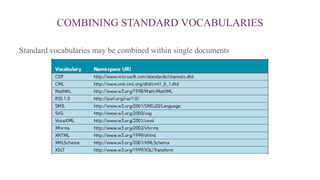
COMBINING STANDARD VOCABULARIES
Standard vocabularies may be combined within single documents
NAME COLLISION
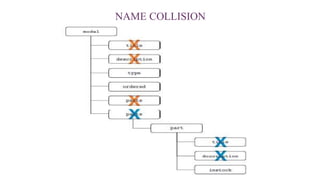
● In XML documents, some element names can be very common such as “name” or
“number”.
● Name collision occurs when elements share the same name in the XML
document.
● A document with name collision can still be well-formed, But it cannot be
validated.
NAME COLLISION
Name Collision
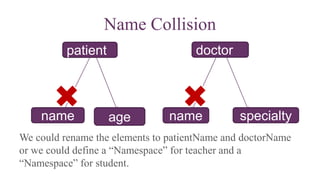
We could rename the elements to patientName and doctorName
or we could define a “Namespace” for teacher and a
“Namespace” for student.
nameage specialty
patient doctor
name
DECLARING A NAMESPACE
● A namespace is a defined collection of element and attribute names.
● Names that belong to the same namespace must be unique. Elements can share the
same name if they reside in different namespaces.
● Namespaces must be declared before they can be used.
● Applying a namespace to an XML document involves two steps:
1. Declaring the namespace.
2. Identifying the elements and attributes within the document that belong to that
namespace.
DECLARING A NAMESPACE
 A namespace is declared as an element attribute. To declare a namespace you add the
following attribute to an element within an XML document:
xmlns: prefix=“URI”
 Where URI is a Uniform Resource Identifier that assigns a unique name to the
namespace, and prefix is a string of letters that associates each element or attribute in
the document with the declared namespace. Note that the URL doesn’t actually have
to point to a real site on the Web.
 Example: xmlns:pat=“www.w3.org/patient”
URIs
● The URI is not a Web address. A URI identifies a physical or an abstract resource.
It is used as an identifier (or an ID)
● A physical resource is a resource one can access and work with such as a file, a
Web page, or an e-mail address.
● An abstract resource is one that doesn’t have any physical existence.
DECLARING A NAMESPACE
 You must declare the namespace before starting to use it
 There are two places to declare the namespace:
o You can either declare it within the element where you want to start using it.
o For example:
o <tch:teacher xmlns:tch=“www.w3.org/teacher”>
o <pat:patient xmlns:pat=“www.w3.org/patient”>
o Or you can declare it within the root element and start using it when you need it
APPLYING A NAMESPACE TO AN ELEMENT
 Once it has been declared and its URI specified, the namespace is applied to
elements and attributes by inserting the namespace prefix before each element name
that belongs to the namespace.
<prefix:element>
content
</prefix:element>
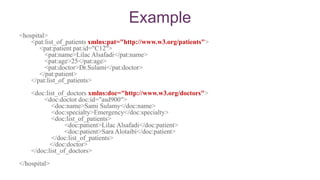
Example
<hospital>
<pat:list_of_patients xmlns:pat="http://www.w3.org/patients">
<pat:patient pat:id="C12">
<pat:name>Lilac Alsafadi</pat:name>
<pat:age>25</pat:age>
<pat:doctor>Dr.Sulami</pat:doctor>
</pat:patient>
</pat:list_of_patients>
<doc:list_of_doctors xmlns:doc="http://www.w3.org/doctors">
<doc:doctor doc:id="asd900">
<doc:name>Sami Sulamy</doc:name>
<doc:specialty>Emergency</doc:specialty>
<doc:list_of_patients>
<doc:patient>Lilac Alsafadi</doc:patient>
<doc:patient>Sara Alotaibi</doc:patient>
</doc:list_of_patients>
</doc:doctor>
</doc:list_of_doctors>
</hospital>
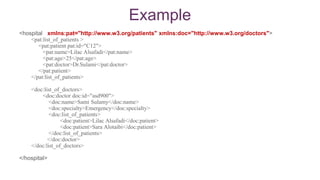
Example
<hospital xmlns:pat="http://www.w3.org/patients" xmlns:doc="http://www.w3.org/doctors">
<pat:list_of_patients >
<pat:patient pat:id="C12">
<pat:name>Lilac Alsafadi</pat:name>
<pat:age>25</pat:age>
<pat:doctor>Dr.Sulami</pat:doctor>
</pat:patient>
</pat:list_of_patients>
<doc:list_of_doctors>
<doc:doctor doc:id="asd900">
<doc:name>Sami Sulamy</doc:name>
<doc:specialty>Emergency</doc:specialty>
<doc:list_of_patients>
<doc:patient>Lilac Alsafadi</doc:patient>
<doc:patient>Sara Alotaibi</doc:patient>
</doc:list_of_patients>
</doc:doctor>
</doc:list_of_doctors>
</hospital>
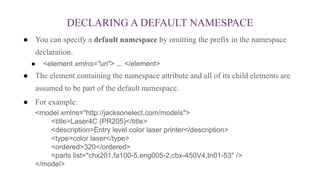
DECLARING A DEFAULT NAMESPACE
● You can specify a default namespace by omitting the prefix in the namespace
declaration.
● <element xmlns="uri"> ... </element>
● The element containing the namespace attribute and all of its child elements are
assumed to be part of the default namespace.
● For example:
<model xmlns="http://jacksonelect.com/models">
<title>Laser4C (PR205)</title>
<description>Entry level color laser printer</description>
<type>color laser</type>
<ordered>320</ordered>
<parts list="chx201,fa100-5,eng005-2,cbx-450V4,tn01-53" />
</model>
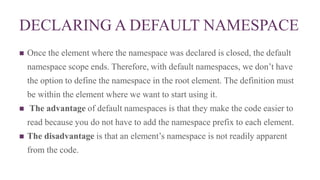
DECLARING A DEFAULT NAMESPACE
 Once the element where the namespace was declared is closed, the default
namespace scope ends. Therefore, with default namespaces, we don’t have
the option to define the namespace in the root element. The definition must
be within the element where we want to start using it.
 The advantage of default namespaces is that they make the code easier to
read because you do not have to add the namespace prefix to each element.
 The disadvantage is that an element’s namespace is not readily apparent
from the code.
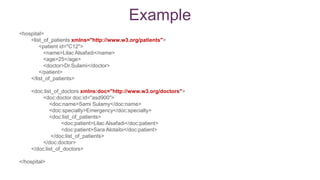
<hospital>
<list_of_patients xmlns="http://www.w3.org/patients">
<patient id="C12">
<name>Lilac Alsafadi</name>
<age>25</age>
<doctor>Dr.Sulami</doctor>
</patient>
</list_of_patients>
<doc:list_of_doctors xmlns:doc="http://www.w3.org/doctors">
<doc:doctor doc:id="asd900">
<doc:name>Sami Sulamy</doc:name>
<doc:specialty>Emergency</doc:specialty>
<doc:list_of_patients>
<doc:patient>Lilac Alsafadi</doc:patient>
<doc:patient>Sara Alotaibi</doc:patient>
</doc:list_of_patients>
</doc:doctor>
</doc:list_of_doctors>
</hospital>
Example
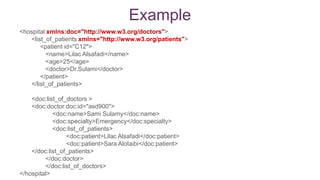
<hospital xmlns:doc="http://www.w3.org/doctors">
<list_of_patients xmlns="http://www.w3.org/patients">
<patient id="C12">
<name>Lilac Alsafadi</name>
<age>25</age>
<doctor>Dr.Sulami</doctor>
</patient>
</list_of_patients>
<doc:list_of_doctors >
<doc:doctor doc:id="asd900">
<doc:name>Sami Sulamy</doc:name>
<doc:specialty>Emergency</doc:specialty>
<doc:list_of_patients>
<doc:patient>Lilac Alsafadi</doc:patient>
<doc:patient>Sara Alotaibi</doc:patient>
</doc:list_of_patients>
</doc:doctor>
</doc:list_of_doctors>
</hospital>
Example
USING NAMESPACES WITH ATTRIBUTES
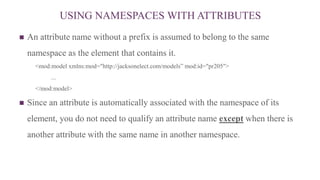
 An attribute name without a prefix is assumed to belong to the same
namespace as the element that contains it.
<mod:model xmlns:mod="http://jacksonelect.com/models” mod:id="pr205">
...
</mod:model>
 Since an attribute is automatically associated with the namespace of its
element, you do not need to qualify an attribute name except when there is
another attribute with the same name in another namespace.
EXAMPLE
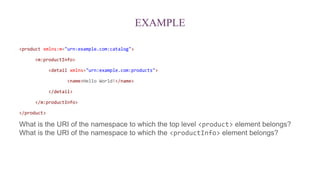
<product xmlns:m="urn:example.com:catalog">
<m:productInfo>
<detail xmlns="urn:example.com:products">
<name>Hello World!</name>
</detail>
</m:productInfo>
</product>
What is the URI of the namespace to which the top level <product> element belongs?
What is the URI of the namespace to which the <productInfo> element belongs?
ANSWER
product does not have a namespace, although it defines the namespace alias xmlns:m="urn:example.com:catalog", product
itself is not in this namespace.
Product would only be in namespace urn:example.com:catalog if it was declared either:
<m:product xmlns:m="urn:example.com:catalog">
or if it reset the default namespace:
<product xmlns="urn:example.com:catalog">
productInfo is in namespace urn:example.com:catalog, for the reason above.
Detail defines the default namespace:
<detail xmlns="urn:example.com:products">
Which means that detail, and sub-elements (such as name) are also in namespace urn:example.com:products
(source: stackoverflow.com)
ADDING A NAMESPACE TO A STYLE SHEET
 To add a namespace in to a Cascading Style Sheets (CSS) you
need to do two steps:
1. Declare a namespace.
2. Applying a namespace into a selector.
ADDING A NAMESPACE TO A STYLE SHEET:
1-DECLARING A NAMESPACE
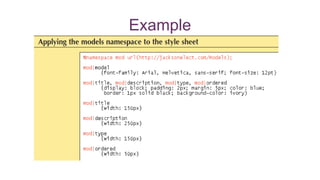
 To declare a namespace in a style sheet, you add the following rule to the style sheet
file:
@namespace prefix url(uri);
 Where prefix is the namespace prefix and uri is the URI of the namespace.
Example:
@namespace mod url(http://jacksonelect.com/models);
 Both the prefix and URI must match the prefix and URI used in the XML document.
ADDING A NAMESPACE TO A STYLE SHEET:
2-APPLYING A NAMESPACE TO A SELECTOR
 Once you’ve declared a namespace in a style sheet, you can associate selectors with
that namespace using the syntax:
prefix|selector {attribute1:value1; attribute2:value2;…}
 For example:
mod|title {width: 150px}
 You also can use the wildcard symbol (*) to apply a style to any element within a
namespace or to elements across different namespaces.
 mod|* {font-size: 12pt}
 Applies the font-size style to any element within the models namespace.
DEFINING NAMESPACES
WITH THE ESCAPE CHARACTER
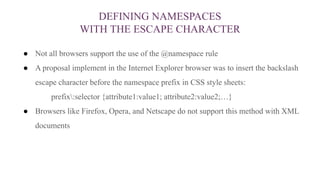
● Not all browsers support the use of the @namespace rule
● A proposal implement in the Internet Explorer browser was to insert the backslash
escape character before the namespace prefix in CSS style sheets:
prefix:selector {attribute1:value1; attribute2:value2;…}
● Browsers like Firefox, Opera, and Netscape do not support this method with XML
documents
Example

Xml part3

  • 1.
  • 2.
    + COMBINING XMLVOCABULARIES
  • 3.
    + COMBINING XMLVOCABULARIES
  • 4.
    COMBINING XML VOCABULARIES We needs to include elements from three XML vocabularies: 1. The parts vocabulary. 2. The models vocabulary. 3. The XHTML vocabulary.  All of these vocabularies need to combined peacefully in the same document, and the various style sheets applied to the elements also need to work together.
  • 5.
    COMBINING XML VOCABULARIES Adocument that combines several vocabularies is known as a compound document
  • 6.
  • 7.
  • 8.
    COMBINING STANDARD VOCABULARIES Standardvocabularies may be combined within single documents
  • 9.
    NAME COLLISION ● InXML documents, some element names can be very common such as “name” or “number”. ● Name collision occurs when elements share the same name in the XML document. ● A document with name collision can still be well-formed, But it cannot be validated.
  • 10.
  • 11.
    Name Collision We couldrename the elements to patientName and doctorName or we could define a “Namespace” for teacher and a “Namespace” for student. nameage specialty patient doctor name
  • 12.
    DECLARING A NAMESPACE ●A namespace is a defined collection of element and attribute names. ● Names that belong to the same namespace must be unique. Elements can share the same name if they reside in different namespaces. ● Namespaces must be declared before they can be used. ● Applying a namespace to an XML document involves two steps: 1. Declaring the namespace. 2. Identifying the elements and attributes within the document that belong to that namespace.
  • 13.
    DECLARING A NAMESPACE A namespace is declared as an element attribute. To declare a namespace you add the following attribute to an element within an XML document: xmlns: prefix=“URI”  Where URI is a Uniform Resource Identifier that assigns a unique name to the namespace, and prefix is a string of letters that associates each element or attribute in the document with the declared namespace. Note that the URL doesn’t actually have to point to a real site on the Web.  Example: xmlns:pat=“www.w3.org/patient”
  • 14.
    URIs ● The URIis not a Web address. A URI identifies a physical or an abstract resource. It is used as an identifier (or an ID) ● A physical resource is a resource one can access and work with such as a file, a Web page, or an e-mail address. ● An abstract resource is one that doesn’t have any physical existence.
  • 15.
    DECLARING A NAMESPACE You must declare the namespace before starting to use it  There are two places to declare the namespace: o You can either declare it within the element where you want to start using it. o For example: o <tch:teacher xmlns:tch=“www.w3.org/teacher”> o <pat:patient xmlns:pat=“www.w3.org/patient”> o Or you can declare it within the root element and start using it when you need it
  • 16.
    APPLYING A NAMESPACETO AN ELEMENT  Once it has been declared and its URI specified, the namespace is applied to elements and attributes by inserting the namespace prefix before each element name that belongs to the namespace. <prefix:element> content </prefix:element>
  • 17.
    Example <hospital> <pat:list_of_patients xmlns:pat="http://www.w3.org/patients"> <pat:patient pat:id="C12"> <pat:name>LilacAlsafadi</pat:name> <pat:age>25</pat:age> <pat:doctor>Dr.Sulami</pat:doctor> </pat:patient> </pat:list_of_patients> <doc:list_of_doctors xmlns:doc="http://www.w3.org/doctors"> <doc:doctor doc:id="asd900"> <doc:name>Sami Sulamy</doc:name> <doc:specialty>Emergency</doc:specialty> <doc:list_of_patients> <doc:patient>Lilac Alsafadi</doc:patient> <doc:patient>Sara Alotaibi</doc:patient> </doc:list_of_patients> </doc:doctor> </doc:list_of_doctors> </hospital>
  • 18.
    Example <hospital xmlns:pat="http://www.w3.org/patients" xmlns:doc="http://www.w3.org/doctors"> <pat:list_of_patients> <pat:patient pat:id="C12"> <pat:name>Lilac Alsafadi</pat:name> <pat:age>25</pat:age> <pat:doctor>Dr.Sulami</pat:doctor> </pat:patient> </pat:list_of_patients> <doc:list_of_doctors> <doc:doctor doc:id="asd900"> <doc:name>Sami Sulamy</doc:name> <doc:specialty>Emergency</doc:specialty> <doc:list_of_patients> <doc:patient>Lilac Alsafadi</doc:patient> <doc:patient>Sara Alotaibi</doc:patient> </doc:list_of_patients> </doc:doctor> </doc:list_of_doctors> </hospital>
  • 19.
    DECLARING A DEFAULTNAMESPACE ● You can specify a default namespace by omitting the prefix in the namespace declaration. ● <element xmlns="uri"> ... </element> ● The element containing the namespace attribute and all of its child elements are assumed to be part of the default namespace. ● For example: <model xmlns="http://jacksonelect.com/models"> <title>Laser4C (PR205)</title> <description>Entry level color laser printer</description> <type>color laser</type> <ordered>320</ordered> <parts list="chx201,fa100-5,eng005-2,cbx-450V4,tn01-53" /> </model>
  • 20.
    DECLARING A DEFAULTNAMESPACE  Once the element where the namespace was declared is closed, the default namespace scope ends. Therefore, with default namespaces, we don’t have the option to define the namespace in the root element. The definition must be within the element where we want to start using it.  The advantage of default namespaces is that they make the code easier to read because you do not have to add the namespace prefix to each element.  The disadvantage is that an element’s namespace is not readily apparent from the code.
  • 21.
    <hospital> <list_of_patients xmlns="http://www.w3.org/patients"> <patient id="C12"> <name>LilacAlsafadi</name> <age>25</age> <doctor>Dr.Sulami</doctor> </patient> </list_of_patients> <doc:list_of_doctors xmlns:doc="http://www.w3.org/doctors"> <doc:doctor doc:id="asd900"> <doc:name>Sami Sulamy</doc:name> <doc:specialty>Emergency</doc:specialty> <doc:list_of_patients> <doc:patient>Lilac Alsafadi</doc:patient> <doc:patient>Sara Alotaibi</doc:patient> </doc:list_of_patients> </doc:doctor> </doc:list_of_doctors> </hospital> Example
  • 22.
    <hospital xmlns:doc="http://www.w3.org/doctors"> <list_of_patients xmlns="http://www.w3.org/patients"> <patientid="C12"> <name>Lilac Alsafadi</name> <age>25</age> <doctor>Dr.Sulami</doctor> </patient> </list_of_patients> <doc:list_of_doctors > <doc:doctor doc:id="asd900"> <doc:name>Sami Sulamy</doc:name> <doc:specialty>Emergency</doc:specialty> <doc:list_of_patients> <doc:patient>Lilac Alsafadi</doc:patient> <doc:patient>Sara Alotaibi</doc:patient> </doc:list_of_patients> </doc:doctor> </doc:list_of_doctors> </hospital> Example
  • 23.
    USING NAMESPACES WITHATTRIBUTES  An attribute name without a prefix is assumed to belong to the same namespace as the element that contains it. <mod:model xmlns:mod="http://jacksonelect.com/models” mod:id="pr205"> ... </mod:model>  Since an attribute is automatically associated with the namespace of its element, you do not need to qualify an attribute name except when there is another attribute with the same name in another namespace.
  • 24.
    EXAMPLE <product xmlns:m="urn:example.com:catalog"> <m:productInfo> <detail xmlns="urn:example.com:products"> <name>HelloWorld!</name> </detail> </m:productInfo> </product> What is the URI of the namespace to which the top level <product> element belongs? What is the URI of the namespace to which the <productInfo> element belongs?
  • 25.
    ANSWER product does nothave a namespace, although it defines the namespace alias xmlns:m="urn:example.com:catalog", product itself is not in this namespace. Product would only be in namespace urn:example.com:catalog if it was declared either: <m:product xmlns:m="urn:example.com:catalog"> or if it reset the default namespace: <product xmlns="urn:example.com:catalog"> productInfo is in namespace urn:example.com:catalog, for the reason above. Detail defines the default namespace: <detail xmlns="urn:example.com:products"> Which means that detail, and sub-elements (such as name) are also in namespace urn:example.com:products (source: stackoverflow.com)
  • 26.
    ADDING A NAMESPACETO A STYLE SHEET  To add a namespace in to a Cascading Style Sheets (CSS) you need to do two steps: 1. Declare a namespace. 2. Applying a namespace into a selector.
  • 27.
    ADDING A NAMESPACETO A STYLE SHEET: 1-DECLARING A NAMESPACE  To declare a namespace in a style sheet, you add the following rule to the style sheet file: @namespace prefix url(uri);  Where prefix is the namespace prefix and uri is the URI of the namespace. Example: @namespace mod url(http://jacksonelect.com/models);  Both the prefix and URI must match the prefix and URI used in the XML document.
  • 28.
    ADDING A NAMESPACETO A STYLE SHEET: 2-APPLYING A NAMESPACE TO A SELECTOR  Once you’ve declared a namespace in a style sheet, you can associate selectors with that namespace using the syntax: prefix|selector {attribute1:value1; attribute2:value2;…}  For example: mod|title {width: 150px}  You also can use the wildcard symbol (*) to apply a style to any element within a namespace or to elements across different namespaces.  mod|* {font-size: 12pt}  Applies the font-size style to any element within the models namespace.
  • 29.
    DEFINING NAMESPACES WITH THEESCAPE CHARACTER ● Not all browsers support the use of the @namespace rule ● A proposal implement in the Internet Explorer browser was to insert the backslash escape character before the namespace prefix in CSS style sheets: prefix:selector {attribute1:value1; attribute2:value2;…} ● Browsers like Firefox, Opera, and Netscape do not support this method with XML documents
  • 30.