6 Wireless LANs
 Characteristics
 IEEE 802.11
 HIPERLAN
 Standards overview
 HiperLAN2
 QoS
 Bluetooth
 Comparison
Characteristics of wireless LANs
Advantages
– very flexible within the reception area
– Ad‐hoc networks without previous planning possible
– (almost) no wiring difficulties (e.g. historic buildings, firewalls)
– more robust against disasters like, e.g., earthquakes, fire ‐ or
users pulling a plug...
Disadvantages
– typically very low bandwidth compared to wired networks (1‐
10 Mbit/s)
– many proprietary solutions, especially for higher bit‐rates,
standards take their time (e.g. IEEE 802.11)
– products have to follow many national restrictions if working
wireless, it takes a vary long time to establish global solutions
like, e.g., IMT‐2000
Design goals for wireless LANs
– global, seamless operation
– low power for battery use
– no special permissions or licenses needed to use the LAN
– robust transmission technology
– simplified spontaneous cooperation at meetings
– easy to use for everyone, simple management
– protection of investment in wired networks
– security (no one should be able to read my data), privacy (no
one should be able to collect user profiles), safety (low
radiation)
– transparency concerning applications and higher layer
protocols, but also location awareness if necessary
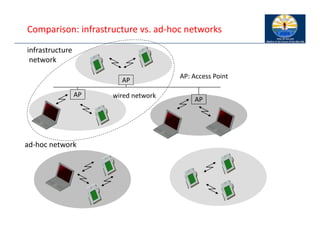
Comparison: infrastructure vs. ad‐hoc networks
infrastructure
network
ad‐hoc network
AP
AP
AP
wired network
AP: Access Point
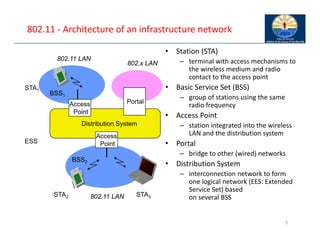
802.11 ‐ Architecture of an infrastructure network
5
Distribution System
Portal
802.x LAN
Access
Point
802.11 LAN
BSS2
802.11 LAN
BSS1
Access
Point
STA1
STA2 STA3
ESS
• Station (STA)
– terminal with access mechanisms to
the wireless medium and radio
contact to the access point
• Basic Service Set (BSS)
– group of stations using the same
radio frequency
• Access Point
– station integrated into the wireless
LAN and the distribution system
• Portal
– bridge to other (wired) networks
• Distribution System
– interconnection network to form
one logical network (EES: Extended
Service Set) based
on several BSS
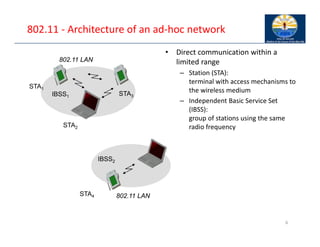
802.11 ‐ Architecture of an ad‐hoc network
6
802.11 LAN
IBSS2
802.11 LAN
IBSS1
STA1
STA4
STA2
STA3
• Direct communication within a
limited range
– Station (STA):
terminal with access mechanisms to
the wireless medium
– Independent Basic Service Set
(IBSS):
group of stations using the same
radio frequency
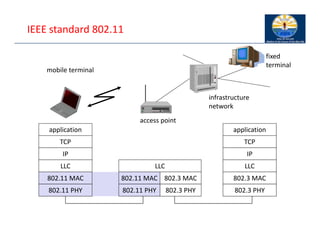
IEEE standard 802.11
mobile terminal
access point
fixed
terminal
application
TCP
802.11 PHY
802.11 MAC
IP
802.3 MAC
802.3 PHY
application
TCP
802.3 PHY
802.3 MAC
IP
802.11 MAC
802.11 PHY
LLC
infrastructure
network
LLC LLC
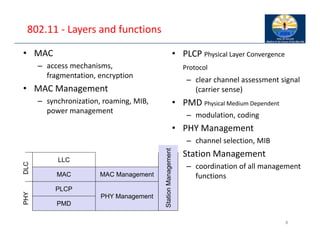
802.11 ‐ Layers and functions
8
• PLCP Physical Layer Convergence
Protocol
– clear channel assessment signal
(carrier sense)
• PMD Physical Medium Dependent
– modulation, coding
• PHY Management
– channel selection, MIB
• Station Management
– coordination of all management
functions
PMD
PLCP
MAC
LLC
MAC Management
PHY Management
• MAC
– access mechanisms,
fragmentation, encryption
• MAC Management
– synchronization, roaming, MIB,
power management
PHY
DLC
Station
Management
802.11 ‐ Physical layer (legacy)
• 3 versions: 2 radio (typ. 2.4 GHz), 1 IR
– data rates 1 or 2 Mbit/s
• FHSS (Frequency Hopping Spread Spectrum)
– spreading, despreading, signal strength, typ. 1 Mbit/s
– min. 2.5 frequency hops/s (USA), two‐level GFSK modulation
• DSSS (Direct Sequence Spread Spectrum)
– DBPSK modulation for 1 Mbit/s (Differential Binary Phase Shift Keying), DQPSK for 2
Mbit/s (Differential Quadrature PSK)
– preamble and header of a frame is always transmitted with 1 Mbit/s, rest of
transmission 1 or 2 Mbit/s
– chipping sequence: +1, ‐1, +1, +1, ‐1, +1, +1, +1, ‐1, ‐1, ‐1 (Barker code)
– max. radiated power 1 W (USA), 100 mW (EU), min. 1mW
• Infrared
– 850‐950 nm, diffuse light, typ. 10 m range
– carrier detection, energy detection, synchron
9
802.11 ‐ MAC layer I – Distributed Foundation Wireless
Medium Access Control (DFWMAC)
• Traffic services
– Asynchronous Data Service (mandatory)
• exchange of data packets based on “best‐effort”
• support of broadcast and multicast
– Time‐Bounded Service (optional)
• implemented using PCF (Point Coordination Function)
• Access methods
– DFWMAC‐DCF CSMA/CA (mandatory)
• collision avoidance via randomized „back‐off“ mechanism
• minimum distance between consecutive packets
• ACK packet for acknowledgements (not for broadcasts)
– DFWMAC‐DCF w/ RTS/CTS (optional)
• Distributed Foundation Wireless MAC
• avoids hidden terminal problem
– DFWMAC‐ PCF (optional)
• access point polls terminals according to a list
10
802.11 ‐ MAC layer II
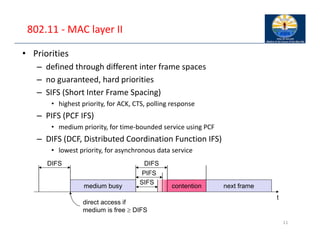
• Priorities
– defined through different inter frame spaces
– no guaranteed, hard priorities
– SIFS (Short Inter Frame Spacing)
• highest priority, for ACK, CTS, polling response
– PIFS (PCF IFS)
• medium priority, for time‐bounded service using PCF
– DIFS (DCF, Distributed Coordination Function IFS)
• lowest priority, for asynchronous data service
11
t
medium busy
SIFS
PIFS
DIFS
DIFS
next frame
contention
direct access if
medium is free  DIFS
802.11 ‐ CSMA/CA access method I
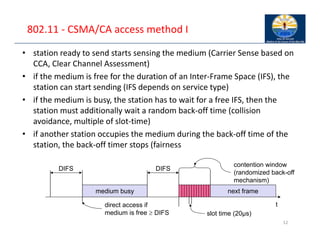
• station ready to send starts sensing the medium (Carrier Sense based on
CCA, Clear Channel Assessment)
• if the medium is free for the duration of an Inter‐Frame Space (IFS), the
station can start sending (IFS depends on service type)
• if the medium is busy, the station has to wait for a free IFS, then the
station must additionally wait a random back‐off time (collision
avoidance, multiple of slot‐time)
• if another station occupies the medium during the back‐off time of the
station, the back‐off timer stops (fairness
12
t
medium busy
DIFS
DIFS
next frame
contention window
(randomized back-off
mechanism)
slot time (20µs)
direct access if
medium is free  DIFS
802.11 ‐ CSMA/CA access method II
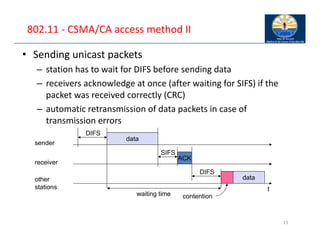
• Sending unicast packets
– station has to wait for DIFS before sending data
– receivers acknowledge at once (after waiting for SIFS) if the
packet was received correctly (CRC)
– automatic retransmission of data packets in case of
transmission errors
13
t
SIFS
DIFS
data
ACK
waiting time
other
stations
receiver
sender
data
DIFS
contention
802.11 CSMA/CA principles
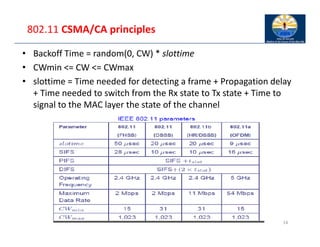
• Backoff Time = random(0, CW) * slottime
• CWmin <= CW <= CWmax
• slottime = Time needed for detecting a frame + Propagation delay
+ Time needed to switch from the Rx state to Tx state + Time to
signal to the MAC layer the state of the channel
14
802.11 ‐ CSMA/CA unicast
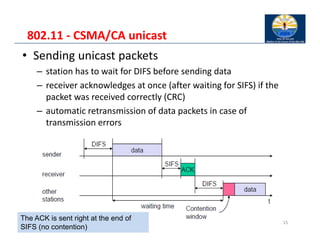
• Sending unicast packets
– station has to wait for DIFS before sending data
– receiver acknowledges at once (after waiting for SIFS) if the
packet was received correctly (CRC)
– automatic retransmission of data packets in case of
transmission errors
15
The ACK is sent right at the end of
SIFS (no contention)
802.11 – DFC with RTS/CTS
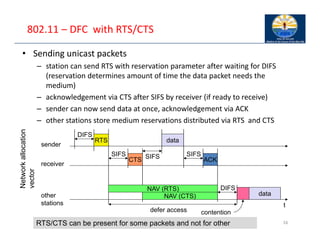
• Sending unicast packets
– station can send RTS with reservation parameter after waiting for DIFS
(reservation determines amount of time the data packet needs the
medium)
– acknowledgement via CTS after SIFS by receiver (if ready to receive)
– sender can now send data at once, acknowledgement via ACK
– other stations store medium reservations distributed via RTS and CTS
16
t
SIFS
DIFS
data
ACK
other
stations
receiver
sender
data
DIFS
RTS
CTS
SIFS SIFS
NAV (RTS)
NAV (CTS)
defer access contention
Network
allocation
vector
RTS/CTS can be present for some packets and not for other
802.11 ‐ MAC management
• Synchronization
– try to find a LAN, try to stay within a LAN
– timer etc.
• Power management
– sleep‐mode without missing a message
– periodic sleep, frame buffering, traffic measurements
• Association/Reassociation
– integration into a LAN
– roaming, i.e. change networks by changing access points
– scanning, i.e. active search for a network
• MIB ‐ Management Information Base
– managing, read, write
17
Power management
Idea: switch the transceiver off if not needed
States of a station: sleep and awake
Timing Synchronization Function (TSF)
– stations wake up at the same time
Infrastructure
– Traffic Indication Map (TIM)
• list of unicast receivers transmitted by AP
– Delivery Traffic Indication Map (DTIM)
• list of broadcast/multicast receivers transmitted by AP
Ad‐hoc
– Ad‐hoc Traffic Indication Map (ATIM)
• announcement of receivers by stations buffering frames
• more complicated ‐ no central AP
• collision of ATIMs possible (scalability?)
802.11 Roaming
No or bad connection? Then perform:
• Scanning
– scan the environment, i.e., listen into the medium for beacon signals or send probes
into the medium and wait for an answer
• Reassociation Request
– station sends a request to one or several AP(s)
• Reassociation Response
– success: AP has answered, station can now participate
– failure: continue scanning
• AP accepts Reassociation Request
– signal the new station to the distribution system
– the distribution system updates its data base (i.e., location information)
– typically, the distribution system now informs the old AP so it can release resources I
• Inter‐Access Point Protocol (802.11f )
– Compatible solution for Roaming between different vendors’ APs
– Load‐balancing between APs
19
WLAN: IEEE 802.11b
20
Data rate
– 1, 2, 5.5, 11 Mbit/s, depending on SNR
– User data rate max. approx. 6 Mbit/s
Transmission range
– 300m outdoor, 30m indoor
– Max. data rate ~10m indoor
Frequency
– Free 2.4 GHz ISM‐band
Security
– Limited, WEP insecure, SSID
Cost
– 100€ adapter, 250€ base station,
dropping
Availability
– Many products, many vendors
Connection set‐up time
– Connectionless/always on
Quality of Service
– Typ. Best effort, no guarantees (unless
polling is used, limited support in
products)
Manageability
– Limited (no automated key
distribution, sym. Encryption)
Special Advantages/Disadvantages
– Advantage: many installed systems, lot
of experience, available worldwide,
free ISM‐band, many vendors,
integrated in laptops, simple system
– Disadvantage: heavy interference on
ISM‐band, no service guarantees, slow
relative speed only
21
WLAN: IEEE 802.11a
Data rate
– 6, 9, 12, 18, 24, 36, 48, 54 Mbit/s,
depending on SNR
– User throughput (1500 byte packets):
5.3 (6), 18 (24), 24 (36), 32 (54)
– 6, 12, 24 Mbit/s mandatory
Transmission range
– 100m outdoor, 10m indoor
• E.g., 54 Mbit/s up to 5 m, 48 up to 12
m, 36 up to 25 m, 24 up to 30m, 18 up
to 40 m, 12 up to 60 m
Frequency
– Free 5.15‐5.25, 5.25‐5.35, 5.725‐5.825
GHz ISM‐band
Security
– Limited, WEP insecure, SSID
Cost
– 280€ adapter, 500€ base station
Availability
– Some products, some vendors
Connection set‐up time
– Connectionless/always on
Quality of Service
– Typ. best effort, no guarantees (same
as all 802.11 products)
Manageability
– Limited (no automated key
distribution, sym. Encryption)
Special Advantages/Disadvantages
– Advantage: fits into 802.x standards,
free ISM‐band, available, simple
system, uses less crowded 5 GHz band
– Disadvantage: stronger shading due to
higher frequency, no QoS
WLAN: IEEE 802.11 – future developments
• 802.11c: Bridge Support
– Definition of MAC procedures to support bridges as extension to 802.1D
• 802.11d: Regulatory Domain Update
– Support of additional regulations related to channel selection, hopping sequences
• 802.11e: MAC Enhancements – QoS
– Enhance the current 802.11 MAC to expand support for applications with Quality of Service requirements,
and in the capabilities and efficiency of the protocol
– Definition of a data flow (“connection”) with parameters like rate, burst, period… supported by HCCA (HCF
(Hybrid Coordinator Function) Controlled Channel Access, optional)
– Additional energy saving mechanisms and more efficient retransmission
– EDCA (Enhanced Distributed Channel Access): high priority traffic waits less for channel access
• 802.11F: Inter‐Access Point Protocol (withdrawn)
– Establish an Inter‐Access Point Protocol for data exchange via the distribution system
• 802.11g: Data Rates > 20 Mbit/s at 2.4 GHz; 54 Mbit/s, OFDM
– Successful successor of 802.11b, performance loss during mixed operation with .11b
• 802.11h: Spectrum Managed 802.11a
– Extension for operation of 802.11a in Europe by mechanisms like channel measurement for dynamic
channel selection (DFS, Dynamic Frequency Selection) and power control (TPC, Transmit Power Control)
• 802.11i: Enhanced Security Mechanisms
– Enhance the current 802.11 MAC to provide improvements in security.
– TKIP enhances the insecure WEP, but remains compatible to older WEP systems
– AES provides a secure encryption method and is based on new hardware
WLAN: IEEE 802.11– current developments
• 802.11j: Extensions for operations in Japan
– Changes of 802.11a for operation at 5GHz in Japan using only half the channel width at larger range
• 802.11‐2007: Current “complete” standard
– Comprises amendments a, b, d, e, g, h, i, j
• 802.11k: Methods for channel measurements
– Devices and access points should be able to estimate channel quality in order to be able to choose a better
access point of channel
• 802.11m: Updates of the 802.11‐2007 standard
• 802.11n: Higher data rates above 100Mbit/s
– Changes of PHY and MAC with the goal of 100Mbit/s at MAC SAP
– MIMO antennas (Multiple Input Multiple Output), up to 600Mbit/s are currently feasible
– However, still a large overhead due to protocol headers and inefficient mechanisms
• 802.11p: Inter car communications
– Communication between cars/road side and cars/cars
– Planned for relative speeds of min. 200km/h and ranges over 1000m
– Usage of 5.850‐5.925GHz band in North America
• 802.11r: Faster Handover between BSS
– Secure, fast handover of a station from one AP to another within an ESS
– Current mechanisms (even newer standards like 802.11i) plus incompatible devices from different vendors
are massive problems for the use of, e.g., VoIP in WLANs
– Handover should be feasible within 50ms in order to support multimedia applications efficiently
23
WLAN: IEEE 802.11– current developments
• 802.11s: Mesh Networking
– Design of a self‐configuring Wireless Distribution System (WDS) based on 802.11
– Support of point‐to‐point and broadcast communication across several hops
• 802.11T: Performance evaluation of 802.11 networks
– Standardization of performance measurement schemes
• 802.11u: Interworking with additional external networks
• 802.11v: Network management
– Extensions of current management functions, channel measurements
– Definition of a unified interface
• 802.11w: Securing of network control
– Classical standards like 802.11, but also 802.11i protect only data frames, not the control frames.
Thus, this standard should extend 802.11i in a way that, e.g., no control frames can be forged.
• 802.11y: Extensions for the 3650‐3700 MHz band in the USA
• 802.11z: Extension to direct link setup
• 802.11aa: Robust audio/video stream transport
• 802.11ac: Very High Throughput <6Ghz
• 802.11ad: Very High Throughput in 60 GHz
• 802.11af: TV white space, ah: sub 1GHz, ai: fast initial link set‐up; … aq: pre‐association discovery
• Note: Not all “standards” will end in products, many ideas get stuck at working group level
• Info: www.ieee802.org/11/, 802wirelessworld.com, standards.ieee.org/getieee802/
24
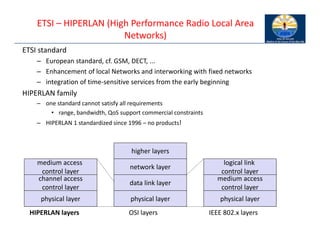
ETSI – HIPERLAN (High Performance Radio Local Area
Networks)
ETSI standard
– European standard, cf. GSM, DECT, ...
– Enhancement of local Networks and interworking with fixed networks
– integration of time‐sensitive services from the early beginning
HIPERLAN family
– one standard cannot satisfy all requirements
• range, bandwidth, QoS support commercial constraints
– HIPERLAN 1 standardized since 1996 – no products!
physical layer
channel access
control layer
medium access
control layer
physical layer
data link layer
HIPERLAN layers OSI layers
network layer
higher layers
physical layer
medium access
control layer
logical link
control layer
IEEE 802.x layers
HIPERLAN 1
• WHAT HIPERLAN/1 PROVIDES:
– allows nodes to be deployed in a pre‐arranged and ad‐hoc manners;
– provides forwarding mechanism e.g., multi‐hop routing;
– provides data rate of around 25Mbps;
– has the capability to support both multimedia and asynchronous data;
• COMPARING WITH IEEE 802.11:
– IEEE 802.11 is seen as dumb but simple;
– HIPERLAN is clever but more sophisticated.
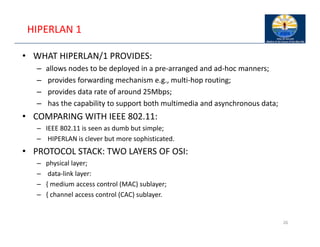
• PROTOCOL STACK: TWO LAYERS OF OSI:
– physical layer;
– data‐link layer:
– { medium access control (MAC) sublayer;
– { channel access control (CAC) sublayer.
26
HIPERLAN 1..
• Physical layer
– WHAT ARE FUNCTIONALITIES:
• modulation and demodulation;
• forward error corrections;
• signal strength measurement;
• synchronization between the sender and a receiver;
• channel sensing (idle/busy) using CCA scheme this is similar to IEEE
802.11.
• MAC sublayer
– WHAT ARE FUNCTIONALITIES:
• processing packets from the higher layer;
• packets according to the QoS requests;
• forwarding packets and power conservation features;
• communication condentiality using encryption‐decryption schemes.
27
HIPERLAN 1 ‐ Characteristics
Data transmission
– point‐to‐point, point‐to‐multipoint, connectionless
– 23.5 Mbit/s, 1 W power, 2383 byte max. packet size
Services
– asynchronous and time‐bounded services with hierarchical priorities
– compatible with ISO MAC
Topology
– infrastructure or ad‐hoc networks
– transmission range can be larger then coverage of a single node
(„forwarding“ integrated in mobile terminals)
Further mechanisms
– power saving, encryption, checksums
HIPERLAN..
• Channel access scheme
– ELIMINATION YIELD NON‐PREEMPTIVE MULTIPLE ACCESS
• dynamic listen‐then‐talk channel access protocol;
• similar to CSMA/CA used in IEEE 802.11;
• exception: provides service dierentiation!
– CHANNEL ACCESS CONSISTS OF THE FOLLOWING CYCLES:
• . . .
• synchronization;
• Prioritization: determine the higher priority of a data pacet ready to be
sent by competing nodes
• Contention: eliminate all but one of the contenders: if more than one
sender has the highest current priority
• transmission: finally transmit the packet of the remaining noder
•
29
• PRIORITIZATION:
– Aim: to detect nodes having packets with the highest CAM
priority. Two stages:
– { priority detection:
• A node listens channel for a number of slots proportional to the CAM
priority of its packet.
– { priority assertion:
• A node asserts its priority sending a signal in the slot corresponding to
the packet priority.
• Nodes having packets with low CAM priority detects nodes with the
higher priority packets.
30
• CONTENTION:
– Aim: eliminate as many nodes as possible to minimize the
collision:
– { Elimination phase:
• a node transmits signal for geometrically distributed number of slots
(0:5k,k is the CAM);
• the it senses the media for one slot;
• if transmissions in this slot are detected, a node stops contention
process;
• if no, it goes to yield phase.
– { Yield phase:
• A node listens channel for a number of slots. If it is idle, the node is
chosen for transmission.
31
32
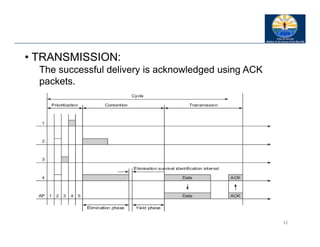
• TRANSMISSION:
The successful delivery is acknowledged using ACK
packets.
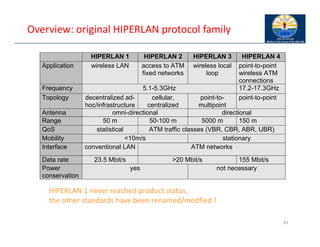
Overview: original HIPERLAN protocol family
33
HIPERLAN 1 HIPERLAN 2 HIPERLAN 3 HIPERLAN 4
Application wireless LAN access to ATM
fixed networks
wireless local
loop
point-to-point
wireless ATM
connections
Frequency 5.1-5.3GHz 17.2-17.3GHz
Topology decentralized ad-
hoc/infrastructure
cellular,
centralized
point-to-
multipoint
point-to-point
Antenna omni-directional directional
Range 50 m 50-100 m 5000 m 150 m
QoS statistical ATM traffic classes (VBR, CBR, ABR, UBR)
Mobility <10m/s stationary
Interface conventional LAN ATM networks
Data rate 23.5 Mbit/s >20 Mbit/s 155 Mbit/s
Power
conservation
yes not necessary
HIPERLAN 1 never reached product status,
the other standards have been renamed/modfied !
Information bases
Route Information Base (RIB) ‐ how to reach a destination
– [destination, next hop, distance]
Neighbor Information Base (NIB) ‐ status of direct neighbors
– [neighbor, status]
Hello Information Base (HIB) ‐ status of destination (via next hop)
– [destination, status, next hop]
Alias Information Base (AIB) ‐ address of nodes outside the net
– [original MSAP address, alias MSAP address]
Source Multipoint Relay Information Base (SMRIB) ‐ current MP
status
– [local multipoint forwarder, multipoint relay set]
Topology Information Base (TIB) ‐ current HIPERLAN topology
– [destination, forwarder, sequence]
Duplicate Detection Information Base (DDIB) ‐ remove
duplicates
– [source, sequence]
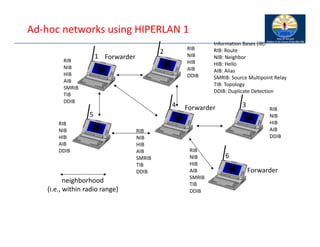
Ad‐hoc networks using HIPERLAN 1
neighborhood
(i.e., within radio range)
Information Bases (IB):
RIB: Route
NIB: Neighbor
HIB: Hello
AIB: Alias
SMRIB: Source Multipoint Relay
TIB: Topology
DDIB: Duplicate Detection
RIB
NIB
HIB
AIB
SMRIB
TIB
DDIB
RIB
NIB
HIB
AIB
SMRIB
TIB
DDIB
RIB
NIB
HIB
AIB
SMRIB
TIB
DDIB
RIB
NIB
HIB
AIB
DDIB
RIB
NIB
HIB
AIB
DDIB
RIB
NIB
HIB
AIB
DDIB
1
2
3
4
5
6
Forwarder
Forwarder
Forwarder
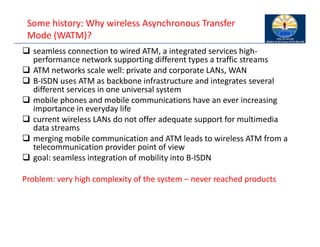
Some history: Why wireless Asynchronous Transfer
Mode (WATM)?
 seamless connection to wired ATM, a integrated services high‐
performance network supporting different types a traffic streams
 ATM networks scale well: private and corporate LANs, WAN
 B‐ISDN uses ATM as backbone infrastructure and integrates several
different services in one universal system
 mobile phones and mobile communications have an ever increasing
importance in everyday life
 current wireless LANs do not offer adequate support for multimedia
data streams
 merging mobile communication and ATM leads to wireless ATM from a
telecommunication provider point of view
 goal: seamless integration of mobility into B‐ISDN
Problem: very high complexity of the system – never reached products
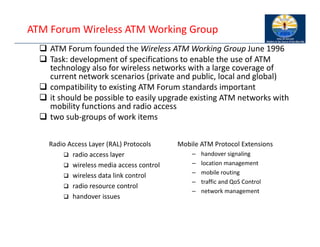
ATM Forum Wireless ATM Working Group
 ATM Forum founded the Wireless ATM Working Group June 1996
 Task: development of specifications to enable the use of ATM
technology also for wireless networks with a large coverage of
current network scenarios (private and public, local and global)
 compatibility to existing ATM Forum standards important
 it should be possible to easily upgrade existing ATM networks with
mobility functions and radio access
 two sub‐groups of work items
Mobile ATM Protocol Extensions
– handover signaling
– location management
– mobile routing
– traffic and QoS Control
– network management
Radio Access Layer (RAL) Protocols
 radio access layer
 wireless media access control
 wireless data link control
 radio resource control
 handover issues
WATM services
Office environment
– multimedia conferencing, online multimedia database access
Universities, schools, training centers
– distance learning, teaching
Industry
– database connection, surveillance, real‐time factory management
Hospitals
– reliable, high‐bandwidth network, medical images, remote
monitoring
Home
– high‐bandwidth interconnect of devices (TV, CD, PC, ...)
Networked vehicles
– trucks, aircraft etc. interconnect, platooning, intelligent roads
WATM components
WMT (Wireless Mobile ATM Terminal)
RAS (Radio Access System)
EMAS‐E (End‐user Mobility‐supporting ATM Switch ‐ Edge)
EMAS‐N (End‐user Mobility‐supporting ATM Switch ‐
Network)
M‐NNI (Network‐to‐Network Interface with Mobility
support)
LS (Location Server)
AUS (Authentication Server)
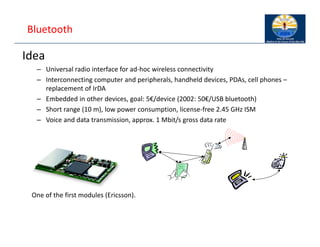
Bluetooth
Idea
– Universal radio interface for ad‐hoc wireless connectivity
– Interconnecting computer and peripherals, handheld devices, PDAs, cell phones –
replacement of IrDA
– Embedded in other devices, goal: 5€/device (2002: 50€/USB bluetooth)
– Short range (10 m), low power consumption, license‐free 2.45 GHz ISM
– Voice and data transmission, approx. 1 Mbit/s gross data rate
One of the first modules (Ericsson).
Bluetooth
History
– 1994: Ericsson (Mattison/Haartsen), “MC‐link” project
– Renaming of the project: Bluetooth according to Harald “Blåtand” Gormsen [son of
Gorm], King of Denmark in the 10th century
– 1998: foundation of Bluetooth SIG, www.bluetooth.org
– 1999: erection of a rune stone at Ercisson/Lund ;‐)
– 2001: first consumer products for mass market, spec. version 1.1 released
Special Interest Group
– Original founding members: Ericsson, Intel, IBM, Nokia, Toshiba
– Added promoters: 3Com, Agere (was: Lucent), Microsoft, Motorola
– > 2500 members
– Common specification and certification of products
(was: )
Characteristics
2.4 GHz ISM band, 79 (23) RF channels, 1 MHz carrier spacing
– Channel 0: 2402 MHz … channel 78: 2480 MHz
– G‐FSK modulation, 1‐100 mW transmit power
FHSS and TDD
– Frequency hopping with 1600 hops/s
– Hopping sequence in a pseudo random fashion, determined by a master
– Time division duplex for send/receive separation
Voice link – SCO (Synchronous Connection Oriented)
– FEC (forward error correction), no retransmission, 64 kbit/s duplex, point‐to‐point,
circuit switched
Data link – ACL (Asynchronous ConnectionLess)
– Asynchronous, fast acknowledge, point‐to‐multipoint, up to 433.9 kbit/s symmetric
or 723.2/57.6 kbit/s asymmetric, packet switched
Topology
– Overlapping piconets (stars) forming a scatternet
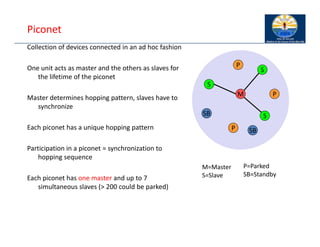
Piconet
Collection of devices connected in an ad hoc fashion
One unit acts as master and the others as slaves for
the lifetime of the piconet
Master determines hopping pattern, slaves have to
synchronize
Each piconet has a unique hopping pattern
Participation in a piconet = synchronization to
hopping sequence
Each piconet has one master and up to 7
simultaneous slaves (> 200 could be parked)
M=Master
S=Slave
P=Parked
SB=Standby
M
S
P
SB
S
S
P
P
SB
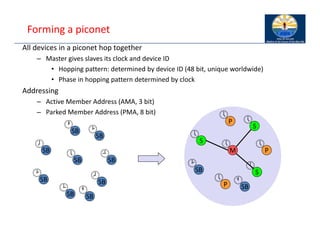
Forming a piconet
All devices in a piconet hop together
– Master gives slaves its clock and device ID
• Hopping pattern: determined by device ID (48 bit, unique worldwide)
• Phase in hopping pattern determined by clock
Addressing
– Active Member Address (AMA, 3 bit)
– Parked Member Address (PMA, 8 bit)
SB
SB
SB
SB
SB
SB
SB
SB
SB
M
S
P
SB
S
S
P
P
SB


















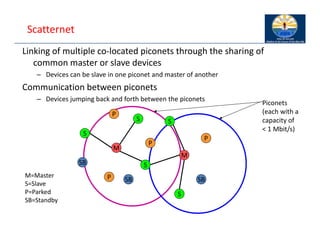
Scatternet
Linking of multiple co‐located piconets through the sharing of
common master or slave devices
– Devices can be slave in one piconet and master of another
Communication between piconets
– Devices jumping back and forth between the piconets
M=Master
S=Slave
P=Parked
SB=Standby
M
S
P
SB
S
S
P
P
SB
M
S
S
P
SB
Piconets
(each with a
capacity of
< 1 Mbit/s)
46
47
7. Mobile Network Protocols/Mobile IP
 Motivation
 Data transfer
 Encapsulation
 Security
 IPv6
 Problems
Motivation
• An IP address not only identifies a host but also a point‐of‐attachment
• based on IP destination address, network prefix (e.g. 129.13.42) determines
physical subnet
• change of physical subnet implies change of IP address to have a topological
correct address (standard IP) or needs special entries in the routing tables
Specific routes to end‐systems?
• change of all routing table entries to forward packets to the right destination
• does not scale with the number of mobile hosts and frequent changes in the
location, security problems
Changing the IP‐address?
• adjust the host IP address depending on the current location
• almost impossible to find a mobile system, DNS updates take to long time
• TCP connections break, security problems
48
Requirements to Mobile IP (RFC 3344, was: 3220,
was: 2002)
Transparency
– mobile end‐systems keep their IP address
– continuation of communication after interruption of link possible
– point of connection to the fixed network can be changed
Compatibility
– support of the same layer 2 protocols as IP
– no changes to current end‐systems and routers required
– mobile end‐systems can communicate with fixed systems
Security
– authentication of all registration messages
Efficiency and scalability
– only little additional messages to the mobile system required (connection typically
via a low bandwidth radio link)
– world‐wide support of a large number of mobile systems in the whole Internet
49
Terminology
Mobile Node (MN)
– system (node) that can change the point of connection to the network without
changing its IP address
Home Agent (HA)
– system in the home network of the MN, typically a router
– registers the location of the MN, tunnels IP datagrams to the COA
Foreign Agent (FA)
– system in the current foreign network of the MN, typically a router
– forwards the tunneled datagrams to the MN, typically also the default router for the
MN
Care‐of Address (COA)
– address of the current tunnel end‐point for the MN (at FA or MN)
– actual location of the MN from an IP point of view
– can be chosen, e.g., via DHCP
Correspondent Node (CN)
– communication partner (the node communicating with the mobile) 50
Mobile IP: Processes
• Agent Discovery: To find agents
– Home agents and foreign agents advertise periodically on
network layer and optionally on datalink
– they also respond to solicitation from mobile node
– Mobile can send solicitation to Mobile agent multicast group
224.0.0.11
– Mobile selects an agent and gets/uses care‐of‐address
• Registration
– Mobile registers its care‐of‐address with home agent. Either
directly or through foreign agent
– agent sends a reply to the CoA
– Each "Mobility binding" has a negotiated lifetime limit
– To continue, reregister within lifetime
51
Mobile IP: Process
• Return to Home:
– Mobile node deregisters with home agent sets care‐
of‐address to its permanent IP address
– Lifetime = 0 Deregistration
– Deregistration with foreign agents is not required.
Expires automatically
– Simultaneous registrations with more than one COA
allowed (for handoff)
52
Mobile IP: Process…
• Tunneling and Routing
– Home agent intercepts mobile node's datagrams and
forwards them to care‐of‐address
– Care of Address can be the Foreign Agent or it can be
collocated in the mobile host
– Home agent tells local nodes and routers to send
mobile node's datagrams to it
– De‐encapsulation: Datagram is extracted and sent to
mobile node
53
Example Network
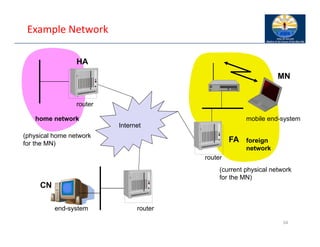
54
mobile end-system
Internet This image cannot currently be displayed.
This image cannot currently be displayed.
router
router
router
end-system
FA
HA
MN
home network
foreign
network
(physical home network
for the MN)
(current physical network
for the MN)
CN
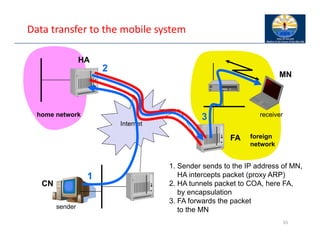
Data transfer to the mobile system
55
Internet
sender
FA
HA
MN
home network
foreign
network
receiver
1
2
3
1. Sender sends to the IP address of MN,
HA intercepts packet (proxy ARP)
2. HA tunnels packet to COA, here FA,
by encapsulation
3. FA forwards the packet
to the MN
CN
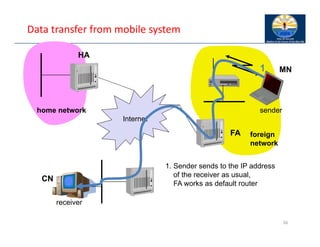
Data transfer from mobile system
56
Internet
receiver
FA
HA
MN
home network
foreign
network
sender
1
1. Sender sends to the IP address
of the receiver as usual,
FA works as default router
CN
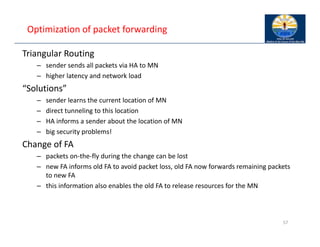
Optimization of packet forwarding
Triangular Routing
– sender sends all packets via HA to MN
– higher latency and network load
“Solutions”
– sender learns the current location of MN
– direct tunneling to this location
– HA informs a sender about the location of MN
– big security problems!
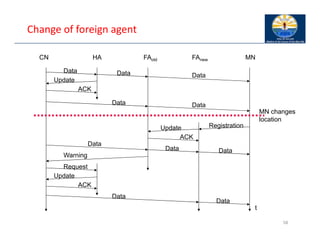
Change of FA
– packets on‐the‐fly during the change can be lost
– new FA informs old FA to avoid packet loss, old FA now forwards remaining packets
to new FA
– this information also enables the old FA to release resources for the MN
57
Change of foreign agent
58
CN HA FAold FAnew MN
MN changes
location
t
Data Data Data
Update
ACK
Data Data
Registration
Update
ACK
Data
Data Data
Warning
Request
Update
ACK
Data
Data
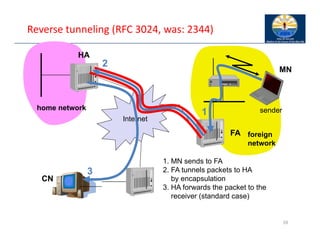
Reverse tunneling (RFC 3024, was: 2344)
59
Internet
FA
HA
MN
home network
foreign
network
sender
3
2
1
1. MN sends to FA
2. FA tunnels packets to HA
by encapsulation
3. HA forwards the packet to the
receiver (standard case)
CN
Home Agent (HA)
Foreign Agent (FA)
Correspondent node (CN)
Mobile node (MN)
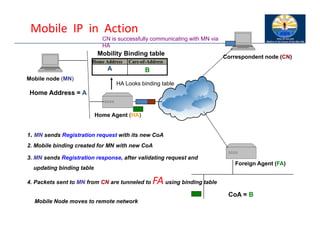
Mobile IP in Action
Mobile Node moves to remote network
1. MN sends Registration request with its new CoA
3. MN sends Registration response, after validating request and
updating binding table
4. Packets sent to MN from CN are tunneled to FAusing binding table
Home Address Care-of-Address
A B
Mobility Binding table
2. Mobile binding created for MN with new CoA
CN is successfully communicating with MN via
HA
HA Looks binding table
Home Address = A
CoA = B
Mobile IP with reverse tunneling
Router accept often only “topological correct“ addresses (firewall!)
– a packet from the MN encapsulated by the FA is now topological correct
– furthermore multicast and TTL problems solved (TTL in the home network
correct, but MN is to far away from the receiver)
Reverse tunneling does not solve
– problems with firewalls, the reverse tunnel can be abused to circumvent
security mechanisms (tunnel hijacking)
– optimization of data paths, i.e. packets will be forwarded through the
tunnel via the HA to a sender (double triangular routing)
The standard is backwards compatible
– the extensions can be implemented easily and cooperate with current
implementations without these extensions
– Agent Advertisements can carry requests for reverse tunneling
61
Mobile IP and IPv6
Mobile IP was developed for IPv4, but IPv6 simplifies the protocols
– security is integrated and not an add‐on, authentication of registration is
included
– COA can be assigned via auto‐configuration (DHCPv6 is one candidate), every
node has address autoconfiguration
– no need for a separate FA, all routers perform router advertisement which
can be used instead of the special agent advertisement; addresses are always
co‐located
– MN can signal a sender directly the COA, sending via HA not needed in this
case (automatic path optimization)
– „soft“ hand‐over, i.e. without packet loss, between two subnets is supported
• MN sends the new COA to its old router
• the old router encapsulates all incoming packets for the MN and forwards them to
the new COA
• authentication is always granted
62
Problems with mobile IP
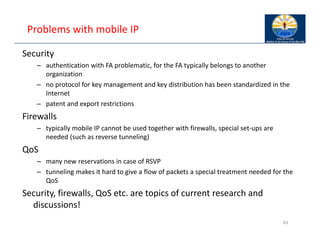
Security
– authentication with FA problematic, for the FA typically belongs to another
organization
– no protocol for key management and key distribution has been standardized in the
Internet
– patent and export restrictions
Firewalls
– typically mobile IP cannot be used together with firewalls, special set‐ups are
needed (such as reverse tunneling)
QoS
– many new reservations in case of RSVP
– tunneling makes it hard to give a flow of packets a special treatment needed for the
QoS
Security, firewalls, QoS etc. are topics of current research and
discussions!
63
Security in Mobile IP
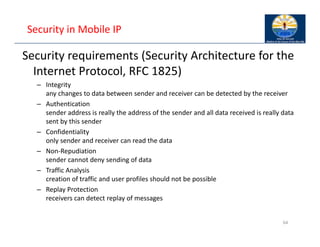
Security requirements (Security Architecture for the
Internet Protocol, RFC 1825)
– Integrity
any changes to data between sender and receiver can be detected by the receiver
– Authentication
sender address is really the address of the sender and all data received is really data
sent by this sender
– Confidentiality
only sender and receiver can read the data
– Non‐Repudiation
sender cannot deny sending of data
– Traffic Analysis
creation of traffic and user profiles should not be possible
– Replay Protection
receivers can detect replay of messages
64
IP security architecture I
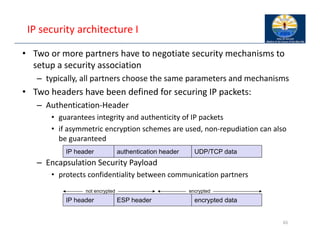
• Two or more partners have to negotiate security mechanisms to
setup a security association
– typically, all partners choose the same parameters and mechanisms
• Two headers have been defined for securing IP packets:
– Authentication‐Header
• guarantees integrity and authenticity of IP packets
• if asymmetric encryption schemes are used, non‐repudiation can also
be guaranteed
– Encapsulation Security Payload
• protects confidentiality between communication partners
65
Authentification-Header
IP-Header UDP/TCP-Paket
authentication header
IP header UDP/TCP data
not encrypted encrypted
ESP header
IP header encrypted data
IP security architecture II
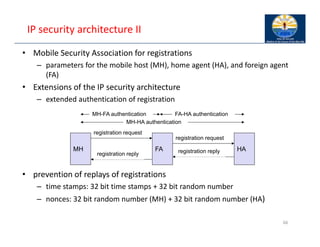
• Mobile Security Association for registrations
– parameters for the mobile host (MH), home agent (HA), and foreign agent
(FA)
• Extensions of the IP security architecture
– extended authentication of registration
• prevention of replays of registrations
– time stamps: 32 bit time stamps + 32 bit random number
– nonces: 32 bit random number (MH) + 32 bit random number (HA)
66
registration request
MH FA HA
registration reply
MH-HA authentication
MH-FA authentication FA-HA authentication
registration reply
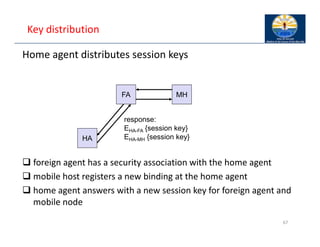
Key distribution
Home agent distributes session keys
 foreign agent has a security association with the home agent
 mobile host registers a new binding at the home agent
 home agent answers with a new session key for foreign agent and
mobile node
67
FA MH
HA
response:
EHA-FA {session key}
EHA-MH {session key}
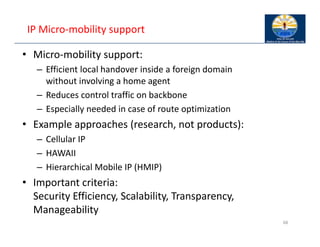
IP Micro‐mobility support
• Micro‐mobility support:
– Efficient local handover inside a foreign domain
without involving a home agent
– Reduces control traffic on backbone
– Especially needed in case of route optimization
• Example approaches (research, not products):
– Cellular IP
– HAWAII
– Hierarchical Mobile IP (HMIP)
• Important criteria:
Security Efficiency, Scalability, Transparency,
Manageability
68
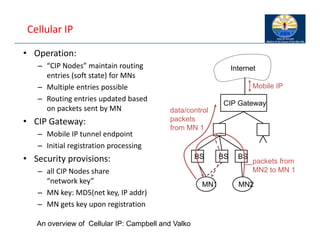
Cellular IP
• Operation:
– “CIP Nodes” maintain routing
entries (soft state) for MNs
– Multiple entries possible
– Routing entries updated based
on packets sent by MN
• CIP Gateway:
– Mobile IP tunnel endpoint
– Initial registration processing
• Security provisions:
– all CIP Nodes share
“network key”
– MN key: MD5(net key, IP addr)
– MN gets key upon registration
CIP Gateway
Internet
BS
MN1
data/control
packets
from MN 1
Mobile IP
BS
BS
MN2
packets from
MN2 to MN 1
An overview of Cellular IP: Campbell and Valko
Cellular IP: Security
• Advantages:
– Initial registration involves authentication of MNs
and is processed centrally by CIP Gateway
– All control messages by MNs are authenticated
– Replay‐protection (using timestamps)
• Potential problems:
– MNs can directly influence routing entries
– Network key known to many entities
(increases risk of compromise)
– No re‐keying mechanisms for network key
– No choice of algorithm (always MD5, prefix+suffix mode)
– Proprietary mechanisms (not, e.g., IPSec AH)
70
Cellular IP: Other issues
• Advantages:
– Simple and elegant architecture
– Mostly self‐configuring (little management needed)
– Integration with firewalls / private address support possible
• Potential problems:
– Not transparent to MNs (additional control messages)
– Public‐key encryption of MN keys may be a problem
for resource‐constrained MNs
– Multiple‐path forwarding may cause inefficient use of available
bandwidth
71
Reading Assignments
• Text Books:
– Dixit and Prasad, Chapter 16, pp. 335‐439.
– Murthy and Manoj, Section 4.3, pp. 158‐172
• IETF Working Group:
– http://www.ietf.org/html.charters/OLD/mobileip‐charter.html
• Other Papers:
– Y. Chen, “A Survey Paper on Mobile IP,”
http://www.cse.wustl.edu/~jain/cis78895/mobile_ip/index.ht
ml
– Charlie Perkins, “Mobile IP,” IEEE Communications Magazine,
May 2002, pp. 66‐82 (also May 1997 pp.84‐99)
72
References: Mobile IPv4 RFCs
• Key RFCs:
– RFC 2005 "Applicability Statement for IP Mobility Support,"
October 1996.
– RFC 3344 "IP Mobility Support for IPv4," August 2002.
– RFC 4988 "Mobile IPv4 Fast Handovers," October 2007.
– RFC 3024 "Reverse Tunneling for Mobile IP, revised,“ January
2001.
– RFC 4433 "Mobile IPv4 Dynamic Home Agent (HA)
Assignment," March 2006.
– RFC 4093 "Problem Statement: Mobile IPv4 Traversal of Virtual
Private Network (VPN) Gateways," August 2005
73
Mobile IP: IPv6
• Configuring Proxy Mobile IP,
http://www.ccip.info/en/US/docs/wireless/access_point
/350/configuration/guide/ap350ch6.pdf
• Key RFCs:
– RFC 3775 "Mobility Support in IPv6," June 2004.
– RFC 5213 "Proxy Mobile IPv6," August 2008.
– RFC 5268 "Mobile IPv6 Fast Handovers," June 2008.
– RFC 5270 "Mobile IPv6 Fast Handovers over IEEE 802," June
2008.
– RFC 5380 "Hierarchical Mobile IPv6 (HMIPv6) Mobility
Management," October 2008.
74
75

6. WLAN annd 7__________. Mobile IP.pdf

  • 1.
    6 Wireless LANs Characteristics  IEEE 802.11  HIPERLAN  Standards overview  HiperLAN2  QoS  Bluetooth  Comparison
  • 2.
    Characteristics of wirelessLANs Advantages – very flexible within the reception area – Ad‐hoc networks without previous planning possible – (almost) no wiring difficulties (e.g. historic buildings, firewalls) – more robust against disasters like, e.g., earthquakes, fire ‐ or users pulling a plug... Disadvantages – typically very low bandwidth compared to wired networks (1‐ 10 Mbit/s) – many proprietary solutions, especially for higher bit‐rates, standards take their time (e.g. IEEE 802.11) – products have to follow many national restrictions if working wireless, it takes a vary long time to establish global solutions like, e.g., IMT‐2000
  • 3.
    Design goals forwireless LANs – global, seamless operation – low power for battery use – no special permissions or licenses needed to use the LAN – robust transmission technology – simplified spontaneous cooperation at meetings – easy to use for everyone, simple management – protection of investment in wired networks – security (no one should be able to read my data), privacy (no one should be able to collect user profiles), safety (low radiation) – transparency concerning applications and higher layer protocols, but also location awareness if necessary
  • 4.
    Comparison: infrastructure vs.ad‐hoc networks infrastructure network ad‐hoc network AP AP AP wired network AP: Access Point
  • 5.
    802.11 ‐ Architectureof an infrastructure network 5 Distribution System Portal 802.x LAN Access Point 802.11 LAN BSS2 802.11 LAN BSS1 Access Point STA1 STA2 STA3 ESS • Station (STA) – terminal with access mechanisms to the wireless medium and radio contact to the access point • Basic Service Set (BSS) – group of stations using the same radio frequency • Access Point – station integrated into the wireless LAN and the distribution system • Portal – bridge to other (wired) networks • Distribution System – interconnection network to form one logical network (EES: Extended Service Set) based on several BSS
  • 6.
    802.11 ‐ Architectureof an ad‐hoc network 6 802.11 LAN IBSS2 802.11 LAN IBSS1 STA1 STA4 STA2 STA3 • Direct communication within a limited range – Station (STA): terminal with access mechanisms to the wireless medium – Independent Basic Service Set (IBSS): group of stations using the same radio frequency
  • 7.
    IEEE standard 802.11 mobileterminal access point fixed terminal application TCP 802.11 PHY 802.11 MAC IP 802.3 MAC 802.3 PHY application TCP 802.3 PHY 802.3 MAC IP 802.11 MAC 802.11 PHY LLC infrastructure network LLC LLC
  • 8.
    802.11 ‐ Layersand functions 8 • PLCP Physical Layer Convergence Protocol – clear channel assessment signal (carrier sense) • PMD Physical Medium Dependent – modulation, coding • PHY Management – channel selection, MIB • Station Management – coordination of all management functions PMD PLCP MAC LLC MAC Management PHY Management • MAC – access mechanisms, fragmentation, encryption • MAC Management – synchronization, roaming, MIB, power management PHY DLC Station Management
  • 9.
    802.11 ‐ Physicallayer (legacy) • 3 versions: 2 radio (typ. 2.4 GHz), 1 IR – data rates 1 or 2 Mbit/s • FHSS (Frequency Hopping Spread Spectrum) – spreading, despreading, signal strength, typ. 1 Mbit/s – min. 2.5 frequency hops/s (USA), two‐level GFSK modulation • DSSS (Direct Sequence Spread Spectrum) – DBPSK modulation for 1 Mbit/s (Differential Binary Phase Shift Keying), DQPSK for 2 Mbit/s (Differential Quadrature PSK) – preamble and header of a frame is always transmitted with 1 Mbit/s, rest of transmission 1 or 2 Mbit/s – chipping sequence: +1, ‐1, +1, +1, ‐1, +1, +1, +1, ‐1, ‐1, ‐1 (Barker code) – max. radiated power 1 W (USA), 100 mW (EU), min. 1mW • Infrared – 850‐950 nm, diffuse light, typ. 10 m range – carrier detection, energy detection, synchron 9
  • 10.
    802.11 ‐ MAClayer I – Distributed Foundation Wireless Medium Access Control (DFWMAC) • Traffic services – Asynchronous Data Service (mandatory) • exchange of data packets based on “best‐effort” • support of broadcast and multicast – Time‐Bounded Service (optional) • implemented using PCF (Point Coordination Function) • Access methods – DFWMAC‐DCF CSMA/CA (mandatory) • collision avoidance via randomized „back‐off“ mechanism • minimum distance between consecutive packets • ACK packet for acknowledgements (not for broadcasts) – DFWMAC‐DCF w/ RTS/CTS (optional) • Distributed Foundation Wireless MAC • avoids hidden terminal problem – DFWMAC‐ PCF (optional) • access point polls terminals according to a list 10
  • 11.
    802.11 ‐ MAClayer II • Priorities – defined through different inter frame spaces – no guaranteed, hard priorities – SIFS (Short Inter Frame Spacing) • highest priority, for ACK, CTS, polling response – PIFS (PCF IFS) • medium priority, for time‐bounded service using PCF – DIFS (DCF, Distributed Coordination Function IFS) • lowest priority, for asynchronous data service 11 t medium busy SIFS PIFS DIFS DIFS next frame contention direct access if medium is free  DIFS
  • 12.
    802.11 ‐ CSMA/CAaccess method I • station ready to send starts sensing the medium (Carrier Sense based on CCA, Clear Channel Assessment) • if the medium is free for the duration of an Inter‐Frame Space (IFS), the station can start sending (IFS depends on service type) • if the medium is busy, the station has to wait for a free IFS, then the station must additionally wait a random back‐off time (collision avoidance, multiple of slot‐time) • if another station occupies the medium during the back‐off time of the station, the back‐off timer stops (fairness 12 t medium busy DIFS DIFS next frame contention window (randomized back-off mechanism) slot time (20µs) direct access if medium is free  DIFS
  • 13.
    802.11 ‐ CSMA/CAaccess method II • Sending unicast packets – station has to wait for DIFS before sending data – receivers acknowledge at once (after waiting for SIFS) if the packet was received correctly (CRC) – automatic retransmission of data packets in case of transmission errors 13 t SIFS DIFS data ACK waiting time other stations receiver sender data DIFS contention
  • 14.
    802.11 CSMA/CA principles •Backoff Time = random(0, CW) * slottime • CWmin <= CW <= CWmax • slottime = Time needed for detecting a frame + Propagation delay + Time needed to switch from the Rx state to Tx state + Time to signal to the MAC layer the state of the channel 14
  • 15.
    802.11 ‐ CSMA/CAunicast • Sending unicast packets – station has to wait for DIFS before sending data – receiver acknowledges at once (after waiting for SIFS) if the packet was received correctly (CRC) – automatic retransmission of data packets in case of transmission errors 15 The ACK is sent right at the end of SIFS (no contention)
  • 16.
    802.11 – DFCwith RTS/CTS • Sending unicast packets – station can send RTS with reservation parameter after waiting for DIFS (reservation determines amount of time the data packet needs the medium) – acknowledgement via CTS after SIFS by receiver (if ready to receive) – sender can now send data at once, acknowledgement via ACK – other stations store medium reservations distributed via RTS and CTS 16 t SIFS DIFS data ACK other stations receiver sender data DIFS RTS CTS SIFS SIFS NAV (RTS) NAV (CTS) defer access contention Network allocation vector RTS/CTS can be present for some packets and not for other
  • 17.
    802.11 ‐ MACmanagement • Synchronization – try to find a LAN, try to stay within a LAN – timer etc. • Power management – sleep‐mode without missing a message – periodic sleep, frame buffering, traffic measurements • Association/Reassociation – integration into a LAN – roaming, i.e. change networks by changing access points – scanning, i.e. active search for a network • MIB ‐ Management Information Base – managing, read, write 17
  • 18.
    Power management Idea: switchthe transceiver off if not needed States of a station: sleep and awake Timing Synchronization Function (TSF) – stations wake up at the same time Infrastructure – Traffic Indication Map (TIM) • list of unicast receivers transmitted by AP – Delivery Traffic Indication Map (DTIM) • list of broadcast/multicast receivers transmitted by AP Ad‐hoc – Ad‐hoc Traffic Indication Map (ATIM) • announcement of receivers by stations buffering frames • more complicated ‐ no central AP • collision of ATIMs possible (scalability?)
  • 19.
    802.11 Roaming No orbad connection? Then perform: • Scanning – scan the environment, i.e., listen into the medium for beacon signals or send probes into the medium and wait for an answer • Reassociation Request – station sends a request to one or several AP(s) • Reassociation Response – success: AP has answered, station can now participate – failure: continue scanning • AP accepts Reassociation Request – signal the new station to the distribution system – the distribution system updates its data base (i.e., location information) – typically, the distribution system now informs the old AP so it can release resources I • Inter‐Access Point Protocol (802.11f ) – Compatible solution for Roaming between different vendors’ APs – Load‐balancing between APs 19
  • 20.
    WLAN: IEEE 802.11b 20 Datarate – 1, 2, 5.5, 11 Mbit/s, depending on SNR – User data rate max. approx. 6 Mbit/s Transmission range – 300m outdoor, 30m indoor – Max. data rate ~10m indoor Frequency – Free 2.4 GHz ISM‐band Security – Limited, WEP insecure, SSID Cost – 100€ adapter, 250€ base station, dropping Availability – Many products, many vendors Connection set‐up time – Connectionless/always on Quality of Service – Typ. Best effort, no guarantees (unless polling is used, limited support in products) Manageability – Limited (no automated key distribution, sym. Encryption) Special Advantages/Disadvantages – Advantage: many installed systems, lot of experience, available worldwide, free ISM‐band, many vendors, integrated in laptops, simple system – Disadvantage: heavy interference on ISM‐band, no service guarantees, slow relative speed only
  • 21.
    21 WLAN: IEEE 802.11a Datarate – 6, 9, 12, 18, 24, 36, 48, 54 Mbit/s, depending on SNR – User throughput (1500 byte packets): 5.3 (6), 18 (24), 24 (36), 32 (54) – 6, 12, 24 Mbit/s mandatory Transmission range – 100m outdoor, 10m indoor • E.g., 54 Mbit/s up to 5 m, 48 up to 12 m, 36 up to 25 m, 24 up to 30m, 18 up to 40 m, 12 up to 60 m Frequency – Free 5.15‐5.25, 5.25‐5.35, 5.725‐5.825 GHz ISM‐band Security – Limited, WEP insecure, SSID Cost – 280€ adapter, 500€ base station Availability – Some products, some vendors Connection set‐up time – Connectionless/always on Quality of Service – Typ. best effort, no guarantees (same as all 802.11 products) Manageability – Limited (no automated key distribution, sym. Encryption) Special Advantages/Disadvantages – Advantage: fits into 802.x standards, free ISM‐band, available, simple system, uses less crowded 5 GHz band – Disadvantage: stronger shading due to higher frequency, no QoS
  • 22.
    WLAN: IEEE 802.11– future developments • 802.11c: Bridge Support – Definition of MAC procedures to support bridges as extension to 802.1D • 802.11d: Regulatory Domain Update – Support of additional regulations related to channel selection, hopping sequences • 802.11e: MAC Enhancements – QoS – Enhance the current 802.11 MAC to expand support for applications with Quality of Service requirements, and in the capabilities and efficiency of the protocol – Definition of a data flow (“connection”) with parameters like rate, burst, period… supported by HCCA (HCF (Hybrid Coordinator Function) Controlled Channel Access, optional) – Additional energy saving mechanisms and more efficient retransmission – EDCA (Enhanced Distributed Channel Access): high priority traffic waits less for channel access • 802.11F: Inter‐Access Point Protocol (withdrawn) – Establish an Inter‐Access Point Protocol for data exchange via the distribution system • 802.11g: Data Rates > 20 Mbit/s at 2.4 GHz; 54 Mbit/s, OFDM – Successful successor of 802.11b, performance loss during mixed operation with .11b • 802.11h: Spectrum Managed 802.11a – Extension for operation of 802.11a in Europe by mechanisms like channel measurement for dynamic channel selection (DFS, Dynamic Frequency Selection) and power control (TPC, Transmit Power Control) • 802.11i: Enhanced Security Mechanisms – Enhance the current 802.11 MAC to provide improvements in security. – TKIP enhances the insecure WEP, but remains compatible to older WEP systems – AES provides a secure encryption method and is based on new hardware
  • 23.
    WLAN: IEEE 802.11–current developments • 802.11j: Extensions for operations in Japan – Changes of 802.11a for operation at 5GHz in Japan using only half the channel width at larger range • 802.11‐2007: Current “complete” standard – Comprises amendments a, b, d, e, g, h, i, j • 802.11k: Methods for channel measurements – Devices and access points should be able to estimate channel quality in order to be able to choose a better access point of channel • 802.11m: Updates of the 802.11‐2007 standard • 802.11n: Higher data rates above 100Mbit/s – Changes of PHY and MAC with the goal of 100Mbit/s at MAC SAP – MIMO antennas (Multiple Input Multiple Output), up to 600Mbit/s are currently feasible – However, still a large overhead due to protocol headers and inefficient mechanisms • 802.11p: Inter car communications – Communication between cars/road side and cars/cars – Planned for relative speeds of min. 200km/h and ranges over 1000m – Usage of 5.850‐5.925GHz band in North America • 802.11r: Faster Handover between BSS – Secure, fast handover of a station from one AP to another within an ESS – Current mechanisms (even newer standards like 802.11i) plus incompatible devices from different vendors are massive problems for the use of, e.g., VoIP in WLANs – Handover should be feasible within 50ms in order to support multimedia applications efficiently 23
  • 24.
    WLAN: IEEE 802.11–current developments • 802.11s: Mesh Networking – Design of a self‐configuring Wireless Distribution System (WDS) based on 802.11 – Support of point‐to‐point and broadcast communication across several hops • 802.11T: Performance evaluation of 802.11 networks – Standardization of performance measurement schemes • 802.11u: Interworking with additional external networks • 802.11v: Network management – Extensions of current management functions, channel measurements – Definition of a unified interface • 802.11w: Securing of network control – Classical standards like 802.11, but also 802.11i protect only data frames, not the control frames. Thus, this standard should extend 802.11i in a way that, e.g., no control frames can be forged. • 802.11y: Extensions for the 3650‐3700 MHz band in the USA • 802.11z: Extension to direct link setup • 802.11aa: Robust audio/video stream transport • 802.11ac: Very High Throughput <6Ghz • 802.11ad: Very High Throughput in 60 GHz • 802.11af: TV white space, ah: sub 1GHz, ai: fast initial link set‐up; … aq: pre‐association discovery • Note: Not all “standards” will end in products, many ideas get stuck at working group level • Info: www.ieee802.org/11/, 802wirelessworld.com, standards.ieee.org/getieee802/ 24
  • 25.
    ETSI – HIPERLAN(High Performance Radio Local Area Networks) ETSI standard – European standard, cf. GSM, DECT, ... – Enhancement of local Networks and interworking with fixed networks – integration of time‐sensitive services from the early beginning HIPERLAN family – one standard cannot satisfy all requirements • range, bandwidth, QoS support commercial constraints – HIPERLAN 1 standardized since 1996 – no products! physical layer channel access control layer medium access control layer physical layer data link layer HIPERLAN layers OSI layers network layer higher layers physical layer medium access control layer logical link control layer IEEE 802.x layers
  • 26.
    HIPERLAN 1 • WHATHIPERLAN/1 PROVIDES: – allows nodes to be deployed in a pre‐arranged and ad‐hoc manners; – provides forwarding mechanism e.g., multi‐hop routing; – provides data rate of around 25Mbps; – has the capability to support both multimedia and asynchronous data; • COMPARING WITH IEEE 802.11: – IEEE 802.11 is seen as dumb but simple; – HIPERLAN is clever but more sophisticated. • PROTOCOL STACK: TWO LAYERS OF OSI: – physical layer; – data‐link layer: – { medium access control (MAC) sublayer; – { channel access control (CAC) sublayer. 26
  • 27.
    HIPERLAN 1.. • Physicallayer – WHAT ARE FUNCTIONALITIES: • modulation and demodulation; • forward error corrections; • signal strength measurement; • synchronization between the sender and a receiver; • channel sensing (idle/busy) using CCA scheme this is similar to IEEE 802.11. • MAC sublayer – WHAT ARE FUNCTIONALITIES: • processing packets from the higher layer; • packets according to the QoS requests; • forwarding packets and power conservation features; • communication condentiality using encryption‐decryption schemes. 27
  • 28.
    HIPERLAN 1 ‐Characteristics Data transmission – point‐to‐point, point‐to‐multipoint, connectionless – 23.5 Mbit/s, 1 W power, 2383 byte max. packet size Services – asynchronous and time‐bounded services with hierarchical priorities – compatible with ISO MAC Topology – infrastructure or ad‐hoc networks – transmission range can be larger then coverage of a single node („forwarding“ integrated in mobile terminals) Further mechanisms – power saving, encryption, checksums
  • 29.
    HIPERLAN.. • Channel accessscheme – ELIMINATION YIELD NON‐PREEMPTIVE MULTIPLE ACCESS • dynamic listen‐then‐talk channel access protocol; • similar to CSMA/CA used in IEEE 802.11; • exception: provides service dierentiation! – CHANNEL ACCESS CONSISTS OF THE FOLLOWING CYCLES: • . . . • synchronization; • Prioritization: determine the higher priority of a data pacet ready to be sent by competing nodes • Contention: eliminate all but one of the contenders: if more than one sender has the highest current priority • transmission: finally transmit the packet of the remaining noder • 29
  • 30.
    • PRIORITIZATION: – Aim:to detect nodes having packets with the highest CAM priority. Two stages: – { priority detection: • A node listens channel for a number of slots proportional to the CAM priority of its packet. – { priority assertion: • A node asserts its priority sending a signal in the slot corresponding to the packet priority. • Nodes having packets with low CAM priority detects nodes with the higher priority packets. 30
  • 31.
    • CONTENTION: – Aim:eliminate as many nodes as possible to minimize the collision: – { Elimination phase: • a node transmits signal for geometrically distributed number of slots (0:5k,k is the CAM); • the it senses the media for one slot; • if transmissions in this slot are detected, a node stops contention process; • if no, it goes to yield phase. – { Yield phase: • A node listens channel for a number of slots. If it is idle, the node is chosen for transmission. 31
  • 32.
    32 • TRANSMISSION: The successfuldelivery is acknowledged using ACK packets.
  • 33.
    Overview: original HIPERLANprotocol family 33 HIPERLAN 1 HIPERLAN 2 HIPERLAN 3 HIPERLAN 4 Application wireless LAN access to ATM fixed networks wireless local loop point-to-point wireless ATM connections Frequency 5.1-5.3GHz 17.2-17.3GHz Topology decentralized ad- hoc/infrastructure cellular, centralized point-to- multipoint point-to-point Antenna omni-directional directional Range 50 m 50-100 m 5000 m 150 m QoS statistical ATM traffic classes (VBR, CBR, ABR, UBR) Mobility <10m/s stationary Interface conventional LAN ATM networks Data rate 23.5 Mbit/s >20 Mbit/s 155 Mbit/s Power conservation yes not necessary HIPERLAN 1 never reached product status, the other standards have been renamed/modfied !
  • 34.
    Information bases Route InformationBase (RIB) ‐ how to reach a destination – [destination, next hop, distance] Neighbor Information Base (NIB) ‐ status of direct neighbors – [neighbor, status] Hello Information Base (HIB) ‐ status of destination (via next hop) – [destination, status, next hop] Alias Information Base (AIB) ‐ address of nodes outside the net – [original MSAP address, alias MSAP address] Source Multipoint Relay Information Base (SMRIB) ‐ current MP status – [local multipoint forwarder, multipoint relay set] Topology Information Base (TIB) ‐ current HIPERLAN topology – [destination, forwarder, sequence] Duplicate Detection Information Base (DDIB) ‐ remove duplicates – [source, sequence]
  • 35.
    Ad‐hoc networks usingHIPERLAN 1 neighborhood (i.e., within radio range) Information Bases (IB): RIB: Route NIB: Neighbor HIB: Hello AIB: Alias SMRIB: Source Multipoint Relay TIB: Topology DDIB: Duplicate Detection RIB NIB HIB AIB SMRIB TIB DDIB RIB NIB HIB AIB SMRIB TIB DDIB RIB NIB HIB AIB SMRIB TIB DDIB RIB NIB HIB AIB DDIB RIB NIB HIB AIB DDIB RIB NIB HIB AIB DDIB 1 2 3 4 5 6 Forwarder Forwarder Forwarder
  • 36.
    Some history: Whywireless Asynchronous Transfer Mode (WATM)?  seamless connection to wired ATM, a integrated services high‐ performance network supporting different types a traffic streams  ATM networks scale well: private and corporate LANs, WAN  B‐ISDN uses ATM as backbone infrastructure and integrates several different services in one universal system  mobile phones and mobile communications have an ever increasing importance in everyday life  current wireless LANs do not offer adequate support for multimedia data streams  merging mobile communication and ATM leads to wireless ATM from a telecommunication provider point of view  goal: seamless integration of mobility into B‐ISDN Problem: very high complexity of the system – never reached products
  • 37.
    ATM Forum WirelessATM Working Group  ATM Forum founded the Wireless ATM Working Group June 1996  Task: development of specifications to enable the use of ATM technology also for wireless networks with a large coverage of current network scenarios (private and public, local and global)  compatibility to existing ATM Forum standards important  it should be possible to easily upgrade existing ATM networks with mobility functions and radio access  two sub‐groups of work items Mobile ATM Protocol Extensions – handover signaling – location management – mobile routing – traffic and QoS Control – network management Radio Access Layer (RAL) Protocols  radio access layer  wireless media access control  wireless data link control  radio resource control  handover issues
  • 38.
    WATM services Office environment –multimedia conferencing, online multimedia database access Universities, schools, training centers – distance learning, teaching Industry – database connection, surveillance, real‐time factory management Hospitals – reliable, high‐bandwidth network, medical images, remote monitoring Home – high‐bandwidth interconnect of devices (TV, CD, PC, ...) Networked vehicles – trucks, aircraft etc. interconnect, platooning, intelligent roads
  • 39.
    WATM components WMT (WirelessMobile ATM Terminal) RAS (Radio Access System) EMAS‐E (End‐user Mobility‐supporting ATM Switch ‐ Edge) EMAS‐N (End‐user Mobility‐supporting ATM Switch ‐ Network) M‐NNI (Network‐to‐Network Interface with Mobility support) LS (Location Server) AUS (Authentication Server)
  • 40.
    Bluetooth Idea – Universal radiointerface for ad‐hoc wireless connectivity – Interconnecting computer and peripherals, handheld devices, PDAs, cell phones – replacement of IrDA – Embedded in other devices, goal: 5€/device (2002: 50€/USB bluetooth) – Short range (10 m), low power consumption, license‐free 2.45 GHz ISM – Voice and data transmission, approx. 1 Mbit/s gross data rate One of the first modules (Ericsson).
  • 41.
    Bluetooth History – 1994: Ericsson(Mattison/Haartsen), “MC‐link” project – Renaming of the project: Bluetooth according to Harald “Blåtand” Gormsen [son of Gorm], King of Denmark in the 10th century – 1998: foundation of Bluetooth SIG, www.bluetooth.org – 1999: erection of a rune stone at Ercisson/Lund ;‐) – 2001: first consumer products for mass market, spec. version 1.1 released Special Interest Group – Original founding members: Ericsson, Intel, IBM, Nokia, Toshiba – Added promoters: 3Com, Agere (was: Lucent), Microsoft, Motorola – > 2500 members – Common specification and certification of products (was: )
  • 42.
    Characteristics 2.4 GHz ISMband, 79 (23) RF channels, 1 MHz carrier spacing – Channel 0: 2402 MHz … channel 78: 2480 MHz – G‐FSK modulation, 1‐100 mW transmit power FHSS and TDD – Frequency hopping with 1600 hops/s – Hopping sequence in a pseudo random fashion, determined by a master – Time division duplex for send/receive separation Voice link – SCO (Synchronous Connection Oriented) – FEC (forward error correction), no retransmission, 64 kbit/s duplex, point‐to‐point, circuit switched Data link – ACL (Asynchronous ConnectionLess) – Asynchronous, fast acknowledge, point‐to‐multipoint, up to 433.9 kbit/s symmetric or 723.2/57.6 kbit/s asymmetric, packet switched Topology – Overlapping piconets (stars) forming a scatternet
  • 43.
    Piconet Collection of devicesconnected in an ad hoc fashion One unit acts as master and the others as slaves for the lifetime of the piconet Master determines hopping pattern, slaves have to synchronize Each piconet has a unique hopping pattern Participation in a piconet = synchronization to hopping sequence Each piconet has one master and up to 7 simultaneous slaves (> 200 could be parked) M=Master S=Slave P=Parked SB=Standby M S P SB S S P P SB
  • 44.
    Forming a piconet Alldevices in a piconet hop together – Master gives slaves its clock and device ID • Hopping pattern: determined by device ID (48 bit, unique worldwide) • Phase in hopping pattern determined by clock Addressing – Active Member Address (AMA, 3 bit) – Parked Member Address (PMA, 8 bit) SB SB SB SB SB SB SB SB SB M S P SB S S P P SB                  
  • 45.
    Scatternet Linking of multipleco‐located piconets through the sharing of common master or slave devices – Devices can be slave in one piconet and master of another Communication between piconets – Devices jumping back and forth between the piconets M=Master S=Slave P=Parked SB=Standby M S P SB S S P P SB M S S P SB Piconets (each with a capacity of < 1 Mbit/s)
  • 46.
  • 47.
    47 7. Mobile NetworkProtocols/Mobile IP  Motivation  Data transfer  Encapsulation  Security  IPv6  Problems
  • 48.
    Motivation • An IPaddress not only identifies a host but also a point‐of‐attachment • based on IP destination address, network prefix (e.g. 129.13.42) determines physical subnet • change of physical subnet implies change of IP address to have a topological correct address (standard IP) or needs special entries in the routing tables Specific routes to end‐systems? • change of all routing table entries to forward packets to the right destination • does not scale with the number of mobile hosts and frequent changes in the location, security problems Changing the IP‐address? • adjust the host IP address depending on the current location • almost impossible to find a mobile system, DNS updates take to long time • TCP connections break, security problems 48
  • 49.
    Requirements to MobileIP (RFC 3344, was: 3220, was: 2002) Transparency – mobile end‐systems keep their IP address – continuation of communication after interruption of link possible – point of connection to the fixed network can be changed Compatibility – support of the same layer 2 protocols as IP – no changes to current end‐systems and routers required – mobile end‐systems can communicate with fixed systems Security – authentication of all registration messages Efficiency and scalability – only little additional messages to the mobile system required (connection typically via a low bandwidth radio link) – world‐wide support of a large number of mobile systems in the whole Internet 49
  • 50.
    Terminology Mobile Node (MN) –system (node) that can change the point of connection to the network without changing its IP address Home Agent (HA) – system in the home network of the MN, typically a router – registers the location of the MN, tunnels IP datagrams to the COA Foreign Agent (FA) – system in the current foreign network of the MN, typically a router – forwards the tunneled datagrams to the MN, typically also the default router for the MN Care‐of Address (COA) – address of the current tunnel end‐point for the MN (at FA or MN) – actual location of the MN from an IP point of view – can be chosen, e.g., via DHCP Correspondent Node (CN) – communication partner (the node communicating with the mobile) 50
  • 51.
    Mobile IP: Processes •Agent Discovery: To find agents – Home agents and foreign agents advertise periodically on network layer and optionally on datalink – they also respond to solicitation from mobile node – Mobile can send solicitation to Mobile agent multicast group 224.0.0.11 – Mobile selects an agent and gets/uses care‐of‐address • Registration – Mobile registers its care‐of‐address with home agent. Either directly or through foreign agent – agent sends a reply to the CoA – Each "Mobility binding" has a negotiated lifetime limit – To continue, reregister within lifetime 51
  • 52.
    Mobile IP: Process •Return to Home: – Mobile node deregisters with home agent sets care‐ of‐address to its permanent IP address – Lifetime = 0 Deregistration – Deregistration with foreign agents is not required. Expires automatically – Simultaneous registrations with more than one COA allowed (for handoff) 52
  • 53.
    Mobile IP: Process… •Tunneling and Routing – Home agent intercepts mobile node's datagrams and forwards them to care‐of‐address – Care of Address can be the Foreign Agent or it can be collocated in the mobile host – Home agent tells local nodes and routers to send mobile node's datagrams to it – De‐encapsulation: Datagram is extracted and sent to mobile node 53
  • 54.
    Example Network 54 mobile end-system InternetThis image cannot currently be displayed. This image cannot currently be displayed. This image cannot currently be displayed. router router router end-system FA HA MN home network foreign network (physical home network for the MN) (current physical network for the MN) CN
  • 55.
    Data transfer tothe mobile system 55 Internet sender FA HA MN home network foreign network receiver 1 2 3 1. Sender sends to the IP address of MN, HA intercepts packet (proxy ARP) 2. HA tunnels packet to COA, here FA, by encapsulation 3. FA forwards the packet to the MN CN
  • 56.
    Data transfer frommobile system 56 Internet receiver FA HA MN home network foreign network sender 1 1. Sender sends to the IP address of the receiver as usual, FA works as default router CN
  • 57.
    Optimization of packetforwarding Triangular Routing – sender sends all packets via HA to MN – higher latency and network load “Solutions” – sender learns the current location of MN – direct tunneling to this location – HA informs a sender about the location of MN – big security problems! Change of FA – packets on‐the‐fly during the change can be lost – new FA informs old FA to avoid packet loss, old FA now forwards remaining packets to new FA – this information also enables the old FA to release resources for the MN 57
  • 58.
    Change of foreignagent 58 CN HA FAold FAnew MN MN changes location t Data Data Data Update ACK Data Data Registration Update ACK Data Data Data Warning Request Update ACK Data Data
  • 59.
    Reverse tunneling (RFC3024, was: 2344) 59 Internet FA HA MN home network foreign network sender 3 2 1 1. MN sends to FA 2. FA tunnels packets to HA by encapsulation 3. HA forwards the packet to the receiver (standard case) CN
  • 60.
    Home Agent (HA) ForeignAgent (FA) Correspondent node (CN) Mobile node (MN) Mobile IP in Action Mobile Node moves to remote network 1. MN sends Registration request with its new CoA 3. MN sends Registration response, after validating request and updating binding table 4. Packets sent to MN from CN are tunneled to FAusing binding table Home Address Care-of-Address A B Mobility Binding table 2. Mobile binding created for MN with new CoA CN is successfully communicating with MN via HA HA Looks binding table Home Address = A CoA = B
  • 61.
    Mobile IP withreverse tunneling Router accept often only “topological correct“ addresses (firewall!) – a packet from the MN encapsulated by the FA is now topological correct – furthermore multicast and TTL problems solved (TTL in the home network correct, but MN is to far away from the receiver) Reverse tunneling does not solve – problems with firewalls, the reverse tunnel can be abused to circumvent security mechanisms (tunnel hijacking) – optimization of data paths, i.e. packets will be forwarded through the tunnel via the HA to a sender (double triangular routing) The standard is backwards compatible – the extensions can be implemented easily and cooperate with current implementations without these extensions – Agent Advertisements can carry requests for reverse tunneling 61
  • 62.
    Mobile IP andIPv6 Mobile IP was developed for IPv4, but IPv6 simplifies the protocols – security is integrated and not an add‐on, authentication of registration is included – COA can be assigned via auto‐configuration (DHCPv6 is one candidate), every node has address autoconfiguration – no need for a separate FA, all routers perform router advertisement which can be used instead of the special agent advertisement; addresses are always co‐located – MN can signal a sender directly the COA, sending via HA not needed in this case (automatic path optimization) – „soft“ hand‐over, i.e. without packet loss, between two subnets is supported • MN sends the new COA to its old router • the old router encapsulates all incoming packets for the MN and forwards them to the new COA • authentication is always granted 62
  • 63.
    Problems with mobileIP Security – authentication with FA problematic, for the FA typically belongs to another organization – no protocol for key management and key distribution has been standardized in the Internet – patent and export restrictions Firewalls – typically mobile IP cannot be used together with firewalls, special set‐ups are needed (such as reverse tunneling) QoS – many new reservations in case of RSVP – tunneling makes it hard to give a flow of packets a special treatment needed for the QoS Security, firewalls, QoS etc. are topics of current research and discussions! 63
  • 64.
    Security in MobileIP Security requirements (Security Architecture for the Internet Protocol, RFC 1825) – Integrity any changes to data between sender and receiver can be detected by the receiver – Authentication sender address is really the address of the sender and all data received is really data sent by this sender – Confidentiality only sender and receiver can read the data – Non‐Repudiation sender cannot deny sending of data – Traffic Analysis creation of traffic and user profiles should not be possible – Replay Protection receivers can detect replay of messages 64
  • 65.
    IP security architectureI • Two or more partners have to negotiate security mechanisms to setup a security association – typically, all partners choose the same parameters and mechanisms • Two headers have been defined for securing IP packets: – Authentication‐Header • guarantees integrity and authenticity of IP packets • if asymmetric encryption schemes are used, non‐repudiation can also be guaranteed – Encapsulation Security Payload • protects confidentiality between communication partners 65 Authentification-Header IP-Header UDP/TCP-Paket authentication header IP header UDP/TCP data not encrypted encrypted ESP header IP header encrypted data
  • 66.
    IP security architectureII • Mobile Security Association for registrations – parameters for the mobile host (MH), home agent (HA), and foreign agent (FA) • Extensions of the IP security architecture – extended authentication of registration • prevention of replays of registrations – time stamps: 32 bit time stamps + 32 bit random number – nonces: 32 bit random number (MH) + 32 bit random number (HA) 66 registration request registration request MH FA HA registration reply MH-HA authentication MH-FA authentication FA-HA authentication registration reply
  • 67.
    Key distribution Home agentdistributes session keys  foreign agent has a security association with the home agent  mobile host registers a new binding at the home agent  home agent answers with a new session key for foreign agent and mobile node 67 FA MH HA response: EHA-FA {session key} EHA-MH {session key}
  • 68.
    IP Micro‐mobility support •Micro‐mobility support: – Efficient local handover inside a foreign domain without involving a home agent – Reduces control traffic on backbone – Especially needed in case of route optimization • Example approaches (research, not products): – Cellular IP – HAWAII – Hierarchical Mobile IP (HMIP) • Important criteria: Security Efficiency, Scalability, Transparency, Manageability 68
  • 69.
    Cellular IP • Operation: –“CIP Nodes” maintain routing entries (soft state) for MNs – Multiple entries possible – Routing entries updated based on packets sent by MN • CIP Gateway: – Mobile IP tunnel endpoint – Initial registration processing • Security provisions: – all CIP Nodes share “network key” – MN key: MD5(net key, IP addr) – MN gets key upon registration CIP Gateway Internet BS MN1 data/control packets from MN 1 Mobile IP BS BS MN2 packets from MN2 to MN 1 An overview of Cellular IP: Campbell and Valko
  • 70.
    Cellular IP: Security •Advantages: – Initial registration involves authentication of MNs and is processed centrally by CIP Gateway – All control messages by MNs are authenticated – Replay‐protection (using timestamps) • Potential problems: – MNs can directly influence routing entries – Network key known to many entities (increases risk of compromise) – No re‐keying mechanisms for network key – No choice of algorithm (always MD5, prefix+suffix mode) – Proprietary mechanisms (not, e.g., IPSec AH) 70
  • 71.
    Cellular IP: Otherissues • Advantages: – Simple and elegant architecture – Mostly self‐configuring (little management needed) – Integration with firewalls / private address support possible • Potential problems: – Not transparent to MNs (additional control messages) – Public‐key encryption of MN keys may be a problem for resource‐constrained MNs – Multiple‐path forwarding may cause inefficient use of available bandwidth 71
  • 72.
    Reading Assignments • TextBooks: – Dixit and Prasad, Chapter 16, pp. 335‐439. – Murthy and Manoj, Section 4.3, pp. 158‐172 • IETF Working Group: – http://www.ietf.org/html.charters/OLD/mobileip‐charter.html • Other Papers: – Y. Chen, “A Survey Paper on Mobile IP,” http://www.cse.wustl.edu/~jain/cis78895/mobile_ip/index.ht ml – Charlie Perkins, “Mobile IP,” IEEE Communications Magazine, May 2002, pp. 66‐82 (also May 1997 pp.84‐99) 72
  • 73.
    References: Mobile IPv4RFCs • Key RFCs: – RFC 2005 "Applicability Statement for IP Mobility Support," October 1996. – RFC 3344 "IP Mobility Support for IPv4," August 2002. – RFC 4988 "Mobile IPv4 Fast Handovers," October 2007. – RFC 3024 "Reverse Tunneling for Mobile IP, revised,“ January 2001. – RFC 4433 "Mobile IPv4 Dynamic Home Agent (HA) Assignment," March 2006. – RFC 4093 "Problem Statement: Mobile IPv4 Traversal of Virtual Private Network (VPN) Gateways," August 2005 73
  • 74.
    Mobile IP: IPv6 •Configuring Proxy Mobile IP, http://www.ccip.info/en/US/docs/wireless/access_point /350/configuration/guide/ap350ch6.pdf • Key RFCs: – RFC 3775 "Mobility Support in IPv6," June 2004. – RFC 5213 "Proxy Mobile IPv6," August 2008. – RFC 5268 "Mobile IPv6 Fast Handovers," June 2008. – RFC 5270 "Mobile IPv6 Fast Handovers over IEEE 802," June 2008. – RFC 5380 "Hierarchical Mobile IPv6 (HMIPv6) Mobility Management," October 2008. 74
  • 75.