Computers: Tools for an Information Age Chapter 3 Operating Systems: Software in the Background
Objectives Describe the functions of an operating system Explain the basics of a personal computer operating system Describe the advantages of a graphical operating system Differentiate among different versions of Microsoft Windows Explain the need for network operating systems Describe the methods of resource allocation on large computers Describe the differences among multiprocessing, multiprogramming, and time-sharing Explain the principles of memory management List several functions that are typically performed by utility programs
Operating Systems: Hidden Software Serves as intermediary between hardware and applications software Operating System Systems software Kernel
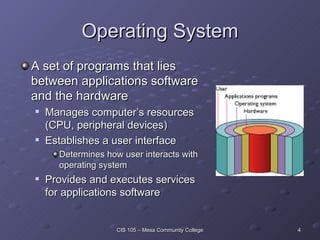
Operating System A set of programs that lies between applications software and the hardware Manages computer’s resources (CPU, peripheral devices) Establishes a user interface Determines how user interacts with operating system Provides and executes services for applications software
Systems Software All programs related to coordinating computer operations Examples Operating systems Language translators Convert program code to machine-readable form Utility programs Perform secondary chores
Kernel Manages the operating system Loaded from hard drive into memory when computer is booted Booting  refers to starting the computer Loads other operating system programs from disk storage as needed Other programs referred to as  nonresident
Operating Systems for Personal Computers Platform: combination of computer hardware and operating system software Wintel  (Microsoft Windows running on an Intel-based PC) is one of the most common Common Platforms MS-DOS Windows MAC OS Unix Linux Your Assignment: Comparison Matrix
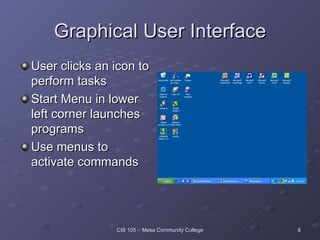
Graphical User Interface User clicks an icon to perform tasks Start Menu in lower left corner launches programs Use menus to activate commands
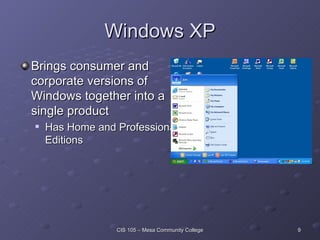
Windows XP Brings consumer and corporate versions of Windows together into a single product Has Home and Professional Editions
Windows XP Enhancements Improved user interface Much clearer and uncluttered desktop More icons on redesigned Start Menu Improved multimedia support More personalization Multiple user support User can log off, leaving programs running, and allow another user to log on Set up limited accounts for children to use; i.e., no inappropriate games or no Internet access Internet support and protection
Operating Systems for Networks Network operating system (NOS)  Handles network functions Sharing resources (hard disks and printers) Data security Troubleshooting Administrative control Make resources appear as though they were running from client computers
Operating Systems for Large Computers Resource allocation: assigning computer resources to certain programs and processes for their use Main issues related to resource allocation Sharing the Central Processing Unit Multiprocessing Multiprogramming Time-Sharing Sharing memory Sharing storage resources Sharing printing resources
Sharing the CPU Multiprocessing The use of a powerful computer with multiple CPUs Multiple programs run simultaneously (each runs on its own processor) Multiprogramming Two or more programs executed concurrently Programs take turns using the CPU Event-driven Time-Sharing Programs take turns using the CPU Time-driven Typically used in applications with many users
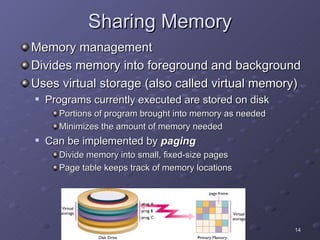
Sharing Memory Memory management Divides memory into foreground and background Uses virtual storage (also called virtual memory) Programs currently executed are stored on disk  Portions of program brought into memory as needed Minimizes the amount of memory needed Can be implemented by  paging Divide memory into small, fixed-size pages Page table keeps track of memory locations
Sharing Storage Resources Keeps track of location of files Responds to commands to manipulate files Keeps track of input and output requests for files Processes them in the order received
Sharing Printing Resources Spooling: program writes a line to a disk file rather than sending directly to a printer When file is completed, placed in queue File printed when printer becomes available Allows program to complete execution much more quickly Writing to disk much quicker than writing to printer
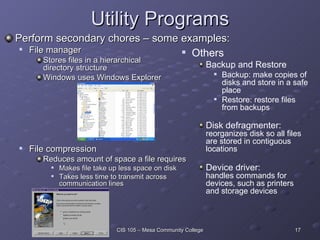
Utility Programs Perform secondary chores – some examples: File manager Stores files in a hierarchical  directory structure Windows uses Windows Explorer File compression Reduces amount of space a file requires Makes file take up less space on disk Takes less time to transmit across  communication lines Others Backup and Restore Backup: make copies of disks and store in a safe place Restore: restore files from backups Disk defragmenter:  reorganizes disk so all files are stored in contiguous locations Device driver:  handles commands for devices, such as printers and storage devices
Systems Software Questions? Types of System Software? Functions? Utility Programs? Operating Systems?
Graphical user interface (GUI) Kernel Memory management Multiprocessing Multiprogramming Operating system Partitions Platform Terms to Know:  Chapter 3 Resource Allocation Response time Spooling Time share Utility programs Virtual Memory/Storage
Can You Explain If Asked? Describe the functions of an operating system Explain the basics of a personal computer operating system Describe the advantages of a graphical operating system Differentiate among different versions of Microsoft Windows Explain the need for network operating systems Describe the methods of resource allocation on large computers Describe the differences among multiprocessing, multiprogramming, and time-sharing Explain the principles of memory management List several functions that are typically performed by utility programs
Sources Capron; Computers: Tools for An Information Age, 8 th  Ed. 2003 Pfaffenberger; Computers in Your Future 2003 Microsoft Clipart   Webopedia

Two Operating Systems

  • 1.
    Computers: Tools foran Information Age Chapter 3 Operating Systems: Software in the Background
  • 2.
    Objectives Describe thefunctions of an operating system Explain the basics of a personal computer operating system Describe the advantages of a graphical operating system Differentiate among different versions of Microsoft Windows Explain the need for network operating systems Describe the methods of resource allocation on large computers Describe the differences among multiprocessing, multiprogramming, and time-sharing Explain the principles of memory management List several functions that are typically performed by utility programs
  • 3.
    Operating Systems: HiddenSoftware Serves as intermediary between hardware and applications software Operating System Systems software Kernel
  • 4.
    Operating System Aset of programs that lies between applications software and the hardware Manages computer’s resources (CPU, peripheral devices) Establishes a user interface Determines how user interacts with operating system Provides and executes services for applications software
  • 5.
    Systems Software Allprograms related to coordinating computer operations Examples Operating systems Language translators Convert program code to machine-readable form Utility programs Perform secondary chores
  • 6.
    Kernel Manages theoperating system Loaded from hard drive into memory when computer is booted Booting refers to starting the computer Loads other operating system programs from disk storage as needed Other programs referred to as nonresident
  • 7.
    Operating Systems forPersonal Computers Platform: combination of computer hardware and operating system software Wintel (Microsoft Windows running on an Intel-based PC) is one of the most common Common Platforms MS-DOS Windows MAC OS Unix Linux Your Assignment: Comparison Matrix
  • 8.
    Graphical User InterfaceUser clicks an icon to perform tasks Start Menu in lower left corner launches programs Use menus to activate commands
  • 9.
    Windows XP Bringsconsumer and corporate versions of Windows together into a single product Has Home and Professional Editions
  • 10.
    Windows XP EnhancementsImproved user interface Much clearer and uncluttered desktop More icons on redesigned Start Menu Improved multimedia support More personalization Multiple user support User can log off, leaving programs running, and allow another user to log on Set up limited accounts for children to use; i.e., no inappropriate games or no Internet access Internet support and protection
  • 11.
    Operating Systems forNetworks Network operating system (NOS) Handles network functions Sharing resources (hard disks and printers) Data security Troubleshooting Administrative control Make resources appear as though they were running from client computers
  • 12.
    Operating Systems forLarge Computers Resource allocation: assigning computer resources to certain programs and processes for their use Main issues related to resource allocation Sharing the Central Processing Unit Multiprocessing Multiprogramming Time-Sharing Sharing memory Sharing storage resources Sharing printing resources
  • 13.
    Sharing the CPUMultiprocessing The use of a powerful computer with multiple CPUs Multiple programs run simultaneously (each runs on its own processor) Multiprogramming Two or more programs executed concurrently Programs take turns using the CPU Event-driven Time-Sharing Programs take turns using the CPU Time-driven Typically used in applications with many users
  • 14.
    Sharing Memory Memorymanagement Divides memory into foreground and background Uses virtual storage (also called virtual memory) Programs currently executed are stored on disk Portions of program brought into memory as needed Minimizes the amount of memory needed Can be implemented by paging Divide memory into small, fixed-size pages Page table keeps track of memory locations
  • 15.
    Sharing Storage ResourcesKeeps track of location of files Responds to commands to manipulate files Keeps track of input and output requests for files Processes them in the order received
  • 16.
    Sharing Printing ResourcesSpooling: program writes a line to a disk file rather than sending directly to a printer When file is completed, placed in queue File printed when printer becomes available Allows program to complete execution much more quickly Writing to disk much quicker than writing to printer
  • 17.
    Utility Programs Performsecondary chores – some examples: File manager Stores files in a hierarchical directory structure Windows uses Windows Explorer File compression Reduces amount of space a file requires Makes file take up less space on disk Takes less time to transmit across communication lines Others Backup and Restore Backup: make copies of disks and store in a safe place Restore: restore files from backups Disk defragmenter: reorganizes disk so all files are stored in contiguous locations Device driver: handles commands for devices, such as printers and storage devices
  • 18.
    Systems Software Questions?Types of System Software? Functions? Utility Programs? Operating Systems?
  • 19.
    Graphical user interface(GUI) Kernel Memory management Multiprocessing Multiprogramming Operating system Partitions Platform Terms to Know: Chapter 3 Resource Allocation Response time Spooling Time share Utility programs Virtual Memory/Storage
  • 20.
    Can You ExplainIf Asked? Describe the functions of an operating system Explain the basics of a personal computer operating system Describe the advantages of a graphical operating system Differentiate among different versions of Microsoft Windows Explain the need for network operating systems Describe the methods of resource allocation on large computers Describe the differences among multiprocessing, multiprogramming, and time-sharing Explain the principles of memory management List several functions that are typically performed by utility programs
  • 21.
    Sources Capron; Computers:Tools for An Information Age, 8 th Ed. 2003 Pfaffenberger; Computers in Your Future 2003 Microsoft Clipart Webopedia