Part I Overview
Chapter 2: Operating System Structures


                                  1
Operating System Services
§ User Interface (e.g., command processor –shell
  and GUI – Graphical User Interface)
§ Program execution
§ I/O operations
§ File-system manipulation
§ Communications
§ Error detection
§ Resource allocation
§ Accounting
§ Protection
                                                   2
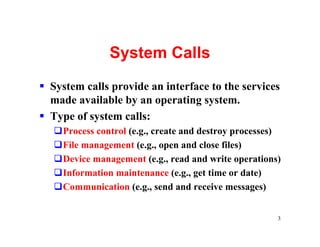
System Calls
§ System calls provide an interface to the services
  made available by an operating system.
§ Type of system calls:
   qProcess control (e.g., create and destroy processes)
   qFile management (e.g., open and close files)
   qDevice management (e.g., read and write operations)
   qInformation maintenance (e.g., get time or date)
   qCommunication (e.g., send and receive messages)


                                                       3
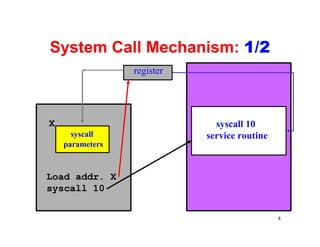
System Call Mechanism: 1/2
                 register


X                             syscall 10
      syscall               service routine
    parameters


Load addr. X
syscall 10

                                              4
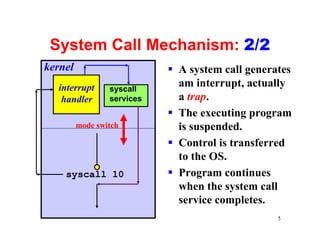
System Call Mechanism: 2/2
kernel                      § A system call generates
  interrupt      syscall
                              am interrupt, actually
   handler       services     a trap.
                            § The executing program
         mode switch          is suspended.
                            § Control is transferred
                              to the OS.
    syscall 10              § Program continues
                              when the system call
                              service completes.
                                                  5
System Programs
§ File management (e.g., create, delete files)
§ Status management (e.g., date/time, available
  memory and disk space)
§ File modification (e.g., editors)
§ Programming language support (e.g.,
  assemblers, compilers, interpreters)
§ Program loading and execution (e.g., loaders,
  linkage editors)
§ Communications (e.g., connections between
  processes, sending/receiving e-mails)
                                                  6
Operating-System Design and
      Implementation: 1/5
§ Design Goals
§ Mechanisms and Polices
§ Implementation


                                7
Operating-System Design and
      Implementation: 2/5
§ Design Goals
  qGoals and specifications will be affected by
   hardware and the type of the system (e.g.,
   batch, time-sharing, real-time, etc)
  qRequirements: user goals and system goals.
     vUser goals: easy of use, reliable, safe, fast
     vSystem goals: easy to design, implement and
      maintain, and flexible, reliable, efficient, etc.
  qThere is no unique way to achieve all goals,
   and some compromises must be taken.
                                                          8
Operating-System Design and
      Implementation: 3/5

§ Mechanisms and Policies: 1/2
  qMechanisms determine how to do something.
  qPolicies determine what will be done.
  qPolicies and mechanisms are usually
   separated: the separation of mechanism and
   policy principle.


                                            9
Operating-System Design and
        Implementation: 4/5
§ Mechanisms and Policies: 2/2
  qThe separation of mechanism and policy:
    vIt is for efficiency purpose. Policies are likely to
     change over time.
    vIf a more general mechanism is available, the impact
     of changing policy on mechanism is reduced.
    vMicrokernel-based systems implement a basic set of
     building blocks, which are almost policy free. Thus,
     advanced policies and mechanisms can be added to
     user-created kernel modules.


                                                      10
Operating-System Design and
       Implementation: 5/5
§ Implementation
  qThe assembly vs. high-level language issue
    vAdvantages of high-level languages: easy to use and
     maintain, and more available programming tools
    vDisadvantages of high-level languages: slower and
     more space
  qMany systems were written in both with a small
   percentage (e.g., 10%) of assembly language for
   the most speed demanding low level portion.
  qBetter data structures and algorithms are more
   important than tweaking assembly instructions.
                                               11
Operating-System Structures

§   Simple Structure
§   Layered Approach
§   Microkernels
§   Modules


                                   12
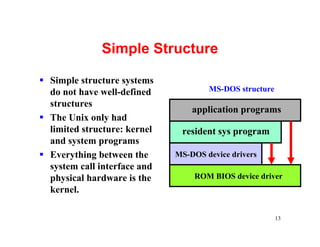
Simple Structure

§ Simple structure systems
  do not have well-defined            MS-DOS structure
  structures
                                  application programs
§ The Unix only had
  limited structure: kernel    resident sys program
  and system programs
§ Everything between the      MS-DOS device drivers
  system call interface and
  physical hardware is the        ROM BIOS device driver
  kernel.

                                                         13
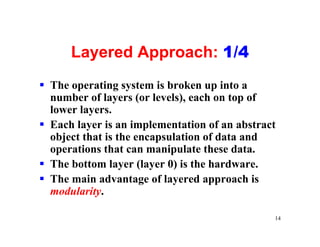
Layered Approach: 1/4
§ The operating system is broken up into a
  number of layers (or levels), each on top of
  lower layers.
§ Each layer is an implementation of an abstract
  object that is the encapsulation of data and
  operations that can manipulate these data.
§ The bottom layer (layer 0) is the hardware.
§ The main advantage of layered approach is
  modularity.

                                               14
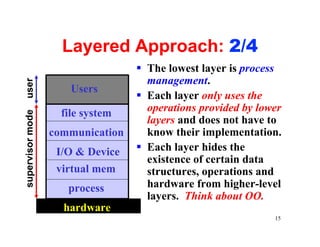
Layered Approach: 2/4
                                  § The lowest layer is process
                                    management.
user


                      Users
                                  § Each layer only uses the
                    file system     operations provided by lower
supervisor mode


                                    layers and does not have to
                  communication     know their implementation.
                   I/O & Device   § Each layer hides the
                                    existence of certain data
                   virtual mem      structures, operations and
                     process        hardware from higher-level
                                    layers. Think about OO.
                    hardware
                                                              15
Layered Approach Problems: 3/4
§ It is difficult to organize the system in
  layers, because a layer can use only
  layers below it. Example: virtual
  memory (lower layer) uses disk I/O
  (upper layer).
§ Layered implementations tend to be less
  efficient than other types. Example: there
  may be too many calls going down the
  layers: user to I/O layer to memory layer
  to process scheduling layer.
                                           16
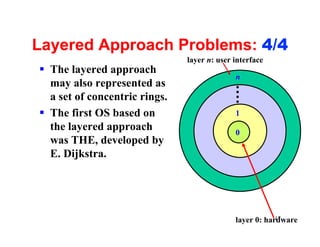
Layered Approach Problems: 4/4
                               layer n: user interface
§ The layered approach
                                             n
  may also represented as
  a set of concentric rings.
§ The first OS based on                      1
  the layered approach                       0
  was THE, developed by
  E. Dijkstra.


                                                         17
                                             layer 0: hardware
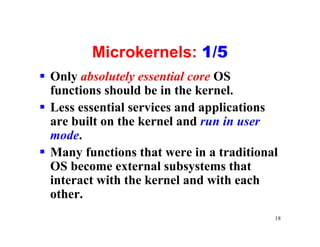
Microkernels: 1/5
§ Only absolutely essential core OS
  functions should be in the kernel.
§ Less essential services and applications
  are built on the kernel and run in user
  mode.
§ Many functions that were in a traditional
  OS become external subsystems that
  interact with the kernel and with each
  other.
                                          18
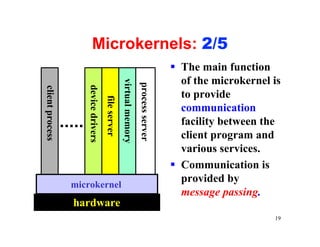
Microkernels: 2/5
                                                                                     § The main function
                                                                                       of the microkernel is


                                                   virtual memory
                                                                    process server
                    device drivers
client process


                                                                                       to provide
                                     file server                                       communication
                                                                                       facility between the
                                                                                       client program and
                                                                                       various services.
                                                                                     § Communication is
                                                                                       provided by
                 microkernel
                                                                                       message passing.
                 hardware
                                                                                                          19
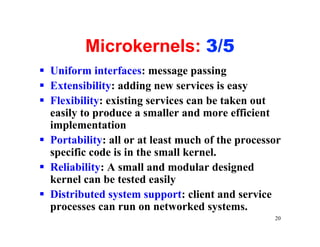
Microkernels: 3/5
§ Uniform interfaces: message passing
§ Extensibility: adding new services is easy
§ Flexibility: existing services can be taken out
  easily to produce a smaller and more efficient
  implementation
§ Portability: all or at least much of the processor
  specific code is in the small kernel.
§ Reliability: A small and modular designed
  kernel can be tested easily
§ Distributed system support: client and service
  processes can run on networked systems.
                                                  20
Microkernels: 4/5
§ But, microkernels do have a problem:
  qAs the number of system functions increases,
   overhead increases and performance reduces.
  qMost microkernel systems took a hybrid
   approach, a combination of microkernel and
   something else (e.g., layered).


                                             21
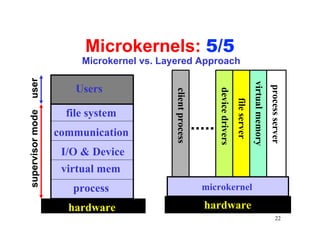
Microkernels: 5/5
                       Microkernel vs. Layered Approach
user


                                                                                             virtual memory
                      Users


                                                                                                              process server
                                                              device drivers
                                          client process


                                                                               file server
                    file system
supervisor mode


                  communication
                   I/O & Device
                   virtual mem
                     process                               microkernel

                    hardware                               hardware
                                                                                                                     22
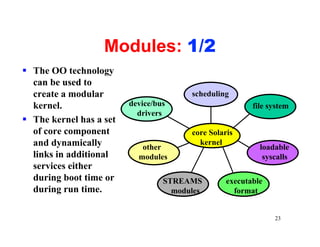
Modules: 1/2
§ The OO technology
  can be used to
  create a modular                      scheduling
  kernel.                device/bus                      file system
                           drivers
§ The kernel has a set
  of core component                     core Solaris
  and dynamically           other
                                          kernel
                                                           loadable
  links in additional      modules                          syscalls
  services either
  during boot time or             STREAMS         executable
  during run time.                  modules         format


                                                               23
Module: 2/2

§ The module approach looks like the layered
  approach as each module has a precise definition;
  however, the former is more flexible in that any
  module can call any other module.
§ The module approach is also like the microkernel
  approach because the core module only includes
  the core functions. However, the module
  approach is more efficient because no message
  passing is required.
                                               24
Virtual Machines: 1/4
§ A virtual machine, VM, is a software
  between the kernel and hardware.
§ Thus, a VM provides all functionalities of
  a CPU with software simulation.
§ A user has the illusion that s/he has a real
  processor that can run a kernel.


                                             25
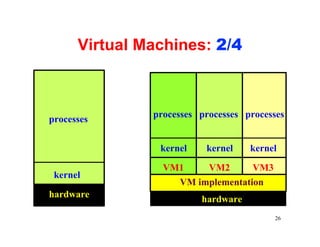
Virtual Machines: 2/4


               processes processes processes
processes


                kernel    kernel    kernel

                 VM1    VM2       VM3
 kernel
                   VM implementation
hardware                 hardware
                                         26
Virtual Machines: 3/4
§ Self-Virtualized VM: the VM is identical to the
  hardware. Example: IBM’s VM/370 and
  VMware (creating a VM under Linux to run
  Windows).
§ Non-Self-Virtualized VM: the VM is not
  identical to the hardware. Example: Java
  Virtual Machine JVM and SoftWindow.
§ It can be proved that all third-generation CPUs
  can be virtualized.

                                                27
Virtual Machines: 4/4
§ VM are difficult to implement because they
  must duplicate all hardware functions.
§ Benefits:
  ØVM provides a robust level of security
  ØVM permits system development to be done
    without disrupting normal system operation.
  ØVM allows multiple operating systems to run
    on the same machine at the same time.
  ØVM can make system transition/upgrade
    much easier

                                              28
Bootstrap or IPL
§ When the system is powered on, a small
  program, usually stored in ROM (i.e., read only
  memory), will be executed. This initial program
  is usually referred to as a bootstrap program or
  an Initial Program Loader (IPL).
§ The bootstrap program reads in and initializes
  the operating system. The execution is then
  transferred to the OS


                                                29

Os structure

  • 1.
    Part I Overview Chapter2: Operating System Structures 1
  • 2.
    Operating System Services §User Interface (e.g., command processor –shell and GUI – Graphical User Interface) § Program execution § I/O operations § File-system manipulation § Communications § Error detection § Resource allocation § Accounting § Protection 2
  • 3.
    System Calls § Systemcalls provide an interface to the services made available by an operating system. § Type of system calls: qProcess control (e.g., create and destroy processes) qFile management (e.g., open and close files) qDevice management (e.g., read and write operations) qInformation maintenance (e.g., get time or date) qCommunication (e.g., send and receive messages) 3
  • 4.
    System Call Mechanism:1/2 register X syscall 10 syscall service routine parameters Load addr. X syscall 10 4
  • 5.
    System Call Mechanism:2/2 kernel § A system call generates interrupt syscall am interrupt, actually handler services a trap. § The executing program mode switch is suspended. § Control is transferred to the OS. syscall 10 § Program continues when the system call service completes. 5
  • 6.
    System Programs § Filemanagement (e.g., create, delete files) § Status management (e.g., date/time, available memory and disk space) § File modification (e.g., editors) § Programming language support (e.g., assemblers, compilers, interpreters) § Program loading and execution (e.g., loaders, linkage editors) § Communications (e.g., connections between processes, sending/receiving e-mails) 6
  • 7.
    Operating-System Design and Implementation: 1/5 § Design Goals § Mechanisms and Polices § Implementation 7
  • 8.
    Operating-System Design and Implementation: 2/5 § Design Goals qGoals and specifications will be affected by hardware and the type of the system (e.g., batch, time-sharing, real-time, etc) qRequirements: user goals and system goals. vUser goals: easy of use, reliable, safe, fast vSystem goals: easy to design, implement and maintain, and flexible, reliable, efficient, etc. qThere is no unique way to achieve all goals, and some compromises must be taken. 8
  • 9.
    Operating-System Design and Implementation: 3/5 § Mechanisms and Policies: 1/2 qMechanisms determine how to do something. qPolicies determine what will be done. qPolicies and mechanisms are usually separated: the separation of mechanism and policy principle. 9
  • 10.
    Operating-System Design and Implementation: 4/5 § Mechanisms and Policies: 2/2 qThe separation of mechanism and policy: vIt is for efficiency purpose. Policies are likely to change over time. vIf a more general mechanism is available, the impact of changing policy on mechanism is reduced. vMicrokernel-based systems implement a basic set of building blocks, which are almost policy free. Thus, advanced policies and mechanisms can be added to user-created kernel modules. 10
  • 11.
    Operating-System Design and Implementation: 5/5 § Implementation qThe assembly vs. high-level language issue vAdvantages of high-level languages: easy to use and maintain, and more available programming tools vDisadvantages of high-level languages: slower and more space qMany systems were written in both with a small percentage (e.g., 10%) of assembly language for the most speed demanding low level portion. qBetter data structures and algorithms are more important than tweaking assembly instructions. 11
  • 12.
    Operating-System Structures § Simple Structure § Layered Approach § Microkernels § Modules 12
  • 13.
    Simple Structure § Simplestructure systems do not have well-defined MS-DOS structure structures application programs § The Unix only had limited structure: kernel resident sys program and system programs § Everything between the MS-DOS device drivers system call interface and physical hardware is the ROM BIOS device driver kernel. 13
  • 14.
    Layered Approach: 1/4 §The operating system is broken up into a number of layers (or levels), each on top of lower layers. § Each layer is an implementation of an abstract object that is the encapsulation of data and operations that can manipulate these data. § The bottom layer (layer 0) is the hardware. § The main advantage of layered approach is modularity. 14
  • 15.
    Layered Approach: 2/4 § The lowest layer is process management. user Users § Each layer only uses the file system operations provided by lower supervisor mode layers and does not have to communication know their implementation. I/O & Device § Each layer hides the existence of certain data virtual mem structures, operations and process hardware from higher-level layers. Think about OO. hardware 15
  • 16.
    Layered Approach Problems:3/4 § It is difficult to organize the system in layers, because a layer can use only layers below it. Example: virtual memory (lower layer) uses disk I/O (upper layer). § Layered implementations tend to be less efficient than other types. Example: there may be too many calls going down the layers: user to I/O layer to memory layer to process scheduling layer. 16
  • 17.
    Layered Approach Problems:4/4 layer n: user interface § The layered approach n may also represented as a set of concentric rings. § The first OS based on 1 the layered approach 0 was THE, developed by E. Dijkstra. 17 layer 0: hardware
  • 18.
    Microkernels: 1/5 § Onlyabsolutely essential core OS functions should be in the kernel. § Less essential services and applications are built on the kernel and run in user mode. § Many functions that were in a traditional OS become external subsystems that interact with the kernel and with each other. 18
  • 19.
    Microkernels: 2/5 § The main function of the microkernel is virtual memory process server device drivers client process to provide file server communication facility between the client program and various services. § Communication is provided by microkernel message passing. hardware 19
  • 20.
    Microkernels: 3/5 § Uniforminterfaces: message passing § Extensibility: adding new services is easy § Flexibility: existing services can be taken out easily to produce a smaller and more efficient implementation § Portability: all or at least much of the processor specific code is in the small kernel. § Reliability: A small and modular designed kernel can be tested easily § Distributed system support: client and service processes can run on networked systems. 20
  • 21.
    Microkernels: 4/5 § But,microkernels do have a problem: qAs the number of system functions increases, overhead increases and performance reduces. qMost microkernel systems took a hybrid approach, a combination of microkernel and something else (e.g., layered). 21
  • 22.
    Microkernels: 5/5 Microkernel vs. Layered Approach user virtual memory Users process server device drivers client process file server file system supervisor mode communication I/O & Device virtual mem process microkernel hardware hardware 22
  • 23.
    Modules: 1/2 § TheOO technology can be used to create a modular scheduling kernel. device/bus file system drivers § The kernel has a set of core component core Solaris and dynamically other kernel loadable links in additional modules syscalls services either during boot time or STREAMS executable during run time. modules format 23
  • 24.
    Module: 2/2 § Themodule approach looks like the layered approach as each module has a precise definition; however, the former is more flexible in that any module can call any other module. § The module approach is also like the microkernel approach because the core module only includes the core functions. However, the module approach is more efficient because no message passing is required. 24
  • 25.
    Virtual Machines: 1/4 §A virtual machine, VM, is a software between the kernel and hardware. § Thus, a VM provides all functionalities of a CPU with software simulation. § A user has the illusion that s/he has a real processor that can run a kernel. 25
  • 26.
    Virtual Machines: 2/4 processes processes processes processes kernel kernel kernel VM1 VM2 VM3 kernel VM implementation hardware hardware 26
  • 27.
    Virtual Machines: 3/4 §Self-Virtualized VM: the VM is identical to the hardware. Example: IBM’s VM/370 and VMware (creating a VM under Linux to run Windows). § Non-Self-Virtualized VM: the VM is not identical to the hardware. Example: Java Virtual Machine JVM and SoftWindow. § It can be proved that all third-generation CPUs can be virtualized. 27
  • 28.
    Virtual Machines: 4/4 §VM are difficult to implement because they must duplicate all hardware functions. § Benefits: ØVM provides a robust level of security ØVM permits system development to be done without disrupting normal system operation. ØVM allows multiple operating systems to run on the same machine at the same time. ØVM can make system transition/upgrade much easier 28
  • 29.
    Bootstrap or IPL §When the system is powered on, a small program, usually stored in ROM (i.e., read only memory), will be executed. This initial program is usually referred to as a bootstrap program or an Initial Program Loader (IPL). § The bootstrap program reads in and initializes the operating system. The execution is then transferred to the OS 29