Computer Software
Introduction
 A set of instructions given to the computer to solve a
particular problem is called software
 Also called computer program
 Software tells the computer what to do and how to
do
 Hardware operates under the control of given set of
instructions
 Software is developed in computer programming
language
Types of Software
 System Software
 Application Software
Application Software
 A program or set of programs that are specially
designed to solve the specific problem of users
 Different kinds of application software
 Commercial software, scientific software, financial
packages, games, multimedia etc
 Two main categories
 Custom built software
 Packaged Software
Custom-Built Software
 Developed for a particular organization or customer
 Also known as customize software
 For example, software developed to maintain the records
of students of a particular college
Packaged Software
 Developed by software development organization
for sale to the general public
 Used to solve some common problems of many
people or users
 Examples
 Word Processing Software
 Spreadsheet Software
 Database Management Software
 Communication Software
 Presentation Software
 Graphics Software
Examples of Graphics Software
 Computer Aided Design
 Desktop Publishing
 Painting Software
 Image Editing Software
 Video & Audio editing Software
 Web Page Authoring Software
System Software
 A program or set of programs that is specially
designed to control different operations of the
computer system
 Controls the working of different parts of the
computer
 Enables the other application programs to execute
properly
 Examples:
 Operating Systems
 Utility Programs
 Device Drivers
 Language Processors
Operating System
 An operating system is a collection of system
programs that controls and coordinates the overall
operation of the computer system
 Also provide the interface between the user and the
computer system
 A computer needs an operating system to do work
Tasks of Operating System
 Accepts input from input devices
 Sends output to the output devices
 Manages the application program in memory
 Manages the files on the storage devices
 Manages & controls the I/O devices
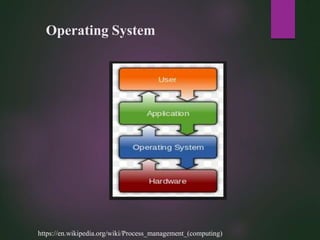
Operating System
https://en.wikipedia.org/wiki/Process_management_(computing)
Parts of Operating System
 Resident Part
 Also known as kernel
 Contains the critical functions
 Loaded into the main memory during the booting process
of computer
 Non-Resident Part
 Loaded into the main memory when required
Examples of Operating System
 Disk Operating System developed by Microsoft
 Operating System 2 developed by IBM
 XENIX developed by Microsoft
 Windows developed by Microsoft
Operating System Functions
 When computer is turned on the operating system is
loaded into the main memory from the disk
 Most of the operating systems perform the similar
functions
Operating System Functions
 Booting a Computer
 User-Interface
 Running Programs
 Managing Files
 Memory Management
 Scheduling Jobs
 Configuring Devices
 Establishing Internet Connection
 Controlling Network
 Task Management
Booting a Computer
 The operating system consists of supervisor portion
and a set of system programs
 When the computer is switched on, the supervisor
portion of the operating system is loaded in the
RAM from the disk
 The process to start or restart a computer is called
booting process
 Two Types
 Cold boot
 Warm Boot
User Interface
 User interface means how the user interacts with the
computer to perform various tasks
 User runs the application programs, open the
documents, enters the data, print the output report
 The operating system plays the main role for
interfacing between user and computer
 The hardware devices like keyboard, mouse,
monitor are used for interfacing
 Two main types of user interface
 Command Line User Interface
 Graphical User Interface
Running Programs
 The operating system also provides the interface
between the programs and the user
 Through program, the user access other computer
resources
 There is built in instruction in program known as
“system calls” that are used to request the services
from the operating system
 The application program sends the request to the
operating system and the operating system gives the
result back to the program
Running Programs
 Saving the data from memory in files on the disk
 Loading the files from disk into memory
 Sending the document on the printer
 To copy or move the data from one document to
another
 For the services of hardware
 To prepare the disk to store data etc
Managing Files
 The data and programs are stored permanently on
the disk for future use
 The files are stored on the disk by giving a file name
 The files are placed or stored in folders or
directories
 A folder may contain file or sub folders
 The operating system maintain a list of these files
and folders in the staring area of the disk called FAT
 File Viewer utility program is used the names of
files and sub folders
 For Example, Windows Explorer
Memory Management
 Memory unit has very important role for data
processing
 Processor takes data and instructions from RAM
during processing
 The operating system loads the data and programs
into RAM and allocates the memory areas and
manage these properly
 When the program is closed, the operating system
clears the memory area allocated to that program
and its data
Memory Management
 During data processing some operating system use
the hard disk as memory, called virtual memory
 During processing, operating system transfer some
of data from RAM to hard disk and reload when
required, called swapping
 Operating systems spends a lot of time in paging
process, instead of executing the application
software, it is referred to as Thrashing
Scheduling Jobs
 A job is an activity or operation that a processor
performs
 May be receiving data from input device
 Sending output to the output device
 Loading data from disk into RAM
 Operating system determines the order in which
jobs are to be processed
 First Come First Serve Basis
 Priority Basis
 If there are multiple jobs of the same nature, the
operating system place the request in buffer,
temporary, process called spooling
Configuring Devices
 The functions of devices attached with the computer
are controlled by the special system software called
device drivers
 Device driver tells the operating system how to
communicate with a device
 Each device has its own device driver
 When you boot a computer, the operating system
loads each device driver
 Usually the operating system has built-in device
driver for commonly used input/output devices
 Operating system automatically install these driver
Establishing Internet Connection
 Operating System provides means to establish
connection between your computer and the ISP
(Internet Service Provider) server
 Some Operating System have built-in program used
to access the information on the internet
 Information downloaded from the internet is
managed by the operating system in RAM as well as
in disk
Controlling Network
 Some operating system are specially developed for
networking
 Called Network Operating System (NOS)
 A network operating system organizes and
coordinates multiple users and make it possible to
access and share resources on network
 Overall functions of users are controlled by NOS
 Creation of account of new user
 Deletion of user account if required
 NOS also has security features
 Require a user name and password to access the network
Task Management
 A task is an operating such as storing, printing,
calculating etc
 A computer can perform many tasks at a time
 Some operating system can handle more than one
program at the same time
 The operating system manage all these tasks
 Some operating system have single user
functionality and can support only one user at a time
Task Management
 The operating system performs the following tasks:
 Multi Tasking
 Multi Programming
 Multiprocessing
 Time Sharing
 Multithreading
 Virtual Memory
 Spooling
Types of Operating System
 In the past, operating system were computer
dependent
 An operating system running on one machine could
not be run another different type of machine
 Three basic categories of operating system are:
 Personal Computer Operating System
 Network Operating System
 Embedded Operating System
Personal Computer Operating System
 Also called stand alone operating system or single
user operating system
 Used to operate personal computers
 Examples
 DOS
 Mac OS
 Windows
Network Operating System
 Supports the network
 Typically resides on a server and controls the
devices or computers connected to the network
 Examples:
 Windows NT Server
 Windows 2000 Server
 UNIX
 Solaris
 Novell’ s Netware
Embedded Operating System
 Different special electronic devices and handheld
computers are also controlled by the operating
systems that are stored in the ROM chip
 Examples:
 Windows CE
 Pocket PC 2002
 Palm Operating System
Difference between Windows & DOS
 DOS provides command line Interface, while
Windows provides Graphical User Interface
 DOS is single tasking operating system, While
Windows is multi-tasking operating system
 DOS does not provide plug and play feature, while
Windows provide plug and play feature
Utility Programs
 A software that helps the user to solve the specific
problems related to the software and hardware is
called utility programs
 It is system software
 A large number of utility programs are available for
the service of hardware and software
 Most operating system include various utility
programs
 While others are available on CDs or can be downloaded from the
internet
Utility Programs
 File Viewer
 File Compression
 Diagnostic Utility Program
 Un-Installer
 Disk Scanner
 Disk Defragmenter
 Back up Utility
Device Drivers
 The programs that operate and control the devices
attached to the computer are called device drivers
 The keyboard, mouse, disk driver, CD-ROM drive,
Modem, Printer etc require to install software that
tells the computer how to use the device
 When you purchase a new hardware device,
manufacturer of the device also provides you a disk
containing a device driver

Computer softwre

  • 1.
  • 2.
    Introduction  A setof instructions given to the computer to solve a particular problem is called software  Also called computer program  Software tells the computer what to do and how to do  Hardware operates under the control of given set of instructions  Software is developed in computer programming language
  • 3.
    Types of Software System Software  Application Software
  • 4.
    Application Software  Aprogram or set of programs that are specially designed to solve the specific problem of users  Different kinds of application software  Commercial software, scientific software, financial packages, games, multimedia etc  Two main categories  Custom built software  Packaged Software
  • 5.
    Custom-Built Software  Developedfor a particular organization or customer  Also known as customize software  For example, software developed to maintain the records of students of a particular college
  • 6.
    Packaged Software  Developedby software development organization for sale to the general public  Used to solve some common problems of many people or users  Examples  Word Processing Software  Spreadsheet Software  Database Management Software  Communication Software  Presentation Software  Graphics Software
  • 7.
    Examples of GraphicsSoftware  Computer Aided Design  Desktop Publishing  Painting Software  Image Editing Software  Video & Audio editing Software  Web Page Authoring Software
  • 8.
    System Software  Aprogram or set of programs that is specially designed to control different operations of the computer system  Controls the working of different parts of the computer  Enables the other application programs to execute properly  Examples:  Operating Systems  Utility Programs  Device Drivers  Language Processors
  • 9.
    Operating System  Anoperating system is a collection of system programs that controls and coordinates the overall operation of the computer system  Also provide the interface between the user and the computer system  A computer needs an operating system to do work
  • 10.
    Tasks of OperatingSystem  Accepts input from input devices  Sends output to the output devices  Manages the application program in memory  Manages the files on the storage devices  Manages & controls the I/O devices
  • 11.
  • 12.
    Parts of OperatingSystem  Resident Part  Also known as kernel  Contains the critical functions  Loaded into the main memory during the booting process of computer  Non-Resident Part  Loaded into the main memory when required
  • 13.
    Examples of OperatingSystem  Disk Operating System developed by Microsoft  Operating System 2 developed by IBM  XENIX developed by Microsoft  Windows developed by Microsoft
  • 14.
    Operating System Functions When computer is turned on the operating system is loaded into the main memory from the disk  Most of the operating systems perform the similar functions
  • 15.
    Operating System Functions Booting a Computer  User-Interface  Running Programs  Managing Files  Memory Management  Scheduling Jobs  Configuring Devices  Establishing Internet Connection  Controlling Network  Task Management
  • 16.
    Booting a Computer The operating system consists of supervisor portion and a set of system programs  When the computer is switched on, the supervisor portion of the operating system is loaded in the RAM from the disk  The process to start or restart a computer is called booting process  Two Types  Cold boot  Warm Boot
  • 17.
    User Interface  Userinterface means how the user interacts with the computer to perform various tasks  User runs the application programs, open the documents, enters the data, print the output report  The operating system plays the main role for interfacing between user and computer  The hardware devices like keyboard, mouse, monitor are used for interfacing  Two main types of user interface  Command Line User Interface  Graphical User Interface
  • 18.
    Running Programs  Theoperating system also provides the interface between the programs and the user  Through program, the user access other computer resources  There is built in instruction in program known as “system calls” that are used to request the services from the operating system  The application program sends the request to the operating system and the operating system gives the result back to the program
  • 19.
    Running Programs  Savingthe data from memory in files on the disk  Loading the files from disk into memory  Sending the document on the printer  To copy or move the data from one document to another  For the services of hardware  To prepare the disk to store data etc
  • 20.
    Managing Files  Thedata and programs are stored permanently on the disk for future use  The files are stored on the disk by giving a file name  The files are placed or stored in folders or directories  A folder may contain file or sub folders  The operating system maintain a list of these files and folders in the staring area of the disk called FAT  File Viewer utility program is used the names of files and sub folders  For Example, Windows Explorer
  • 21.
    Memory Management  Memoryunit has very important role for data processing  Processor takes data and instructions from RAM during processing  The operating system loads the data and programs into RAM and allocates the memory areas and manage these properly  When the program is closed, the operating system clears the memory area allocated to that program and its data
  • 22.
    Memory Management  Duringdata processing some operating system use the hard disk as memory, called virtual memory  During processing, operating system transfer some of data from RAM to hard disk and reload when required, called swapping  Operating systems spends a lot of time in paging process, instead of executing the application software, it is referred to as Thrashing
  • 23.
    Scheduling Jobs  Ajob is an activity or operation that a processor performs  May be receiving data from input device  Sending output to the output device  Loading data from disk into RAM  Operating system determines the order in which jobs are to be processed  First Come First Serve Basis  Priority Basis  If there are multiple jobs of the same nature, the operating system place the request in buffer, temporary, process called spooling
  • 24.
    Configuring Devices  Thefunctions of devices attached with the computer are controlled by the special system software called device drivers  Device driver tells the operating system how to communicate with a device  Each device has its own device driver  When you boot a computer, the operating system loads each device driver  Usually the operating system has built-in device driver for commonly used input/output devices  Operating system automatically install these driver
  • 25.
    Establishing Internet Connection Operating System provides means to establish connection between your computer and the ISP (Internet Service Provider) server  Some Operating System have built-in program used to access the information on the internet  Information downloaded from the internet is managed by the operating system in RAM as well as in disk
  • 26.
    Controlling Network  Someoperating system are specially developed for networking  Called Network Operating System (NOS)  A network operating system organizes and coordinates multiple users and make it possible to access and share resources on network  Overall functions of users are controlled by NOS  Creation of account of new user  Deletion of user account if required  NOS also has security features  Require a user name and password to access the network
  • 27.
    Task Management  Atask is an operating such as storing, printing, calculating etc  A computer can perform many tasks at a time  Some operating system can handle more than one program at the same time  The operating system manage all these tasks  Some operating system have single user functionality and can support only one user at a time
  • 28.
    Task Management  Theoperating system performs the following tasks:  Multi Tasking  Multi Programming  Multiprocessing  Time Sharing  Multithreading  Virtual Memory  Spooling
  • 29.
    Types of OperatingSystem  In the past, operating system were computer dependent  An operating system running on one machine could not be run another different type of machine  Three basic categories of operating system are:  Personal Computer Operating System  Network Operating System  Embedded Operating System
  • 30.
    Personal Computer OperatingSystem  Also called stand alone operating system or single user operating system  Used to operate personal computers  Examples  DOS  Mac OS  Windows
  • 31.
    Network Operating System Supports the network  Typically resides on a server and controls the devices or computers connected to the network  Examples:  Windows NT Server  Windows 2000 Server  UNIX  Solaris  Novell’ s Netware
  • 32.
    Embedded Operating System Different special electronic devices and handheld computers are also controlled by the operating systems that are stored in the ROM chip  Examples:  Windows CE  Pocket PC 2002  Palm Operating System
  • 33.
    Difference between Windows& DOS  DOS provides command line Interface, while Windows provides Graphical User Interface  DOS is single tasking operating system, While Windows is multi-tasking operating system  DOS does not provide plug and play feature, while Windows provide plug and play feature
  • 34.
    Utility Programs  Asoftware that helps the user to solve the specific problems related to the software and hardware is called utility programs  It is system software  A large number of utility programs are available for the service of hardware and software  Most operating system include various utility programs  While others are available on CDs or can be downloaded from the internet
  • 35.
    Utility Programs  FileViewer  File Compression  Diagnostic Utility Program  Un-Installer  Disk Scanner  Disk Defragmenter  Back up Utility
  • 36.
    Device Drivers  Theprograms that operate and control the devices attached to the computer are called device drivers  The keyboard, mouse, disk driver, CD-ROM drive, Modem, Printer etc require to install software that tells the computer how to use the device  When you purchase a new hardware device, manufacturer of the device also provides you a disk containing a device driver