LECTURE 8
OPERATING SYSTEMS
AND UTILITY PROGRAMS
System Software
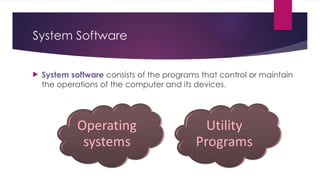
 System software consists of the programs that control or maintain
the operations of the computer and its devices.
Operating Systems (OS)
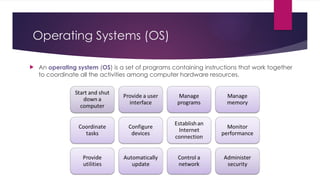
 An operating system (OS) is a set of programs containing instructions that work together
to coordinate all the activities among computer hardware resources.
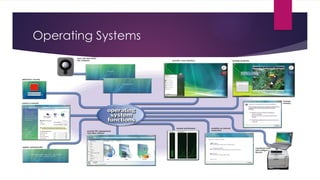
Operating Systems
Operating System
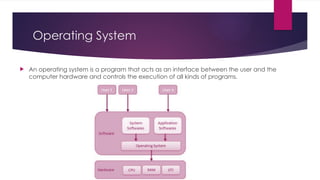
 An operating system is a program that acts as an interface between the user and the
computer hardware and controls the execution of all kinds of programs.
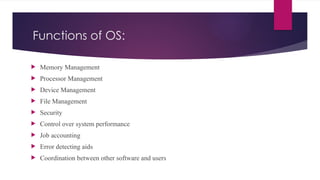
Functions of OS:
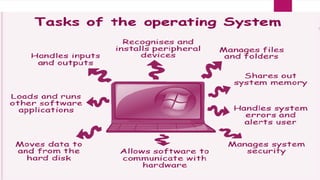
 Memory Management
 Processor Management
 Device Management
 File Management
 Security
 Control over system performance
 Job accounting
 Error detecting aids
 Coordination between other software and users
Functions of OS
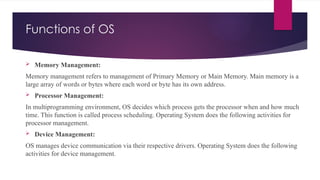
 Memory Management:
Memory management refers to management of Primary Memory or Main Memory. Main memory is a
large array of words or bytes where each word or byte has its own address.
 Processor Management:
In multiprogramming environment, OS decides which process gets the processor when and how much
time. This function is called process scheduling. Operating System does the following activities for
processor management.
 Device Management:
OS manages device communication via their respective drivers. Operating System does the following
activities for device management.
Functions of OS
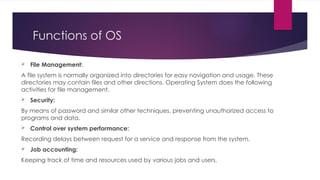
 File Management:
A file system is normally organized into directories for easy navigation and usage. These
directories may contain files and other directions. Operating System does the following
activities for file management.
 Security:
By means of password and similar other techniques, preventing unauthorized access to
programs and data.
 Control over system performance:
Recording delays between request for a service and response from the system.
 Job accounting:
Keeping track of time and resources used by various jobs and users.
Functions of OS
Error detecting aids -- Production of dumps, traces, error messages and other
debugging and error detecting aids.
Coordination between other software's and users
Coordination and assignment of compilers, interpreters, assemblers and other software
to the various users of the computer systems.
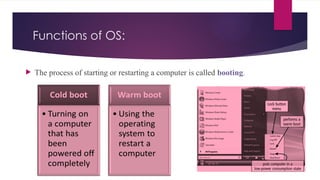
Functions of OS:
 The process of starting or restarting a computer is called booting.
Functions of OS
A boot drive is the drive from
which your computer starts
• You can boot from a boot disk
• A recovery disk contains a few system
files that will start the computer
Functions of OS
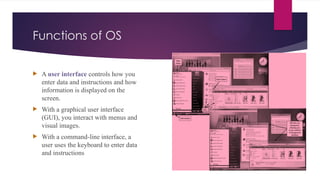
 A user interface controls how you
enter data and instructions and how
information is displayed on the
screen.
 With a graphical user interface
(GUI), you interact with menus and
visual images.
 With a command-line interface, a
user uses the keyboard to enter data
and instructions
Functions of OS
 The operating system determines the order in which tasks are processed.
Functions of OS
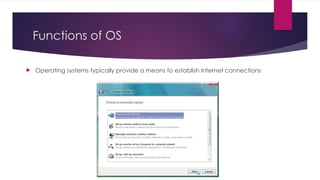
 Operating systems typically provide a means to establish Internet connections
Operating System Functions
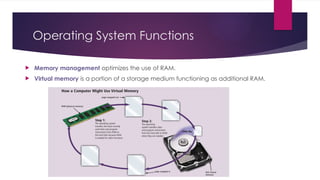
 Memory management optimizes the use of RAM.
 Virtual memory is a portion of a storage medium functioning as additional RAM.
Functions of OS
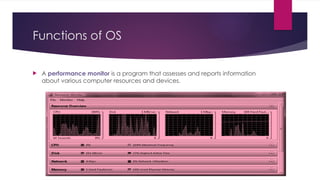
 A performance monitor is a program that assesses and reports information
about various computer resources and devices.
Operating System Functions
 Some operating systems are designed to work with a server on a network
 A server operating system organizes and coordinates how multiple users access
and share resources on a network.
 A network administrator uses the server operating system to:
 Add and remove users, computers, and other devices
 Install software and administer network security
Types of Operating System
Following are some of the most widely used types of Operating
system.
 Simple Batch System
 Multiprogramming Batch System
 Multiprocessor System
 Distributed Operating System
 Real-time Operating System
SIMPLE BATCH SYSTEMS
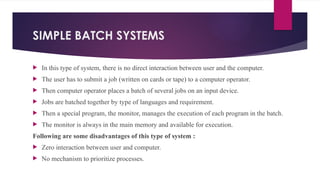
 In this type of system, there is no direct interaction between user and the computer.
 The user has to submit a job (written on cards or tape) to a computer operator.
 Then computer operator places a batch of several jobs on an input device.
 Jobs are batched together by type of languages and requirement.
 Then a special program, the monitor, manages the execution of each program in the batch.
 The monitor is always in the main memory and available for execution.
Following are some disadvantages of this type of system :
 Zero interaction between user and computer.
 No mechanism to prioritize processes.
MULTIPROGRAMMING BATCH SYSTEMS
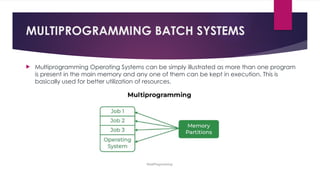
 Multiprogramming Operating Systems can be simply illustrated as more than one program
is present in the main memory and any one of them can be kept in execution. This is
basically used for better utilization of resources.
MULTIPROCESSOR SYSTEMS
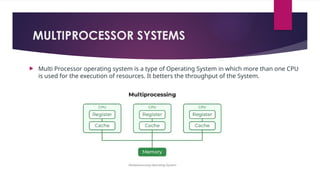
 Multi Processor operating system is a type of Operating System in which more than one CPU
is used for the execution of resources. It betters the throughput of the System.
DISTRIBUTED OPERATING SYSTEMS
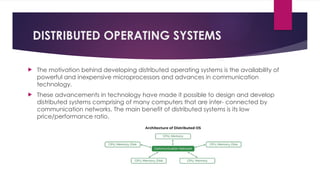
 The motivation behind developing distributed operating systems is the availability of
powerful and inexpensive microprocessors and advances in communication
technology.
 These advancements in technology have made it possible to design and develop
distributed systems comprising of many computers that are inter- connected by
communication networks. The main benefit of distributed systems is its low
price/performance ratio.
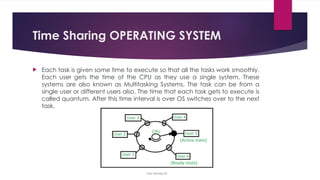
Time Sharing OPERATING SYSTEM
 Each task is given some time to execute so that all the tasks work smoothly.
Each user gets the time of the CPU as they use a single system. These
systems are also known as Multitasking Systems. The task can be from a
single user or different users also. The time that each task gets to execute is
called quantum. After this time interval is over OS switches over to the next
task.
REAL-TIME OPERATING SYSTEM
 Real time system is defines as a data processing system in which the
time interval required to process and respond to inputs is so small
that it controls the environment.
 Hard real-time systems guarantee that critical tasks complete on
time. In hard real-time systems secondary storage is limited or
missing with data stored in ROM.
 Soft real time systems are less restrictive. Critical real-time task gets
priority over other tasks and retains the priority until it completes.
 For example, Multimedia, virtual reality, Advanced Scientific Projects
like undersea exploration and planetary rovers etc.
OS Services
 An Operating System provides services to both the
users and to the programs.
 It provides programs, an environment to execute.
 It provides users, services to execute the programs
in a convenient manner.
OS Services
Following are few common services provided by operating systems.
 Program execution
 I/O operations
 File System manipulation
 Communication
 Error Detection
 Resource Allocation
 Protection
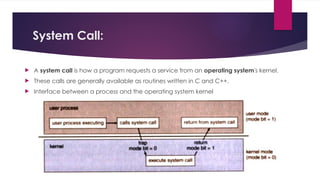
System Call:
 A system call is how a program requests a service from an operating system's kernel.
 These calls are generally available as routines written in C and C++.
 Interface between a process and the operating system kernel
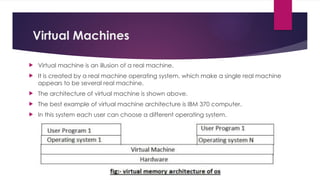
Virtual Machines
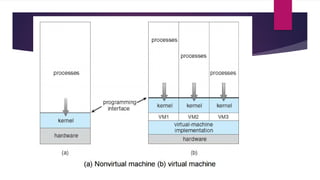
 Virtual machine is an illusion of a real machine.
 It is created by a real machine operating system, which make a single real machine
appears to be several real machine.
 The architecture of virtual machine is shown above.
 The best example of virtual machine architecture is IBM 370 computer.
 In this system each user can choose a different operating system.
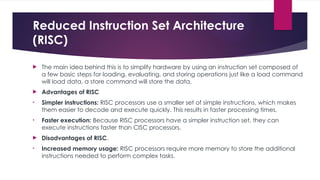
Reduced Instruction Set Architecture
(RISC)
 The main idea behind this is to simplify hardware by using an instruction set composed of
a few basic steps for loading, evaluating, and storing operations just like a load command
will load data, a store command will store the data.
 Advantages of RISC
• Simpler instructions: RISC processors use a smaller set of simple instructions, which makes
them easier to decode and execute quickly. This results in faster processing times.
• Faster execution: Because RISC processors have a simpler instruction set, they can
execute instructions faster than CISC processors.
 Disadvantages of RISC.
• Increased memory usage: RISC processors require more memory to store the additional
instructions needed to perform complex tasks.
Complex Instruction Set Architecture
(CISC)
 The main idea is that a single instruction will do all loading, evaluating, and storing operations just like a
multiplication command will do stuff like loading data, evaluating, and storing it, hence it’s complex.
 Advantages of CISC
• Reduced code size: CISC processors use complex instructions that can perform multiple operations,
reducing the amount of code needed to perform a task.
• More memory efficient: Because CISC instructions are more complex, they require fewer instructions to
perform complex tasks, which can result in more memory-efficient code.
• Widely used: CISC processors have been in use for a longer time than RISC processors, so they have a
larger user base and more available software.
 Disadvantages of CISC
• Slower execution: CISC processors take longer to execute instructions because they have more
complex instructions and need more time to decode them.
• More complex design: CISC processors have more complex instruction sets, which makes them more
difficult to design and manufacture.
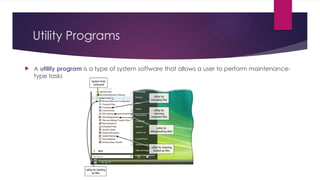
Utility Programs
 A utility program is a type of system software that allows a user to perform maintenance-
type tasks
Utility Programs
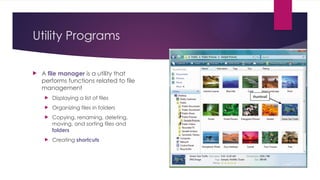
 A file manager is a utility that
performs functions related to file
management
 Displaying a list of files
 Organizing files in folders
 Copying, renaming, deleting,
moving, and sorting files and
folders
 Creating shortcuts
Utility Programs
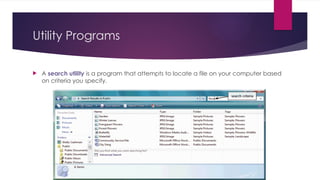
 A search utility is a program that attempts to locate a file on your computer based
on criteria you specify.
Utility Programs
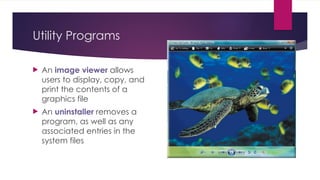
 An image viewer allows
users to display, copy, and
print the contents of a
graphics file
 An uninstaller removes a
program, as well as any
associated entries in the
system files
Utility Programs
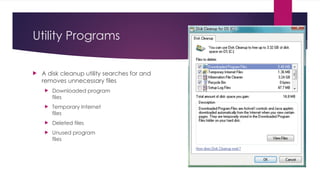
 A disk cleanup utility searches for and
removes unnecessary files
 Downloaded program
files
 Temporary Internet
files
 Deleted files
 Unused program
files
Utility Programs
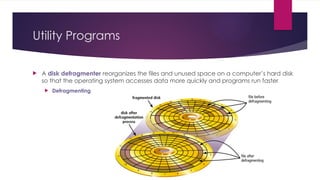
 A disk defragmenter reorganizes the files and unused space on a computer’s hard disk
so that the operating system accesses data more quickly and programs run faster
 Defragmenting
Utility Programs
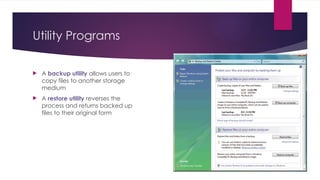
 A backup utility allows users to
copy files to another storage
medium
 A restore utility reverses the
process and returns backed up
files to their original form
Utility Programs
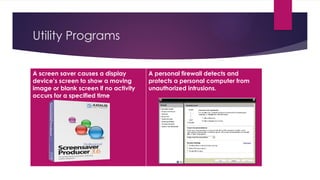
A screen saver causes a display
device’s screen to show a moving
image or blank screen if no activity
occurs for a specified time
A personal firewall detects and
protects a personal computer from
unauthorized intrusions.
Utility Programs
Utility Programs
Spyware is a program placed
on a computer without the
user’s knowledge that
secretly collects information
about the user
• A spyware remover detects
and deletes spyware and
other similar programs
Adware displays an online
advertisement in a banner or
pop-up window
• An adware remover is a
program that detects and
deletes adware
Utility Programs
 A file compression utility shrinks the size of a file(s)
 Compressing files frees up room on the storage media
 Two types of compression
 Lossy
 Lossless
 Compressed files sometimes are called zipped files
 Can be uncompressed
Utility Programs
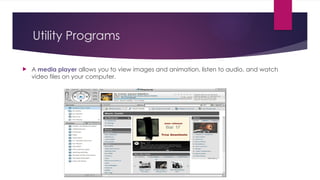
 A media player allows you to view images and animation, listen to audio, and watch
video files on your computer.
Utility Programs
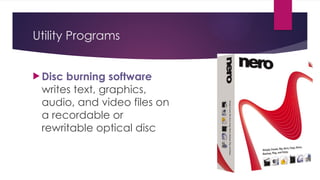
 Disc burning software
writes text, graphics,
audio, and video files on
a recordable or
rewritable optical disc
Utility Programs
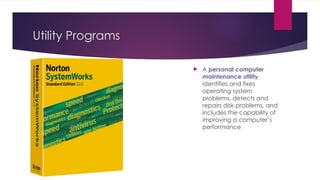
 A personal computer
maintenance utility
identifies and fixes
operating system
problems, detects and
repairs disk problems, and
includes the capability of
improving a computer’s
performance
Summary
Definition of an
operating system
Functions common
to most operating
systems
Types of Operating
Systems, Services
of operating
system
System calls,
Virtual Machine
Several utility
programs

Operating system and utility program LECTURE 8.pptx

  • 1.
  • 2.
    System Software  Systemsoftware consists of the programs that control or maintain the operations of the computer and its devices.
  • 3.
    Operating Systems (OS) An operating system (OS) is a set of programs containing instructions that work together to coordinate all the activities among computer hardware resources.
  • 5.
  • 6.
    Operating System  Anoperating system is a program that acts as an interface between the user and the computer hardware and controls the execution of all kinds of programs.
  • 7.
    Functions of OS: Memory Management  Processor Management  Device Management  File Management  Security  Control over system performance  Job accounting  Error detecting aids  Coordination between other software and users
  • 8.
    Functions of OS Memory Management: Memory management refers to management of Primary Memory or Main Memory. Main memory is a large array of words or bytes where each word or byte has its own address.  Processor Management: In multiprogramming environment, OS decides which process gets the processor when and how much time. This function is called process scheduling. Operating System does the following activities for processor management.  Device Management: OS manages device communication via their respective drivers. Operating System does the following activities for device management.
  • 9.
    Functions of OS File Management: A file system is normally organized into directories for easy navigation and usage. These directories may contain files and other directions. Operating System does the following activities for file management.  Security: By means of password and similar other techniques, preventing unauthorized access to programs and data.  Control over system performance: Recording delays between request for a service and response from the system.  Job accounting: Keeping track of time and resources used by various jobs and users.
  • 10.
    Functions of OS Errordetecting aids -- Production of dumps, traces, error messages and other debugging and error detecting aids. Coordination between other software's and users Coordination and assignment of compilers, interpreters, assemblers and other software to the various users of the computer systems.
  • 11.
    Functions of OS: The process of starting or restarting a computer is called booting.
  • 12.
    Functions of OS Aboot drive is the drive from which your computer starts • You can boot from a boot disk • A recovery disk contains a few system files that will start the computer
  • 13.
    Functions of OS A user interface controls how you enter data and instructions and how information is displayed on the screen.  With a graphical user interface (GUI), you interact with menus and visual images.  With a command-line interface, a user uses the keyboard to enter data and instructions
  • 14.
    Functions of OS The operating system determines the order in which tasks are processed.
  • 15.
    Functions of OS Operating systems typically provide a means to establish Internet connections
  • 16.
    Operating System Functions Memory management optimizes the use of RAM.  Virtual memory is a portion of a storage medium functioning as additional RAM.
  • 17.
    Functions of OS A performance monitor is a program that assesses and reports information about various computer resources and devices.
  • 18.
    Operating System Functions Some operating systems are designed to work with a server on a network  A server operating system organizes and coordinates how multiple users access and share resources on a network.  A network administrator uses the server operating system to:  Add and remove users, computers, and other devices  Install software and administer network security
  • 19.
    Types of OperatingSystem Following are some of the most widely used types of Operating system.  Simple Batch System  Multiprogramming Batch System  Multiprocessor System  Distributed Operating System  Real-time Operating System
  • 20.
    SIMPLE BATCH SYSTEMS In this type of system, there is no direct interaction between user and the computer.  The user has to submit a job (written on cards or tape) to a computer operator.  Then computer operator places a batch of several jobs on an input device.  Jobs are batched together by type of languages and requirement.  Then a special program, the monitor, manages the execution of each program in the batch.  The monitor is always in the main memory and available for execution. Following are some disadvantages of this type of system :  Zero interaction between user and computer.  No mechanism to prioritize processes.
  • 21.
    MULTIPROGRAMMING BATCH SYSTEMS Multiprogramming Operating Systems can be simply illustrated as more than one program is present in the main memory and any one of them can be kept in execution. This is basically used for better utilization of resources.
  • 22.
    MULTIPROCESSOR SYSTEMS  MultiProcessor operating system is a type of Operating System in which more than one CPU is used for the execution of resources. It betters the throughput of the System.
  • 23.
    DISTRIBUTED OPERATING SYSTEMS The motivation behind developing distributed operating systems is the availability of powerful and inexpensive microprocessors and advances in communication technology.  These advancements in technology have made it possible to design and develop distributed systems comprising of many computers that are inter- connected by communication networks. The main benefit of distributed systems is its low price/performance ratio.
  • 24.
    Time Sharing OPERATINGSYSTEM  Each task is given some time to execute so that all the tasks work smoothly. Each user gets the time of the CPU as they use a single system. These systems are also known as Multitasking Systems. The task can be from a single user or different users also. The time that each task gets to execute is called quantum. After this time interval is over OS switches over to the next task.
  • 25.
    REAL-TIME OPERATING SYSTEM Real time system is defines as a data processing system in which the time interval required to process and respond to inputs is so small that it controls the environment.  Hard real-time systems guarantee that critical tasks complete on time. In hard real-time systems secondary storage is limited or missing with data stored in ROM.  Soft real time systems are less restrictive. Critical real-time task gets priority over other tasks and retains the priority until it completes.  For example, Multimedia, virtual reality, Advanced Scientific Projects like undersea exploration and planetary rovers etc.
  • 26.
    OS Services  AnOperating System provides services to both the users and to the programs.  It provides programs, an environment to execute.  It provides users, services to execute the programs in a convenient manner.
  • 27.
    OS Services Following arefew common services provided by operating systems.  Program execution  I/O operations  File System manipulation  Communication  Error Detection  Resource Allocation  Protection
  • 28.
    System Call:  Asystem call is how a program requests a service from an operating system's kernel.  These calls are generally available as routines written in C and C++.  Interface between a process and the operating system kernel
  • 29.
    Virtual Machines  Virtualmachine is an illusion of a real machine.  It is created by a real machine operating system, which make a single real machine appears to be several real machine.  The architecture of virtual machine is shown above.  The best example of virtual machine architecture is IBM 370 computer.  In this system each user can choose a different operating system.
  • 31.
    Reduced Instruction SetArchitecture (RISC)  The main idea behind this is to simplify hardware by using an instruction set composed of a few basic steps for loading, evaluating, and storing operations just like a load command will load data, a store command will store the data.  Advantages of RISC • Simpler instructions: RISC processors use a smaller set of simple instructions, which makes them easier to decode and execute quickly. This results in faster processing times. • Faster execution: Because RISC processors have a simpler instruction set, they can execute instructions faster than CISC processors.  Disadvantages of RISC. • Increased memory usage: RISC processors require more memory to store the additional instructions needed to perform complex tasks.
  • 32.
    Complex Instruction SetArchitecture (CISC)  The main idea is that a single instruction will do all loading, evaluating, and storing operations just like a multiplication command will do stuff like loading data, evaluating, and storing it, hence it’s complex.  Advantages of CISC • Reduced code size: CISC processors use complex instructions that can perform multiple operations, reducing the amount of code needed to perform a task. • More memory efficient: Because CISC instructions are more complex, they require fewer instructions to perform complex tasks, which can result in more memory-efficient code. • Widely used: CISC processors have been in use for a longer time than RISC processors, so they have a larger user base and more available software.  Disadvantages of CISC • Slower execution: CISC processors take longer to execute instructions because they have more complex instructions and need more time to decode them. • More complex design: CISC processors have more complex instruction sets, which makes them more difficult to design and manufacture.
  • 33.
    Utility Programs  Autility program is a type of system software that allows a user to perform maintenance- type tasks
  • 34.
    Utility Programs  Afile manager is a utility that performs functions related to file management  Displaying a list of files  Organizing files in folders  Copying, renaming, deleting, moving, and sorting files and folders  Creating shortcuts
  • 35.
    Utility Programs  Asearch utility is a program that attempts to locate a file on your computer based on criteria you specify.
  • 36.
    Utility Programs  Animage viewer allows users to display, copy, and print the contents of a graphics file  An uninstaller removes a program, as well as any associated entries in the system files
  • 37.
    Utility Programs  Adisk cleanup utility searches for and removes unnecessary files  Downloaded program files  Temporary Internet files  Deleted files  Unused program files
  • 38.
    Utility Programs  Adisk defragmenter reorganizes the files and unused space on a computer’s hard disk so that the operating system accesses data more quickly and programs run faster  Defragmenting
  • 39.
    Utility Programs  Abackup utility allows users to copy files to another storage medium  A restore utility reverses the process and returns backed up files to their original form
  • 40.
    Utility Programs A screensaver causes a display device’s screen to show a moving image or blank screen if no activity occurs for a specified time A personal firewall detects and protects a personal computer from unauthorized intrusions.
  • 41.
  • 42.
    Utility Programs Spyware isa program placed on a computer without the user’s knowledge that secretly collects information about the user • A spyware remover detects and deletes spyware and other similar programs Adware displays an online advertisement in a banner or pop-up window • An adware remover is a program that detects and deletes adware
  • 43.
    Utility Programs  Afile compression utility shrinks the size of a file(s)  Compressing files frees up room on the storage media  Two types of compression  Lossy  Lossless  Compressed files sometimes are called zipped files  Can be uncompressed
  • 44.
    Utility Programs  Amedia player allows you to view images and animation, listen to audio, and watch video files on your computer.
  • 45.
    Utility Programs  Discburning software writes text, graphics, audio, and video files on a recordable or rewritable optical disc
  • 46.
    Utility Programs  Apersonal computer maintenance utility identifies and fixes operating system problems, detects and repairs disk problems, and includes the capability of improving a computer’s performance
  • 47.
    Summary Definition of an operatingsystem Functions common to most operating systems Types of Operating Systems, Services of operating system System calls, Virtual Machine Several utility programs

Editor's Notes

  • #20 What it is: This type of OS processes a batch of tasks together without user interaction during execution. Jobs are collected, grouped, and processed in batches. Example: Payroll systems where employee salaries are processed in one go
  • #22 What it is: Allows multiple programs to run at the same time or uses multiple processors for better performance. Example: Your personal computer running multiple apps, like Word, Chrome, and Spotify, simultaneously.
  • #23 Distributed Operating System:What it is: A system where tasks are distributed across multiple computers connected in a network. These computers work together as one. Example: Google Search, where data is processed on servers worldwide.
  • #25 What it is: Designed to respond to events or tasks immediately, often used in critical systems where delays are unacceptable. Example: Airplane autopilot systems or anti-lock braking systems (ABS) in cars.
  • #26 For Programs: It creates a suitable environment for programs to run smoothly and efficiently. For Users: It makes it easy for users to run and use programs without worrying about technical details.
  • #27 Program execution: Loads a program into memory ,Executes the program ,Handles program's execution ,Provides a mechanism for process synchronization, Provides a mechanism for process communication ,Provides a mechanism for deadlock handling. I/O Operations: I/O subsystem comprised of I/O devices and their corresponding driver software. Drivers hides the peculiarities of specific hardware devices From the user as the device driver knows the peculiarities of the specific device. Operating System manages the communication between user and device drivers. File System Manipulation: A file system is normally organized into directories for easy navigation and usage. These directories may contain files and other directions. Following are the major activities of an operating system with respect to file management. Communication: In case of distributed systems which are a collection of processors that do not share memory, peripheral devices, or a clock, operating system manages communications between processes. Multiple processes with one another through communication lines in the network. OS handles routing and connection strategies, and the problems of contention and security. Error Handling: Error can occur anytime and anywhere. Error may occur in CPU, in I/O devices or in the memory hardware. Resource Management: In case of multi-user or multi-tasking environment, resources such as main memory, CPU cycles and files storage are to be allocated to each user or job. Protection: Protection refers to mechanism or a way to control the access of programs, processes, or users to the resources defined by a computer systems.
  • #28 A system call is how a program asks the operating system to perform a task that requires access to the system's core functions
  • #29 A virtual machine (VM) is like a "pretend" computer created inside a real computer. The real computer’s operating system makes it look like there are multiple separate computers, even though it’s all happening on one machine. Each virtual machine can run its own operating system, allowing different users to work independently as if they each have their own computer. An example is the IBM 370 system, where users could choose and run different operating systems on their virtual machines.
  • #33 utility software keeps your computer healthy and improves its performance!
  • #34 Examples include: Antivirus: Protects your device from viruses and malware. File Management: Helps organize, copy, or back up files. Disk Cleanup: Removes unnecessary files to free up space. Compression Tools: Shrinks file sizes (e.g., ZIP files). System Monitoring: Tracks system performance like CPU usage or battery health.