

#TWEETNLEARN:
CREATING A DIGITAL
PERSONA ON TWITTER
By Rachel A. Adler
Business Development
Manager
#TWEETNLEARN
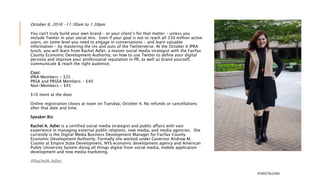
October 6, 2016 -11:30am to 1:30pm
You can't truly build your own brand – or your
client’s for that matter – unless you include Twitter
in your social mix. Even if your goal is not to reach
all 330 million active users, on some level you need
to engage in conversations – and learn valuable
information – by mastering the ins and outs of the
Twitterverse. At the October 6 IPRA lunch, you will
learn from Rachel Adler, a master social media
strategist with the Fairfax County Economic
Development Authority, on how to use Twitter to
define your digital persona and improve your
professional reputation in PR, as well as brand
yourself, communicate & reach the right audience.
Speaker Bio
Rachel A. Adler is a certified social media strategist and public
affairs with vast experience in managing external public relations,
new media, and media agencies. She currently is the Digital Media
Business Development Manager for Fairfax County Economic
Development Authority. Formally she worked under Governor
Andrew M. Cuomo at Empire State Development, NYS economic
development agency and American Public University System doing
all things digital from social media, mobile application #TWEETNLEARN
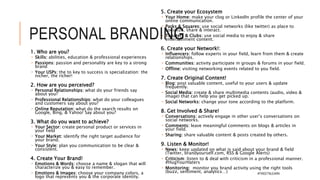
PERSONAL
BRANDING
1. Who are you?
 Skills: abilities, education & professional experiences
 Passions: passion and personality are key to a strong brand
 Your USPs: the to key to success is specialization: the nicher, the richer!
2. How are you perceived?
 Personal Relationships: what do your friends say about you?
 Professional Relationships: what do your colleagues and customers say about you?
 Online Reputation: what do the search results on Google, Bing, & Yahoo! Say about you?
3. What do you want to achieve?
 Your Sector: create personal product or services in your field
 Your Market: identify the right target audience for your brand.
 Your Style: plan you communication to be clear & consistent.
4. Create Your Brand!
 Emotions & Words: choose a name & slogan that will characterize you & easy to remember.
 Emotions & Images: choose your company colors, a logo that represents you & the corporate
identity.
 Emotions & Storytelling: engage in your own story using your bio.
#TWEETNLEARN
5. Create your Ecosystem
 Your Home: make your clog or LinkedIn profile the center of your online communication.
 Parks & Squares: use social networks (like twitter) as place to socialize, share & interact.
 Theaters & Clubs: use social media to enjoy & share entertainment content.
6. Create your Network!:
 Influencers: follow experts in your field, learn from them & create relationships.
 Communities: activity participate in groups & forums in your field.
 Offline: visiting networking events related to you field.
7. Create Original Content!
 Blog: post valuable content, useful to your users & update frequently.
 Social Media: create & share multimedia contents (audio, video & image) that can help you get
picked up.
 Social Networks: change your tone according to the platform.
8. Get Involved & Share!
 Conversations: actively engage in other user’s conversations on social networks.
 Comments: leave meaningful comments on blogs & articles in your field.
 Sharing: share valuable content & posts created by others.
9. Listen & Monitor!
 News: keep updated on what is said about your brand & field (Twitter, brandyourself.com, RSS &
Google Alerts)
 Criticism: listen to & deal with criticism in a professional manner. #HugYourHaters
 Monitoring: monitor you brand activity using the right tools (buzz, sentiment, analytics…)
#TWEETNLEARN
#TWEETNLEARN
WHY TWITTER?
#TWEETNLEARN
#TWEETNLEARN
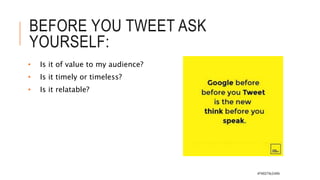
BEFORE YOU TWEET ASK
YOURSELF:
• Is it of value to my audience?
• Is it timely or timeless?
• Is it relatable?
#TWEETNLEARN
HOW TO GROW YOUR
PERSONAL BRAND ON TWITTER
Learn Twitter
Take 1-2 hours to really
deep dive into Twitter
 Resources:
 Getting Started with Twitter:
https://support.twitter.com/articles/
215585 via @Twitter
 Twitter 101: A Beginner's Guide
https://shar.es/1xRrlB via
@socialmedia2day
Set Up Your Profile
Explain what you do and who you are. Be
accurate.
Create a sense of inspiration and excitement.
No one likes to read a boring bio.
Make sure that you’re identifying yourself
with the right niche. If you’re part of an
industry or niche, claim it.
Be open about what you’ve done and/or
accomplished without being too arrogant.
Try to be real. If you truly do love coffee or
beer (cliché statements on Twitter bios), then
you can say so.
Create interest in your lifestyle. Twitter is
about people following people. If you look
boring on Twitter, then no one will follow
you. #TWEETNLEARN
HOW TO GROW YOUR
PERSONAL BRAND ON TWITTER
Be active every day
Tweet Once A Day (Minimum)
And Use At Least Two Hashtags
Tweet About At Least Two
Trends
ACTION: Post regularly, without
taking any breaks from Twitter,
for at least a solid month
 Simply being active on Twitter helps
you get noticed. Don’t let up. Stay on
it.
 People will start following you.
You will get traction.
Follow At Least Two New
People a Day
Be cautious about following too
many people. You don’t want there
to be a huge difference between the
number of people you follow and the
amount who follow you.
Pick One Person From The “Who To
Follow” Tab.
Follow Leaders In Your Industry
Follow The People Whom Industry
Leaders Follow
Follow Back Anyone Who Followed
You #TWEETNLEARN
HOW TO GROW YOUR
PERSONAL BRAND ON TWITTER
Discover & Retweet 2 items a
day
Check Out Your Notifications
Each day, go to your notifications
tab and find out what happened
while you were away. If you
neglect your notifications, you
are neglecting a very critical part
of the whole buzz and
excitement of Twitter.
Favorite Any Conversations
That Have Ended
#TWEETNLEARN
TWITTER STATS:
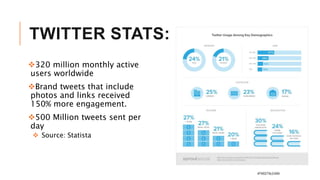
320 million monthly active
users worldwide
Brand tweets that include
photos and links received
150% more engagement.
500 Million tweets sent per
day
 Source: Statista
#TWEETNLEARN
HOW TO BUILD YOUR
TWITTER STEP BY STEP
#TWEETNLEARN
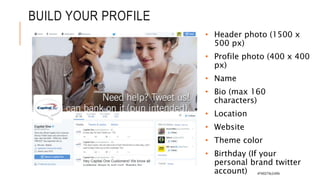
BUILD YOUR PROFILE
• Header photo (1500 x
500 px)
• Profile photo (400 x 400
px)
• Name
• Bio (max 160 characters)
• Location
• Website
• Theme color
• Birthday (If your personal
brand twitter account)
#TWEETNLEARN
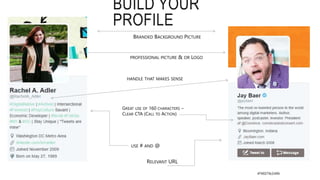
BUILD YOUR
PROFILE
USE # AND @
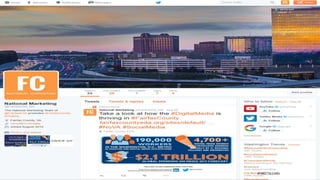
GREAT USE OF 160 CHARACTERS –
CLEAR CTA (CALL TO ACTION)
BRANDED BACKGROUND PICTURE
RELEVANT URL
HANDLE THAT MAKES SENSE
PROFESSIONAL PICTURE & OR LOGO
#TWEETNLEARN
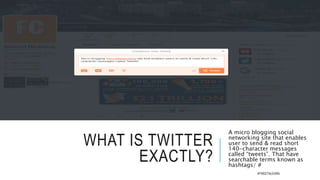
WHAT IS TWITTER
EXACTLY?
A micro blogging social
networking site that enables
user to send & read short
140-character messages
called “tweets”. That have
searchable terms known as
hashtags/ #
#TWEETNLEARN
#TWEETNLEARN
#TWEETNLEARN
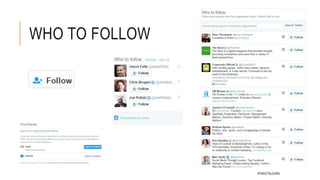
WHO TO FOLLOW
#TWEETNLEARN
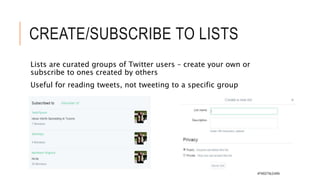
CREATE/SUBSCRIBE TO LISTS
Lists are curated groups of Twitter users – create your own or
subscribe to ones created by others
Useful for reading tweets, not tweeting to a specific group
#TWEETNLEARN
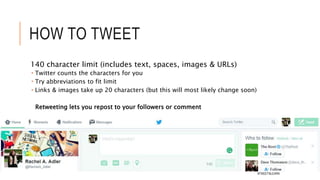
HOW TO TWEET
140 character limit (includes text, spaces, images & URLs)
 Twitter counts the characters for you
 Try abbreviations to fit limit
 Links & images take up 20 characters (but this will most likely change
soon)
Retweeting lets you repost to your followers or comment
#TWEETNLEARN
TWITTER TO STOP COUNTING
PHOTOS AND LINKS IN 140-
CHARACTER LIMIT
The social media company will soon stop counting photos and
links as part of its 140-character limit for messages, according
to a person familiar with the matter. The change could happen
in the next two weeks, said the person who asked not to be
named because the decision isn’t yet public.
Links currently take up 23 characters, even after Twitter
automatically shortens them. The company declined to
comment.
 Source: http://www.bloomberg.com/news/articles/2016-05-16/twitter-to-stop-counting-photos-and-
links-in-140-character-limit
#TWEETNLEARN
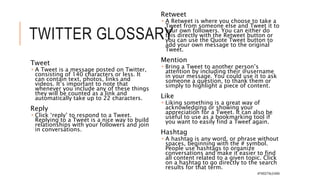
TWITTER GLOSSARY
Tweet
 A Tweet is a message posted on Twitter,
consisting of 140 characters or less. It can
contain text, photos, links and videos. It’s
important to note that whenever you
include any of these things they will be
counted as a link and automatically take
up to 22 characters.
Reply
 Click ‘reply’ to respond to a Tweet.
Replying to a Tweet is a nice way to build
relationships with your followers and join
in conversations.
Retweet
 A Retweet is where you choose to take a
Tweet from someone else and Tweet it to
your own followers. You can either do this
directly with the Retweet button or you can
Mention
 Bring a Tweet to another person’s attention
by including their @username in your
message. You could use it to ask someone a
question, to thank them or simply to
highlight a piece of content.
Like
 Liking something is a great way of
acknowledging or showing your
appreciation for a Tweet. It can also be
useful to use as a bookmarking tool if you
want to easily find a Tweet again.
Hashtag
 A hashtag is any word, or phrase without
spaces, beginning with the # symbol. People
use hashtags to organize conversations and
make it easier to find all content related to a
given topic. Click on a hashtag to go#TWEETNLEARN
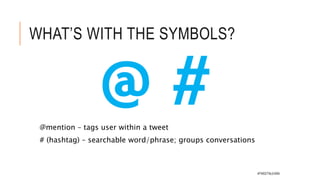
WHAT’S WITH THE SYMBOLS?
@mention – tags user within a tweet
# (hashtag) – searchable word/phrase; groups
conversations
@ #
#TWEETNLEARN
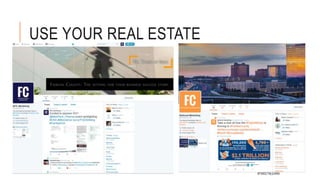
USE YOUR REAL ESTATE
#TWEETNLEARN
CREATE A TWITTER
CONTENT STRATEGY
• Listen &
Observe
• If you see
something, say
something to
the marketing
manager.
• Use the 80/20
rule
• 80% - Our
“customers”
news
• 20% - Our
Content
(Website,#TWEETNLEARN
8 WAYS TO
MAKE YOUR
TWEETS MORE
IMPACTFUL
Know your target audience
 Hint: It’s not everyone. Choose meaningful
keywords for your industry, and create lists
of Twitter users with them in their bio. Watch
these users’ tweets.
Talk with them, not at them
 Twitter is a giant chat room. Most people are
there for conversation, jokes, or education.
You can’t treat Twitter like free advertising.
Tip: Way less than half of your tweets should
be self-promotion.
Add calls-to-action
 “Help,” “retweet,” “please,” “how to,” and
“follow” are among the most retweeted
words. Ask followers for a retweet, or to tag a
friend. Include links and prompt followers to
read more. This extends your reach far
beyond your own followers.
Realize less is not more
 70-100 characters is the sweet spot on
#TWEETNLEARN
8 WAYS TO
MAKE YOUR
TWEETS
MORE
IMPACTFUL
Use relevant hashtags
 Identify relevant hashtags and leverage them to
your advantage. Don’t try to piggyback on
irrelevant hashtags; you’ll look foolish.
Know when to tweet
 Your audience isn’t online all the time. Use tools
like Audiense, Hootsuite, and Mention to find out
when your target audience is engaged. When you
tweet makes a huge difference.
Use images
 Pictures have been shown to triple the rate of
retweets, and nearly double the rate of likes. They
also maximize your real estate in a user’s feed.
Tip: ‘Quote pictures’ are a great source of
universal content
 www.CANVA.com (Will become your BFF)
Be personal
 Address users by name, using a conversational
tone. Don’t tweet like a robot. This is social#TWEETNLEARN
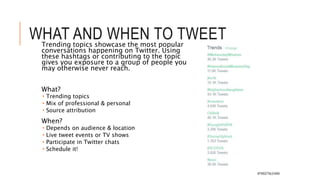
WHAT AND WHEN TO TWEET
Trending topics showcase the most
popular conversations happening on
Twitter. Using these hashtags or
contributing to the topic gives you
exposure to a group of people you
may otherwise never reach.
What?
 Trending topics
 Mix of professional & personal
 Source attribution
When?
 Depends on audience & location
 Live tweet events or TV shows
 Participate in Twitter chats
 Schedule it!
#TWEETNLEARN
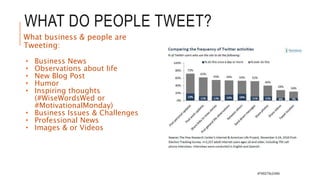
WHAT DO PEOPLE TWEET?
What business & people are
Tweeting:
• Business News
• Observations about life
• New Blog Post
• Humor
• Inspiring thoughts
(#WiseWordsWed or
#MotivationalMonday)
• Business Issues & Challenges
• Professional News
• Images & or Videos
#TWEETNLEARN
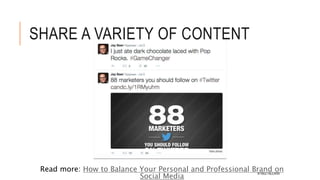
SHARE A VARIETY OF
CONTENT
Read more: How to Balance Your Personal and Professional Brand on
Social Media
#TWEETNLEARN
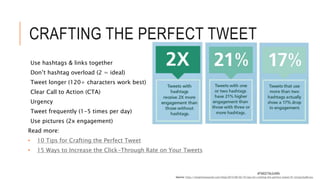
CRAFTING THE PERFECT
TWEET
Use hashtags & links together
Don’t hashtag overload (2 = ideal)
Tweet longer (120+ characters work best)
Clear Call to Action (CTA)
Urgency
Tweet frequently (1-5 times per day)
Use pictures (2x engagement)
Read more:
• 10 Tips for Crafting the Perfect Tweet
• 15 Ways to Increase the Click-Through Rate on Your Tweets
Source: http://simplymeasured.com/blog/2014/06/02/10-tips-for-crafting-the-perfect-tweet/#i.1q1qnz3yd6cvsu
#TWEETNLEARN
EXAMPLE STRATEGY
Monday Motivation &
Promotion
 Events
 Industry Spotlight (Leaders =
quotes)
Tuesday
 Behind the scenes
 Reaching out to prospects
Wed
 Helpful Tips
 Reaching out to prospects for
Thursday
 Customer spotlight
 Reaching out prospects
Friday
 Fairfax Friday's
#FairfaxFriday
 #FF: Follow Friday
#TWEETNLEARN
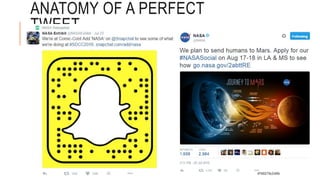
ANATOMY OF A PERFECT TWEET
#TWEETNLEARN
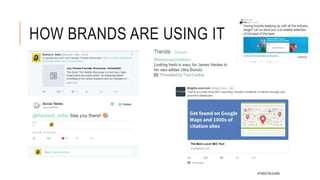
HOW BRANDS ARE USING IT
#TWEETNLEARN
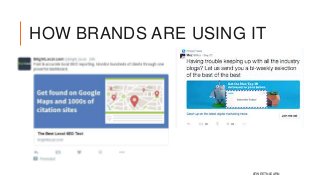
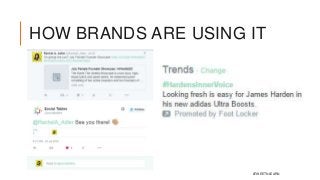
HOW BRANDS ARE USING IT
#TWEETNLEARN
Questions?
#TWEETNLEARN

#TweetNLearn: Creating your Digital Persona on Twitter

  • 1.
    #TWEETNLEARN: CREATING A DIGITAL PERSONAON TWITTER By Rachel A. Adler Business Development Manager #TWEETNLEARN
  • 2.
    October 6, 2016-11:30am to 1:30pm You can't truly build your own brand – or your client’s for that matter – unless you include Twitter in your social mix. Even if your goal is not to reach all 330 million active users, on some level you need to engage in conversations – and learn valuable information – by mastering the ins and outs of the Twitterverse. At the October 6 IPRA lunch, you will learn from Rachel Adler, a master social media strategist with the Fairfax County Economic Development Authority, on how to use Twitter to define your digital persona and improve your professional reputation in PR, as well as brand yourself, communicate & reach the right audience. Speaker Bio Rachel A. Adler is a certified social media strategist and public affairs with vast experience in managing external public relations, new media, and media agencies. She currently is the Digital Media Business Development Manager for Fairfax County Economic Development Authority. Formally she worked under Governor Andrew M. Cuomo at Empire State Development, NYS economic development agency and American Public University System doing all things digital from social media, mobile application #TWEETNLEARN
  • 3.
    PERSONAL BRANDING 1. Who areyou?  Skills: abilities, education & professional experiences  Passions: passion and personality are key to a strong brand  Your USPs: the to key to success is specialization: the nicher, the richer! 2. How are you perceived?  Personal Relationships: what do your friends say about you?  Professional Relationships: what do your colleagues and customers say about you?  Online Reputation: what do the search results on Google, Bing, & Yahoo! Say about you? 3. What do you want to achieve?  Your Sector: create personal product or services in your field  Your Market: identify the right target audience for your brand.  Your Style: plan you communication to be clear & consistent. 4. Create Your Brand!  Emotions & Words: choose a name & slogan that will characterize you & easy to remember.  Emotions & Images: choose your company colors, a logo that represents you & the corporate identity.  Emotions & Storytelling: engage in your own story using your bio. #TWEETNLEARN
  • 4.
    5. Create yourEcosystem  Your Home: make your clog or LinkedIn profile the center of your online communication.  Parks & Squares: use social networks (like twitter) as place to socialize, share & interact.  Theaters & Clubs: use social media to enjoy & share entertainment content. 6. Create your Network!:  Influencers: follow experts in your field, learn from them & create relationships.  Communities: activity participate in groups & forums in your field.  Offline: visiting networking events related to you field. 7. Create Original Content!  Blog: post valuable content, useful to your users & update frequently.  Social Media: create & share multimedia contents (audio, video & image) that can help you get picked up.  Social Networks: change your tone according to the platform. 8. Get Involved & Share!  Conversations: actively engage in other user’s conversations on social networks.  Comments: leave meaningful comments on blogs & articles in your field.  Sharing: share valuable content & posts created by others. 9. Listen & Monitor!  News: keep updated on what is said about your brand & field (Twitter, brandyourself.com, RSS & Google Alerts)  Criticism: listen to & deal with criticism in a professional manner. #HugYourHaters  Monitoring: monitor you brand activity using the right tools (buzz, sentiment, analytics…) #TWEETNLEARN
  • 5.
  • 6.
  • 7.
  • 8.
    BEFORE YOU TWEETASK YOURSELF: • Is it of value to my audience? • Is it timely or timeless? • Is it relatable? #TWEETNLEARN
  • 9.
    HOW TO GROWYOUR PERSONAL BRAND ON TWITTER Learn Twitter Take 1-2 hours to really deep dive into Twitter  Resources:  Getting Started with Twitter: https://support.twitter.com/articles/ 215585 via @Twitter  Twitter 101: A Beginner's Guide https://shar.es/1xRrlB via @socialmedia2day Set Up Your Profile Explain what you do and who you are. Be accurate. Create a sense of inspiration and excitement. No one likes to read a boring bio. Make sure that you’re identifying yourself with the right niche. If you’re part of an industry or niche, claim it. Be open about what you’ve done and/or accomplished without being too arrogant. Try to be real. If you truly do love coffee or beer (cliché statements on Twitter bios), then you can say so. Create interest in your lifestyle. Twitter is about people following people. If you look boring on Twitter, then no one will follow you. #TWEETNLEARN
  • 10.
    HOW TO GROWYOUR PERSONAL BRAND ON TWITTER Be active every day Tweet Once A Day (Minimum) And Use At Least Two Hashtags Tweet About At Least Two Trends ACTION: Post regularly, without taking any breaks from Twitter, for at least a solid month  Simply being active on Twitter helps you get noticed. Don’t let up. Stay on it.  People will start following you. You will get traction. Follow At Least Two New People a Day Be cautious about following too many people. You don’t want there to be a huge difference between the number of people you follow and the amount who follow you. Pick One Person From The “Who To Follow” Tab. Follow Leaders In Your Industry Follow The People Whom Industry Leaders Follow Follow Back Anyone Who Followed You #TWEETNLEARN
  • 11.
    HOW TO GROWYOUR PERSONAL BRAND ON TWITTER Discover & Retweet 2 items a day Check Out Your Notifications Each day, go to your notifications tab and find out what happened while you were away. If you neglect your notifications, you are neglecting a very critical part of the whole buzz and excitement of Twitter. Favorite Any Conversations That Have Ended #TWEETNLEARN
  • 12.
    TWITTER STATS: 320 millionmonthly active users worldwide Brand tweets that include photos and links received 150% more engagement. 500 Million tweets sent per day  Source: Statista #TWEETNLEARN
  • 13.
    HOW TO BUILDYOUR TWITTER STEP BY STEP #TWEETNLEARN
  • 14.
    BUILD YOUR PROFILE •Header photo (1500 x 500 px) • Profile photo (400 x 400 px) • Name • Bio (max 160 characters) • Location • Website • Theme color • Birthday (If your personal brand twitter account) #TWEETNLEARN
  • 15.
    BUILD YOUR PROFILE USE #AND @ GREAT USE OF 160 CHARACTERS – CLEAR CTA (CALL TO ACTION) BRANDED BACKGROUND PICTURE RELEVANT URL HANDLE THAT MAKES SENSE PROFESSIONAL PICTURE & OR LOGO #TWEETNLEARN
  • 16.
    WHAT IS TWITTER EXACTLY? Amicro blogging social networking site that enables user to send & read short 140-character messages called “tweets”. That have searchable terms known as hashtags/ # #TWEETNLEARN
  • 17.
  • 18.
  • 19.
  • 20.
    CREATE/SUBSCRIBE TO LISTS Listsare curated groups of Twitter users – create your own or subscribe to ones created by others Useful for reading tweets, not tweeting to a specific group #TWEETNLEARN
  • 21.
    HOW TO TWEET 140character limit (includes text, spaces, images & URLs)  Twitter counts the characters for you  Try abbreviations to fit limit  Links & images take up 20 characters (but this will most likely change soon) Retweeting lets you repost to your followers or comment #TWEETNLEARN
  • 22.
    TWITTER TO STOPCOUNTING PHOTOS AND LINKS IN 140- CHARACTER LIMIT The social media company will soon stop counting photos and links as part of its 140-character limit for messages, according to a person familiar with the matter. The change could happen in the next two weeks, said the person who asked not to be named because the decision isn’t yet public. Links currently take up 23 characters, even after Twitter automatically shortens them. The company declined to comment.  Source: http://www.bloomberg.com/news/articles/2016-05-16/twitter-to-stop-counting-photos-and- links-in-140-character-limit #TWEETNLEARN
  • 23.
    TWITTER GLOSSARY Tweet  ATweet is a message posted on Twitter, consisting of 140 characters or less. It can contain text, photos, links and videos. It’s important to note that whenever you include any of these things they will be counted as a link and automatically take up to 22 characters. Reply  Click ‘reply’ to respond to a Tweet. Replying to a Tweet is a nice way to build relationships with your followers and join in conversations. Retweet  A Retweet is where you choose to take a Tweet from someone else and Tweet it to your own followers. You can either do this directly with the Retweet button or you can Mention  Bring a Tweet to another person’s attention by including their @username in your message. You could use it to ask someone a question, to thank them or simply to highlight a piece of content. Like  Liking something is a great way of acknowledging or showing your appreciation for a Tweet. It can also be useful to use as a bookmarking tool if you want to easily find a Tweet again. Hashtag  A hashtag is any word, or phrase without spaces, beginning with the # symbol. People use hashtags to organize conversations and make it easier to find all content related to a given topic. Click on a hashtag to go#TWEETNLEARN
  • 24.
    WHAT’S WITH THESYMBOLS? @mention – tags user within a tweet # (hashtag) – searchable word/phrase; groups conversations @ # #TWEETNLEARN
  • 25.
    USE YOUR REALESTATE #TWEETNLEARN
  • 26.
    CREATE A TWITTER CONTENTSTRATEGY • Listen & Observe • If you see something, say something to the marketing manager. • Use the 80/20 rule • 80% - Our “customers” news • 20% - Our Content (Website,#TWEETNLEARN
  • 27.
    8 WAYS TO MAKEYOUR TWEETS MORE IMPACTFUL Know your target audience  Hint: It’s not everyone. Choose meaningful keywords for your industry, and create lists of Twitter users with them in their bio. Watch these users’ tweets. Talk with them, not at them  Twitter is a giant chat room. Most people are there for conversation, jokes, or education. You can’t treat Twitter like free advertising. Tip: Way less than half of your tweets should be self-promotion. Add calls-to-action  “Help,” “retweet,” “please,” “how to,” and “follow” are among the most retweeted words. Ask followers for a retweet, or to tag a friend. Include links and prompt followers to read more. This extends your reach far beyond your own followers. Realize less is not more  70-100 characters is the sweet spot on #TWEETNLEARN
  • 28.
    8 WAYS TO MAKEYOUR TWEETS MORE IMPACTFUL Use relevant hashtags  Identify relevant hashtags and leverage them to your advantage. Don’t try to piggyback on irrelevant hashtags; you’ll look foolish. Know when to tweet  Your audience isn’t online all the time. Use tools like Audiense, Hootsuite, and Mention to find out when your target audience is engaged. When you tweet makes a huge difference. Use images  Pictures have been shown to triple the rate of retweets, and nearly double the rate of likes. They also maximize your real estate in a user’s feed. Tip: ‘Quote pictures’ are a great source of universal content  www.CANVA.com (Will become your BFF) Be personal  Address users by name, using a conversational tone. Don’t tweet like a robot. This is social#TWEETNLEARN
  • 29.
    WHAT AND WHENTO TWEET Trending topics showcase the most popular conversations happening on Twitter. Using these hashtags or contributing to the topic gives you exposure to a group of people you may otherwise never reach. What?  Trending topics  Mix of professional & personal  Source attribution When?  Depends on audience & location  Live tweet events or TV shows  Participate in Twitter chats  Schedule it! #TWEETNLEARN
  • 30.
    WHAT DO PEOPLETWEET? What business & people are Tweeting: • Business News • Observations about life • New Blog Post • Humor • Inspiring thoughts (#WiseWordsWed or #MotivationalMonday) • Business Issues & Challenges • Professional News • Images & or Videos #TWEETNLEARN
  • 31.
    SHARE A VARIETYOF CONTENT Read more: How to Balance Your Personal and Professional Brand on Social Media #TWEETNLEARN
  • 32.
    CRAFTING THE PERFECT TWEET Usehashtags & links together Don’t hashtag overload (2 = ideal) Tweet longer (120+ characters work best) Clear Call to Action (CTA) Urgency Tweet frequently (1-5 times per day) Use pictures (2x engagement) Read more: • 10 Tips for Crafting the Perfect Tweet • 15 Ways to Increase the Click-Through Rate on Your Tweets Source: http://simplymeasured.com/blog/2014/06/02/10-tips-for-crafting-the-perfect-tweet/#i.1q1qnz3yd6cvsu #TWEETNLEARN
  • 33.
    EXAMPLE STRATEGY Monday Motivation& Promotion  Events  Industry Spotlight (Leaders = quotes) Tuesday  Behind the scenes  Reaching out to prospects Wed  Helpful Tips  Reaching out to prospects for Thursday  Customer spotlight  Reaching out prospects Friday  Fairfax Friday's #FairfaxFriday  #FF: Follow Friday #TWEETNLEARN
  • 34.
    ANATOMY OF APERFECT TWEET #TWEETNLEARN
  • 35.
    HOW BRANDS AREUSING IT #TWEETNLEARN
  • 36.
    HOW BRANDS AREUSING IT #TWEETNLEARN
  • 37.

Editor's Notes

  • #4 Brands often expect their websites to handle virtually every aspect of the customer life cycle: attract, inform, convert, transact, support and engender. That’s a lot of work for a site, and this is only a partial list. Brand Strategy Websites matter, and your website is part of the conversation, but the business/brand strategy matters more. Your brand no longer needs to convey brand essence in every customer interaction, but rather become part of their life, their friends’ lives, the communities they know, places they go and things they love. That’s not easy to do, but if you have a brand strategy, the quest to solve this problem becomes tangible. Before you build a new online destination, you need to build strategy around what your customer really needs and where else they’ll be hanging out. Here are a few Key Components to creating brand strategy: Identify or define your most important customers. Discover what motivates your customers and what could cause them to choose your brand over your competitor’s brands. Develop brand messaging (including an elevator speech). Reinforce your brand’s promise at each point of customer contact. Measure the ongoing equity of the brand and make adjustments as necessary.
  • #5 Brands often expect their websites to handle virtually every aspect of the customer life cycle: attract, inform, convert, transact, support and engender. That’s a lot of work for a site, and this is only a partial list. Brand Strategy Websites matter, and your website is part of the conversation, but the business/brand strategy matters more. Your brand no longer needs to convey brand essence in every customer interaction, but rather become part of their life, their friends’ lives, the communities they know, places they go and things they love. That’s not easy to do, but if you have a brand strategy, the quest to solve this problem becomes tangible. Before you build a new online destination, you need to build strategy around what your customer really needs and where else they’ll be hanging out. Here are a few Key Components to creating brand strategy: Identify or define your most important customers. Discover what motivates your customers and what could cause them to choose your brand over your competitor’s brands. Develop brand messaging (including an elevator speech). Reinforce your brand’s promise at each point of customer contact. Measure the ongoing equity of the brand and make adjustments as necessary.
  • #15 Your Twitter bio is your personal brand’s elevator pitch.
  • #20 Who to follow appears on the right side of your timeline Click through to searchable area Find friends also available under Settings Verified account – blue check mark indicates an authentic identity https://support.twitter.com/articles/119135-faqs-about-verified-accounts