Beyond	
  Survival:	
  	
  
Explore,	
  Develop	
  and	
  Strengthen	
  
Your	
  Twi;er	
  Skills	
  	
  
for	
  Marke@ng	
  Success	
  
Rachel Lawley
@Rachel_Lawley
TSAE Education Day October 19, 2011
What	
  is	
  Twi;er	
  
•  Twitter.com: “Twitter is an information network.
Millions of people, organizations, and
businesses use it to discover and share new
information.”
•  About.com: “Social messaging, news reporting,
social media marketing, and microblogging”
What	
  is	
  Twi;er	
  
•  What Rachel thinks it is:
An efficient, online, free tool used to communicate, learn,
share information and network while serving as a key
medium to integrate all aspects of marketing campaigns
and goals.
It offers a new dimension of customer service.
A quick and easy connection to your interests and
prospects on the Internet.
What	
  Can	
  Twi;er	
  Offer	
  
•  Real-time way to communicate
•  Networking opportunities not possible through sites that restrict you
to “likes,” “networks,” etc.
•  Learn from mentors, authors, community and industry leaders,
and peers
•  Stay current on news and events
•  Communicate timely news and information
•  Connect with influential and key people
•  Create and deepen relationships
•  Research
•  Viral marketing - promote charities and businesses through goodwill
It’s incredible what you can learn, teach and share
in 140 characters!
Why	
  Are	
  You	
  Twee@ng?	
  
•  Whether personal or business, know your
purpose
•  Business:
o  Goals
o  Topics
o  Social media plan
o  Social media policies
•  For anything posted about your business
•  Internal / Staff
•  Personal:
o  What do you offer that your business account
doesn’t?
Jump	
  In	
  
Get Your Flight Plan Ready
Basic	
  Twi;er	
  Glossary	
  
•  Tweet: a post using 140 characters or less, sometimes referred to as “post”
•  Handle: your name / username
•  Mention: when you use a handle in a tweet preceded with the @ symbol
•  @: use this to mention a user, this also makes the handle a link to that profile
•  Retweet: when a tweet by another user is forwarded or re-posted, reaching a new set
of followers
•  Message or DM: a direct message is a 140 character private message to a user who
follows you
•  # (Hashtag): place before a keyword or phrase to categorize or label your tweet
•  Follow: to subscribe to read someone’s tweets
•  Followers: the number of twitter users subscribed to your feed
•  Following: the number of twitter users you subscribed to, these tweets will appear in
your feed
•  List: group of twitter users; group by topic, interest, location of users choice
Get	
  Started	
  
Or	
  to	
  Refresh	
  Yourself	
  
•  Handle
o  Easy to remember, distinctive, descriptive
o  Short
o  Easy for people to recall
•  Account tab:
o  Tweet privacy
o  Notices
•  Profile tab:
o  Bio
•  160 characters to introduce yourself
•  If personal, perhaps don’t list your job
o  Website
o  Picture / Logo
o  Post to Facebook – let’s discuss
•  Design tab
Find	
  Good	
  Tweeps	
  
Stay true to your plan and goals
•  Who to follow:
o  Peers
o  Industry experts
o  Associations, societies, organizations
o  Mentors
o  Authors
o  Those you enjoy learning from
o  Relevant media
•  See who Twitter suggests
•  Check out people’s lists
•  Wefollow.com
•  Tweettop.com
•  JustTweetIt.com
A	
  Few	
  Neat	
  Tweeps	
  
•  Local / Networking
o  @TallySAE
o  @FSAE
o  @FreshfromFlorida
•  Social media & business
o  @Mashable
o  @OPENForum
o  @smexaminer
o  @oneforty
Find	
  Prospects:	
  Digging	
  Deeper	
  	
  
•  Search.twitter.com – review the operators
•  Search for people using your keywords
•  What are your competitors talking about? More
importantly, what are Tweeps talking about with
your competitors?
Find	
  a	
  Twi;er	
  Client	
  
(Dashboard,	
  Browser)	
  
•  Several Twitter browsers to chose from
o  Play around - use what works for you
•  Top five from TopTenReviews.com’s “Twitter Client
Review”
o  Seesmic
o  HootSuite
o  Twitter
o  TweetDeck
o  Mixero
•  ArgyleSocial.com - $$, marketing campaign tracking
•  Check oneforty.com for options, tools and more
Time	
  to	
  Tweet!	
  
Get Your Chirp Ready
Twee@ng	
  
•  Stick to your strategies, goals, and SM and
marketing plans
•  Keep it under 140
o  Shorten your links
o  Leave room for others to RT you
•  Keep in interesting: mix it up
o  News
o  Local Info / Updates / Events
o  Your events & things related to your event
o  Random, funny thoughts & observations
o  Causes you believe in and/or support
o  Blog posts
Twee@ng	
  
•  Respond
•  Share behind the scenes
•  Ask to learn, value your member
•  Reward with special offers, contests,
advanced knowledge
•  Exhibit leadership, industry experience
•  Recognize and reply
Twee@ng	
  
•  Be true to yourself and your brand
o  Consider how much personality you want
o  Be yourself
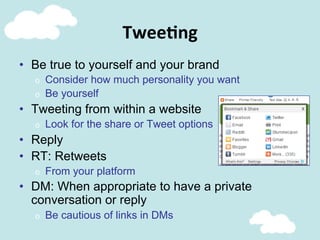
•  Tweeting from within a website
o  Look for the share or Tweet options
•  Reply
•  RT: Retweets
o  From your platform
•  DM: When appropriate to have a private
conversation or reply
o  Be cautious of links in DMs
Do	
  More	
  Than	
  
Tweet,	
  Read,	
  ReTweet	
  
Feather Fluffing
Tweet	
  with	
  Meaning…and	
  Manners	
  
•  Think of the 5 stages of customer buying behavior
o  Perceiving a need
o  Seeking value
o  Assessing value
o  Buying value
o  Value in use
•  This is an example of your customer service
o  How would you handle compliments, complaints,
suggestions, introductions in face-to-face situations
o  When ReTweeting, add comments
o  Say “thanks,” “you’re welcome” and “welcome”
•  Don’t just push your sales information
o  Don’t be a used car salesman: “I’m great, look at me!”
Link	
  Wisely	
  
•  Follow your integrated plan and link to:
o  your website
o  your other SM platforms
o  brochures and other online publications
o  the most direct landing page that provides the information
•  Are you sending followers somewhere useful?
•  Does it make sense with your post?
•  Always make sure your links are working and relevant
o  Make sure your links are not password protected, members-only,
etc.
•  Don’t ReTweet blindly – read what you’re linking to
Use	
  Hashtags	
  Wisely	
  
•  Online chat sessions: #assnchat
•  Live events, conferences: #TallySAE
•  Don’t over-use
•  Search
•  Create lists
•  Common #s
o  #FF – why you recommend them
o  #FB
o  #TallySAE
•  Play around on hashtags.org
When	
  to	
  Tweet	
  
•  Pick the times of day that work for you
•  Integrate into your marketing plan
o  Your customers’ buying schedule
o  How far out to promote events
•  Think about what you’re promoting
•  Recurring event? Tweet during this one to get
interest in the next one.
•  Buffer.com
•  Timely.is
Schedule	
  Your	
  Tweets	
  
•  Outline a strategy
o  Timeline for starting/ending tweets
o  What will you schedule vs. live tweet
o  How often will you incorporate “live” tweets?
o  Handling mentions & ReTweets
•  Schedule tweets using clients and sites like
Co-Tweet, FutureTweets
•  Twitter is about instant communication, so
balance wisely
o  Maybe only time generic messages like quotes,
announcements, events, posts you like
Promote	
  with	
  Purpose	
  
•  Promote without being tacky –
what interests your audience?
o  Meetings, speakers
o  Books, news
o  Local events
o  Contests
•  Good examples:
o  @BrknHrtsFL
o  @FreshfromFlorida
o  @FLStateParks
o  @VisitFlorida
o  @BagelHeads
o  @aflacduck
•  Remember: enthusiasm is contagious!
Stay	
  On	
  Top	
  
of	
  Your	
  Twi;er	
  Experience	
  
Keep a Bird’s Eye View
Who’s	
  Following	
  You	
  
•  Keep an eye on your followers
o  Clean
o  Active
o  Different beliefs on “unfollow”
•  Watch out for creeps
•  Use tools to help clean your follow list
Clean Up
o  Twitoria
o  FriendorFollow
o  TheTwitCleaner
o  UnTweeps
Tracking and Analytics
o  Twitalyzer
o  TweetStats
o  Klout
o  TweetGrader
o  Don’t forget the
analytics tools in the
clients like HooteSuite
and through bit.ly
Manage	
  Your	
  Account	
  
	
  Clean,	
  Organize,	
  Learn	
  the	
  Effects	
  
Read	
  More	
  About	
  It…	
  
•  Good resources:
o  Amex Open Forum:
www.openforum.com
o  Mashable:
mashable.com
o  Blog Hubspot:
blog.hubspot.com
o  Social Media Examiner:
www.socialmediaexaminer.com
Thank	
  you	
  &	
  	
  
have	
  fun!	
  
Rachel Lawley
@Rachel_Lawley
lawleyrs@gmail.com

Twitter2011EdDay

  • 1.
    Beyond  Survival:     Explore,  Develop  and  Strengthen   Your  Twi;er  Skills     for  Marke@ng  Success   Rachel Lawley @Rachel_Lawley TSAE Education Day October 19, 2011
  • 2.
    What  is  Twi;er   •  Twitter.com: “Twitter is an information network. Millions of people, organizations, and businesses use it to discover and share new information.” •  About.com: “Social messaging, news reporting, social media marketing, and microblogging”
  • 3.
    What  is  Twi;er   •  What Rachel thinks it is: An efficient, online, free tool used to communicate, learn, share information and network while serving as a key medium to integrate all aspects of marketing campaigns and goals. It offers a new dimension of customer service. A quick and easy connection to your interests and prospects on the Internet.
  • 4.
    What  Can  Twi;er  Offer   •  Real-time way to communicate •  Networking opportunities not possible through sites that restrict you to “likes,” “networks,” etc. •  Learn from mentors, authors, community and industry leaders, and peers •  Stay current on news and events •  Communicate timely news and information •  Connect with influential and key people •  Create and deepen relationships •  Research •  Viral marketing - promote charities and businesses through goodwill It’s incredible what you can learn, teach and share in 140 characters!
  • 5.
    Why  Are  You  Twee@ng?   •  Whether personal or business, know your purpose •  Business: o  Goals o  Topics o  Social media plan o  Social media policies •  For anything posted about your business •  Internal / Staff •  Personal: o  What do you offer that your business account doesn’t?
  • 6.
    Jump  In   GetYour Flight Plan Ready
  • 7.
    Basic  Twi;er  Glossary   •  Tweet: a post using 140 characters or less, sometimes referred to as “post” •  Handle: your name / username •  Mention: when you use a handle in a tweet preceded with the @ symbol •  @: use this to mention a user, this also makes the handle a link to that profile •  Retweet: when a tweet by another user is forwarded or re-posted, reaching a new set of followers •  Message or DM: a direct message is a 140 character private message to a user who follows you •  # (Hashtag): place before a keyword or phrase to categorize or label your tweet •  Follow: to subscribe to read someone’s tweets •  Followers: the number of twitter users subscribed to your feed •  Following: the number of twitter users you subscribed to, these tweets will appear in your feed •  List: group of twitter users; group by topic, interest, location of users choice
  • 8.
    Get  Started   Or  to  Refresh  Yourself   •  Handle o  Easy to remember, distinctive, descriptive o  Short o  Easy for people to recall •  Account tab: o  Tweet privacy o  Notices •  Profile tab: o  Bio •  160 characters to introduce yourself •  If personal, perhaps don’t list your job o  Website o  Picture / Logo o  Post to Facebook – let’s discuss •  Design tab
  • 9.
    Find  Good  Tweeps   Stay true to your plan and goals •  Who to follow: o  Peers o  Industry experts o  Associations, societies, organizations o  Mentors o  Authors o  Those you enjoy learning from o  Relevant media •  See who Twitter suggests •  Check out people’s lists •  Wefollow.com •  Tweettop.com •  JustTweetIt.com
  • 10.
    A  Few  Neat  Tweeps   •  Local / Networking o  @TallySAE o  @FSAE o  @FreshfromFlorida •  Social media & business o  @Mashable o  @OPENForum o  @smexaminer o  @oneforty
  • 11.
    Find  Prospects:  Digging  Deeper     •  Search.twitter.com – review the operators •  Search for people using your keywords •  What are your competitors talking about? More importantly, what are Tweeps talking about with your competitors?
  • 12.
    Find  a  Twi;er  Client   (Dashboard,  Browser)   •  Several Twitter browsers to chose from o  Play around - use what works for you •  Top five from TopTenReviews.com’s “Twitter Client Review” o  Seesmic o  HootSuite o  Twitter o  TweetDeck o  Mixero •  ArgyleSocial.com - $$, marketing campaign tracking •  Check oneforty.com for options, tools and more
  • 13.
    Time  to  Tweet!   Get Your Chirp Ready
  • 14.
    Twee@ng   •  Stickto your strategies, goals, and SM and marketing plans •  Keep it under 140 o  Shorten your links o  Leave room for others to RT you •  Keep in interesting: mix it up o  News o  Local Info / Updates / Events o  Your events & things related to your event o  Random, funny thoughts & observations o  Causes you believe in and/or support o  Blog posts
  • 15.
    Twee@ng   •  Respond • Share behind the scenes •  Ask to learn, value your member •  Reward with special offers, contests, advanced knowledge •  Exhibit leadership, industry experience •  Recognize and reply
  • 16.
    Twee@ng   •  Betrue to yourself and your brand o  Consider how much personality you want o  Be yourself •  Tweeting from within a website o  Look for the share or Tweet options •  Reply •  RT: Retweets o  From your platform •  DM: When appropriate to have a private conversation or reply o  Be cautious of links in DMs
  • 17.
    Do  More  Than   Tweet,  Read,  ReTweet   Feather Fluffing
  • 18.
    Tweet  with  Meaning…and  Manners   •  Think of the 5 stages of customer buying behavior o  Perceiving a need o  Seeking value o  Assessing value o  Buying value o  Value in use •  This is an example of your customer service o  How would you handle compliments, complaints, suggestions, introductions in face-to-face situations o  When ReTweeting, add comments o  Say “thanks,” “you’re welcome” and “welcome” •  Don’t just push your sales information o  Don’t be a used car salesman: “I’m great, look at me!”
  • 19.
    Link  Wisely   • Follow your integrated plan and link to: o  your website o  your other SM platforms o  brochures and other online publications o  the most direct landing page that provides the information •  Are you sending followers somewhere useful? •  Does it make sense with your post? •  Always make sure your links are working and relevant o  Make sure your links are not password protected, members-only, etc. •  Don’t ReTweet blindly – read what you’re linking to
  • 20.
    Use  Hashtags  Wisely   •  Online chat sessions: #assnchat •  Live events, conferences: #TallySAE •  Don’t over-use •  Search •  Create lists •  Common #s o  #FF – why you recommend them o  #FB o  #TallySAE •  Play around on hashtags.org
  • 21.
    When  to  Tweet   •  Pick the times of day that work for you •  Integrate into your marketing plan o  Your customers’ buying schedule o  How far out to promote events •  Think about what you’re promoting •  Recurring event? Tweet during this one to get interest in the next one. •  Buffer.com •  Timely.is
  • 22.
    Schedule  Your  Tweets   •  Outline a strategy o  Timeline for starting/ending tweets o  What will you schedule vs. live tweet o  How often will you incorporate “live” tweets? o  Handling mentions & ReTweets •  Schedule tweets using clients and sites like Co-Tweet, FutureTweets •  Twitter is about instant communication, so balance wisely o  Maybe only time generic messages like quotes, announcements, events, posts you like
  • 23.
    Promote  with  Purpose   •  Promote without being tacky – what interests your audience? o  Meetings, speakers o  Books, news o  Local events o  Contests •  Good examples: o  @BrknHrtsFL o  @FreshfromFlorida o  @FLStateParks o  @VisitFlorida o  @BagelHeads o  @aflacduck •  Remember: enthusiasm is contagious!
  • 24.
    Stay  On  Top   of  Your  Twi;er  Experience   Keep a Bird’s Eye View
  • 25.
    Who’s  Following  You   •  Keep an eye on your followers o  Clean o  Active o  Different beliefs on “unfollow” •  Watch out for creeps •  Use tools to help clean your follow list
  • 26.
    Clean Up o  Twitoria o FriendorFollow o  TheTwitCleaner o  UnTweeps Tracking and Analytics o  Twitalyzer o  TweetStats o  Klout o  TweetGrader o  Don’t forget the analytics tools in the clients like HooteSuite and through bit.ly Manage  Your  Account    Clean,  Organize,  Learn  the  Effects  
  • 27.
    Read  More  About  It…   •  Good resources: o  Amex Open Forum: www.openforum.com o  Mashable: mashable.com o  Blog Hubspot: blog.hubspot.com o  Social Media Examiner: www.socialmediaexaminer.com
  • 28.
    Thank  you  &     have  fun!   Rachel Lawley @Rachel_Lawley lawleyrs@gmail.com