Let's Get Social:
    Social Media 201 for
Public Health Professionals
             May 11, 2012
            Plymouth, MA

      Presented by David Crowley
       www.davidbcrowley.com
Your hopes for this workshop?
Agenda
Benefits of social media
platforms
Planning for social
success
Facebook hands on
Twitter hands on
What brings me here…

Connecting people to community info key to
Social Capital Inc. (SCI) mission.
Using technology to engage people has been key
to our work.
Early evidence that social media can strengthen
relationships.
We’ve had some success…
SCI & David on Social Media
@socialcap 3869 followers (400 new past 4 months);
@cookingchat 1053 @davidbcrowley 508
713 LinkedIn Connections
327“likes” on Facebook (socialcapital)
715 have circled davidbcrowley on Google+ since July launch,
1072 following SCI on G+ since pages launched in Nov.
Over 12,000 unique visitors to our websites every month
Klout score=56
Have recruited volunteers & applicants for positions, gotten a
job for an alum, reached new donors, increased web traffic…
Facebook benefits
900+ billion users!
Leverages existing social ties (and relationships
your org has)
Visual appeal
Ease of use (especially for the basics needs of a
typical user)
Top demographics on Facebook:
       1) 21- 24 yr olds
       2) 18- 20 yr olds
       3) 35- 44 yr olds

source http://adage.com/article/adagestat/demographics-facebook-linkedin-myspace-twitter/227569/
       http://adage.com/article/adagestat/demographics- facebook- linkedin- myspace-
Cautions re: Facebook
Based on friend relationships; not as open to
reaching general public as other platforms
Page engagement drop since timelines.
The typical Facebook page post only gets into
16% of newsfeeds.
  Strategy & work required to do better than 16%!
Basic use fairly easy, but various settings,
frequent changes, etc. can get complicated.
Twitter Benefits
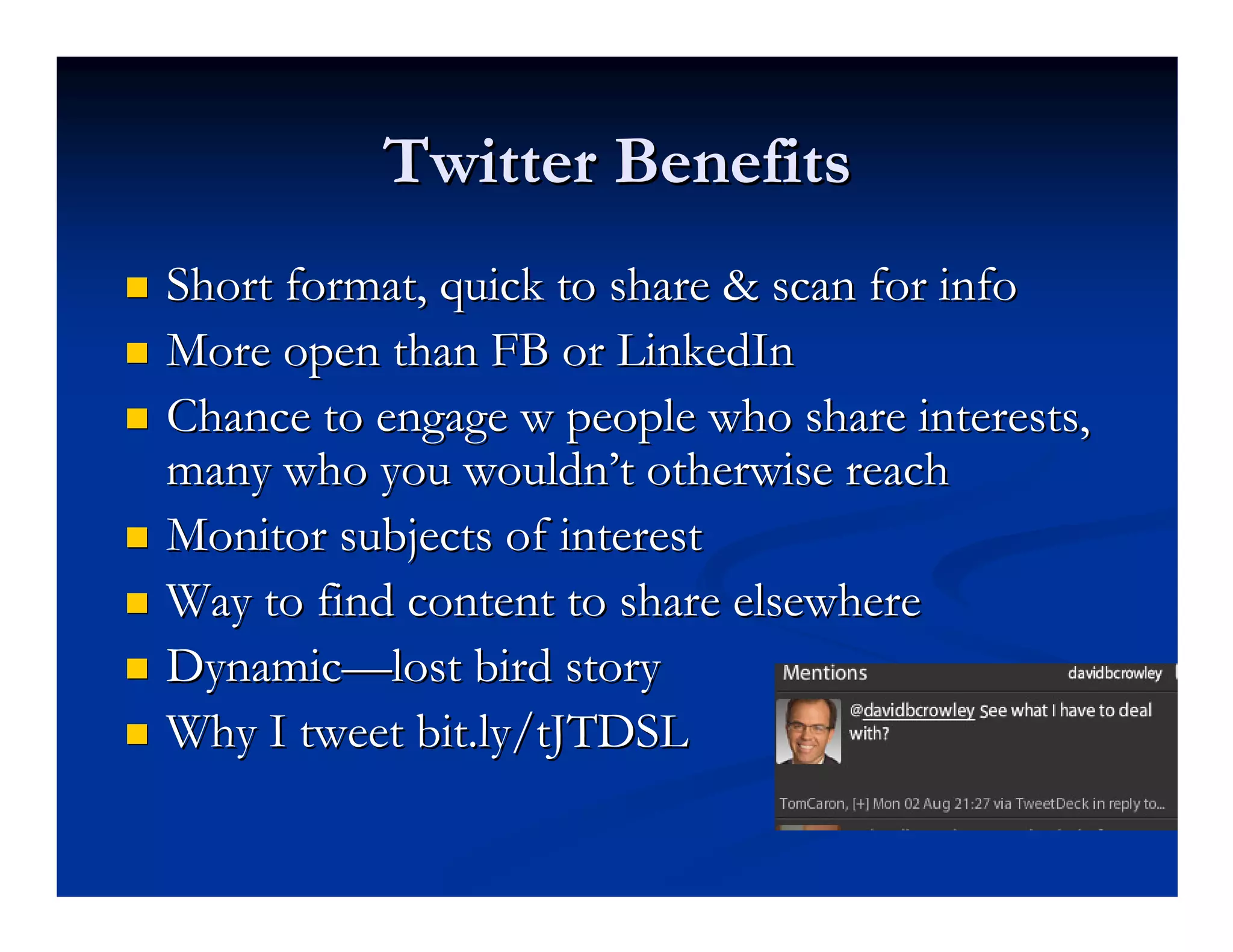
Short format, quick to share & scan for info
More open than FB or LinkedIn
Chance to engage w people who share interests,
many who you wouldn’t otherwise reach
Monitor subjects of interest
Way to find content to share elsewhere
Dynamic—lost bird story
Why I tweet bit.ly/tJTDSL
LinkedIn
    Especially good for accessing particular contacts
    Groups can be useful.
    The “message” function is also very useful &
    underutilized. E.g
    “I sent a batch of 50 messages while writing this. Within 2 minutes of sending the message, the
    message had shared with 3,553 more people on Twitter, thanks to Tweets
    by @mimio00,@good2gether and SCI alum @kmcconkie (3 more Tweets came in within the
    hour, but I think you get the point).”

http://www.davidbcrowley.com/2012/01/19/7-tips-for-leveraging-linkedin-messages/
http://www.davidbcrowley.com/2012/01/19/7- tips- for- leveraging- linkedin-
Blogging/Your website
More control over format
Better place for more detailed information
Long-term storage (tags & categories)
New Kids on the Block
Planning
  Who is your audience for outreach you are doing?
  What results do you hope to achieve communicating
  with your audience?
  What kinds of branding messages & info do you want
  to share?
  Your social media channels & messaging should flow
  from your answers—how can social media help you
  reach this audience?
  Show content planning templates

Spend a few minutes thinking about your answers to these.
Leveraging Facebook
#1 Post photos and videos! Most shared content.
  Create photo albums for your big events
  Post to albums in a few batches over time
  Tag those photos
You can’t tag friends if you don’t have any
  Have several page admins that can leverage their own friend
  relationshps
  Your page should like other pages
  Ask contacts to like your page via email, LinkedIn, etc.
  Put your Facebook address on print materials.
            Move on to the hands on demo & practice here
Getting seen on Facebook
How people see your content
  people who like your page
  people interact w your page
  “Edgerank” is algorithm that determines who sees
  your page in the new newsfeed. Priotizes (in order)
 1)   Shares
 2)   Comments
 3)   Likes
Strategies for Interaction & Growth
Review your insights (or a neighbors)
Discuss: what post got the most interaction for
you. Why? What items didn’t get much
interaction?
What could you do to get more interaction? Try
something...
Facebook page admins:
               not to do list!
Contact info or promotions in your cover photo
Run promotions using the regular Facebook
page features (like this, share this, etc.). Need to
use a separate app.
More not to dos: http://www.marketinggum.com/what-you-cannot-do-
on-facebook-page-admins-read-these-rules/
Other Facebook questions?
Let’s take a closer look at some
        Twitter basics…
What is Twitter?
   a social networking and microblogging service,
  enabling its users to send and read messages
  called tweets.
  Tweets are text-based posts of up to
  140 characters displayed on the user's profile page.
  Tweets are publicly visible by default.
  Users may subscribe to other users' tweets – this is
  known as following and subscribers are known
  as followers or tweeps
Source: Wikipedia 4/25/11
Getting started w Twitter
Associate the account with an email address.
Choose a short username or “handle” [you will have an
existing account for your SCI Tweets]
  A handle that is easy to remember makes it more likely
  people will “retweet” you.
  Your handle uses up some of the 140 characters when
  retweeted
The profile helps people can quickly see where you are,
what you are Tweeting about. (help them decide to
follow or not). We will be providing templates soon. (see
next slide)
Twitter Basics
Your Tweets:
  Type into the “What’s New” box upper left
  140 characters or less—125 is better to leave room for
  “retweeting”
  Can be viewed by anyone on the Internet (unless you protect
  your Tweets-not recommended for biz)
     Most likely to be seen by your followers
     Also may be found by people searching for relevant terms “HACC”
  5-10 Tweets a day is common for active users
     Timing Tweets with Tweetdeck or Hootsuite is a good idea
Twitter Basics
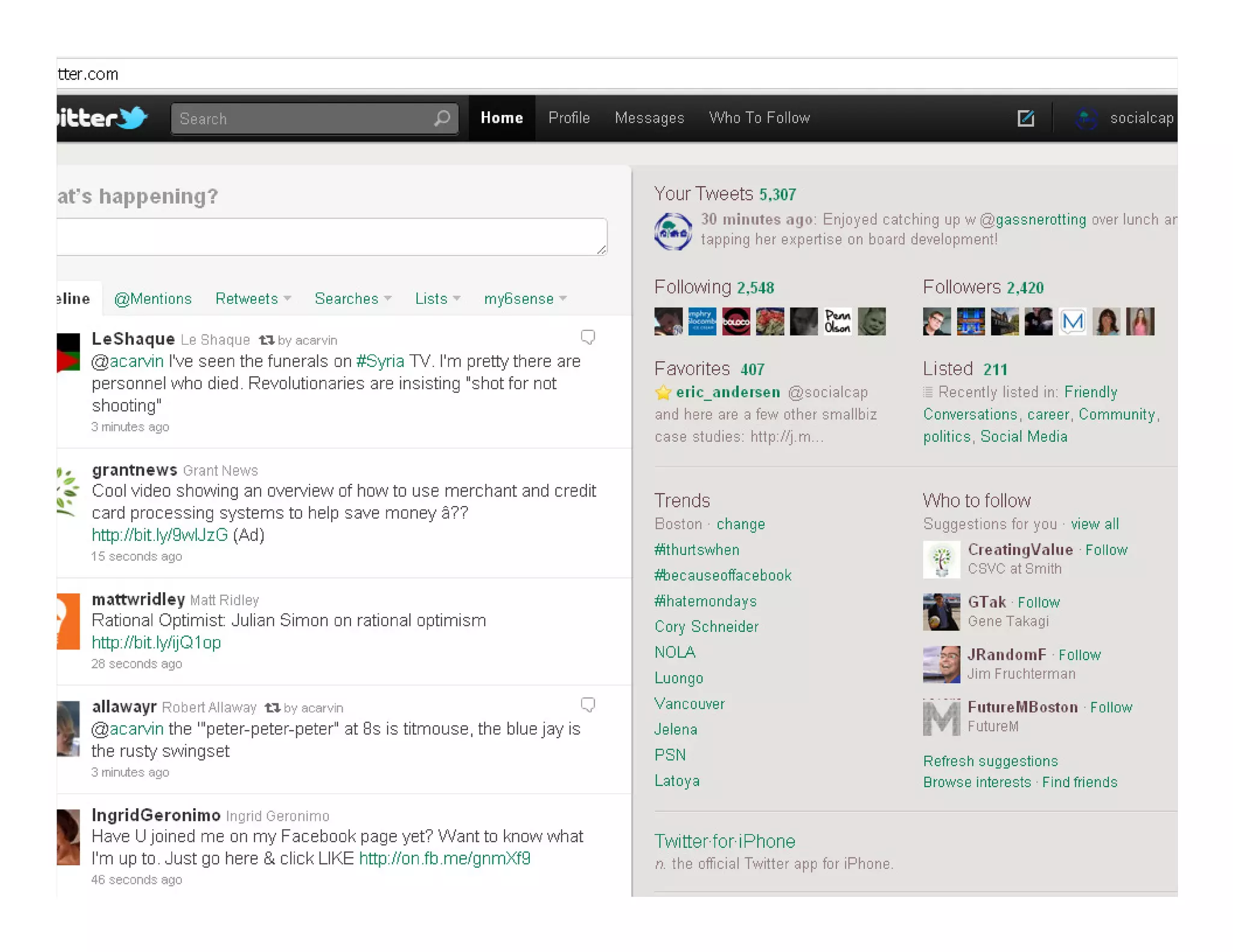
Timeline
  Stream of Tweets from Tweeps you follow
  Fast moving stream if you follow a lot of people
  Expectations to respond or have read a Tweet only
  comes in if they @ mention you
Twitter basics
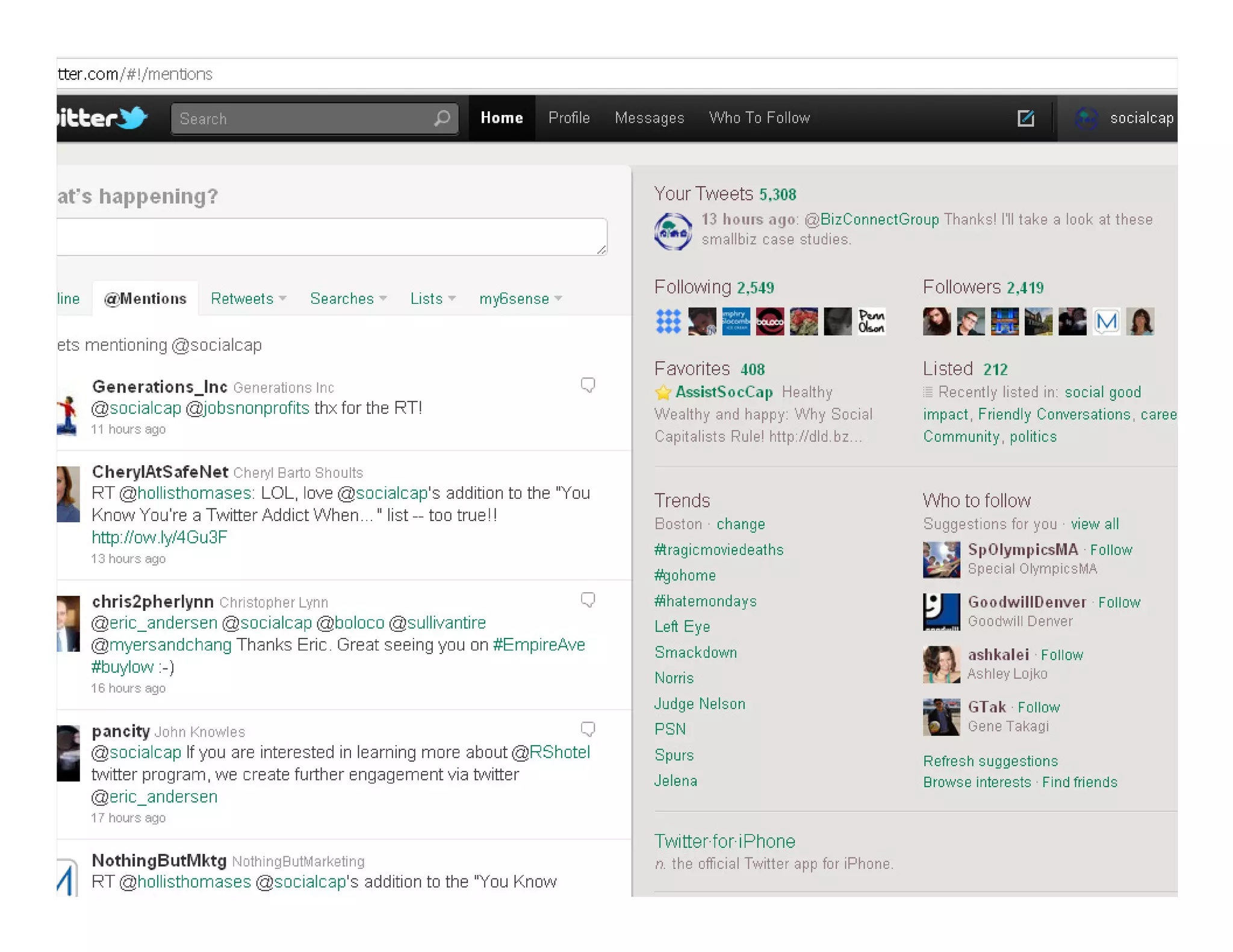
Mentions
  When someone references you in their tweet, with your handle,
  this is called a mention. It will show in your “mention” stream
  on Twitter.com.
      You generally should chime in promptly when someone mentions you.
  A mention starting w your handle, e.g. “@socialcap you have
  great AmeriCorps members”, is considered an “@ reply” or
  message.
      This is a way of directing a tweet toward someone in particular, but
      anyone on the web could see it (though it will only show in the
      Twitter.com stream of people who are following both you & the person
      you are interacting with.
      So if you want reference someone in a way that maximizes people who
      see it, you should start with something other than their handle. E.g.
      “Looking for the latest Dorchester news? Follow @mydorchester”
Twitter basics
Retweets “RTs”
  Shows you are sharing someone else’s content
  Sharing good content from others (and providing
  content people want to share) lies at the heart of
  Twitter.
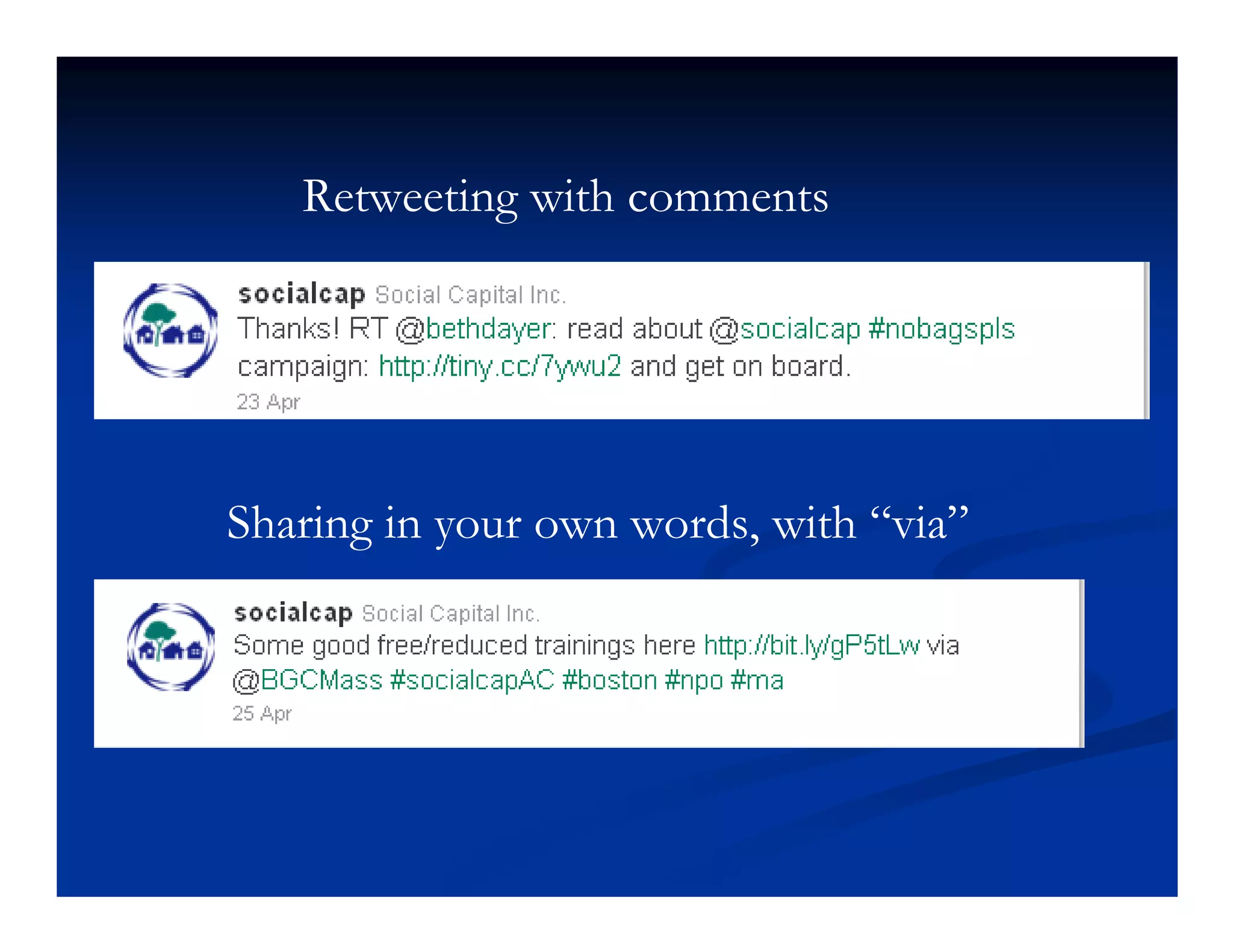
  RTing with comments even better-you’re adding
  more value.
Retweeting with comments


Sharing in your own words, with “via”
#hashtags
Part of workshop in which David extols the
virtues of hashtags, explains and shows how
they work, and discusses examples of why they
are important.
Today’s hashtag is #seCHNA (not cap sensitive)
My top Twitter Tips
Determine the topics you are going to focus on.
TWEET! Engage, tweet. Tweet some more.
Tweet throughout your day—find a good article, tweet it. At a meeting, tweet
it.
Follow generously, use lists & search feeds to keep closer eye on key
people/topics.
   Clean up your following accounts. I recommend manageflitter.com
Use hashtags (but don’t overdue it, 1 or 2 per tweet is good).
Include a link in most tweets.
Reciprocate.
Schedule your tweets, spread timing out (but know when you get most
action)…post your most important ones 5-10 times throughout the week.
16 tips on building your following base
http://www.davidbcrowley.com/2012/04/17/sweet-16-tips-to-build-your-
twitter-following/
More Twitter Tips
Engage, don’t just push out marketing info
  Be responsive to those who RT & mention you
  To “talk” directly to someone
    Publicly: start your Tweet w their handle
       e.g. @HACC Great meeting tonight!
    Privately: use the Direct Message “DM” function
    Strive for at least 80% non-selling messages.
Lists become helpful when you’re following
hundreds or more.
Use a tool like TweetDeck or HootSuite
Resources (public health/social
             media)
Article on Boston Public Health campaign on
sexual health
http://abcnews.go.com/Health/Parenting/stor
y?id=8251025&page=1#.T5arJ7PWZog
CDC social media
http://www.cdc.gov/socialmedia/
Resources (gen social media)
Bookmarks for Facebook articles/resources: http://bit.ly/Jyyl2S
Bookmarks for Twitter articles/resources: http://bit.ly/nnlA5w
Longer list of bookmarks for all social media:
http://bit.ly/ogEGRa
The Nonprofit Facebook Guy http://www.johnhaydon.com/
Beth Kanter, co-author of The Networked Nonprofit
http://www.bethkanter.org/
http://www.davidbcrowley.com/tag/social-media/

Social Media 201 Slides

  • 1.
    Let's Get Social: Social Media 201 for Public Health Professionals May 11, 2012 Plymouth, MA Presented by David Crowley www.davidbcrowley.com
  • 2.
    Your hopes forthis workshop?
  • 3.
    Agenda Benefits of socialmedia platforms Planning for social success Facebook hands on Twitter hands on
  • 4.
    What brings mehere… Connecting people to community info key to Social Capital Inc. (SCI) mission. Using technology to engage people has been key to our work. Early evidence that social media can strengthen relationships. We’ve had some success…
  • 5.
    SCI & Davidon Social Media @socialcap 3869 followers (400 new past 4 months); @cookingchat 1053 @davidbcrowley 508 713 LinkedIn Connections 327“likes” on Facebook (socialcapital) 715 have circled davidbcrowley on Google+ since July launch, 1072 following SCI on G+ since pages launched in Nov. Over 12,000 unique visitors to our websites every month Klout score=56 Have recruited volunteers & applicants for positions, gotten a job for an alum, reached new donors, increased web traffic…
  • 6.
    Facebook benefits 900+ billionusers! Leverages existing social ties (and relationships your org has) Visual appeal Ease of use (especially for the basics needs of a typical user)
  • 7.
    Top demographics onFacebook: 1) 21- 24 yr olds 2) 18- 20 yr olds 3) 35- 44 yr olds source http://adage.com/article/adagestat/demographics-facebook-linkedin-myspace-twitter/227569/ http://adage.com/article/adagestat/demographics- facebook- linkedin- myspace-
  • 8.
    Cautions re: Facebook Basedon friend relationships; not as open to reaching general public as other platforms Page engagement drop since timelines. The typical Facebook page post only gets into 16% of newsfeeds. Strategy & work required to do better than 16%! Basic use fairly easy, but various settings, frequent changes, etc. can get complicated.
  • 10.
    Twitter Benefits Short format,quick to share & scan for info More open than FB or LinkedIn Chance to engage w people who share interests, many who you wouldn’t otherwise reach Monitor subjects of interest Way to find content to share elsewhere Dynamic—lost bird story Why I tweet bit.ly/tJTDSL
  • 11.
    LinkedIn Especially good for accessing particular contacts Groups can be useful. The “message” function is also very useful & underutilized. E.g “I sent a batch of 50 messages while writing this. Within 2 minutes of sending the message, the message had shared with 3,553 more people on Twitter, thanks to Tweets by @mimio00,@good2gether and SCI alum @kmcconkie (3 more Tweets came in within the hour, but I think you get the point).” http://www.davidbcrowley.com/2012/01/19/7-tips-for-leveraging-linkedin-messages/ http://www.davidbcrowley.com/2012/01/19/7- tips- for- leveraging- linkedin-
  • 12.
    Blogging/Your website More controlover format Better place for more detailed information Long-term storage (tags & categories)
  • 13.
    New Kids onthe Block
  • 17.
    Planning Whois your audience for outreach you are doing? What results do you hope to achieve communicating with your audience? What kinds of branding messages & info do you want to share? Your social media channels & messaging should flow from your answers—how can social media help you reach this audience? Show content planning templates Spend a few minutes thinking about your answers to these.
  • 18.
    Leveraging Facebook #1 Postphotos and videos! Most shared content. Create photo albums for your big events Post to albums in a few batches over time Tag those photos You can’t tag friends if you don’t have any Have several page admins that can leverage their own friend relationshps Your page should like other pages Ask contacts to like your page via email, LinkedIn, etc. Put your Facebook address on print materials. Move on to the hands on demo & practice here
  • 19.
    Getting seen onFacebook How people see your content people who like your page people interact w your page “Edgerank” is algorithm that determines who sees your page in the new newsfeed. Priotizes (in order) 1) Shares 2) Comments 3) Likes
  • 20.
    Strategies for Interaction& Growth Review your insights (or a neighbors) Discuss: what post got the most interaction for you. Why? What items didn’t get much interaction? What could you do to get more interaction? Try something...
  • 21.
    Facebook page admins: not to do list! Contact info or promotions in your cover photo Run promotions using the regular Facebook page features (like this, share this, etc.). Need to use a separate app. More not to dos: http://www.marketinggum.com/what-you-cannot-do- on-facebook-page-admins-read-these-rules/
  • 22.
  • 23.
    Let’s take acloser look at some Twitter basics…
  • 24.
    What is Twitter? a social networking and microblogging service, enabling its users to send and read messages called tweets. Tweets are text-based posts of up to 140 characters displayed on the user's profile page. Tweets are publicly visible by default. Users may subscribe to other users' tweets – this is known as following and subscribers are known as followers or tweeps Source: Wikipedia 4/25/11
  • 25.
    Getting started wTwitter Associate the account with an email address. Choose a short username or “handle” [you will have an existing account for your SCI Tweets] A handle that is easy to remember makes it more likely people will “retweet” you. Your handle uses up some of the 140 characters when retweeted The profile helps people can quickly see where you are, what you are Tweeting about. (help them decide to follow or not). We will be providing templates soon. (see next slide)
  • 26.
    Twitter Basics Your Tweets: Type into the “What’s New” box upper left 140 characters or less—125 is better to leave room for “retweeting” Can be viewed by anyone on the Internet (unless you protect your Tweets-not recommended for biz) Most likely to be seen by your followers Also may be found by people searching for relevant terms “HACC” 5-10 Tweets a day is common for active users Timing Tweets with Tweetdeck or Hootsuite is a good idea
  • 28.
    Twitter Basics Timeline Stream of Tweets from Tweeps you follow Fast moving stream if you follow a lot of people Expectations to respond or have read a Tweet only comes in if they @ mention you
  • 32.
    Twitter basics Mentions When someone references you in their tweet, with your handle, this is called a mention. It will show in your “mention” stream on Twitter.com. You generally should chime in promptly when someone mentions you. A mention starting w your handle, e.g. “@socialcap you have great AmeriCorps members”, is considered an “@ reply” or message. This is a way of directing a tweet toward someone in particular, but anyone on the web could see it (though it will only show in the Twitter.com stream of people who are following both you & the person you are interacting with. So if you want reference someone in a way that maximizes people who see it, you should start with something other than their handle. E.g. “Looking for the latest Dorchester news? Follow @mydorchester”
  • 33.
    Twitter basics Retweets “RTs” Shows you are sharing someone else’s content Sharing good content from others (and providing content people want to share) lies at the heart of Twitter. RTing with comments even better-you’re adding more value.
  • 34.
    Retweeting with comments Sharingin your own words, with “via”
  • 35.
    #hashtags Part of workshopin which David extols the virtues of hashtags, explains and shows how they work, and discusses examples of why they are important. Today’s hashtag is #seCHNA (not cap sensitive)
  • 36.
    My top TwitterTips Determine the topics you are going to focus on. TWEET! Engage, tweet. Tweet some more. Tweet throughout your day—find a good article, tweet it. At a meeting, tweet it. Follow generously, use lists & search feeds to keep closer eye on key people/topics. Clean up your following accounts. I recommend manageflitter.com Use hashtags (but don’t overdue it, 1 or 2 per tweet is good). Include a link in most tweets. Reciprocate. Schedule your tweets, spread timing out (but know when you get most action)…post your most important ones 5-10 times throughout the week. 16 tips on building your following base http://www.davidbcrowley.com/2012/04/17/sweet-16-tips-to-build-your- twitter-following/
  • 37.
    More Twitter Tips Engage,don’t just push out marketing info Be responsive to those who RT & mention you To “talk” directly to someone Publicly: start your Tweet w their handle e.g. @HACC Great meeting tonight! Privately: use the Direct Message “DM” function Strive for at least 80% non-selling messages. Lists become helpful when you’re following hundreds or more. Use a tool like TweetDeck or HootSuite
  • 40.
    Resources (public health/social media) Article on Boston Public Health campaign on sexual health http://abcnews.go.com/Health/Parenting/stor y?id=8251025&page=1#.T5arJ7PWZog CDC social media http://www.cdc.gov/socialmedia/
  • 41.
    Resources (gen socialmedia) Bookmarks for Facebook articles/resources: http://bit.ly/Jyyl2S Bookmarks for Twitter articles/resources: http://bit.ly/nnlA5w Longer list of bookmarks for all social media: http://bit.ly/ogEGRa The Nonprofit Facebook Guy http://www.johnhaydon.com/ Beth Kanter, co-author of The Networked Nonprofit http://www.bethkanter.org/ http://www.davidbcrowley.com/tag/social-media/