
Static NAT
www.netprotocolxpert.in
 With static NAT, routers or firewalls translate one private IP
address to one public IP address.
 Each private IP address has been mapped to a single public IP
address. Static NAT is not often used because it requires one
public IP address for each private IP address.
 To configure static NAT, three steps are required:
1. Configure private/public IP address mapping by using the ip nat
inside source static PRIVATE_IP PUBLIC_IP command
2. Configure the router's inside interface using the ip nat
inside command
3. Configure the router's outside interface using the ip nat
outside command
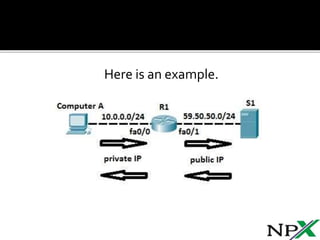
Here is an example.
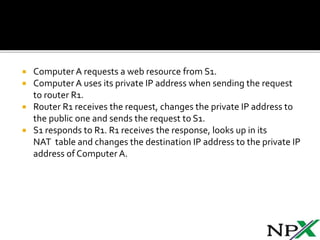
 Computer A requests a web resource from S1.
 Computer A uses its private IP address when sending the request
to router R1.
 Router R1 receives the request, changes the private IP address to
the public one and sends the request to S1.
 S1 responds to R1. R1 receives the response, looks up in its
NAT table and changes the destination IP address to the private IP
address of Computer A.
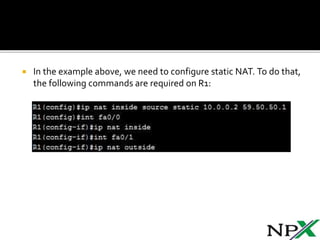
 In the example above, we need to configure static NAT. To do that,
the following commands are required on R1:
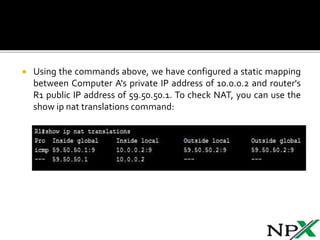
 Using the commands above, we have configured a static mapping
between Computer A's private IP address of 10.0.0.2 and router's
R1 public IP address of 59.50.50.1. To check NAT, you can use the
show ip nat translations command:

Static NAT

  • 1.
  • 2.
     With staticNAT, routers or firewalls translate one private IP address to one public IP address.  Each private IP address has been mapped to a single public IP address. Static NAT is not often used because it requires one public IP address for each private IP address.  To configure static NAT, three steps are required: 1. Configure private/public IP address mapping by using the ip nat inside source static PRIVATE_IP PUBLIC_IP command 2. Configure the router's inside interface using the ip nat inside command 3. Configure the router's outside interface using the ip nat outside command
  • 3.
    Here is anexample.
  • 4.
     Computer Arequests a web resource from S1.  Computer A uses its private IP address when sending the request to router R1.  Router R1 receives the request, changes the private IP address to the public one and sends the request to S1.  S1 responds to R1. R1 receives the response, looks up in its NAT table and changes the destination IP address to the private IP address of Computer A.
  • 5.
     In theexample above, we need to configure static NAT. To do that, the following commands are required on R1:
  • 6.
     Using thecommands above, we have configured a static mapping between Computer A's private IP address of 10.0.0.2 and router's R1 public IP address of 59.50.50.1. To check NAT, you can use the show ip nat translations command: