1
1
Network Address Translation (NAT)
Relates to Lab 7.
Module about private networks and NAT.
2
Private Network
• Private IP network is an IP network that is not directly
connected to the Internet
• IP addresses in a private network can be assigned arbitrarily.
– Not registered and not guaranteed to be globally unique
• Generally, private networks use addresses from the following
experimental address ranges (non-routable addresses):
– 10.0.0.0 – 10.255.255.255
– 172.16.0.0 – 172.31.255.255
– 192.168.0.0 – 192.168.255.255
2
3
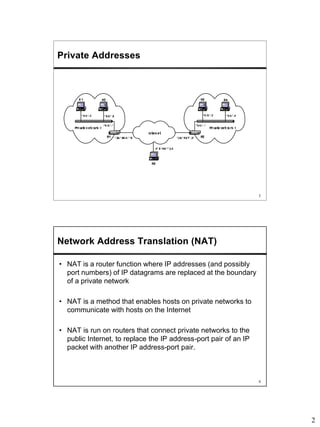
Private Addresses
4
Network Address Translation (NAT)
• NAT is a router function where IP addresses (and possibly
port numbers) of IP datagrams are replaced at the boundary
of a private network
• NAT is a method that enables hosts on private networks to
communicate with hosts on the Internet
• NAT is run on routers that connect private networks to the
public Internet, to replace the IP address-port pair of an IP
packet with another IP address-port pair.
3
5
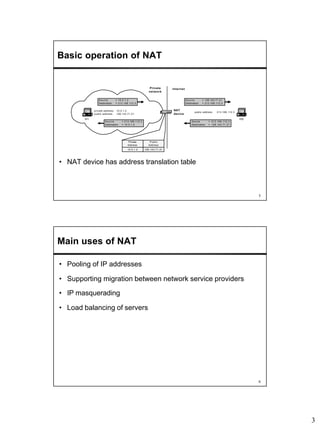
Basic operation of NAT
• NAT device has address translation table
H1
private address: 10.0.1.2
public address: 128.143.71.21
H5
Private
network
Internet
Source = 10.0.1.2
Destination = 213.168.112.3
Source = 128.143.71.21
Destination = 213.168.112.3
public address: 213.168.112.3
NAT
device
Source = 213.168.112.3
Destination = 128.143.71.21
Source = 213.168.112.3
Destination = 10.0.1.2
Private
Address
Public
Address
10.0.1.2 128.143.71.21
6
Main uses of NAT
• Pooling of IP addresses
• Supporting migration between network service providers
• IP masquerading
• Load balancing of servers
4
7
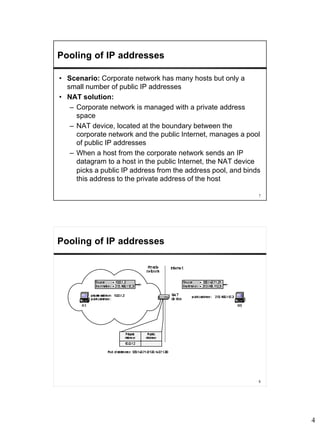
Pooling of IP addresses
• Scenario: Corporate network has many hosts but only a
small number of public IP addresses
• NAT solution:
– Corporate network is managed with a private address
space
– NAT device, located at the boundary between the
corporate network and the public Internet, manages a pool
of public IP addresses
– When a host from the corporate network sends an IP
datagram to a host in the public Internet, the NAT device
picks a public IP address from the address pool, and binds
this address to the private address of the host
8
Pooling of IP addresses
5
9
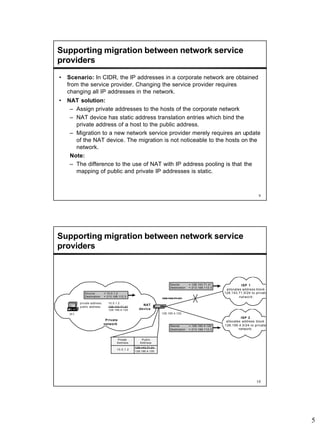
Supporting migration between network service
providers
• Scenario: In CIDR, the IP addresses in a corporate network are obtained
from the service provider. Changing the service provider requires
changing all IP addresses in the network.
• NAT solution:
– Assign private addresses to the hosts of the corporate network
– NAT device has static address translation entries which bind the
private address of a host to the public address.
– Migration to a new network service provider merely requires an update
of the NAT device. The migration is not noticeable to the hosts on the
network.
Note:
– The difference to the use of NAT with IP address pooling is that the
mapping of public and private IP addresses is static.
10
Supporting migration between network service
providers
H1
private address: 10.0.1.2
public address: 128.143.71.21
128.195.4.120
Source = 10.0.1.2
Destination = 213.168.112.3
NAT
device
Private
Address
Public
Address
10.0.1.2
128.143.71.21
128.195.4.120
128.143.71.21
128.195.4.120
Source = 128.143.71.21
Destination = 213.168.112.3
Source = 128.195.4.120
Destination = 213.168.112.3
ISP 2
allocates address block
128.195.4.0/24 to private
network:
Private
network
ISP 1
allocates address block
128.143.71.0/24 to private
network:
6
11
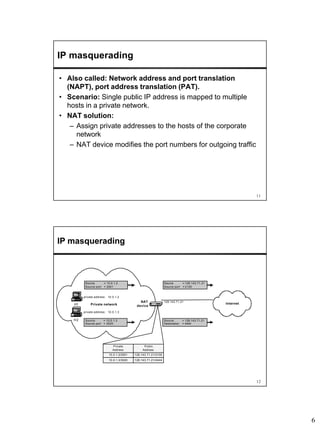
IP masquerading
• Also called: Network address and port translation
(NAPT), port address translation (PAT).
• Scenario: Single public IP address is mapped to multiple
hosts in a private network.
• NAT solution:
– Assign private addresses to the hosts of the corporate
network
– NAT device modifies the port numbers for outgoing traffic
12
IP masquerading
H1
private address: 10.0.1.2
Private network
Source = 10.0.1.2
Source port = 2001
Source = 128.143.71.21
Source port = 2100
NAT
device
Private
Address
Public
Address
10.0.1.2/2001 128.143.71.21/2100
10.0.1.3/3020 128.143.71.21/4444
H2
private address: 10.0.1.3
Source = 10.0.1.3
Source port = 3020
Internet
Source = 128.143.71.21
Destination = 4444
128.143.71.21
7
13
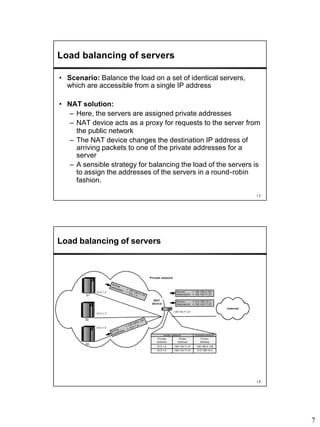
Load balancing of servers
• Scenario: Balance the load on a set of identical servers,
which are accessible from a single IP address
• NAT solution:
– Here, the servers are assigned private addresses
– NAT device acts as a proxy for requests to the server from
the public network
– The NAT device changes the destination IP address of
arriving packets to one of the private addresses for a
server
– A sensible strategy for balancing the load of the servers is
to assign the addresses of the servers in a round-robin
fashion.
14
Load balancing of servers
Private network
Source = 213.168.12.3
Destination = 128.143.71.21
NAT
device
Private
Address
Public
Address
10.0.1.2 128.143.71.21
Inside network
10.0.1.4 128.143.71.21
Internet
128.143.71.21
S1
S2
S3
10.0.1.4
10.0.1.3
10.0.1.2
Source
= 128.195.4.1 20
Destination
= 10.0.1.2
Public
Address
128.195.4.120
Outside network
213.168.12.3
Source = 128.195.4.120
Destination = 128.143.71.21
Source
= 128.195.4 .120
Destination
= 10.0.1.4
8
15
Concerns about NAT
• Performance:
– Modifying the IP header by changing the IP address
requires that NAT boxes recalculate the IP header
checksum
– Modifying port number requires that NAT boxes recalculate
TCP checksum
• Fragmentation
– Care must be taken that a datagram that is fragmented
before it reaches the NAT device, is not assigned a
different IP address or different port numbers for each of
the fragments.
16
Concerns about NAT
• End-to-end connectivity:
– NAT destroys universal end-to-end reachability of hosts on
the Internet.
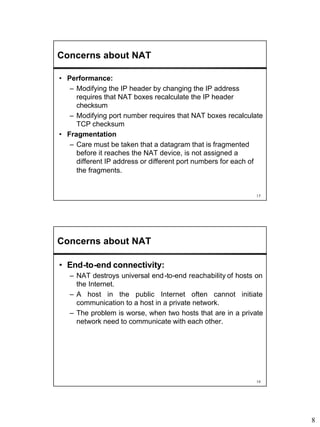
– A host in the public Internet often cannot initiate
communication to a host in a private network.
– The problem is worse, when two hosts that are in a private
network need to communicate with each other.
9
17
Concerns about NAT
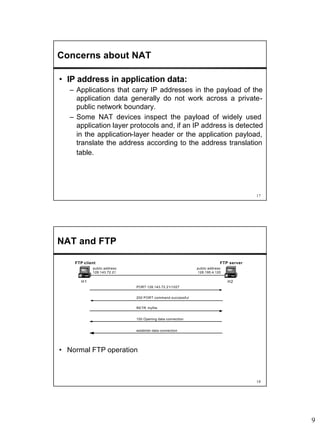
• IP address in application data:
– Applications that carry IP addresses in the payload of the
application data generally do not work across a private-
public network boundary.
– Some NAT devices inspect the payload of widely used
application layer protocols and, if an IP address is detected
in the application-layer header or the application payload,
translate the address according to the address translation
table.
18
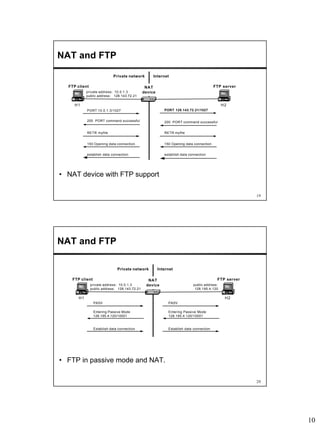
NAT and FTP
H1 H2
public address:
128.143.72.21
FTP client FTP server
PORT 128.143.72.21/1027
200 PORT command successful
public address:
128.195.4.120
RETR myfile
150 Opening data connection
establish data connection
• Normal FTP operation
10
19
NAT and FTP
• NAT device with FTP support
H1
Private network
NAT
device
H2
private address: 10.0.1.3
public address: 128.143.72.21
Internet
FTP client FTP server
PORT 10.0.1.3/1027 PORT 128.143.72.21/1027
200 PORT command successful200 PORT command successful
RETR myfile
establish data connection
RETR myfile
150 Opening data connection150 Opening data connection
establish data connection
20
NAT and FTP
• FTP in passive mode and NAT.
H1
Private network
NAT
device
H2
private address: 10.0.1.3
public address: 128.143.72.21
Internet
FTP client FTP server
PASV PASV
Entering Passive Mode
128.195.4.120/10001
Entering Passive Mode
128.195.4.120/10001
public address:
128.195.4.120
Establish data connection Establish data connection
11
21
Configuring NAT in Linux
• Linux uses the Netfilter/iptable package to add filtering rules
to the IP module
Incoming
datagram
filter
INPUT
Destination
is local?
filter
FORWARD
nat
OUTPUT
To application From application
Outgoing
datagram
nat
POSTROUTING
(SNAT)
No
Yes filter
OUTPUT
nat
PREROUTING
(DNAT)
22
Configuring NAT with iptable
• First example:
iptables –t nat –A POSTROUTING –s 10.0.1.2
–j SNAT --to-source 128.143.71.21
• Pooling of IP addresses:
iptables –t nat –A POSTROUTING –s 10.0.1.0/24
–j SNAT --to-source 128.128.71.0–128.143.71.30
• ISP migration:
iptables –t nat –R POSTROUTING –s 10.0.1.0/24
–j SNAT --to-source 128.195.4.0–128.195.4.254
• IP masquerading:
iptables –t nat –A POSTROUTING –s 10.0.1.0/24
–o eth1 –j MASQUERADE
• Load balancing:
iptables -t nat -A PREROUTING -i eth1 -j DNAT --to-
destination 10.0.1.2-10.0.1.4

Module17 nat v2

  • 1.
    1 1 Network Address Translation(NAT) Relates to Lab 7. Module about private networks and NAT. 2 Private Network • Private IP network is an IP network that is not directly connected to the Internet • IP addresses in a private network can be assigned arbitrarily. – Not registered and not guaranteed to be globally unique • Generally, private networks use addresses from the following experimental address ranges (non-routable addresses): – 10.0.0.0 – 10.255.255.255 – 172.16.0.0 – 172.31.255.255 – 192.168.0.0 – 192.168.255.255
  • 2.
    2 3 Private Addresses 4 Network AddressTranslation (NAT) • NAT is a router function where IP addresses (and possibly port numbers) of IP datagrams are replaced at the boundary of a private network • NAT is a method that enables hosts on private networks to communicate with hosts on the Internet • NAT is run on routers that connect private networks to the public Internet, to replace the IP address-port pair of an IP packet with another IP address-port pair.
  • 3.
    3 5 Basic operation ofNAT • NAT device has address translation table H1 private address: 10.0.1.2 public address: 128.143.71.21 H5 Private network Internet Source = 10.0.1.2 Destination = 213.168.112.3 Source = 128.143.71.21 Destination = 213.168.112.3 public address: 213.168.112.3 NAT device Source = 213.168.112.3 Destination = 128.143.71.21 Source = 213.168.112.3 Destination = 10.0.1.2 Private Address Public Address 10.0.1.2 128.143.71.21 6 Main uses of NAT • Pooling of IP addresses • Supporting migration between network service providers • IP masquerading • Load balancing of servers
  • 4.
    4 7 Pooling of IPaddresses • Scenario: Corporate network has many hosts but only a small number of public IP addresses • NAT solution: – Corporate network is managed with a private address space – NAT device, located at the boundary between the corporate network and the public Internet, manages a pool of public IP addresses – When a host from the corporate network sends an IP datagram to a host in the public Internet, the NAT device picks a public IP address from the address pool, and binds this address to the private address of the host 8 Pooling of IP addresses
  • 5.
    5 9 Supporting migration betweennetwork service providers • Scenario: In CIDR, the IP addresses in a corporate network are obtained from the service provider. Changing the service provider requires changing all IP addresses in the network. • NAT solution: – Assign private addresses to the hosts of the corporate network – NAT device has static address translation entries which bind the private address of a host to the public address. – Migration to a new network service provider merely requires an update of the NAT device. The migration is not noticeable to the hosts on the network. Note: – The difference to the use of NAT with IP address pooling is that the mapping of public and private IP addresses is static. 10 Supporting migration between network service providers H1 private address: 10.0.1.2 public address: 128.143.71.21 128.195.4.120 Source = 10.0.1.2 Destination = 213.168.112.3 NAT device Private Address Public Address 10.0.1.2 128.143.71.21 128.195.4.120 128.143.71.21 128.195.4.120 Source = 128.143.71.21 Destination = 213.168.112.3 Source = 128.195.4.120 Destination = 213.168.112.3 ISP 2 allocates address block 128.195.4.0/24 to private network: Private network ISP 1 allocates address block 128.143.71.0/24 to private network:
  • 6.
    6 11 IP masquerading • Alsocalled: Network address and port translation (NAPT), port address translation (PAT). • Scenario: Single public IP address is mapped to multiple hosts in a private network. • NAT solution: – Assign private addresses to the hosts of the corporate network – NAT device modifies the port numbers for outgoing traffic 12 IP masquerading H1 private address: 10.0.1.2 Private network Source = 10.0.1.2 Source port = 2001 Source = 128.143.71.21 Source port = 2100 NAT device Private Address Public Address 10.0.1.2/2001 128.143.71.21/2100 10.0.1.3/3020 128.143.71.21/4444 H2 private address: 10.0.1.3 Source = 10.0.1.3 Source port = 3020 Internet Source = 128.143.71.21 Destination = 4444 128.143.71.21
  • 7.
    7 13 Load balancing ofservers • Scenario: Balance the load on a set of identical servers, which are accessible from a single IP address • NAT solution: – Here, the servers are assigned private addresses – NAT device acts as a proxy for requests to the server from the public network – The NAT device changes the destination IP address of arriving packets to one of the private addresses for a server – A sensible strategy for balancing the load of the servers is to assign the addresses of the servers in a round-robin fashion. 14 Load balancing of servers Private network Source = 213.168.12.3 Destination = 128.143.71.21 NAT device Private Address Public Address 10.0.1.2 128.143.71.21 Inside network 10.0.1.4 128.143.71.21 Internet 128.143.71.21 S1 S2 S3 10.0.1.4 10.0.1.3 10.0.1.2 Source = 128.195.4.1 20 Destination = 10.0.1.2 Public Address 128.195.4.120 Outside network 213.168.12.3 Source = 128.195.4.120 Destination = 128.143.71.21 Source = 128.195.4 .120 Destination = 10.0.1.4
  • 8.
    8 15 Concerns about NAT •Performance: – Modifying the IP header by changing the IP address requires that NAT boxes recalculate the IP header checksum – Modifying port number requires that NAT boxes recalculate TCP checksum • Fragmentation – Care must be taken that a datagram that is fragmented before it reaches the NAT device, is not assigned a different IP address or different port numbers for each of the fragments. 16 Concerns about NAT • End-to-end connectivity: – NAT destroys universal end-to-end reachability of hosts on the Internet. – A host in the public Internet often cannot initiate communication to a host in a private network. – The problem is worse, when two hosts that are in a private network need to communicate with each other.
  • 9.
    9 17 Concerns about NAT •IP address in application data: – Applications that carry IP addresses in the payload of the application data generally do not work across a private- public network boundary. – Some NAT devices inspect the payload of widely used application layer protocols and, if an IP address is detected in the application-layer header or the application payload, translate the address according to the address translation table. 18 NAT and FTP H1 H2 public address: 128.143.72.21 FTP client FTP server PORT 128.143.72.21/1027 200 PORT command successful public address: 128.195.4.120 RETR myfile 150 Opening data connection establish data connection • Normal FTP operation
  • 10.
    10 19 NAT and FTP •NAT device with FTP support H1 Private network NAT device H2 private address: 10.0.1.3 public address: 128.143.72.21 Internet FTP client FTP server PORT 10.0.1.3/1027 PORT 128.143.72.21/1027 200 PORT command successful200 PORT command successful RETR myfile establish data connection RETR myfile 150 Opening data connection150 Opening data connection establish data connection 20 NAT and FTP • FTP in passive mode and NAT. H1 Private network NAT device H2 private address: 10.0.1.3 public address: 128.143.72.21 Internet FTP client FTP server PASV PASV Entering Passive Mode 128.195.4.120/10001 Entering Passive Mode 128.195.4.120/10001 public address: 128.195.4.120 Establish data connection Establish data connection
  • 11.
    11 21 Configuring NAT inLinux • Linux uses the Netfilter/iptable package to add filtering rules to the IP module Incoming datagram filter INPUT Destination is local? filter FORWARD nat OUTPUT To application From application Outgoing datagram nat POSTROUTING (SNAT) No Yes filter OUTPUT nat PREROUTING (DNAT) 22 Configuring NAT with iptable • First example: iptables –t nat –A POSTROUTING –s 10.0.1.2 –j SNAT --to-source 128.143.71.21 • Pooling of IP addresses: iptables –t nat –A POSTROUTING –s 10.0.1.0/24 –j SNAT --to-source 128.128.71.0–128.143.71.30 • ISP migration: iptables –t nat –R POSTROUTING –s 10.0.1.0/24 –j SNAT --to-source 128.195.4.0–128.195.4.254 • IP masquerading: iptables –t nat –A POSTROUTING –s 10.0.1.0/24 –o eth1 –j MASQUERADE • Load balancing: iptables -t nat -A PREROUTING -i eth1 -j DNAT --to- destination 10.0.1.2-10.0.1.4