NAT & Firewall in Linux
Cassiano Campes
R&D Internship @ PARKS
How distinct networks communicate?
NAT TABLES
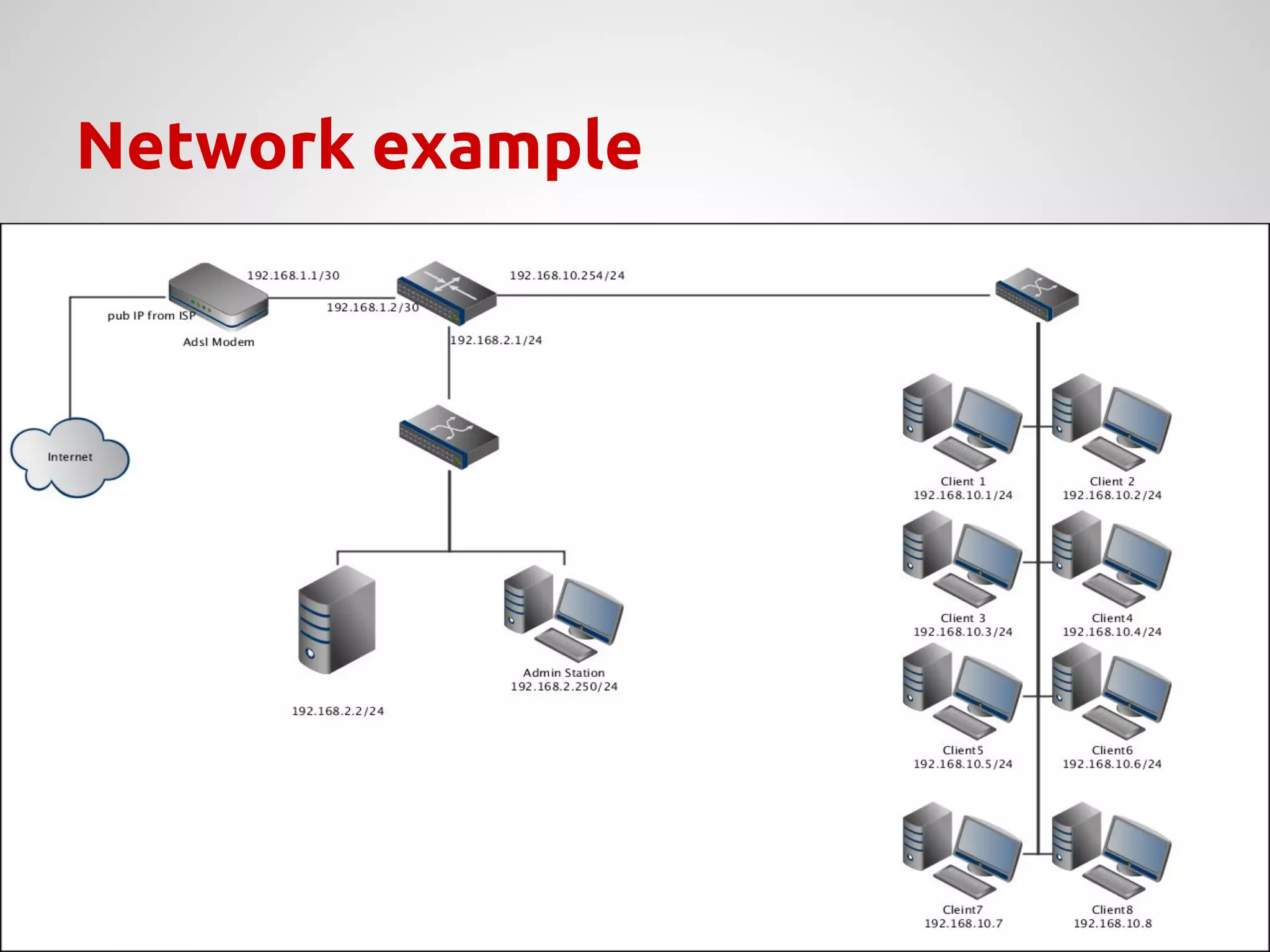
Network example
Network Address Translation - NAT
There are three different NAT methods:
↝ Static NAT;
↝ Dynamic NAT;
↝ NAT Overload;
↝ Useful to map hosts in different networks;
↝ Address translation turn the hosts invisible to
different domains;
↝ Still manageable in case of limited IP
addresses;
Why use NAT?
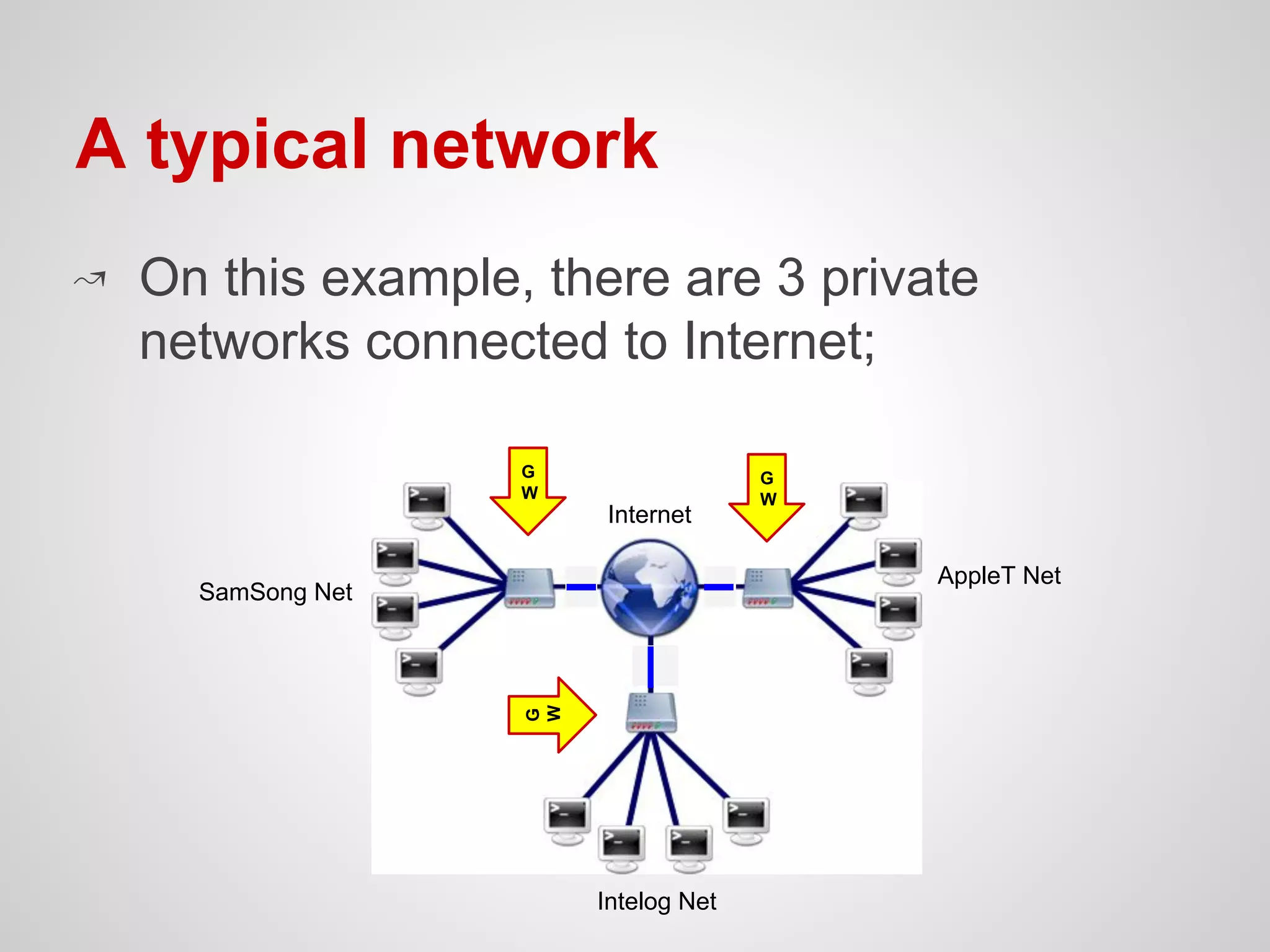
A typical network
↝ On this example, there are 3 private
networks connected to Internet;
SamSong Net
AppleT Net
Intelog Net
Internet
G
W
G
W
G
W
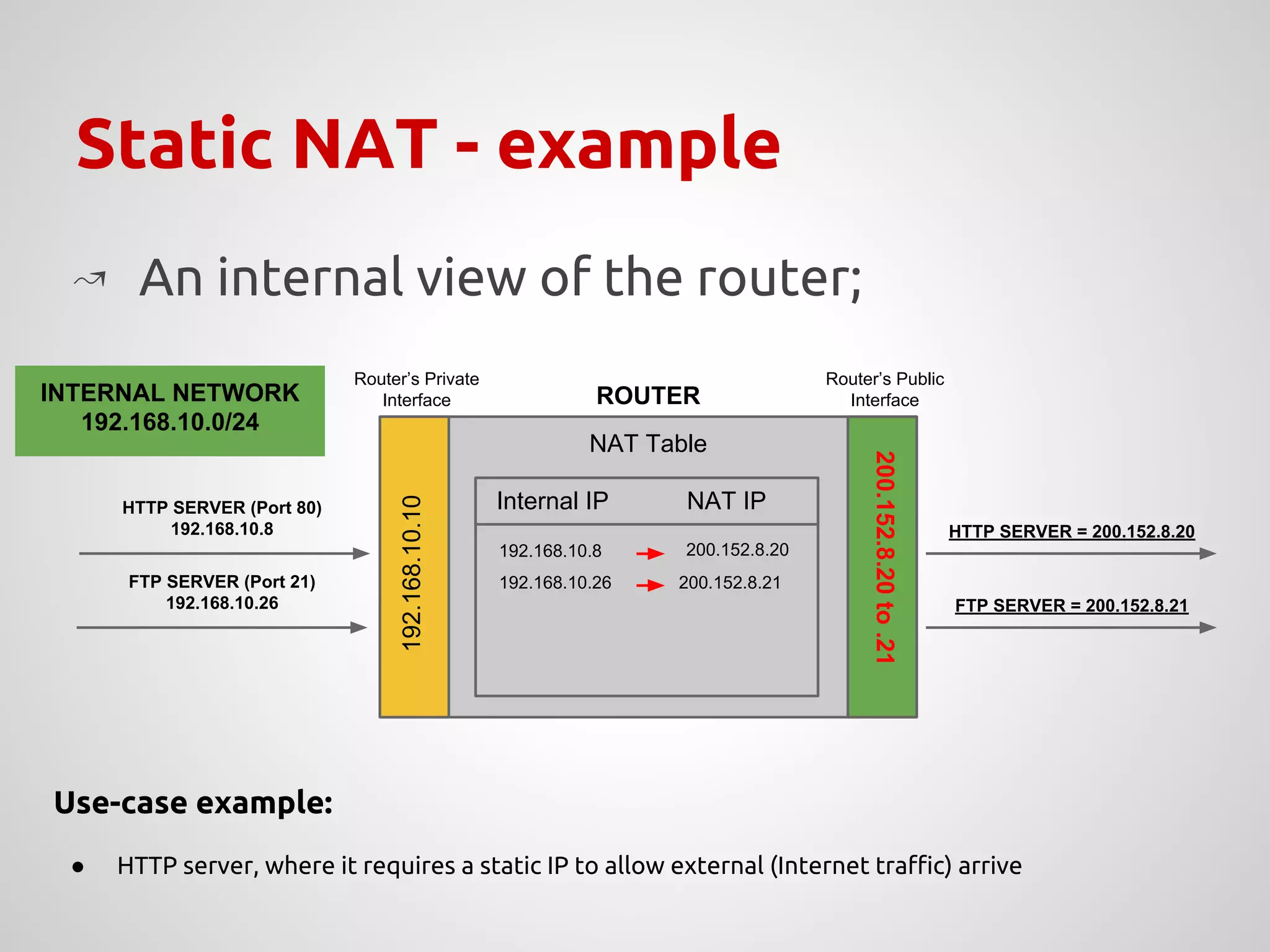
Static NAT - example
NAT Table
200.152.8.20to.21
Router’s Private
Interface
Router’s Public
Interface
192.168.10.10
ROUTER
Internal IP NAT IP
↝ An internal view of the router;
192.168.10.8
192.168.10.26
HTTP SERVER (Port 80)
192.168.10.8
FTP SERVER (Port 21)
192.168.10.26
HTTP SERVER = 200.152.8.20
FTP SERVER = 200.152.8.21
INTERNAL NETWORK
192.168.10.0/24
200.152.8.20
200.152.8.21
Use-case example:
● HTTP server, where it requires a static IP to allow external (Internet traffic) arrive
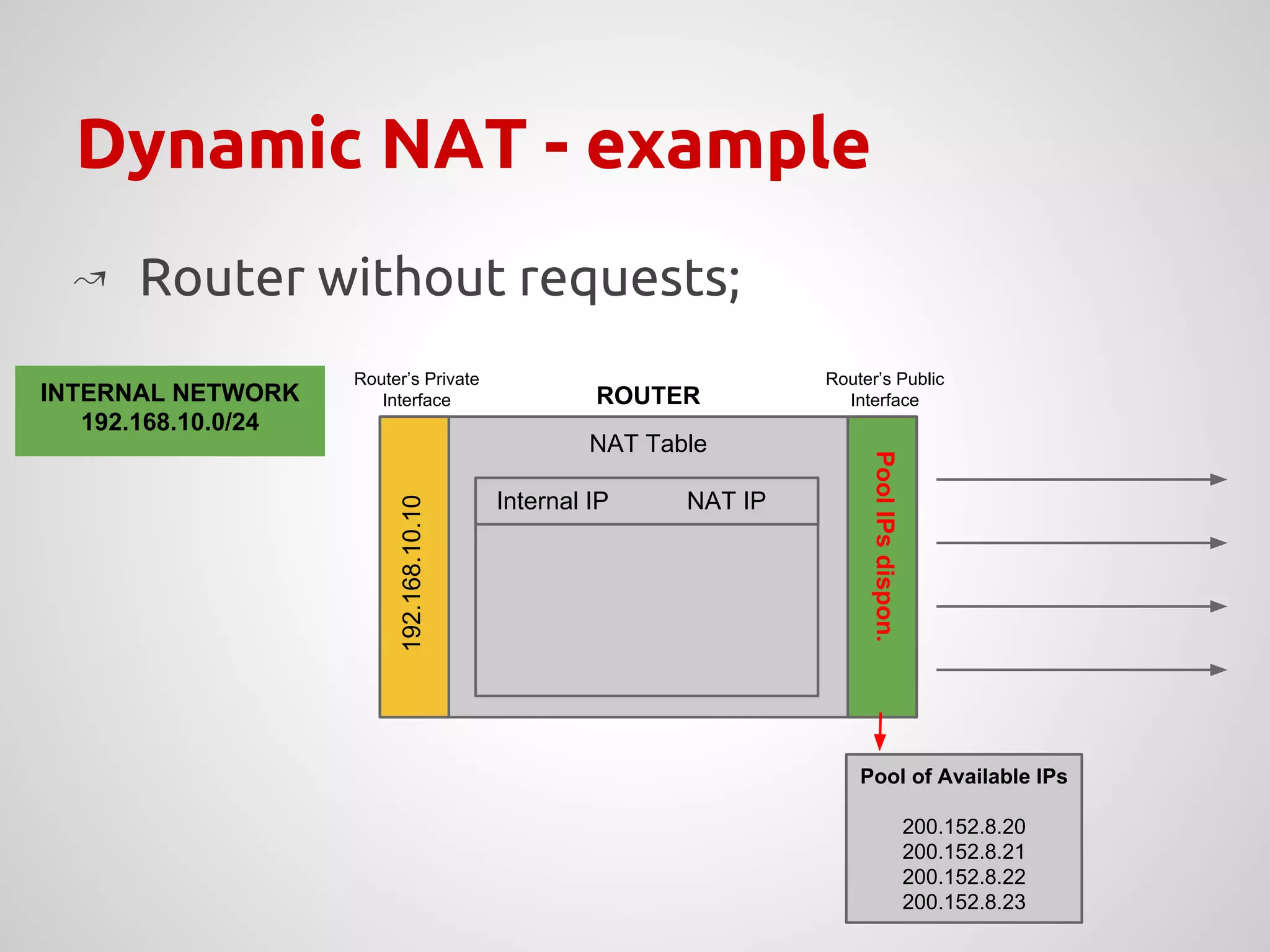
Dynamic NAT - example
NAT Table
PoolIPsdispon.
Router’s Private
Interface
Router’s Public
Interface
192.168.10.10
ROUTER
Internal IP NAT IP
↝ Router without requests;
Pool of Available IPs
200.152.8.20
200.152.8.21
200.152.8.22
200.152.8.23
INTERNAL NETWORK
192.168.10.0/24
Internal IP NAT IP
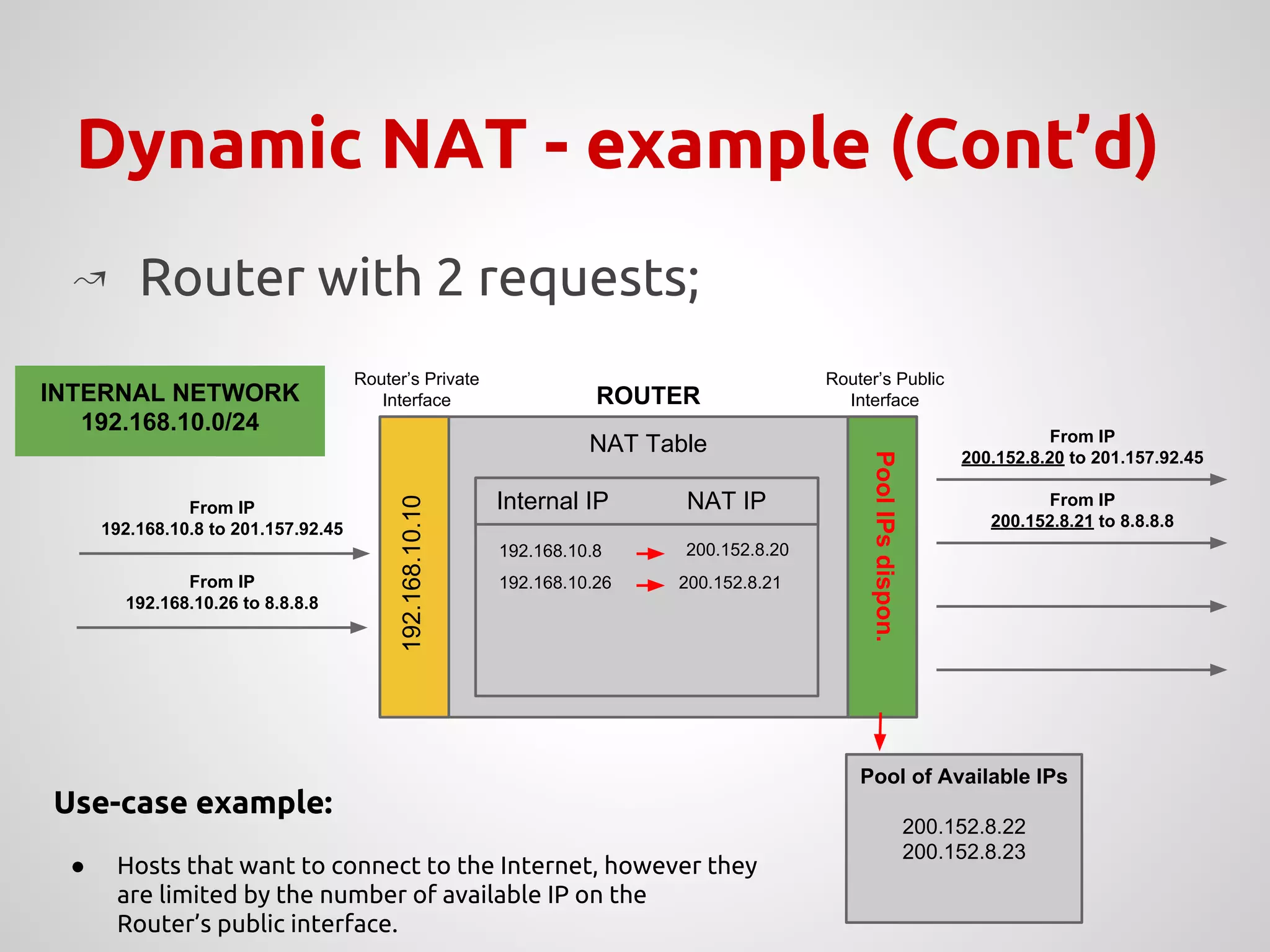
Dynamic NAT - example (Cont’d)
NAT Table
PoolIPsdispon.
192.168.10.10
Internal IP NAT IP
↝ Router with 2 requests;
192.168.10.8
200.152.8.20
From IP
192.168.10.26 to 8.8.8.8
Pool of Available IPs
200.152.8.22
200.152.8.23
From IP
192.168.10.8 to 201.157.92.45
Internal IP NAT IP
192.168.10.8
192.168.10.26
200.152.8.20
200.152.8.21
From IP
200.152.8.21 to 8.8.8.8
From IP
200.152.8.20 to 201.157.92.45
Use-case example:
● Hosts that want to connect to the Internet, however they
are limited by the number of available IP on the
Router’s public interface.
Router’s Private
Interface
Router’s Public
InterfaceROUTERINTERNAL NETWORK
192.168.10.0/24
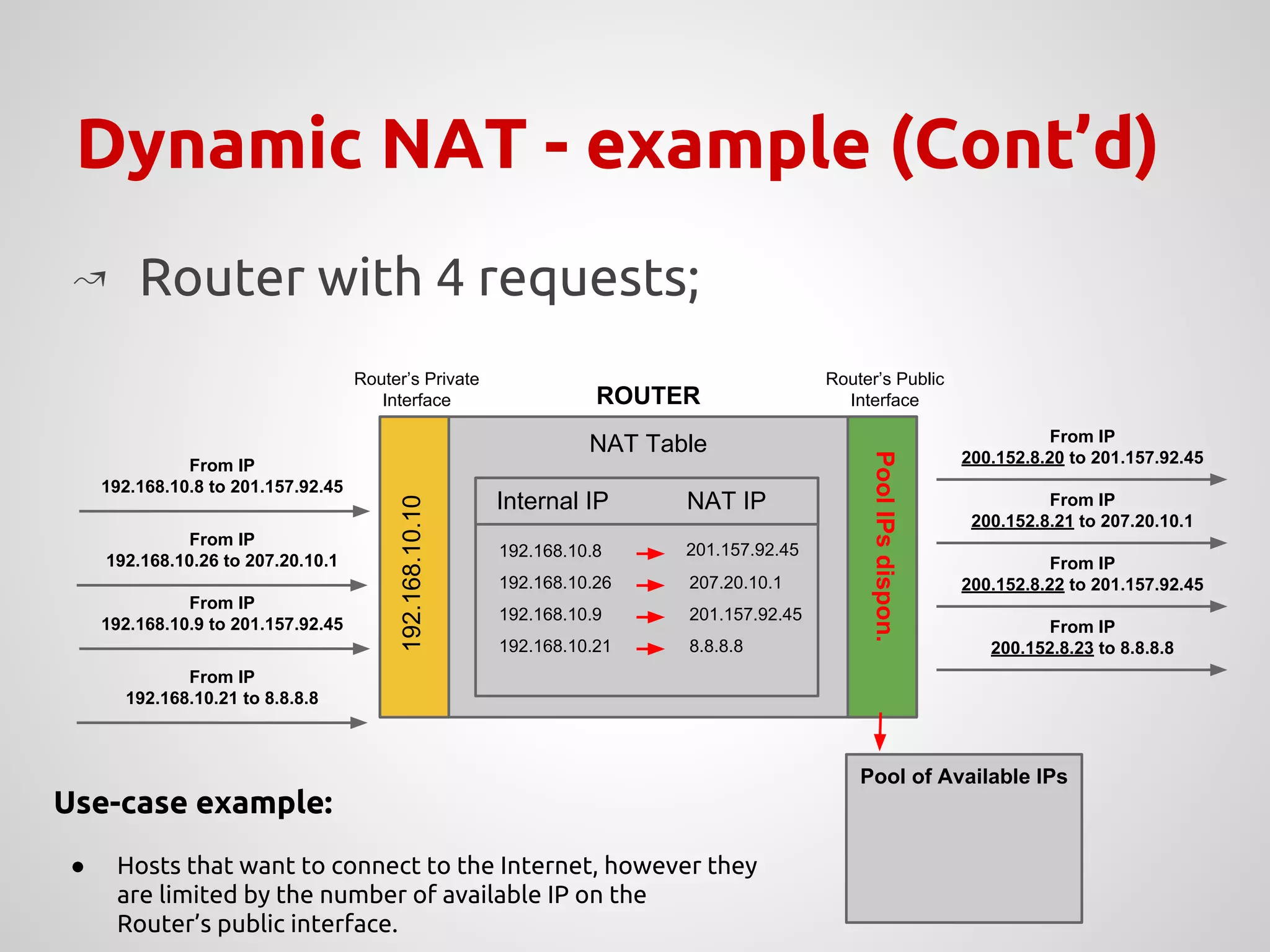
Dynamic NAT - example (Cont’d)
NAT Table
PoolIPsdispon.
192.168.10.10
Internal IP NAT IP
↝ Router with 4 requests;
192.168.10.8
200.152.8.20
From IP
192.168.10.26 to 207.20.10.1
Pool of Available IPs
From IP
192.168.10.8 to 201.157.92.45
Internal IP NAT IP
192.168.10.8
192.168.10.26
201.157.92.45
207.20.10.1
From IP
200.152.8.21 to 207.20.10.1
From IP
200.152.8.20 to 201.157.92.45
From IP
192.168.10.21 to 8.8.8.8
From IP
192.168.10.9 to 201.157.92.45
From IP
200.152.8.22 to 201.157.92.45
From IP
200.152.8.23 to 8.8.8.8
192.168.10.9 201.157.92.45
192.168.10.21 8.8.8.8
Use-case example:
● Hosts that want to connect to the Internet, however they
are limited by the number of available IP on the
Router’s public interface.
Router’s Private
Interface
Router’s Public
InterfaceROUTER
NAT Overload - IP’s limitations
↝ Alternative to handle public IPs limitations;
↝ Dynamic IP translation, translating both
source to destination IPs in the packet;
↝ For a single public IP, it is possible to map
approximately 64510 hosts;
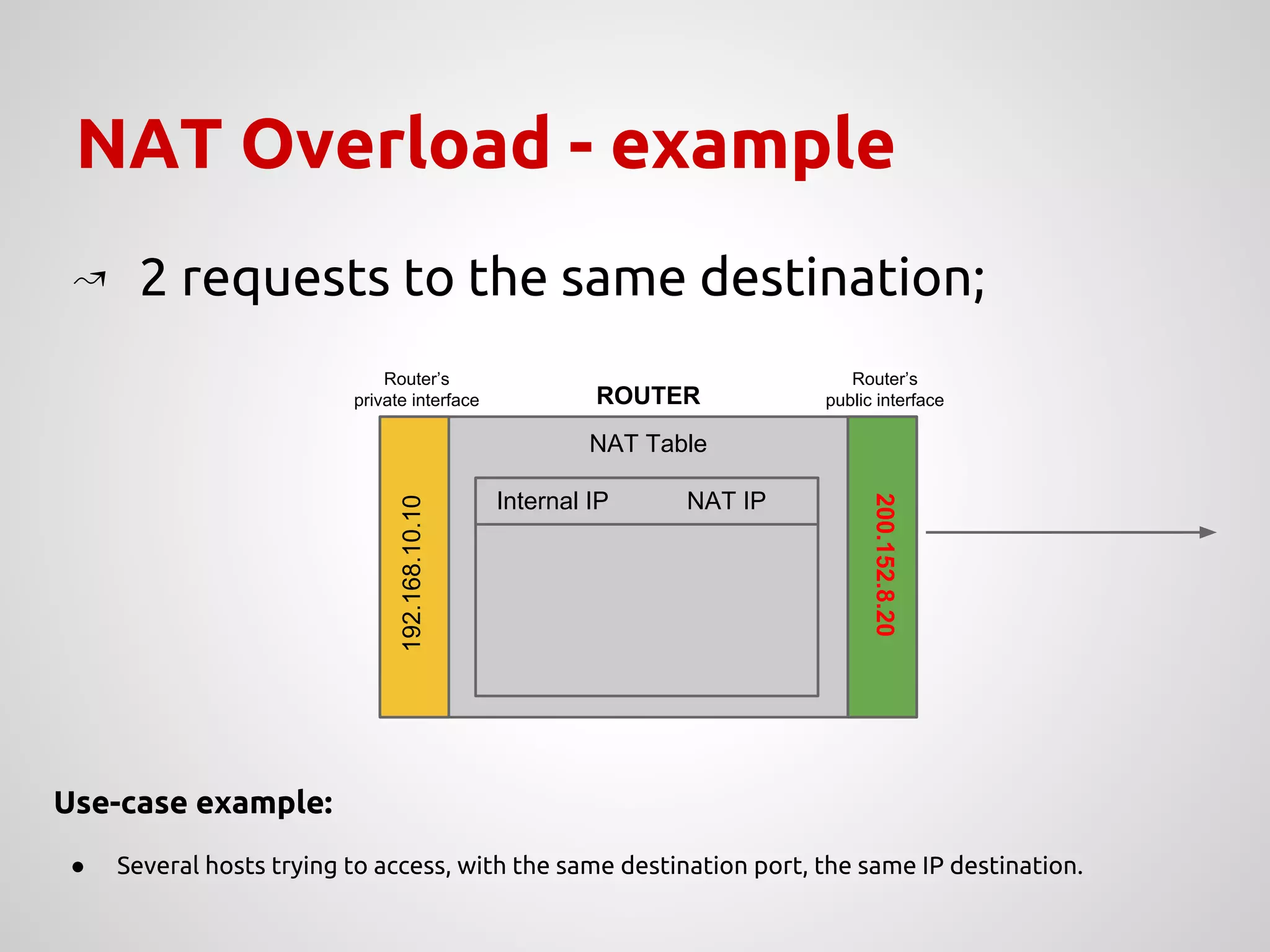
NAT Overload - example
NAT Table
200.152.8.20
Router’s
private interface
Router’s
public interface
192.168.10.10
ROUTER
Internal IP NAT IP
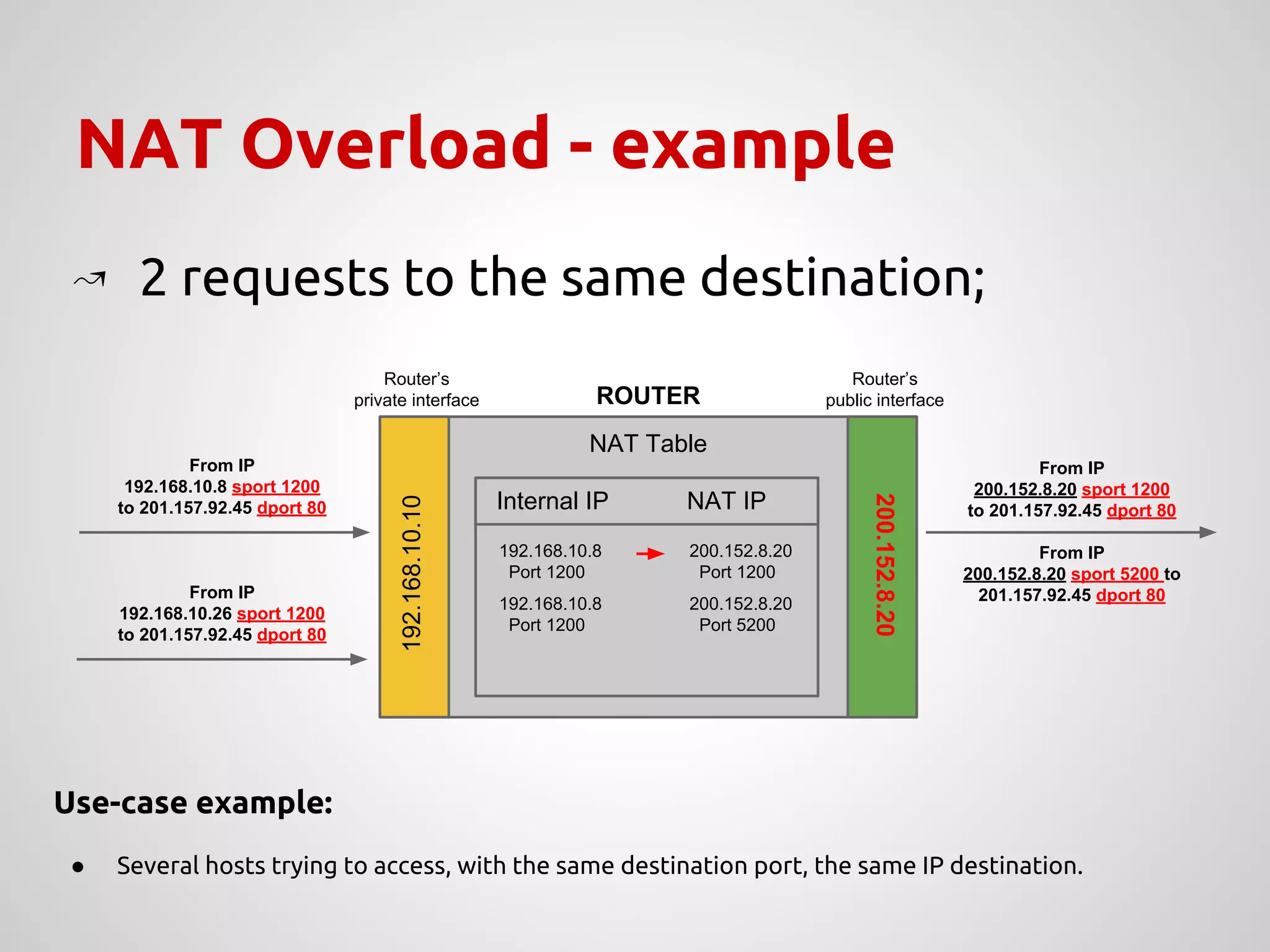
↝ 2 requests to the same destination;
Use-case example:
● Several hosts trying to access, with the same destination port, the same IP destination.
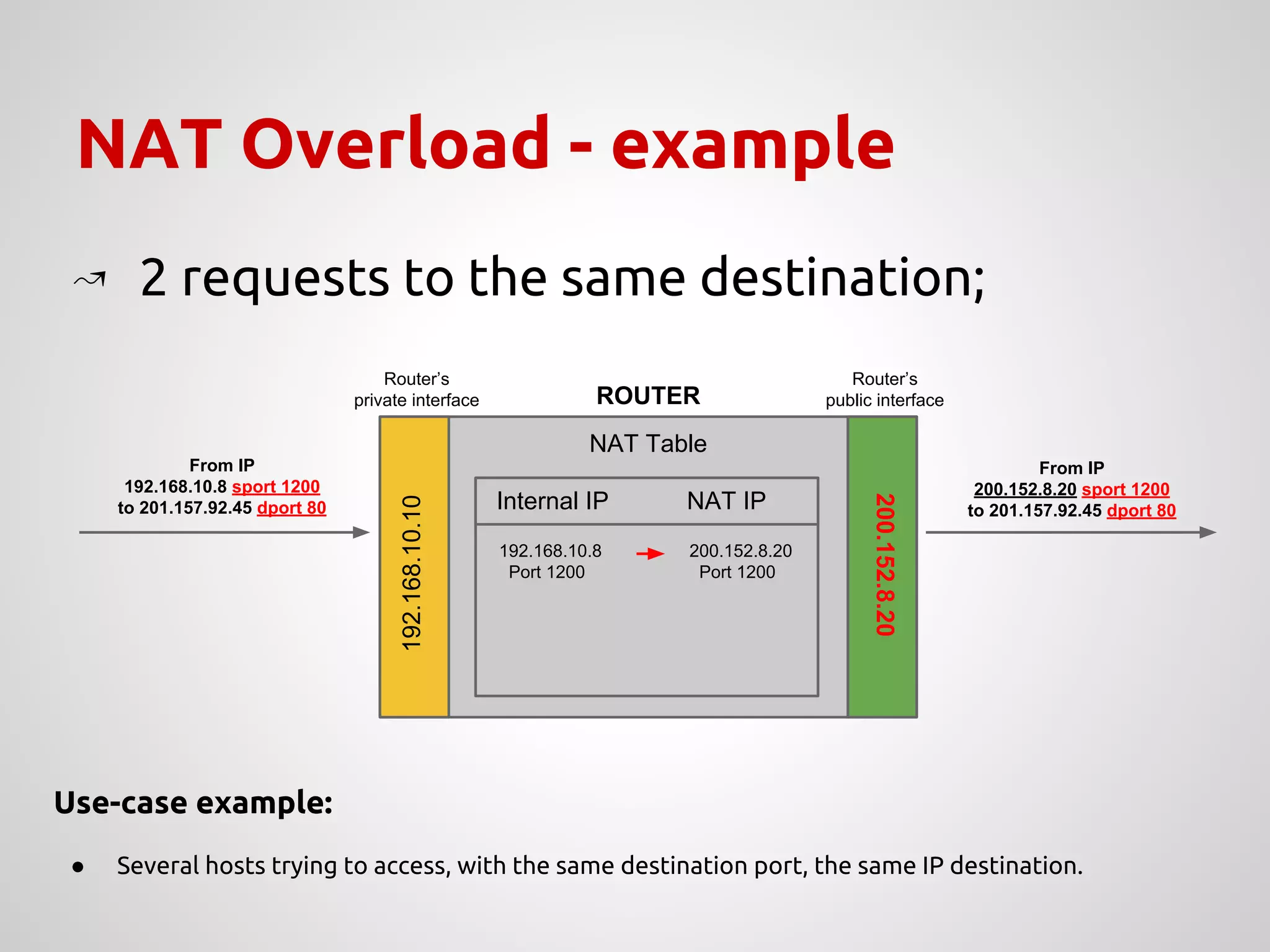
NAT Overload - example
NAT Table
200.152.8.20
Router’s
private interface
Router’s
public interface
192.168.10.10
ROUTER
Internal IP NAT IP
↝ 2 requests to the same destination;
192.168.10.8 200.152.8.20
Port 1200 Port 1200
From IP
200.152.8.20 sport 1200
to 201.157.92.45 dport 80
From IP
192.168.10.8 sport 1200
to 201.157.92.45 dport 80
Use-case example:
● Several hosts trying to access, with the same destination port, the same IP destination.
NAT Overload - example
NAT Table
200.152.8.20
Router’s
private interface
Router’s
public interface
192.168.10.10
ROUTER
Internal IP NAT IP
↝ 2 requests to the same destination;
192.168.10.8 200.152.8.20
Port 1200 Port 1200
From IP
200.152.8.20 sport 1200
to 201.157.92.45 dport 80
From IP
192.168.10.8 sport 1200
to 201.157.92.45 dport 80
From IP
192.168.10.26 sport 1200
to 201.157.92.45 dport 80
Use-case example:
● Several hosts trying to access, with the same destination port, the same IP destination.
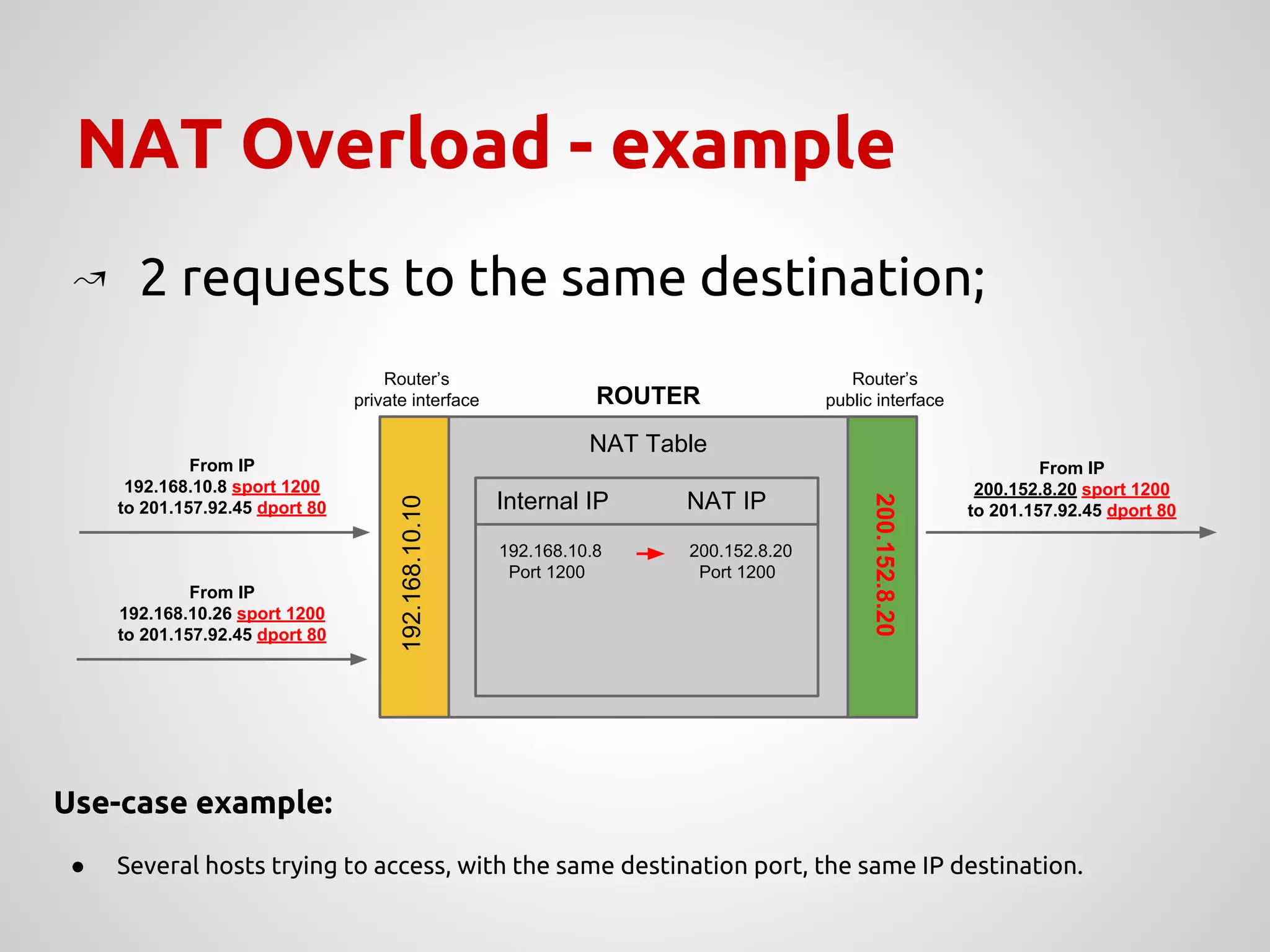
NAT Overload - example
NAT Table
200.152.8.20
Router’s
private interface
Router’s
public interface
192.168.10.10
ROUTER
Internal IP NAT IP
↝ 2 requests to the same destination;
192.168.10.8 200.152.8.20
Port 1200 Port 1200
From IP
200.152.8.20 sport 1200
to 201.157.92.45 dport 80
From IP
192.168.10.8 sport 1200
to 201.157.92.45 dport 80
From IP
192.168.10.26 sport 1200
to 201.157.92.45 dport 80
Use-case example:
● Several hosts trying to access, with the same destination port, the same IP destination.
192.168.10.8 200.152.8.20
Port 1200 Port 5200
From IP
200.152.8.20 sport 5200 to
201.157.92.45 dport 80
NAT Overload - example (Cont’d)
NAT Table
200.152.8.20
Router’s
private interface
Router’s
public interface
192.168.10.10
ROUTER
Internal IP NAT IP
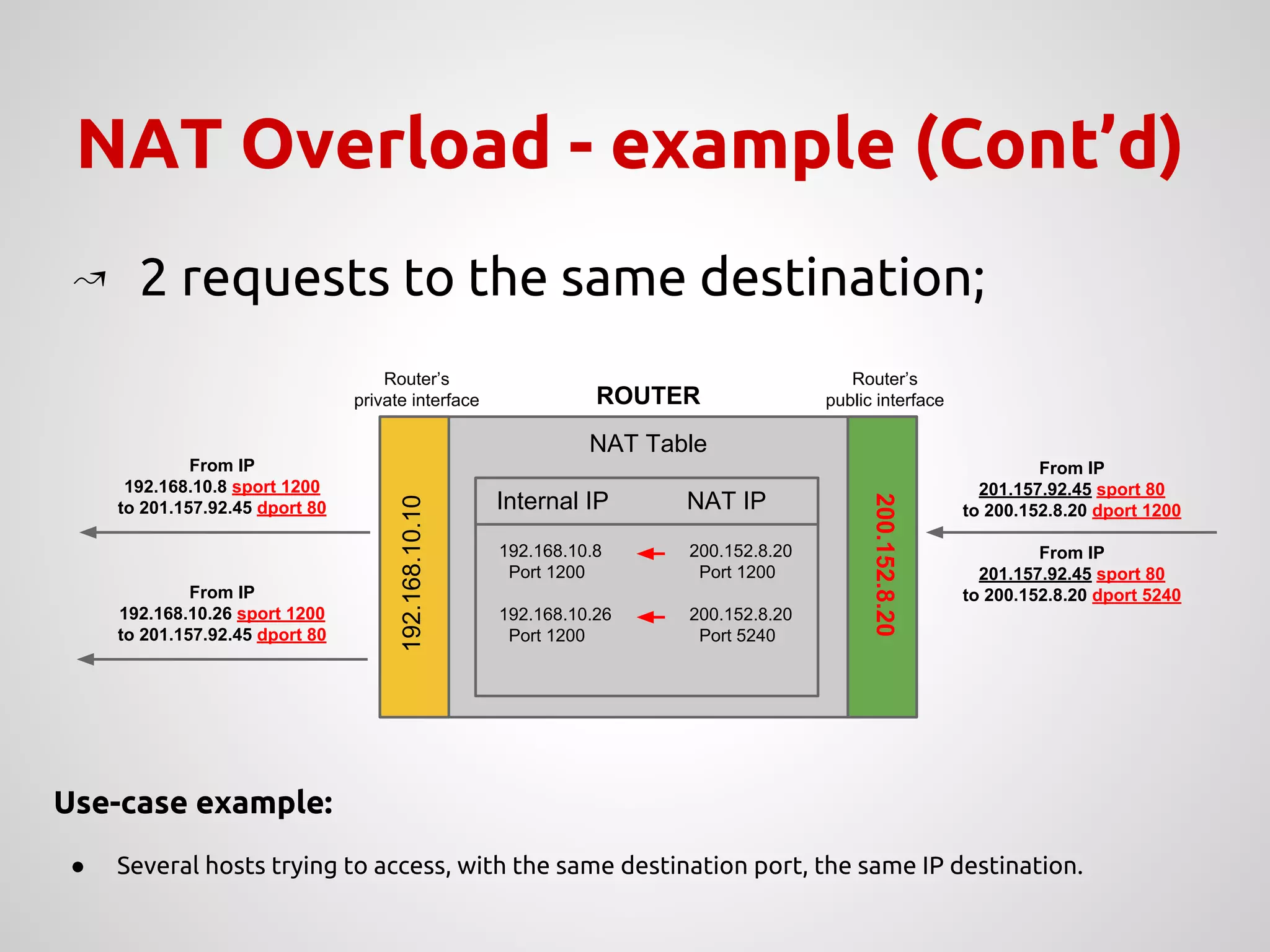
↝ 2 requests to the same destination;
192.168.10.8 200.152.8.20
Port 1200 Port 1200
192.168.10.26 200.152.8.20
Port 1200 Port 5240
From IP
201.157.92.45 sport 80
to 200.152.8.20 dport 1200
From IP
192.168.10.8 sport 1200
to 201.157.92.45 dport 80
From IP
192.168.10.26 sport 1200
to 201.157.92.45 dport 80
Use-case example:
● Several hosts trying to access, with the same destination port, the same IP destination.
From IP
201.157.92.45 sport 80
to 200.152.8.20 dport 5240
NAT - translation examplee
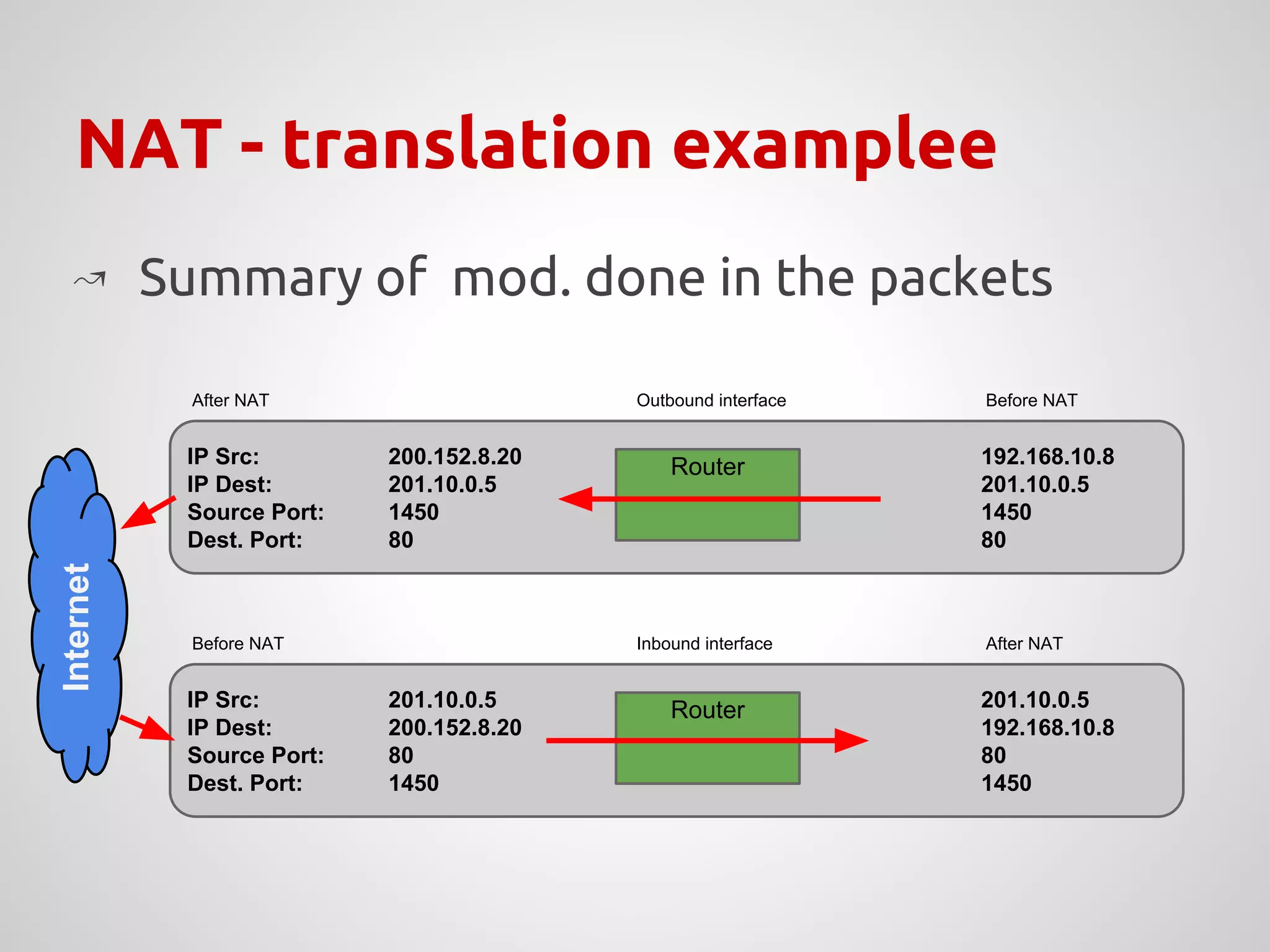
↝ Summary of mod. done in the packets
IP Src:
IP Dest:
Source Port:
Dest. Port:
200.152.8.20
201.10.0.5
1450
80
192.168.10.8
201.10.0.5
1450
80
Router
Before NATAfter NAT Outbound interface
IP Src:
IP Dest:
Source Port:
Dest. Port:
201.10.0.5
200.152.8.20
80
1450
201.10.0.5
192.168.10.8
80
1450
Router
After NATBefore NAT Inbound interface
Internet
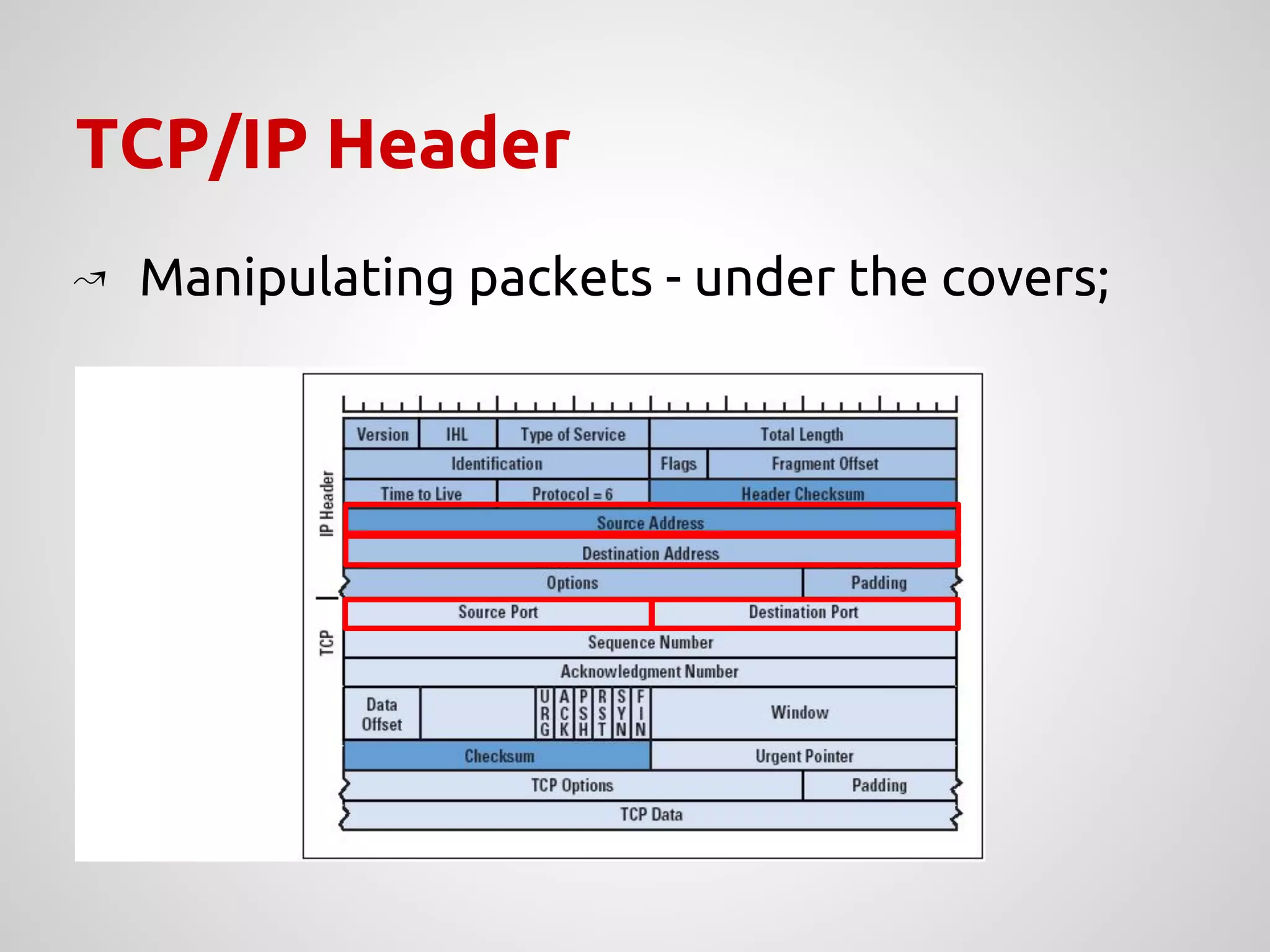
TCP/IP Header
↝ Manipulating packets - under the covers;
↝ Uses a “state machine”;
■ To track connections;
↝ It is needed to keep information of all
connections being performed;
■ It is also possible to not track connections;
↝ conntrack is the tracker used for this;
○ /proc/sys/net/ipv4/netfilter
Where are the registers?
Manipulating packets in a network
IP TABLES
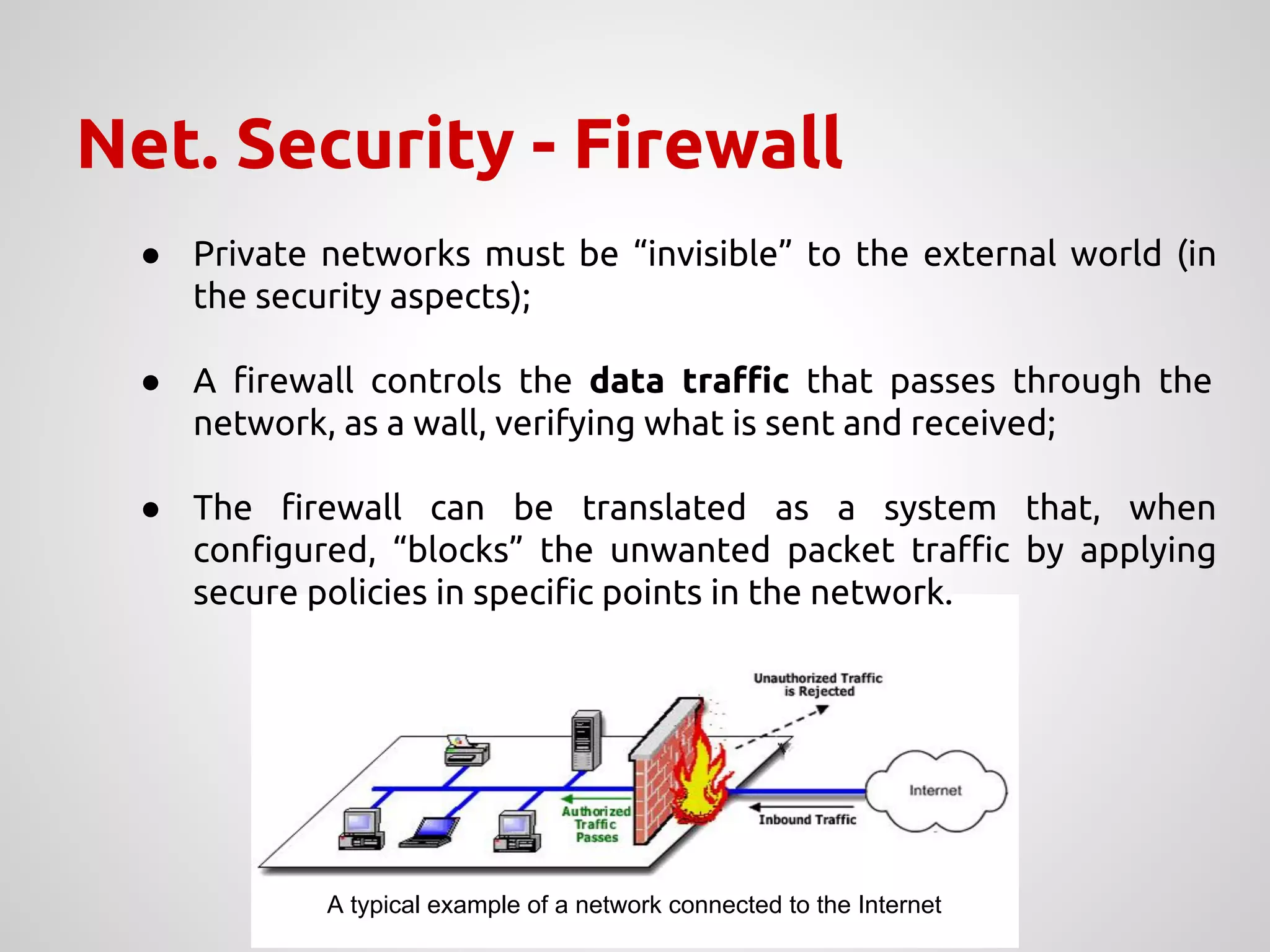
Net. Security - Firewall
● Private networks must be “invisible” to the external world (in
the security aspects);
● A firewall controls the data traffic that passes through the
network, as a wall, verifying what is sent and received;
● The firewall can be translated as a system that, when
configured, “blocks” the unwanted packet traffic by applying
secure policies in specific points in the network.
A typical example of a network connected to the Internet
Firewall Linux - iptables
● Flow control at packet-level through iptables;
● Tables with a set of rules (chains) that allow to filter
and manipulate packets in different points of the
packet flow;
● Chains have a set of rules that are applied to the
packets;
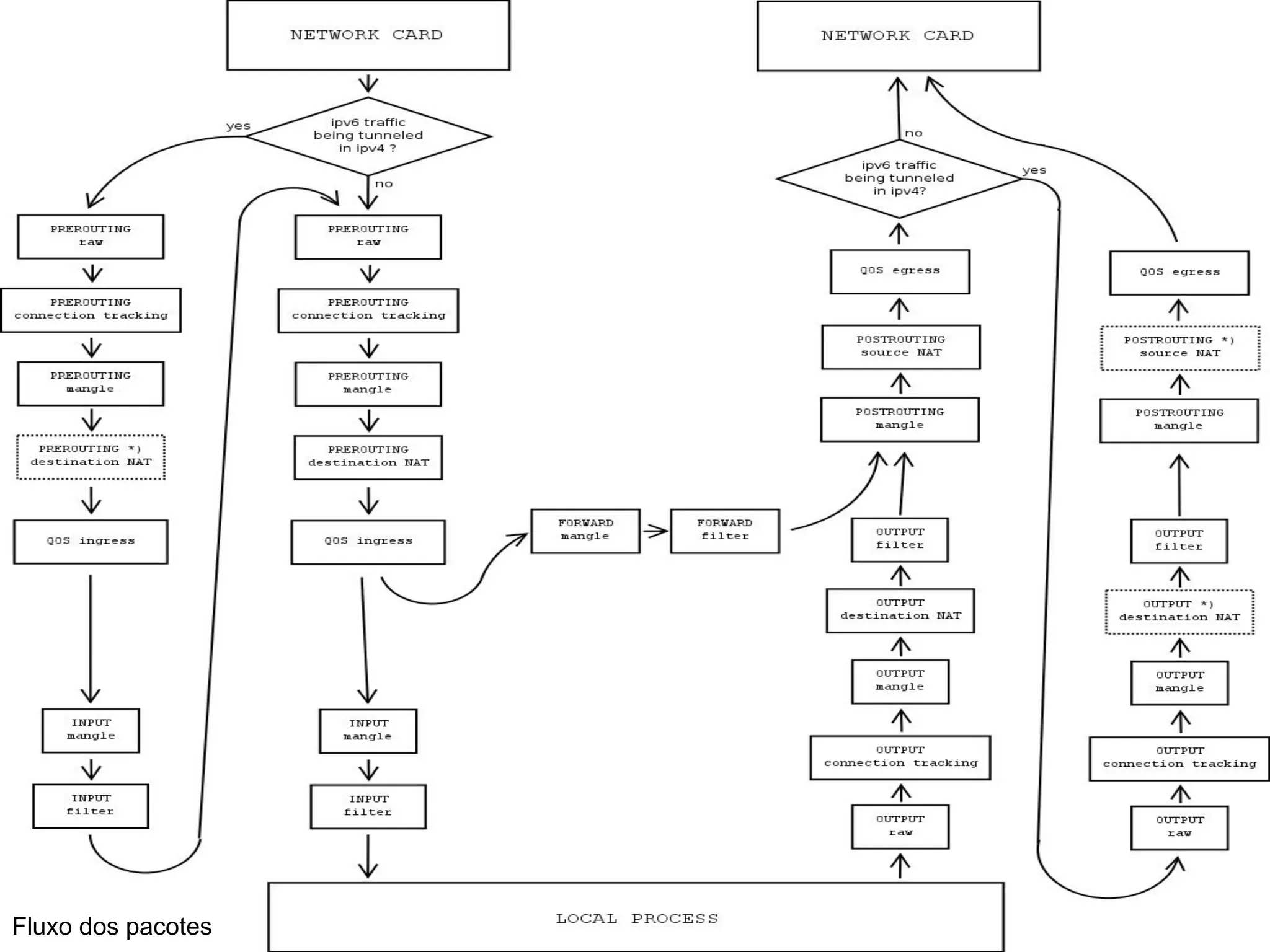
● There are 4 types of tables, each one corresponds to
a specific packet flow (explained later)
Type of tables
↝ Raw
↝ Routing without packet tracking;
↝ Filter
↝ The default table for packet filters;
↝ Nat
↝ Used for address translation;
↝ Mangle
↝ Used for specific changes in the packets;
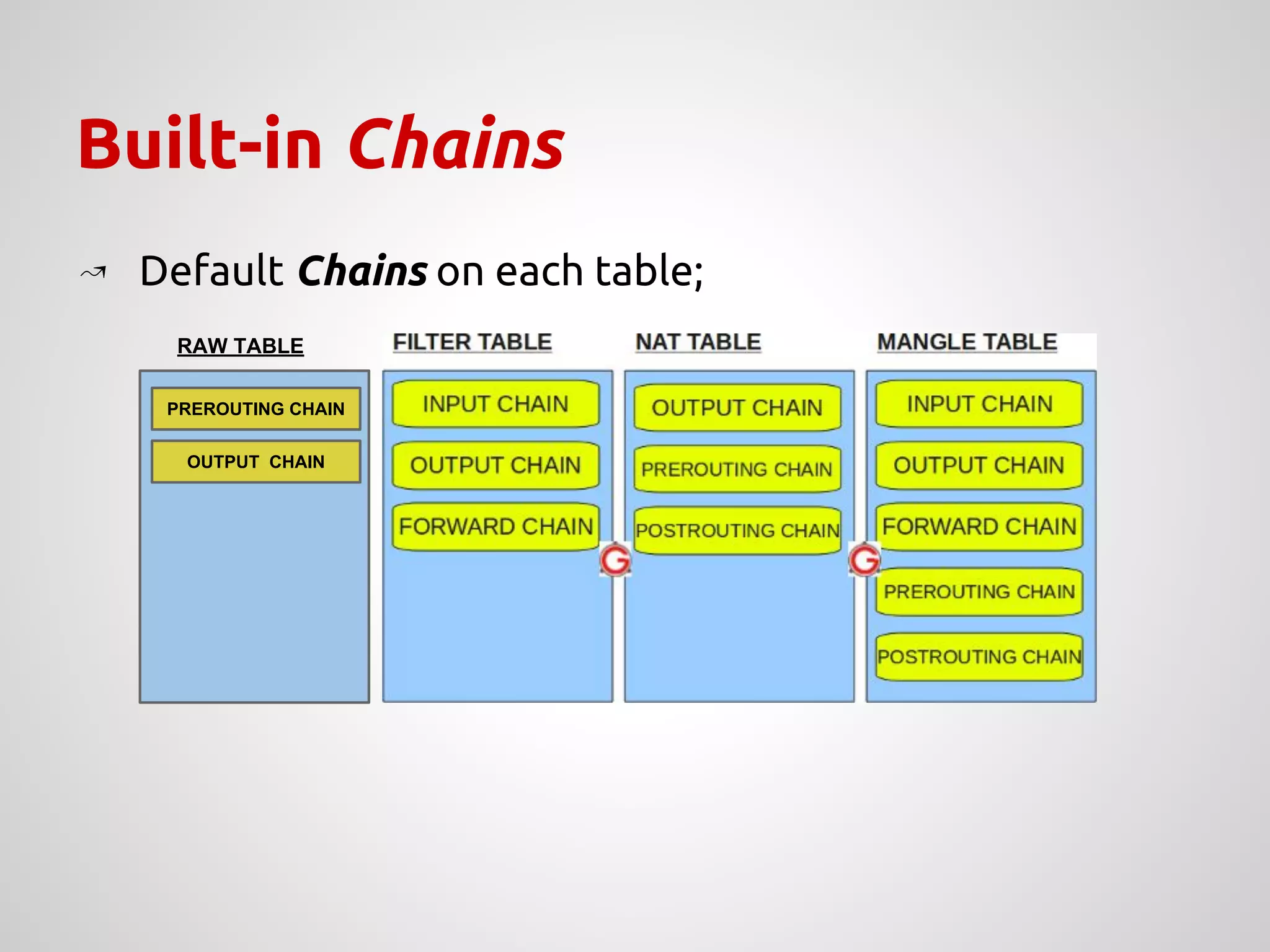
Built-in Chains
↝ Default Chains on each table;
PREROUTING CHAIN
OUTPUT CHAIN
RAW TABLE
Fluxo dos pacotes
Packets destination
↝ ACCEPT
↝ Jumps a set of rules;
↝ REJECT
↝ The packet is discarded, sending an ICMP notification
- destination unreachable - to the source;
↝ DROP
↝ The packet is discarded, without notifying the source;
↝ QUEUE
↝ Packet is transferred to user space for further
processing
Study-case scenarios
↝ Create a subnetwork in a host within the
PARKS network;
↝ Configure a DHCP server on this host;
↝ Add rules for packet forwarding;
↝ Allow access to the Internet for this
subnetwork;
Server properties
↝ Create a subnetwork in a PARKS host;
↝ Configure a DHCP server;
↝ Configure iptables with specific rules:
➢ Allow HTTP[S] traffic to a specific time;
➢ Translate addresses with access to Internet;
➢ Allow FTP traffic;
➢ HTTP server in a specific host in the subnet, with
external access permission;
➢ FTP server allowed only to work within the subnet;
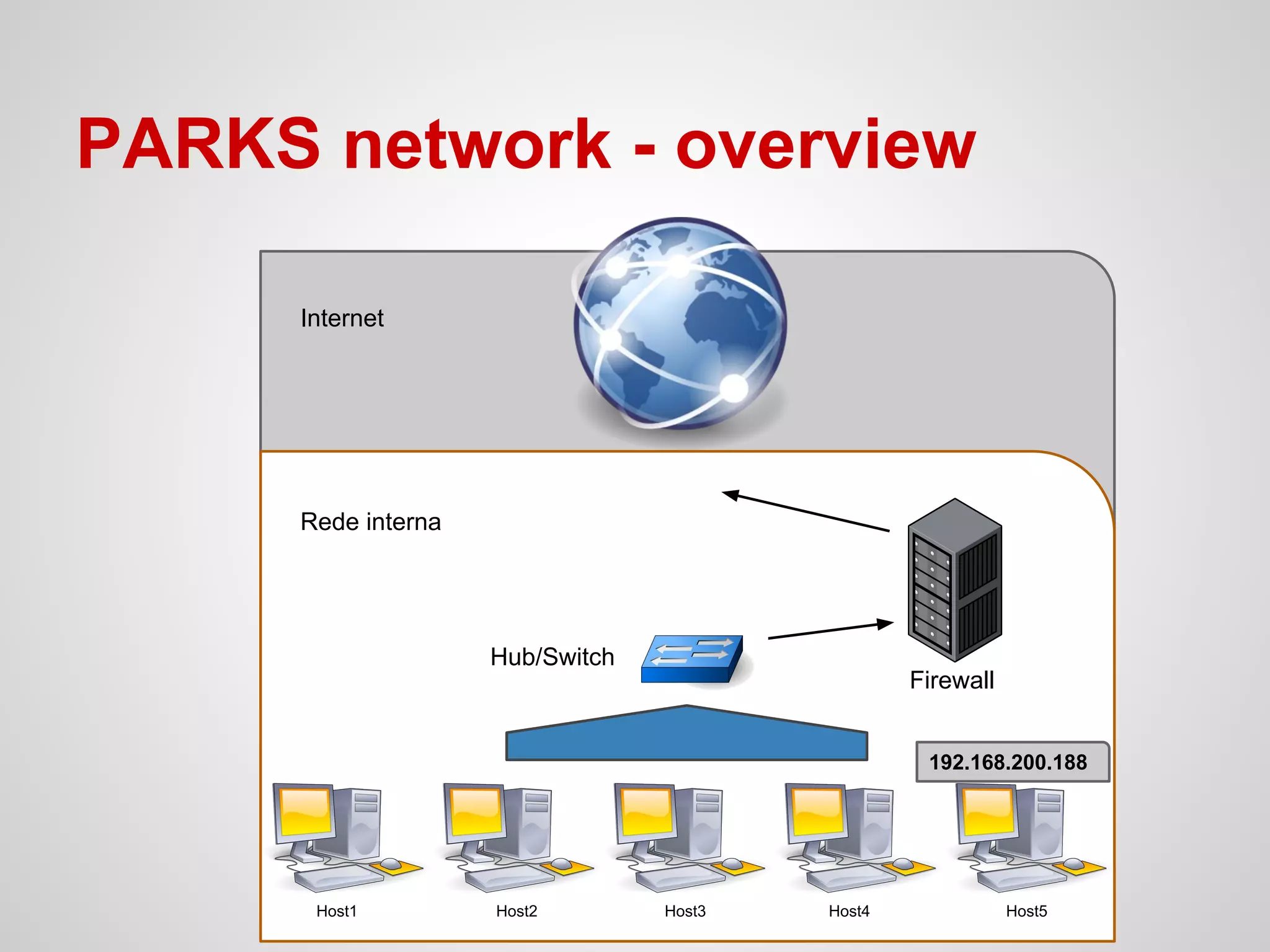
PARKS network - overview
Host1 Host2 Host3 Host4 Host5
Firewall
Internet
Rede interna
192.168.200.188
Hub/Switch
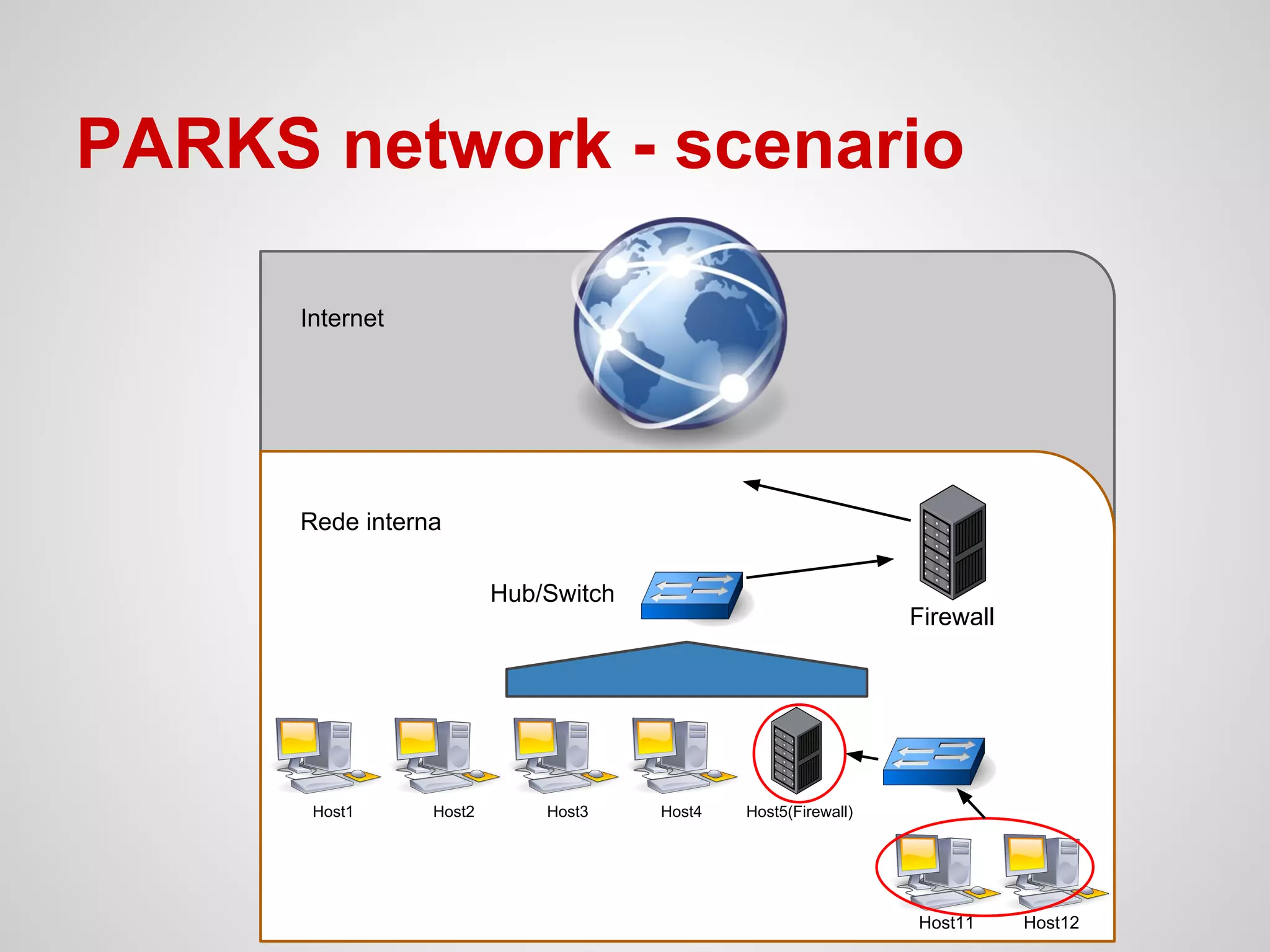
PARKS network - scenario
Firewall
Internet
Rede interna
Host11 Host12
Host1 Host2 Host3 Host4 Host5(Firewall)
Hub/Switch
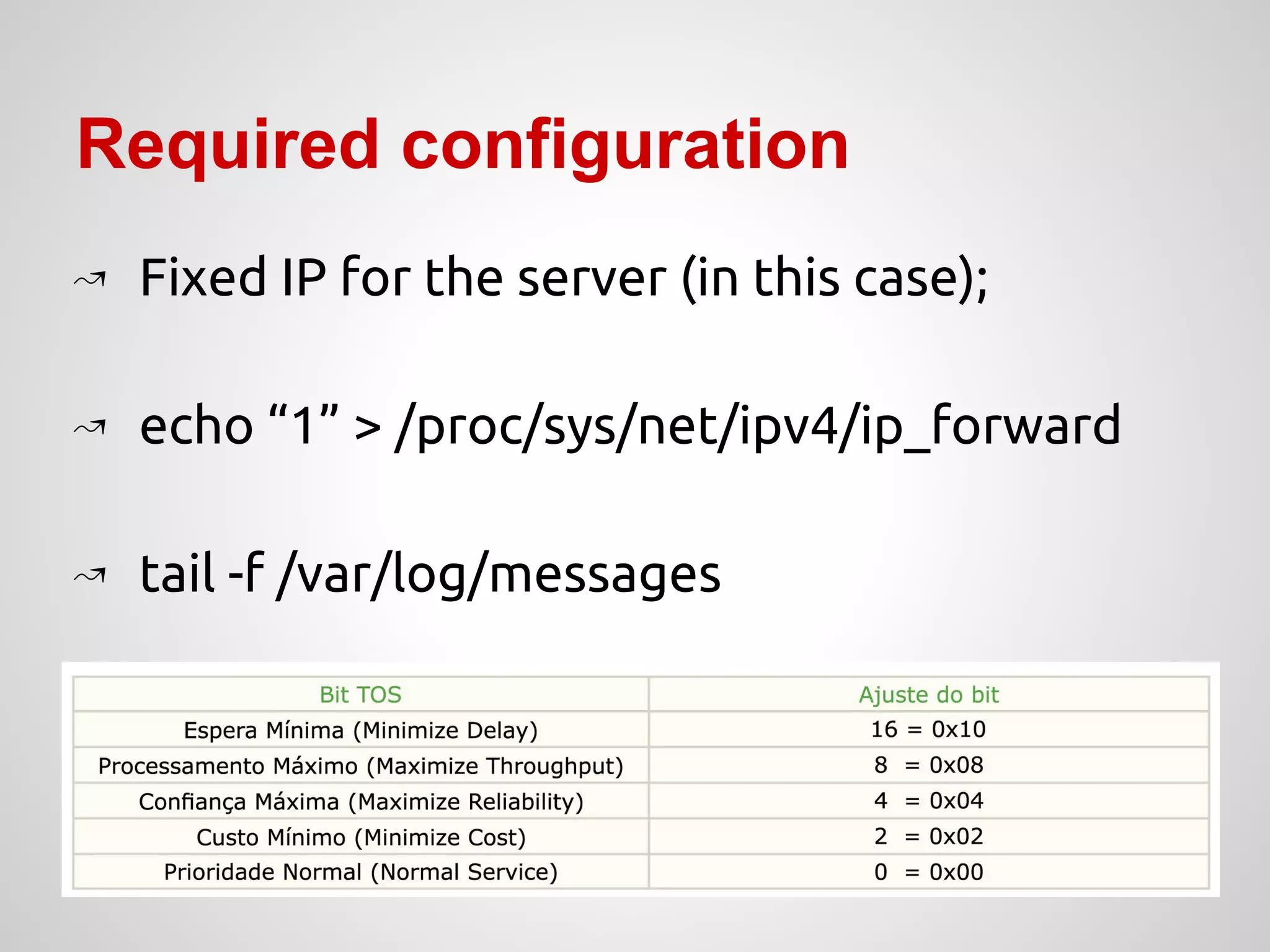
Required configuration
↝ Fixed IP for the server (in this case);
↝ echo “1” > /proc/sys/net/ipv4/ip_forward
↝ tail -f /var/log/messages
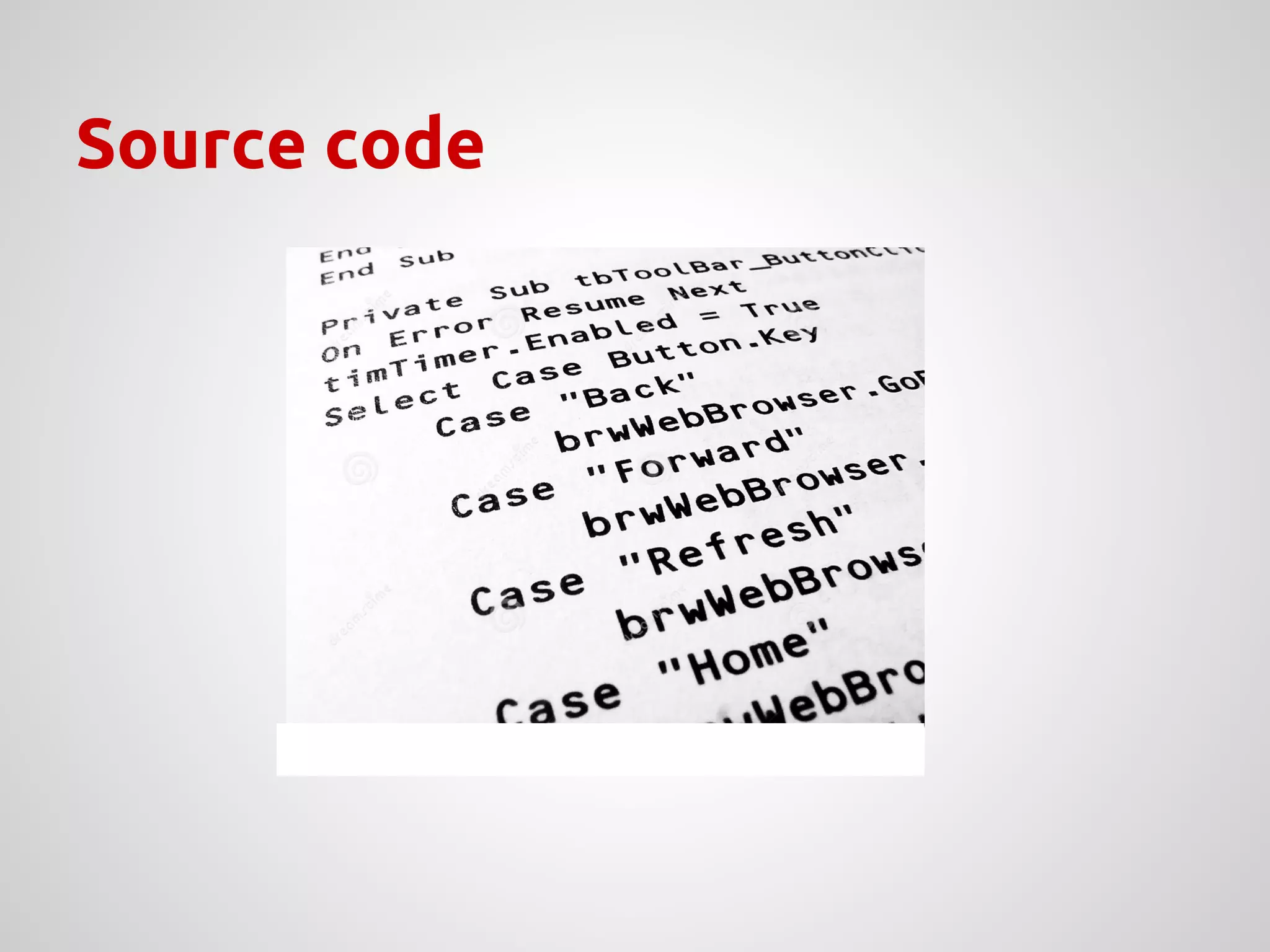
Source code
NAT - [PRE-POST]ROUTING
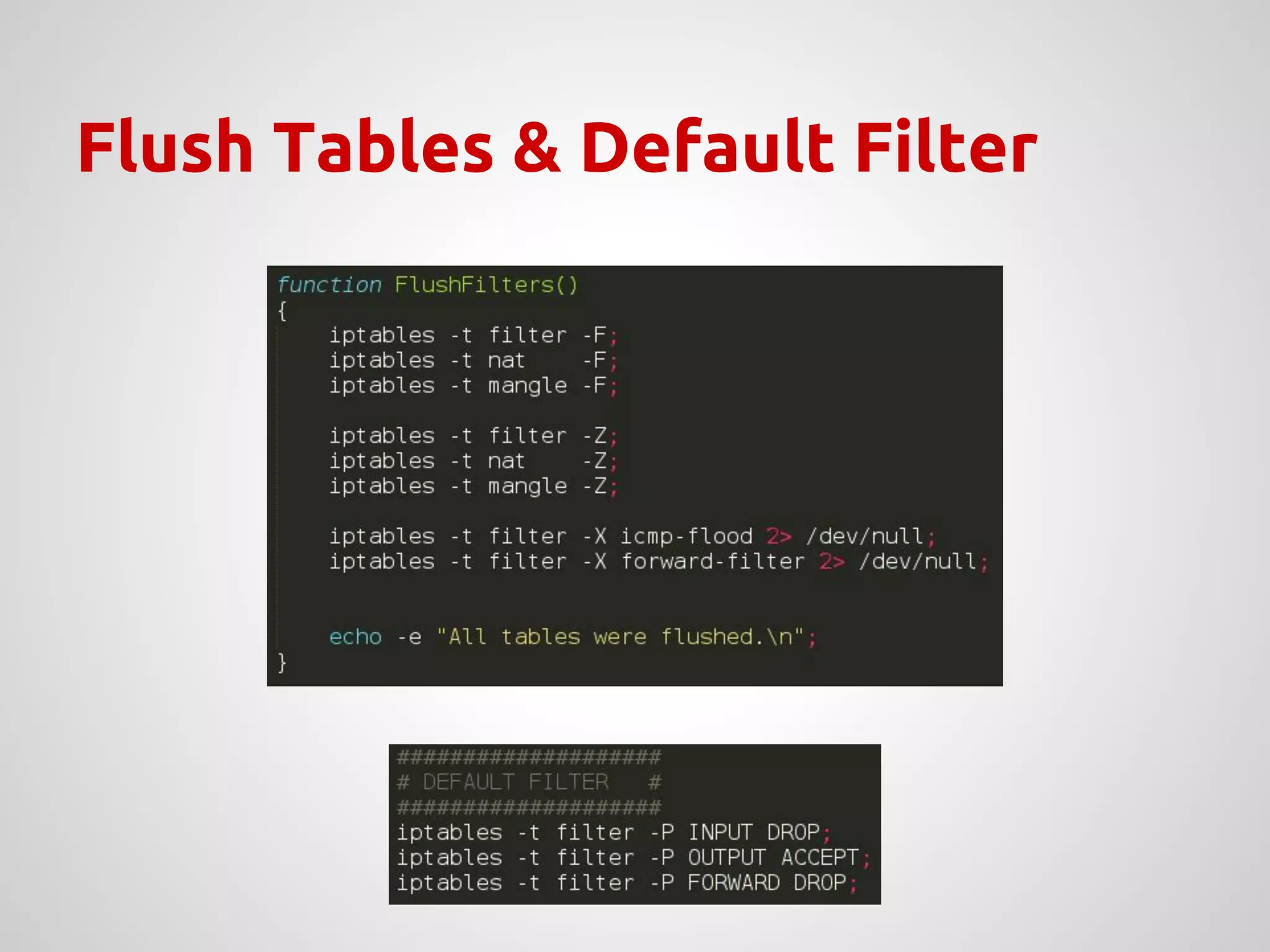
Flush Tables & Default Filter
NAT - [PRE-POST]ROUTING
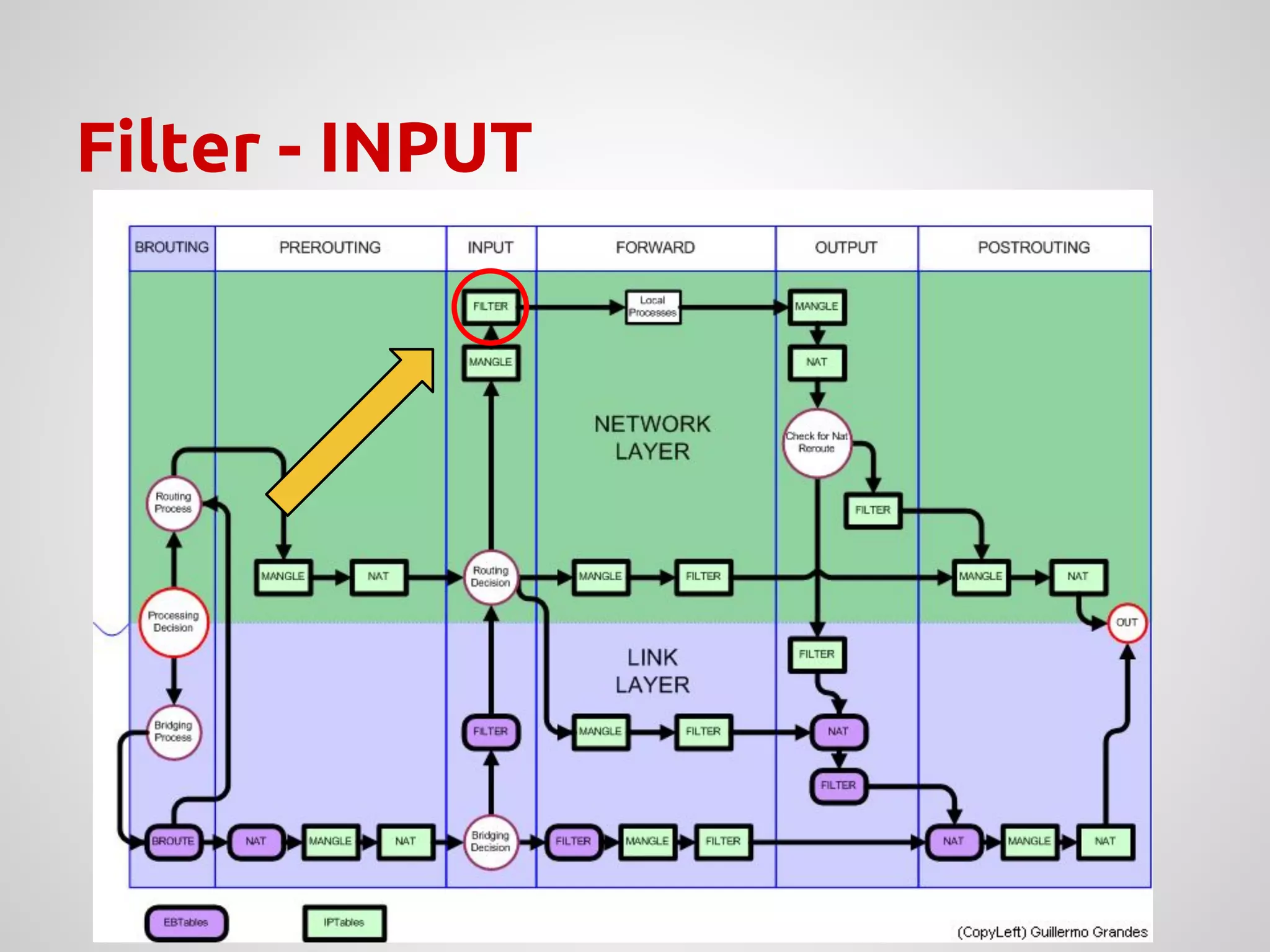
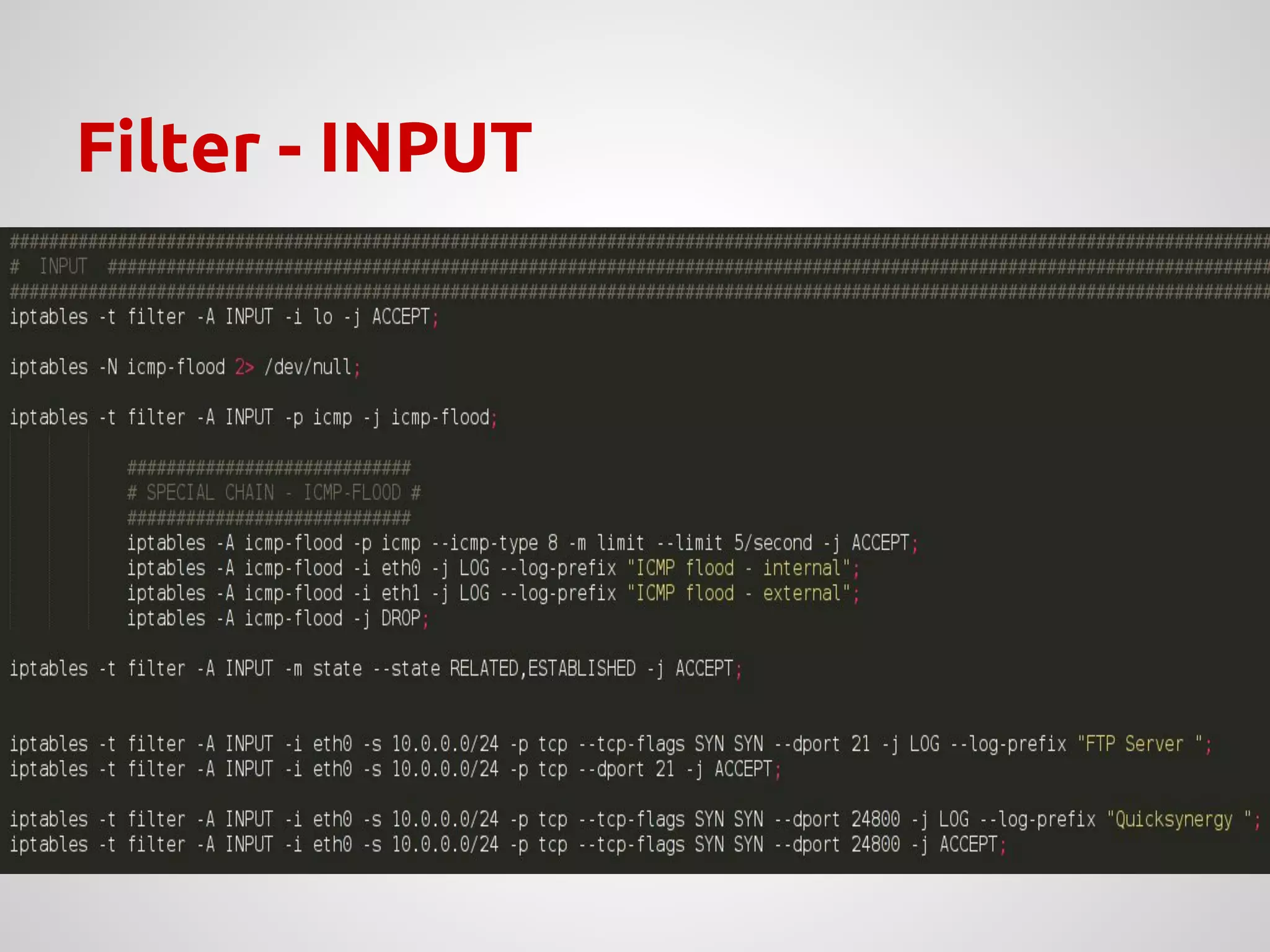
Filter - INPUT
Filter - INPUT
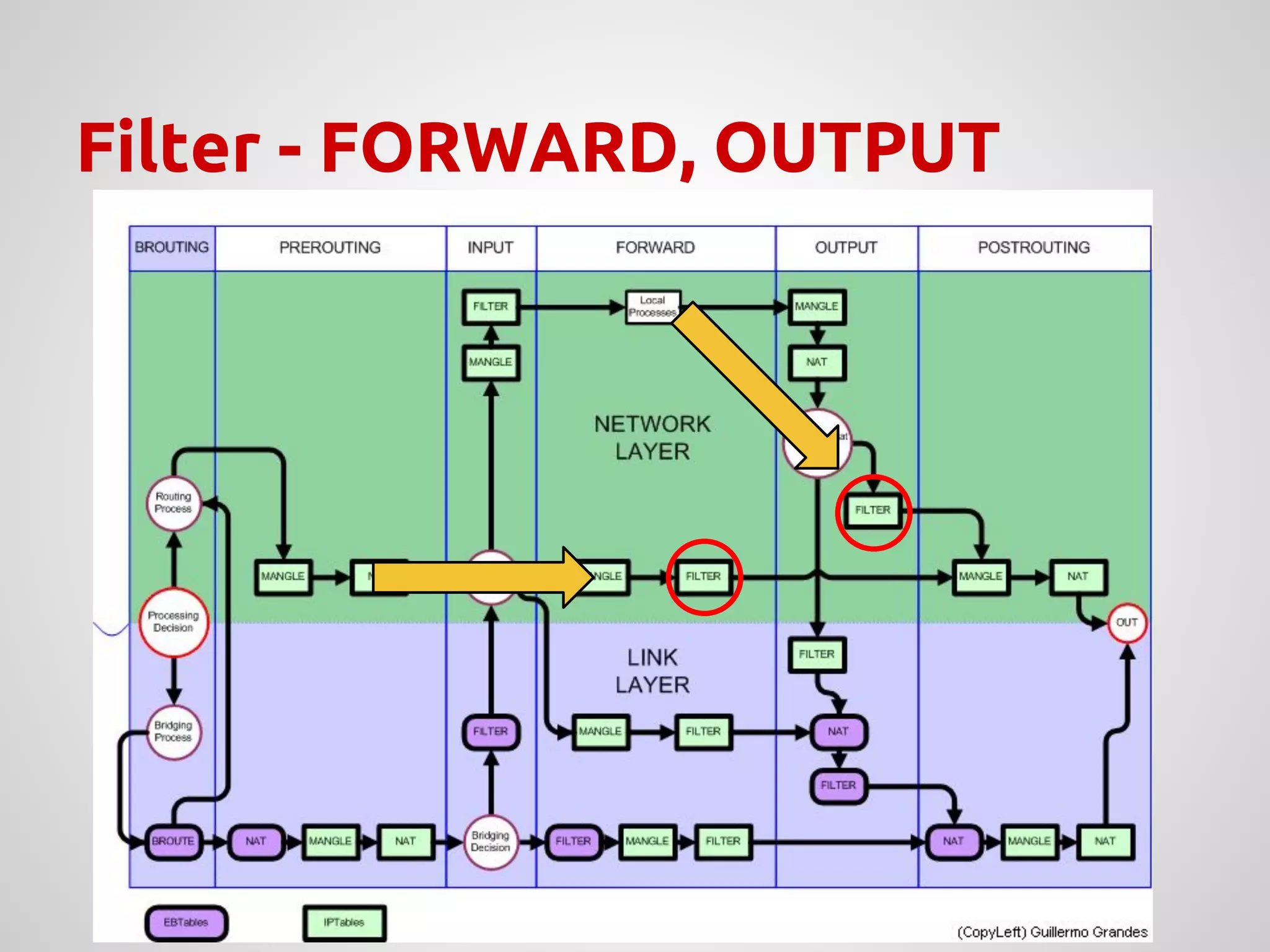
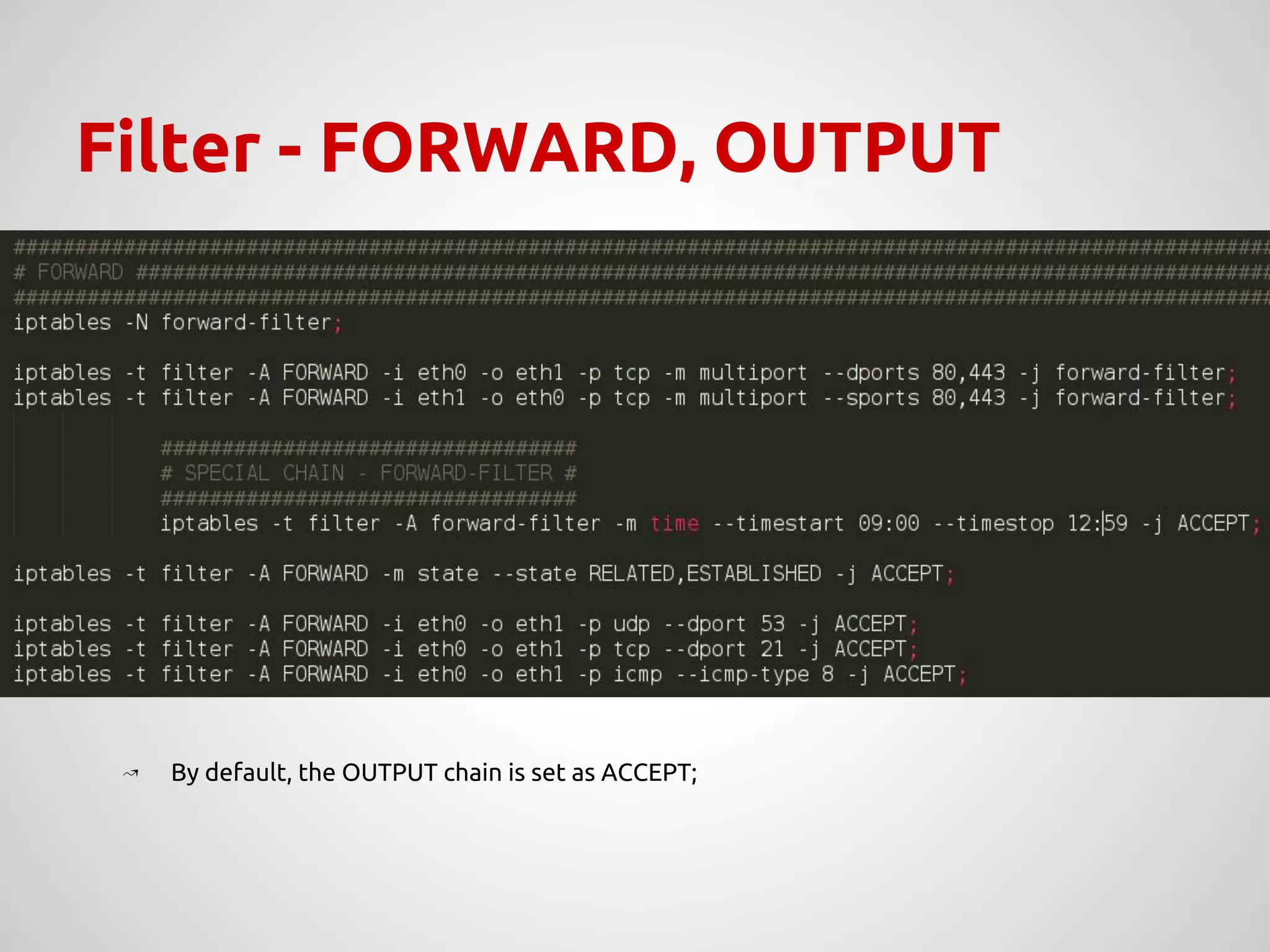
Filter - FORWARD, OUTPUT
↝ By default, the OUTPUT chain is set as ACCEPT;
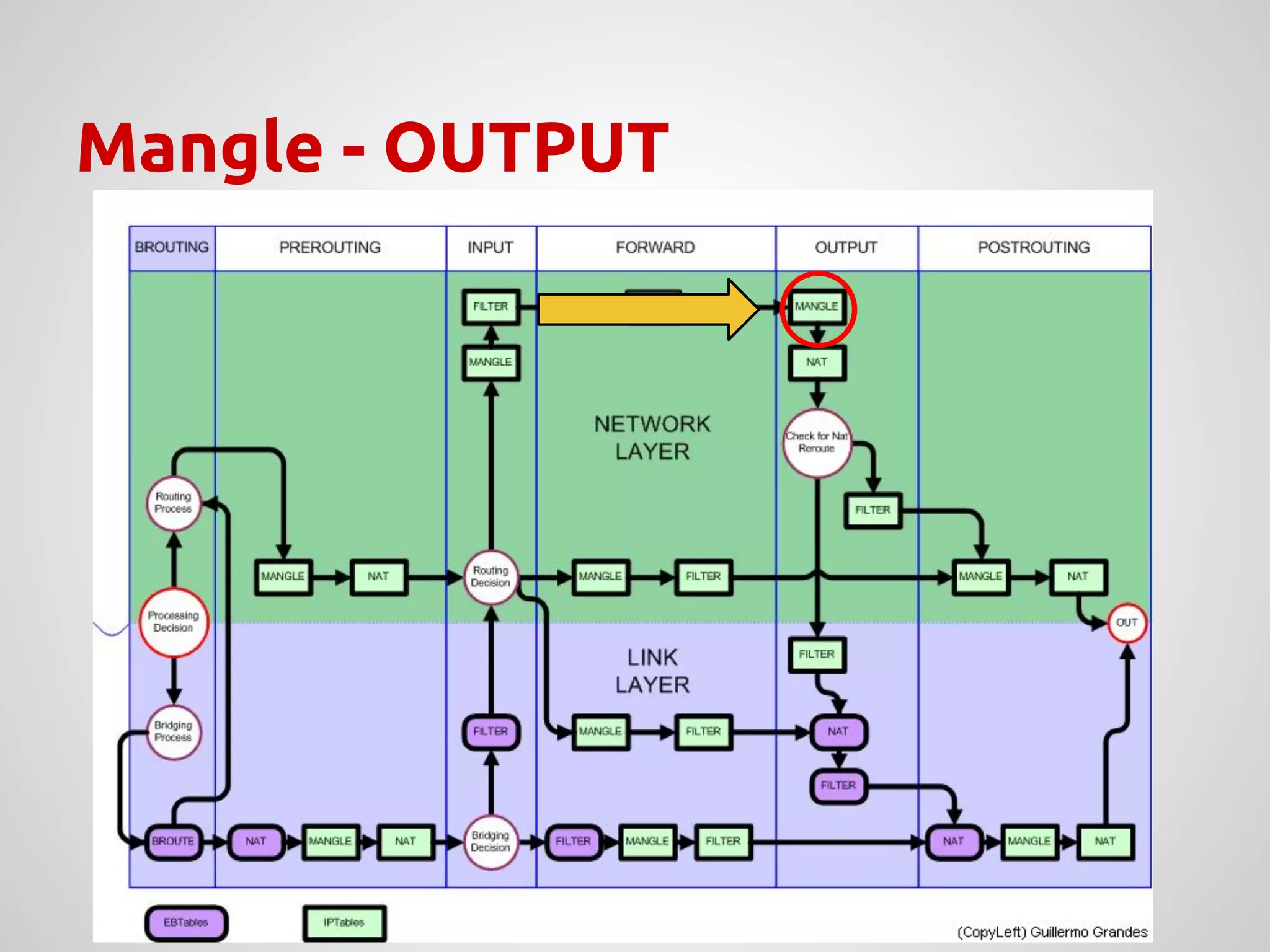
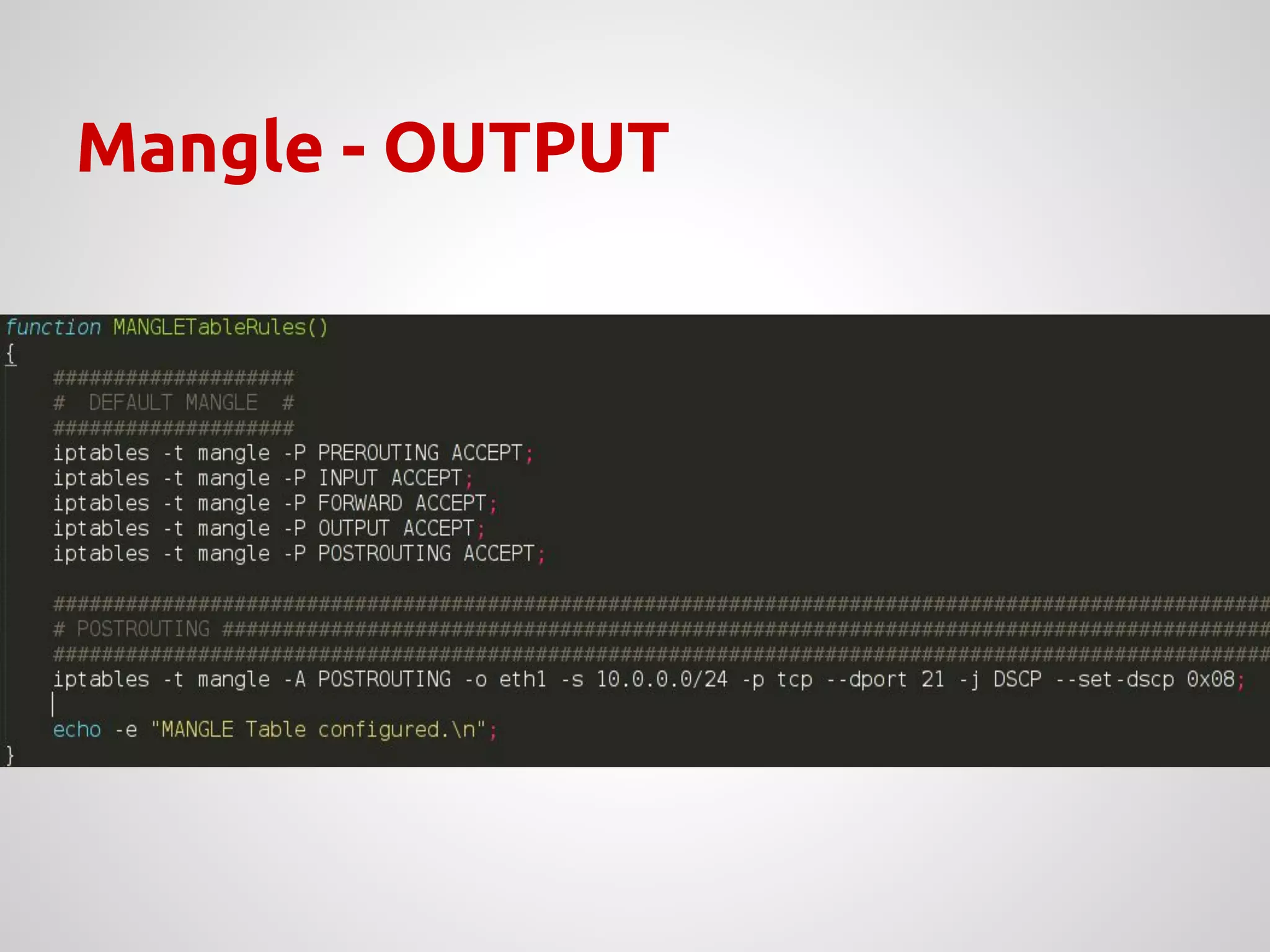
Mangle - OUTPUT
Mangle - OUTPUT
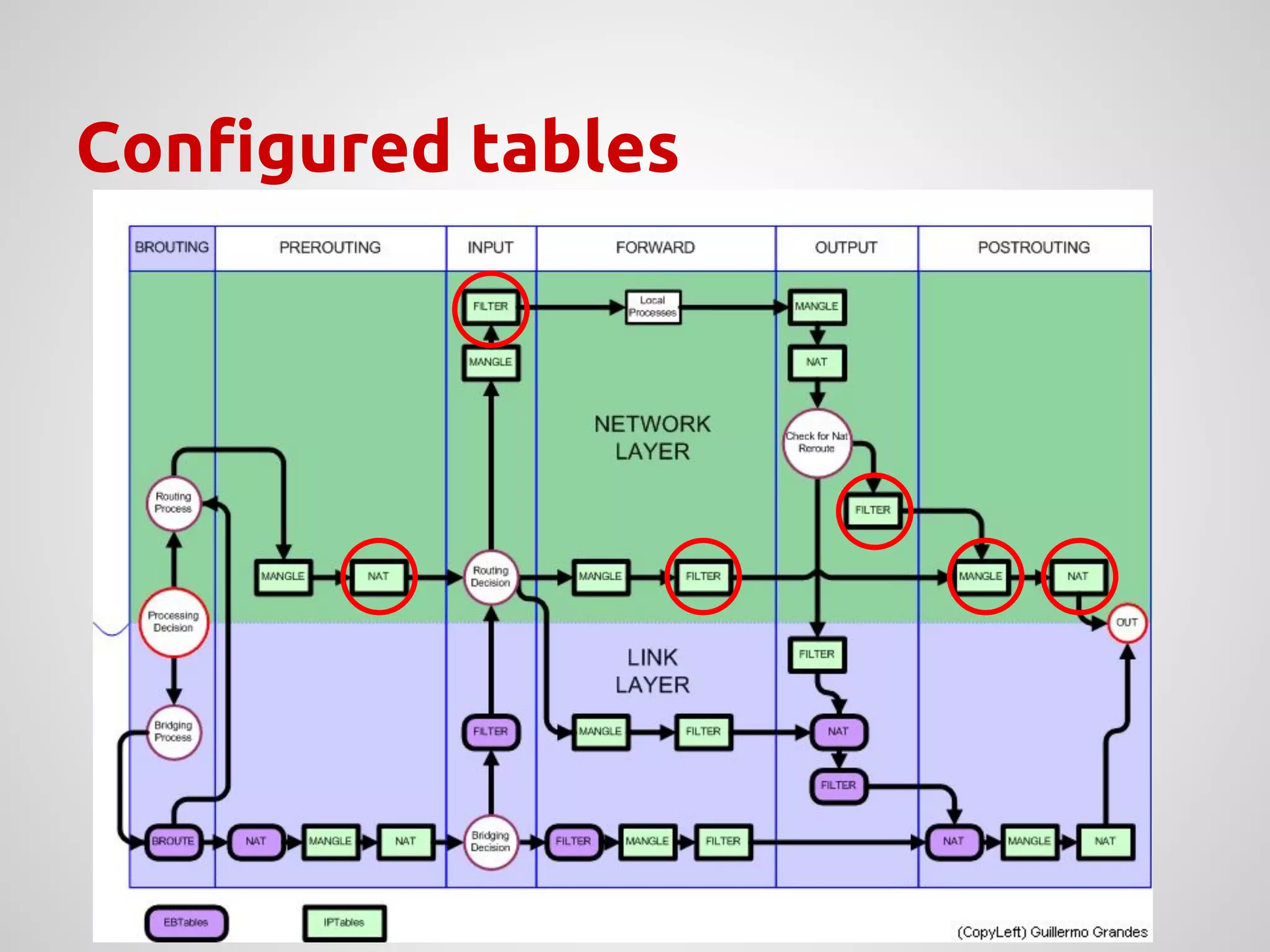
Configured tables
↝ Any questions?
Thank you!

NAT and firewall presentation - how setup a nice firewall

  • 1.
    NAT & Firewallin Linux Cassiano Campes R&D Internship @ PARKS
  • 2.
    How distinct networkscommunicate? NAT TABLES
  • 3.
  • 4.
    Network Address Translation- NAT There are three different NAT methods: ↝ Static NAT; ↝ Dynamic NAT; ↝ NAT Overload;
  • 5.
    ↝ Useful tomap hosts in different networks; ↝ Address translation turn the hosts invisible to different domains; ↝ Still manageable in case of limited IP addresses; Why use NAT?
  • 6.
    A typical network ↝On this example, there are 3 private networks connected to Internet; SamSong Net AppleT Net Intelog Net Internet G W G W G W
  • 7.
    Static NAT -example NAT Table 200.152.8.20to.21 Router’s Private Interface Router’s Public Interface 192.168.10.10 ROUTER Internal IP NAT IP ↝ An internal view of the router; 192.168.10.8 192.168.10.26 HTTP SERVER (Port 80) 192.168.10.8 FTP SERVER (Port 21) 192.168.10.26 HTTP SERVER = 200.152.8.20 FTP SERVER = 200.152.8.21 INTERNAL NETWORK 192.168.10.0/24 200.152.8.20 200.152.8.21 Use-case example: ● HTTP server, where it requires a static IP to allow external (Internet traffic) arrive
  • 8.
    Dynamic NAT -example NAT Table PoolIPsdispon. Router’s Private Interface Router’s Public Interface 192.168.10.10 ROUTER Internal IP NAT IP ↝ Router without requests; Pool of Available IPs 200.152.8.20 200.152.8.21 200.152.8.22 200.152.8.23 INTERNAL NETWORK 192.168.10.0/24 Internal IP NAT IP
  • 9.
    Dynamic NAT -example (Cont’d) NAT Table PoolIPsdispon. 192.168.10.10 Internal IP NAT IP ↝ Router with 2 requests; 192.168.10.8 200.152.8.20 From IP 192.168.10.26 to 8.8.8.8 Pool of Available IPs 200.152.8.22 200.152.8.23 From IP 192.168.10.8 to 201.157.92.45 Internal IP NAT IP 192.168.10.8 192.168.10.26 200.152.8.20 200.152.8.21 From IP 200.152.8.21 to 8.8.8.8 From IP 200.152.8.20 to 201.157.92.45 Use-case example: ● Hosts that want to connect to the Internet, however they are limited by the number of available IP on the Router’s public interface. Router’s Private Interface Router’s Public InterfaceROUTERINTERNAL NETWORK 192.168.10.0/24
  • 10.
    Dynamic NAT -example (Cont’d) NAT Table PoolIPsdispon. 192.168.10.10 Internal IP NAT IP ↝ Router with 4 requests; 192.168.10.8 200.152.8.20 From IP 192.168.10.26 to 207.20.10.1 Pool of Available IPs From IP 192.168.10.8 to 201.157.92.45 Internal IP NAT IP 192.168.10.8 192.168.10.26 201.157.92.45 207.20.10.1 From IP 200.152.8.21 to 207.20.10.1 From IP 200.152.8.20 to 201.157.92.45 From IP 192.168.10.21 to 8.8.8.8 From IP 192.168.10.9 to 201.157.92.45 From IP 200.152.8.22 to 201.157.92.45 From IP 200.152.8.23 to 8.8.8.8 192.168.10.9 201.157.92.45 192.168.10.21 8.8.8.8 Use-case example: ● Hosts that want to connect to the Internet, however they are limited by the number of available IP on the Router’s public interface. Router’s Private Interface Router’s Public InterfaceROUTER
  • 11.
    NAT Overload -IP’s limitations ↝ Alternative to handle public IPs limitations; ↝ Dynamic IP translation, translating both source to destination IPs in the packet; ↝ For a single public IP, it is possible to map approximately 64510 hosts;
  • 12.
    NAT Overload -example NAT Table 200.152.8.20 Router’s private interface Router’s public interface 192.168.10.10 ROUTER Internal IP NAT IP ↝ 2 requests to the same destination; Use-case example: ● Several hosts trying to access, with the same destination port, the same IP destination.
  • 13.
    NAT Overload -example NAT Table 200.152.8.20 Router’s private interface Router’s public interface 192.168.10.10 ROUTER Internal IP NAT IP ↝ 2 requests to the same destination; 192.168.10.8 200.152.8.20 Port 1200 Port 1200 From IP 200.152.8.20 sport 1200 to 201.157.92.45 dport 80 From IP 192.168.10.8 sport 1200 to 201.157.92.45 dport 80 Use-case example: ● Several hosts trying to access, with the same destination port, the same IP destination.
  • 14.
    NAT Overload -example NAT Table 200.152.8.20 Router’s private interface Router’s public interface 192.168.10.10 ROUTER Internal IP NAT IP ↝ 2 requests to the same destination; 192.168.10.8 200.152.8.20 Port 1200 Port 1200 From IP 200.152.8.20 sport 1200 to 201.157.92.45 dport 80 From IP 192.168.10.8 sport 1200 to 201.157.92.45 dport 80 From IP 192.168.10.26 sport 1200 to 201.157.92.45 dport 80 Use-case example: ● Several hosts trying to access, with the same destination port, the same IP destination.
  • 15.
    NAT Overload -example NAT Table 200.152.8.20 Router’s private interface Router’s public interface 192.168.10.10 ROUTER Internal IP NAT IP ↝ 2 requests to the same destination; 192.168.10.8 200.152.8.20 Port 1200 Port 1200 From IP 200.152.8.20 sport 1200 to 201.157.92.45 dport 80 From IP 192.168.10.8 sport 1200 to 201.157.92.45 dport 80 From IP 192.168.10.26 sport 1200 to 201.157.92.45 dport 80 Use-case example: ● Several hosts trying to access, with the same destination port, the same IP destination. 192.168.10.8 200.152.8.20 Port 1200 Port 5200 From IP 200.152.8.20 sport 5200 to 201.157.92.45 dport 80
  • 16.
    NAT Overload -example (Cont’d) NAT Table 200.152.8.20 Router’s private interface Router’s public interface 192.168.10.10 ROUTER Internal IP NAT IP ↝ 2 requests to the same destination; 192.168.10.8 200.152.8.20 Port 1200 Port 1200 192.168.10.26 200.152.8.20 Port 1200 Port 5240 From IP 201.157.92.45 sport 80 to 200.152.8.20 dport 1200 From IP 192.168.10.8 sport 1200 to 201.157.92.45 dport 80 From IP 192.168.10.26 sport 1200 to 201.157.92.45 dport 80 Use-case example: ● Several hosts trying to access, with the same destination port, the same IP destination. From IP 201.157.92.45 sport 80 to 200.152.8.20 dport 5240
  • 17.
    NAT - translationexamplee ↝ Summary of mod. done in the packets IP Src: IP Dest: Source Port: Dest. Port: 200.152.8.20 201.10.0.5 1450 80 192.168.10.8 201.10.0.5 1450 80 Router Before NATAfter NAT Outbound interface IP Src: IP Dest: Source Port: Dest. Port: 201.10.0.5 200.152.8.20 80 1450 201.10.0.5 192.168.10.8 80 1450 Router After NATBefore NAT Inbound interface Internet
  • 18.
    TCP/IP Header ↝ Manipulatingpackets - under the covers;
  • 19.
    ↝ Uses a“state machine”; ■ To track connections; ↝ It is needed to keep information of all connections being performed; ■ It is also possible to not track connections; ↝ conntrack is the tracker used for this; ○ /proc/sys/net/ipv4/netfilter Where are the registers?
  • 20.
    Manipulating packets ina network IP TABLES
  • 21.
    Net. Security -Firewall ● Private networks must be “invisible” to the external world (in the security aspects); ● A firewall controls the data traffic that passes through the network, as a wall, verifying what is sent and received; ● The firewall can be translated as a system that, when configured, “blocks” the unwanted packet traffic by applying secure policies in specific points in the network. A typical example of a network connected to the Internet
  • 22.
    Firewall Linux -iptables ● Flow control at packet-level through iptables; ● Tables with a set of rules (chains) that allow to filter and manipulate packets in different points of the packet flow; ● Chains have a set of rules that are applied to the packets; ● There are 4 types of tables, each one corresponds to a specific packet flow (explained later)
  • 23.
    Type of tables ↝Raw ↝ Routing without packet tracking; ↝ Filter ↝ The default table for packet filters; ↝ Nat ↝ Used for address translation; ↝ Mangle ↝ Used for specific changes in the packets;
  • 24.
    Built-in Chains ↝ DefaultChains on each table; PREROUTING CHAIN OUTPUT CHAIN RAW TABLE
  • 25.
  • 26.
    Packets destination ↝ ACCEPT ↝Jumps a set of rules; ↝ REJECT ↝ The packet is discarded, sending an ICMP notification - destination unreachable - to the source; ↝ DROP ↝ The packet is discarded, without notifying the source; ↝ QUEUE ↝ Packet is transferred to user space for further processing
  • 27.
    Study-case scenarios ↝ Createa subnetwork in a host within the PARKS network; ↝ Configure a DHCP server on this host; ↝ Add rules for packet forwarding; ↝ Allow access to the Internet for this subnetwork;
  • 28.
    Server properties ↝ Createa subnetwork in a PARKS host; ↝ Configure a DHCP server; ↝ Configure iptables with specific rules: ➢ Allow HTTP[S] traffic to a specific time; ➢ Translate addresses with access to Internet; ➢ Allow FTP traffic; ➢ HTTP server in a specific host in the subnet, with external access permission; ➢ FTP server allowed only to work within the subnet;
  • 29.
    PARKS network -overview Host1 Host2 Host3 Host4 Host5 Firewall Internet Rede interna 192.168.200.188 Hub/Switch
  • 30.
    PARKS network -scenario Firewall Internet Rede interna Host11 Host12 Host1 Host2 Host3 Host4 Host5(Firewall) Hub/Switch
  • 31.
    Required configuration ↝ FixedIP for the server (in this case); ↝ echo “1” > /proc/sys/net/ipv4/ip_forward ↝ tail -f /var/log/messages
  • 32.
  • 33.
  • 34.
    Flush Tables &Default Filter
  • 35.
  • 36.
  • 37.
  • 38.
  • 39.
  • 40.
    Filter - FORWARD,OUTPUT ↝ By default, the OUTPUT chain is set as ACCEPT;
  • 41.
  • 42.
  • 43.
  • 44.