SPSS
Statistical Package for
the Social Sciences
By
Salem Almadhun
1
What is SPSS?
• SPSS is a program that can be used to perform
data entry and analysis and to create tables
and graphs.
• SPSS is capable of handling large amounts of
data and can perform all analyses that you
want.
2
Cont.…
• SPSS is commonly used in the Social Sciences
and in the business world, so familiarity with
this program should serve any one needs to
analysis data.
3
Cont.…
• SPSS has two main windows:
1. The Data Editor window.
2. The Viewer window.
• The Data Editor window is divided into:
– Data View.
– Variable View.
4
Cont.…
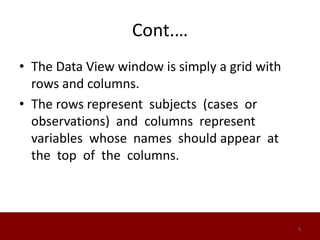
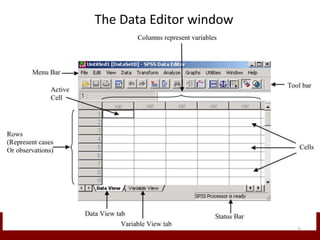
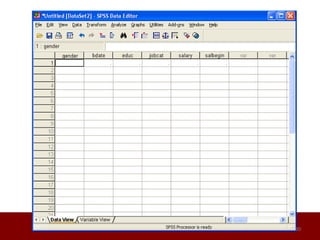
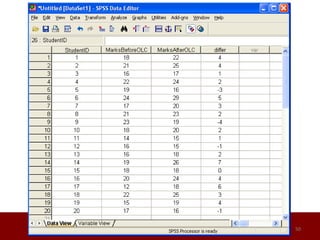
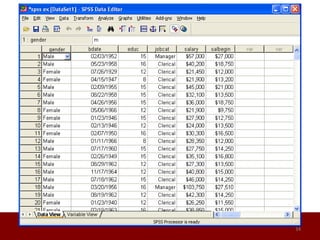
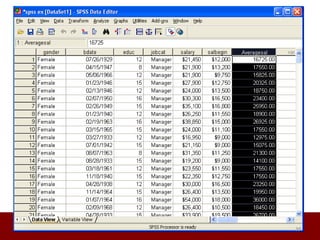
• The Data View window is simply a grid with
rows and columns.
• The rows represent subjects (cases or
observations) and columns represent
variables whose names should appear at
the top of the columns.
5
The Data Editor window
6
Cont.…
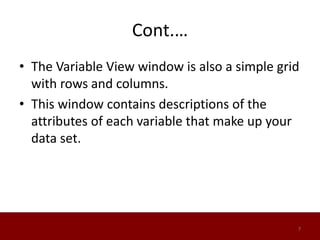
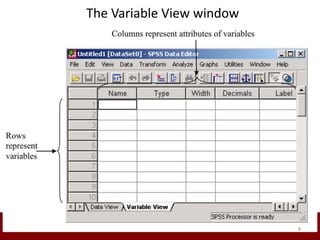
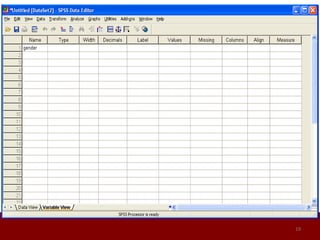
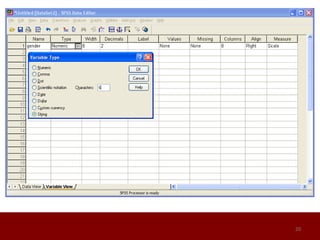
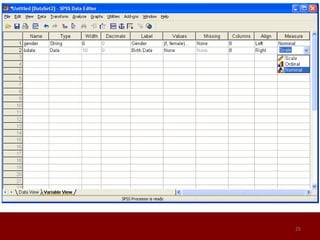
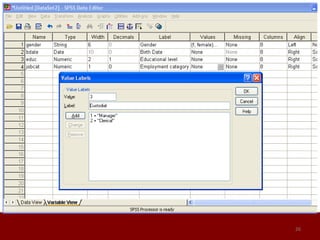
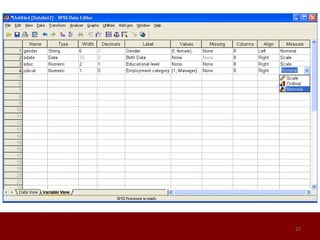
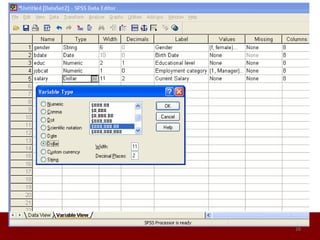
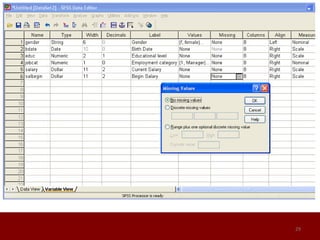
• The Variable View window is also a simple grid
with rows and columns.
• This window contains descriptions of the
attributes of each variable that make up your
data set.
7
The Variable View window
8
Cont.…
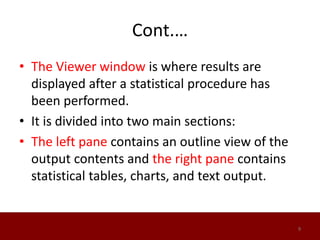
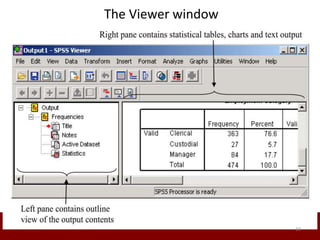
• The Viewer window is where results are
displayed after a statistical procedure has
been performed.
• It is divided into two main sections:
• The left pane contains an outline view of the
output contents and the right pane contains
statistical tables, charts, and text output.
9
The Viewer window
10
How to Make a Questionnaire?
1. Decide what you would like to learn from
your questionnaire.
• This will help you come up with questions to
ask and the order in which to ask them.
• Ask yourself how you will use the data and
witch measure you want to use.
11
Cont..
2. Start writing out questions that can help you
reach your goals.
Keep the questions and answers simple, using as
few words as possible.
12
Cont..
3. Design your questionnaire based on the
method in which it will be delivered.
Decide if you want to give clarifications to your
questions if the respondent doesn't understand
something.
13
Cont..
4. Ask questions that are very similar but
worded differently.
This will give you a better chance at finding the
person's true opinion on a given topic.
14
Cont..
5. Order the questions so that if a person says
yes or no to a certain question, they bypass
any questions that don't apply to them.
This will help keep the questionnaire focused
and take less time to complete
15
Cont..
6. Test your questionnaire before you begin
surveying people
Friends, employees and family can be good
testers.
You may need to reword some things, rearrange
questions, make additions or delete questions
that don't help you reach your end goal
16
17
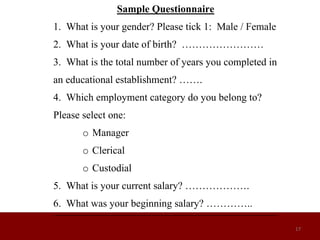
Sample Questionnaire
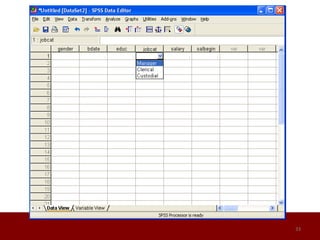
1. What is your gender? Please tick 1: Male / Female
2. What is your date of birth? ……………………
3. What is the total number of years you completed in
an educational establishment? …….
4. Which employment category do you belong to?
Please select one:
o Manager
o Clerical
o Custodial
5. What is your current salary? ……………….
6. What was your beginning salary? …………..
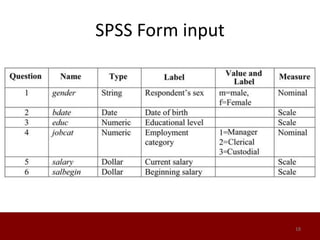
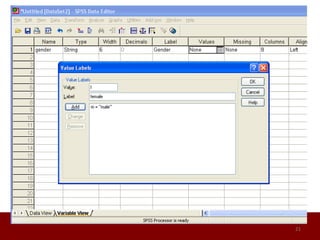
SPSS Form input
18
19
20
21
22
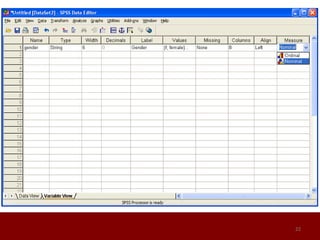
Types of Data
• There are basically three types of data:
• Interval or Scale data: These are data taken from an
independent scale with units.
• Examples: height, weight, marks, and temperature.
• Ordinal data :These are data collected from ranking
variables on a given scale.
• Example: you may ask respondents to rank some
variable based on their perceived level of importance
of the variables using Likert type scale such as 1, 2, 3,
4 and 5.
23
Types of Data
• Nominal data Examples: gender (male or
female), nationality (British, American,
African,.), etc.
• Both Interval and Ordinal data relate to
quantitative variables while Nominal data
refers to qualitative variables.
24
25
26
27
28
29
30
31
32
33
34
35
36
37
38
39
40
41
42
43
44
45
46
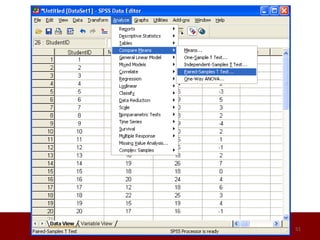
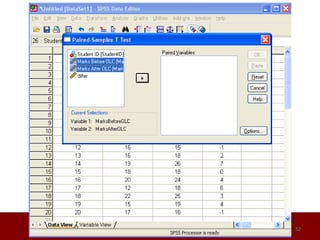
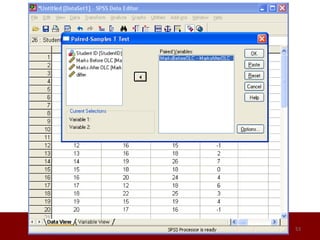
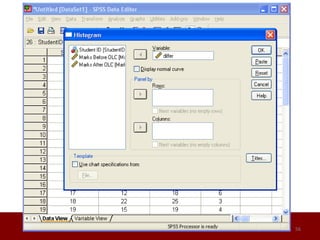
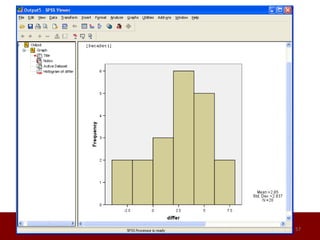
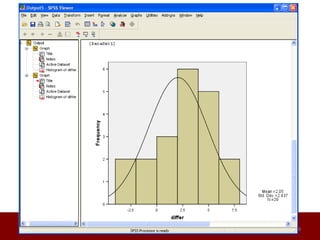
Paired T-test
• A paired T-test is used to compare between
two means where you have two samples in
which observations in one sample can be
paired with observations in the other sample.
• Before-and-after observations on the same
subjects.
47
48
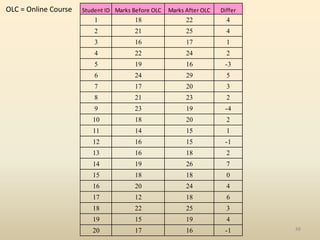
Student ID Marks Before OLC Marks After OLC Differ
1 18 22 4
2 21 25 4
3 16 17 1
4 22 24 2
5 19 16 -3
6 24 29 5
7 17 20 3
8 21 23 2
9 23 19 -4
10 18 20 2
11 14 15 1
12 16 15 -1
13 16 18 2
14 19 26 7
15 18 18 0
16 20 24 4
17 12 18 6
18 22 25 3
19 15 19 4
20 17 16 -1
OLC = Online Course
Cont.…
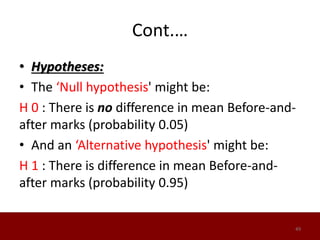
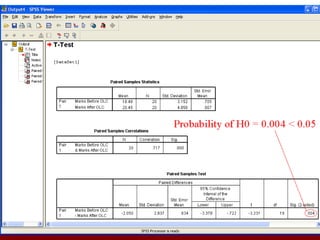
• Hypotheses:
• The ‘Null hypothesis' might be:
H 0 : There is no difference in mean Before-and-
after marks (probability 0.05)
• And an ‘Alternative hypothesis' might be:
H 1 : There is difference in mean Before-and-
after marks (probability 0.95)
49
50
51
52
53
54
55
56
57
58
Conclusion
• Using the SPSS package takes away the time-
consuming tedium of computing statistics by
hand and allows the researcher to concentrate
on the conceptual aspects of his or her study.
• Of course, it is still important that the
researcher understand the nature and use of
statistical techniques.
59
Thank You
60

Spss

  • 1.
    SPSS Statistical Package for theSocial Sciences By Salem Almadhun 1
  • 2.
    What is SPSS? •SPSS is a program that can be used to perform data entry and analysis and to create tables and graphs. • SPSS is capable of handling large amounts of data and can perform all analyses that you want. 2
  • 3.
    Cont.… • SPSS iscommonly used in the Social Sciences and in the business world, so familiarity with this program should serve any one needs to analysis data. 3
  • 4.
    Cont.… • SPSS hastwo main windows: 1. The Data Editor window. 2. The Viewer window. • The Data Editor window is divided into: – Data View. – Variable View. 4
  • 5.
    Cont.… • The DataView window is simply a grid with rows and columns. • The rows represent subjects (cases or observations) and columns represent variables whose names should appear at the top of the columns. 5
  • 6.
  • 7.
    Cont.… • The VariableView window is also a simple grid with rows and columns. • This window contains descriptions of the attributes of each variable that make up your data set. 7
  • 8.
  • 9.
    Cont.… • The Viewerwindow is where results are displayed after a statistical procedure has been performed. • It is divided into two main sections: • The left pane contains an outline view of the output contents and the right pane contains statistical tables, charts, and text output. 9
  • 10.
  • 11.
    How to Makea Questionnaire? 1. Decide what you would like to learn from your questionnaire. • This will help you come up with questions to ask and the order in which to ask them. • Ask yourself how you will use the data and witch measure you want to use. 11
  • 12.
    Cont.. 2. Start writingout questions that can help you reach your goals. Keep the questions and answers simple, using as few words as possible. 12
  • 13.
    Cont.. 3. Design yourquestionnaire based on the method in which it will be delivered. Decide if you want to give clarifications to your questions if the respondent doesn't understand something. 13
  • 14.
    Cont.. 4. Ask questionsthat are very similar but worded differently. This will give you a better chance at finding the person's true opinion on a given topic. 14
  • 15.
    Cont.. 5. Order thequestions so that if a person says yes or no to a certain question, they bypass any questions that don't apply to them. This will help keep the questionnaire focused and take less time to complete 15
  • 16.
    Cont.. 6. Test yourquestionnaire before you begin surveying people Friends, employees and family can be good testers. You may need to reword some things, rearrange questions, make additions or delete questions that don't help you reach your end goal 16
  • 17.
    17 Sample Questionnaire 1. Whatis your gender? Please tick 1: Male / Female 2. What is your date of birth? …………………… 3. What is the total number of years you completed in an educational establishment? ……. 4. Which employment category do you belong to? Please select one: o Manager o Clerical o Custodial 5. What is your current salary? ………………. 6. What was your beginning salary? …………..
  • 18.
  • 19.
  • 20.
  • 21.
  • 22.
  • 23.
    Types of Data •There are basically three types of data: • Interval or Scale data: These are data taken from an independent scale with units. • Examples: height, weight, marks, and temperature. • Ordinal data :These are data collected from ranking variables on a given scale. • Example: you may ask respondents to rank some variable based on their perceived level of importance of the variables using Likert type scale such as 1, 2, 3, 4 and 5. 23
  • 24.
    Types of Data •Nominal data Examples: gender (male or female), nationality (British, American, African,.), etc. • Both Interval and Ordinal data relate to quantitative variables while Nominal data refers to qualitative variables. 24
  • 25.
  • 26.
  • 27.
  • 28.
  • 29.
  • 30.
  • 31.
  • 32.
  • 33.
  • 34.
  • 35.
  • 36.
  • 37.
  • 38.
  • 39.
  • 40.
  • 41.
  • 42.
  • 43.
  • 44.
  • 45.
  • 46.
  • 47.
    Paired T-test • Apaired T-test is used to compare between two means where you have two samples in which observations in one sample can be paired with observations in the other sample. • Before-and-after observations on the same subjects. 47
  • 48.
    48 Student ID MarksBefore OLC Marks After OLC Differ 1 18 22 4 2 21 25 4 3 16 17 1 4 22 24 2 5 19 16 -3 6 24 29 5 7 17 20 3 8 21 23 2 9 23 19 -4 10 18 20 2 11 14 15 1 12 16 15 -1 13 16 18 2 14 19 26 7 15 18 18 0 16 20 24 4 17 12 18 6 18 22 25 3 19 15 19 4 20 17 16 -1 OLC = Online Course
  • 49.
    Cont.… • Hypotheses: • The‘Null hypothesis' might be: H 0 : There is no difference in mean Before-and- after marks (probability 0.05) • And an ‘Alternative hypothesis' might be: H 1 : There is difference in mean Before-and- after marks (probability 0.95) 49
  • 50.
  • 51.
  • 52.
  • 53.
  • 54.
  • 55.
  • 56.
  • 57.
  • 58.
  • 59.
    Conclusion • Using theSPSS package takes away the time- consuming tedium of computing statistics by hand and allows the researcher to concentrate on the conceptual aspects of his or her study. • Of course, it is still important that the researcher understand the nature and use of statistical techniques. 59
  • 60.