How to prepare scientific research questionnaires and use
the statistical analysis program SPSS
Presenting and preparing of researcher Rana Abdullah
Tahan
https://orcid.org/0000-0002-1093-7740
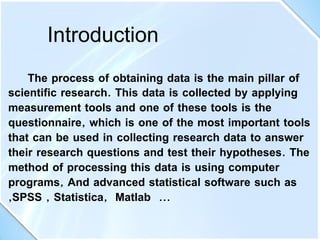
The process of obtaining data is the main pillar of
scientific research. This data is collected by applying
measurement tools and one of these tools is the
questionnaire, which is one of the most important tools
that can be used in collecting research data to answer
their research questions and test their hypotheses. The
method of processing this data is using computer
programs, And advanced statistical software such as
,SPSS , Statistica, Matlab ...
Introduction
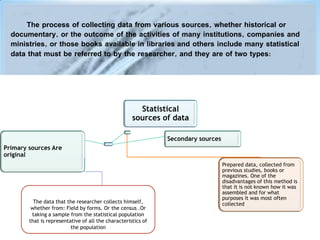
The process of collecting data from various sources, whether historical or
documentary, or the outcome of the activities of many institutions, companies and
ministries, or those books available in libraries and others include many statistical
data that must be referred to by the researcher, and they are of two types:
Primary sources Are
original
Prepared data, collected from
previous studies, books or
magazines. One of the
disadvantages of this method is
that it is not known how it was
assembled and for what
purposes it was most often
collected
Secondary sources
Statistical
sources of data
The data that the researcher collects himself,
whether from: Field by forms. Or the census .Or
taking a sample from the statistical population
that is representative of all the characteristics of
the population
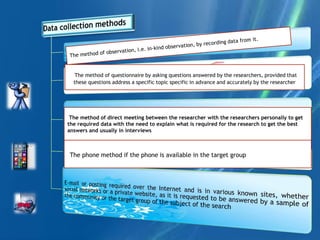
The phone method if the phone is available in the target group
The method of direct meeting between the researcher with the researchers personally to get
the required data with the need to explain what is required for the research to get the best
answers and usually in interviews
The method of questionnaire by asking questions answered by the researchers, provided that
these questions address a specific topic specific in advance and accurately by the researcher
Here we focus on the most important and most used method in the field of social
sciences in particular, which is the questionnaire
The researcher cannot obtain what he wants from the results if there is no clear and
specific goal from the survey.
Whenever the goal or purpose is unclear, it is a waste of the participants' time and
resources.
The questionnaire design must be very accurate
In terms of setting the goal of it and does not leave it general.
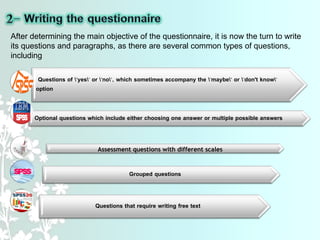
Questions of "yes" or "no", which sometimes accompany the "maybe" or "don't know"
option
Optional questions which include either choosing one answer or multiple possible answers
Assessment questions with different scales
Grouped questions
Questions that require writing free text
After determining the main objective of the questionnaire, it is now the turn to write
its questions and paragraphs, as there are several common types of questions,
including
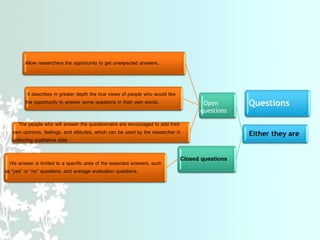
Questions
Either they are
Open
questions
Allow researchers the opportunity to get unexpected answers.
It describes in greater depth the true views of people who would like
the opportunity to answer some questions in their own words.
The people who will answer the questionnaire are encouraged to add their
own opinions, feelings, and attitudes, which can be used by the researcher in
collecting qualitative data
Closed questions
His answer is limited to a specific area of ​​the expected answers, such
as “yes” or “no” questions, and average evaluation questions.
.
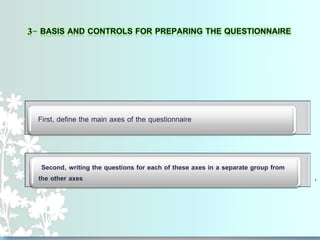
First, define the main axes of the questionnaire
Second, writing the questions for each of these axes in a separate group from
the other axes
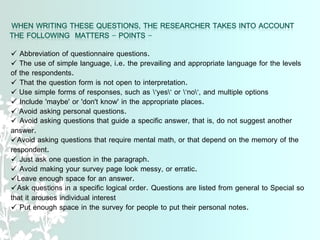
 Abbreviation of questionnaire questions.
 The use of simple language, i.e. the prevailing and appropriate language for the levels
of the respondents.
 That the question form is not open to interpretation.
 Use simple forms of responses, such as "yes" or "no", and multiple options
 Include 'maybe' or 'don't know' in the appropriate places.
 Avoid asking personal questions.
 Avoid asking questions that guide a specific answer, that is, do not suggest another
answer.
Avoid asking questions that require mental math, or that depend on the memory of the
respondent.
 Just ask one question in the paragraph.
 Avoid making your survey page look messy, or erratic.
Leave enough space for an answer.
Ask questions in a specific logical order. Questions are listed from general to Special so
that it arouses individual interest
 Put enough space in the survey for people to put their personal notes.
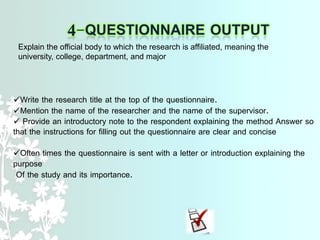
Write the research title at the top of the questionnaire.
Mention the name of the researcher and the name of the supervisor.
 Provide an introductory note to the respondent explaining the method Answer so
that the instructions for filling out the questionnaire are clear and concise
Often times the questionnaire is sent with a letter or introduction explaining the
purpose
Of the study and its importance.
Explain the official body to which the research is affiliated, meaning the
university, college, department, and major
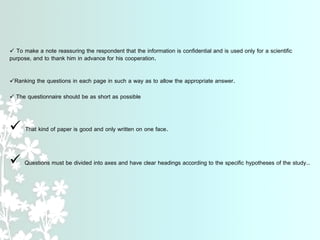
 To make a note reassuring the respondent that the information is confidential and is used only for a scientific
purpose, and to thank him in advance for his cooperation.
Ranking the questions in each page in such a way as to allow the appropriate answer.
 The questionnaire should be as short as possible
 That kind of paper is good and only written on one face.
 Questions must be divided into axes and have clear headings according to the specific hypotheses of the study..
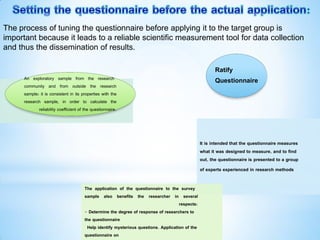
It is intended that the questionnaire measures
what it was designed to measure, and to find
out, the questionnaire is presented to a group
of experts experienced in research methods
The application of the questionnaire to the survey
sample also benefits the researcher in several
respects:
- Determine the degree of response of researchers to
the questionnaire
Help identify mysterious questions. Application of the
questionnaire on
Ratify
Questionnaire
An exploratory sample from the research
community and from outside the research
sample: it is consistent in its properties with the
research sample, in order to calculate the
reliability coefficient of the questionnaire.
The process of tuning the questionnaire before applying it to the target group is
important because it leads to a reliable scientific measurement tool for data collection
and thus the dissemination of results.
-After designing, testing and modifying the questionnaire, it is circulated to the target
sample of the study, and after collecting it from the respondents it is analyzed and
there are several programs for statistical analysis, but we will use the SPSS program
-Which we will deal with in some detail later, as the program facilitates for us decision-
making about the subject of study through its management of data and its rapid
statistical analysis of the results.
The statistical analysis programme is considered SPSS
One of the statistical programmes most commonly used by
researchers for statistical analysis; SPSS is an acronym for the full
name of the programme:Package for Social Sciences" "Statistical
It is commonly used in all scientific research, which includes many
digital data and is not limited to social research only, although it was
originally created for this purpose, but involves almost all statistical
testing, its high data processing capacity and its compatibility with
most popular software have made it an effective tool for analyzing
various types of scientific research.
Read data from most file types to be used to
extract results in the form of statistical reports or figures.
The packages can make statistical analysis suitable for
both a novice and expert researcher.
You can deal with this program like any program running under a window
of various versions, such as the word processor program In all the
regular commands in terms of creating a new file, saving the file, lines
correspond to printing the file and other operations. As for statistical
operations and statistical analysis, it has specific commands that we will
deal with in detail through the application.
Output files:
contains all the results that are done after any statistical process,
Each time, the program asks the user to save or delete the file,
It is recommended that all output files be saved only as needed by the
researcher or user on an ongoing basis and after the results are confirmed.
 The initial interface of the packages,
Interface similar to electronic tables,
used to enter raw data for the first time,
Data can be read, modified or changed through the editor in terms of
dealing with variables, naming them, changing their names, and keeping
them called Data files, and this file cannot extract any kind of results, but the
results are sent to another type of file, namely output files.
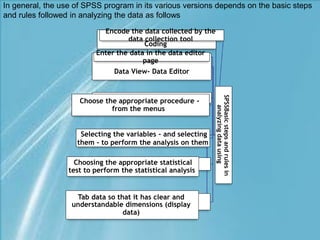
SPSSBasic
steps
and
rules
in
analyzing
data
using
Coding
Encode the data collected by the
data collection tool
View- Data Editor
Data
Enter the data in the data editor
page
Choose the appropriate procedure -
from the menus
Selecting the variables - and selecting
them - to perform the analysis on them
Choosing the appropriate statistical
test to perform the statistical analysis
Tab data so that it has clear and
understandable dimensions (display
data)
In general, the use of SPSS program in its various versions depends on the basic steps
and rules followed in analyzing the data as follows
Statistics, by its very nature, is a fundamental science for all the
different sciences. Without its methods, methods and theories, no branch
of the different sciences can predict, plan and make decisions.
It is considered one of the most important newly known
methods of solving most problems
It helped with the speed, accuracy and ability of the decision-
makers which led To a tremendous and amazing development
in all disciplines
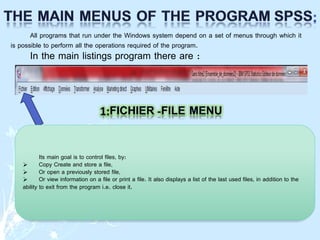
All programs that run under the Windows system depend on a set of menus through which it
is possible to perform all the operations required of the program.
In the main listings program there are :
Its main goal is to control files, by:
 Copy Create and store a file,
 Or open a previously stored file,
 Or view information on a file or print a file. It also displays a list of the last used files, in addition to the
ability to exit from the program i.e. close it.
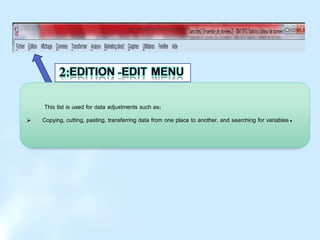
This list is used for data adjustments such as:
 Copying, cutting, pasting, transferring data from one place to another, and searching for variables.
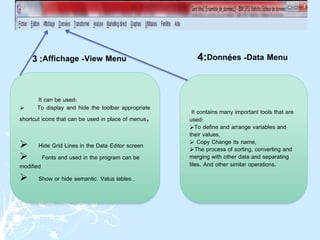
It can be used:
 To display and hide the toolbar appropriate
shortcut icons that can be used in place of menus,
 Hide Grid Lines in the Data Editor screen
 Fonts and used in the program can be
modified
 Show or hide semantic Valus lables .
It contains many important tools that are
used:
To define and arrange variables and
their values,
 Copy Change its name,
The process of sorting, converting and
merging with other data and separating
files. And other similar operations.
View Menu
-
Affichage
:
3 Data Menu
-
Données
:
4
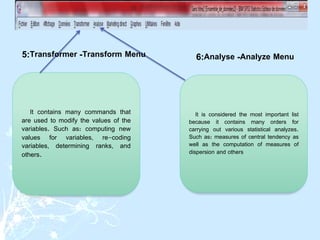
It contains many commands that
are used to modify the values ​​of the
variables. Such as: computing new
values ​​for variables, re-coding
variables, determining ranks, and
others.
It is considered the most important list
because it contains many orders for
carrying out various statistical analyzes.
Such as: measures of central tendency as
well as the computation of measures of
dispersion and others
Transform Menu
-
Transformer
:
5 Analyze Menu
-
Analyse
:
6
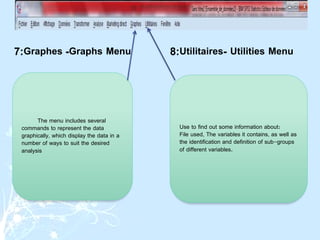
The menu includes several
commands to represent the data
graphically, which display the data in a
number of ways to suit the desired
analysis
Use to find out some information about:
File used, The variables it contains, as well as
the identification and definition of sub-groups
of different variables.
Graphs Menu
-
Graphes
:
7 Utilities Menu
-
Utilitaires
:
8
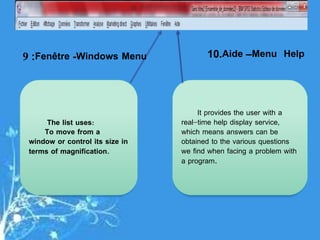
The list uses:
To move from a
window or control its size in
terms of magnification.
It provides the user with a
real-time help display service,
which means answers can be
obtained to the various questions
we find when facing a problem with
a program.
Windows Menu
-
Fenêtre
:
9 Menu Help
–
Aide
.
10
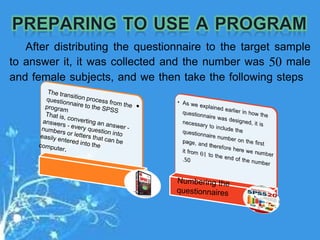
After distributing the questionnaire to the target sample
to answer it, it was collected and the number was 50 male
and female subjects, and we then take the following steps
-
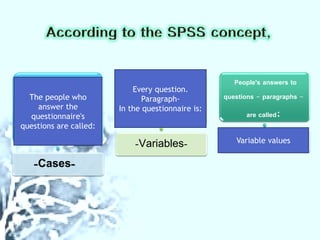
Cases
-
-
Variables
-
People's answers to
questions - paragraphs -
are called:
The people who
answer the
questionnaire's
questions are called:
Every question.
Paragraph-
In the questionnaire is:
Variable values
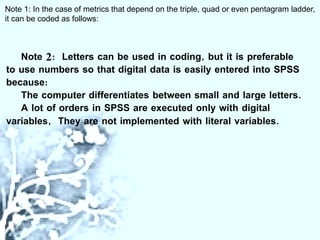
Note 2: Letters can be used in coding, but it is preferable
to use numbers so that digital data is easily entered into SPSS
because:
The computer differentiates between small and large letters.
A lot of orders in SPSS are executed only with digital
variables, They are not implemented with literal variables.
Note 1: In the case of metrics that depend on the triple, quad or even pentagram ladder,
it can be coded as follows:
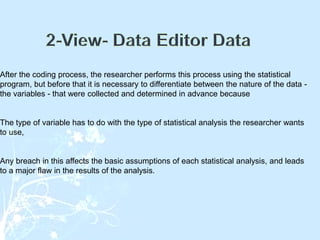
After the coding process, the researcher performs this process using the statistical
program, but before that it is necessary to differentiate between the nature of the data -
the variables - that were collected and determined in advance because
The type of variable has to do with the type of statistical analysis the researcher wants
to use,
Any breach in this affects the basic assumptions of each statistical analysis, and leads
to a major flaw in the results of the analysis.
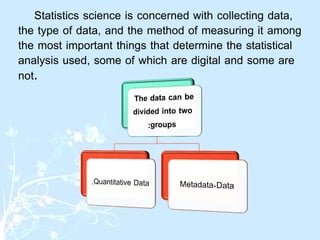
Statistics science is concerned with collecting data,
the type of data, and the method of measuring it among
the most important things that determine the statistical
analysis used, some of which are digital and some are
not.
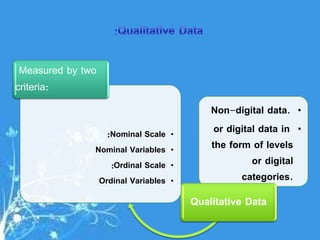
•
Non-digital data.
•
or digital data in
the form of levels
or digital
categories.
Qualitative Data
•
Nominal Scale
:
•
Nominal Variables
•
Ordinal Scale
:
•
Ordinal Variables
Measured by two
criteria:
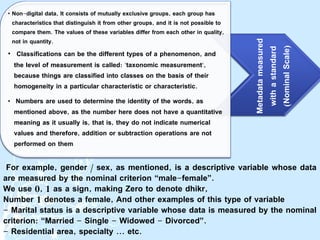
For example, gender / sex, as mentioned, is a descriptive variable whose data
are measured by the nominal criterion “male-female”.
We use 0, 1 as a sign, making Zero to denote dhikr,
Number 1 denotes a female, And other examples of this type of variable
- Marital status is a descriptive variable whose data is measured by the nominal
criterion: “Married - Single - Widowed - Divorced”.
- Residential area, specialty ... etc.
Metadata
measured
with
a
standard
(
Nominal
Scale
)
• Non-digital data, It consists of mutually exclusive groups, each group has
characteristics that distinguish it from other groups, and it is not possible to
compare them. The values ​​of these variables differ from each other in quality,
not in quantity.
• Classifications can be the different types of a phenomenon, and
the level of measurement is called: "taxonomic measurement",
because things are classified into classes on the basis of their
homogeneity in a particular characteristic or characteristic.
• Numbers are used to determine the identity of the words, as
mentioned above, as the number here does not have a quantitative
meaning as it usually is, that is, they do not indicate numerical
values ​​and therefore, addition or subtraction operations are not
performed on them
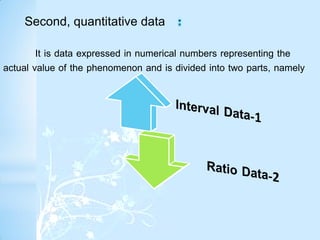
It is data expressed in numerical numbers representing the
actual value of the phenomenon and is divided into two parts, namely
Second, quantitative data
It is numerical data measured by its distance from zero, meaning that
zero indicates the existence of the phenomenon.
They are called interval variables, and they are located at a higher level
than the hierarchical level variables. In addition to the properties of both the
nominal and the hierarchical measurement, the measurement here includes
a property of equal distances between ranks, and equal distances indicate
equal amounts of the characteristic that are measured, and therefore it is
sometimes called “scale” Distance
The numbers used by the variable categories indicate the type of the
number, its order and its quantity, such as measuring students' intelligence.
 Zero does not mean the absence of the phenomenon to be studied, so the
student's obtaining a zero in the statistics does not mean that he does not
know anything in the course, and the zero here is called the relative or default
zero, and it is not an absolute zero.
This data cannot be subjected to mathematical operations such as
multiplication and division.
They are quantitative variables, the value "0" denotes the absence of the
phenomenon.
They are called the relative variables, which take a higher place than the
previous variables, so the relative level of measurement is located at the
highest or at the top of the levels of measurement. "Absolute" is used
widely in the natural sciences.
Example
-Height, number of family members, number of children, number of weekly traffic
accidents.
- This data can be subjected to mathematical operations such as multiplication and
division.
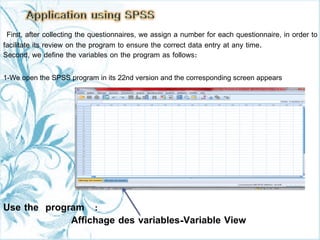
First, after collecting the questionnaires, we assign a number for each questionnaire, in order to
facilitate its review on the program to ensure the correct data entry at any time.
Second, we define the variables on the program as follows:
1-We open the SPSS program in its 22nd version and the corresponding screen appears
Use the program :
Variable View
-
Affichage des variables
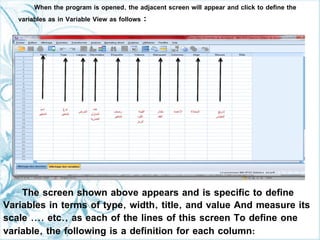
When the program is opened, the adjacent screen will appear and click to define the
variables as in Variable View as follows :
The screen shown above appears and is specific to define
Variables in terms of type, width, title, and value And measure its
scale .... etc., as each of the lines of this screen To define one
variable, the following is a definition for each column:
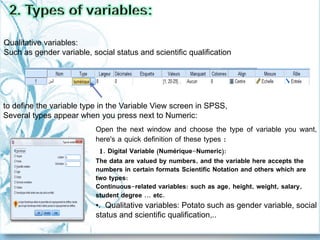
Open the next window and choose the type of variable you want,
here's a quick definition of these types :
1. Digital Variable (Numérique-Numeric):
The data are valued by numbers, and the variable here accepts the
numbers in certain formats Scientific Notation and others which are
two types:
Continuous-related variables: such as age, height, weight, salary,
student degree ... etc.
•. Qualitative variables: Potato such as gender variable, social
status and scientific qualification,..
to define the variable type in the Variable View screen in SPSS,
Several types appear when you press next to Numeric:
Qualitative variables:
Such as gender variable, social status and scientific qualification
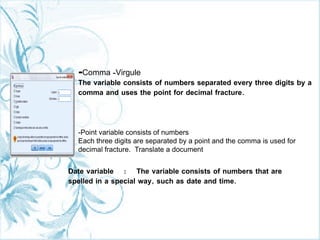
-Comma -Virgule
The variable consists of numbers separated every three digits by a
comma and uses the point for decimal fracture.
-Point variable consists of numbers
Each three digits are separated by a point and the comma is used for
decimal fracture. Translate a document
Date variable : The variable consists of numbers that are
spelled in a special way, such as date and time.
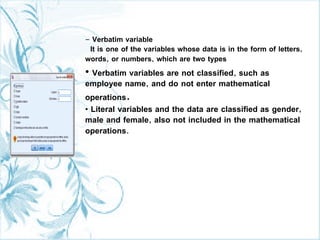
- Verbatim variable
It is one of the variables whose data is in the form of letters,
words, or numbers, which are two types
• Verbatim variables are not classified, such as
employee name, and do not enter mathematical
operations.
• Literal variables and the data are classified as gender,
male and female, also not included in the mathematical
operations.
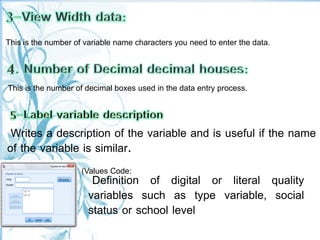
Definition of digital or literal quality
variables such as type variable, social
status or school level
Writes a description of the variable and is useful if the name
of the variable is similar.
(Values Code:
This is the number of decimal boxes used in the data entry process.
This is the number of variable name characters you need to enter the data.
.
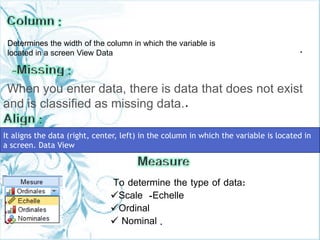
When you enter data, there is data that does not exist
and is classified as missing data..
To determine the type of data:
Scale -Echelle
Ordinal
 Nominal .
Determines the width of the column in which the variable is
located in a screen View Data
It aligns the data (right, center, left) in the column in which the variable is located in
a screen. Data View
.
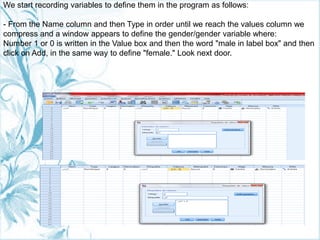
We start recording variables to define them in the program as follows:
- From the Name column and then Type in order until we reach the values column we
compress and a window appears to define the gender/gender variable where:
Number 1 or 0 is written in the Value box and then the word "male in label box" and then
click on Add, in the same way to define "female." Look next door.
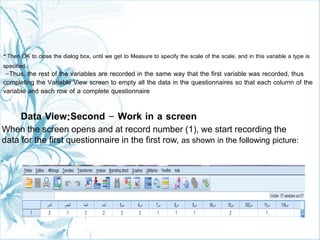
Then OK to close the dialog box, until we get to Measure to specify the scale of the scale, and in this variable a type is
specified.
-Thus, the rest of the variables are recorded in the same way that the first variable was recorded, thus
completing the Variable View screen to empty all the data in the questionnaires so that each column of the
variable and each row of a complete questionnaire
Data View:Second - Work in a screen
When the screen opens and at record number (1), we start recording the
data for the first questionnaire in the first row, as shown in the following picture:
-
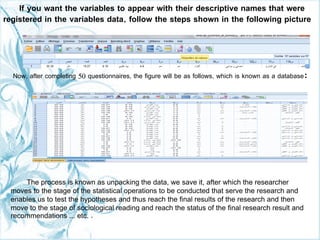
If you want the variables to appear with their descriptive names that were
registered in the variables data, follow the steps shown in the following picture
Now, after completing 50 questionnaires, the figure will be as follows, which is known as a database:
The process is known as unpacking the data, we save it, after which the researcher
moves to the stage of the statistical operations to be conducted that serve the research and
enables us to test the hypotheses and thus reach the final results of the research and then
move to the stage of sociological reading and reach the status of the final research result and
recommendations ... etc. .
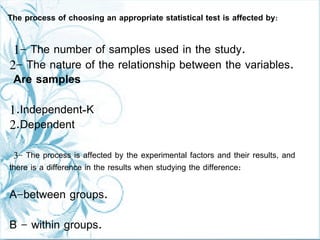
1- The number of samples used in the study.
2- The nature of the relationship between the variables.
Are samples
1.Independent-K
2.Dependent
3- The process is affected by the experimental factors and their results, and
there is a difference in the results when studying the difference:
A-between groups.
B - within groups.
The process of choosing an appropriate statistical test is affected by:
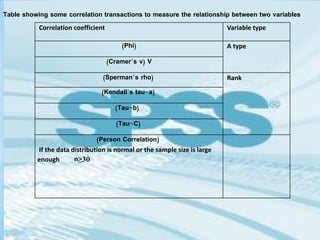
Table showing some correlation transactions to measure the relationship between two variables
Variable type
Correlation coefficient
A type
(
Phi
)
V
(
Cramer’s v
)
Rank
(
Sperman’s rho
)
(
Kendall’s tau-a
)
(
Tau-b
)
(
Tau-C
)
(
Person Correlation
)
If the data distribution is normal or the sample size is large
enough n≥30
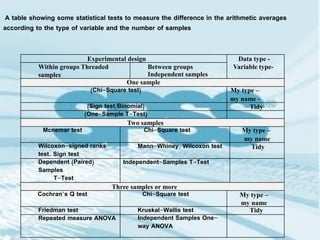
A table showing some statistical tests to measure the difference in the arithmetic averages
according to the type of variable and the number of samples
Data type -
Variable type-
Experimental design
Between groups
Independent samples
Within groups Threaded
samples
One sample
My type –
my name -
(
Chi-Square test
)
Tidy
(
Sign test/Binomial
)
(
One-Sample T-Test
)
Two samples
My type –
my name
Chi-Square test
Mcnemar test
Tidy
Mann-Whiney, Wilcoxon test
Wilcoxon-signed ranks
test, Sign test
Independent-Samples T-Test
Dependent (Paired)
Samples
T-Test
Three samples or more
My type –
my name
Chi-Square test
Cochran’s Q test
Tidy
Kruskal-Wallis test
Friedman test
Independent Samples One-
way ANOVA
Repeated measure ANOVA
Thank you for listening and attending.

How to prepare scientific research questionnaires and use the statistical analysis program spss

  • 1.
    How to preparescientific research questionnaires and use the statistical analysis program SPSS Presenting and preparing of researcher Rana Abdullah Tahan https://orcid.org/0000-0002-1093-7740
  • 2.
    The process ofobtaining data is the main pillar of scientific research. This data is collected by applying measurement tools and one of these tools is the questionnaire, which is one of the most important tools that can be used in collecting research data to answer their research questions and test their hypotheses. The method of processing this data is using computer programs, And advanced statistical software such as ,SPSS , Statistica, Matlab ... Introduction
  • 3.
    The process ofcollecting data from various sources, whether historical or documentary, or the outcome of the activities of many institutions, companies and ministries, or those books available in libraries and others include many statistical data that must be referred to by the researcher, and they are of two types: Primary sources Are original Prepared data, collected from previous studies, books or magazines. One of the disadvantages of this method is that it is not known how it was assembled and for what purposes it was most often collected Secondary sources Statistical sources of data The data that the researcher collects himself, whether from: Field by forms. Or the census .Or taking a sample from the statistical population that is representative of all the characteristics of the population
  • 4.
    The phone methodif the phone is available in the target group The method of direct meeting between the researcher with the researchers personally to get the required data with the need to explain what is required for the research to get the best answers and usually in interviews The method of questionnaire by asking questions answered by the researchers, provided that these questions address a specific topic specific in advance and accurately by the researcher
  • 5.
    Here we focuson the most important and most used method in the field of social sciences in particular, which is the questionnaire The researcher cannot obtain what he wants from the results if there is no clear and specific goal from the survey. Whenever the goal or purpose is unclear, it is a waste of the participants' time and resources. The questionnaire design must be very accurate In terms of setting the goal of it and does not leave it general.
  • 6.
    Questions of "yes"or "no", which sometimes accompany the "maybe" or "don't know" option Optional questions which include either choosing one answer or multiple possible answers Assessment questions with different scales Grouped questions Questions that require writing free text After determining the main objective of the questionnaire, it is now the turn to write its questions and paragraphs, as there are several common types of questions, including
  • 7.
    Questions Either they are Open questions Allowresearchers the opportunity to get unexpected answers. It describes in greater depth the true views of people who would like the opportunity to answer some questions in their own words. The people who will answer the questionnaire are encouraged to add their own opinions, feelings, and attitudes, which can be used by the researcher in collecting qualitative data Closed questions His answer is limited to a specific area of ​​the expected answers, such as “yes” or “no” questions, and average evaluation questions.
  • 8.
    . First, define themain axes of the questionnaire Second, writing the questions for each of these axes in a separate group from the other axes
  • 9.
     Abbreviation ofquestionnaire questions.  The use of simple language, i.e. the prevailing and appropriate language for the levels of the respondents.  That the question form is not open to interpretation.  Use simple forms of responses, such as "yes" or "no", and multiple options  Include 'maybe' or 'don't know' in the appropriate places.  Avoid asking personal questions.  Avoid asking questions that guide a specific answer, that is, do not suggest another answer. Avoid asking questions that require mental math, or that depend on the memory of the respondent.  Just ask one question in the paragraph.  Avoid making your survey page look messy, or erratic. Leave enough space for an answer. Ask questions in a specific logical order. Questions are listed from general to Special so that it arouses individual interest  Put enough space in the survey for people to put their personal notes.
  • 10.
    Write the researchtitle at the top of the questionnaire. Mention the name of the researcher and the name of the supervisor.  Provide an introductory note to the respondent explaining the method Answer so that the instructions for filling out the questionnaire are clear and concise Often times the questionnaire is sent with a letter or introduction explaining the purpose Of the study and its importance. Explain the official body to which the research is affiliated, meaning the university, college, department, and major
  • 11.
     To makea note reassuring the respondent that the information is confidential and is used only for a scientific purpose, and to thank him in advance for his cooperation. Ranking the questions in each page in such a way as to allow the appropriate answer.  The questionnaire should be as short as possible  That kind of paper is good and only written on one face.  Questions must be divided into axes and have clear headings according to the specific hypotheses of the study..
  • 12.
    It is intendedthat the questionnaire measures what it was designed to measure, and to find out, the questionnaire is presented to a group of experts experienced in research methods The application of the questionnaire to the survey sample also benefits the researcher in several respects: - Determine the degree of response of researchers to the questionnaire Help identify mysterious questions. Application of the questionnaire on Ratify Questionnaire An exploratory sample from the research community and from outside the research sample: it is consistent in its properties with the research sample, in order to calculate the reliability coefficient of the questionnaire. The process of tuning the questionnaire before applying it to the target group is important because it leads to a reliable scientific measurement tool for data collection and thus the dissemination of results.
  • 13.
    -After designing, testingand modifying the questionnaire, it is circulated to the target sample of the study, and after collecting it from the respondents it is analyzed and there are several programs for statistical analysis, but we will use the SPSS program -Which we will deal with in some detail later, as the program facilitates for us decision- making about the subject of study through its management of data and its rapid statistical analysis of the results.
  • 14.
    The statistical analysisprogramme is considered SPSS One of the statistical programmes most commonly used by researchers for statistical analysis; SPSS is an acronym for the full name of the programme:Package for Social Sciences" "Statistical It is commonly used in all scientific research, which includes many digital data and is not limited to social research only, although it was originally created for this purpose, but involves almost all statistical testing, its high data processing capacity and its compatibility with most popular software have made it an effective tool for analyzing various types of scientific research.
  • 15.
    Read data frommost file types to be used to extract results in the form of statistical reports or figures. The packages can make statistical analysis suitable for both a novice and expert researcher. You can deal with this program like any program running under a window of various versions, such as the word processor program In all the regular commands in terms of creating a new file, saving the file, lines correspond to printing the file and other operations. As for statistical operations and statistical analysis, it has specific commands that we will deal with in detail through the application.
  • 16.
    Output files: contains allthe results that are done after any statistical process, Each time, the program asks the user to save or delete the file, It is recommended that all output files be saved only as needed by the researcher or user on an ongoing basis and after the results are confirmed.  The initial interface of the packages, Interface similar to electronic tables, used to enter raw data for the first time, Data can be read, modified or changed through the editor in terms of dealing with variables, naming them, changing their names, and keeping them called Data files, and this file cannot extract any kind of results, but the results are sent to another type of file, namely output files.
  • 17.
    SPSSBasic steps and rules in analyzing data using Coding Encode the datacollected by the data collection tool View- Data Editor Data Enter the data in the data editor page Choose the appropriate procedure - from the menus Selecting the variables - and selecting them - to perform the analysis on them Choosing the appropriate statistical test to perform the statistical analysis Tab data so that it has clear and understandable dimensions (display data) In general, the use of SPSS program in its various versions depends on the basic steps and rules followed in analyzing the data as follows
  • 19.
    Statistics, by itsvery nature, is a fundamental science for all the different sciences. Without its methods, methods and theories, no branch of the different sciences can predict, plan and make decisions. It is considered one of the most important newly known methods of solving most problems It helped with the speed, accuracy and ability of the decision- makers which led To a tremendous and amazing development in all disciplines
  • 20.
    All programs thatrun under the Windows system depend on a set of menus through which it is possible to perform all the operations required of the program. In the main listings program there are : Its main goal is to control files, by:  Copy Create and store a file,  Or open a previously stored file,  Or view information on a file or print a file. It also displays a list of the last used files, in addition to the ability to exit from the program i.e. close it.
  • 21.
    This list isused for data adjustments such as:  Copying, cutting, pasting, transferring data from one place to another, and searching for variables.
  • 22.
    It can beused:  To display and hide the toolbar appropriate shortcut icons that can be used in place of menus,  Hide Grid Lines in the Data Editor screen  Fonts and used in the program can be modified  Show or hide semantic Valus lables . It contains many important tools that are used: To define and arrange variables and their values,  Copy Change its name, The process of sorting, converting and merging with other data and separating files. And other similar operations. View Menu - Affichage : 3 Data Menu - Données : 4
  • 23.
    It contains manycommands that are used to modify the values ​​of the variables. Such as: computing new values ​​for variables, re-coding variables, determining ranks, and others. It is considered the most important list because it contains many orders for carrying out various statistical analyzes. Such as: measures of central tendency as well as the computation of measures of dispersion and others Transform Menu - Transformer : 5 Analyze Menu - Analyse : 6
  • 24.
    The menu includesseveral commands to represent the data graphically, which display the data in a number of ways to suit the desired analysis Use to find out some information about: File used, The variables it contains, as well as the identification and definition of sub-groups of different variables. Graphs Menu - Graphes : 7 Utilities Menu - Utilitaires : 8
  • 25.
    The list uses: Tomove from a window or control its size in terms of magnification. It provides the user with a real-time help display service, which means answers can be obtained to the various questions we find when facing a problem with a program. Windows Menu - Fenêtre : 9 Menu Help – Aide . 10
  • 26.
    After distributing thequestionnaire to the target sample to answer it, it was collected and the number was 50 male and female subjects, and we then take the following steps
  • 27.
    - Cases - - Variables - People's answers to questions- paragraphs - are called: The people who answer the questionnaire's questions are called: Every question. Paragraph- In the questionnaire is: Variable values
  • 28.
    Note 2: Letterscan be used in coding, but it is preferable to use numbers so that digital data is easily entered into SPSS because: The computer differentiates between small and large letters. A lot of orders in SPSS are executed only with digital variables, They are not implemented with literal variables. Note 1: In the case of metrics that depend on the triple, quad or even pentagram ladder, it can be coded as follows:
  • 29.
    After the codingprocess, the researcher performs this process using the statistical program, but before that it is necessary to differentiate between the nature of the data - the variables - that were collected and determined in advance because The type of variable has to do with the type of statistical analysis the researcher wants to use, Any breach in this affects the basic assumptions of each statistical analysis, and leads to a major flaw in the results of the analysis.
  • 30.
    Statistics science isconcerned with collecting data, the type of data, and the method of measuring it among the most important things that determine the statistical analysis used, some of which are digital and some are not.
  • 31.
    • Non-digital data. • or digitaldata in the form of levels or digital categories. Qualitative Data • Nominal Scale : • Nominal Variables • Ordinal Scale : • Ordinal Variables Measured by two criteria:
  • 32.
    For example, gender/ sex, as mentioned, is a descriptive variable whose data are measured by the nominal criterion “male-female”. We use 0, 1 as a sign, making Zero to denote dhikr, Number 1 denotes a female, And other examples of this type of variable - Marital status is a descriptive variable whose data is measured by the nominal criterion: “Married - Single - Widowed - Divorced”. - Residential area, specialty ... etc. Metadata measured with a standard ( Nominal Scale ) • Non-digital data, It consists of mutually exclusive groups, each group has characteristics that distinguish it from other groups, and it is not possible to compare them. The values ​​of these variables differ from each other in quality, not in quantity. • Classifications can be the different types of a phenomenon, and the level of measurement is called: "taxonomic measurement", because things are classified into classes on the basis of their homogeneity in a particular characteristic or characteristic. • Numbers are used to determine the identity of the words, as mentioned above, as the number here does not have a quantitative meaning as it usually is, that is, they do not indicate numerical values ​​and therefore, addition or subtraction operations are not performed on them
  • 33.
    It is dataexpressed in numerical numbers representing the actual value of the phenomenon and is divided into two parts, namely Second, quantitative data
  • 34.
    It is numericaldata measured by its distance from zero, meaning that zero indicates the existence of the phenomenon. They are called interval variables, and they are located at a higher level than the hierarchical level variables. In addition to the properties of both the nominal and the hierarchical measurement, the measurement here includes a property of equal distances between ranks, and equal distances indicate equal amounts of the characteristic that are measured, and therefore it is sometimes called “scale” Distance The numbers used by the variable categories indicate the type of the number, its order and its quantity, such as measuring students' intelligence.  Zero does not mean the absence of the phenomenon to be studied, so the student's obtaining a zero in the statistics does not mean that he does not know anything in the course, and the zero here is called the relative or default zero, and it is not an absolute zero. This data cannot be subjected to mathematical operations such as multiplication and division.
  • 35.
    They are quantitativevariables, the value "0" denotes the absence of the phenomenon. They are called the relative variables, which take a higher place than the previous variables, so the relative level of measurement is located at the highest or at the top of the levels of measurement. "Absolute" is used widely in the natural sciences. Example -Height, number of family members, number of children, number of weekly traffic accidents. - This data can be subjected to mathematical operations such as multiplication and division.
  • 36.
    First, after collectingthe questionnaires, we assign a number for each questionnaire, in order to facilitate its review on the program to ensure the correct data entry at any time. Second, we define the variables on the program as follows: 1-We open the SPSS program in its 22nd version and the corresponding screen appears Use the program : Variable View - Affichage des variables
  • 37.
    When the programis opened, the adjacent screen will appear and click to define the variables as in Variable View as follows : The screen shown above appears and is specific to define Variables in terms of type, width, title, and value And measure its scale .... etc., as each of the lines of this screen To define one variable, the following is a definition for each column:
  • 38.
    Open the nextwindow and choose the type of variable you want, here's a quick definition of these types : 1. Digital Variable (Numérique-Numeric): The data are valued by numbers, and the variable here accepts the numbers in certain formats Scientific Notation and others which are two types: Continuous-related variables: such as age, height, weight, salary, student degree ... etc. •. Qualitative variables: Potato such as gender variable, social status and scientific qualification,.. to define the variable type in the Variable View screen in SPSS, Several types appear when you press next to Numeric: Qualitative variables: Such as gender variable, social status and scientific qualification
  • 39.
    -Comma -Virgule The variableconsists of numbers separated every three digits by a comma and uses the point for decimal fracture. -Point variable consists of numbers Each three digits are separated by a point and the comma is used for decimal fracture. Translate a document Date variable : The variable consists of numbers that are spelled in a special way, such as date and time.
  • 40.
    - Verbatim variable Itis one of the variables whose data is in the form of letters, words, or numbers, which are two types • Verbatim variables are not classified, such as employee name, and do not enter mathematical operations. • Literal variables and the data are classified as gender, male and female, also not included in the mathematical operations.
  • 41.
    Definition of digitalor literal quality variables such as type variable, social status or school level Writes a description of the variable and is useful if the name of the variable is similar. (Values Code: This is the number of decimal boxes used in the data entry process. This is the number of variable name characters you need to enter the data.
  • 42.
    . When you enterdata, there is data that does not exist and is classified as missing data.. To determine the type of data: Scale -Echelle Ordinal  Nominal . Determines the width of the column in which the variable is located in a screen View Data It aligns the data (right, center, left) in the column in which the variable is located in a screen. Data View
  • 43.
    . We start recordingvariables to define them in the program as follows: - From the Name column and then Type in order until we reach the values column we compress and a window appears to define the gender/gender variable where: Number 1 or 0 is written in the Value box and then the word "male in label box" and then click on Add, in the same way to define "female." Look next door.
  • 44.
    Then OK toclose the dialog box, until we get to Measure to specify the scale of the scale, and in this variable a type is specified. -Thus, the rest of the variables are recorded in the same way that the first variable was recorded, thus completing the Variable View screen to empty all the data in the questionnaires so that each column of the variable and each row of a complete questionnaire Data View:Second - Work in a screen When the screen opens and at record number (1), we start recording the data for the first questionnaire in the first row, as shown in the following picture: -
  • 45.
    If you wantthe variables to appear with their descriptive names that were registered in the variables data, follow the steps shown in the following picture Now, after completing 50 questionnaires, the figure will be as follows, which is known as a database: The process is known as unpacking the data, we save it, after which the researcher moves to the stage of the statistical operations to be conducted that serve the research and enables us to test the hypotheses and thus reach the final results of the research and then move to the stage of sociological reading and reach the status of the final research result and recommendations ... etc. .
  • 46.
    1- The numberof samples used in the study. 2- The nature of the relationship between the variables. Are samples 1.Independent-K 2.Dependent 3- The process is affected by the experimental factors and their results, and there is a difference in the results when studying the difference: A-between groups. B - within groups. The process of choosing an appropriate statistical test is affected by:
  • 47.
    Table showing somecorrelation transactions to measure the relationship between two variables Variable type Correlation coefficient A type ( Phi ) V ( Cramer’s v ) Rank ( Sperman’s rho ) ( Kendall’s tau-a ) ( Tau-b ) ( Tau-C ) ( Person Correlation ) If the data distribution is normal or the sample size is large enough n≥30
  • 48.
    A table showingsome statistical tests to measure the difference in the arithmetic averages according to the type of variable and the number of samples Data type - Variable type- Experimental design Between groups Independent samples Within groups Threaded samples One sample My type – my name - ( Chi-Square test ) Tidy ( Sign test/Binomial ) ( One-Sample T-Test ) Two samples My type – my name Chi-Square test Mcnemar test Tidy Mann-Whiney, Wilcoxon test Wilcoxon-signed ranks test, Sign test Independent-Samples T-Test Dependent (Paired) Samples T-Test Three samples or more My type – my name Chi-Square test Cochran’s Q test Tidy Kruskal-Wallis test Friedman test Independent Samples One- way ANOVA Repeated measure ANOVA
  • 49.
    Thank you forlistening and attending.