SPSS is a statistical software package used for statistical analysis of data. It allows users to enter and manage data, conduct complex statistical analyses, and produce charts and graphs to visualize results. Some key features of SPSS include its ease of use, robust data management tools, wide range of statistical tests and methods, and output of statistical metrics. Common uses of SPSS include applications in telecommunications, banking, healthcare, manufacturing, and education.

What is SPSS
•Software Package used for Statistical Analysis of data.
• One of the most popular statistical packages which can perform highly complex
data manipulation and analysis with simple instructions
• SPSS used to stand for “Statistical Package for the Social Sciences”
• Later changed to “Statistical Product and Service Solutions”
Dr. Irfan ul Haq AKhoon
3.
Introduction to SPSS
•SPSS is a comprehensive and flexible statistical analysis and data management solution
• Computer program used for survey authoring and deployment, data mining, text
analytics, statistical analysis, and collaboration
• It can take data from almost any type of file and use them to generate tabulated
reports, charts, plots of distributions & trends, descriptive statistics, and conduct
complex statistical analyses.
• SPSS is among the most widely used programs for statistical analysis in social science.
Dr. Irfan ul Haq AKhoon
4.
SPSS software
• SPSSis a commercial software developed by Norman H. Nie and C. Hadlai Hull of SPSS
Inc. in the year 1968.
• Acquired by IBM in 2009, Now known as IBM-SPSS Statistics
• Current version is 22.0
• Statistic 17.0 (basic package) is freely available for students
• It is compatible with Windows, Linux, UNIX & Mac operating systems.
Dr. Irfan ul Haq AKhoon
5.
SPSS software
• Severalspecialized packages include:
– SPSS Data Collection (for surveys)
– SPSS Modeler (for data mining)
– SPSS Analytic Catalyst (for Big data) etc.
• Basic format is .SAV
• Supports other common formats such as .XLSX, .CSV, .DAT etc
• SPSS syntax file (.SPS) can be used to convert other formats to SPSS format
Dr. Irfan ul Haq AKhoon
6.
Features
• It iseasy to learn and use.
• It includes a full range of data management system and editing tools.
• It provides in-depth statistical capabilities.
• It offers complete plotting, reporting and presentation features
• Very rich collection of Statistical tests and methods
• Outputs an extensive set of metrics and statistically important factors
• 24x7 Support available
Dr. Irfan ul Haq AKhoon
7.
Drawbacks
• Expensive (atleast, not free!)
• Basic Package is not tailored for Data Mining.
• Heavy software
Dr. Irfan ul Haq AKhoon
8.
Uses of SPSS
•Telecommunications,
• Banking,
• Finance,
• Insurance,
• Healthcare,
• Manufacturing,
• Retail,
• Consumer packaged goods,
• Higher education,
• Government,
• Market research
Dr. Irfan ul Haq AKhoon
9.
Entering Data inSPSS
The data editor offers a simple and efficient spreadsheet like facility for entering data and
browsing the working data file.
• This window displays the content of the data file.
• One can create new data files or modify existing ones.
• This editor provides two views of the data,
– DATA VIEW: Displays the actual data values or defined value labels.
– VARIABLE VIEW: Displays variable definition information, including defined variable
and value labels, data type, etc.,
Dr. Irfan ul Haq AKhoon
10.
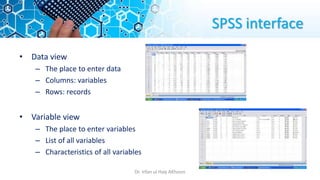
SPSS interface
• Dataview
– The place to enter data
– Columns: variables
– Rows: records
• Variable view
– The place to enter variables
– List of all variables
– Characteristics of all variables
Dr. Irfan ul Haq AKhoon
11.
Basic Summaries
• DataEditor
– Data View
– Variable View
• File/Save
• Variable definition
– Name
– Type
– Width
– Decimals
– Label
– Values
– Missing
– Columns
– Align
– Measure
Dr. Irfan ul Haq AKhoon
12.
Scales of Measurement
•Nominal Scale - groups or classes : objects or
people are categorized according to some
criterion
Gender
Job Category
• Ordinal Scale - order matters: Categories which
are ranked according to characteristics
Ranks (top ten videos)
income-
low,
moderate, high
• Interval Scale - difference matters : contain equal
distance between units of measure- but no zero
Temperatures (0F, 0C),
Likert Scale
calendar years
• Ratio Scale - Ratio matters – has a natural zero
value and consistent intervals
Salaries
distance,
weight
Dr. Irfan ul Haq AKhoon
13.
The basic analysisof SPSS
• Frequencies
This analysis produces frequency tables showing frequency counts and
percentages of the values of individual variables.
• Descriptive
This analysis shows the maximum, minimum, mean, and standard deviation of
the variable.
• Linear regression analysis
Linear Regression estimates the coefficients of the linear equation
Dr. Irfan ul Haq AKhoon
14.
Graphical Representation
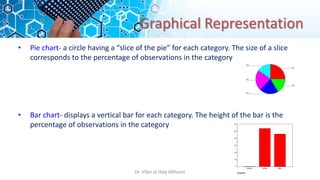
• Piechart- a circle having a “slice of the pie” for each category. The size of a slice
corresponds to the percentage of observations in the category
• Bar chart- displays a vertical bar for each category. The height of the bar is the
percentage of observations in the category
GENDER
Male
Female
Missing
Percent
60
50
40
30
20
10
0
EQ5
EQ4
EQ3
EQ2
EQ1
Dr. Irfan ul Haq AKhoon
15.
Graphical Representation
• LineChart:
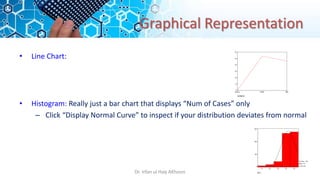
• Histogram: Really just a bar chart that displays “Num of Cases” only
– Click “Display Normal Curve” to inspect if your distribution deviates from normal
GENDER
Male
Female
Missing
Percent
60
50
40
30
20
10
0
EQ1
5.0
4.0
3.0
2.0
1.0
300
200
100
0
Std. Dev = .86
Mean = 4.3
N = 614.00
Dr. Irfan ul Haq AKhoon