1
Market Trends
2
Old & New Threats
Despite all the publicity about zero-day exploits, a big
percentage of breaches (44 per cent) come from
vulnerabilities which are two to four years old.
[…] Most vulnerabilities stem from a relatively small
number of common software programming errors.
Every one of the top ten vulnerabilities exploited in 2014
took advantage of code written years or even decades
ago, according to HP, which recorded an increase in the
level of mobile malware detected.
“Many of the biggest security risks are issues we’ve known
about for decades, leaving organisations unnecessarily
exposed,” said Art Gilliland, senior vice president and
general manager, Enterprise Security Products, HP.
3
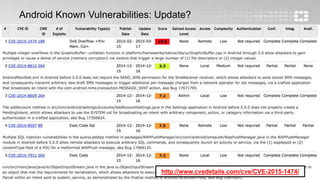
Android Known Vulnerabilities: Update?
http://www.cvedetails.com/cve/CVE-2015-1474/
4
Sandboxing
5
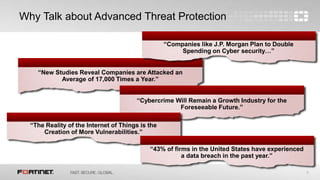
Why Talk about Advanced Threat Protection
“New Studies Reveal Companies are Attacked an
Average of 17,000 Times a Year.”
“Companies like J.P. Morgan Plan to Double
Spending on Cyber security…”
“Cybercrime Will Remain a Growth Industry for the
Foreseeable Future.”
“The Reality of the Internet of Things is the
Creation of More Vulnerabilities.”
“43% of firms in the United States have experienced
a data breach in the past year.”
6
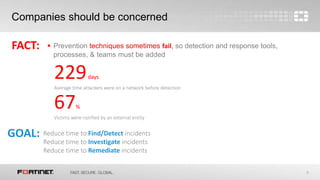
Companies should be concerned
 Prevention techniques sometimes fail, so detection and response tools,
processes, & teams must be added
FACT:
GOAL: Reduce time to Find/Detect incidents
Reduce time to Investigate incidents
Reduce time to Remediate incidents
229days
Average time attackers were on a network before detection
67%
Victims were notified by an external entity
7
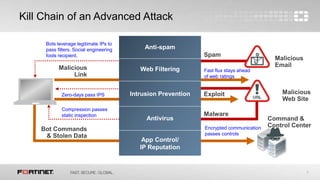
Kill Chain of an Advanced Attack
Spam
Malicious
Email
Malicious
Web Site
Exploit
Malware
Command &
Control Center
Bots leverage legitimate IPs to
pass filters. Social engineering
fools recipient.
Malicious
Link
Bot Commands
& Stolen Data
Anti-spam
Web Filtering
Intrusion Prevention
Antivirus
App Control/
IP Reputation
Fast flux stays ahead
of web ratings
Zero-days pass IPS
Compression passes
static inspection
Encrypted communication
passes controls
8
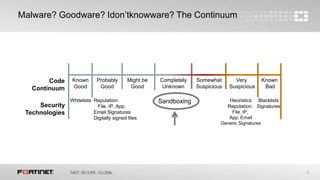
Known
Good
Known
Bad
Probably
Good
Very
Suspicious
Somewhat
Suspicious
Might be
Good
Completely
Unknown
Whitelists Reputation:
File, IP, App,
Email Signatures
Digitally signed files
Blacklists
Signatures
Heuristics
Reputation:
File, IP,
App, Email
Generic Signatures
Code
Continuum
Security
Technologies
Sandboxing
Malware? Goodware? Idon’tknowware? The Continuum
9
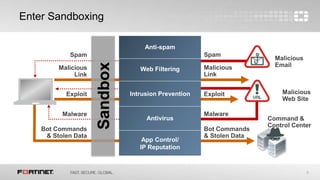
Enter Sandboxing
Spam
Malicious
EmailMalicious
Link
Malicious
Web Site
Exploit
Malware
Bot Commands
& Stolen Data
Command &
Control Center
Spam
Malicious
Link
Exploit
Malware
Bot Commands
& Stolen Data
Sandbox
Anti-spam
Web Filtering
Intrusion Prevention
Antivirus
App Control/
IP Reputation
10
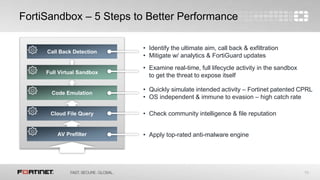
FortiSandbox – 5 Steps to Better Performance
Call Back Detection
Full Virtual Sandbox
Code Emulation
Cloud File Query
AV Prefilter
• Quickly simulate intended activity – Fortinet patented CPRL
• OS independent & immune to evasion – high catch rate
• Apply top-rated anti-malware engine
• Examine real-time, full lifecycle activity in the sandbox
to get the threat to expose itself
• Check community intelligence & file reputation
• Identify the ultimate aim, call back & exfiltration
• Mitigate w/ analytics & FortiGuard updates
11
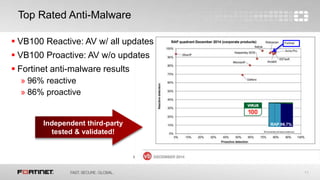
 VB100 Reactive: AV w/ all updates
 VB100 Proactive: AV w/o updates
 Fortinet anti-malware results
» 96% reactive
» 86% proactive
Top Rated Anti-Malware
Independent third-party
tested & validated!
12
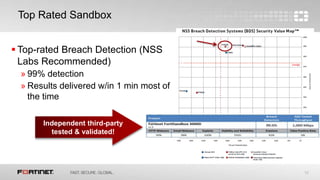
 Top-rated Breach Detection (NSS
Labs Recommended)
» 99% detection
» Results delivered w/in 1 min most of
the time
Top Rated Sandbox
Independent third-party
tested & validated!
13
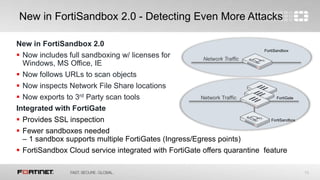
New in FortiSandbox 2.0
 Now includes full sandboxing w/ licenses for
Windows, MS Office, IE
 Now follows URLs to scan objects
 Now inspects Network File Share locations
 Now exports to 3rd Party scan tools
Integrated with FortiGate
 Provides SSL inspection
 Fewer sandboxes needed
– 1 sandbox supports multiple FortiGates (Ingress/Egress points)
 FortiSandbox Cloud service integrated with FortiGate offers quarantine feature
New in FortiSandbox 2.0 - Detecting Even More Attacks
Network Traffic
Network Traffic FortiGate
FortiSandbox
FortiSandbox
14
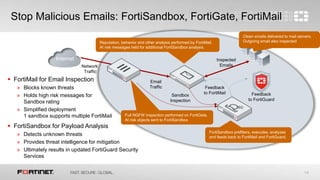
Stop Malicious Emails: FortiSandbox, FortiGate, FortiMail
Reputation, behavior and other analysis performed by FortiMail.
At risk messages held for additional FortiSandbox analysis.
Clean emails delivered to mail servers.
Outgoing email also inspected
FortiSandbox prefilters, executes, analyzes
and feeds back to FortiMail and FortiGuard.
Feedback
to FortiGuard
Feedback
to FortiMail
Email
Traffic
Internet
Sandbox
Inspection
Inspected
EmailsNetwork
Traffic
Full NGFW inspection performed on FortiGate.
At risk objects sent to FortiSandbox
 FortiMail for Email Inspection
» Blocks known threats
» Holds high risk messages for
Sandbox rating
» Simplified deployment
1 sandbox supports multiple FortiMail
 FortiSandbox for Payload Analysis
» Detects unknown threats
» Provides threat intelligence for mitigation
» Ultimately results in updated FortiGuard Security
Services
15
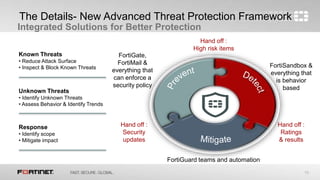
The Details- New Advanced Threat Protection Framework
Integrated Solutions for Better Protection
Hand off :
High risk items
Hand off :
Ratings
& results
Hand off :
Security
updates
FortiSandbox &
everything that
is behavior
based
FortiGate,
FortiMail &
everything that
can enforce a
security policy
FortiGuard teams and automation
Known Threats
• Reduce Attack Surface
• Inspect & Block Known Threats
Unknown Threats
• Identify Unknown Threats
• Assess Behavior & Identify Trends
Response
• Identify scope
• Mitigate impact
16
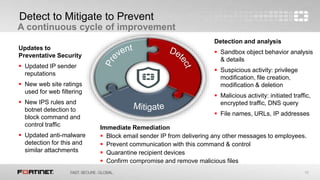
Detect to Mitigate to Prevent
A continuous cycle of improvement
Updates to
Preventative Security
 Updated IP sender
reputations
 New web site ratings
used for web filtering
 New IPS rules and
botnet detection to
block command and
control traffic
 Updated anti-malware
detection for this and
similar attachments
Detection and analysis
 Sandbox object behavior analysis
& details
 Suspicious activity: privilege
modification, file creation,
modification & deletion
 Malicious activity: initiated traffic,
encrypted traffic, DNS query
 File names, URLs, IP addresses
Immediate Remediation
 Block email sender IP from delivering any other messages to employees.
 Prevent communication with this command & control
 Quarantine recipient devices
 Confirm compromise and remove malicious files
17
Contattaci gratuitamente…
In questi anni di partnership con la casa
madre, Lan & Wan Solutions ha ottenuto tutte
le specializzazioni previste nei vari iter di
certificazione, raggiungendo la qualifica di
Partner Of Excellence.
Certified experts in Fortimail and email
security
Certified experts in Fortiweb and web
application firewall protection
Certified experts in FortiAp, FortiWifi
and wireless security
Contacts
Tel. +39 049 8843198 DIGIT (5)
contacts@lanewan.it
www.lanewan.it

Sandboxing

  • 1.
  • 2.
    2 Old & NewThreats Despite all the publicity about zero-day exploits, a big percentage of breaches (44 per cent) come from vulnerabilities which are two to four years old. […] Most vulnerabilities stem from a relatively small number of common software programming errors. Every one of the top ten vulnerabilities exploited in 2014 took advantage of code written years or even decades ago, according to HP, which recorded an increase in the level of mobile malware detected. “Many of the biggest security risks are issues we’ve known about for decades, leaving organisations unnecessarily exposed,” said Art Gilliland, senior vice president and general manager, Enterprise Security Products, HP.
  • 3.
    3 Android Known Vulnerabilities:Update? http://www.cvedetails.com/cve/CVE-2015-1474/
  • 4.
  • 5.
    5 Why Talk aboutAdvanced Threat Protection “New Studies Reveal Companies are Attacked an Average of 17,000 Times a Year.” “Companies like J.P. Morgan Plan to Double Spending on Cyber security…” “Cybercrime Will Remain a Growth Industry for the Foreseeable Future.” “The Reality of the Internet of Things is the Creation of More Vulnerabilities.” “43% of firms in the United States have experienced a data breach in the past year.”
  • 6.
    6 Companies should beconcerned  Prevention techniques sometimes fail, so detection and response tools, processes, & teams must be added FACT: GOAL: Reduce time to Find/Detect incidents Reduce time to Investigate incidents Reduce time to Remediate incidents 229days Average time attackers were on a network before detection 67% Victims were notified by an external entity
  • 7.
    7 Kill Chain ofan Advanced Attack Spam Malicious Email Malicious Web Site Exploit Malware Command & Control Center Bots leverage legitimate IPs to pass filters. Social engineering fools recipient. Malicious Link Bot Commands & Stolen Data Anti-spam Web Filtering Intrusion Prevention Antivirus App Control/ IP Reputation Fast flux stays ahead of web ratings Zero-days pass IPS Compression passes static inspection Encrypted communication passes controls
  • 8.
    8 Known Good Known Bad Probably Good Very Suspicious Somewhat Suspicious Might be Good Completely Unknown Whitelists Reputation: File,IP, App, Email Signatures Digitally signed files Blacklists Signatures Heuristics Reputation: File, IP, App, Email Generic Signatures Code Continuum Security Technologies Sandboxing Malware? Goodware? Idon’tknowware? The Continuum
  • 9.
    9 Enter Sandboxing Spam Malicious EmailMalicious Link Malicious Web Site Exploit Malware BotCommands & Stolen Data Command & Control Center Spam Malicious Link Exploit Malware Bot Commands & Stolen Data Sandbox Anti-spam Web Filtering Intrusion Prevention Antivirus App Control/ IP Reputation
  • 10.
    10 FortiSandbox – 5Steps to Better Performance Call Back Detection Full Virtual Sandbox Code Emulation Cloud File Query AV Prefilter • Quickly simulate intended activity – Fortinet patented CPRL • OS independent & immune to evasion – high catch rate • Apply top-rated anti-malware engine • Examine real-time, full lifecycle activity in the sandbox to get the threat to expose itself • Check community intelligence & file reputation • Identify the ultimate aim, call back & exfiltration • Mitigate w/ analytics & FortiGuard updates
  • 11.
    11  VB100 Reactive:AV w/ all updates  VB100 Proactive: AV w/o updates  Fortinet anti-malware results » 96% reactive » 86% proactive Top Rated Anti-Malware Independent third-party tested & validated!
  • 12.
    12  Top-rated BreachDetection (NSS Labs Recommended) » 99% detection » Results delivered w/in 1 min most of the time Top Rated Sandbox Independent third-party tested & validated!
  • 13.
    13 New in FortiSandbox2.0  Now includes full sandboxing w/ licenses for Windows, MS Office, IE  Now follows URLs to scan objects  Now inspects Network File Share locations  Now exports to 3rd Party scan tools Integrated with FortiGate  Provides SSL inspection  Fewer sandboxes needed – 1 sandbox supports multiple FortiGates (Ingress/Egress points)  FortiSandbox Cloud service integrated with FortiGate offers quarantine feature New in FortiSandbox 2.0 - Detecting Even More Attacks Network Traffic Network Traffic FortiGate FortiSandbox FortiSandbox
  • 14.
    14 Stop Malicious Emails:FortiSandbox, FortiGate, FortiMail Reputation, behavior and other analysis performed by FortiMail. At risk messages held for additional FortiSandbox analysis. Clean emails delivered to mail servers. Outgoing email also inspected FortiSandbox prefilters, executes, analyzes and feeds back to FortiMail and FortiGuard. Feedback to FortiGuard Feedback to FortiMail Email Traffic Internet Sandbox Inspection Inspected EmailsNetwork Traffic Full NGFW inspection performed on FortiGate. At risk objects sent to FortiSandbox  FortiMail for Email Inspection » Blocks known threats » Holds high risk messages for Sandbox rating » Simplified deployment 1 sandbox supports multiple FortiMail  FortiSandbox for Payload Analysis » Detects unknown threats » Provides threat intelligence for mitigation » Ultimately results in updated FortiGuard Security Services
  • 15.
    15 The Details- NewAdvanced Threat Protection Framework Integrated Solutions for Better Protection Hand off : High risk items Hand off : Ratings & results Hand off : Security updates FortiSandbox & everything that is behavior based FortiGate, FortiMail & everything that can enforce a security policy FortiGuard teams and automation Known Threats • Reduce Attack Surface • Inspect & Block Known Threats Unknown Threats • Identify Unknown Threats • Assess Behavior & Identify Trends Response • Identify scope • Mitigate impact
  • 16.
    16 Detect to Mitigateto Prevent A continuous cycle of improvement Updates to Preventative Security  Updated IP sender reputations  New web site ratings used for web filtering  New IPS rules and botnet detection to block command and control traffic  Updated anti-malware detection for this and similar attachments Detection and analysis  Sandbox object behavior analysis & details  Suspicious activity: privilege modification, file creation, modification & deletion  Malicious activity: initiated traffic, encrypted traffic, DNS query  File names, URLs, IP addresses Immediate Remediation  Block email sender IP from delivering any other messages to employees.  Prevent communication with this command & control  Quarantine recipient devices  Confirm compromise and remove malicious files
  • 17.
    17 Contattaci gratuitamente… In questianni di partnership con la casa madre, Lan & Wan Solutions ha ottenuto tutte le specializzazioni previste nei vari iter di certificazione, raggiungendo la qualifica di Partner Of Excellence. Certified experts in Fortimail and email security Certified experts in Fortiweb and web application firewall protection Certified experts in FortiAp, FortiWifi and wireless security Contacts Tel. +39 049 8843198 DIGIT (5) contacts@lanewan.it www.lanewan.it

Editor's Notes

  • #6 The threat landscape just keeps escalating and these days there is a lot of scrutiny over IT security because a successful data breach can be headline news. Certainly we’ve seen many very high profile companies and brands in the news with massive data breaches. The risk environment has made a lot of organizations start to pay more attention to their security measures. Viruses and hackers are not new, so what’s changed? There are many more different types of devices attacked to the network than ever before. And this Internet of Things includes many devices that do not have the ability to maintain regular security updates and it includes many devices and applications made for consumer use that are now being used within the enterprise. The cybercrime economy has matured and is a profitable industry that is more accessible than ever to black hat entrepreneurs. There is much higher awareness of the risk due to laws requiring public disclosure of a breach and the subsequent press coverage some breaches get. Hackers are getting even more sophisticated in how they orchestrate attacks in order to get around existing security coverage.
  • #7 You may have any number of excellent security technologies in place already in your organization – things such as firewalls, VPNs, authentication, antivirus, web filtering, IPS, and antispam. This is good and these solutions will prevent a lot of threats from ever impacting your organization. However, nothing is 100% and sometimes advanced attacks will find a way to get through these prevention techniques. You need to be ready to deal with these types of advanced targeted attacks. In recent breaches it took 229 days on average to detect an attack that’s gotten on the network if it has managed to slip past existing defenses. And in 67% of the time the victim organizations only learned about the breach from an external entity. Clearly no organization wants to be part of this statistic. The goal behind advanced threat detection is to prevent what attacks you can and then, accepting that some things will get through, to reduce the time to find and detect an attack. And once youv’e identified an attack, reduce the time it takes to investigate and analyze the threat. Finally, with this intelligence in hand you can more quickly remediate any impact on your organization.
  • #8 So how does an advanced attack work? Here’s a snapshot of a typical kill chain for an advanced attack and the typical security technologies that are in play in order to block that attack and break the kill chain. The number one, most popular method for initiating an advanced attack is to send a malicious email to the target. This email may have a malicious file attachment or a URL that connects to a malicious web site. You hope your anti-spam will stop this email from ever reaching an end user target. However there are ways to get around antispam and other email gateway security techniques. For example Bots may leverage legitimate (but compromised) IPs from which to send the email or they may use targeted spear phishing techniques and social engineering to get through filters and to entice an end users to click on a URL. They may encrypt a malicious attachment to hide it from AV scanning. If an email with a malicious URL gets through and an end user clicks on that URL link, you hope your web filtering protection will stop the user from ever connecting to that malicious web site and in many cases this will work. However, some attackers use a fast flux approach, only using a site for a few days or a few hours – harvesting what they can before moving on to another URL. If the end user connects with the malicious web site, that site will launch exploits at the user and you hope your Intrusion prevention will block the attack. However exploits can slip through by taking advantage of zero-day vulnerabilities, new variants, and encryption. If an exploit gets through, you hope you will catch any malware it tries to deliver with your antivirus. And many times this will work but sometimes it doesn’t. Malware can use file compression, encryption, and new malware variants to get through an AV filter. If that malware gets into the organization, it will try to proliferate and it will look for valuable data to collect. Eventually it will try to exfiltrate stolen data or simply go out to try to pull more threats into the organization and here’s where your application control and IP reputation controls may be able to identify and stop a connection to a command & control center. But if it doesn’t (maybe because the traffic was encrypted) your organization is breached.
  • #9 Here’s another way to look at how threats can get through security. Our industry has done a great job over the years to create new techniques to identify and classify code. We have tried and true techniques to identify code that is known to be good and that code known to be bad – whitelists and blacklist for example. We have good techniques to identify code that is probably good or probably bad – using heuristics, generic signatures, and file reputation. And depending on if you don’t mind the occasional false positive, these techniques can be used to identify code that might be good or is only somewhat suspicious. The area that’s been the biggest challenge for security is how to identify code that we know nothing about. In order for most security approaches to work, there must be something about the code that is already known. For years security research teams have used sandboxing in the lab to identify and analyze new threats. Its only in recent years that its become practical to put sandboxing into commercial use. So now, any organization can get the advantage of sandboxing to evaluate unknown code to see if it will reveal itself to be suspicious or malicious in a safe environment.
  • #10 Here’s how the addition of sandboxing changes the protection game in an enterprise. It’s still a very good idea to have all those traditional preventative techniques in place. They are the fastest, most efficient way to prevent attacks from ever getting into your organization. However, by adding sandbox to back up these techniques you now have the chance to catch all those threats that can slip by because it is unknown by your preventative techniques such as antispam, IPS, AV, etc. And once your sandbox has analyzed a threat, you get useful insights that can be used to mitigate the threat. Both by remediating any exposure to it you may have had and by using that new threat intelligence to improve the preventative technologies you have in place.
  • #11 However, sandboxing is resource and time intensive. It takes time to let a file run so you can analyze its behavior. Fortinet’s FortiSandbox solution is architected to optimize both security effectiveness and speed to results. It is not simply a sandbox, it uses a multi step approach to evaluate and analyze objects, starting with the most efficient technologies and stepping up to more resource intensive approaches as needed. FortiSandbox goes through 5 steps. Step 1: objects are run though Fortinet’s top-rated AV engine. This AV prefilter uses a larger, more extended threat database from FortiGuard Labs in order to catch more variants and older variants of malware. Step 2: FortiSandbox performs a cloud query to see if this file has been previously identified (in some systems this is referred to as a file reputation check) Step 3: the code is put through a simulator and Fortinet’s patented Compact Pattern Recognition Language is used to analyze the code to see if any malicious or suspicious patterns can be identified Steps 1 through 3 are typically performed in just a few seconds. On average these three steps are able to identify over 60% of threats. Step 4: the code is placed in a full virtual sandbox environment and allowed to run. The behavior lifecycle of the code is observed and if the object is malicious, it will expose itself. Step 5: The activity in the sandbox is analyzed to identify if it is malicious or suspicious and the activity is documented. The object is assigned a risk rating and is then reported out. New findings from this analysis can be shared with FortiGuard Labs in order to create new security updates in order to improve the extended FortiGuard security ecosystem.
  • #12 Step 1 in FortiSandbox uses the anti-malware engine created by FortiGuard Labs to catch threats. FortiGuard Labs is Fortinet’s own dedicated security research. Fortinet has a strong tradition of participation in third-party industry testing and their antivirus engine performs very well compared to others in the industry. This is the reactive and proactive text from Virus Bulletin’s VB100. It’s a standard industry review of AV effectiveness. The reactive test is the vertical axis and it tests AV solutions with all security updates current and enabled. The horizontal axis is the proactive test that uses AV solutions that have had their security updates disabled for two weeks – to see how well they do without the latest security updates. Fortinet was one of the top performers in this latest VB100 test in both reactive and proactive protection. This is the same baseline AV engine used by all Fortinet security products. In addition to this AV engine, FortiSandbox appliances also have access to an extended threat database.
  • #13 Fortinet also participates in NSS Labs testing for NGFW and Breach Detection Systems. These are the results of the Breach Detection Systems industry tests in 2014. As you can see in the chart, Fortinet tested high for effectiveness and well for performance and value, detecting 99% of threats and delivering results in under 1 minute the majority of the time. The vertical axis shows the security effectiveness results from the test and the horizontal axis shows the performance/value results. Fortinet’s FortiSandbox fell into the upper right quadrant in results and thus earned a Recommended rating from NSS Labs.
  • #14  Fortinet recently release FortiSandbox 2.0. This new release adds some additional detection capabilities including full licenses for Windows, IE, and MS Office with each sandbox. Most other sandbox solutions don’t come with licenses for the environments they run in the sandbox – they leave licensing up to the end customer, which can be legally tricky since most EULAs don’t give permission for software to be used in this way. FortiSandbox scans network traffic. It can do this as a standalone solution or as an integrated solution combined with FortiGate. It can also be used to do on-demand scanning. With 2.0 you can submit URLs to FortiSandbox to be scanned for malicious objects. And FortiSandbox 2.0 can be set up to scan network file share locations. It is also able to export objects so they can be submitted to another 3rd party scanning tool. FortiSandbox is even more efficient when deployed with Fortinet’s NSS Labs Recommended FortiGate Next Generation Firewall. The FortiGate performs SSL inspection and acts as a prefilter for FortiSandbox. Plus a single FortiSandbox can be connected to multiple FortiGates, making it possible to protect multiple ingress/egress points in your network with a single sandbox appliance. In addition to being an on-premise appliance, FortiSandbox can also be purchased as a cloud service integrated with the FortiGate firewall. The latest FortiSandbox Cloud integrated service in conjunction with FortiGate also includes the ability to quarantine devices that may have been impacted by identified threats – speeding up any remediation action necessary to contain those threats.
  • #15 A FortiSandbox appliance integrates with FortiGate for more efficient processing of threats, to protect multiple ingress/egress points and for SSL inspection. It also integrates with FortiMail to provide preventative protection against email-borne threats. Unlike with network traffic, email traffic is a store and forward system so it is generally okay to introduce a small amount of latency into the system. Because of this, you can use FortiMail with FortiSandbox and FortiGate to prevent advanced threats in email from ever reaching the end user. With this simple integration, at risk email traffic is sent to FortiSandbox and held until it has been analyzed. If a suspicious or malicious item is found by FortiSandbox, that email can be blocked from ever being delivered.
  • #16 There is no “silver bullet” to protect organizations against all advanced targeted attacks. There is too much rapid innovation happening in cyber crime for any single approach to be the solution. The most effective defense is through a cohesive, integrated solution. The Fortinet Advanced Threat Protection Framework provides a guide to building a more effective layer of protection – one that is continually improving. This cohesive ATP solution includes: technologies to prevent known threats from getting into an organization, technologies to detect that which is unknown and cannot be stopped by traditional preventative measures, and the ability to mitigate threats through remediation and security updates aimed at continually improving the preventative technologies already in play. It sounds simple but it can difficult to create this with just a collection of point solutions. In the case of the Fortinet solution, FortiGate NGFW and UTM technologies and FortiMail email security work to prevent threats from impacting an organization through IPS, web filtering, AV, IP reputation, antispam, application control and VPN functions. FortiAuthenticator also helps to control access to the network and FortiClient can help protect endpoints. FortiGate and FortiMail integrate with FortiSandbox to hand off high risk items for deeper analysis with the aim to detect advanced new and evasive threats. FortiSandbox identifies and analyzes threats and gathers information that then can be used to mitigate attacks – either through automated mitigation leveraging integration with FortiGate or FortiMail directly or through security updates from the FortiGuard Labs research team that feed back into the greater Fortinet security solution ecosystem.
  • #17 By implementing an Advanced Threat Protection Framework the process of learning, remediating and improving security follows a natural flow. In the Detection and Analysis phase the sandbox identifies suspicious threat activities such as privilege modification and file creation or deletion as well as known malicious behavior such as initiated network traffic or DNS queries. The sandbox can learn details from its analysis in form of file names, URLs, IP addresses and more that can be used in remediation and added to security updates. With the details of a threat attack, including its source and destination from FortiSandbox, it is much easier to instigate immediate remediation activities such as blocking an email sender IP from sending more messages to employees, preventing communications with known command & control addresses, and to quarantine compromised devices within the network to prevent the spread of malware. Finally, the threat information learned by the sandbox has multiple uses. Malicious IP addresses and URLs identified can be added to web filtering and IP reputation lists. File characteristics can be used to create new IPS rules and anti-malware signatures. All this feeds into security updates to improve the protection delivered by all the solutions in the framework.