DATA
ACQUISITION
UNDERSTANDING STORAGE FORMATS
FOR DIGITAL EVIDENCE
▪ Data in a forensics acquisition tool is stored as an image file
▪ Three formats
▪ Raw format
▪ Proprietary formats
▪ Advanced Forensics Format (AFF)
RAW FORMAT
▪ Makes it possible to write bit-stream data to files
▪ Advantages
▪ Fast data transfers
▪ Ignores minor data read errors on source drive
▪ Most computer forensics tools can read raw format
▪ Disadvantages
▪ Requires as much storage as original disk or data
▪ Tools might not collect marginal (bad) sectors
PROPRIETARY FORMATS
▪ Most forensics tools have their own formats
▪ Features offered
▪ Option to compress or not compress image files
▪ Can split an image into smaller segmented files
▪ Can integrate metadata into the image file
▪ Disadvantages
▪ Inability to share an image between different tools
▪ File size limitation for each segmented volume
▪ The Expert Witness format is unofficial standard
▪ FTK uses and Encases USES
ADVANCED FORENSICS FORMAT
▪ Developed by Dr. Simson L. Garfinkel as an open-source acquisition format
▪ Design goals
▪ Provide compressed or uncompressed image files
▪ No size restriction for disk-to-image files
▪ Provide space in the image file or segmented files for metadata
▪ Simple design with extensibility
▪ Open source for multiple platforms and Os’s
▪ Internal consistency checks for self-authentication
▪ File extensions include:
▪ .aff – variation that stores all data and metadata in a single file
▪ .afm – variation stores all the data and metadata in separate files
▪ .afd – variation stores all the data and metadata in multiple small files.
▪ AFF is open source
PROCESS FOR ACQUIRING DATA
▪ Step 1: Choose Acquisition Method
▪ Step 2: Snapshot the System
▪ Step 3: Acquire Volatile System Data
▪ Step 4: Securing and Transporting the System
▪ Step 5: Prepare Drive
▪ Step 6: Perform Acquisition
▪ Step 7: Validate
▪ Step 8: Contingency Planning
DETERMINING THE BEST ACQUISITION
METHOD
▪ Types of acquisitions
▪ Static acquisitions and live acquisitions
▪ Four methods of data collection
▪ Creating a disk-to-image file
▪ Creating a disk-to-disk
▪ Creating a logical disk-to-disk or disk-to-data file
▪ Creating a sparse data copy of a file or folder
▪ Determining the best method depends on the circumstances of the
investigation
▪ Size of the source disk
▪ Time
▪ Whether you can retain the disk
DETERMINING THE BEST ACQUISITION
METHOD
▪ Creating a disk-to-image file
▪ Most common method and offers most flexibility
▪ Can make more than one copy
▪ Copies are bit-for-bit replications of the original drive
▪ ProDiscover, EnCase, FTK, SMART, Sleuth Kit, X-Ways, iLookIX
▪ Creating a disk-to-disk
▪ When disk-to-image copy is not possible
▪ Tools can adjust disk’s geometry configuration
▪ EnCase, SafeBack, SnapCopy
DETERMINING THE BEST ACQUISITION
METHOD
▪ Logical acquisition or sparse acquisition
▪ Use when your time is limited
▪ Logical acquisition captures only specific files of interest to the case
▪ Sparse acquisition collects fragments of unallocated (deleted) data
▪ For large disks
▪ PST or OST mail files, RAID servers
SNAPSHOT THE SYSTEM
▪ Before shutting down a system an analyst must create a snapshot of the
current run state.
▪ Additionally, this must be done by minimizing your fingerprint.
▪ Snapshot a list of running processes
▪ Task Manager, ps –efl
▪ Need to check for possible malware that could execute on shutdown, process start
ups, etc.
▪ Question: How can we snapshot the current run state without altering the disk?
▪ Snapshot the network connection status
▪ Netstat
▪ Need to check if there are any live connections to the system.
ACQUIRE VOLATILE SYSTEM DATA
▪ Before the machine can be shutdown to snapshot the physical
equipment, any volatile data must be recovered.
▪ Cache Memory
▪ Main Memory
▪ We will focus more on main memory recovery next week.
▪ Ex. Recovering user account and password information from RAM.
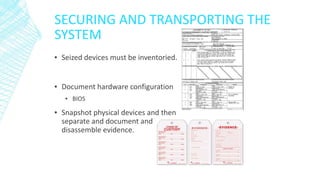
SECURING AND TRANSPORTING THE
SYSTEM
▪ Seized devices must be inventoried.
▪ Document hardware configuration
▪ BIOS
▪ Snapshot physical devices and then
separate and document and
disassemble evidence.
ACQUIRING DATA WITH A LINUX BOOT
CD
▪ Linux can access a drive that isn’t
mounted
▪ Windows OSs and newer Linux
automatically mount and access
a drive
▪ Forensic Linux Live CDs don’t
access media automatically
▪ Which eliminates the need for a
write-blocker
▪ Using Linux Live CD Distributions
▪ Forensic Linux Live CDs
▪ Contain additionally utilities
▪ Forensic Linux Live CDs (cont’d)
▪ Configured not to mount, or to
mount as read-only, any connected
storage media
▪ Well-designed Linux Live CDs for
computer forensics
▪ Penguin Sleuth
▪ F.I.R.E
▪ CAINE
▪ Deft
▪ Kali Linux
▪ Knoppix
▪ SANS Investigative Toolkit
PREPARING A TARGET DRIVE FOR
ACQUISITION IN LINUX
▪ Current Linux distributions can create Microsoft FAT and NTFS
partition tables
▪ fdisk command lists, creates, deletes, and verifies partitions in Linux
▪ mkfs.msdos command formats a FAT file system from Linux
ACQUIRING DATA WITH A LINUX BOOT
CD
▪ Acquiring data with dd in Linux
▪ dd (“data dump”) command
▪ Can read and write from media device and data
file
▪ Creates raw format file that most computer
forensics analysis tools can read
▪ Shortcomings of dd command
▪ Requires more advanced skills than average user
▪ Does not compress data
▪ dd command combined with the split command
▪ Segments output into separate volumes
▪ Follow the step starting on page 104 in the text to
make an image of an NTFS disk on a FAT32 disk
▪ Acquiring data with dcfldd in Linux
▪ The dd command is intended as a data
management tool
▪ Not designed for forensics acquisitions
▪ Acquiring data with dcfldd in Linux (cont’d)
▪ dcfldd additional functions
▪ Specify hex patterns or text for clearing disk space
▪ Log errors to an output file for analysis and review
▪ Use several hashing options
▪ Refer to a status display indicating the progress of
the acquisition in bytes
▪ Split data acquisitions into segmented volumes
with numeric extensions
▪ Verify acquired data with original disk or media
data
▪ Acquiring data with dc3dd in Linux
▪ Patch applied to the GNU dd
VALIDATING DATA ACQUISITIONS
▪ Validating evidence may be the most critical aspect of computer
forensics
▪ Requires using a hashing algorithm utility
▪ Validation techniques
▪ MD5 and SHA-1 to SHA-512
CONTINGENCY PLANNING FOR IMAGE
ACQUISITIONS
▪ Create a duplicate copy of your evidence image file
▪ Make at least two images of digital evidence
▪ Use different tools or techniques
▪ Copy host protected area of a disk drive as well
▪ Consider using a hardware acquisition tool that can access the drive
at the BIOS level
▪ Be prepared to deal with encrypted drives
▪ Whole disk encryption feature in Windows called BitLocker makes
static acquisitions more difficult
▪ May require user to provide decryption key
PERFORMING RAID DATA ACQUISITIONS
▪ Acquisition of RAID drives can be challenging and frustrating
because of how RAID systems are
▪ Designed
▪ Configured
▪ Sized
▪ Size is the biggest concern
▪ Many RAID systems now have terabytes of data
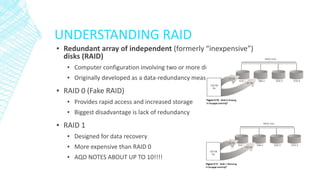
UNDERSTANDING RAID
▪ Redundant array of independent (formerly “inexpensive”)
disks (RAID)
▪ Computer configuration involving two or more disks
▪ Originally developed as a data-redundancy measure
▪ RAID 0 (Fake RAID)
▪ Provides rapid access and increased storage
▪ Biggest disadvantage is lack of redundancy
▪ RAID 1
▪ Designed for data recovery
▪ More expensive than RAID 0
▪ AQD NOTES ABOUT UP TO 10!!!!
ACQUIRING RAID DISKS
▪ Address the following concerns
▪ How much data storage is needed?
▪ What type of RAID is used?
▪ Do you have the right acquisition tool?
▪ Can the tool read a forensically copied
RAID image?
▪ Can the tool read split data saves of each
RAID disk?
▪ Copying small RAID systems to one
large disk is possible
▪ Occasionally, a RAID system is too large
for a static acquisition
▪ Retrieve only the data relevant to the
investigation with the sparse or logical
acquisition method
▪ Vendors offering RAID acquisition
functions
▪ Technology Pathways ProDiscover
▪ Guidance Software EnCase
▪ X-Ways Forensics
▪ AccessData FTK
▪ Runtime Software
▪ R-Tools Technologies
USING REMOTE NETWORK
ACQUISITION TOOLS
▪ You can remotely connect to a suspect computer via a
network connection and copy data from it
▪ Remote acquisition tools vary in configurations and
capabilities
▪ Drawbacks
▪ Antivirus, antispyware, and firewall tools can be configured to ignore
remote access programs
▪ Suspects could easily install their own security tools that trigger an
alarm to notify them of remote access intrusions
▪ Question: What is our ISY “Swiss army knife tool” to perform this type
of live acquisition?
SUMMARY
▪ Forensics data acquisitions are stored
in three different formats:
▪ Raw, proprietary, and AFF
▪ Data acquisition methods
▪ Disk-to-image file
▪ Disk-to-disk copy
▪ Logical disk-to-disk or disk-to-data file
▪ Sparse data copy
▪ Plan your digital evidence
contingencies
▪ Make a copy of each acquisition
▪ Write-blocking devices or utilities must be
used with GUI acquisition tools
▪ Always validate acquisition
▪ A Linux Live CD, such as SIFT, Kali Linux,
or Deft, provides many useful tools for
digital forensics acquisitions
▪ Preferred Linux acquisition tool is
dcfldd (not dd)
▪ Use a physical write-blocker device for
acquisitions
▪ To acquire RAID disks, determine the
type of RAID
▪ And then which acquisition tool to use
▪ Remote network acquisition tools
require installing a remote agent on the
suspect computer

Data Acquisition

  • 1.
  • 2.
    UNDERSTANDING STORAGE FORMATS FORDIGITAL EVIDENCE ▪ Data in a forensics acquisition tool is stored as an image file ▪ Three formats ▪ Raw format ▪ Proprietary formats ▪ Advanced Forensics Format (AFF)
  • 3.
    RAW FORMAT ▪ Makesit possible to write bit-stream data to files ▪ Advantages ▪ Fast data transfers ▪ Ignores minor data read errors on source drive ▪ Most computer forensics tools can read raw format ▪ Disadvantages ▪ Requires as much storage as original disk or data ▪ Tools might not collect marginal (bad) sectors
  • 4.
    PROPRIETARY FORMATS ▪ Mostforensics tools have their own formats ▪ Features offered ▪ Option to compress or not compress image files ▪ Can split an image into smaller segmented files ▪ Can integrate metadata into the image file ▪ Disadvantages ▪ Inability to share an image between different tools ▪ File size limitation for each segmented volume ▪ The Expert Witness format is unofficial standard ▪ FTK uses and Encases USES
  • 5.
    ADVANCED FORENSICS FORMAT ▪Developed by Dr. Simson L. Garfinkel as an open-source acquisition format ▪ Design goals ▪ Provide compressed or uncompressed image files ▪ No size restriction for disk-to-image files ▪ Provide space in the image file or segmented files for metadata ▪ Simple design with extensibility ▪ Open source for multiple platforms and Os’s ▪ Internal consistency checks for self-authentication ▪ File extensions include: ▪ .aff – variation that stores all data and metadata in a single file ▪ .afm – variation stores all the data and metadata in separate files ▪ .afd – variation stores all the data and metadata in multiple small files. ▪ AFF is open source
  • 6.
    PROCESS FOR ACQUIRINGDATA ▪ Step 1: Choose Acquisition Method ▪ Step 2: Snapshot the System ▪ Step 3: Acquire Volatile System Data ▪ Step 4: Securing and Transporting the System ▪ Step 5: Prepare Drive ▪ Step 6: Perform Acquisition ▪ Step 7: Validate ▪ Step 8: Contingency Planning
  • 7.
    DETERMINING THE BESTACQUISITION METHOD ▪ Types of acquisitions ▪ Static acquisitions and live acquisitions ▪ Four methods of data collection ▪ Creating a disk-to-image file ▪ Creating a disk-to-disk ▪ Creating a logical disk-to-disk or disk-to-data file ▪ Creating a sparse data copy of a file or folder ▪ Determining the best method depends on the circumstances of the investigation ▪ Size of the source disk ▪ Time ▪ Whether you can retain the disk
  • 8.
    DETERMINING THE BESTACQUISITION METHOD ▪ Creating a disk-to-image file ▪ Most common method and offers most flexibility ▪ Can make more than one copy ▪ Copies are bit-for-bit replications of the original drive ▪ ProDiscover, EnCase, FTK, SMART, Sleuth Kit, X-Ways, iLookIX ▪ Creating a disk-to-disk ▪ When disk-to-image copy is not possible ▪ Tools can adjust disk’s geometry configuration ▪ EnCase, SafeBack, SnapCopy
  • 9.
    DETERMINING THE BESTACQUISITION METHOD ▪ Logical acquisition or sparse acquisition ▪ Use when your time is limited ▪ Logical acquisition captures only specific files of interest to the case ▪ Sparse acquisition collects fragments of unallocated (deleted) data ▪ For large disks ▪ PST or OST mail files, RAID servers
  • 10.
    SNAPSHOT THE SYSTEM ▪Before shutting down a system an analyst must create a snapshot of the current run state. ▪ Additionally, this must be done by minimizing your fingerprint. ▪ Snapshot a list of running processes ▪ Task Manager, ps –efl ▪ Need to check for possible malware that could execute on shutdown, process start ups, etc. ▪ Question: How can we snapshot the current run state without altering the disk? ▪ Snapshot the network connection status ▪ Netstat ▪ Need to check if there are any live connections to the system.
  • 11.
    ACQUIRE VOLATILE SYSTEMDATA ▪ Before the machine can be shutdown to snapshot the physical equipment, any volatile data must be recovered. ▪ Cache Memory ▪ Main Memory ▪ We will focus more on main memory recovery next week. ▪ Ex. Recovering user account and password information from RAM.
  • 12.
    SECURING AND TRANSPORTINGTHE SYSTEM ▪ Seized devices must be inventoried. ▪ Document hardware configuration ▪ BIOS ▪ Snapshot physical devices and then separate and document and disassemble evidence.
  • 13.
    ACQUIRING DATA WITHA LINUX BOOT CD ▪ Linux can access a drive that isn’t mounted ▪ Windows OSs and newer Linux automatically mount and access a drive ▪ Forensic Linux Live CDs don’t access media automatically ▪ Which eliminates the need for a write-blocker ▪ Using Linux Live CD Distributions ▪ Forensic Linux Live CDs ▪ Contain additionally utilities ▪ Forensic Linux Live CDs (cont’d) ▪ Configured not to mount, or to mount as read-only, any connected storage media ▪ Well-designed Linux Live CDs for computer forensics ▪ Penguin Sleuth ▪ F.I.R.E ▪ CAINE ▪ Deft ▪ Kali Linux ▪ Knoppix ▪ SANS Investigative Toolkit
  • 14.
    PREPARING A TARGETDRIVE FOR ACQUISITION IN LINUX ▪ Current Linux distributions can create Microsoft FAT and NTFS partition tables ▪ fdisk command lists, creates, deletes, and verifies partitions in Linux ▪ mkfs.msdos command formats a FAT file system from Linux
  • 15.
    ACQUIRING DATA WITHA LINUX BOOT CD ▪ Acquiring data with dd in Linux ▪ dd (“data dump”) command ▪ Can read and write from media device and data file ▪ Creates raw format file that most computer forensics analysis tools can read ▪ Shortcomings of dd command ▪ Requires more advanced skills than average user ▪ Does not compress data ▪ dd command combined with the split command ▪ Segments output into separate volumes ▪ Follow the step starting on page 104 in the text to make an image of an NTFS disk on a FAT32 disk ▪ Acquiring data with dcfldd in Linux ▪ The dd command is intended as a data management tool ▪ Not designed for forensics acquisitions ▪ Acquiring data with dcfldd in Linux (cont’d) ▪ dcfldd additional functions ▪ Specify hex patterns or text for clearing disk space ▪ Log errors to an output file for analysis and review ▪ Use several hashing options ▪ Refer to a status display indicating the progress of the acquisition in bytes ▪ Split data acquisitions into segmented volumes with numeric extensions ▪ Verify acquired data with original disk or media data ▪ Acquiring data with dc3dd in Linux ▪ Patch applied to the GNU dd
  • 16.
    VALIDATING DATA ACQUISITIONS ▪Validating evidence may be the most critical aspect of computer forensics ▪ Requires using a hashing algorithm utility ▪ Validation techniques ▪ MD5 and SHA-1 to SHA-512
  • 17.
    CONTINGENCY PLANNING FORIMAGE ACQUISITIONS ▪ Create a duplicate copy of your evidence image file ▪ Make at least two images of digital evidence ▪ Use different tools or techniques ▪ Copy host protected area of a disk drive as well ▪ Consider using a hardware acquisition tool that can access the drive at the BIOS level ▪ Be prepared to deal with encrypted drives ▪ Whole disk encryption feature in Windows called BitLocker makes static acquisitions more difficult ▪ May require user to provide decryption key
  • 18.
    PERFORMING RAID DATAACQUISITIONS ▪ Acquisition of RAID drives can be challenging and frustrating because of how RAID systems are ▪ Designed ▪ Configured ▪ Sized ▪ Size is the biggest concern ▪ Many RAID systems now have terabytes of data
  • 19.
    UNDERSTANDING RAID ▪ Redundantarray of independent (formerly “inexpensive”) disks (RAID) ▪ Computer configuration involving two or more disks ▪ Originally developed as a data-redundancy measure ▪ RAID 0 (Fake RAID) ▪ Provides rapid access and increased storage ▪ Biggest disadvantage is lack of redundancy ▪ RAID 1 ▪ Designed for data recovery ▪ More expensive than RAID 0 ▪ AQD NOTES ABOUT UP TO 10!!!!
  • 20.
    ACQUIRING RAID DISKS ▪Address the following concerns ▪ How much data storage is needed? ▪ What type of RAID is used? ▪ Do you have the right acquisition tool? ▪ Can the tool read a forensically copied RAID image? ▪ Can the tool read split data saves of each RAID disk? ▪ Copying small RAID systems to one large disk is possible ▪ Occasionally, a RAID system is too large for a static acquisition ▪ Retrieve only the data relevant to the investigation with the sparse or logical acquisition method ▪ Vendors offering RAID acquisition functions ▪ Technology Pathways ProDiscover ▪ Guidance Software EnCase ▪ X-Ways Forensics ▪ AccessData FTK ▪ Runtime Software ▪ R-Tools Technologies
  • 21.
    USING REMOTE NETWORK ACQUISITIONTOOLS ▪ You can remotely connect to a suspect computer via a network connection and copy data from it ▪ Remote acquisition tools vary in configurations and capabilities ▪ Drawbacks ▪ Antivirus, antispyware, and firewall tools can be configured to ignore remote access programs ▪ Suspects could easily install their own security tools that trigger an alarm to notify them of remote access intrusions ▪ Question: What is our ISY “Swiss army knife tool” to perform this type of live acquisition?
  • 22.
    SUMMARY ▪ Forensics dataacquisitions are stored in three different formats: ▪ Raw, proprietary, and AFF ▪ Data acquisition methods ▪ Disk-to-image file ▪ Disk-to-disk copy ▪ Logical disk-to-disk or disk-to-data file ▪ Sparse data copy ▪ Plan your digital evidence contingencies ▪ Make a copy of each acquisition ▪ Write-blocking devices or utilities must be used with GUI acquisition tools ▪ Always validate acquisition ▪ A Linux Live CD, such as SIFT, Kali Linux, or Deft, provides many useful tools for digital forensics acquisitions ▪ Preferred Linux acquisition tool is dcfldd (not dd) ▪ Use a physical write-blocker device for acquisitions ▪ To acquire RAID disks, determine the type of RAID ▪ And then which acquisition tool to use ▪ Remote network acquisition tools require installing a remote agent on the suspect computer

Editor's Notes

  • #3 Understanding Storage Formats for Digital Evidence Data in a forensics acquisition tool is stored as an image file Three formats Raw format Proprietary formats Advanced Forensics Format (AFF)
  • #4 Raw Format Makes it possible to write bit-stream data to files Advantages Fast data transfers Ignores minor data read errors on source drive Most computer forensics tools can read raw format Disadvantages Requires as much storage as original disk or data Tools might not collect marginal (bad) sectors
  • #5 Proprietary Formats Most forensics tools have their own formats Features offered Option to compress or not compress image files Can split an image into smaller segmented files Can integrate metadata into the image file Disadvantages Inability to share an image between different tools File size limitation for each segmented volume The Expert Witness format is unofficial standard
  • #6 Advanced Forensics Format Developed by Dr. Simson L. Garfinkel as an open-source acquisition format Design goals Provide compressed or uncompressed image files No size restriction for disk-to-image files Provide space in the image file or segmented files for metadata Simple design with extensibility Open source for multiple platforms and OSs
  • #8 Determining the Best Acquisition Method Types of acquisitions Static acquisitions and live acquisitions Four methods of data collection Creating a disk-to-image file Creating a disk-to-disk Creating a logical disk-to-disk or disk-to-data file Creating a sparse data copy of a file or folder Determining the best method depends on the circumstances of the investigation
  • #9 Determining the Best Acquisition Method Creating a disk-to-image file Most common method and offers most flexibility Can make more than one copy Copies are bit-for-bit replications of the original drive ProDiscover, EnCase, FTK, SMART, Sleuth Kit, X-Ways, iLookIX Creating a disk-to-disk When disk-to-image copy is not possible Tools can adjust disk’s geometry configuration EnCase, SafeBack, SnapCopy
  • #10 Determining the Best Acquisition Method Logical acquisition or sparse acquisition Can take several hours; use when your time is limited Logical acquisition captures only specific files of interest to the case Sparse acquisition collects fragments of unallocated (deleted) data For large disks PST or OST mail files, RAID servers
  • #14 Acquiring Data with a Linux Boot CD Linux can access a drive that isn’t mounted Windows OSs and newer Linux automatically mount and access a drive Forensic Linux Live CDs don’t access media automatically Which eliminates the need for a write-blocker Using Linux Live CD Distributions Forensic Linux Live CDs Contain additionally utilities
  • #15 Acquiring Data with a Linux Boot CD Preparing a target drive for acquisition in Linux Current Linux distributions can create Microsoft FAT and NTFS partition tables fdisk command lists, creates, deletes, and verifies partitions in Linux mkfs.msdos command formats a FAT file system from Linux If you have a functioning Linux computer, follow steps starting on page 99 to learn how to prepare a target drive for acquisition
  • #16 Acquiring Data with a Linux Boot CD Acquiring data with dd in Linux dd (“data dump”) command Can read and write from media device and data file Creates raw format file that most computer forensics analysis tools can read Shortcomings of dd command Requires more advanced skills than average user Does not compress data dd command combined with the split command Segments output into separate volumes
  • #17 Validating Data Acquisitions Validating evidence may be the most critical aspect of computer forensics Requires using a hashing algorithm utility Validation techniques CRC-32, MD5, and SHA-1 to SHA-512
  • #18 Contingency Planning for Image Acquisitions Create a duplicate copy of your evidence image file Make at least two images of digital evidence Use different tools or techniques Copy host protected area of a disk drive as well Consider using a hardware acquisition tool that can access the drive at the BIOS level Be prepared to deal with encrypted drives Whole disk encryption feature in Windows called BitLocker makes static acquisitions more difficult May require user to provide decryption key
  • #19 Performing RAID Data Acquisitions Acquisition of RAID drives can be challenging and frustrating because of how RAID systems are Designed Configured Sized Size is the biggest concern Many RAID systems now have terabytes of data
  • #20 Understanding RAID Redundant array of independent (formerly “inexpensive”) disks (RAID) Computer configuration involving two or more disks Originally developed as a data-redundancy measure RAID 0 Provides rapid access and increased storage Biggest disadvantage is lack of redundancy RAID 1 Designed for data recovery More expensive than RAID 0
  • #21 Acquiring RAID Disks Address the following concerns How much data storage is needed? What type of RAID is used? Do you have the right acquisition tool? Can the tool read a forensically copied RAID image? Can the tool read split data saves of each RAID disk? Copying small RAID systems to one large disk is possible
  • #22 Using Remote Network Acquisition Tools You can remotely connect to a suspect computer via a network connection and copy data from it Remote acquisition tools vary in configurations and capabilities Drawbacks Antivirus, antispyware, and firewall tools can be configured to ignore remote access programs Suspects could easily install their own security tools that trigger an alarm to notify them of remote access intrusions
  • #23 Summary Forensics data acquisitions are stored in three different formats: Raw, proprietary, and AFF Data acquisition methods Disk-to-image file Disk-to-disk copy Logical disk-to-disk or disk-to-data file Sparse data copy