SANDBOX TECHNOLOGY
Running Untrusted
Application Code
Rohit Jain
Ayush Gupta
INDEX
• What is Sandbox?
• How does it work?
• Features ,Types & Examples
• How to Sandbox any program
• W/O Sandbox
• Virus scanner VS Sandbox
• Summary
The term security always plays an
important role in our lives ,where it is the
age of computers so security plays an
even bigger role.
The latest and most sophisticated
technology emerged over the years is
Sand Box technology.
INTRODUCTION
Sandboxing is a popular technique for
creating confined execution
environments,
which could be used for running
untrusted programs.
RUNNING UNTRUSTED CODE
• We often need to run buggy/untrusted code:
–programs from untrusted Internet sites
•toolbars, viewers, codecs for media player
–old or insecure applications: ghost view, outlook
–legacy softwares
• Goal: if application “misbehaves,” kill it.
FEATURES OF SANDBOX
• User friendly It can detect unknown viruses with a
minimal risk of false alarms.
• Provides a platform to test malwares and other risky
piece of codes.
• Much of the code your devices run every day is already
sandboxed for your protection
EXAMPLES
• Web Pages: Your browser essentially sandboxes the web pages
it loads. Web pages can run JavaScript code, but this code can’t
do anything it wants — if JavaScript code tries to access a local
file on your computer, the request will fail.
• PDFs and Other Documents: Adobe Reader now runs PDF
files in a sandbox, preventing them from escaping the PDF
viewer and tampering with the rest of your computer. Microsoft
Office also has a sandbox mode to prevent unsafe macros from
harming your system.
EXAMPLES
• Mobile Apps: Mobile platforms run their apps in a
sandbox. Apps for iOS, Android, and Windows 8 are
restricted from doing many of the things standard
desktop applications can do.
• Windows Programs: User Account Control functions as
a bit of a sandbox, essentially restricting Windows
desktop applications from modifying system files
without first asking you permission. User Account
Control just restricts access to system files and system-
wide settings.
VIRUS SCANNERS VS SANDBOX
• Sand Box scans the actions the virus code takes and
not the name or characteristics of the virus. where the
virus scanners have can only inform you and remove
the type of virus you have .
• Sandbox cannot replace anti-virus scanners as
identification, disinfection and removal of viruses can
only be done by virus scanners.
• Both work complementary to each others for
providing a fully secured environment .
HOW TO SANDBOX ANY PROGRAM
• Virtual Machines: A virtual machine program
like VirtualBox or VMware creates virtual hardware
devices that it uses to run an operating system. This
entire operating system is essentially sandboxed, as it
doesn’t have access to anything outside of the virtual
machine.
• Using other tools: Sandboxie, Bufferzone
WITHOUT SANDBOX ?
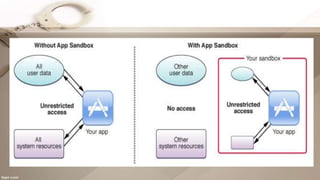
If the sandbox agent does not protect your computer, hostile
applets could access all the files and resources that are available
on your computer.
Recently corporate networks and computers connects to the
internet have been attacked and have reported damages from
illegal access from the outside.
Malicious mobile code (active x, java, vb script as well as other
executables ) is increasingly being used to issue these attacks.
without sophisticated knowledge like sandbox the rate of threats
increases enormously.
TYPES OF APPLICATION SANDBOXES
• Type A: OS enhancement based: Sandboxie,
Buffer Zone Pro etc.
• Type B: Master/slave model: Adobe ReaderX,
Chrome browser
TYPE A
Examples:
Sand boxie (available since 2006), BufferZone
• Custom kernel driver modifies Windows behavior, so that
change to protected system components is prevented
• Use cases: Most of such sandboxes are used for controlled
execution of applications
TYPE B
•Example: Google Chrome ,Adobe
Reader
•Slave is confined using OS access
control facilities
•Master mediates access to resources
•Use case: protect the application from
exploitation
SUMMARY
• Sandboxing is a tried and true technique for running
risky applications or visiting potentially dangerous web
sites.
• Sanbox is vulnerable.
• Security should always be multi-layered, so you should
not rely on the sandboxed environment, by itself, to
provide complete protection.

Sandbox

  • 1.
  • 2.
    INDEX • What isSandbox? • How does it work? • Features ,Types & Examples • How to Sandbox any program • W/O Sandbox • Virus scanner VS Sandbox • Summary
  • 3.
    The term securityalways plays an important role in our lives ,where it is the age of computers so security plays an even bigger role. The latest and most sophisticated technology emerged over the years is Sand Box technology.
  • 4.
    INTRODUCTION Sandboxing is apopular technique for creating confined execution environments, which could be used for running untrusted programs.
  • 5.
    RUNNING UNTRUSTED CODE •We often need to run buggy/untrusted code: –programs from untrusted Internet sites •toolbars, viewers, codecs for media player –old or insecure applications: ghost view, outlook –legacy softwares • Goal: if application “misbehaves,” kill it.
  • 6.
    FEATURES OF SANDBOX •User friendly It can detect unknown viruses with a minimal risk of false alarms. • Provides a platform to test malwares and other risky piece of codes. • Much of the code your devices run every day is already sandboxed for your protection
  • 7.
    EXAMPLES • Web Pages:Your browser essentially sandboxes the web pages it loads. Web pages can run JavaScript code, but this code can’t do anything it wants — if JavaScript code tries to access a local file on your computer, the request will fail. • PDFs and Other Documents: Adobe Reader now runs PDF files in a sandbox, preventing them from escaping the PDF viewer and tampering with the rest of your computer. Microsoft Office also has a sandbox mode to prevent unsafe macros from harming your system.
  • 8.
    EXAMPLES • Mobile Apps:Mobile platforms run their apps in a sandbox. Apps for iOS, Android, and Windows 8 are restricted from doing many of the things standard desktop applications can do. • Windows Programs: User Account Control functions as a bit of a sandbox, essentially restricting Windows desktop applications from modifying system files without first asking you permission. User Account Control just restricts access to system files and system- wide settings.
  • 9.
    VIRUS SCANNERS VSSANDBOX • Sand Box scans the actions the virus code takes and not the name or characteristics of the virus. where the virus scanners have can only inform you and remove the type of virus you have . • Sandbox cannot replace anti-virus scanners as identification, disinfection and removal of viruses can only be done by virus scanners. • Both work complementary to each others for providing a fully secured environment .
  • 10.
    HOW TO SANDBOXANY PROGRAM • Virtual Machines: A virtual machine program like VirtualBox or VMware creates virtual hardware devices that it uses to run an operating system. This entire operating system is essentially sandboxed, as it doesn’t have access to anything outside of the virtual machine. • Using other tools: Sandboxie, Bufferzone
  • 11.
    WITHOUT SANDBOX ? Ifthe sandbox agent does not protect your computer, hostile applets could access all the files and resources that are available on your computer. Recently corporate networks and computers connects to the internet have been attacked and have reported damages from illegal access from the outside. Malicious mobile code (active x, java, vb script as well as other executables ) is increasingly being used to issue these attacks. without sophisticated knowledge like sandbox the rate of threats increases enormously.
  • 13.
    TYPES OF APPLICATIONSANDBOXES • Type A: OS enhancement based: Sandboxie, Buffer Zone Pro etc. • Type B: Master/slave model: Adobe ReaderX, Chrome browser
  • 14.
    TYPE A Examples: Sand boxie(available since 2006), BufferZone • Custom kernel driver modifies Windows behavior, so that change to protected system components is prevented • Use cases: Most of such sandboxes are used for controlled execution of applications
  • 15.
    TYPE B •Example: GoogleChrome ,Adobe Reader •Slave is confined using OS access control facilities •Master mediates access to resources •Use case: protect the application from exploitation
  • 16.
    SUMMARY • Sandboxing isa tried and true technique for running risky applications or visiting potentially dangerous web sites. • Sanbox is vulnerable. • Security should always be multi-layered, so you should not rely on the sandboxed environment, by itself, to provide complete protection.