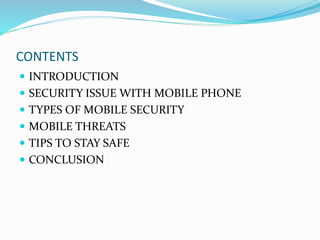
MOBILE SECURITY
By
DILIP DUBEY
( 13STUHHCS0057 )
CONTENTS
 INTRODUCTION
 SECURITY ISSUE WITH MOBILE PHONE
 TYPES OF MOBILE SECURITY
 MOBILE THREATS
 TIPS TO STAY SAFE
 CONCLUSION
INTRODUCTION
 Used to call and send text messages.
 Have Internet access, built-in video cameras and the ability to install
additional software
 Contain a lot of private data and, unfortunately, a phone can be lost
easily.
SECURITY ISSUE WITH MOBILE PHONE
 Physical Security
A phone can be Confiscated or stolen. We should always enable some kind
of password protection on our phone.
 Voice
Although the voice on a mobile phone channel is encrypted, this
encryption was hacked some time ago and is not considered safe anymore.
Normal voice communications are very insecure as they are not encrypted.
 SMS
Text messages are sent in plain text over the network, so they are also not
considered Secure.
 IMEI No.
Beware that your phone also has a unique identifier,
(known as the IMEI number i.e (International Mobile Equipment Identity))
so switching SIM cards will not guarantee to protect your privacy.
TYPES OF MOBILE SECURITY
Mobile device security.
Mobile application security.
Mobile Device Security
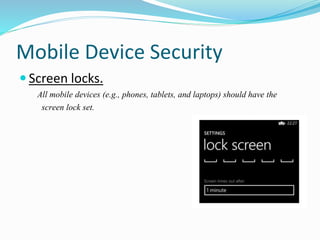
 Screen locks.
All mobile devices (e.g., phones, tablets, and laptops) should have the
screen lock set.
 Lockout settings.
After a specific no. of unsuccessful unlock attempts, the device
will get locked which can only be opened through user’s ID.
 GPS.
Many mobile devices have GPS capabilities, allowing the device
to be located if it is lost or stolen.
 Remote wiping.
Some mobile devices allow for the device to be wiped (all data
and applications are removed) remotely. This can be used if a
device is unrecoverable.
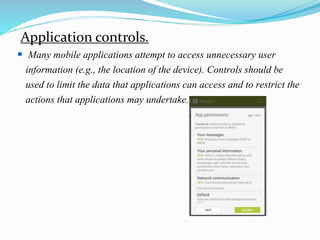
Application controls.
 Many mobile applications attempt to access unnecessary user
information (e.g., the location of the device). Controls should be
used to limit the data that applications can access and to restrict the
actions that applications may undertake.
Mobile Application Security
 Encryption.
Ensure that mobile applications are encrypting sensitive data that
is stored on the device. Encryption keys must also be created and
stored securely.
 Authentication.
A best practice is for the mobile application to authenticate the
user and to base access to data on the user’s authentication level.
 Geotagging.
Geotagging is most commonly used for photographs and can help people get a
lot of specific information about where the picture was taken or the exact
location of friend who logged on to service.
Application whitelisting.
 It is a device administration practice used to prevent unauthorized
application from running. The purpose is primarily to protect device and
networks from harmful application.
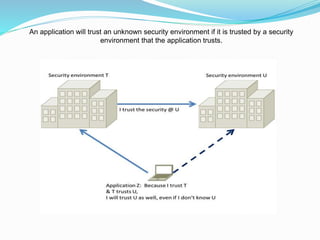
An application will trust an unknown security environment if it is trusted by a security
environment that the application trusts.
Mobile Threats
 Application Based Threats
 Web Based Threats.
 Network Threats.
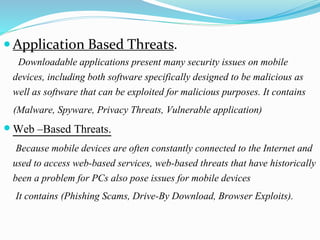
 Application Based Threats.
Downloadable applications present many security issues on mobile
devices, including both software specifically designed to be malicious as
well as software that can be exploited for malicious purposes. It contains
(Malware, Spyware, Privacy Threats, Vulnerable application)
 Web –Based Threats.
Because mobile devices are often constantly connected to the Internet and
used to access web-based services, web-based threats that have historically
been a problem for PCs also pose issues for mobile devices
It contains (Phishing Scams, Drive-By Download, Browser Exploits).
 Network Threats
Mobile devices typically support cellular networks as well as local
wireless networks. It contains (Network Exploits, Wi-Fi Sniffing).
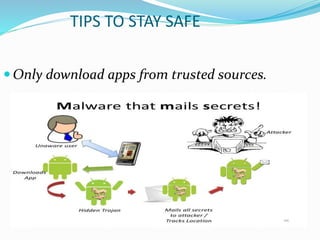
TIPS TO STAY SAFE
 Only download apps from trusted sources.
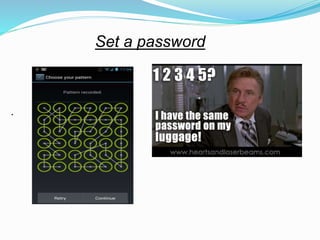
Set a password
.
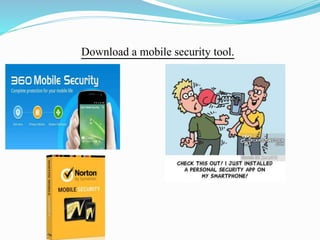
Download a mobile security tool.
 Be alert for unusual behaviors on your phone(unusual text messages,
strange charges to the phone bill , decreased battery life)
CONCLUSION
Our mobile devices contains important and delicate data
which needs to be kept safe and secure .
With the simple tips given in presentation , we can keep
our data safe and secure

Mobile security

  • 1.
  • 2.
    CONTENTS  INTRODUCTION  SECURITYISSUE WITH MOBILE PHONE  TYPES OF MOBILE SECURITY  MOBILE THREATS  TIPS TO STAY SAFE  CONCLUSION
  • 3.
    INTRODUCTION  Used tocall and send text messages.  Have Internet access, built-in video cameras and the ability to install additional software  Contain a lot of private data and, unfortunately, a phone can be lost easily.
  • 4.
    SECURITY ISSUE WITHMOBILE PHONE  Physical Security A phone can be Confiscated or stolen. We should always enable some kind of password protection on our phone.  Voice Although the voice on a mobile phone channel is encrypted, this encryption was hacked some time ago and is not considered safe anymore. Normal voice communications are very insecure as they are not encrypted.
  • 5.
     SMS Text messagesare sent in plain text over the network, so they are also not considered Secure.  IMEI No. Beware that your phone also has a unique identifier, (known as the IMEI number i.e (International Mobile Equipment Identity)) so switching SIM cards will not guarantee to protect your privacy.
  • 6.
    TYPES OF MOBILESECURITY Mobile device security. Mobile application security.
  • 7.
    Mobile Device Security Screen locks. All mobile devices (e.g., phones, tablets, and laptops) should have the screen lock set.
  • 8.
     Lockout settings. Aftera specific no. of unsuccessful unlock attempts, the device will get locked which can only be opened through user’s ID.  GPS. Many mobile devices have GPS capabilities, allowing the device to be located if it is lost or stolen.  Remote wiping. Some mobile devices allow for the device to be wiped (all data and applications are removed) remotely. This can be used if a device is unrecoverable.
  • 9.
    Application controls.  Manymobile applications attempt to access unnecessary user information (e.g., the location of the device). Controls should be used to limit the data that applications can access and to restrict the actions that applications may undertake.
  • 10.
    Mobile Application Security Encryption. Ensure that mobile applications are encrypting sensitive data that is stored on the device. Encryption keys must also be created and stored securely.  Authentication. A best practice is for the mobile application to authenticate the user and to base access to data on the user’s authentication level.
  • 11.
     Geotagging. Geotagging ismost commonly used for photographs and can help people get a lot of specific information about where the picture was taken or the exact location of friend who logged on to service. Application whitelisting.  It is a device administration practice used to prevent unauthorized application from running. The purpose is primarily to protect device and networks from harmful application.
  • 12.
    An application willtrust an unknown security environment if it is trusted by a security environment that the application trusts.
  • 13.
    Mobile Threats  ApplicationBased Threats  Web Based Threats.  Network Threats.
  • 14.
     Application BasedThreats. Downloadable applications present many security issues on mobile devices, including both software specifically designed to be malicious as well as software that can be exploited for malicious purposes. It contains (Malware, Spyware, Privacy Threats, Vulnerable application)  Web –Based Threats. Because mobile devices are often constantly connected to the Internet and used to access web-based services, web-based threats that have historically been a problem for PCs also pose issues for mobile devices It contains (Phishing Scams, Drive-By Download, Browser Exploits).
  • 15.
     Network Threats Mobiledevices typically support cellular networks as well as local wireless networks. It contains (Network Exploits, Wi-Fi Sniffing).
  • 16.
    TIPS TO STAYSAFE  Only download apps from trusted sources.
  • 17.
  • 18.
    Download a mobilesecurity tool.
  • 19.
     Be alertfor unusual behaviors on your phone(unusual text messages, strange charges to the phone bill , decreased battery life)
  • 20.
    CONCLUSION Our mobile devicescontains important and delicate data which needs to be kept safe and secure . With the simple tips given in presentation , we can keep our data safe and secure