Reactome usability testing :
was it useful?
Steve Jupe
Why do usability testing?
   Learn from user behaviour
   Test assumptions to inform the design process
   Involve users in design
   Identify unnecessary features and spot issues
   Fix problems early (when it’s easy)
   Objective evidence, not opinions
   Reassure stakeholders
   Save a lot of work later on....
Who?
   Identify the right users to test
       Who are the intended audience for the features you want to
        test?
       Do you have access to a sample set?
Recruiting
  We need volunteers to test our website – biologists who
  occasionally use Reactome are ideal.
  Testing involves working through typical usage scenarios,
  e.g. ‘Is Fyn in Reactome, and if so in what pathways?’.
  Duration ~1 hour. All participants receive a gift!
  Purpose is to record when the user has difficulties with
  the task – not a test of the user!
  Results will guide our next design /improvements phase.
  Contact: sjupe@ebi.ac.uk
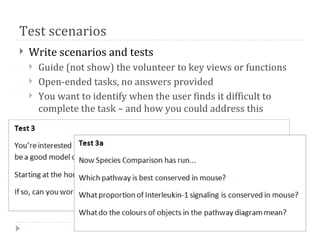
Test scenarios
   Write scenarios and tests
       Guide (not show) the volunteer to key views or functions
       Open-ended tasks, no answers provided
       You want to identify when the user finds it difficult to
        complete the task – and how you could address this
Resources required
   A quiet place with some privacy
       Best if a familiar setting for the user
       Privacy to avoid disturbance and relax test subject
   PC with software or web access to site
       Optional: webcam, microphone, keylogger software such as
        Silverback (Mac) or BB FlashBack (free!)
   Observer with notepad
       To note issues as they arise
       Ideally observer and tester
           Tester interacts with test subject
           Observer can focus entirely on observing, may ask follow-up
            questions
The testing process
   Use a Tester and an Observer
   Explain the testing process – use a script if you need to
   Explain that the site, not the user, is being tested
   User background – biologist or programmer? Helps to
    relax the volunteer
   Ask volunteer to give a running commentary
   Explain scenarios. Start tasks by reading them out, give
    a reference paper copy.
   End testing when time runs out, or tests becomes
    frustrating
During the test...
   Remind the test subject to keep up the running
    commentary
   Guide the test subject only when needed - don’t train
   Try not to directly answer questions, guide.
   Ask questions that draw out answers:
       What are you thinking now?
       Is that what you expected to happen/see?
   If there is an issue, note it but also investigate, ask test
    subject as above, try to find out why there is an issue,
    what would avoid it/improve it.
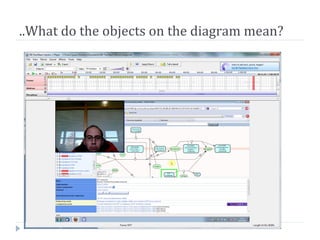
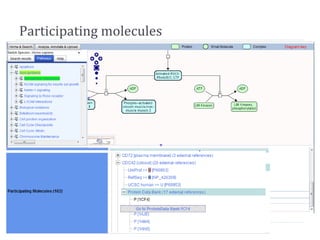
..What do the objects on the diagram mean?
Drawing Conclusions
   Don’t leap to conclusions – 5 or 6 people can be
    enough to identify common issues, 3 is not.
   Look for common themes in your observations...


   Video is for deeper analysis but often the top problems
    become obvious...we didn’t use our videos
More info
   EBI Usability experts (Jenny Cham, Francis Rowland,
    Sangya Pundir)
   http://ebiinterfaces.wordpress.com/category/usability/
   http://www.ebi.ac.uk/~frowland/dev/usability_testing/us
    ability_resources.php

   Lots of online books & videos
Acting on the results
   Reactome developers brought in to group issues by
    technology and difficulty
       Usability identifies potential issues - there may be more
        than one solution
       Resolution depends on difficulty/resources
       Find and fix early!
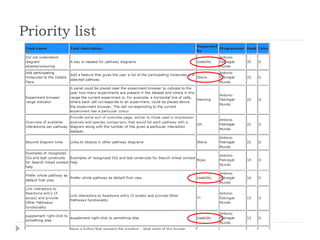
   Project Prioritization Poker used to prioritize usability
    issues against other objectives (i.e. our wish-list)
       Fun - but serves it’s purpose, ranking with scores
       Reactome Management adjustments and sign-off
   Final ranking used to generate task list(s)
Priority list
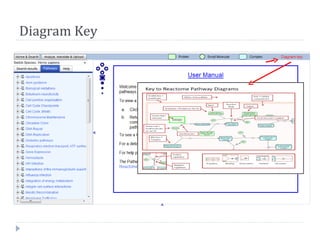
Diagram Key
Participating molecules
Summary
   Usability testing has proven to be:
   Easy to set up and run
   Useful:
       Identified unexpected issues (e.g. Zoom level)
       Used to avoid guesswork on known issues and help rank
        developer activities
   Usability testing planned for:
       Alternate pathway illustration styles
       Redesigned layout for Homepage
       Diagram key alternatives

Reactome: Usability testing - is it useful?

  • 1.
    Reactome usability testing: was it useful? Steve Jupe
  • 2.
    Why do usabilitytesting?  Learn from user behaviour  Test assumptions to inform the design process  Involve users in design  Identify unnecessary features and spot issues  Fix problems early (when it’s easy)  Objective evidence, not opinions  Reassure stakeholders  Save a lot of work later on....
  • 3.
    Who?  Identify the right users to test  Who are the intended audience for the features you want to test?  Do you have access to a sample set?
  • 4.
    Recruiting Weneed volunteers to test our website – biologists who occasionally use Reactome are ideal. Testing involves working through typical usage scenarios, e.g. ‘Is Fyn in Reactome, and if so in what pathways?’. Duration ~1 hour. All participants receive a gift! Purpose is to record when the user has difficulties with the task – not a test of the user! Results will guide our next design /improvements phase. Contact: sjupe@ebi.ac.uk
  • 5.
    Test scenarios  Write scenarios and tests  Guide (not show) the volunteer to key views or functions  Open-ended tasks, no answers provided  You want to identify when the user finds it difficult to complete the task – and how you could address this
  • 6.
    Resources required  A quiet place with some privacy  Best if a familiar setting for the user  Privacy to avoid disturbance and relax test subject  PC with software or web access to site  Optional: webcam, microphone, keylogger software such as Silverback (Mac) or BB FlashBack (free!)  Observer with notepad  To note issues as they arise  Ideally observer and tester  Tester interacts with test subject  Observer can focus entirely on observing, may ask follow-up questions
  • 7.
    The testing process  Use a Tester and an Observer  Explain the testing process – use a script if you need to  Explain that the site, not the user, is being tested  User background – biologist or programmer? Helps to relax the volunteer  Ask volunteer to give a running commentary  Explain scenarios. Start tasks by reading them out, give a reference paper copy.  End testing when time runs out, or tests becomes frustrating
  • 8.
    During the test...  Remind the test subject to keep up the running commentary  Guide the test subject only when needed - don’t train  Try not to directly answer questions, guide.  Ask questions that draw out answers:  What are you thinking now?  Is that what you expected to happen/see?  If there is an issue, note it but also investigate, ask test subject as above, try to find out why there is an issue, what would avoid it/improve it.
  • 9.
    ..What do theobjects on the diagram mean?
  • 10.
    Drawing Conclusions  Don’t leap to conclusions – 5 or 6 people can be enough to identify common issues, 3 is not.  Look for common themes in your observations...  Video is for deeper analysis but often the top problems become obvious...we didn’t use our videos
  • 11.
    More info  EBI Usability experts (Jenny Cham, Francis Rowland, Sangya Pundir)  http://ebiinterfaces.wordpress.com/category/usability/  http://www.ebi.ac.uk/~frowland/dev/usability_testing/us ability_resources.php  Lots of online books & videos
  • 12.
    Acting on theresults  Reactome developers brought in to group issues by technology and difficulty  Usability identifies potential issues - there may be more than one solution  Resolution depends on difficulty/resources  Find and fix early!  Project Prioritization Poker used to prioritize usability issues against other objectives (i.e. our wish-list)  Fun - but serves it’s purpose, ranking with scores  Reactome Management adjustments and sign-off  Final ranking used to generate task list(s)
  • 13.
  • 14.
  • 15.
  • 16.
    Summary  Usability testing has proven to be:  Easy to set up and run  Useful:  Identified unexpected issues (e.g. Zoom level)  Used to avoid guesswork on known issues and help rank developer activities  Usability testing planned for:  Alternate pathway illustration styles  Redesigned layout for Homepage  Diagram key alternatives