BEHAVIOUR FOR LEARNING

• Be an ACTIVE learner
• Be willing and ready to learn
• Behave positively
• Treat everyone with respect
• Always try your best.
Are you Ready for Learning?
Neale Wade Way – logbooks on the desk,
correct uniform, no phones or ipods out.
OBJECTIVES
Understand how to use layers and other to
demonstrate and achieve;
• The Desaturation Effect.

• The Lomo Effect.
LESSON OUTCOMES
All students will be able to create a desaturation
and Lomo with support as necessary.
Most students will be able to create a
desaturation and Lomo effect with limited
support and use the effects together.
Some students will work independently to create
a desaturation and Lomo effect together and
then extend this work with a technique used
previously
Understand how to use layers and other to
demonstrate and achieve;
•

The Desaturation Effect.

•

The Lomo Effect.
STARTER – WEB QUEST
Today we will be learning to new features in
Photoshop. You have 5 minutes to discover;

What is desaturation?
What is the Lomo Effect?
Some of the information you read will not be right in
this case!
Understand how to use layers and other to
demonstrate and achieve;
•

The Desaturation Effect.

•

The Lomo Effect.
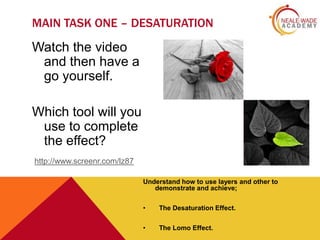
MAIN TASK ONE – DESATURATION

Watch the video
and then have a
go yourself.
Which tool will you
use to complete
the effect?
http://www.screenr.com/lz87
Understand how to use layers and other to
demonstrate and achieve;
•

The Desaturation Effect.

•

The Lomo Effect.
MINI PLENARY

What tool was it?
Why did it allow you to do
this?
How did it work?
Understand how to use layers and other to
demonstrate and achieve;
•

The Desaturation Effect.

•

The Lomo Effect.
MAIN TASK TWO – LOMO EFFECT

Watch the video
and then have a
go yourself.
Can you combine
the two effects?
http://www.screenr.com/Jb87
Understand how to use layers and other to
demonstrate and achieve;
•

The Desaturation Effect.

•

The Lomo Effect.
PLENARY EXIT CARD - QUESTION

Name all the techniques and tools
we have used in Photoshop so far.
Give a quick idea of how you have
used them.

Photoshop Lesson 4

  • 2.
    BEHAVIOUR FOR LEARNING •Be an ACTIVE learner • Be willing and ready to learn • Behave positively • Treat everyone with respect • Always try your best. Are you Ready for Learning? Neale Wade Way – logbooks on the desk, correct uniform, no phones or ipods out.
  • 3.
    OBJECTIVES Understand how touse layers and other to demonstrate and achieve; • The Desaturation Effect. • The Lomo Effect.
  • 4.
    LESSON OUTCOMES All studentswill be able to create a desaturation and Lomo with support as necessary. Most students will be able to create a desaturation and Lomo effect with limited support and use the effects together. Some students will work independently to create a desaturation and Lomo effect together and then extend this work with a technique used previously Understand how to use layers and other to demonstrate and achieve; • The Desaturation Effect. • The Lomo Effect.
  • 5.
    STARTER – WEBQUEST Today we will be learning to new features in Photoshop. You have 5 minutes to discover; What is desaturation? What is the Lomo Effect? Some of the information you read will not be right in this case! Understand how to use layers and other to demonstrate and achieve; • The Desaturation Effect. • The Lomo Effect.
  • 6.
    MAIN TASK ONE– DESATURATION Watch the video and then have a go yourself. Which tool will you use to complete the effect? http://www.screenr.com/lz87 Understand how to use layers and other to demonstrate and achieve; • The Desaturation Effect. • The Lomo Effect.
  • 7.
    MINI PLENARY What toolwas it? Why did it allow you to do this? How did it work? Understand how to use layers and other to demonstrate and achieve; • The Desaturation Effect. • The Lomo Effect.
  • 8.
    MAIN TASK TWO– LOMO EFFECT Watch the video and then have a go yourself. Can you combine the two effects? http://www.screenr.com/Jb87 Understand how to use layers and other to demonstrate and achieve; • The Desaturation Effect. • The Lomo Effect.
  • 9.
    PLENARY EXIT CARD- QUESTION Name all the techniques and tools we have used in Photoshop so far. Give a quick idea of how you have used them.