



Intro to Lean UX with UserTesting
/Productschool @ProdSchool /ProductmanagementSF
Alexandra Michaelides, Ph.D.
- User Experience Researcher at UserTesting
- Former UER at FlyWheel Software
- User Experience background
www.productschool.com
Intro to Lean UX with UserTesting
Alexandra Michaelides, Ph.D.
What is user experience?
“User experience encompasses all aspects of the
end-user’s interaction with the company, its
services, and its products.” –Don Norman
UX isn’t a new concept
“When the point of contact between the product and the people
becomes a point of friction, then the industrial designer has failed. On
the other hand, if people are made safer, more comfortable, more
eager to purchase, more efficient—or just plain happier—by contact
with the product, then the designer has succeeded.”
–Henry Dreyfuss, Designing for People, 1955
Increased customer acceptance and engagement
•70% of projects fail due to lack of user acceptance. (Source: Forrester
Research)
Increased revenue
•Every $1 invested in UX returns up to $100. (Source: IBM)
Decreased costs
•Fixing a problem after launch is up to 100x more expensive than
fixing it during design and development. (Source: NASA)
Rule #1 of UX: You are NOT your user
Test early, test often. Be open to feedback.
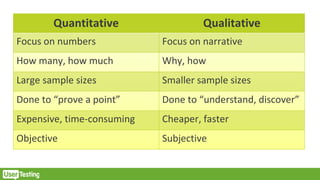
Quantitative Qualitative
Focus on numbers Focus on narrative
How many, how much Why, how
Large sample sizes Smaller sample sizes
Done to “prove a point” Done to “understand, discover”
Expensive, time-consuming Cheaper, faster
Objective Subjective
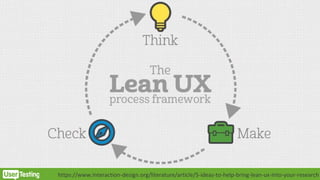
https://www.interaction-design.org/literature/article/5-ideas-to-help-bring-lean-ux-into-your-research
What is UserTesting?
We provide insights based on videos of your
customers interacting with any brand, regardless of
device or location.
If you can imagine it, we can probably test it.
“If you can imagine it, we can probably test it.”
Test anything with our desktop and breakthrough mobile recorders
✓ From sketches, prototypes, and websites
✓ To mobile apps, mobile websites, and even unreleased apps
✓ To real-world experiences in-store and in-home, unboxing, and more
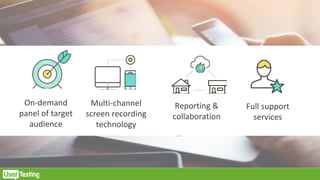
On-demand
panel of target
audience
Multi-channel
screen recording
technology
Reporting &
collaboration
Full support
services
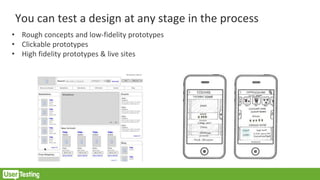
You can test a design at any stage in the process
• Rough concepts and low-fidelity prototypes
• Clickable prototypes
• High fidelity prototypes & live sites
Remote Unmoderated Research
Pros:
Quick turn around time
Recruitment of testers
No researcher present/ honest feedback
Cons:
Inability to ask follow up questions, prod tester for more
Inability to clarify any confusions
Inability to see full context/ environment
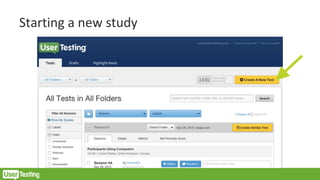
Starting a new study
Screenshot
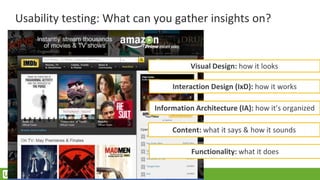
Usability testing: What can you gather insights on?
Visual Design: how it looks
Information Architecture (IA): how it’s organized
Interaction Design (IxD): how it works
Content: what it says & how it sounds
Functionality: what it does
What can you “test” with UserTesting?
• How do participants “use” or “interact” with an experience?
– Do they understand it?
– Can they access it?
– Can they use it?
– Is it easy to use?
– Do they enjoy using it?
What you shouldn’t “test” with UserTesting?
• Will participants use or adopt the experience in the future?
• Would they buy it?
• Do they “like” it?
• Which one do they “like” better?
Before you launch a study, define objectives
• What exactly are you
hoping to learn?
• Do you have broad or
specific objectives?
Writing objectives
• UserTesting sessions
should run
approximately 15
minutes
• Suggestion of 1-3
objectives
• User fatigue
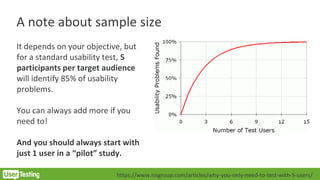
A note about sample size
It depends on your objective, but
for a standard usability test, 5
participants per target audience
will identify 85% of usability
problems.
You can always add more if you
need to!
And you should always start with
just 1 user in a “pilot” study.
https://www.nngroup.com/articles/why-you-only-need-to-test-with-5-users/
Getting the right participants
• Define the most important
characteristics of your target
audience
– Age? Income? Hobbies?
Profession?
• For basic usability tests,
minimal screening is required
• Keep screener simple and
clear
Tip: Avoid leading questions and yes/no answers
Bad
❑ Do you prefer organic cotton sheets?
❑ Yes [Accept]
❑ No
Good
❑ What kind of sheets do you prefer?
❑ Organic cotton [Accept]
❑ Cotton
❑ Sateen
❑ Synthetic
❑ Polyester
❑ Silk
❑ Jersey
❑ Other
Tip: Use multiple, separate questions
Bad
❑ How often do you exercise on a treadmill?
❑ Less than 1 time a week
❑ 1-2 times a week
❑ 3+ times a week [Accept]
Good
❑ How often do you exercise?
❑ Less than 1 time a week
❑ 1-2 times a week
❑ 3+ times a week [Accept]
❑ What kind of exercise do you do most often?
❑ Yoga
❑ Elliptical
❑ Treadmill [Accept]
❑ Free Weights
❑ Other
Tip: Give participants an “out”
Bad
❑ What is your marital status?
❑ Married [Accept]
❑ Not married
Good
❑ What is your marital status?
❑ Married [Accept]
❑ Not married
❑ Other
❑ I prefer not to say
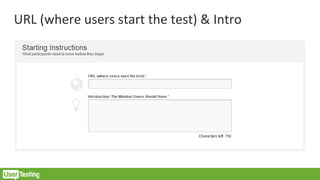
URL (where users start the test) & Intro
Consider broad & specific tasks
• Broad tasks are great for:
• Understanding how testers think or
behave
• Familiarizing testers with site
• Gathering impressions
• Specific tasks are great for:
• Tracking browser paths/ patterns
• Evaluating particular pages, processes,
features
• Identifying pain points at a particular
part of the process
Clarity is key
• The longer your task/question is, the
easier it will be for the user to miss
something
• Keep tasks simple
• Avoid listing multiple steps at once
• Use URLs or bit.ly links to ensure users
evaluate the correct pages
• Use instructive, active language
Be concise and clear
• Confusing questions = confusing
answers
• Avoid using jargon like “PDP” or
“callout”
• Emphasize important points
• Avoid repetition in task language
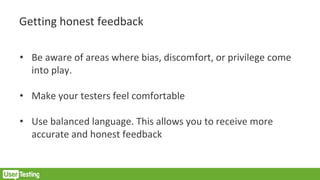
Getting honest feedback
• Be aware of areas where bias, discomfort, or privilege come
into play.
• Make your testers feel comfortable
• Use balanced language. This allows you to receive more
accurate and honest feedback
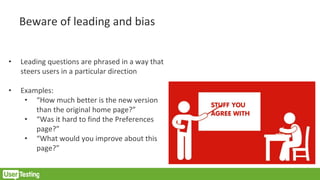
Beware of leading and bias
• Leading questions are phrased in a way that
steers users in a particular direction
• Examples:
• “How much better is the new version
than the original home page?”
• “Was it hard to find the Preferences
page?”
• “What would you improve about this
page?”
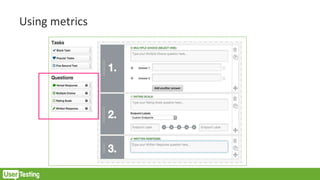
Using metrics
Using metrics
• When to use:
• Written questions
• Ratings scale
• Multiple choice
• Make sure they are aligned with
your objectives
• Use sparingly—beware of user
fatigue
• Be specific
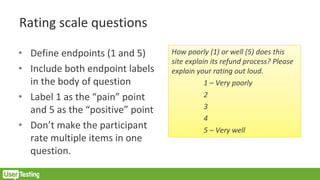
Rating scale questions
• Define endpoints (1 and 5)
• Include both endpoint labels
in the body of question
• Label 1 as the “pain” point
and 5 as the “positive” point
• Don’t make the participant
rate multiple items in one
question.
How poorly (1) or well (5) does this
site explain its refund process? Please
explain your rating out loud.
1 – Very poorly
2
3
4
5 – Very well
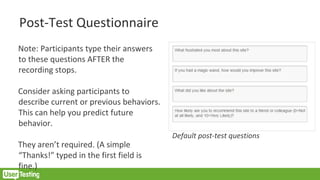
Post-Test Questionnaire
Note: Participants type their answers
to these questions AFTER the
recording stops.
Consider asking participants to
describe current or previous behaviors.
This can help you predict future
behavior.
They aren’t required. (A simple
“Thanks!” typed in the first field is
fine.)
Default post-test questions
Test the test! Always.
Do tasks and questions make sense?
Does the test follow the right “flow”?
Do tasks contain jargon that particpiants don’t undersatnd?
Do links work?
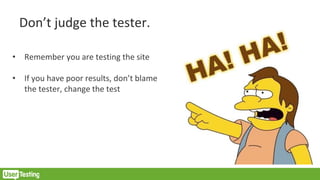
Don’t judge the tester.
• Remember you are testing the site
• If you have poor results, don’t blame
the tester, change the test
Before starting your analysis
• Refresh yourself on the research objectives
• Get organized. What do you want to capture for each
participants?
– Success rate?
– Time on task?
– Satisfaction?
– Errors?
– Quotes?
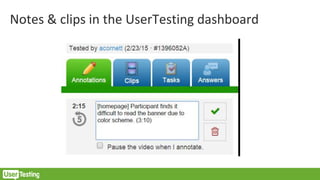
Notes & clips in the UserTesting dashboard
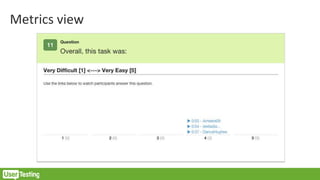
Metrics view
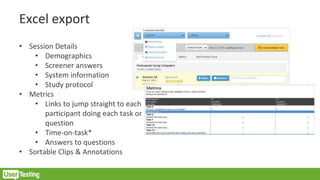
Excel export
• Session Details
• Demographics
• Screener answers
• System information
• Study protocol
• Metrics
• Links to jump straight to each
participant doing each task or
question
• Time-on-task*
• Answers to questions
• Sortable Clips & Annotations
Learn from your mistakes. Get better. Have fun.
Upcoming Courses
www.productschool.com
jake@productschool.com
APPLY AT
SAN FRANCISCO
Weekdays: May 3rd
Weekends: May 7th
MOUNTAIN VIEW
Weekdays: June 14th
Weekends: June 18th
Mixpanel presents -- Behavioral Analytics as a
Driver of Product Strategy – March 16th
UPCOMING WORKSHOP
www.productschool.com
RSVP ON EVENTBRITE

Intro to Lean UX with UserTesting

  • 1.
    Intro to LeanUX with UserTesting /Productschool @ProdSchool /ProductmanagementSF
  • 2.
    Alexandra Michaelides, Ph.D. -User Experience Researcher at UserTesting - Former UER at FlyWheel Software - User Experience background www.productschool.com Intro to Lean UX with UserTesting
  • 3.
    Intro to LeanUX with UserTesting Alexandra Michaelides, Ph.D.
  • 4.
    What is userexperience? “User experience encompasses all aspects of the end-user’s interaction with the company, its services, and its products.” –Don Norman
  • 5.
    UX isn’t anew concept “When the point of contact between the product and the people becomes a point of friction, then the industrial designer has failed. On the other hand, if people are made safer, more comfortable, more eager to purchase, more efficient—or just plain happier—by contact with the product, then the designer has succeeded.” –Henry Dreyfuss, Designing for People, 1955
  • 6.
    Increased customer acceptanceand engagement •70% of projects fail due to lack of user acceptance. (Source: Forrester Research) Increased revenue •Every $1 invested in UX returns up to $100. (Source: IBM) Decreased costs •Fixing a problem after launch is up to 100x more expensive than fixing it during design and development. (Source: NASA)
  • 7.
    Rule #1 ofUX: You are NOT your user
  • 8.
    Test early, testoften. Be open to feedback.
  • 9.
    Quantitative Qualitative Focus onnumbers Focus on narrative How many, how much Why, how Large sample sizes Smaller sample sizes Done to “prove a point” Done to “understand, discover” Expensive, time-consuming Cheaper, faster Objective Subjective
  • 10.
  • 11.
    What is UserTesting? Weprovide insights based on videos of your customers interacting with any brand, regardless of device or location. If you can imagine it, we can probably test it.
  • 12.
    “If you canimagine it, we can probably test it.” Test anything with our desktop and breakthrough mobile recorders ✓ From sketches, prototypes, and websites ✓ To mobile apps, mobile websites, and even unreleased apps ✓ To real-world experiences in-store and in-home, unboxing, and more
  • 13.
    On-demand panel of target audience Multi-channel screenrecording technology Reporting & collaboration Full support services
  • 14.
    You can testa design at any stage in the process • Rough concepts and low-fidelity prototypes • Clickable prototypes • High fidelity prototypes & live sites
  • 15.
    Remote Unmoderated Research Pros: Quickturn around time Recruitment of testers No researcher present/ honest feedback Cons: Inability to ask follow up questions, prod tester for more Inability to clarify any confusions Inability to see full context/ environment
  • 16.
    Starting a newstudy Screenshot
  • 17.
    Usability testing: Whatcan you gather insights on? Visual Design: how it looks Information Architecture (IA): how it’s organized Interaction Design (IxD): how it works Content: what it says & how it sounds Functionality: what it does
  • 18.
    What can you“test” with UserTesting? • How do participants “use” or “interact” with an experience? – Do they understand it? – Can they access it? – Can they use it? – Is it easy to use? – Do they enjoy using it?
  • 19.
    What you shouldn’t“test” with UserTesting? • Will participants use or adopt the experience in the future? • Would they buy it? • Do they “like” it? • Which one do they “like” better?
  • 20.
    Before you launcha study, define objectives • What exactly are you hoping to learn? • Do you have broad or specific objectives?
  • 21.
    Writing objectives • UserTestingsessions should run approximately 15 minutes • Suggestion of 1-3 objectives • User fatigue
  • 22.
    A note aboutsample size It depends on your objective, but for a standard usability test, 5 participants per target audience will identify 85% of usability problems. You can always add more if you need to! And you should always start with just 1 user in a “pilot” study. https://www.nngroup.com/articles/why-you-only-need-to-test-with-5-users/
  • 23.
    Getting the rightparticipants • Define the most important characteristics of your target audience – Age? Income? Hobbies? Profession? • For basic usability tests, minimal screening is required • Keep screener simple and clear
  • 24.
    Tip: Avoid leadingquestions and yes/no answers Bad ❑ Do you prefer organic cotton sheets? ❑ Yes [Accept] ❑ No Good ❑ What kind of sheets do you prefer? ❑ Organic cotton [Accept] ❑ Cotton ❑ Sateen ❑ Synthetic ❑ Polyester ❑ Silk ❑ Jersey ❑ Other
  • 25.
    Tip: Use multiple,separate questions Bad ❑ How often do you exercise on a treadmill? ❑ Less than 1 time a week ❑ 1-2 times a week ❑ 3+ times a week [Accept] Good ❑ How often do you exercise? ❑ Less than 1 time a week ❑ 1-2 times a week ❑ 3+ times a week [Accept] ❑ What kind of exercise do you do most often? ❑ Yoga ❑ Elliptical ❑ Treadmill [Accept] ❑ Free Weights ❑ Other
  • 26.
    Tip: Give participantsan “out” Bad ❑ What is your marital status? ❑ Married [Accept] ❑ Not married Good ❑ What is your marital status? ❑ Married [Accept] ❑ Not married ❑ Other ❑ I prefer not to say
  • 27.
    URL (where usersstart the test) & Intro
  • 28.
    Consider broad &specific tasks • Broad tasks are great for: • Understanding how testers think or behave • Familiarizing testers with site • Gathering impressions • Specific tasks are great for: • Tracking browser paths/ patterns • Evaluating particular pages, processes, features • Identifying pain points at a particular part of the process
  • 29.
    Clarity is key •The longer your task/question is, the easier it will be for the user to miss something • Keep tasks simple • Avoid listing multiple steps at once • Use URLs or bit.ly links to ensure users evaluate the correct pages • Use instructive, active language
  • 30.
    Be concise andclear • Confusing questions = confusing answers • Avoid using jargon like “PDP” or “callout” • Emphasize important points • Avoid repetition in task language
  • 31.
    Getting honest feedback •Be aware of areas where bias, discomfort, or privilege come into play. • Make your testers feel comfortable • Use balanced language. This allows you to receive more accurate and honest feedback
  • 32.
    Beware of leadingand bias • Leading questions are phrased in a way that steers users in a particular direction • Examples: • “How much better is the new version than the original home page?” • “Was it hard to find the Preferences page?” • “What would you improve about this page?”
  • 33.
  • 34.
    Using metrics • Whento use: • Written questions • Ratings scale • Multiple choice • Make sure they are aligned with your objectives • Use sparingly—beware of user fatigue • Be specific
  • 35.
    Rating scale questions •Define endpoints (1 and 5) • Include both endpoint labels in the body of question • Label 1 as the “pain” point and 5 as the “positive” point • Don’t make the participant rate multiple items in one question. How poorly (1) or well (5) does this site explain its refund process? Please explain your rating out loud. 1 – Very poorly 2 3 4 5 – Very well
  • 36.
    Post-Test Questionnaire Note: Participantstype their answers to these questions AFTER the recording stops. Consider asking participants to describe current or previous behaviors. This can help you predict future behavior. They aren’t required. (A simple “Thanks!” typed in the first field is fine.) Default post-test questions
  • 37.
    Test the test!Always. Do tasks and questions make sense? Does the test follow the right “flow”? Do tasks contain jargon that particpiants don’t undersatnd? Do links work?
  • 38.
    Don’t judge thetester. • Remember you are testing the site • If you have poor results, don’t blame the tester, change the test
  • 39.
    Before starting youranalysis • Refresh yourself on the research objectives • Get organized. What do you want to capture for each participants? – Success rate? – Time on task? – Satisfaction? – Errors? – Quotes?
  • 40.
    Notes & clipsin the UserTesting dashboard
  • 41.
  • 42.
    Excel export • SessionDetails • Demographics • Screener answers • System information • Study protocol • Metrics • Links to jump straight to each participant doing each task or question • Time-on-task* • Answers to questions • Sortable Clips & Annotations
  • 43.
    Learn from yourmistakes. Get better. Have fun.
  • 44.
    Upcoming Courses www.productschool.com www.productschool.com jake@productschool.com APPLY AT SANFRANCISCO Weekdays: May 3rd Weekends: May 7th MOUNTAIN VIEW Weekdays: June 14th Weekends: June 18th
  • 45.
    Mixpanel presents --Behavioral Analytics as a Driver of Product Strategy – March 16th UPCOMING WORKSHOP www.productschool.com RSVP ON EVENTBRITE