UI/UX Foundations:
Research & Analysis
Meg Kurdziolek and Karen Tang
Your Goals
What would you like to learn today?
Our Goals
We want you to…
talk confidently to UX researchers
critically understand research presented to you
conduct basic UX research on your own
have a basis to continue learning about UX research
Activity (setup)
Which of these problems do you feel strongly about?
Pittsburgh public transportation
Food delivery in Pittsburgh
Finding family-friendly activities in Pittsburgh
Pittsburgh public schools
Agenda
09:00 - 09:20 Breakfast and Introductions
09:20 - 09:30 User-Centered Design
09:30 - 10:10 Surveys, Diary Studies, Interviews
10:10 - 10:55 Usability Studies, Field Studies
10:55 - 11:25 A/B Testing, Log Analysis
11:25 - 12:00 Adapting Your Methods
12:00 - 12:30 LUNCH
12:30 - 01:00 Interpreting Your Data
01:00 - 01:40 Special Topics: Dark UX Patterns
01:40 - 01:50 Case Studies
01:50 - 02:00 Group reflections & wrap-up Q&A
User-centered design (n.) - a framework of processes
in which the needs, wants, and limitations of end
users of a product are given extensive attention at
each stage of the design process.
https://en.wikipedia.org/wiki/User-centered_design
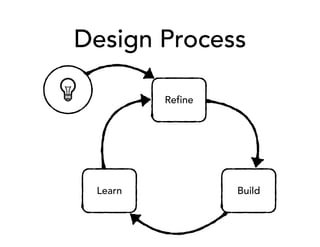
Design Process
Refine
BuildLearn
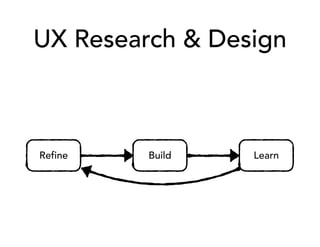
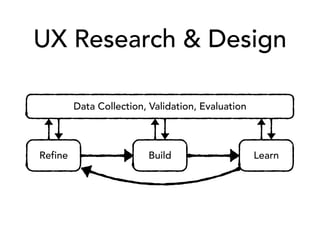
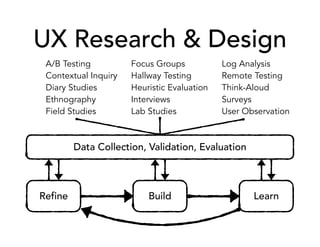
UX Research & Design
Refine Build Learn
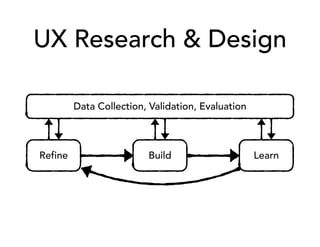
UX Research & Design
Refine Build Learn
Data Collection, Validation, Evaluation
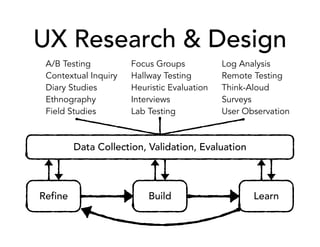
UX Research & Design
Refine Build Learn
Data Collection, Validation, Evaluation
UX Research & Design
Refine Build Learn
Data Collection, Validation, Evaluation
A/B Testing
Contextual Inquiry
Diary Studies
Ethnography
Field Studies
Focus Groups
Hallway Testing
Heuristic Evaluation
Interviews
Lab Testing
Log Analysis
Remote Testing
Think-Aloud
Surveys
User Observation
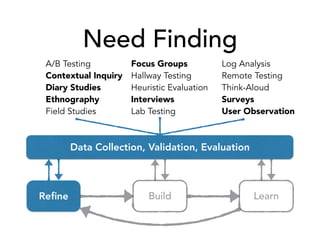
Need Finding
Refine Build Learn
Data Collection, Validation, Evaluation
A/B Testing
Contextual Inquiry
Diary Studies
Ethnography
Field Studies
Focus Groups
Hallway Testing
Heuristic Evaluation
Interviews
Lab Testing
Log Analysis
Remote Testing
Think-Aloud
Surveys
User Observation
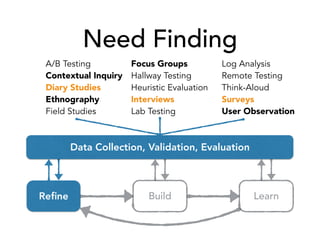
Need Finding
Refine Build Learn
A/B Testing
Contextual Inquiry
Diary Studies
Ethnography
Field Studies
Focus Groups
Hallway Testing
Heuristic Evaluation
Interviews
Lab Testing
Log Analysis
Remote Testing
Think-Aloud
Surveys
User Observation
Data Collection, Validation, Evaluation
Surveys
http://www.baerpm.com/blog/what-a-customer-survey-can-do-for-your-business/
are good
for learning:
overall impressions
who your users are
(demographics)
outstanding opinions
who’s might participate
in further research
Surveys
Common Survey Example
How likely is it that you’d recommend [brand] to a friend?
Not at
all Likely
Neutral
Very
Likely
1 2 3 4 5 6 7 8 9 10
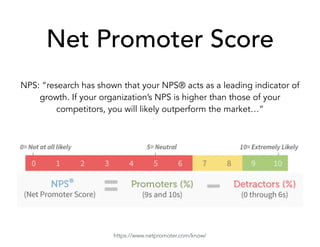
Net Promoter Score
NPS: “research has shown that your NPS® acts as a leading indicator of
growth. If your organization’s NPS is higher than those of your
competitors, you will likely outperform the market…”
https://www.netpromoter.com/know/
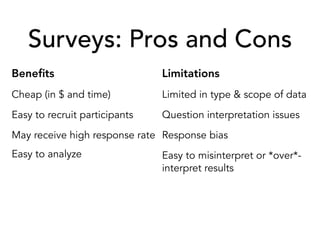
Surveys: Pros and Cons
Benefits
Cheap (in $ and time)
Easy to recruit participants
May receive high response rate
Easy to analyze
Limitations
Limited in type & scope of data
Question interpretation issues
Response bias
Easy to misinterpret or *over*-
interpret results
Silly Survey Example
Do you like to eat lunch alone?
Yes
No
Diary Studies
http://hciresearch4.hcii.cs.cmu.edu/M-HCI/2011/BOA-PlanningTools/
are good for….
day-to-day habits & patterns
when, how, and why they
use your product
reflections on real problems
encountered and how they
were solved
Diary Studies
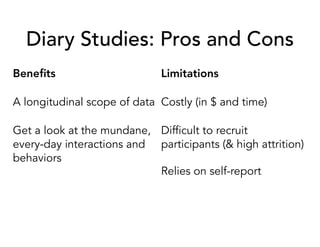
Diary Studies: Pros and Cons
Benefits
A longitudinal scope of data
Get a look at the mundane,
every-day interactions and
behaviors
Limitations
Costly (in $ and time)
Difficult to recruit
participants (& high attrition)
Relies on self-report
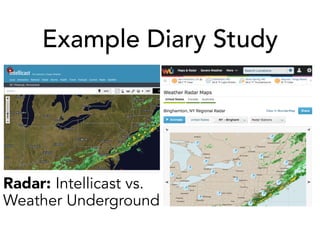
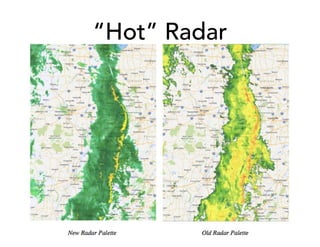
Example Diary Study
Radar: Intellicast vs.
Weather Underground
“Hot” Radar
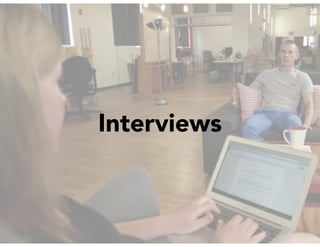
Interviews
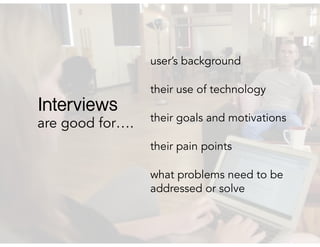
are good for….
user’s background
their use of technology
their goals and motivations
their pain points
what problems need to be
addressed or solve
Interviews
Interviews: Pros and Cons
Benefits
Cheap (in $)
Can target specific users or be
opportunistic
Can engage with users
personally
Can get the answer to lots of
“why” questions
Limitations
Takes a moderately amount
of time
Results indicate what people
*say* they do (rather than
actual behavior)
Interview Tips
Start broad, then narrow-in.
example: “Overall, how do you think Pittsburgh public
transit compares to other cities?”
Ask clarifying questions, and use their words.
example: “You said the bus system is hard to predict,
could you explain that to me?”
It’s okay to play-dumb. (But be honest.)
example: “I’ve never used public transit here. Can you
tell me how you would find out the schedules and
figure it out how to get downtown from here?”
More Interview Tips
Avoid “Yes/No” questions.
Avoid asking about feelings. Ask about behaviors instead.
Don’t number your questions. Organize by topics you
want to cover. Be prepared to skip around.
Always be prepared to go off-script.
Ask the question, then pause. Don’t rush to fill silence.
Activity - Part 1
Partner with someone who is interested in a different topic than you. You
will interview them on their chosen topic.
It’s your job to explore what the needs are and uncover the main issues,
feelings, thoughts, and pain-points.
Round 1: (5 minutes) Develop your Script
Goal: Individually, develop a rough script that you will use to interview
your partner. Start broad to gather overall impressions, then narrow in
on specific topic areas. Remember, you are trying to understand overall
impression and the biggest pain-points.
Round 2: (20 minutes) Interview (10 minutes each)
Goal: Take turns interviewing each other. Be sure to keep notes.
How do you know when you are
done conducting interviews?
Saturation (n.) - when the same topics (or themes)
keep emerging in your interviews, and conducting
more interviews results in no new themes.
Rule of thumb - 12 interviews for saturation
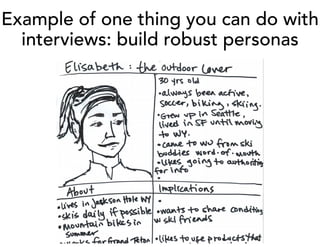
Example of one thing you can do with
interviews: build robust personas
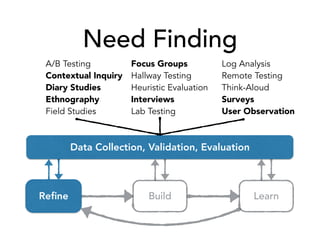
Need Finding
Refine Build Learn
Data Collection, Validation, Evaluation
A/B Testing
Contextual Inquiry
Diary Studies
Ethnography
Field Studies
Focus Groups
Hallway Testing
Heuristic Evaluation
Interviews
Lab Testing
Log Analysis
Remote Testing
Think-Aloud
Surveys
User Observation
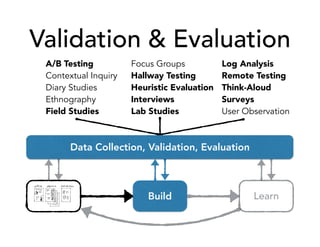
Validation & Evaluation
Build Learn
A/B Testing
Contextual Inquiry
Diary Studies
Ethnography
Field Studies
Focus Groups
Hallway Testing
Heuristic Evaluation
Interviews
Lab Studies
Log Analysis
Remote Testing
Think-Aloud
Surveys
User Observation
Data Collection, Validation, Evaluation
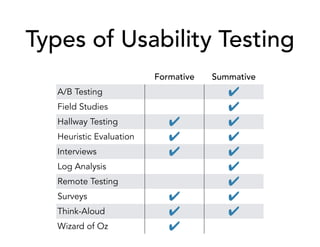
Types of Usability Testing
Formative Summative
A/B Testing ✔
Field Studies ✔
Hallway Testing ✔ ✔
Heuristic Evaluation ✔ ✔
Interviews ✔ ✔
Log Analysis ✔
Remote Testing ✔
Surveys ✔ ✔
Think-Aloud ✔ ✔
Wizard of Oz ✔
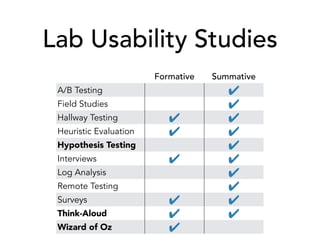
Lab Usability Studies
Formative Summative
A/B Testing ✔
Field Studies ✔
Hallway Testing ✔ ✔
Heuristic Evaluation ✔ ✔
Hypothesis Testing ✔
Interviews ✔ ✔
Log Analysis ✔
Remote Testing ✔
Surveys ✔ ✔
Think-Aloud ✔ ✔
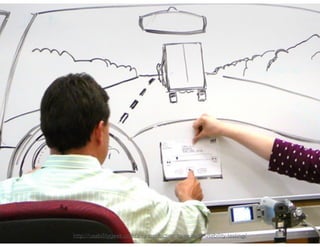
Wizard of Oz ✔
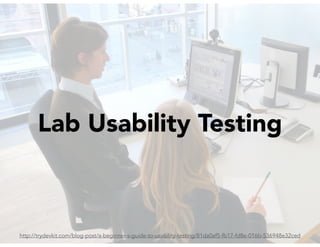
Lab Usability Testing
http://trydevkit.com/blog-post/a-beginner-s-guide-to-usability-testing/81da0af5-fb17-fd8e-016b-536948e32ced
http://usabilitygeek.com/an-introduction-to-website-usability-testing/
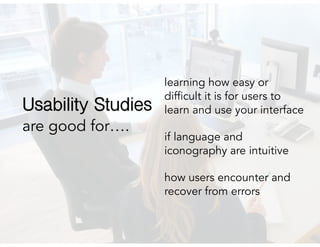
are good for….
learning how easy or
difficult it is for users to
learn and use your interface
if language and
iconography are intuitive
how users encounter and
recover from errors
Usability Studies
Lab Usability Studies
Benefits
Cheap (in $)
Observe user behavior as
they encounter a design for
the first time
See the consequences of
design decisions first-hand
Limitations
Usually takes a moderate
amount of time and set-up
Can sometimes feel staged,
or unauthentic
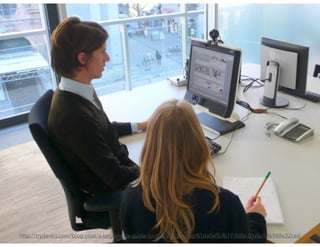
Running a Usability Study
Planning: create test plan, recruit participants
Pilot: practice with internal users, resolve any technical or
logistical issues
Test session: run test plan, be present (formative) or simply
observe (summative)
Debrief: short Q&A with participants, discuss observations
with other study observers
Analysis
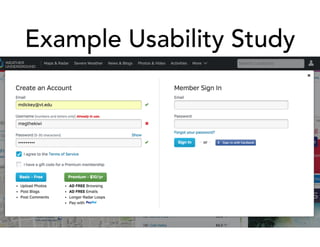
Example Usability Study
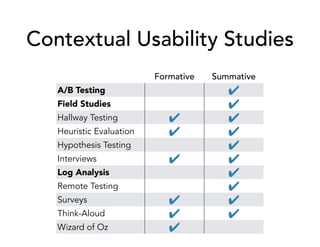
Contextual Usability Studies
Formative Summative
A/B Testing ✔
Field Studies ✔
Hallway Testing ✔ ✔
Heuristic Evaluation ✔ ✔
Hypothesis Testing ✔
Interviews ✔ ✔
Log Analysis ✔
Remote Testing ✔
Surveys ✔ ✔
Think-Aloud ✔ ✔
Wizard of Oz ✔
Field Studies
http://www.oracle.com/webfolder/ux/applications/getInvolved/customerFeedback.html
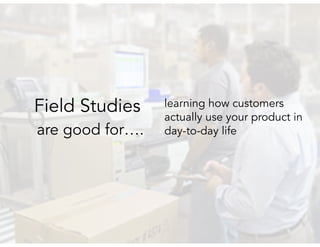
are good for….
learning how customers
actually use your product in
day-to-day life
Field Studies
Field Studies
Benefits
Allows you to observe
authentic, contextual, user
behavior
Can observe the day-to-day
experience users have with
your product, across a
longer period of time
Limitations
Significant cost ($)
Takes more time to run
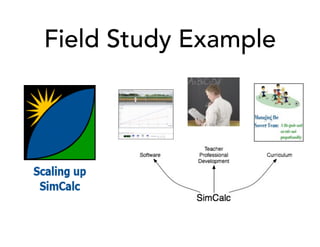
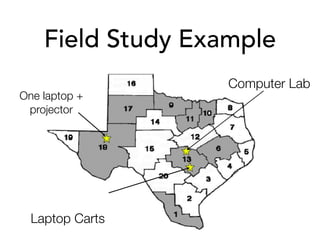
Field Study Example
Field Study Example
One laptop +
projector
Computer Lab
Laptop Carts
Field Study Example
[00:24:19.08] Boy says to the girl
on his right: "you cheating”
[00:24:21.19] Girl to the left:
"what? Its fun. ::mumble:: the
simulation. Look.”
[00:24:25.21] The boy looks to
the girl on his left, then back to
the girl on the right, then down to
his workbook in front of him. He
puts his head on the table.
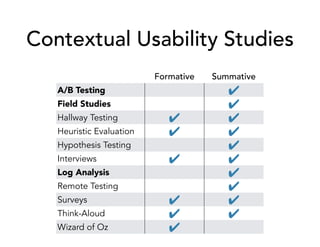
Contextual Usability Studies
Formative Summative
A/B Testing ✔
Field Studies ✔
Hallway Testing ✔ ✔
Heuristic Evaluation ✔ ✔
Hypothesis Testing ✔
Interviews ✔ ✔
Log Analysis ✔
Remote Testing ✔
Surveys ✔ ✔
Think-Aloud ✔ ✔
Wizard of Oz ✔
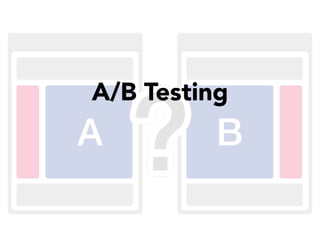
A/B Testing
A/B Testing
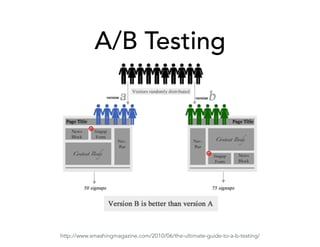
http://www.smashingmagazine.com/2010/06/the-ultimate-guide-to-a-b-testing/
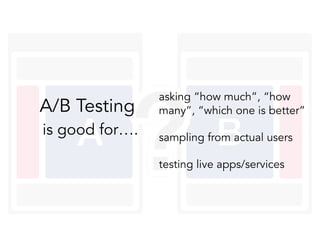
is good for….
asking “how much”, “how
many”, “which one is better”
sampling from actual users
testing live apps/services
A/B Testing
A/B Testing
Benefits
Low maintenance: release and
wait for data
Can measure very specific
questions
Live testing, measures actual
vs. self-reported user behavior
Limitations
Missing context of why users
take an action
May have no results, not
guaranteed to be conclusive
Only measures certain user
interactions
Running an A/B Test
Make sure to:
test conditions simultaneously (fewer confounding factors)
be consistent, keep track of which users see which version
deploy tests cautiously; user research can help inform
Things to watch out for:
don’t jump to conclusions, wait for statistical significance
waiting too long could cost you potential conversions
you might be interfering with user habit
Running an A/B Test
Make sure to:
test conditions simultaneously (fewer confounding factors)
be consistent, keep track of which users see which version
deploy tests cautiously; user research can help inform
Things to watch out for:
don’t jump to conclusions, wait for statistical significance
waiting too long could cost you potential conversions
you might be interfering with user habit
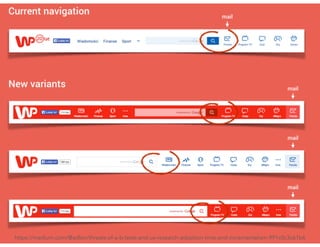
https://medium.com/@adlon/threats-of-a-b-tests-and-ux-research-adoption-time-and-incrementalism-991c0c3c61b6
A/B Testing Tools
Optimizely
Visual Website Optimizer
Unbounce*
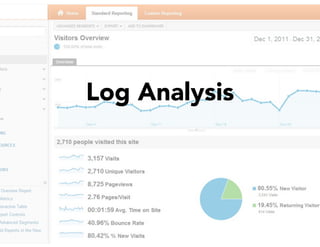
Log Analysis
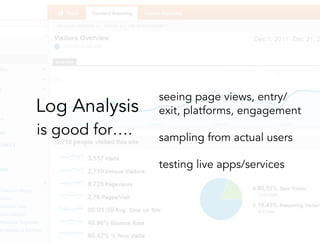
is good for….
seeing page views, entry/
exit, platforms, engagement
sampling from actual users
testing live apps/services
Log Analysis
Log Analysis
Benefits
Low maintenance: release and
wait for data
Flexibility, can measure a wide
range of data
Live testing, measures actual
vs. self-reported user behavior
Limitations
Missing context of why users
take an action
Often requires initial
development overhead
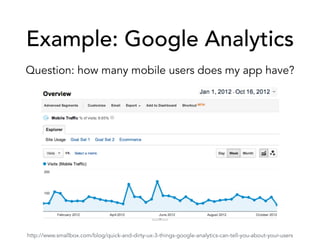
Example: Google Analytics
Question: how many mobile users does my app have?
http://www.smallbox.com/blog/quick-and-dirty-ux-3-things-google-analytics-can-tell-you-about-your-users
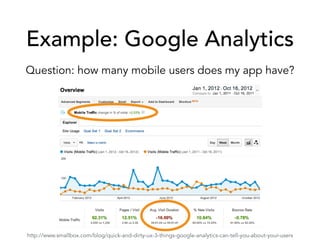
Example: Google Analytics
Question: how many mobile users does my app have?
http://www.smallbox.com/blog/quick-and-dirty-ux-3-things-google-analytics-can-tell-you-about-your-users
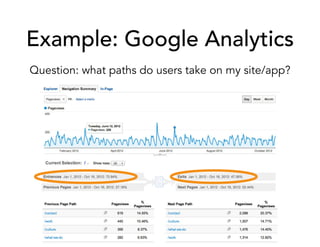
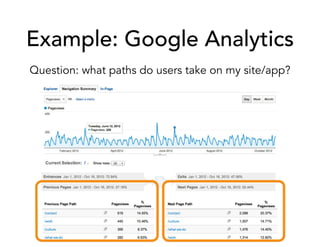
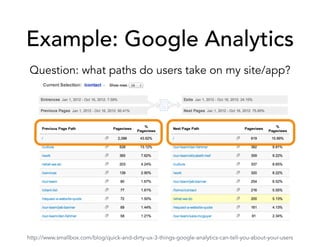
Example: Google Analytics
Question: what paths do users take on my site/app?
Example: Google Analytics
Question: what paths do users take on my site/app?
Example: Google Analytics
Question: what paths do users take on my site/app?
http://www.smallbox.com/blog/quick-and-dirty-ux-3-things-google-analytics-can-tell-you-about-your-users
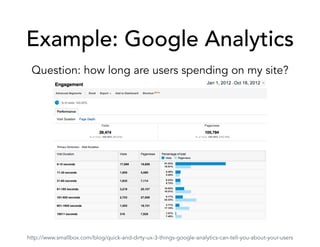
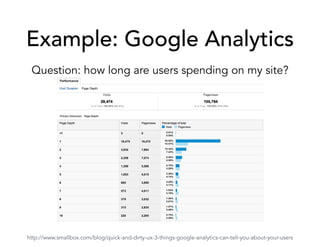
Example: Google Analytics
Question: how long are users spending on my site?
http://www.smallbox.com/blog/quick-and-dirty-ux-3-things-google-analytics-can-tell-you-about-your-users
Example: Google Analytics
Question: how long are users spending on my site?
http://www.smallbox.com/blog/quick-and-dirty-ux-3-things-google-analytics-can-tell-you-about-your-users
Example: Google Analytics
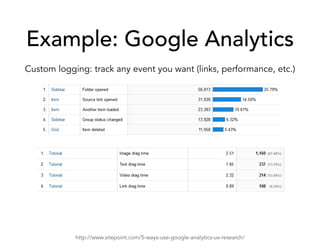
Custom logging: track any event you want (links, performance, etc.)
http://www.sitepoint.com/5-ways-use-google-analytics-ux-research/
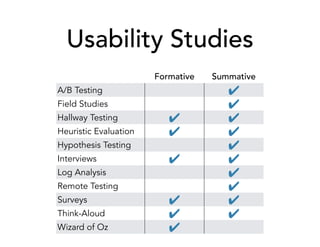
Usability Studies
Formative Summative
A/B Testing ✔
Field Studies ✔
Hallway Testing ✔ ✔
Heuristic Evaluation ✔ ✔
Hypothesis Testing ✔
Interviews ✔ ✔
Log Analysis ✔
Remote Testing ✔
Surveys ✔ ✔
Think-Aloud ✔ ✔
Wizard of Oz ✔
How to Choose a Usability Study?
Triangulation (n.) - using two or more methods to
discover and validate a finding.
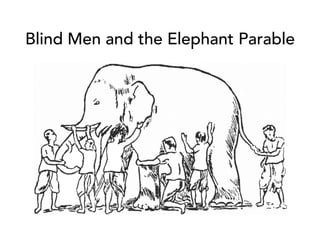
Blind Men and the Elephant Parable
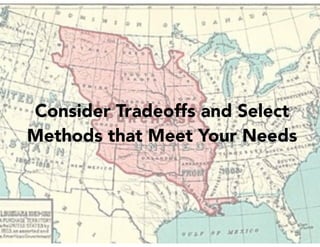
Consider Tradeoffs and Select
Methods that Meet Your Needs
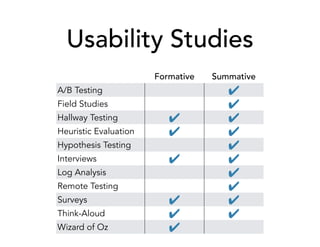
Usability Studies
Formative Summative
A/B Testing ✔
Field Studies ✔
Hallway Testing ✔ ✔
Heuristic Evaluation ✔ ✔
Hypothesis Testing ✔
Interviews ✔ ✔
Log Analysis ✔
Remote Testing ✔
Surveys ✔ ✔
Think-Aloud ✔ ✔
Wizard of Oz ✔
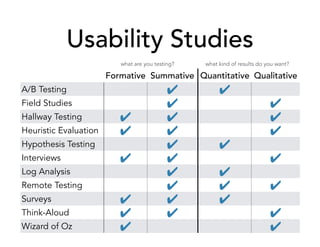
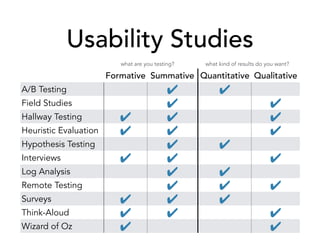
Usability Studies
Formative Summative Quantitative Qualitative
A/B Testing ✔ ✔
Field Studies ✔ ✔
Hallway Testing ✔ ✔ ✔
Heuristic Evaluation ✔ ✔ ✔
Hypothesis Testing ✔ ✔
Interviews ✔ ✔ ✔
Log Analysis ✔ ✔
Remote Testing ✔ ✔ ✔
Surveys ✔ ✔ ✔
Think-Aloud ✔ ✔ ✔
Wizard of Oz ✔ ✔
what are you testing? what kind of results do you want?
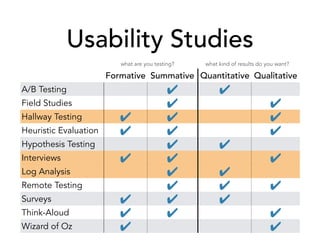
Usability Studies
Formative Summative Quantitative Qualitative
A/B Testing ✔ ✔
Field Studies ✔ ✔
Hallway Testing ✔ ✔ ✔
Heuristic Evaluation ✔ ✔ ✔
Hypothesis Testing ✔ ✔
Interviews ✔ ✔ ✔
Log Analysis ✔ ✔
Remote Testing ✔ ✔ ✔
Surveys ✔ ✔ ✔
Think-Aloud ✔ ✔ ✔
Wizard of Oz ✔ ✔
what are you testing? what kind of results do you want?
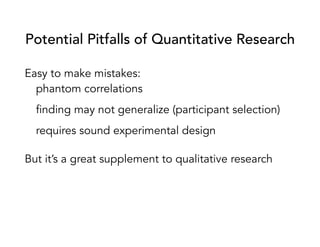
Potential Pitfalls of Quantitative Research
Easy to make mistakes:
phantom correlations
finding may not generalize (participant selection)
requires sound experimental design
But it’s a great supplement to qualitative research
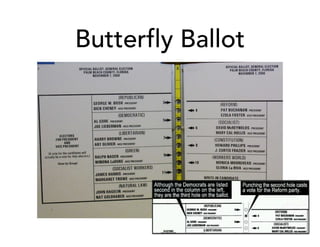
Butterfly Ballot
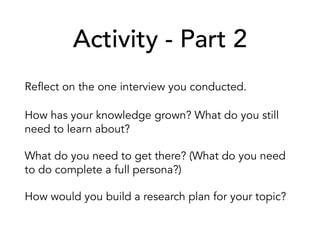
Activity - Part 2
Reflect on the one interview you conducted.
How has your knowledge grown? What do you still
need to learn about?
What do you need to get there? (What do you need
to do complete a full persona?)
How would you build a research plan for your topic?
Usability Studies
Formative Summative Quantitative Qualitative
A/B Testing ✔ ✔
Field Studies ✔ ✔
Hallway Testing ✔ ✔ ✔
Heuristic Evaluation ✔ ✔ ✔
Hypothesis Testing ✔ ✔
Interviews ✔ ✔ ✔
Log Analysis ✔ ✔
Remote Testing ✔ ✔ ✔
Surveys ✔ ✔ ✔
Think-Aloud ✔ ✔ ✔
Wizard of Oz ✔ ✔
what are you testing? what kind of results do you want?
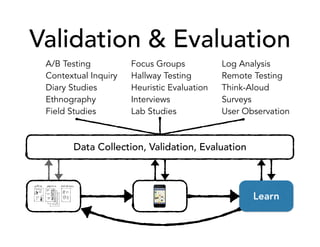
Validation & Evaluation
A/B Testing
Contextual Inquiry
Diary Studies
Ethnography
Field Studies
Focus Groups
Hallway Testing
Heuristic Evaluation
Interviews
Lab Studies
Log Analysis
Remote Testing
Think-Aloud
Surveys
User Observation
Data Collection, Validation, Evaluation
Learn
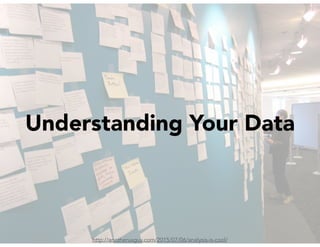
http://anotheruxguy.com/2015/07/06/analysis-is-cool/
Understanding Your Data
So Why Doesn’t My UI Work?
Seven Stages of Action
Mental Models
Psychological Biases
Dark UX Patterns
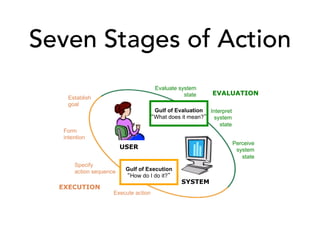
Seven Stages of Action
USER
SYSTEM
Establish
goal
Form
intention
Specify
action sequence
Execute action
Perceive
system
state
Interpret
system
state
Evaluate system
state
EXECUTION
EVALUATION
Gulf of Execution
How do I do it?
Gulf of Evaluation
What does it mean?
The Gulfs
Gulf of Execution
Does your app have good mappings? Can they easily
figure out how to execute on their desired goal?
Gulf of Evaluation
Does your app provide good feedback and visual
cues? Can users easily interpret what the data the
app is conveying to them?
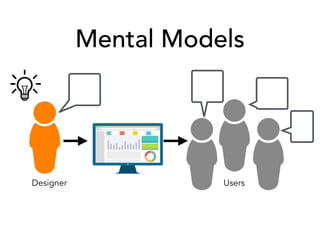
Mental Models
Designer Users
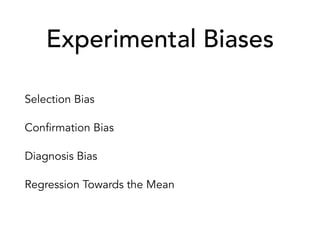
Experimental Biases
Selection Bias
Confirmation Bias
Diagnosis Bias
Regression Towards the Mean
confirmation bias (n) - the tendency to search for or
interpret information in a way that confirms one’s
preconceptions
possible pitfalls:
you focus your questioning on behaviors that you
expected to see, that confirm or validate your design
you discount negative comments about your design
diagnosis bias (n) - the tendency to label things
based on initial impressions, and the difficulty or
inability to change minds after the initial impression
possible pitfalls:
discounting a participant’s responses based on their
initial responses to selected questions
regression towards the mean (n) - when a non-
random sample is selected, the average of that
sample tends to regress towards the mean
possible pitfalls:
thought your intervention was the reason for an
improvement, but it was simply due to sampling
Cognitive Biases
Anchoring
Framing
Change Blindness
Illusion of Control
Loss Aversion
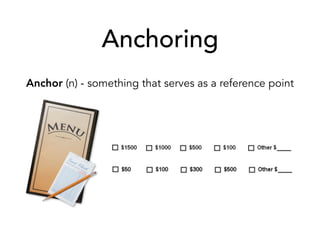
Anchoring
Anchor (n) - something that serves as a reference point
Anchoring
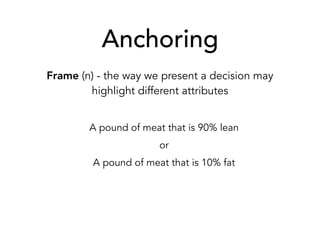
Frame (n) - the way we present a decision may
highlight different attributes
A pound of meat that is 90% lean
or
A pound of meat that is 10% fat
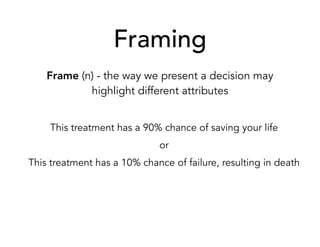
Framing
Frame (n) - the way we present a decision may
highlight different attributes
This treatment has a 90% chance of saving your life
or
This treatment has a 10% chance of failure, resulting in death
Change Blindness
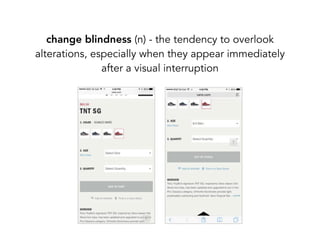
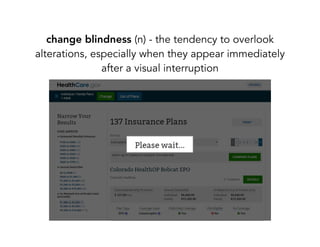
change blindness (n) - the tendency to overlook
alterations, especially when they appear immediately
after a visual interruption
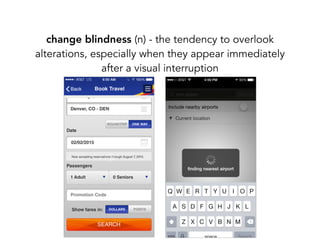
change blindness (n) - the tendency to overlook
alterations, especially when they appear immediately
after a visual interruption
change blindness (n) - the tendency to overlook
alterations, especially when they appear immediately
after a visual interruption
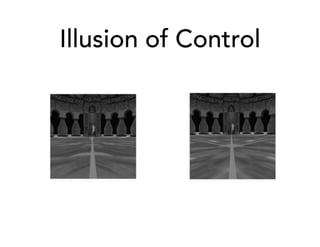
Illusion of Control
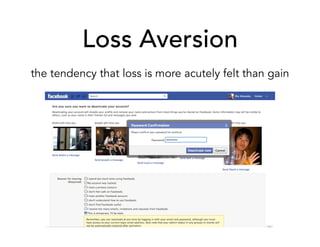
Loss Aversion
the tendency that loss is more acutely felt than gain
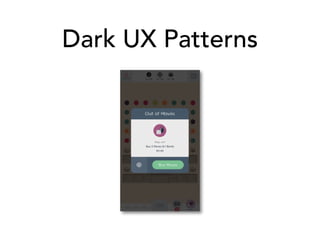
Dark UX Patterns
Dark UX Patterns
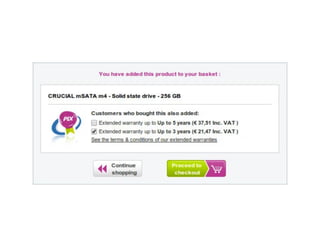
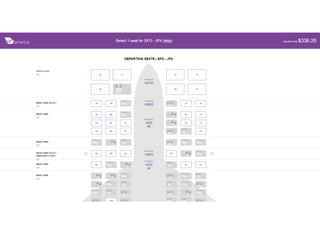
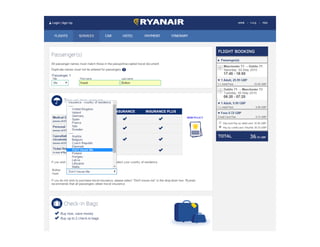
Privacy: Should it be opt-in or opt out?
UX is a holistic approach,
driven by process & iterations
Case-Study: Anemia in Cambodia
Iron deficiency is a global problem
In the US: affects 3.5 million Americans each year
In Cambodia: affects 68% of children, 50% of adults
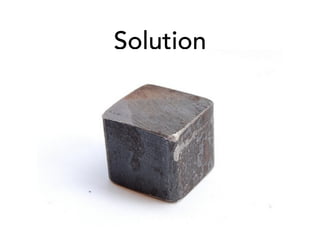
Solution
Uh, gross.
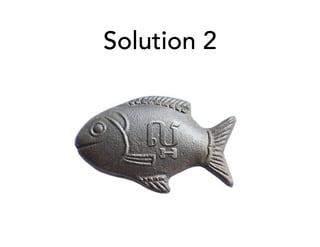
Solution 2
Image borrowed from: http://www.bustle.com/articles/84173-the-lucky-iron-fish-helps-fix-iron-
deficiencies-just-by-boiling-it-with-food-and-it
UX Research & Design
Refine Build Learn
A/B Testing
Contextual Inquiry
Diary Studies
Ethnography
Field Studies
Focus Groups
Hallway Testing
Heuristic Evaluation
Interviews
Lab Studies
Log Analysis
Remote Testing
Think-Aloud
Surveys
User Observation
Data Collection, Validation, Evaluation
Feedback & QA
Questions? Comments?
Are there topics you wished we spent more time on?
How do you see some of these topics applying to
your current work?
Thank you!
Meg Kurdziolek
meg.kurdziolek@gmail.com
www.megkurdziolek.com
Karen Tang
karen@kptang.com
www.kptang.com
Resources
Surveys:
http://uxmastery.com/better-user-research-through-surveys/
Interviews:
http://theuxreview.co.uk/user-interviews-the-beginners-guide/
http://www.nngroup.com/articles/interviewing-users/
https://whitneyhess.com/blog/2010/07/07/my-best-advice-for-conducting-user-
interviews/
Usability Studies:
http://www.usability.gov/how-to-and-tools/methods/usability-testing.html
Resources
Lucky iron fish TED Talk
https://www.youtube.com/watch?v=0Lf6glgKt3Q
Great UX Research Books
Just Enough Research by Erika Hall
Usability Testing Essentials by Carol M. Barnum
Observing the User Experience by Elizabeth
Goodman

UI/UX Foundations - Research

  • 1.
    UI/UX Foundations: Research &Analysis Meg Kurdziolek and Karen Tang
  • 2.
    Your Goals What wouldyou like to learn today?
  • 3.
    Our Goals We wantyou to… talk confidently to UX researchers critically understand research presented to you conduct basic UX research on your own have a basis to continue learning about UX research
  • 4.
    Activity (setup) Which ofthese problems do you feel strongly about? Pittsburgh public transportation Food delivery in Pittsburgh Finding family-friendly activities in Pittsburgh Pittsburgh public schools
  • 5.
    Agenda 09:00 - 09:20Breakfast and Introductions 09:20 - 09:30 User-Centered Design 09:30 - 10:10 Surveys, Diary Studies, Interviews 10:10 - 10:55 Usability Studies, Field Studies 10:55 - 11:25 A/B Testing, Log Analysis 11:25 - 12:00 Adapting Your Methods 12:00 - 12:30 LUNCH 12:30 - 01:00 Interpreting Your Data 01:00 - 01:40 Special Topics: Dark UX Patterns 01:40 - 01:50 Case Studies 01:50 - 02:00 Group reflections & wrap-up Q&A
  • 6.
    User-centered design (n.)- a framework of processes in which the needs, wants, and limitations of end users of a product are given extensive attention at each stage of the design process. https://en.wikipedia.org/wiki/User-centered_design
  • 7.
  • 8.
    UX Research &Design Refine Build Learn
  • 9.
    UX Research &Design Refine Build Learn Data Collection, Validation, Evaluation
  • 10.
    UX Research &Design Refine Build Learn Data Collection, Validation, Evaluation
  • 11.
    UX Research &Design Refine Build Learn Data Collection, Validation, Evaluation A/B Testing Contextual Inquiry Diary Studies Ethnography Field Studies Focus Groups Hallway Testing Heuristic Evaluation Interviews Lab Testing Log Analysis Remote Testing Think-Aloud Surveys User Observation
  • 12.
    Need Finding Refine BuildLearn Data Collection, Validation, Evaluation A/B Testing Contextual Inquiry Diary Studies Ethnography Field Studies Focus Groups Hallway Testing Heuristic Evaluation Interviews Lab Testing Log Analysis Remote Testing Think-Aloud Surveys User Observation
  • 13.
    Need Finding Refine BuildLearn A/B Testing Contextual Inquiry Diary Studies Ethnography Field Studies Focus Groups Hallway Testing Heuristic Evaluation Interviews Lab Testing Log Analysis Remote Testing Think-Aloud Surveys User Observation Data Collection, Validation, Evaluation
  • 14.
  • 15.
    are good for learning: overallimpressions who your users are (demographics) outstanding opinions who’s might participate in further research Surveys
  • 16.
    Common Survey Example Howlikely is it that you’d recommend [brand] to a friend? Not at all Likely Neutral Very Likely 1 2 3 4 5 6 7 8 9 10
  • 17.
    Net Promoter Score NPS:“research has shown that your NPS® acts as a leading indicator of growth. If your organization’s NPS is higher than those of your competitors, you will likely outperform the market…” https://www.netpromoter.com/know/
  • 18.
    Surveys: Pros andCons Benefits Cheap (in $ and time) Easy to recruit participants May receive high response rate Easy to analyze Limitations Limited in type & scope of data Question interpretation issues Response bias Easy to misinterpret or *over*- interpret results
  • 19.
    Silly Survey Example Doyou like to eat lunch alone? Yes No
  • 20.
  • 21.
    are good for…. day-to-dayhabits & patterns when, how, and why they use your product reflections on real problems encountered and how they were solved Diary Studies
  • 22.
    Diary Studies: Prosand Cons Benefits A longitudinal scope of data Get a look at the mundane, every-day interactions and behaviors Limitations Costly (in $ and time) Difficult to recruit participants (& high attrition) Relies on self-report
  • 23.
    Example Diary Study Radar:Intellicast vs. Weather Underground
  • 24.
  • 25.
  • 26.
    are good for…. user’sbackground their use of technology their goals and motivations their pain points what problems need to be addressed or solve Interviews
  • 27.
    Interviews: Pros andCons Benefits Cheap (in $) Can target specific users or be opportunistic Can engage with users personally Can get the answer to lots of “why” questions Limitations Takes a moderately amount of time Results indicate what people *say* they do (rather than actual behavior)
  • 28.
    Interview Tips Start broad,then narrow-in. example: “Overall, how do you think Pittsburgh public transit compares to other cities?” Ask clarifying questions, and use their words. example: “You said the bus system is hard to predict, could you explain that to me?” It’s okay to play-dumb. (But be honest.) example: “I’ve never used public transit here. Can you tell me how you would find out the schedules and figure it out how to get downtown from here?”
  • 29.
    More Interview Tips Avoid“Yes/No” questions. Avoid asking about feelings. Ask about behaviors instead. Don’t number your questions. Organize by topics you want to cover. Be prepared to skip around. Always be prepared to go off-script. Ask the question, then pause. Don’t rush to fill silence.
  • 30.
    Activity - Part1 Partner with someone who is interested in a different topic than you. You will interview them on their chosen topic. It’s your job to explore what the needs are and uncover the main issues, feelings, thoughts, and pain-points. Round 1: (5 minutes) Develop your Script Goal: Individually, develop a rough script that you will use to interview your partner. Start broad to gather overall impressions, then narrow in on specific topic areas. Remember, you are trying to understand overall impression and the biggest pain-points. Round 2: (20 minutes) Interview (10 minutes each) Goal: Take turns interviewing each other. Be sure to keep notes.
  • 31.
    How do youknow when you are done conducting interviews? Saturation (n.) - when the same topics (or themes) keep emerging in your interviews, and conducting more interviews results in no new themes. Rule of thumb - 12 interviews for saturation
  • 32.
    Example of onething you can do with interviews: build robust personas
  • 33.
    Need Finding Refine BuildLearn Data Collection, Validation, Evaluation A/B Testing Contextual Inquiry Diary Studies Ethnography Field Studies Focus Groups Hallway Testing Heuristic Evaluation Interviews Lab Testing Log Analysis Remote Testing Think-Aloud Surveys User Observation
  • 34.
    Validation & Evaluation BuildLearn A/B Testing Contextual Inquiry Diary Studies Ethnography Field Studies Focus Groups Hallway Testing Heuristic Evaluation Interviews Lab Studies Log Analysis Remote Testing Think-Aloud Surveys User Observation Data Collection, Validation, Evaluation
  • 35.
    Types of UsabilityTesting Formative Summative A/B Testing ✔ Field Studies ✔ Hallway Testing ✔ ✔ Heuristic Evaluation ✔ ✔ Interviews ✔ ✔ Log Analysis ✔ Remote Testing ✔ Surveys ✔ ✔ Think-Aloud ✔ ✔ Wizard of Oz ✔
  • 36.
    Lab Usability Studies FormativeSummative A/B Testing ✔ Field Studies ✔ Hallway Testing ✔ ✔ Heuristic Evaluation ✔ ✔ Hypothesis Testing ✔ Interviews ✔ ✔ Log Analysis ✔ Remote Testing ✔ Surveys ✔ ✔ Think-Aloud ✔ ✔ Wizard of Oz ✔
  • 37.
  • 38.
  • 39.
  • 40.
    are good for…. learninghow easy or difficult it is for users to learn and use your interface if language and iconography are intuitive how users encounter and recover from errors Usability Studies
  • 41.
    Lab Usability Studies Benefits Cheap(in $) Observe user behavior as they encounter a design for the first time See the consequences of design decisions first-hand Limitations Usually takes a moderate amount of time and set-up Can sometimes feel staged, or unauthentic
  • 42.
    Running a UsabilityStudy Planning: create test plan, recruit participants Pilot: practice with internal users, resolve any technical or logistical issues Test session: run test plan, be present (formative) or simply observe (summative) Debrief: short Q&A with participants, discuss observations with other study observers Analysis
  • 43.
  • 44.
    Contextual Usability Studies FormativeSummative A/B Testing ✔ Field Studies ✔ Hallway Testing ✔ ✔ Heuristic Evaluation ✔ ✔ Hypothesis Testing ✔ Interviews ✔ ✔ Log Analysis ✔ Remote Testing ✔ Surveys ✔ ✔ Think-Aloud ✔ ✔ Wizard of Oz ✔
  • 45.
  • 46.
    are good for…. learninghow customers actually use your product in day-to-day life Field Studies
  • 47.
    Field Studies Benefits Allows youto observe authentic, contextual, user behavior Can observe the day-to-day experience users have with your product, across a longer period of time Limitations Significant cost ($) Takes more time to run
  • 48.
  • 49.
    Field Study Example Onelaptop + projector Computer Lab Laptop Carts
  • 50.
    Field Study Example [00:24:19.08]Boy says to the girl on his right: "you cheating” [00:24:21.19] Girl to the left: "what? Its fun. ::mumble:: the simulation. Look.” [00:24:25.21] The boy looks to the girl on his left, then back to the girl on the right, then down to his workbook in front of him. He puts his head on the table.
  • 51.
    Contextual Usability Studies FormativeSummative A/B Testing ✔ Field Studies ✔ Hallway Testing ✔ ✔ Heuristic Evaluation ✔ ✔ Hypothesis Testing ✔ Interviews ✔ ✔ Log Analysis ✔ Remote Testing ✔ Surveys ✔ ✔ Think-Aloud ✔ ✔ Wizard of Oz ✔
  • 52.
  • 53.
  • 54.
    is good for…. asking“how much”, “how many”, “which one is better” sampling from actual users testing live apps/services A/B Testing
  • 55.
    A/B Testing Benefits Low maintenance:release and wait for data Can measure very specific questions Live testing, measures actual vs. self-reported user behavior Limitations Missing context of why users take an action May have no results, not guaranteed to be conclusive Only measures certain user interactions
  • 56.
    Running an A/BTest Make sure to: test conditions simultaneously (fewer confounding factors) be consistent, keep track of which users see which version deploy tests cautiously; user research can help inform Things to watch out for: don’t jump to conclusions, wait for statistical significance waiting too long could cost you potential conversions you might be interfering with user habit
  • 57.
    Running an A/BTest Make sure to: test conditions simultaneously (fewer confounding factors) be consistent, keep track of which users see which version deploy tests cautiously; user research can help inform Things to watch out for: don’t jump to conclusions, wait for statistical significance waiting too long could cost you potential conversions you might be interfering with user habit
  • 58.
  • 59.
    A/B Testing Tools Optimizely VisualWebsite Optimizer Unbounce*
  • 60.
  • 61.
    is good for…. seeingpage views, entry/ exit, platforms, engagement sampling from actual users testing live apps/services Log Analysis
  • 62.
    Log Analysis Benefits Low maintenance:release and wait for data Flexibility, can measure a wide range of data Live testing, measures actual vs. self-reported user behavior Limitations Missing context of why users take an action Often requires initial development overhead
  • 63.
    Example: Google Analytics Question:how many mobile users does my app have? http://www.smallbox.com/blog/quick-and-dirty-ux-3-things-google-analytics-can-tell-you-about-your-users
  • 64.
    Example: Google Analytics Question:how many mobile users does my app have? http://www.smallbox.com/blog/quick-and-dirty-ux-3-things-google-analytics-can-tell-you-about-your-users
  • 65.
    Example: Google Analytics Question:what paths do users take on my site/app?
  • 66.
    Example: Google Analytics Question:what paths do users take on my site/app?
  • 67.
    Example: Google Analytics Question:what paths do users take on my site/app? http://www.smallbox.com/blog/quick-and-dirty-ux-3-things-google-analytics-can-tell-you-about-your-users
  • 68.
    Example: Google Analytics Question:how long are users spending on my site? http://www.smallbox.com/blog/quick-and-dirty-ux-3-things-google-analytics-can-tell-you-about-your-users
  • 69.
    Example: Google Analytics Question:how long are users spending on my site? http://www.smallbox.com/blog/quick-and-dirty-ux-3-things-google-analytics-can-tell-you-about-your-users
  • 70.
    Example: Google Analytics Customlogging: track any event you want (links, performance, etc.) http://www.sitepoint.com/5-ways-use-google-analytics-ux-research/
  • 71.
    Usability Studies Formative Summative A/BTesting ✔ Field Studies ✔ Hallway Testing ✔ ✔ Heuristic Evaluation ✔ ✔ Hypothesis Testing ✔ Interviews ✔ ✔ Log Analysis ✔ Remote Testing ✔ Surveys ✔ ✔ Think-Aloud ✔ ✔ Wizard of Oz ✔
  • 72.
    How to Choosea Usability Study? Triangulation (n.) - using two or more methods to discover and validate a finding.
  • 73.
    Blind Men andthe Elephant Parable
  • 74.
    Consider Tradeoffs andSelect Methods that Meet Your Needs
  • 75.
    Usability Studies Formative Summative A/BTesting ✔ Field Studies ✔ Hallway Testing ✔ ✔ Heuristic Evaluation ✔ ✔ Hypothesis Testing ✔ Interviews ✔ ✔ Log Analysis ✔ Remote Testing ✔ Surveys ✔ ✔ Think-Aloud ✔ ✔ Wizard of Oz ✔
  • 76.
    Usability Studies Formative SummativeQuantitative Qualitative A/B Testing ✔ ✔ Field Studies ✔ ✔ Hallway Testing ✔ ✔ ✔ Heuristic Evaluation ✔ ✔ ✔ Hypothesis Testing ✔ ✔ Interviews ✔ ✔ ✔ Log Analysis ✔ ✔ Remote Testing ✔ ✔ ✔ Surveys ✔ ✔ ✔ Think-Aloud ✔ ✔ ✔ Wizard of Oz ✔ ✔ what are you testing? what kind of results do you want?
  • 77.
    Usability Studies Formative SummativeQuantitative Qualitative A/B Testing ✔ ✔ Field Studies ✔ ✔ Hallway Testing ✔ ✔ ✔ Heuristic Evaluation ✔ ✔ ✔ Hypothesis Testing ✔ ✔ Interviews ✔ ✔ ✔ Log Analysis ✔ ✔ Remote Testing ✔ ✔ ✔ Surveys ✔ ✔ ✔ Think-Aloud ✔ ✔ ✔ Wizard of Oz ✔ ✔ what are you testing? what kind of results do you want?
  • 78.
    Potential Pitfalls ofQuantitative Research Easy to make mistakes: phantom correlations finding may not generalize (participant selection) requires sound experimental design But it’s a great supplement to qualitative research
  • 79.
  • 80.
    Activity - Part2 Reflect on the one interview you conducted. How has your knowledge grown? What do you still need to learn about? What do you need to get there? (What do you need to do complete a full persona?) How would you build a research plan for your topic?
  • 81.
    Usability Studies Formative SummativeQuantitative Qualitative A/B Testing ✔ ✔ Field Studies ✔ ✔ Hallway Testing ✔ ✔ ✔ Heuristic Evaluation ✔ ✔ ✔ Hypothesis Testing ✔ ✔ Interviews ✔ ✔ ✔ Log Analysis ✔ ✔ Remote Testing ✔ ✔ ✔ Surveys ✔ ✔ ✔ Think-Aloud ✔ ✔ ✔ Wizard of Oz ✔ ✔ what are you testing? what kind of results do you want?
  • 83.
    Validation & Evaluation A/BTesting Contextual Inquiry Diary Studies Ethnography Field Studies Focus Groups Hallway Testing Heuristic Evaluation Interviews Lab Studies Log Analysis Remote Testing Think-Aloud Surveys User Observation Data Collection, Validation, Evaluation Learn
  • 84.
  • 85.
    So Why Doesn’tMy UI Work? Seven Stages of Action Mental Models Psychological Biases Dark UX Patterns
  • 86.
    Seven Stages ofAction USER SYSTEM Establish goal Form intention Specify action sequence Execute action Perceive system state Interpret system state Evaluate system state EXECUTION EVALUATION Gulf of Execution How do I do it? Gulf of Evaluation What does it mean?
  • 87.
    The Gulfs Gulf ofExecution Does your app have good mappings? Can they easily figure out how to execute on their desired goal? Gulf of Evaluation Does your app provide good feedback and visual cues? Can users easily interpret what the data the app is conveying to them?
  • 88.
  • 89.
    Experimental Biases Selection Bias ConfirmationBias Diagnosis Bias Regression Towards the Mean
  • 90.
    confirmation bias (n)- the tendency to search for or interpret information in a way that confirms one’s preconceptions possible pitfalls: you focus your questioning on behaviors that you expected to see, that confirm or validate your design you discount negative comments about your design
  • 91.
    diagnosis bias (n)- the tendency to label things based on initial impressions, and the difficulty or inability to change minds after the initial impression possible pitfalls: discounting a participant’s responses based on their initial responses to selected questions
  • 92.
    regression towards themean (n) - when a non- random sample is selected, the average of that sample tends to regress towards the mean possible pitfalls: thought your intervention was the reason for an improvement, but it was simply due to sampling
  • 93.
  • 94.
    Anchoring Anchor (n) -something that serves as a reference point
  • 95.
    Anchoring Frame (n) -the way we present a decision may highlight different attributes A pound of meat that is 90% lean or A pound of meat that is 10% fat
  • 96.
    Framing Frame (n) -the way we present a decision may highlight different attributes This treatment has a 90% chance of saving your life or This treatment has a 10% chance of failure, resulting in death
  • 97.
  • 98.
    change blindness (n)- the tendency to overlook alterations, especially when they appear immediately after a visual interruption
  • 99.
    change blindness (n)- the tendency to overlook alterations, especially when they appear immediately after a visual interruption
  • 100.
    change blindness (n)- the tendency to overlook alterations, especially when they appear immediately after a visual interruption
  • 101.
  • 102.
    Loss Aversion the tendencythat loss is more acutely felt than gain
  • 103.
  • 107.
    Dark UX Patterns Privacy:Should it be opt-in or opt out?
  • 108.
    UX is aholistic approach, driven by process & iterations
  • 109.
    Case-Study: Anemia inCambodia Iron deficiency is a global problem In the US: affects 3.5 million Americans each year In Cambodia: affects 68% of children, 50% of adults
  • 110.
  • 111.
  • 112.
  • 113.
    Image borrowed from:http://www.bustle.com/articles/84173-the-lucky-iron-fish-helps-fix-iron- deficiencies-just-by-boiling-it-with-food-and-it
  • 114.
    UX Research &Design Refine Build Learn A/B Testing Contextual Inquiry Diary Studies Ethnography Field Studies Focus Groups Hallway Testing Heuristic Evaluation Interviews Lab Studies Log Analysis Remote Testing Think-Aloud Surveys User Observation Data Collection, Validation, Evaluation
  • 115.
    Feedback & QA Questions?Comments? Are there topics you wished we spent more time on? How do you see some of these topics applying to your current work?
  • 116.
  • 117.
  • 118.
    Resources Lucky iron fishTED Talk https://www.youtube.com/watch?v=0Lf6glgKt3Q
  • 119.
    Great UX ResearchBooks Just Enough Research by Erika Hall Usability Testing Essentials by Carol M. Barnum Observing the User Experience by Elizabeth Goodman