Raster processing
Dr. Hans van der Kwast
OpenCourseWare
ocw.unesco-ihe.org
Learning objectives
• After this course you will be able to
• Understand different raster data types
• Use map algebra for geoprocessing
2
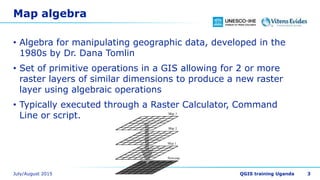
Map algebra
• Algebra for manipulating geographic data, developed in the
1980s by Dr. Dana Tomlin
• Set of primitive operations in a GIS allowing for 2 or more
raster layers of similar dimensions to produce a new raster
layer using algebraic operations
• Typically executed through a Raster Calculator, Command
Line or script.
3
Syntax for operators
• Syntax when using mathematical operators (+,-,*,/, etc.):
• Result = expression1 operator expression2
−operator: name of the operator
−expression1, expression2 are the arguments (i.e. inputs), these
can be:
−Maps
−Expressions resulting in a map (i.e. nesting of expressions is
possible)
−Result is the return value (i.e. what is created):
−One map
4
Syntax for operators
• Example 1: multiply two maps (for each cell), arguments are
maps:
• MapA = MapB * MapC
• Example 2: multiply two maps (for each cell), second
argument is another expression:
• MapA = MapB * (MapC + MapD)
5
Syntax for functions
• Syntax when using GIS functions:
• Result = function(expression1, expression2, …, expressionn)
−function: name of the function
−expression1, expression2, …, expressionn are the arguments
(i.e. inputs), these can be:
−Maps
−Expressions resulting in a map
−Result is the return value (i.e. what is created):
−One map (sometimes more)
6
Syntax for functions
• Example 1: calculate the slope of a Digital Elevation Model
(DEM):
• SlopeMap = slope(DEM)
7
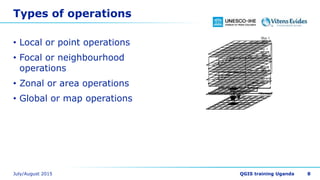
Types of operations
• Local or point operations
• Focal or neighbourhood
operations
• Zonal or area operations
• Global or map operations
8
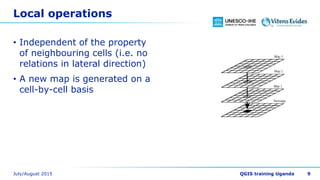
Local operations
• Independent of the property
of neighbouring cells (i.e. no
relations in lateral direction)
• A new map is generated on a
cell-by-cell basis
9
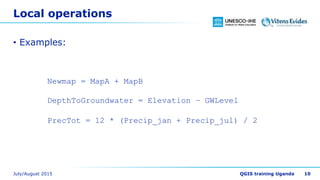
Local operations
• Examples:
10
Newmap = MapA + MapB
DepthToGroundwater = Elevation – GWLevel
PrecTot = 12 * (Precip_jan + Precip_jul) / 2
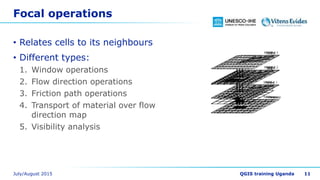
Focal operations
• Relates cells to its neighbours
• Different types:
1. Window operations
2. Flow direction operations
3. Friction path operations
4. Transport of material over flow
direction map
5. Visibility analysis
11
Focal operations
• Examples:
12
AverageElevation = windowaverage(Elevation,3000)
Diversity = windowdiversity(Habitats,5000)
Slopemap = slope(DEM)
RunoffMap = accuflux(LddMap,1000 * RainMm)
Zonal operations
• cell value is determined on
basis of values of cells which
are in the same area as the
cell under consideration.
• aggregation of cell values over
units of cartographic space
(areas)
13
Zonal operations
• Examples:
14
ClassAverage = areaaverage(temperature,landuse)
AverageKsat = areaaverage(ksat,soilmap)
Global operations
• computes one non-spatial
value as a function of existing
cell values of cells associated
with a map
• value is determined on basis
of all cells in a map
15
Global operations
• Examples:
16
totalPopulation = maptotal(populationmap)
averagePrecipitation = mapaverage(precipitation)
Boolean operations
• Boolean maps contain 1
(TRUE) and 0 (FALSE):
• Yes/No
• Suitable/Unsuitable
• Visible/Not visible
• Boolean operators result in a
boolean map:
• AND
• NOT
• OR
• XOR
17
and expression1 Result
expression2 True True True
expression2 True False False
expression2 False True False
expression2 False False False
or expression1 Result
expression2 True True True
expression2 True False True
expression2 False True True
expression2 False False False
xor expression1 Result
expression2 True True False
expression2 True False True
expression2 False True True
expression2 False False False
Raster calculations and NODATA
• For some functions boolean with TRUE and FALSE has a
different meaning than a map with TRUE and NODATA
• Example: distance calculations calculate the distance from
NODATA cells to the cells with a value. So if there are zeros,
the resulting map contains only NODATA
• Every map algebra operation with NODATA in one input map
results in NODATA in the output map.
18
Acknowledgments
• The map algebra illustrations were taken from the PCRaster
documentation: http://pcraster.geo.uu.nl with permission
from the Department of Physical Geography, Faculty of
Geosciences, Utrecht University, the Netherlands
19

Raster processing

  • 1.
    Raster processing Dr. Hansvan der Kwast OpenCourseWare ocw.unesco-ihe.org
  • 2.
    Learning objectives • Afterthis course you will be able to • Understand different raster data types • Use map algebra for geoprocessing 2
  • 3.
    Map algebra • Algebrafor manipulating geographic data, developed in the 1980s by Dr. Dana Tomlin • Set of primitive operations in a GIS allowing for 2 or more raster layers of similar dimensions to produce a new raster layer using algebraic operations • Typically executed through a Raster Calculator, Command Line or script. 3
  • 4.
    Syntax for operators •Syntax when using mathematical operators (+,-,*,/, etc.): • Result = expression1 operator expression2 −operator: name of the operator −expression1, expression2 are the arguments (i.e. inputs), these can be: −Maps −Expressions resulting in a map (i.e. nesting of expressions is possible) −Result is the return value (i.e. what is created): −One map 4
  • 5.
    Syntax for operators •Example 1: multiply two maps (for each cell), arguments are maps: • MapA = MapB * MapC • Example 2: multiply two maps (for each cell), second argument is another expression: • MapA = MapB * (MapC + MapD) 5
  • 6.
    Syntax for functions •Syntax when using GIS functions: • Result = function(expression1, expression2, …, expressionn) −function: name of the function −expression1, expression2, …, expressionn are the arguments (i.e. inputs), these can be: −Maps −Expressions resulting in a map −Result is the return value (i.e. what is created): −One map (sometimes more) 6
  • 7.
    Syntax for functions •Example 1: calculate the slope of a Digital Elevation Model (DEM): • SlopeMap = slope(DEM) 7
  • 8.
    Types of operations •Local or point operations • Focal or neighbourhood operations • Zonal or area operations • Global or map operations 8
  • 9.
    Local operations • Independentof the property of neighbouring cells (i.e. no relations in lateral direction) • A new map is generated on a cell-by-cell basis 9
  • 10.
    Local operations • Examples: 10 Newmap= MapA + MapB DepthToGroundwater = Elevation – GWLevel PrecTot = 12 * (Precip_jan + Precip_jul) / 2
  • 11.
    Focal operations • Relatescells to its neighbours • Different types: 1. Window operations 2. Flow direction operations 3. Friction path operations 4. Transport of material over flow direction map 5. Visibility analysis 11
  • 12.
    Focal operations • Examples: 12 AverageElevation= windowaverage(Elevation,3000) Diversity = windowdiversity(Habitats,5000) Slopemap = slope(DEM) RunoffMap = accuflux(LddMap,1000 * RainMm)
  • 13.
    Zonal operations • cellvalue is determined on basis of values of cells which are in the same area as the cell under consideration. • aggregation of cell values over units of cartographic space (areas) 13
  • 14.
    Zonal operations • Examples: 14 ClassAverage= areaaverage(temperature,landuse) AverageKsat = areaaverage(ksat,soilmap)
  • 15.
    Global operations • computesone non-spatial value as a function of existing cell values of cells associated with a map • value is determined on basis of all cells in a map 15
  • 16.
    Global operations • Examples: 16 totalPopulation= maptotal(populationmap) averagePrecipitation = mapaverage(precipitation)
  • 17.
    Boolean operations • Booleanmaps contain 1 (TRUE) and 0 (FALSE): • Yes/No • Suitable/Unsuitable • Visible/Not visible • Boolean operators result in a boolean map: • AND • NOT • OR • XOR 17 and expression1 Result expression2 True True True expression2 True False False expression2 False True False expression2 False False False or expression1 Result expression2 True True True expression2 True False True expression2 False True True expression2 False False False xor expression1 Result expression2 True True False expression2 True False True expression2 False True True expression2 False False False
  • 18.
    Raster calculations andNODATA • For some functions boolean with TRUE and FALSE has a different meaning than a map with TRUE and NODATA • Example: distance calculations calculate the distance from NODATA cells to the cells with a value. So if there are zeros, the resulting map contains only NODATA • Every map algebra operation with NODATA in one input map results in NODATA in the output map. 18
  • 19.
    Acknowledgments • The mapalgebra illustrations were taken from the PCRaster documentation: http://pcraster.geo.uu.nl with permission from the Department of Physical Geography, Faculty of Geosciences, Utrecht University, the Netherlands 19