GIS – Whirlwind Tour
(In 25 slides)
What, Why, How
GIS
► Geographical Information Science
 Not just computerised maps
► Data Capture ('EO' – though often = just physical/RS)
 Survey: GPS, EDM, Laserscanner
 RS: Aerial/Satellite, but also other sensors, Sensor Networks
 Primary Data, Secondary Data (verification techniques/theory/PAI)
► Analysis, 2D Map – Cartography, also whole field of
(Geo)Visualisation, (incl. 3D)
► Visualisation can also permit further analysis
 Exploratory (Spatial) Data Analysis – EDA/ESDA
GIS – Three or Four Kinds
►Desktop Application / Full Package
►Web Mapping / Feature Server / Server GIS
►Web Browser with GIS Tools / Thick Client
►Apps, Mashups, APIs – Distributed GIS
Spatial Phenomena
► Land Use – Urban, Rural, Building Types
► Flood Risk, Water Transport, Soil Type
► Topography – Elevation, Slope, Aspect
 How does topog’ affect ‘occurrence’ in landscape
► People – Travel to work, shop, emergency services
Modelling
► Conceptual Models
 To understand world, predict conditions at locations in time and/or space
► Mathematical Models
 Numerical models where formalised - some idealised, some less so
► Data Models
 Structure and flow of information in time and space
► Spatial Data – often (not always) represented in maps
 (Lots of) Data with spatial component, some attempts to address time too
► Computerised Spatial Data -> Quick Spatial Analysis over wide extent
 GIS – Geographical Information Science (and/or Systems)
GIS History / Software
► Geography Techniques (by hand) pre 1960s: John Snow, Minard’s Map (Napoleon)
► Forestry – Canada (+E Africa) - CGIS
 First GIS – Roger Tomlinson 1960+, operational from 1971+
► USA – Government Organisations: USGS, US Forest Serv, others incl. CIA
► Academia
 Edinburgh – GIMMS 1970+ (Sold from 1973), MSc GIS 1985+
 Harvard – Computer Graphics and Spatial Analysis Lab 1965
► ESRI 1969 Env. Consultancy – Arc/Info 1982 -> ArcView Desktop 1995 -> ArcGIS 1999
► Physics/Space (Moon landings) later CAD/Utilities – LaserScan/Intergraph 1969
► Demographics/Consultancy – MapInfo 1986
► OpenSource – GRASS, Quantum GIS (QGIS), gvSIG, … link to DBMS
► Web GIS – WMS, WFS, Google Maps, Google Earth, OGC, OpenStreetMap
Data Types
►Vector – Discrete Entities within space
 Points
 Lines
 Polygons
►Raster – Contin’s Field/Surface across space
 Elevation
 pH
 Growth Pot’l as secondary data based on above
Attributes
► Vector – Multiple Attributes (Properties)
 Attributes are of each feature (point, line, poly)
► Raster – Single Attribute (Value) e.g. pH
 Each cell has a different value of this attribute
 BUT! Can also have in turn Value Attributes e.g.
1 = Acid, 7 = Neutral, 14 = Alkaline
 BUT! Again only one per value!
Model Framework to use – 1?
►Q. For mapping HGVs across Europe?
 Ans: Lines – A Linear Network (Vector)
 Lorries constrained to linear road network
 Each road can have multiple attributes: speed
limit, length, width, number of lanes
Model Framework to use – 2
►Q. To model flow/drainage in moorland?
 Ans: Raster Grid – A continuous surface
 Each cell can have a flow direction
 Need multiple spatially co-incident grids to
combine in order to achieve end result (answer)
Spatial Co-incidence – Map Layers
► Combination of spatial and aspatial (often numerical)
manipulation of data
► Grids lie on top of each other. Co-incident cells can then
be combined numerically to give result.
► GIS all about combining info from different Layers
► Layers form a stack – but usually only in model – multiple
measures found in same x,y,z (cell) location
 E.g. elevation, pH, salinity – each of these in different grid layer
Overlay – Attribute Transfer
► Can convert between raster + vector but limited
and tend to be treated in isolation but can be
viewed together easily
► Can however easily combine vector layers –
mathematical combination of geometry – easy to
cut-up and intersect => Vector Overlay
► Vector Overlay all about Attribute Transfer
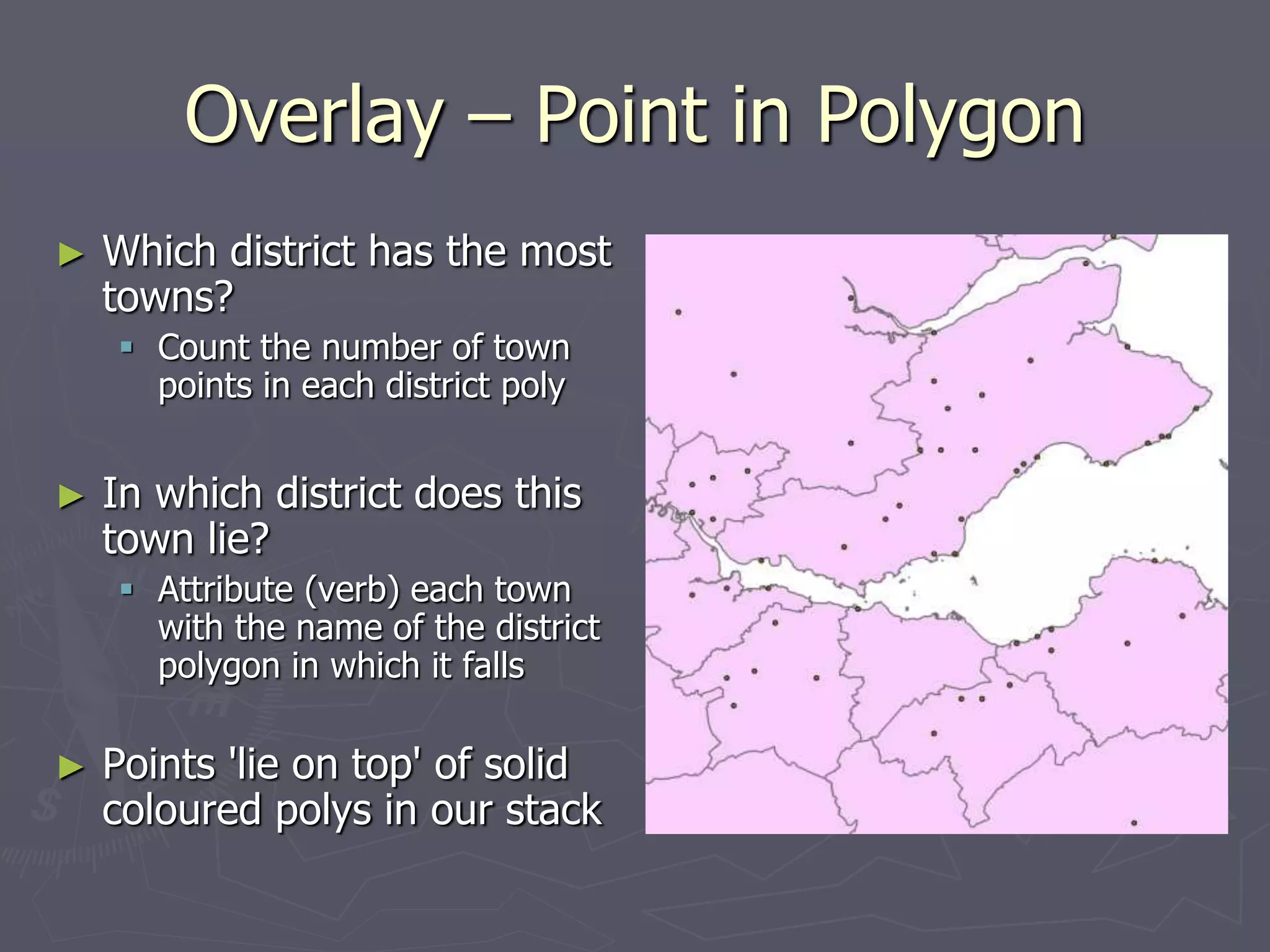
Overlay – Point in Polygon
► Which district has the most
towns?
 Count the number of town
points in each district poly
► In which district does this
town lie?
 Attribute (verb) each town
with the name of the district
polygon in which it falls
► Points 'lie on top' of solid
coloured polys in our stack
Overlay – Polygon Overlay
►Degree of overlap between different
districts/zones/catchment areas
►E.g. Erase SSSI polygons from potential Golf
Course polygons (unless you are a Trump)
►Intersect pollution zones with population
zones (> 10,000 pop) to get danger zones!
Co-ord’te Reference Systems (CRS) –
Map Projections, Datums
► Spatial Data can be measured/located in:
 Angular Units – Lat, Long, e.g. 56º23'4'' (dms), 56.38º (dd)
 Linear Units – Flat Grid-based: Easting, Northing, e.g. metres, ft
► Spherical (Angular) = 'Geographic' CRS (unprojected)
► Flat Planar (Linear) = 'Projected' CRS, e.g. BNG, UTM
► All CRS based on a reference datum – a model of the Earth’s
surface/shape. This MUST be correctly defined, for any later
projection (curved to flat) to WORK correctly.
► If collecting GPS data in Britain, we want to end up in BNG but MUST
define source data as WGS84 datum / geographic sys as THAT is what
the GPS uses. Once source data defined we can project to BNG.
Simple GIS – Google Earth
► Last point less of an issue if using Simple GIS – Google Earth – uses
WGS84 lat long; loads in KML files – now often saved by GPS software
directly. E.g. GPS Utility. Or just write raw KML or use converter prog.
► Simple annotation / measurement tools etc. but also clever features,
e.g. timestamp allows animation/viewing change through time
► Beware – Google Maps uses its own Mercator projection but you can
link to KML URL in Google Maps
► Can make 'mashups': Google Maps, JavaScript, WMS, Scanned Maps
NO pricey GIS package required
Industry Standard - ArcGIS
► ArcGIS: ArcMap – 2D, ArcScene 3D, ArcCatalog, others
► Relatively easy to get started, though can at times be
overwhelming! Some similarity to Word/Excel in structure
► ArcToolbox now primary interface to functionality (or
command line) though various toolbars (drop-down
menus) too
► Beware – from v10 Arc tries to save everything to a default
geodatabase in user’s home path. In UoE, home path is
M: and for undergrads this may still be quite small. Thus
must keep some space on M: even if other space available
File Formats
► Shapefile – Actually a set of 3-6 files (min 3)
 Prob one of most widely used file type – though closed, proprietary format
 Myfile.shp (geom), Myfile.shx, Myfile.dbf (attrs), .prj, ...
 Move each file, or .zip all together at OS; just move the .shp in ArcCatalog
► Geodatabase
 Single file at OS level – neatly holds all vectors & rasters
 File Geodatabase now 1Tb (and there are ways to get up to 256 Tb!)
 In time will likely be the only thing to use (other GIS still use shp for now)
► Coverage (vector); Grid (raster)
 Older formats you may need to know about
 Hybrid structure of one folder mygrid and a shared info folder – shared
between ALL coverages and grids in a containing folder
 Move ALL of these at OS – or better still use ArcCatalog only!
Data Storage Theory
► Hybrid Arc/Info model based on storing correct type of
data in best place for that
► Data can be re-joined when required
► Same principle means store only relevant info in a table of
particular feature types and join these at query/display
time – also use key tables & numbers to reduce data vols
► Relational DBs good for this and can store spatial data –
Many offer spatial extensions with spatial analysis functions
Database Storage
►Can connect GIS to RDBMS for:
 Better querying
 Robust storage
 Multi-user access and sophisticated control
(only one user edits electoral district at a time!)
►Examples:
 ArcSDE – Create GeoDatabase in RDBMS
 SPIT – Connects QGIS to PostgreSQL(PostGIS)
Open (Source) GIS
► PostGIS, MySQL – Open Source DBMS – implement OGC standards
► OGC – Consortium of 482 Companies/Orgs – Define Open Standards
► OSGeo Found’n – Support develop’t of op’n source Geospatial software
► GRASS – Orig. US Army, now project of OS Geo
► GDAL (Conversion), GEOS (Geometry), rasdaman (rasters)
► Quantum GIS (QGIS) – Another OSGeo Project
 MapServer export, OpenStreetMap editor, Run GRASS datasets/tools within
► MapTiler (uses GDAL2Tiles) – Create OpenLayers/Google Maps Tilesets
Web GIS
► Tools – MapTiler, OpenLayers, MapServer, GeoServer
► Developers’ Platforms – JavaScript, AJAX, SVG, Java
► Google Earth/Maps, Virtual Earth, Streetmap
► OpenStreetMap, (interesting to compare against OS!)
► OS Get-a-map; OS OpenData (Apr 2010); OpenData API
► Simple User Requirements? – ArcGIS Online
The Future 1 – PDAs, AR, Apps
►Move from mainframe to desktop to
distributed desktops, and distributed servers
►PDAs and Phones – ArcPad, GPS Maps
►Augmented Reality – Scan horizon, Utilities
►AIS – Ships, Planes – Track in Google Earth
The Future 2 – LBS, Sensors, Clouds
► Location Based Services, Sensor Networks
► Cloud Computing, Ubiquitous Computing
► Tracking People? Civil Liberties / Freedoms?
► Social inequality – advantaged vs disadvantaged?
► Free/VGI => more folk making bad maps - noise?
► But a more skilled-up knowledgeable population…?
Thank You!
Questions?

GIS_Whirlwind_Tour.ppt

  • 1.
    GIS – WhirlwindTour (In 25 slides) What, Why, How
  • 2.
    GIS ► Geographical InformationScience  Not just computerised maps ► Data Capture ('EO' – though often = just physical/RS)  Survey: GPS, EDM, Laserscanner  RS: Aerial/Satellite, but also other sensors, Sensor Networks  Primary Data, Secondary Data (verification techniques/theory/PAI) ► Analysis, 2D Map – Cartography, also whole field of (Geo)Visualisation, (incl. 3D) ► Visualisation can also permit further analysis  Exploratory (Spatial) Data Analysis – EDA/ESDA
  • 3.
    GIS – Threeor Four Kinds ►Desktop Application / Full Package ►Web Mapping / Feature Server / Server GIS ►Web Browser with GIS Tools / Thick Client ►Apps, Mashups, APIs – Distributed GIS
  • 4.
    Spatial Phenomena ► LandUse – Urban, Rural, Building Types ► Flood Risk, Water Transport, Soil Type ► Topography – Elevation, Slope, Aspect  How does topog’ affect ‘occurrence’ in landscape ► People – Travel to work, shop, emergency services
  • 5.
    Modelling ► Conceptual Models To understand world, predict conditions at locations in time and/or space ► Mathematical Models  Numerical models where formalised - some idealised, some less so ► Data Models  Structure and flow of information in time and space ► Spatial Data – often (not always) represented in maps  (Lots of) Data with spatial component, some attempts to address time too ► Computerised Spatial Data -> Quick Spatial Analysis over wide extent  GIS – Geographical Information Science (and/or Systems)
  • 6.
    GIS History /Software ► Geography Techniques (by hand) pre 1960s: John Snow, Minard’s Map (Napoleon) ► Forestry – Canada (+E Africa) - CGIS  First GIS – Roger Tomlinson 1960+, operational from 1971+ ► USA – Government Organisations: USGS, US Forest Serv, others incl. CIA ► Academia  Edinburgh – GIMMS 1970+ (Sold from 1973), MSc GIS 1985+  Harvard – Computer Graphics and Spatial Analysis Lab 1965 ► ESRI 1969 Env. Consultancy – Arc/Info 1982 -> ArcView Desktop 1995 -> ArcGIS 1999 ► Physics/Space (Moon landings) later CAD/Utilities – LaserScan/Intergraph 1969 ► Demographics/Consultancy – MapInfo 1986 ► OpenSource – GRASS, Quantum GIS (QGIS), gvSIG, … link to DBMS ► Web GIS – WMS, WFS, Google Maps, Google Earth, OGC, OpenStreetMap
  • 7.
    Data Types ►Vector –Discrete Entities within space  Points  Lines  Polygons ►Raster – Contin’s Field/Surface across space  Elevation  pH  Growth Pot’l as secondary data based on above
  • 8.
    Attributes ► Vector –Multiple Attributes (Properties)  Attributes are of each feature (point, line, poly) ► Raster – Single Attribute (Value) e.g. pH  Each cell has a different value of this attribute  BUT! Can also have in turn Value Attributes e.g. 1 = Acid, 7 = Neutral, 14 = Alkaline  BUT! Again only one per value!
  • 9.
    Model Framework touse – 1? ►Q. For mapping HGVs across Europe?  Ans: Lines – A Linear Network (Vector)  Lorries constrained to linear road network  Each road can have multiple attributes: speed limit, length, width, number of lanes
  • 10.
    Model Framework touse – 2 ►Q. To model flow/drainage in moorland?  Ans: Raster Grid – A continuous surface  Each cell can have a flow direction  Need multiple spatially co-incident grids to combine in order to achieve end result (answer)
  • 11.
    Spatial Co-incidence –Map Layers ► Combination of spatial and aspatial (often numerical) manipulation of data ► Grids lie on top of each other. Co-incident cells can then be combined numerically to give result. ► GIS all about combining info from different Layers ► Layers form a stack – but usually only in model – multiple measures found in same x,y,z (cell) location  E.g. elevation, pH, salinity – each of these in different grid layer
  • 12.
    Overlay – AttributeTransfer ► Can convert between raster + vector but limited and tend to be treated in isolation but can be viewed together easily ► Can however easily combine vector layers – mathematical combination of geometry – easy to cut-up and intersect => Vector Overlay ► Vector Overlay all about Attribute Transfer
  • 13.
    Overlay – Pointin Polygon ► Which district has the most towns?  Count the number of town points in each district poly ► In which district does this town lie?  Attribute (verb) each town with the name of the district polygon in which it falls ► Points 'lie on top' of solid coloured polys in our stack
  • 14.
    Overlay – PolygonOverlay ►Degree of overlap between different districts/zones/catchment areas ►E.g. Erase SSSI polygons from potential Golf Course polygons (unless you are a Trump) ►Intersect pollution zones with population zones (> 10,000 pop) to get danger zones!
  • 15.
    Co-ord’te Reference Systems(CRS) – Map Projections, Datums ► Spatial Data can be measured/located in:  Angular Units – Lat, Long, e.g. 56º23'4'' (dms), 56.38º (dd)  Linear Units – Flat Grid-based: Easting, Northing, e.g. metres, ft ► Spherical (Angular) = 'Geographic' CRS (unprojected) ► Flat Planar (Linear) = 'Projected' CRS, e.g. BNG, UTM ► All CRS based on a reference datum – a model of the Earth’s surface/shape. This MUST be correctly defined, for any later projection (curved to flat) to WORK correctly. ► If collecting GPS data in Britain, we want to end up in BNG but MUST define source data as WGS84 datum / geographic sys as THAT is what the GPS uses. Once source data defined we can project to BNG.
  • 16.
    Simple GIS –Google Earth ► Last point less of an issue if using Simple GIS – Google Earth – uses WGS84 lat long; loads in KML files – now often saved by GPS software directly. E.g. GPS Utility. Or just write raw KML or use converter prog. ► Simple annotation / measurement tools etc. but also clever features, e.g. timestamp allows animation/viewing change through time ► Beware – Google Maps uses its own Mercator projection but you can link to KML URL in Google Maps ► Can make 'mashups': Google Maps, JavaScript, WMS, Scanned Maps NO pricey GIS package required
  • 17.
    Industry Standard -ArcGIS ► ArcGIS: ArcMap – 2D, ArcScene 3D, ArcCatalog, others ► Relatively easy to get started, though can at times be overwhelming! Some similarity to Word/Excel in structure ► ArcToolbox now primary interface to functionality (or command line) though various toolbars (drop-down menus) too ► Beware – from v10 Arc tries to save everything to a default geodatabase in user’s home path. In UoE, home path is M: and for undergrads this may still be quite small. Thus must keep some space on M: even if other space available
  • 18.
    File Formats ► Shapefile– Actually a set of 3-6 files (min 3)  Prob one of most widely used file type – though closed, proprietary format  Myfile.shp (geom), Myfile.shx, Myfile.dbf (attrs), .prj, ...  Move each file, or .zip all together at OS; just move the .shp in ArcCatalog ► Geodatabase  Single file at OS level – neatly holds all vectors & rasters  File Geodatabase now 1Tb (and there are ways to get up to 256 Tb!)  In time will likely be the only thing to use (other GIS still use shp for now) ► Coverage (vector); Grid (raster)  Older formats you may need to know about  Hybrid structure of one folder mygrid and a shared info folder – shared between ALL coverages and grids in a containing folder  Move ALL of these at OS – or better still use ArcCatalog only!
  • 19.
    Data Storage Theory ►Hybrid Arc/Info model based on storing correct type of data in best place for that ► Data can be re-joined when required ► Same principle means store only relevant info in a table of particular feature types and join these at query/display time – also use key tables & numbers to reduce data vols ► Relational DBs good for this and can store spatial data – Many offer spatial extensions with spatial analysis functions
  • 20.
    Database Storage ►Can connectGIS to RDBMS for:  Better querying  Robust storage  Multi-user access and sophisticated control (only one user edits electoral district at a time!) ►Examples:  ArcSDE – Create GeoDatabase in RDBMS  SPIT – Connects QGIS to PostgreSQL(PostGIS)
  • 21.
    Open (Source) GIS ►PostGIS, MySQL – Open Source DBMS – implement OGC standards ► OGC – Consortium of 482 Companies/Orgs – Define Open Standards ► OSGeo Found’n – Support develop’t of op’n source Geospatial software ► GRASS – Orig. US Army, now project of OS Geo ► GDAL (Conversion), GEOS (Geometry), rasdaman (rasters) ► Quantum GIS (QGIS) – Another OSGeo Project  MapServer export, OpenStreetMap editor, Run GRASS datasets/tools within ► MapTiler (uses GDAL2Tiles) – Create OpenLayers/Google Maps Tilesets
  • 22.
    Web GIS ► Tools– MapTiler, OpenLayers, MapServer, GeoServer ► Developers’ Platforms – JavaScript, AJAX, SVG, Java ► Google Earth/Maps, Virtual Earth, Streetmap ► OpenStreetMap, (interesting to compare against OS!) ► OS Get-a-map; OS OpenData (Apr 2010); OpenData API ► Simple User Requirements? – ArcGIS Online
  • 23.
    The Future 1– PDAs, AR, Apps ►Move from mainframe to desktop to distributed desktops, and distributed servers ►PDAs and Phones – ArcPad, GPS Maps ►Augmented Reality – Scan horizon, Utilities ►AIS – Ships, Planes – Track in Google Earth
  • 24.
    The Future 2– LBS, Sensors, Clouds ► Location Based Services, Sensor Networks ► Cloud Computing, Ubiquitous Computing ► Tracking People? Civil Liberties / Freedoms? ► Social inequality – advantaged vs disadvantaged? ► Free/VGI => more folk making bad maps - noise? ► But a more skilled-up knowledgeable population…?
  • 25.