Projections
Dr. Hans van der Kwast
OpenCourseWare
ocw.unesco-ihe.org
Learning objectives
• After this course you will be able to
• Understand why we use projections
• Know the advantages and disadvantages of projections
• Choose the right projection for your purpose
• Understand the difference between on-the-fly projection and the
projection of layers
Why projections?
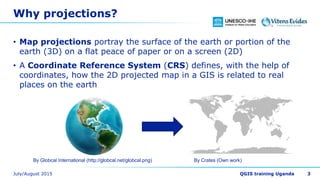
• Map projections portray the surface of the earth or portion of the
earth (3D) on a flat peace of paper or on a screen (2D)
• A Coordinate Reference System (CRS) defines, with the help of
coordinates, how the 2D projected map in a GIS is related to real
places on the earth
3
By Globcal International (http://globcal.net/globcal.png) By Crates (Own work)
Latitude and longitude
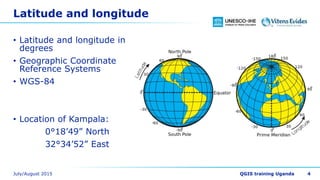
• Latitude and longitude in
degrees
• Geographic Coordinate
Reference Systems
• WGS-84
• Location of Kampala:
0°18’49” North
32°34’52” East
4
Converting Lat/Lon to decimal degrees
• 32°34’52” (32 degrees, 34 minutes, 52 seconds)
• 32 + 34’/60 + 52”/3600 = 32.5811 degrees
• How much is 0°18’49” North in decimal degrees?
5
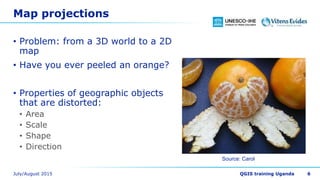
Map projections
• Problem: from a 3D world to a 2D
map
• Have you ever peeled an orange?
• Properties of geographic objects
that are distorted:
• Area
• Scale
• Shape
• Direction
6
Source: Carol
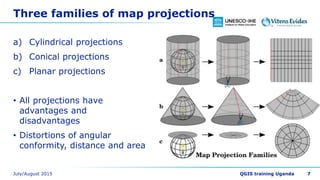
Three families of map projections
a) Cylindrical projections
b) Conical projections
c) Planar projections
• All projections have
advantages and
disadvantages
• Distortions of angular
conformity, distance and area
7
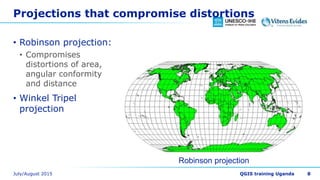
Projections that compromise distortions
• Robinson projection:
• Compromises
distortions of area,
angular conformity
and distance
• Winkel Tripel
projection
8
Robinson projection
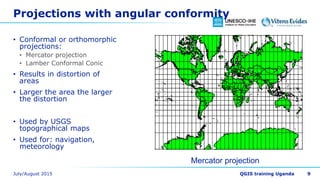
Projections with angular conformity
• Conformal or orthomorphic
projections:
• Mercator projection
• Lamber Conformal Conic
• Results in distortion of
areas
• Larger the area the larger
the distortion
• Used by USGS
topographical maps
• Used for: navigation,
meteorology
9
Mercator projection
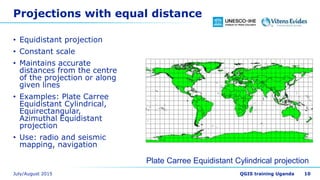
Projections with equal distance
• Equidistant projection
• Constant scale
• Maintains accurate
distances from the centre
of the projection or along
given lines
• Examples: Plate Carree
Equidistant Cylindrical,
Equirectangular,
Azimuthal Equidistant
projection
• Use: radio and seismic
mapping, navigation
10
Plate Carree Equidistant Cylindrical projection
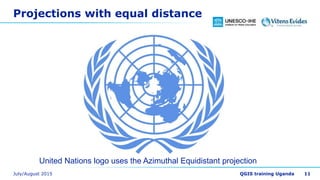
Projections with equal distance
11
United Nations logo uses the Azimuthal Equidistant projection
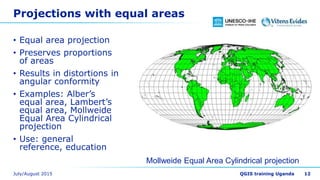
Projections with equal areas
• Equal area projection
• Preserves proportions
of areas
• Results in distortions in
angular conformity
• Examples: Alber’s
equal area, Lambert’s
equal area, Mollweide
Equal Area Cylindrical
projection
• Use: general
reference, education
12
Mollweide Equal Area Cylindrical projection
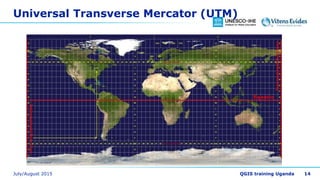
Universal Transverse Mercator (UTM)
• UTM is a global map projection
• Divided in 60 equal zones, 6 degrees wide in longitude from
East to West
• UTM zones numbered 1-60 starting at the international date line
• Origin on the equator at a specific longitude
• N or S are used to distinguish between Northern and Southern
hemisphere
• E.g. Uganda:
• UTM Zone 36N
• Kampala: 452611 Easting, 36127 Northing
13
Universal Transverse Mercator (UTM)
14
Some terminology
• Datum
• Spheroid
• Geoid
• False Northing, False Easting
15
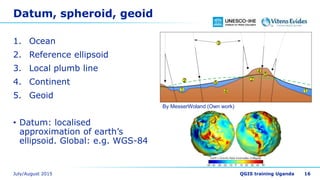
Datum, spheroid, geoid
1. Ocean
2. Reference ellipsoid
3. Local plumb line
4. Continent
5. Geoid
• Datum: localised
approximation of earth’s
ellipsoid. Global: e.g. WGS-84
16
By MesserWoland (Own work)
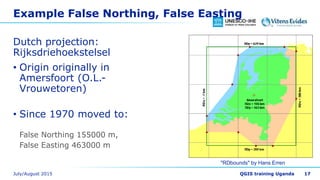
Example False Northing, False Easting
Dutch projection:
Rijksdriehoekstelsel
• Origin originally in
Amersfoort (O.L.-
Vrouwetoren)
• Since 1970 moved to:
False Northing 155000 m,
False Easting 463000 m
17
"RDbounds" by Hans Erren
Which projection to use?
• Depends on:
• Regional extent
• Type of analysis
• Availability of data (national data, global data)
18
GIS and Projections
• Decide on the projection of your model data before you
start preprocessing!
• You need a common reference system (per project or for
your organisation):
• Local coordinate system (e.g. Amersfoort/RD new)
• Global coordinate system (e.g. UTM Zone 31N/WGS-84)
• Geographic Coordinate Reference System (Lat/Lon, WGS-84)
Coordinates, more practical
• Use EPSG codes to standardise projections within a project!
• Supported by most open source GIS desktop and server applications, incl.
QGIS, GDAL
• EPSG codes (European Petroleum Survey Group), examples:
• Amersfoort RD/New: 28992
• UTM Zone 31 North, datum WGS-84: 32631
• Google Earth (Lat/Lon WGS-84): 4326
• Online reference:
• http://spatialreference.org/
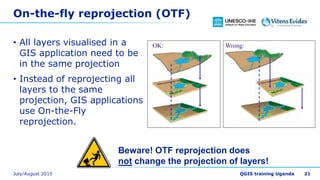
On-the-fly reprojection (OTF)
• All layers visualised in a
GIS application need to be
in the same projection
• Instead of reprojecting all
layers to the same
projection, GIS applications
use On-the-Fly
reprojection.
21
Beware! OTF reprojection does
not change the projection of layers!
3 Cases with projections
1. Projection is known AND projection is assigned  No action
needed
2. Projection is known BUT NOT assigned  Assign projection to
layer
3. Projection is unknown  Georeference layer (register/rectify)
22
Acknowledgements
• Examples were taken from:
A Gentle Introduction to GIS
http://docs.qgis.org/2.6/en/docs/gentle_gis_introduction/
23

Projections

  • 1.
    Projections Dr. Hans vander Kwast OpenCourseWare ocw.unesco-ihe.org
  • 2.
    Learning objectives • Afterthis course you will be able to • Understand why we use projections • Know the advantages and disadvantages of projections • Choose the right projection for your purpose • Understand the difference between on-the-fly projection and the projection of layers
  • 3.
    Why projections? • Mapprojections portray the surface of the earth or portion of the earth (3D) on a flat peace of paper or on a screen (2D) • A Coordinate Reference System (CRS) defines, with the help of coordinates, how the 2D projected map in a GIS is related to real places on the earth 3 By Globcal International (http://globcal.net/globcal.png) By Crates (Own work)
  • 4.
    Latitude and longitude •Latitude and longitude in degrees • Geographic Coordinate Reference Systems • WGS-84 • Location of Kampala: 0°18’49” North 32°34’52” East 4
  • 5.
    Converting Lat/Lon todecimal degrees • 32°34’52” (32 degrees, 34 minutes, 52 seconds) • 32 + 34’/60 + 52”/3600 = 32.5811 degrees • How much is 0°18’49” North in decimal degrees? 5
  • 6.
    Map projections • Problem:from a 3D world to a 2D map • Have you ever peeled an orange? • Properties of geographic objects that are distorted: • Area • Scale • Shape • Direction 6 Source: Carol
  • 7.
    Three families ofmap projections a) Cylindrical projections b) Conical projections c) Planar projections • All projections have advantages and disadvantages • Distortions of angular conformity, distance and area 7
  • 8.
    Projections that compromisedistortions • Robinson projection: • Compromises distortions of area, angular conformity and distance • Winkel Tripel projection 8 Robinson projection
  • 9.
    Projections with angularconformity • Conformal or orthomorphic projections: • Mercator projection • Lamber Conformal Conic • Results in distortion of areas • Larger the area the larger the distortion • Used by USGS topographical maps • Used for: navigation, meteorology 9 Mercator projection
  • 10.
    Projections with equaldistance • Equidistant projection • Constant scale • Maintains accurate distances from the centre of the projection or along given lines • Examples: Plate Carree Equidistant Cylindrical, Equirectangular, Azimuthal Equidistant projection • Use: radio and seismic mapping, navigation 10 Plate Carree Equidistant Cylindrical projection
  • 11.
    Projections with equaldistance 11 United Nations logo uses the Azimuthal Equidistant projection
  • 12.
    Projections with equalareas • Equal area projection • Preserves proportions of areas • Results in distortions in angular conformity • Examples: Alber’s equal area, Lambert’s equal area, Mollweide Equal Area Cylindrical projection • Use: general reference, education 12 Mollweide Equal Area Cylindrical projection
  • 13.
    Universal Transverse Mercator(UTM) • UTM is a global map projection • Divided in 60 equal zones, 6 degrees wide in longitude from East to West • UTM zones numbered 1-60 starting at the international date line • Origin on the equator at a specific longitude • N or S are used to distinguish between Northern and Southern hemisphere • E.g. Uganda: • UTM Zone 36N • Kampala: 452611 Easting, 36127 Northing 13
  • 14.
  • 15.
    Some terminology • Datum •Spheroid • Geoid • False Northing, False Easting 15
  • 16.
    Datum, spheroid, geoid 1.Ocean 2. Reference ellipsoid 3. Local plumb line 4. Continent 5. Geoid • Datum: localised approximation of earth’s ellipsoid. Global: e.g. WGS-84 16 By MesserWoland (Own work)
  • 17.
    Example False Northing,False Easting Dutch projection: Rijksdriehoekstelsel • Origin originally in Amersfoort (O.L.- Vrouwetoren) • Since 1970 moved to: False Northing 155000 m, False Easting 463000 m 17 "RDbounds" by Hans Erren
  • 18.
    Which projection touse? • Depends on: • Regional extent • Type of analysis • Availability of data (national data, global data) 18
  • 19.
    GIS and Projections •Decide on the projection of your model data before you start preprocessing! • You need a common reference system (per project or for your organisation): • Local coordinate system (e.g. Amersfoort/RD new) • Global coordinate system (e.g. UTM Zone 31N/WGS-84) • Geographic Coordinate Reference System (Lat/Lon, WGS-84)
  • 20.
    Coordinates, more practical •Use EPSG codes to standardise projections within a project! • Supported by most open source GIS desktop and server applications, incl. QGIS, GDAL • EPSG codes (European Petroleum Survey Group), examples: • Amersfoort RD/New: 28992 • UTM Zone 31 North, datum WGS-84: 32631 • Google Earth (Lat/Lon WGS-84): 4326 • Online reference: • http://spatialreference.org/
  • 21.
    On-the-fly reprojection (OTF) •All layers visualised in a GIS application need to be in the same projection • Instead of reprojecting all layers to the same projection, GIS applications use On-the-Fly reprojection. 21 Beware! OTF reprojection does not change the projection of layers!
  • 22.
    3 Cases withprojections 1. Projection is known AND projection is assigned  No action needed 2. Projection is known BUT NOT assigned  Assign projection to layer 3. Projection is unknown  Georeference layer (register/rectify) 22
  • 23.
    Acknowledgements • Examples weretaken from: A Gentle Introduction to GIS http://docs.qgis.org/2.6/en/docs/gentle_gis_introduction/ 23