Presentation on Memory
Last Benchers
1. Manoj
2. Leeladhar
3. Surendra
4. Deepak
5. Ramesh
1Memory
Memory
• A memory is just like a human brain. It is used to
store data and instructions. Computer memory is
the storage space in computer where data is to
be processed and instructions required for
processing are stored. The memory is divided into
large number of small parts called cells. Each
location or cell has a unique address which varies
from zero to memory size minus one. For
example if computer has 64k words, then this
memory unit has 64 * 1024=65536 memory
locations. The address of these locations varies
from 0 to 65535.
2Memory
Memory is primarily of three types
• Cache Memory
• Primary Memory/Main Memory
• Secondary Memory
3Memory
Cache Memory
4Memory
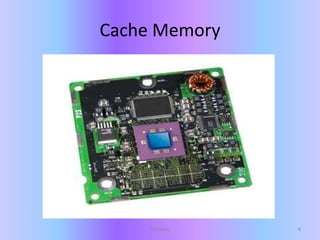
Cache Memory
• Cache memory is a very high speed
semiconductor memory which can speed up
CPU. It acts as a buffer between the CPU and
main memory. It is used to hold those parts of
data and program which are most frequently
used by CPU. The parts of data and programs
are transferred from disk to cache memory by
operating system, from where CPU can access
them.
5Memory
Cache Memory
Advantages
The advantages of cache memory
are as follows:
• Cache memory is faster than
main memory.
• It consumes less access time
as compared to main memory.
• It stores the program that can
be executed within a short
period of time.
• It stores data for temporary
use.
Disadvantages
The disadvantages of cache
memory are as follows:
• Cache memory has limited
capacity.
• It is very expensive.
6Memory
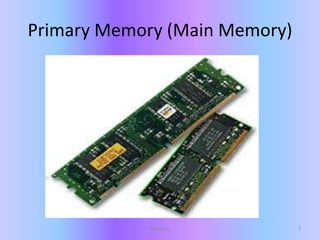
Primary Memory (Main Memory)
7Memory
Primary Memory (Main Memory)
• Primary memory holds only those data and
instructions on which computer is currently
working. It has limited capacity and data is lost
when power is switched off. It is generally
made up of semiconductor device. These
memories are not as fast as registers. The data
and instruction required to be processed
reside in main memory. It is divided into two
subcategories RAM and ROM.
8Memory
Characteristics of Main Memory
• These are semiconductor memories
• It is known as main memory.
• Usually volatile memory.
• Data is lost in case power is switched off.
• It is working memory of the computer.
• Faster than secondary memories.
• A computer cannot run without primary memory.
9Memory
Secondary Memory
10Memory
Secondary Memory
• This type of memory is also known as external
memory or non-volatile. It is slower than main
memory. These are used for storing
data/Information permanently. CPU directly
does not access these memories instead they
are accessed via input-output routines.
Contents of secondary memories are first
transferred to main memory, and then CPU
can access it. For example : disk, CD-ROM,
DVD etc
11Memory
Characteristic of Secondary Memory
• These are magnetic and optical memories
• It is known as backup memory.
• It is non-volatile memory.
• Data is permanently stored even if power is
switched off.
• It is used for storage of data in a computer.
• Computer may run without secondary memory.
• Slower than primary memories.
12Memory
Memory 13

Basic information about Computer memory

  • 1.
    Presentation on Memory LastBenchers 1. Manoj 2. Leeladhar 3. Surendra 4. Deepak 5. Ramesh 1Memory
  • 2.
    Memory • A memoryis just like a human brain. It is used to store data and instructions. Computer memory is the storage space in computer where data is to be processed and instructions required for processing are stored. The memory is divided into large number of small parts called cells. Each location or cell has a unique address which varies from zero to memory size minus one. For example if computer has 64k words, then this memory unit has 64 * 1024=65536 memory locations. The address of these locations varies from 0 to 65535. 2Memory
  • 3.
    Memory is primarilyof three types • Cache Memory • Primary Memory/Main Memory • Secondary Memory 3Memory
  • 4.
  • 5.
    Cache Memory • Cachememory is a very high speed semiconductor memory which can speed up CPU. It acts as a buffer between the CPU and main memory. It is used to hold those parts of data and program which are most frequently used by CPU. The parts of data and programs are transferred from disk to cache memory by operating system, from where CPU can access them. 5Memory
  • 6.
    Cache Memory Advantages The advantagesof cache memory are as follows: • Cache memory is faster than main memory. • It consumes less access time as compared to main memory. • It stores the program that can be executed within a short period of time. • It stores data for temporary use. Disadvantages The disadvantages of cache memory are as follows: • Cache memory has limited capacity. • It is very expensive. 6Memory
  • 7.
    Primary Memory (MainMemory) 7Memory
  • 8.
    Primary Memory (MainMemory) • Primary memory holds only those data and instructions on which computer is currently working. It has limited capacity and data is lost when power is switched off. It is generally made up of semiconductor device. These memories are not as fast as registers. The data and instruction required to be processed reside in main memory. It is divided into two subcategories RAM and ROM. 8Memory
  • 9.
    Characteristics of MainMemory • These are semiconductor memories • It is known as main memory. • Usually volatile memory. • Data is lost in case power is switched off. • It is working memory of the computer. • Faster than secondary memories. • A computer cannot run without primary memory. 9Memory
  • 10.
  • 11.
    Secondary Memory • Thistype of memory is also known as external memory or non-volatile. It is slower than main memory. These are used for storing data/Information permanently. CPU directly does not access these memories instead they are accessed via input-output routines. Contents of secondary memories are first transferred to main memory, and then CPU can access it. For example : disk, CD-ROM, DVD etc 11Memory
  • 12.
    Characteristic of SecondaryMemory • These are magnetic and optical memories • It is known as backup memory. • It is non-volatile memory. • Data is permanently stored even if power is switched off. • It is used for storage of data in a computer. • Computer may run without secondary memory. • Slower than primary memories. 12Memory
  • 13.