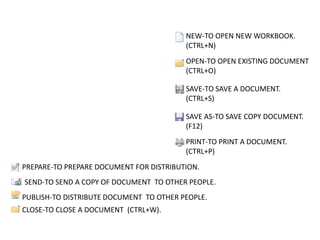
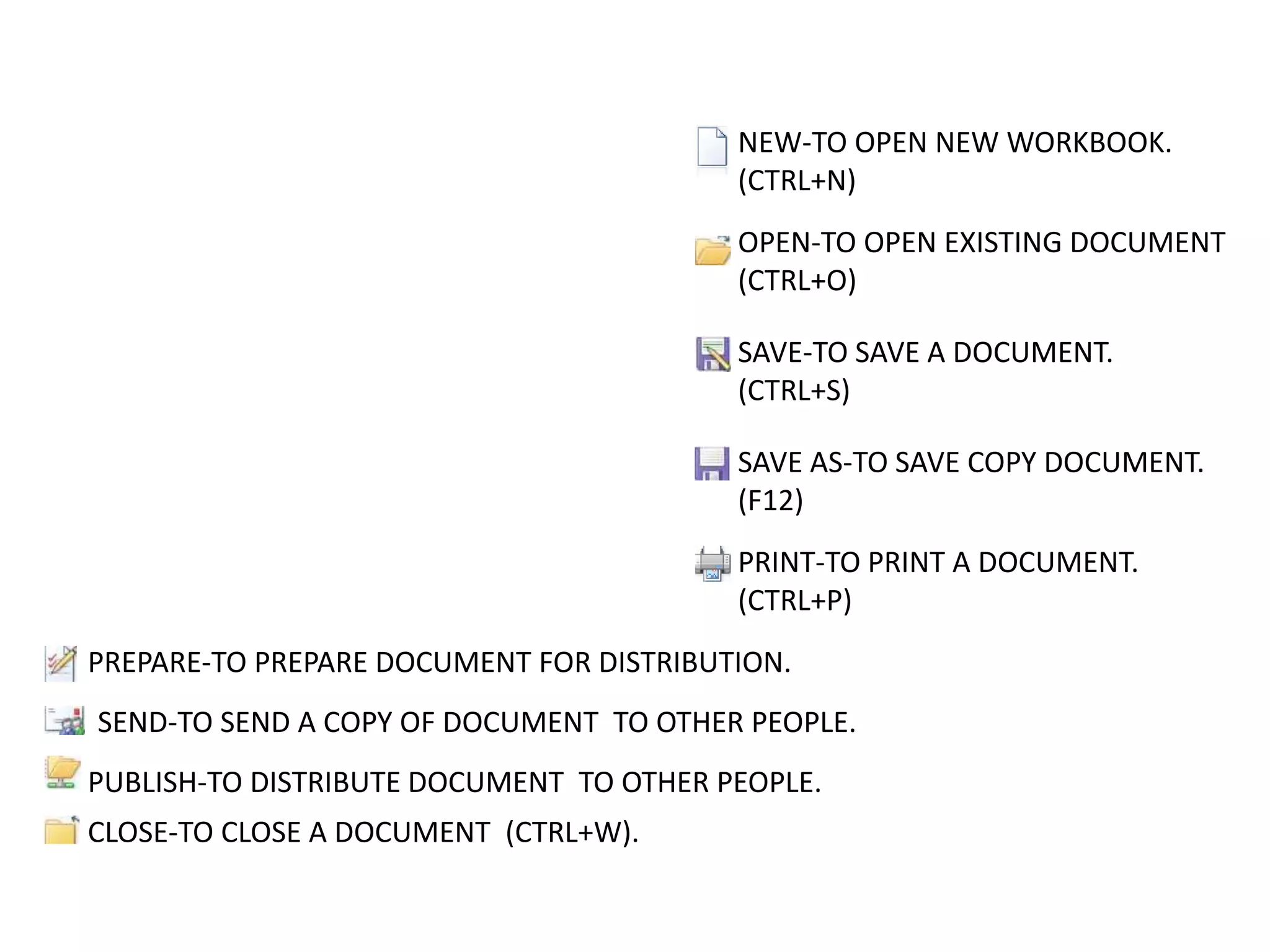
NEW-TO OPEN NEW WORKBOOK.
(CTRL+N)
OPEN-TO OPEN EXISTING DOCUMENT
(CTRL+O)
SAVE-TO SAVE A DOCUMENT.
(CTRL+S)
SAVE AS-TO SAVE COPY DOCUMENT.
(F12)
PRINT-TO PRINT A DOCUMENT.
(CTRL+P)
PREPARE-TO PREPARE DOCUMENT FOR DISTRIBUTION.
SEND-TO SEND A COPY OF DOCUMENT TO OTHER PEOPLE.
PUBLISH-TO DISTRIBUTE DOCUMENT TO OTHER PEOPLE.
CLOSE-TO CLOSE A DOCUMENT (CTRL+W).
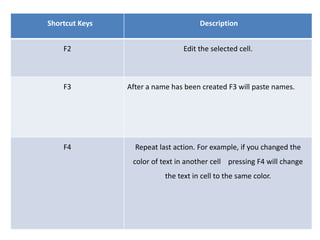
Shortcut Keys Description
F2 Edit the selected cell.
F3 After a name has been created F3 will paste names.
F4 Repeat last action. For example, if you changed the
color of text in another cell pressing F4 will change
the text in cell to the same color.
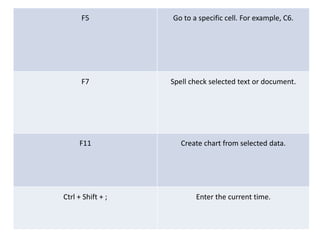
F5 Go to a specific cell. For example, C6.
F7 Spell check selected text or document.
F11 Create chart from selected data.
Ctrl + Shift + ; Enter the current time.
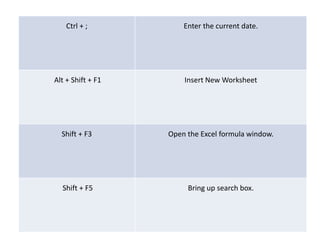
Ctrl + ; Enter the current date.
Alt + Shift + F1 Insert New Worksheet
Shift + F3 Open the Excel formula window.
Shift + F5 Bring up search box.
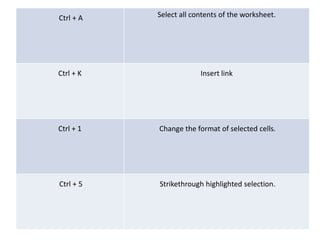
Ctrl + A Select all contents of the worksheet.
Ctrl + K Insert link
Ctrl + 1 Change the format of selected cells.
Ctrl + 5 Strikethrough highlighted selection.
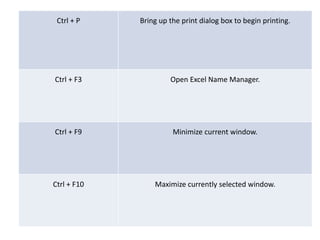
Ctrl + P Bring up the print dialog box to begin printing.
Ctrl + F3 Open Excel Name Manager.
Ctrl + F9 Minimize current window.
Ctrl + F10 Maximize currently selected window.
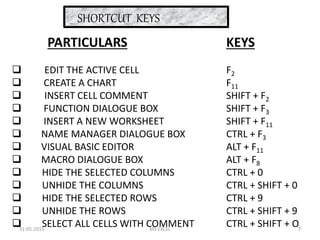
SHORTCUT KEYS
PARTICULARS
 EDIT THE ACTIVE CELL
 CREATE A CHART
 INSERT CELL COMMENT
 FUNCTION DIALOGUE BOX
 INSERT A NEW WORKSHEET
 NAME MANAGER DIALOGUE BOX
 VISUAL BASIC EDITOR
 MACRO DIALOGUE BOX
 HIDE THE SELECTED COLUMNS
 UNHIDE THE COLUMNS
 HIDE THE SELECTED ROWS
 UNHIDE THE ROWS
 SELECT ALL CELLS WITH COMMENT
KEYS
F2
F11
SHIFT + F2
SHIFT + F3
SHIFT + F11
CTRL + F3
ALT + F11
ALT + F8
CTRL + 0
CTRL + SHIFT + 0
CTRL + 9
CTRL + SHIFT + 9
CTRL + SHIFT + O31-05-2015 7MS EXCEL
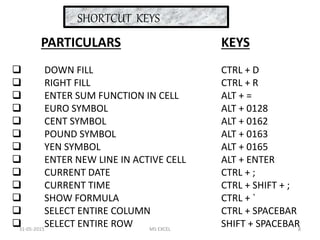
SHORTCUT KEYS
PARTICULARS
 DOWN FILL
 RIGHT FILL
 ENTER SUM FUNCTION IN CELL
 EURO SYMBOL
 CENT SYMBOL
 POUND SYMBOL
 YEN SYMBOL
 ENTER NEW LINE IN ACTIVE CELL
 CURRENT DATE
 CURRENT TIME
 SHOW FORMULA
 SELECT ENTIRE COLUMN
 SELECT ENTIRE ROW
KEYS
CTRL + D
CTRL + R
ALT + =
ALT + 0128
ALT + 0162
ALT + 0163
ALT + 0165
ALT + ENTER
CTRL + ;
CTRL + SHIFT + ;
CTRL + `
CTRL + SPACEBAR
SHIFT + SPACEBAR31-05-2015 8MS EXCEL
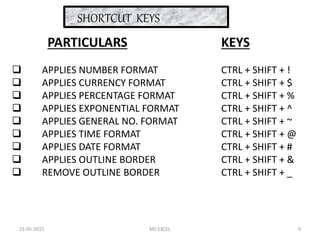
SHORTCUT KEYS
PARTICULARS
 APPLIES NUMBER FORMAT
 APPLIES CURRENCY FORMAT
 APPLIES PERCENTAGE FORMAT
 APPLIES EXPONENTIAL FORMAT
 APPLIES GENERAL NO. FORMAT
 APPLIES TIME FORMAT
 APPLIES DATE FORMAT
 APPLIES OUTLINE BORDER
 REMOVE OUTLINE BORDER
KEYS
CTRL + SHIFT + !
CTRL + SHIFT + $
CTRL + SHIFT + %
CTRL + SHIFT + ^
CTRL + SHIFT + ~
CTRL + SHIFT + @
CTRL + SHIFT + #
CTRL + SHIFT + &
CTRL + SHIFT + _
31-05-2015 9MS EXCEL
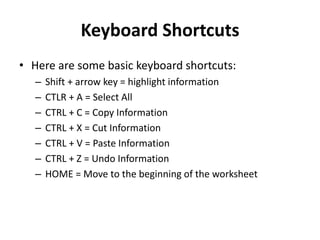
Keyboard Shortcuts
• Here are some basic keyboard shortcuts:
– Shift + arrow key = highlight information
– CTLR + A = Select All
– CTRL + C = Copy Information
– CTRL + X = Cut Information
– CTRL + V = Paste Information
– CTRL + Z = Undo Information
– HOME = Move to the beginning of the worksheet
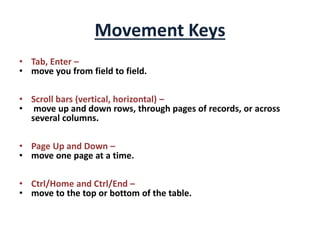
Movement Keys
• Tab, Enter –
• move you from field to field.
• Scroll bars (vertical, horizontal) –
• move up and down rows, through pages of records, or across
several columns.
• Page Up and Down –
• move one page at a time.
• Ctrl/Home and Ctrl/End –
• move to the top or bottom of the table.
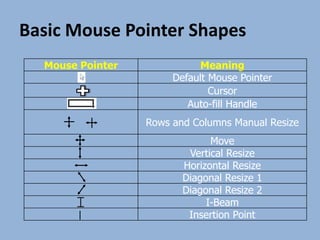
Basic Mouse Pointer Shapes
Mouse Pointer Meaning
Default Mouse Pointer
Cursor
Auto-fill Handle
Rows and Columns Manual Resize
Move
Vertical Resize
Horizontal Resize
Diagonal Resize 1
Diagonal Resize 2
I-Beam
Insertion Point
• Copy(Ctrl + C)
• Paste(Ctrl + V)
• Cut (Ctrl +X)
• Undo(Ctrl + Z) or Redo(Ctrl + Y)

Some Short cut keys of Computer

  • 1.
    NEW-TO OPEN NEWWORKBOOK. (CTRL+N) OPEN-TO OPEN EXISTING DOCUMENT (CTRL+O) SAVE-TO SAVE A DOCUMENT. (CTRL+S) SAVE AS-TO SAVE COPY DOCUMENT. (F12) PRINT-TO PRINT A DOCUMENT. (CTRL+P) PREPARE-TO PREPARE DOCUMENT FOR DISTRIBUTION. SEND-TO SEND A COPY OF DOCUMENT TO OTHER PEOPLE. PUBLISH-TO DISTRIBUTE DOCUMENT TO OTHER PEOPLE. CLOSE-TO CLOSE A DOCUMENT (CTRL+W).
  • 2.
    Shortcut Keys Description F2Edit the selected cell. F3 After a name has been created F3 will paste names. F4 Repeat last action. For example, if you changed the color of text in another cell pressing F4 will change the text in cell to the same color.
  • 3.
    F5 Go toa specific cell. For example, C6. F7 Spell check selected text or document. F11 Create chart from selected data. Ctrl + Shift + ; Enter the current time.
  • 4.
    Ctrl + ;Enter the current date. Alt + Shift + F1 Insert New Worksheet Shift + F3 Open the Excel formula window. Shift + F5 Bring up search box.
  • 5.
    Ctrl + ASelect all contents of the worksheet. Ctrl + K Insert link Ctrl + 1 Change the format of selected cells. Ctrl + 5 Strikethrough highlighted selection.
  • 6.
    Ctrl + PBring up the print dialog box to begin printing. Ctrl + F3 Open Excel Name Manager. Ctrl + F9 Minimize current window. Ctrl + F10 Maximize currently selected window.
  • 7.
    SHORTCUT KEYS PARTICULARS  EDITTHE ACTIVE CELL  CREATE A CHART  INSERT CELL COMMENT  FUNCTION DIALOGUE BOX  INSERT A NEW WORKSHEET  NAME MANAGER DIALOGUE BOX  VISUAL BASIC EDITOR  MACRO DIALOGUE BOX  HIDE THE SELECTED COLUMNS  UNHIDE THE COLUMNS  HIDE THE SELECTED ROWS  UNHIDE THE ROWS  SELECT ALL CELLS WITH COMMENT KEYS F2 F11 SHIFT + F2 SHIFT + F3 SHIFT + F11 CTRL + F3 ALT + F11 ALT + F8 CTRL + 0 CTRL + SHIFT + 0 CTRL + 9 CTRL + SHIFT + 9 CTRL + SHIFT + O31-05-2015 7MS EXCEL
  • 8.
    SHORTCUT KEYS PARTICULARS  DOWNFILL  RIGHT FILL  ENTER SUM FUNCTION IN CELL  EURO SYMBOL  CENT SYMBOL  POUND SYMBOL  YEN SYMBOL  ENTER NEW LINE IN ACTIVE CELL  CURRENT DATE  CURRENT TIME  SHOW FORMULA  SELECT ENTIRE COLUMN  SELECT ENTIRE ROW KEYS CTRL + D CTRL + R ALT + = ALT + 0128 ALT + 0162 ALT + 0163 ALT + 0165 ALT + ENTER CTRL + ; CTRL + SHIFT + ; CTRL + ` CTRL + SPACEBAR SHIFT + SPACEBAR31-05-2015 8MS EXCEL
  • 9.
    SHORTCUT KEYS PARTICULARS  APPLIESNUMBER FORMAT  APPLIES CURRENCY FORMAT  APPLIES PERCENTAGE FORMAT  APPLIES EXPONENTIAL FORMAT  APPLIES GENERAL NO. FORMAT  APPLIES TIME FORMAT  APPLIES DATE FORMAT  APPLIES OUTLINE BORDER  REMOVE OUTLINE BORDER KEYS CTRL + SHIFT + ! CTRL + SHIFT + $ CTRL + SHIFT + % CTRL + SHIFT + ^ CTRL + SHIFT + ~ CTRL + SHIFT + @ CTRL + SHIFT + # CTRL + SHIFT + & CTRL + SHIFT + _ 31-05-2015 9MS EXCEL
  • 10.
    Keyboard Shortcuts • Hereare some basic keyboard shortcuts: – Shift + arrow key = highlight information – CTLR + A = Select All – CTRL + C = Copy Information – CTRL + X = Cut Information – CTRL + V = Paste Information – CTRL + Z = Undo Information – HOME = Move to the beginning of the worksheet
  • 11.
    Movement Keys • Tab,Enter – • move you from field to field. • Scroll bars (vertical, horizontal) – • move up and down rows, through pages of records, or across several columns. • Page Up and Down – • move one page at a time. • Ctrl/Home and Ctrl/End – • move to the top or bottom of the table.
  • 12.
    Basic Mouse PointerShapes Mouse Pointer Meaning Default Mouse Pointer Cursor Auto-fill Handle Rows and Columns Manual Resize Move Vertical Resize Horizontal Resize Diagonal Resize 1 Diagonal Resize 2 I-Beam Insertion Point
  • 13.
    • Copy(Ctrl +C) • Paste(Ctrl + V) • Cut (Ctrl +X) • Undo(Ctrl + Z) or Redo(Ctrl + Y)