
Kurt Wollenberg, PhD
Phylogenetics Specialist
Bioinformatics and Computational Biology Branch (BCBB)
Phylogenetics and Sequence Analysis
Lecture 7: Molecular Evolutionary Analysis
of Pathogens Using BEAST
Fall 2015
Kurt Wollenberg, PhD
Phylogenetics Specialist
Bioinformatics and Computational Biology Branch (BCBB)
Course Organization
• Building a clean sequence
• Collecting homologs
• Aligning your sequences
• Building trees
• Further Analysis
Lecture Organization
• What’s so special about pathogens?
• What is BEAST?
• A short tour of Bayesian MCMC analysis
• An overview of the BEAST package
•BEAST Analysis Demo
• Odds and ends
What’s so special about pathogens?
• Short generation time
• Rapid evolution
• Genotypes - easy, phenotypes - hard
• Large populations
• Structured populations
• Rigorous temporal sampling of genotypes
What is BEAST?
• Bayesian Evolutionary Analysis Sampling Trees
• A collection of programs for performing Bayesian
MCMC analysis of molecular sequences
• Can incorporate sample time information
• Can perform a broad range of other evolutionary
analyses using sequence data.
What is Bayesian analysis?
• Calculation of the probability of
parameters (tree, substitution model)
given the data (sequence alignment)
• p(θ|D) = (Likelihood x prior)/probability of
the data
• p(θ|D) = p(D|θ)p(θ)/p(D)
What is Bayesian analysis?
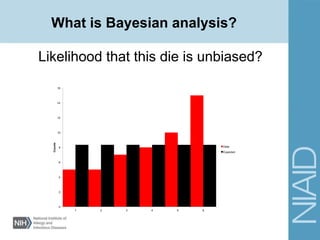
Likelihood that this die is unbiased?
0
2
4
6
8
10
12
14
16
1 2 3 4 5 6
Counts
Data
Expected
Exploring the posterior probability distribution
Posterior probabilities of trees and
parameters are approximated using Markov
Chain Monte Carlo (MCMC) sampling
Markov Chain: A statement of the probability
of moving from one state to another
Bayesian Analysis
What is MCMC?
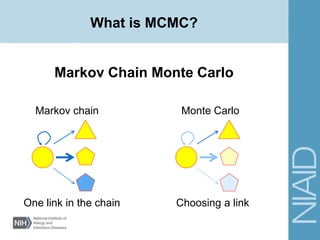
Markov Chain Monte Carlo
Markov chain Monte Carlo
One link in the chain Choosing a link
What is MCMC?
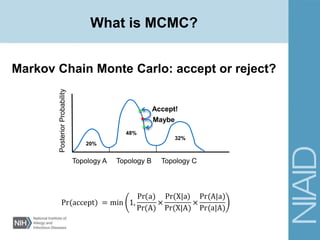
Markov Chain Monte Carlo: accept or reject?
PosteriorProbability
Topology A Topology B Topology C
20%
48%
32%
Accept!
Maybe
What is BEAST?
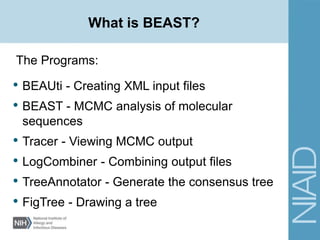
The Programs:
• BEAUti - Creating XML input files
• BEAST - MCMC analysis of molecular
sequences
• Tracer - Viewing MCMC output
• LogCombiner - Combining output files
• TreeAnnotator - Generate the consensus tree
• FigTree - Drawing a tree
Different types of BEAST analyses
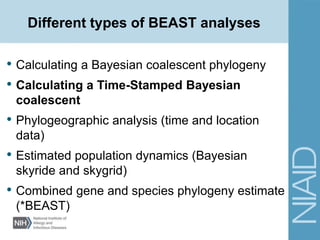
• Calculating a Bayesian coalescent phylogeny
• Calculating a Time-Stamped Bayesian
coalescent
• Phylogeographic analysis (time and location
data)
• Estimated population dynamics (Bayesian
skyride and skygrid)
• Combined gene and species phylogeny estimate
(*BEAST)
Defining your analysis
• Prior knowledge of tree?
• Calibrating nodes?
• Substitution model?
• Effective population sizes?
• What priors to use?
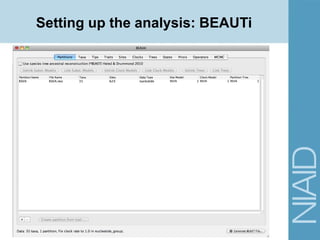
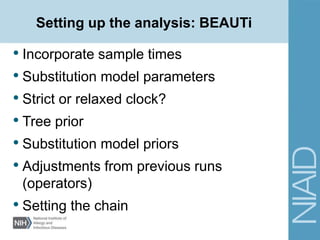
Setting up the analysis: BEAUTi
• Incorporate sample times
• Substitution model parameters
• Strict or relaxed clock?
• Tree prior
• Substitution model priors
• Adjustments from previous runs
(operators)
• Setting the chain
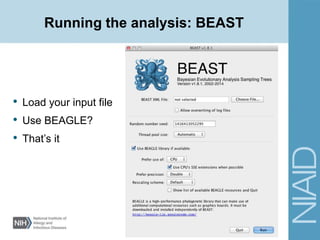
Running the analysis: BEAST
• Load your input file
• Use BEAGLE?
• That’s it
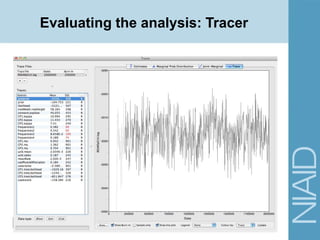
Evaluating the analysis: Tracer
• Check for convergence
• Viewing parameter estimates from multiple
runs
• Extract parameter estimates and statistics
Evaluating the analysis: Tracer
• What if my analysis didn’t converge?
• Can I make multiple simultaneous runs?
• Swarm on Biowulf
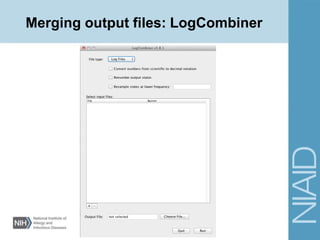
Merging output files: LogCombiner
• Log files vs Tree files
• Selecting files
• Specifying burn-in (number of states)
• Specifying subsampling
• Specifying output file
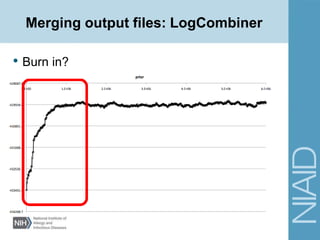
Merging output files: LogCombiner
• Burn in?
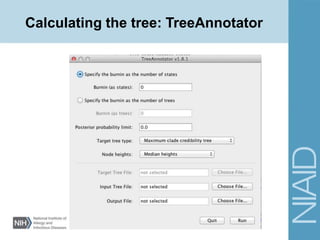
Calculating the tree: TreeAnnotator
• Burn in? Number of trees or the number of
steps.
• Tree Type: MCC, Max sum of CC, or target
• Node heights: target, mean, or median
• Specify input and output files
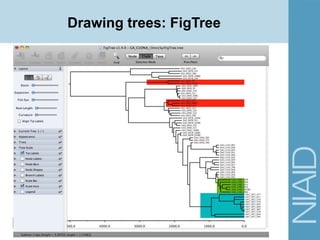
Drawing trees: FigTree
• Specifying additional values (esp. posterior
probabilities)
• Tree appearance
• Ordering branches
• Re-rooting
• Exporting graphics
Running BEAST
DEMO
Running BEAST: Demo
• Site Models
• Substitution Models
• HKY - Unequal base frequencies and
transition/transversion rate ratio
• Must specify prior and initial estimates for
transition/transversion rate ratio
• GTR - Unequal base frequencies and each
substitution has its own rate parameter
• Must specify prior and initial estimates for each
substitution rate (relative to C-T rate)
Running BEAST: Demo
• Site Models
• Substitution models
• Site heterogeneity models
• Get estimates from the program jModelTest
Model selected: TVM+I+G
-lnL = 1676.8109
K = 9
AIC = 3371.6218
Base frequencies:
freqA = 0.2259
freqC = 0.3199
freqG = 0.2405
freqT = 0.2137
Substitution model:
Rate matrix
R(a) [A-C] = 0.2494
R(b) [A-G] = 4.8655
R(c) [A-T] = 0.7435
R(d) [C-G] = 0.3907
R(e) [C-T] = 4.8655
R(f) [G-T] = 1.0000
Among-site rate variation
Proportion of invariable sites (I) = 0.6508
Variable sites (G)
Gamma distribution shape parameter = 0.5913
Running BEAST: Demo
Site Models
• Site heterogeneity models
• Gamma
• Modeling rate of change using a discrete
gamma distribution
• Invariant
• Percent of non-variable sites in the data
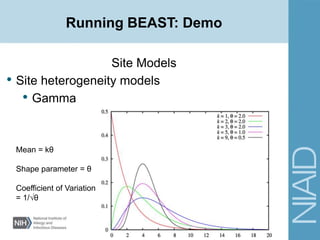
Running BEAST: Demo
Site Models
• Site heterogeneity models
• Gamma
Mean = kθ
Shape parameter = θ
Coefficient of Variation
= 1/√θ
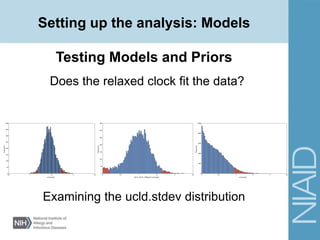
Setting up the analysis: Models
Testing Models and Priors
Does the relaxed clock fit the data?
ucld.stdev
Frequency
0.5 1 1.5 2 2.5
0
50
100
150
200
250
300
350
400
2014_GN.SL_SRDpart1.ucld.stdev
Frequency
0 0.5 1 1.5 2 2.5 3
0
50
100
150
200
250
300
350
ucld.stdev
Frequency
0 0.5 1 1.5 2 2.5 3
0
500
1000
1500
2000
2500
Examining the ucld.stdev distribution
Running BEAST
Testing Models and Priors
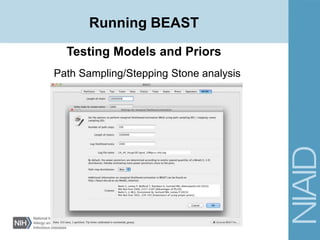
Path Sampling/Stepping Stone analysis
• Estimation of marginal likelihoods under different
analysis parameters.
• Invoke on MCMC tab in BEAUti.
• Separate runs necessary for each changed parameter.
• Runs a complete MCMC analysis, then the X PS/SS
iterations.
Testing Models and Priors
Path Sampling/Stepping Stone analysis
Running BEAST
Testing Models and Priors
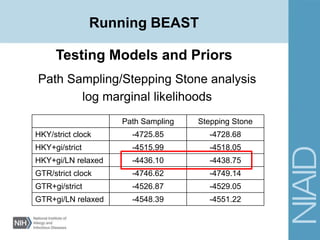
Path Sampling/Stepping Stone analysis
log marginal likelihoods
Path Sampling Stepping Stone
HKY/strict clock -4725.85 -4728.68
HKY+gi/strict -4515.99 -4518.05
HKY+gi/LN relaxed -4436.10 -4438.75
GTR/strict clock -4746.62 -4749.14
GTR+gi/strict -4526.87 -4529.05
GTR+gi/LN relaxed -4548.39 -4551.22
Running BEAST
Running BEAST: swarm on Biowulf
• Requires a .swarm file
• A text file containing
• Run in command line
beast beastJob_1.xml > beastJob_1out.txt
sleep 2; beast beastJob_2.xml > beastJob_2out.txt
sleep 4; beast beastJob_3.xml > beastJob_3out.txt
sleep 6; beast beastJob_4.xml > beastJob_4out.txt
sleep 8; beast beastJob_5.xml > beastJob_5out.txt
[username]$ swarm -f beastInput.swarm –module BEAST
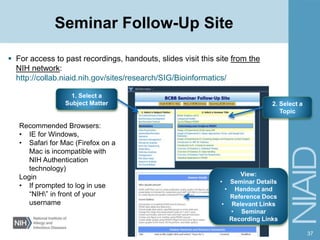
Seminar Follow-Up Site
 For access to past recordings, handouts, slides visit this site from the
NIH network:
http://collab.niaid.nih.gov/sites/research/SIG/Bioinformatics/
37
1. Select a
Subject Matter
View:
• Seminar Details
• Handout and
Reference Docs
• Relevant Links
• Seminar
Recording Links
2. Select a
Topic
Recommended Browsers:
• IE for Windows,
• Safari for Mac (Firefox on a
Mac is incompatible with
NIH Authentication
technology)
Login
• If prompted to log in use
“NIH” in front of your
username
38
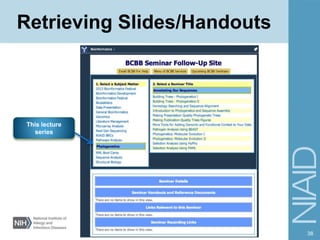
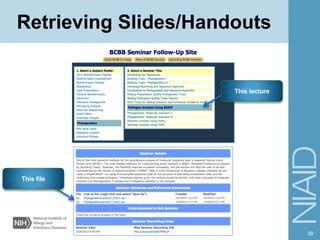
Retrieving Slides/Handouts
This lecture
series
39
Retrieving Slides/Handouts
This lecture
This file
40
Questions?
41

Pathogen phylogenetics using BEAST

  • 1.
    Kurt Wollenberg, PhD PhylogeneticsSpecialist Bioinformatics and Computational Biology Branch (BCBB) Phylogenetics and Sequence Analysis Lecture 7: Molecular Evolutionary Analysis of Pathogens Using BEAST Fall 2015 Kurt Wollenberg, PhD Phylogenetics Specialist Bioinformatics and Computational Biology Branch (BCBB)
  • 2.
    Course Organization • Buildinga clean sequence • Collecting homologs • Aligning your sequences • Building trees • Further Analysis
  • 3.
    Lecture Organization • What’sso special about pathogens? • What is BEAST? • A short tour of Bayesian MCMC analysis • An overview of the BEAST package •BEAST Analysis Demo • Odds and ends
  • 4.
    What’s so specialabout pathogens? • Short generation time • Rapid evolution • Genotypes - easy, phenotypes - hard • Large populations • Structured populations • Rigorous temporal sampling of genotypes
  • 5.
    What is BEAST? •Bayesian Evolutionary Analysis Sampling Trees • A collection of programs for performing Bayesian MCMC analysis of molecular sequences • Can incorporate sample time information • Can perform a broad range of other evolutionary analyses using sequence data.
  • 6.
    What is Bayesiananalysis? • Calculation of the probability of parameters (tree, substitution model) given the data (sequence alignment) • p(θ|D) = (Likelihood x prior)/probability of the data • p(θ|D) = p(D|θ)p(θ)/p(D)
  • 7.
    What is Bayesiananalysis? Likelihood that this die is unbiased? 0 2 4 6 8 10 12 14 16 1 2 3 4 5 6 Counts Data Expected
  • 8.
    Exploring the posteriorprobability distribution Posterior probabilities of trees and parameters are approximated using Markov Chain Monte Carlo (MCMC) sampling Markov Chain: A statement of the probability of moving from one state to another Bayesian Analysis
  • 9.
    What is MCMC? MarkovChain Monte Carlo Markov chain Monte Carlo One link in the chain Choosing a link
  • 10.
    What is MCMC? MarkovChain Monte Carlo: accept or reject? PosteriorProbability Topology A Topology B Topology C 20% 48% 32% Accept! Maybe
  • 11.
    What is BEAST? ThePrograms: • BEAUti - Creating XML input files • BEAST - MCMC analysis of molecular sequences • Tracer - Viewing MCMC output • LogCombiner - Combining output files • TreeAnnotator - Generate the consensus tree • FigTree - Drawing a tree
  • 12.
    Different types ofBEAST analyses • Calculating a Bayesian coalescent phylogeny • Calculating a Time-Stamped Bayesian coalescent • Phylogeographic analysis (time and location data) • Estimated population dynamics (Bayesian skyride and skygrid) • Combined gene and species phylogeny estimate (*BEAST)
  • 13.
    Defining your analysis •Prior knowledge of tree? • Calibrating nodes? • Substitution model? • Effective population sizes? • What priors to use?
  • 14.
    Setting up theanalysis: BEAUTi
  • 15.
    Setting up theanalysis: BEAUTi • Incorporate sample times • Substitution model parameters • Strict or relaxed clock? • Tree prior • Substitution model priors • Adjustments from previous runs (operators) • Setting the chain
  • 16.
    Running the analysis:BEAST • Load your input file • Use BEAGLE? • That’s it
  • 17.
  • 18.
    Evaluating the analysis:Tracer • Check for convergence • Viewing parameter estimates from multiple runs • Extract parameter estimates and statistics
  • 19.
    Evaluating the analysis:Tracer • What if my analysis didn’t converge? • Can I make multiple simultaneous runs? • Swarm on Biowulf
  • 20.
  • 21.
    Merging output files:LogCombiner • Log files vs Tree files • Selecting files • Specifying burn-in (number of states) • Specifying subsampling • Specifying output file
  • 22.
    Merging output files:LogCombiner • Burn in?
  • 23.
    Calculating the tree:TreeAnnotator
  • 24.
    Calculating the tree:TreeAnnotator • Burn in? Number of trees or the number of steps. • Tree Type: MCC, Max sum of CC, or target • Node heights: target, mean, or median • Specify input and output files
  • 25.
  • 26.
    Drawing trees: FigTree •Specifying additional values (esp. posterior probabilities) • Tree appearance • Ordering branches • Re-rooting • Exporting graphics
  • 27.
  • 28.
    Running BEAST: Demo •Site Models • Substitution Models • HKY - Unequal base frequencies and transition/transversion rate ratio • Must specify prior and initial estimates for transition/transversion rate ratio • GTR - Unequal base frequencies and each substitution has its own rate parameter • Must specify prior and initial estimates for each substitution rate (relative to C-T rate)
  • 29.
    Running BEAST: Demo •Site Models • Substitution models • Site heterogeneity models • Get estimates from the program jModelTest Model selected: TVM+I+G -lnL = 1676.8109 K = 9 AIC = 3371.6218 Base frequencies: freqA = 0.2259 freqC = 0.3199 freqG = 0.2405 freqT = 0.2137 Substitution model: Rate matrix R(a) [A-C] = 0.2494 R(b) [A-G] = 4.8655 R(c) [A-T] = 0.7435 R(d) [C-G] = 0.3907 R(e) [C-T] = 4.8655 R(f) [G-T] = 1.0000 Among-site rate variation Proportion of invariable sites (I) = 0.6508 Variable sites (G) Gamma distribution shape parameter = 0.5913
  • 30.
    Running BEAST: Demo SiteModels • Site heterogeneity models • Gamma • Modeling rate of change using a discrete gamma distribution • Invariant • Percent of non-variable sites in the data
  • 31.
    Running BEAST: Demo SiteModels • Site heterogeneity models • Gamma Mean = kθ Shape parameter = θ Coefficient of Variation = 1/√θ
  • 32.
    Setting up theanalysis: Models Testing Models and Priors Does the relaxed clock fit the data? ucld.stdev Frequency 0.5 1 1.5 2 2.5 0 50 100 150 200 250 300 350 400 2014_GN.SL_SRDpart1.ucld.stdev Frequency 0 0.5 1 1.5 2 2.5 3 0 50 100 150 200 250 300 350 ucld.stdev Frequency 0 0.5 1 1.5 2 2.5 3 0 500 1000 1500 2000 2500 Examining the ucld.stdev distribution
  • 33.
    Running BEAST Testing Modelsand Priors Path Sampling/Stepping Stone analysis • Estimation of marginal likelihoods under different analysis parameters. • Invoke on MCMC tab in BEAUti. • Separate runs necessary for each changed parameter. • Runs a complete MCMC analysis, then the X PS/SS iterations.
  • 34.
    Testing Models andPriors Path Sampling/Stepping Stone analysis Running BEAST
  • 35.
    Testing Models andPriors Path Sampling/Stepping Stone analysis log marginal likelihoods Path Sampling Stepping Stone HKY/strict clock -4725.85 -4728.68 HKY+gi/strict -4515.99 -4518.05 HKY+gi/LN relaxed -4436.10 -4438.75 GTR/strict clock -4746.62 -4749.14 GTR+gi/strict -4526.87 -4529.05 GTR+gi/LN relaxed -4548.39 -4551.22 Running BEAST
  • 36.
    Running BEAST: swarmon Biowulf • Requires a .swarm file • A text file containing • Run in command line beast beastJob_1.xml > beastJob_1out.txt sleep 2; beast beastJob_2.xml > beastJob_2out.txt sleep 4; beast beastJob_3.xml > beastJob_3out.txt sleep 6; beast beastJob_4.xml > beastJob_4out.txt sleep 8; beast beastJob_5.xml > beastJob_5out.txt [username]$ swarm -f beastInput.swarm –module BEAST
  • 37.
    Seminar Follow-Up Site For access to past recordings, handouts, slides visit this site from the NIH network: http://collab.niaid.nih.gov/sites/research/SIG/Bioinformatics/ 37 1. Select a Subject Matter View: • Seminar Details • Handout and Reference Docs • Relevant Links • Seminar Recording Links 2. Select a Topic Recommended Browsers: • IE for Windows, • Safari for Mac (Firefox on a Mac is incompatible with NIH Authentication technology) Login • If prompted to log in use “NIH” in front of your username
  • 38.
  • 39.
  • 40.
  • 41.

Editor's Notes

  • #7 Posterior = (“likelihood” x prior)/pr(data)
  • #8 50 trials, counts are 5, 5, 7, 8, 10, 15. Knowing this what is p, the probability of a certain roll? Is p uniform for all outcomes? Is a uniform distribution a good fit for this die?
  • #11 Points along trace are particular branch lengths for that topology. Area under curve is posterior of that topology. Pr(accept) = min(1, prior ratio x likelihood ratio x proposal/Hastings ratio)
  • #32 Small values of alpha give exp-type distribution. Large alpha more “normal”.