Object Oriented Analysis &
Design
Sequence Diagram and collaboration diagram
Instructor: Ms farwa taimoor
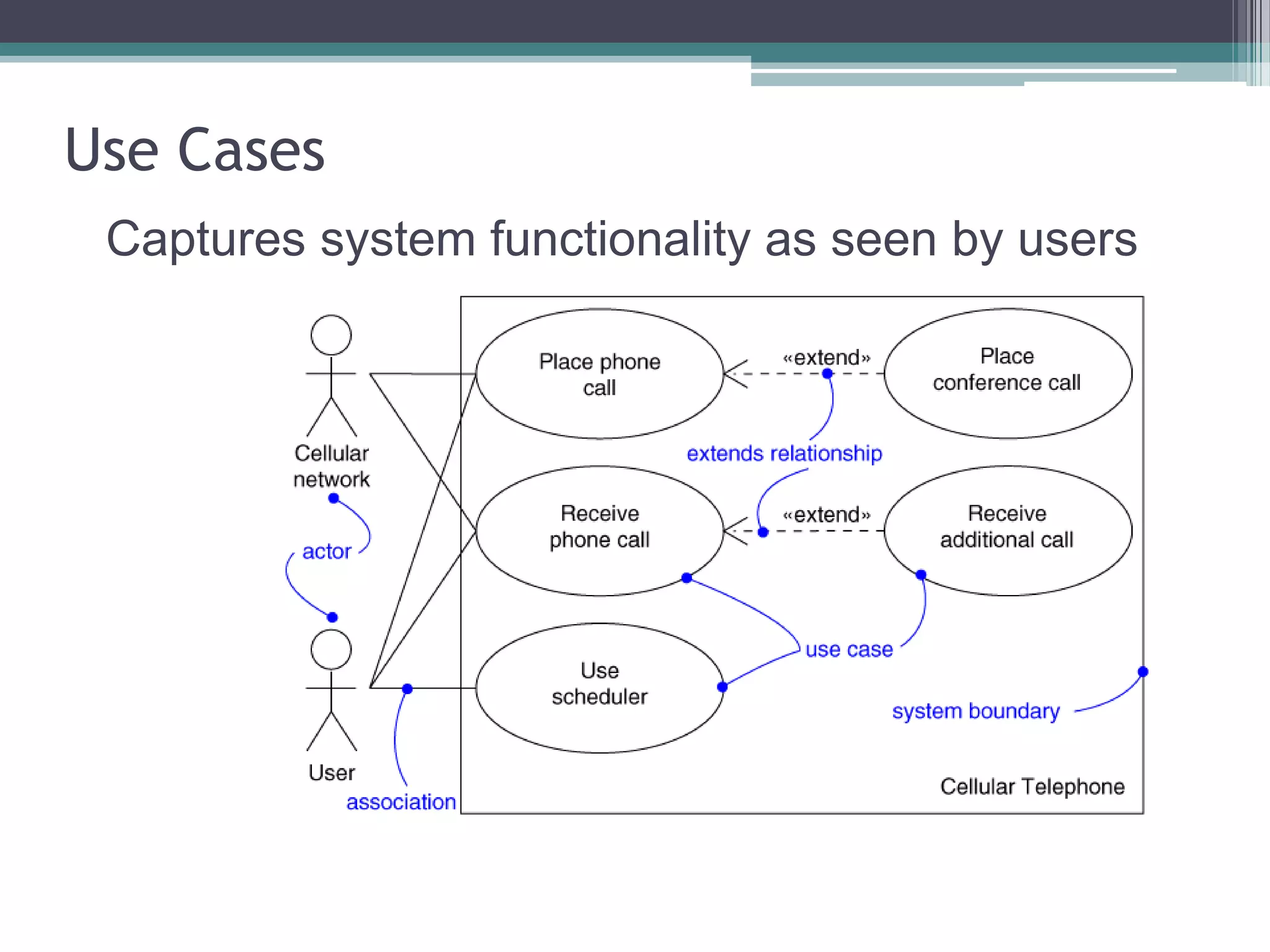
Use Cases
Captures system functionality as seen by users
Use Case Diagram
• Captures system functionality as seen by users
• Built in early stages of development
• Purpose
▫ Specify the context of a system
▫ Capture the requirements of a system
▫ Validate a system’s architecture
▫ Drive implementation and generate test cases
• Developed by analysts and domain experts
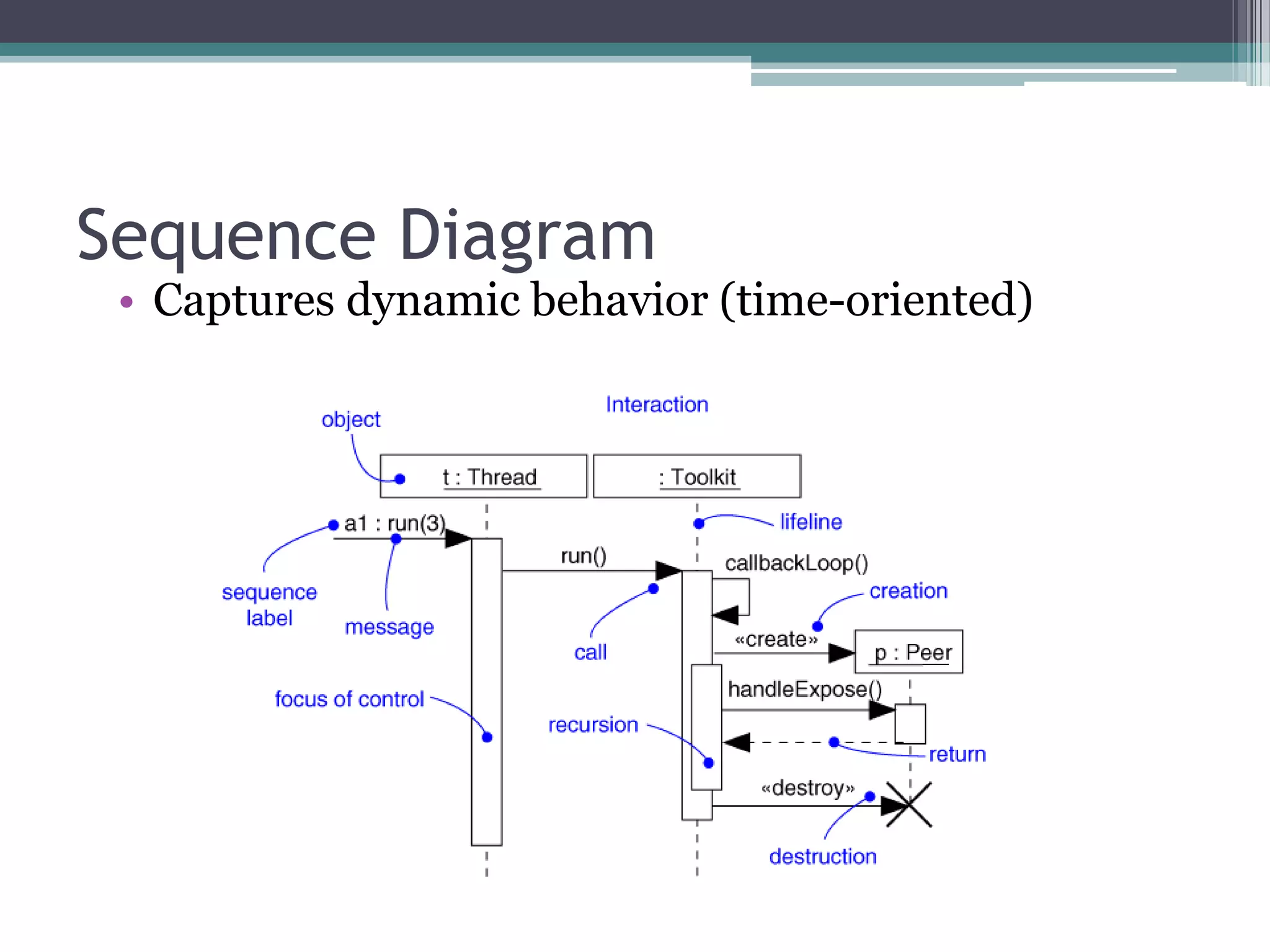
Sequence Diagram
• Captures dynamic behavior (time-oriented)
Sequence Diagram
• Captures dynamic behavior (time-oriented)
• Purpose
▫ Model flow of control
▫ Illustrate typical scenarios
Sequence Diagrams
A sequence diagram shows an interaction
▫ arranged in time sequence
▫ the objects (not the classes)
▫ the messages that pass between them
when an interaction occurs
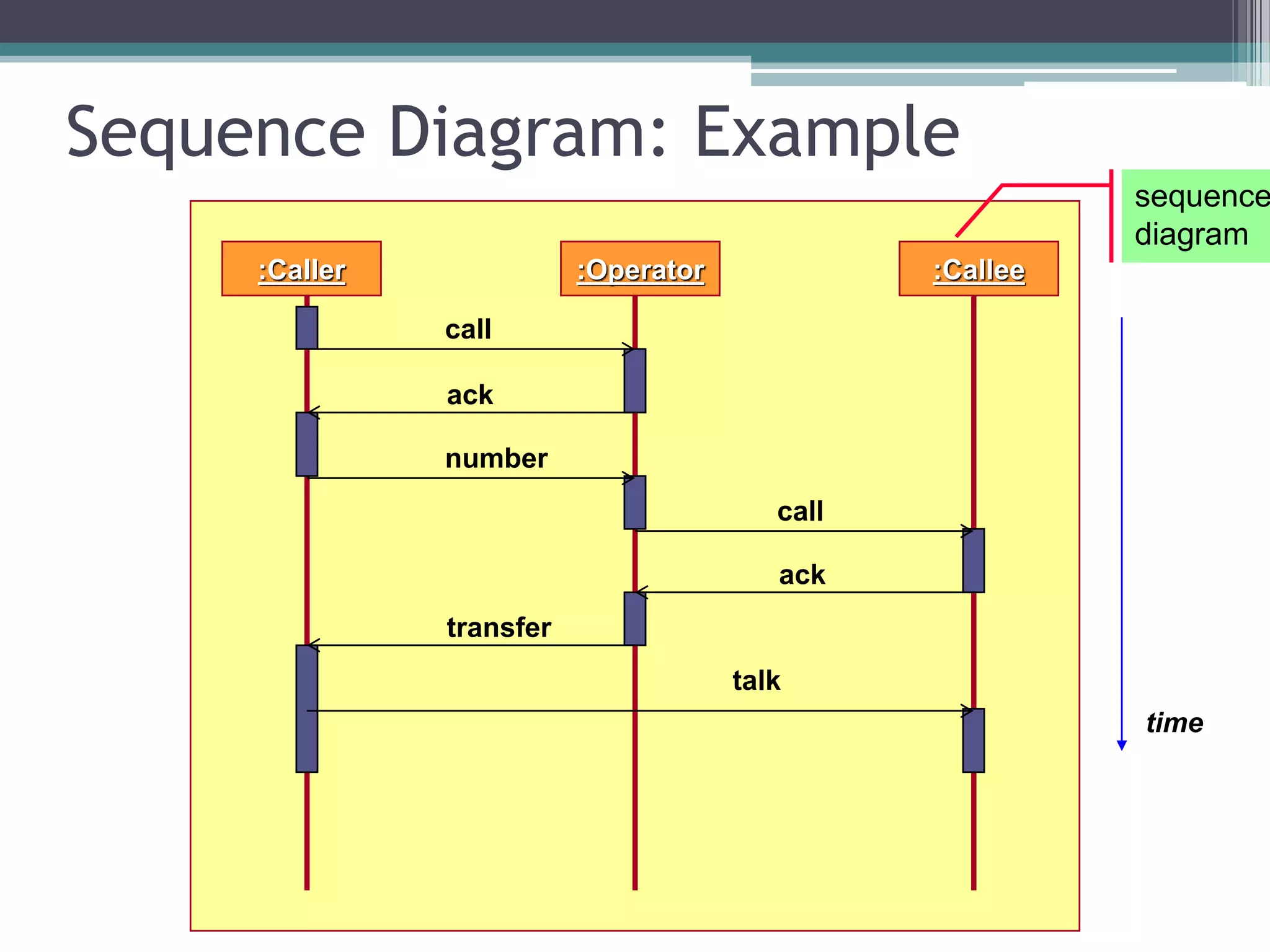
Sequence Diagram: Example
:Caller :Operator :Callee
time
call
ack
number
call
ack
talk
transfer
sequence
diagram
Sequence Diagram
• Objects are shown in rectangles on the top of the
diagrams
• Each rectangle contains
▫ Name (always underlined)
[objects are underlined not class]
objectName:className
Sequence Diagram
objectName:className
•Below each object rectangle,
shown with a dotted line, is the
LIFELINE, of that object.
•A time-ordered visual
framework for message
exchange between the objects
(and with the system)
Sequence Diagram
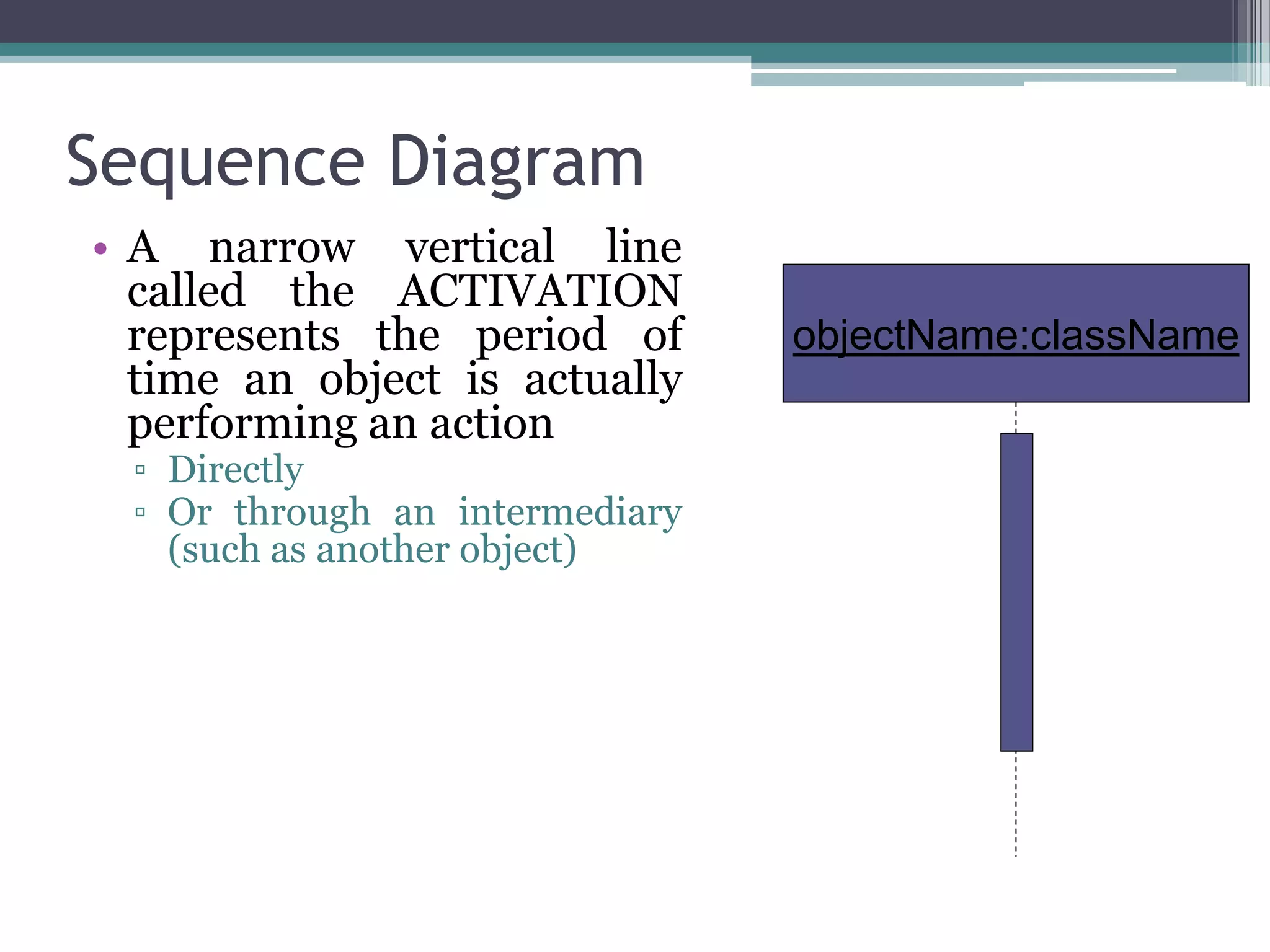
• A narrow vertical line
called the ACTIVATION
represents the period of
time an object is actually
performing an action
▫ Directly
▫ Or through an intermediary
(such as another object)
objectName:className
Sequence Diagram
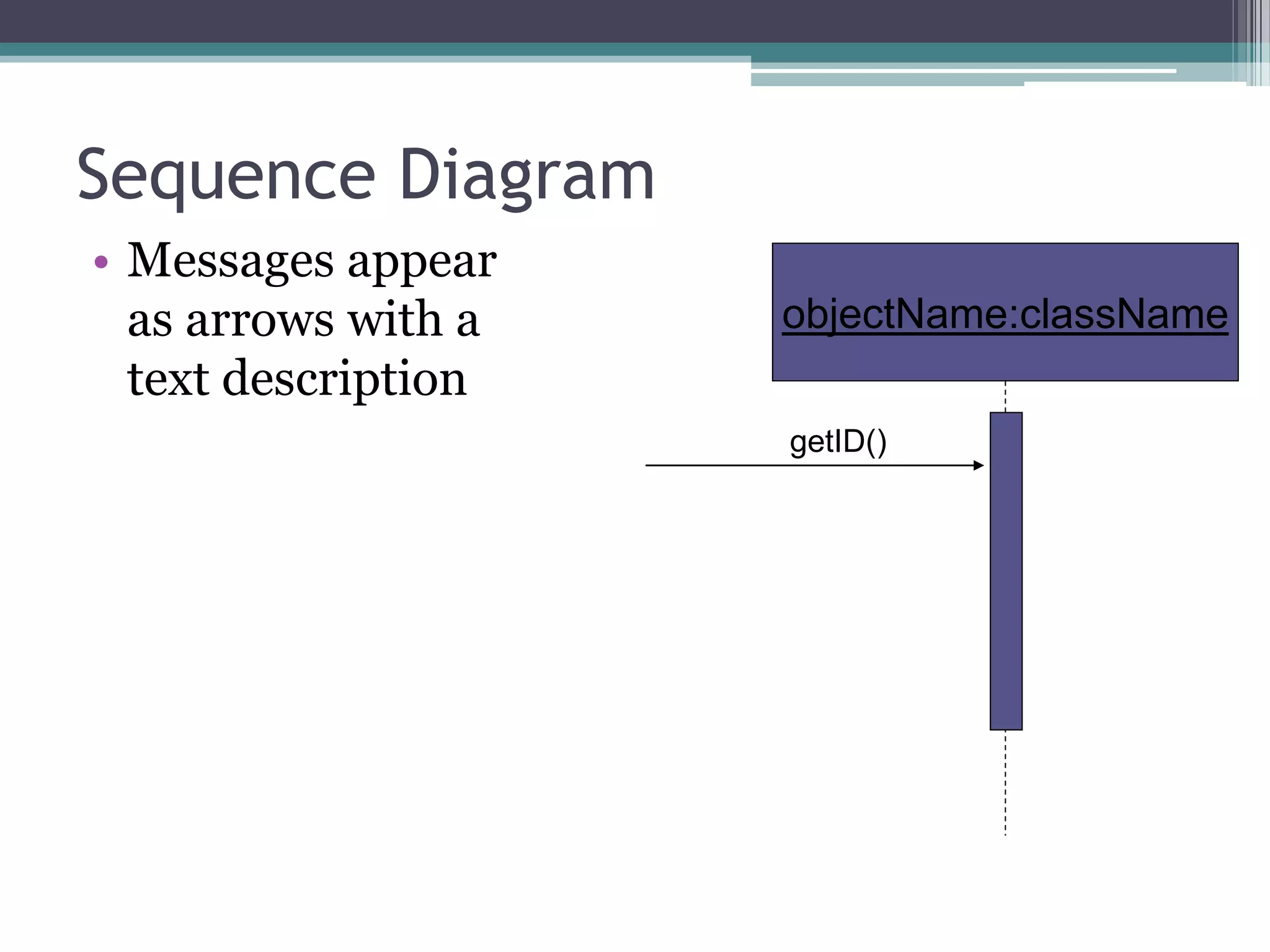
• Messages appear
as arrows with a
text description
objectName:className
getID()
Message Types
• Simple Message
▫ Control is passed from one object to another without
providing details
• Synchronous Message
▫ The sending object pause to wait for a result
• Asynchronous Message
▫ The sending object does not pause to wait for the result
• Return Message
▫ This message indicates a return from a procedure call
Message Types
Asynchronous Message
Return Message
Synchronous Message
Simple Message
Collaboration Diagrams
Dynamic Behaviour
Collaboration Diagram
• The second interaction diagram is collaboration
diagram. It shows the object organization as shown
below. Here in collaboration diagram the method call
sequence is indicated by some numbering technique as
shown below. The number indicates how the methods
are called one after another. We have taken the same
order management system to describe the collaboration
diagram.
Collaboration Diagram(Cont..)
• The method calls are similar to that of a sequence
diagram. But the difference is that the sequence diagram
does not describe the object organization where as the
collaboration diagram shows the object organization.
• Now to choose between these two diagrams the main
emphasis is given on the type of requirement. If the time
sequence is important then sequence diagram is used
and if organization is required then collaboration
diagram is used.
Example

Ooad sequence diagram_collaboration diagram

  • 1.
    Object Oriented Analysis& Design Sequence Diagram and collaboration diagram Instructor: Ms farwa taimoor
  • 2.
    Use Cases Captures systemfunctionality as seen by users
  • 3.
    Use Case Diagram •Captures system functionality as seen by users • Built in early stages of development • Purpose ▫ Specify the context of a system ▫ Capture the requirements of a system ▫ Validate a system’s architecture ▫ Drive implementation and generate test cases • Developed by analysts and domain experts
  • 4.
    Sequence Diagram • Capturesdynamic behavior (time-oriented)
  • 5.
    Sequence Diagram • Capturesdynamic behavior (time-oriented) • Purpose ▫ Model flow of control ▫ Illustrate typical scenarios
  • 6.
    Sequence Diagrams A sequencediagram shows an interaction ▫ arranged in time sequence ▫ the objects (not the classes) ▫ the messages that pass between them when an interaction occurs
  • 7.
    Sequence Diagram: Example :Caller:Operator :Callee time call ack number call ack talk transfer sequence diagram
  • 8.
    Sequence Diagram • Objectsare shown in rectangles on the top of the diagrams • Each rectangle contains ▫ Name (always underlined) [objects are underlined not class] objectName:className
  • 9.
    Sequence Diagram objectName:className •Below eachobject rectangle, shown with a dotted line, is the LIFELINE, of that object. •A time-ordered visual framework for message exchange between the objects (and with the system)
  • 10.
    Sequence Diagram • Anarrow vertical line called the ACTIVATION represents the period of time an object is actually performing an action ▫ Directly ▫ Or through an intermediary (such as another object) objectName:className
  • 11.
    Sequence Diagram • Messagesappear as arrows with a text description objectName:className getID()
  • 12.
    Message Types • SimpleMessage ▫ Control is passed from one object to another without providing details • Synchronous Message ▫ The sending object pause to wait for a result • Asynchronous Message ▫ The sending object does not pause to wait for the result • Return Message ▫ This message indicates a return from a procedure call
  • 13.
    Message Types Asynchronous Message ReturnMessage Synchronous Message Simple Message
  • 14.
  • 15.
    Collaboration Diagram • Thesecond interaction diagram is collaboration diagram. It shows the object organization as shown below. Here in collaboration diagram the method call sequence is indicated by some numbering technique as shown below. The number indicates how the methods are called one after another. We have taken the same order management system to describe the collaboration diagram.
  • 16.
    Collaboration Diagram(Cont..) • Themethod calls are similar to that of a sequence diagram. But the difference is that the sequence diagram does not describe the object organization where as the collaboration diagram shows the object organization. • Now to choose between these two diagrams the main emphasis is given on the type of requirement. If the time sequence is important then sequence diagram is used and if organization is required then collaboration diagram is used.
  • 17.