Data and Functional Modeling

                                      Saranya.V
                                       AP/CSE,
 Sri Vidya College of Engineering & Technology,
                                  Virudhunagar
Introduction


• Data Modeling in software Engineering is the process
  of creating a data model by applying formal data
  model descriptions using data modeling techniques.

• Used to define and analyze data requirements needed
  to support the business processes of an organization.

• Data requirements are recorded as a Conceptual
  Model.

• Implementation of Conceptual model is called as
  logical model.
Uses of Data Modeling

• Manage data as a resource.

• For the integration of information systems

• For designing databases, data warehouses and
  data repositories.
Tasks in Data Modeling
• Application developer should know the fundamentals of data
  modeling in order to work effectively with Database
  Administrator(DBA).
   • Identify entity types

   • Identify attributes

   • Apply naming conventions

   • Identify relationships

   • Assign keys

   • Apply data model patterns

   • Normalize to reduce data redundancy

   • Denormalize to improve performance.
Entity/Relationship diagrams or a
  Complete Data Model

• Entity/Relationship Diagram(ER Diagram) is an abstract
  and conceptual representation of data.

• ER modeling is a database modeling method used to
  produce a type of conceptual schema or semantic data
  model of a system.

• Diagrams created by this process are called Entity
  Relationship Diagrams, ER diagrams or ERD’s
Entity and Entity sets
• Entity is an object that exists and is distinguishable from
  other objects.

• An Entity may be Concrete (a Person, book, etc) or
  Abstract (like bank account)

• An Entity Set is a Set of entities of the same type. (all
  persons having an account at a bank)

• Entity sets may not be a disjoint. (example Entity set
  Employee (all employees of a bank) and the entity set
  customer(all customers of the bank) may have members in
  common.
:
 Similarity between ERD and programming
language notation
• A Entity represented as a Set of Attributes.
   • Name , Street, city, id customer entity
• The domain of the attribute is the set of permitted values(ph
  number has minimum 7 to 10 digits)
• Every entity is described by a set of (attribute and value)
  pairs.
• Ex:
• Customer: Entity
{(name,priya),(id,1111),(street,North),(city,Chennai)
  }
• Entity set corresponds to the programming language
  type definition.
• Programming language variable corresponds to an entity
  in the ER model.
• Five entity sets:
   • Branch  set of all branches of a particular bank.
   • Customer set of all people having an account at
      the bank
   • Employee with attributes(name and ph num
      )
   • Account  set of all accounts created and
      maintained in the bank.
   • Transaction  set of all account transactions
Relationships and Relationship Sets

• Relationship is an association between several
  entities.
• Relationship set is a set of relationships of the same type.
   • A role of an Entity is the function it plays in a
      Relationship.
   • Relationship “Works for”              ordered pairs of
      “Employee” .
   • Attributes:
Employee  Entity Set
Attributes  Employee name, Employee phone-number
The phone be treated as an entity itself, with attributes phone
  number and location.
Mapping Constraints or Cardinality
• ER scheme may define certain constraints.
• Mapping Cardinalities: express the number of entities
  to which another entity can be associated via a
  relationship. A and B relationship must be:
• One to One: A is associated with at most one entity in
  B and B is associated with at must one entity in A.
• One to Many: A is associated with any number in B. An
  entity in B is associated with at most one entity in A.
• Many to One: An entity in A is associated with at most
  one entity in B. An entity in B is associated with any
  number in A.
• Many to Many: Entities in A and B are associated with
  any number from each other.
• Existence Dependency:       if the existence of entity X
  depends on the existence of entity Y then X is said to be
  existence Dependent on Y.
Entity Relationship Diagram:
• Graphical Representation:
• Rectangles: entity sets

• Ellipses: attributes

• Diamonds: relationship sets

• Lines: Linking attributes to entity sets to relationship
  sets.
One to One Entity Relationship


             1:1         1:1
                                 Register
   Student
                                  Num
One to Many Entity Relationship


           1:M

Football               Players
 Team
                 1:M
Many to One Entity Relationship


            M:1


customers               Bank
                  M:1
Many to Many Entity Relationship


            M:M


 Student                    Subject
                    M:M
Functional Model
 • Structures Representation of the functions or process
   within the subject area.

 • Also known as activity model or process model.

 • Graphical representation.

 • Used to describe the functions and processes.

 • Identify opportunities.
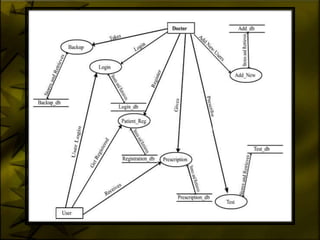
Data Flow Diagram
• Shows the flow of data through a system.

• Any complex system will not perform the transformation
  in a “single Step”.

• It aims to capture the transformations that take place
  within the system to the input data so that eventually
  the output data is produced.

• Input to output transformations is called “ Process”.

• 2 types:

   • Physical  used in “Analysis phase”

   • Logical  “Design Phase”.
Elements of Data Flow Diagram:

                     External Entity
• External Entity:


• Processes:          Processes


                        Data Store
• Data Store :
                                       or
• Data Flow:

                     Data flow

• External Entity : determine the system boundary.
                • May represent the another system.
• Processes: work or actions (no subject)
                • Inputs and outputs
                • Always “Running” state
                • Major functions are Computations
                  and making decisions.
• Data Store: act as repository.
      • Temp or permanent.
      • 2 or more systems can share the data.
Rules for drawing DFD:
 • Process must have one input and one output flow.

 • Never label a process with an IF-Then statement.

 • Never show time dependency directly on DFD.

 • A process begins to perform its tasks as soon as it received the
    necessary input data flows.

 • A primitive process performs a single Well-Defined Function.

 • Be sure that data Stores, Data Flows, Data Processes have
    descriptive titles. Processes should use imperative verbs to project
    action.

 • All processes receive and generate at least one data flow.

 • Begin/End data flows with the Bubble.
Guidelines for drawing DFD:
• Identify the key processing system.
• Process bubbles should be arranged from top left to
  bottom right.
• Name each data flow with noun.
• Data stores and destinations are also named with noun.
• Number the each processes.(1.0, 2.0) name the
  process with verb.
• Summarize the entire system as one bubble and shows
  inputs and outputs to a system.
• Don’t change the inputs and outputs.
• Do not try to put everything know on the DFD.
Functional Modeling Methods

• Functional Flow Block Diagram.

• N2 chart.

• IDEFO

• Axiomatic Design

• Operator Function Model

• Business Process Modeling Notation.

• HIPO and IPO hierarchical input process output.

Data and functional modeling

  • 1.
    Data and FunctionalModeling Saranya.V AP/CSE, Sri Vidya College of Engineering & Technology, Virudhunagar
  • 2.
    Introduction • Data Modelingin software Engineering is the process of creating a data model by applying formal data model descriptions using data modeling techniques. • Used to define and analyze data requirements needed to support the business processes of an organization. • Data requirements are recorded as a Conceptual Model. • Implementation of Conceptual model is called as logical model.
  • 3.
    Uses of DataModeling • Manage data as a resource. • For the integration of information systems • For designing databases, data warehouses and data repositories.
  • 4.
    Tasks in DataModeling • Application developer should know the fundamentals of data modeling in order to work effectively with Database Administrator(DBA). • Identify entity types • Identify attributes • Apply naming conventions • Identify relationships • Assign keys • Apply data model patterns • Normalize to reduce data redundancy • Denormalize to improve performance.
  • 5.
    Entity/Relationship diagrams ora Complete Data Model • Entity/Relationship Diagram(ER Diagram) is an abstract and conceptual representation of data. • ER modeling is a database modeling method used to produce a type of conceptual schema or semantic data model of a system. • Diagrams created by this process are called Entity Relationship Diagrams, ER diagrams or ERD’s
  • 6.
    Entity and Entitysets • Entity is an object that exists and is distinguishable from other objects. • An Entity may be Concrete (a Person, book, etc) or Abstract (like bank account) • An Entity Set is a Set of entities of the same type. (all persons having an account at a bank) • Entity sets may not be a disjoint. (example Entity set Employee (all employees of a bank) and the entity set customer(all customers of the bank) may have members in common.
  • 7.
    : Similarity betweenERD and programming language notation • A Entity represented as a Set of Attributes. • Name , Street, city, id customer entity • The domain of the attribute is the set of permitted values(ph number has minimum 7 to 10 digits) • Every entity is described by a set of (attribute and value) pairs. • Ex: • Customer: Entity {(name,priya),(id,1111),(street,North),(city,Chennai) }
  • 8.
    • Entity setcorresponds to the programming language type definition. • Programming language variable corresponds to an entity in the ER model. • Five entity sets: • Branch  set of all branches of a particular bank. • Customer set of all people having an account at the bank • Employee with attributes(name and ph num ) • Account  set of all accounts created and maintained in the bank. • Transaction  set of all account transactions
  • 9.
    Relationships and RelationshipSets • Relationship is an association between several entities. • Relationship set is a set of relationships of the same type. • A role of an Entity is the function it plays in a Relationship. • Relationship “Works for” ordered pairs of “Employee” . • Attributes: Employee  Entity Set Attributes  Employee name, Employee phone-number The phone be treated as an entity itself, with attributes phone number and location.
  • 10.
    Mapping Constraints orCardinality • ER scheme may define certain constraints. • Mapping Cardinalities: express the number of entities to which another entity can be associated via a relationship. A and B relationship must be: • One to One: A is associated with at most one entity in B and B is associated with at must one entity in A. • One to Many: A is associated with any number in B. An entity in B is associated with at most one entity in A. • Many to One: An entity in A is associated with at most one entity in B. An entity in B is associated with any number in A. • Many to Many: Entities in A and B are associated with any number from each other.
  • 11.
    • Existence Dependency: if the existence of entity X depends on the existence of entity Y then X is said to be existence Dependent on Y.
  • 12.
    Entity Relationship Diagram: •Graphical Representation: • Rectangles: entity sets • Ellipses: attributes • Diamonds: relationship sets • Lines: Linking attributes to entity sets to relationship sets.
  • 13.
    One to OneEntity Relationship 1:1 1:1 Register Student Num
  • 14.
    One to ManyEntity Relationship 1:M Football Players Team 1:M
  • 15.
    Many to OneEntity Relationship M:1 customers Bank M:1
  • 16.
    Many to ManyEntity Relationship M:M Student Subject M:M
  • 17.
    Functional Model •Structures Representation of the functions or process within the subject area. • Also known as activity model or process model. • Graphical representation. • Used to describe the functions and processes. • Identify opportunities.
  • 18.
    Data Flow Diagram •Shows the flow of data through a system. • Any complex system will not perform the transformation in a “single Step”. • It aims to capture the transformations that take place within the system to the input data so that eventually the output data is produced. • Input to output transformations is called “ Process”. • 2 types: • Physical  used in “Analysis phase” • Logical  “Design Phase”.
  • 19.
    Elements of DataFlow Diagram: External Entity • External Entity: • Processes: Processes Data Store • Data Store : or
  • 20.
    • Data Flow: Data flow • External Entity : determine the system boundary. • May represent the another system. • Processes: work or actions (no subject) • Inputs and outputs • Always “Running” state • Major functions are Computations and making decisions. • Data Store: act as repository. • Temp or permanent. • 2 or more systems can share the data.
  • 21.
    Rules for drawingDFD: • Process must have one input and one output flow. • Never label a process with an IF-Then statement. • Never show time dependency directly on DFD. • A process begins to perform its tasks as soon as it received the necessary input data flows. • A primitive process performs a single Well-Defined Function. • Be sure that data Stores, Data Flows, Data Processes have descriptive titles. Processes should use imperative verbs to project action. • All processes receive and generate at least one data flow. • Begin/End data flows with the Bubble.
  • 25.
    Guidelines for drawingDFD: • Identify the key processing system. • Process bubbles should be arranged from top left to bottom right. • Name each data flow with noun. • Data stores and destinations are also named with noun. • Number the each processes.(1.0, 2.0) name the process with verb. • Summarize the entire system as one bubble and shows inputs and outputs to a system. • Don’t change the inputs and outputs. • Do not try to put everything know on the DFD.
  • 26.
    Functional Modeling Methods •Functional Flow Block Diagram. • N2 chart. • IDEFO • Axiomatic Design • Operator Function Model • Business Process Modeling Notation. • HIPO and IPO hierarchical input process output.