Sequence Diagrams Collaboration diagrams are used to show simple interactions between objects While it is possible to define complicated behaviour using collaborations, often the diagrams become very visually complicated and difficult to follow Sequence diagrams are specifically suited to defining complex interactions over a period of time It is important to remind you that collaboration and sequence diagrams can be used interchangeably However, each have their specific uses
Sequence Diagrams Sequence diagrams show interactions between objects over time Sequence diagrams are often preferable to collaboration diagrams when: There are several interactions involved in a particular behaviour The sequence (temporal placement) of these interactions gets fairly complicated
Sequence Diagrams Most of the symbols in sequence diagrams are identical to those used in collaboration diagrams The biggest differences lie mainly in the layout of these symbols into a complete diagram Sequence diagrams are similar to graphs, where the y-axis represents the passage of time
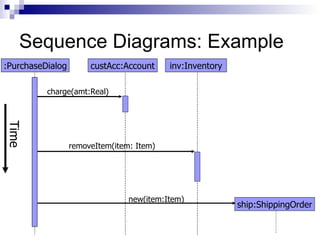
Sequence Diagrams: Example Consider an operation called purchase in a warehouse environment It may involve a number of steps: Charge the price of the item (plus tax) to the customer's account Removing the product from the inventory database Creating a shipping order for the product when it arrives so the item will be delivered to the customer's address
Sequence Diagrams: Example :PurchaseDialog custAcc:Account inv:Inventory ship:ShippingOrder Time charge(amt:Real) removeItem(item: Item) new(item:Item)
Asynchronous Messages The messages discussed so far represent synchronous messages The sender of the message waits for the receiver to complete the task (operation) before it continues Another type of message is possible: asynchronous The sender of the message continues its own operation immediately after issuing the message Eventually, a response may be received from the receiver
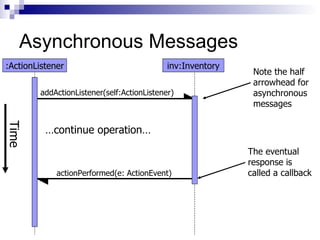
Asynchronous Messages An example of this is a Timer in Java: An object that implements ActionListener may register itself as a listener for a Timer object The Timer object will store a handle to the object, but then return control to the object after it does so Later, when the Timer's duration has expired, an event will be issued to the object's 'actionPerformed' method Obviously, if the object had to wait for the timer to expire, it could have missed a long period of potential computation time
Asynchronous Messages :ActionListener inv:Inventory Time addActionListener(self:ActionListener) Note the half arrowhead for asynchronous messages actionPerformed(e: ActionEvent) The eventual response is called a callback … continue operation…
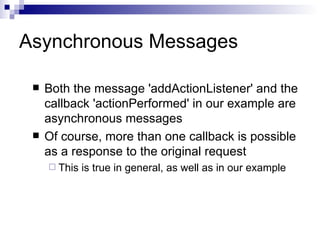
Asynchronous Messages Both the message 'addActionListener' and the callback 'actionPerformed' in our example are asynchronous messages Of course, more than one callback is possible as a response to the original request This is true in general, as well as in our example
Message Priority With asynchronous messages, there is a possibility of messages being received faster than they can be processed When this occurs, the messages are normally stored in a queue, and processed in the order in which they arrived UML provides notation that allows this to be extended to provide priority Instead of a true queue, higher priority messages can be handled with less delay than lower priority messages This uses a form of prioritized queue
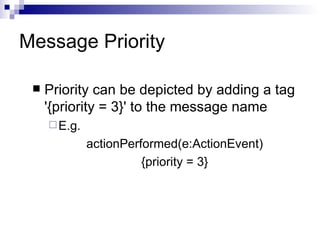
Message Priority Priority can be depicted by adding a tag '{priority = 3}' to the message name E.g.  actionPerformed(e:ActionEvent) {priority = 3}
Interaction Diagram Summary Object-interaction diagrams allow you to describe behaviour at a low level Thus, to describe the operation of an entire system, many interaction diagrams are required As discussed previously, which type of interaction diagram, depends on the complexity of the interaction

Sequence diagrams

  • 1.
    Sequence Diagrams Collaborationdiagrams are used to show simple interactions between objects While it is possible to define complicated behaviour using collaborations, often the diagrams become very visually complicated and difficult to follow Sequence diagrams are specifically suited to defining complex interactions over a period of time It is important to remind you that collaboration and sequence diagrams can be used interchangeably However, each have their specific uses
  • 2.
    Sequence Diagrams Sequencediagrams show interactions between objects over time Sequence diagrams are often preferable to collaboration diagrams when: There are several interactions involved in a particular behaviour The sequence (temporal placement) of these interactions gets fairly complicated
  • 3.
    Sequence Diagrams Mostof the symbols in sequence diagrams are identical to those used in collaboration diagrams The biggest differences lie mainly in the layout of these symbols into a complete diagram Sequence diagrams are similar to graphs, where the y-axis represents the passage of time
  • 4.
    Sequence Diagrams: ExampleConsider an operation called purchase in a warehouse environment It may involve a number of steps: Charge the price of the item (plus tax) to the customer's account Removing the product from the inventory database Creating a shipping order for the product when it arrives so the item will be delivered to the customer's address
  • 5.
    Sequence Diagrams: Example:PurchaseDialog custAcc:Account inv:Inventory ship:ShippingOrder Time charge(amt:Real) removeItem(item: Item) new(item:Item)
  • 6.
    Asynchronous Messages Themessages discussed so far represent synchronous messages The sender of the message waits for the receiver to complete the task (operation) before it continues Another type of message is possible: asynchronous The sender of the message continues its own operation immediately after issuing the message Eventually, a response may be received from the receiver
  • 7.
    Asynchronous Messages Anexample of this is a Timer in Java: An object that implements ActionListener may register itself as a listener for a Timer object The Timer object will store a handle to the object, but then return control to the object after it does so Later, when the Timer's duration has expired, an event will be issued to the object's 'actionPerformed' method Obviously, if the object had to wait for the timer to expire, it could have missed a long period of potential computation time
  • 8.
    Asynchronous Messages :ActionListenerinv:Inventory Time addActionListener(self:ActionListener) Note the half arrowhead for asynchronous messages actionPerformed(e: ActionEvent) The eventual response is called a callback … continue operation…
  • 9.
    Asynchronous Messages Boththe message 'addActionListener' and the callback 'actionPerformed' in our example are asynchronous messages Of course, more than one callback is possible as a response to the original request This is true in general, as well as in our example
  • 10.
    Message Priority Withasynchronous messages, there is a possibility of messages being received faster than they can be processed When this occurs, the messages are normally stored in a queue, and processed in the order in which they arrived UML provides notation that allows this to be extended to provide priority Instead of a true queue, higher priority messages can be handled with less delay than lower priority messages This uses a form of prioritized queue
  • 11.
    Message Priority Prioritycan be depicted by adding a tag '{priority = 3}' to the message name E.g. actionPerformed(e:ActionEvent) {priority = 3}
  • 12.
    Interaction Diagram SummaryObject-interaction diagrams allow you to describe behaviour at a low level Thus, to describe the operation of an entire system, many interaction diagrams are required As discussed previously, which type of interaction diagram, depends on the complexity of the interaction