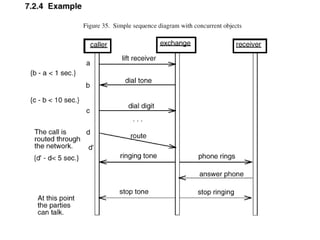
•Sequence Diagram expresses the interactions of
instances.
objectsuse caseuse caseOOobjectsuse case
Sequence diagrams
When to use Sequence Diagrams
•
•
•
•
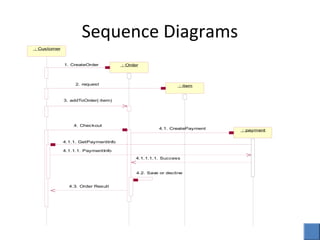
Sequence Diagrams
: Customer
: Order
: item
: payment
1. CreateOrder
2. request
3. addToOrder(:item)
4. Checkout
4.1. CreatePayment
4.1.1. GetPaymentInfo
4.1.1.1. PaymentInfo
4.1.1.1.1. Success
4.3. Order Result
4.2. Save or decline
Sequence Diagrams
• Sequence diagrams show how instance
exchange messages.
• An instance can be:
–An object, not a class
–An actor
Sequence Diagrams
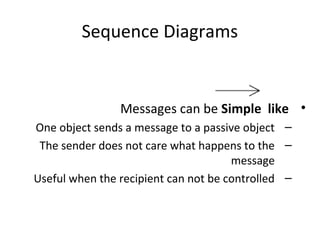
•Messages can be Simple like
–One object sends a message to a passive object
–The sender does not care what happens to the
message
–Useful when the recipient can not be controlled
Sequence Diagrams
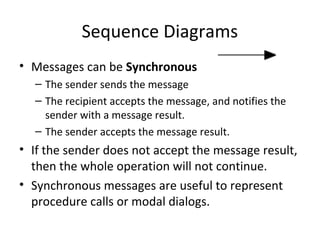
• Messages can be Synchronous
– The sender sends the message
– The recipient accepts the message, and notifies the
sender with a message result.
– The sender accepts the message result.
• If the sender does not accept the message result,
then the whole operation will not continue.
• Synchronous messages are useful to represent
procedure calls or modal dialogs.
Sequence Diagrams
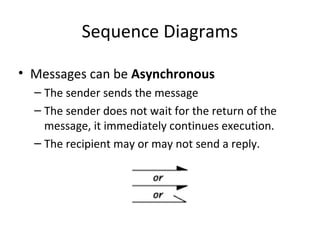
• Messages can be Asynchronous
– The sender sends the message
– The sender does not wait for the return of the
message, it immediately continues execution.
– The recipient may or may not send a reply.
Sequence Diagrams
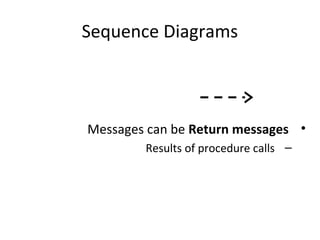
•Messages can be Return messages
–Results of procedure calls
Sequence Diagrams
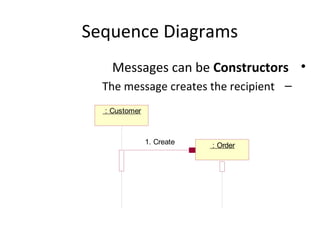
•Messages can be Constructors
–The message creates the recipient
: Customer
: Order1. Create
Sequence Diagrams
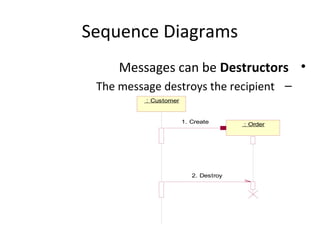
•Messages can be Destructors
–The message destroys the recipient
: Customer
: Order1. Create
2. Destroy
Sequence Diagrams
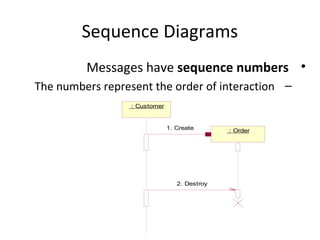
•Messages have sequence numbers
–The numbers represent the order of interaction
: Customer
: Order1. Create
2. Destroy
Sequence Diagrams
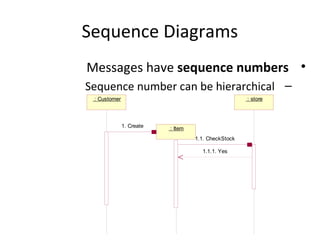
•Messages have sequence numbers
–Sequence number can be hierarchical
: Customer
: Item
: store
1. Create
1.1. CheckStock
1.1.1. Yes
Sequence Diagrams
•Messages have a specific format
[Condition]Sequence Number.Return value := MessageName(Arguments)
[Condition]Sequence Number. Return value := MessageName(Arguments)*[iteration]
17
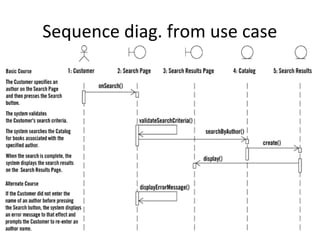
Sequence diag. from use case
18
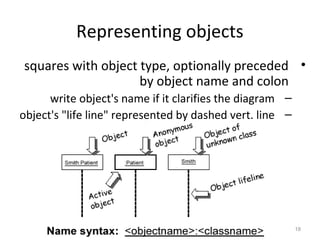
Representing objects
•squares with object type, optionally preceded
by object name and colon
–write object's name if it clarifies the diagram
–object's "life line" represented by dashed vert. line
19
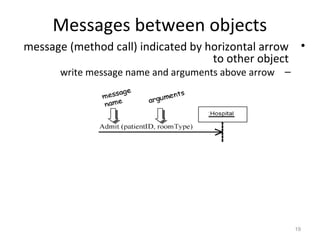
•message (method call) indicated by horizontal arrow
to other object
–write message name and arguments above arrow
Messages between objects
20
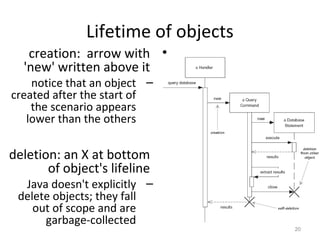
Lifetime of objects
•creation: arrow with
'new' written above it
–notice that an object
created after the start of
the scenario appears
lower than the others
•deletion: an X at bottom
of object's lifeline
–Java doesn't explicitly
delete objects; they fall
out of scope and are
garbage-collected
21
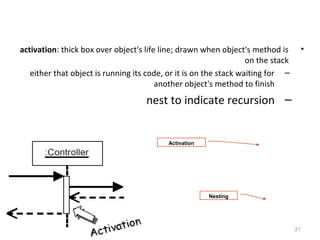
•activation: thick box over object's life line; drawn when object's method is
on the stack
–either that object is running its code, or it is on the stack waiting for
another object's method to finish
–nest to indicate recursion
Activation
Nesting
22
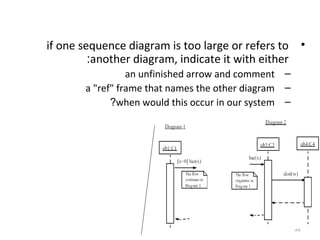
•if one sequence diagram is too large or refers to
another diagram, indicate it with either:
–an unfinished arrow and comment
–a "ref" frame that names the other diagram
–when would this occur in our system?
23
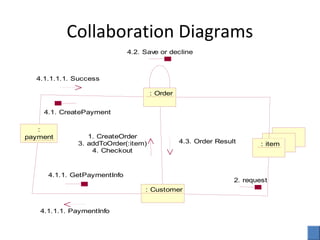
Collaboration Diagrams
: Customer
: Order
: item
:
payment
4.2. Save or decline
4.1.1. GetPaymentInfo
4.1.1.1. PaymentInfo
1. CreateOrder
3. addToOrder(:item)
4. Checkout
4.3. Order Result
2. request
4.1. CreatePayment
4.1.1.1.1. Success
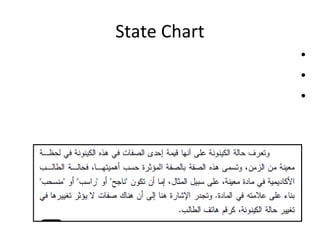
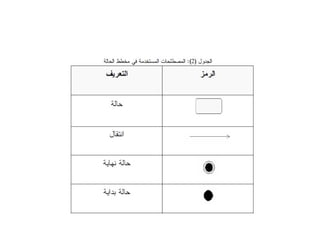
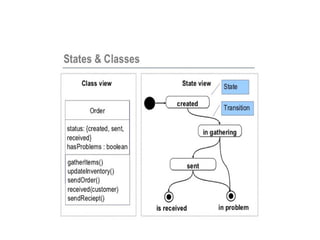
State Chart
•
•
•
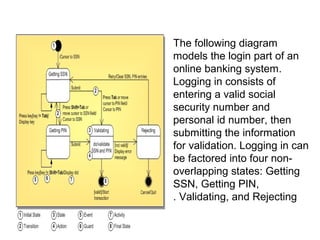
The following diagram
models the login part of an
online banking system.
Logging in consists of
entering a valid social
security number and
personal id number, then
submitting the information
for validation. Logging in can
be factored into four non-
overlapping states: Getting
SSN, Getting PIN,
Validating, and Rejecting.
ملخص تحليل الانظمة وتصميمها - الوحدة السادسة

ملخص تحليل الانظمة وتصميمها - الوحدة السادسة

  • 2.
    •Sequence Diagram expressesthe interactions of instances. objectsuse caseuse caseOOobjectsuse case Sequence diagrams
  • 3.
    When to useSequence Diagrams • • • •
  • 4.
    Sequence Diagrams : Customer :Order : item : payment 1. CreateOrder 2. request 3. addToOrder(:item) 4. Checkout 4.1. CreatePayment 4.1.1. GetPaymentInfo 4.1.1.1. PaymentInfo 4.1.1.1.1. Success 4.3. Order Result 4.2. Save or decline
  • 6.
    Sequence Diagrams • Sequencediagrams show how instance exchange messages. • An instance can be: –An object, not a class –An actor
  • 7.
    Sequence Diagrams •Messages canbe Simple like –One object sends a message to a passive object –The sender does not care what happens to the message –Useful when the recipient can not be controlled
  • 8.
    Sequence Diagrams • Messagescan be Synchronous – The sender sends the message – The recipient accepts the message, and notifies the sender with a message result. – The sender accepts the message result. • If the sender does not accept the message result, then the whole operation will not continue. • Synchronous messages are useful to represent procedure calls or modal dialogs.
  • 9.
    Sequence Diagrams • Messagescan be Asynchronous – The sender sends the message – The sender does not wait for the return of the message, it immediately continues execution. – The recipient may or may not send a reply.
  • 10.
    Sequence Diagrams •Messages canbe Return messages –Results of procedure calls
  • 11.
    Sequence Diagrams •Messages canbe Constructors –The message creates the recipient : Customer : Order1. Create
  • 12.
    Sequence Diagrams •Messages canbe Destructors –The message destroys the recipient : Customer : Order1. Create 2. Destroy
  • 13.
    Sequence Diagrams •Messages havesequence numbers –The numbers represent the order of interaction : Customer : Order1. Create 2. Destroy
  • 14.
    Sequence Diagrams •Messages havesequence numbers –Sequence number can be hierarchical : Customer : Item : store 1. Create 1.1. CheckStock 1.1.1. Yes
  • 15.
    Sequence Diagrams •Messages havea specific format [Condition]Sequence Number.Return value := MessageName(Arguments) [Condition]Sequence Number. Return value := MessageName(Arguments)*[iteration]
  • 17.
  • 18.
    18 Representing objects •squares withobject type, optionally preceded by object name and colon –write object's name if it clarifies the diagram –object's "life line" represented by dashed vert. line
  • 19.
    19 •message (method call)indicated by horizontal arrow to other object –write message name and arguments above arrow Messages between objects
  • 20.
    20 Lifetime of objects •creation:arrow with 'new' written above it –notice that an object created after the start of the scenario appears lower than the others •deletion: an X at bottom of object's lifeline –Java doesn't explicitly delete objects; they fall out of scope and are garbage-collected
  • 21.
    21 •activation: thick boxover object's life line; drawn when object's method is on the stack –either that object is running its code, or it is on the stack waiting for another object's method to finish –nest to indicate recursion Activation Nesting
  • 22.
    22 •if one sequencediagram is too large or refers to another diagram, indicate it with either: –an unfinished arrow and comment –a "ref" frame that names the other diagram –when would this occur in our system?
  • 23.
  • 24.
  • 26.
    Collaboration Diagrams : Customer :Order : item : payment 4.2. Save or decline 4.1.1. GetPaymentInfo 4.1.1.1. PaymentInfo 1. CreateOrder 3. addToOrder(:item) 4. Checkout 4.3. Order Result 2. request 4.1. CreatePayment 4.1.1.1.1. Success
  • 28.
  • 30.
    The following diagram modelsthe login part of an online banking system. Logging in consists of entering a valid social security number and personal id number, then submitting the information for validation. Logging in can be factored into four non- overlapping states: Getting SSN, Getting PIN, Validating, and Rejecting.