OOAD with the UML: Analyzing the System  Dynamic Modeling Aggregation relationships Composition relationships
Introduction The purpose of the presentation is to explain how to analyze the system using object interaction diagramming and depicting relationships between objects and classes My name is Jerry Myong
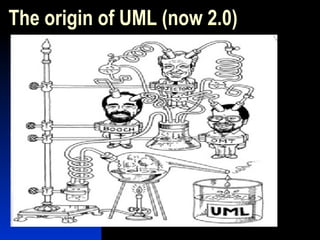
The origin of UML (now 2.0)
UML:  Best of the “3 Amigos” OMT (Rumbaugh) was really strong in Analysis, but weaker in design Booch Methodology was stronger in design, weaker in analysis Jacobson’s Objectory was good with user-experience (ala use-cases) The “method war” finally ended when UML came into being
Topics of Discussion Object Interaction Diagramming Depicting associations Modeling aggregation/composition Adding multiplicity to relationships
Sequence Diagramming For analysts or designers who want to model dynamic object behavior How to build a sequence diagram Define the components Relate the objects using  messages
Sequence Diagramming The constructs Actors Objects Boundary  Control Entity Messages Simple (open-arrowhead; object-to-object, self) Synchronous (solid-arrowhead; client/supplier in same thread) Asynchronous (half-arrowhead; client/supplier have separate threads) X-axis (Actors, Objects) Y-axis (Timeline)
Sequence Diagramming Use a consistent naming convention Underline the  Objectname  or  Objectname:Class Use the “stick-man” figure for an actor and rectangle for objects I prefer to use the “stick-man” for a user, application or system I prefer to use the rectangle (object) for the objects created in the proposed system
Sequence Diagramming Objects are related by passing or  receiving messages In analysis, the level of abstraction can  be just a high-level message The message may be conceptual or a  proposed method name In design, the details of the message  will usu. be available So the actual method name with  parameters may be used
Sequence Diagramming Analyze the use-case scenario Identify the candidate objects Realize the objects from the candidate list Analyze the grammar of the scenario and identify the verbs Construct the messages from the verbs Choose level of abstraction If high-level, then conceptual messages If detailed-level, then actual messages with parameters, return values, etc. Level of detail is discretionary
Sequence Diagramming Identify the most active objects and place them to the left Numbering of each object-message call is not necessary, since the top-down sequencing implies order In collaboration diagrams, numbering is necessary The diagram will be easier to understand if messaging is to neighboring objects Objects with less messaging can be moved to the right-side Btw, this is an advantage of using the collaboration diagram
Sequence Diagramming Analyze the sequence diagram and determine if the messaging is balanced across the objects Identify the objects that have too much responsibility Determine the need to shift responsibility to existing objects or create new objects Use timeline axis to identify the relative time an object needs to perform all responsibilities (focus of control) Too much time for one object could indicate the need to redistribute some responsibility (to existing or new objects)
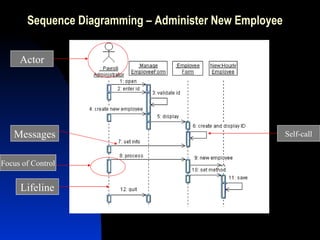
Sequence Diagramming – Administer New Employee Actor Lifeline Messages Focus of Control Self-call
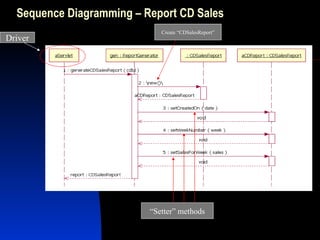
Sequence Diagramming – Report CD Sales Driver Create “CDSalesReport” “ Setter” methods
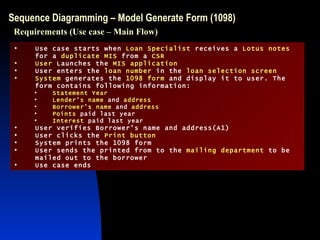
Sequence Diagramming – Model Generate Form (1098) Use case starts when  Loan Specialist  receives a  Lotus notes  for a  duplicate MIS  from a  CSR User  Launches the  MIS application User enters the  loan number  in the  loan selection screen System  generates the  1098 form  and display it to user. The form contains following information: Statement Year Lender’s name  and  address Borrower’s name  and  address Points  paid last year Interest  paid last year User verifies Borrower’s name and address(A1) User clicks the  Print button System prints the 1098 form User sends the printed from to the  mailing department  to be mailed out to the borrower Use case ends Requirements (Use case – Main Flow)
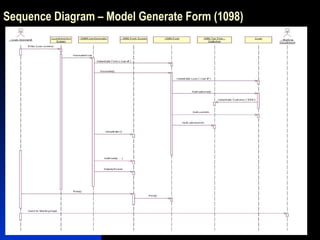
Sequence Diagram – Model Generate Form (1098)
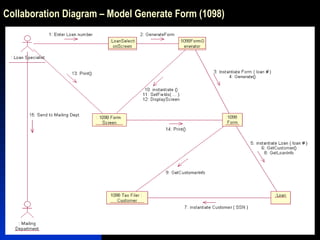
Collaboration Diagramming – Different View of Sequence Diagram Focus on the relationships between objects Very useful for visualizing how several objects interact with each other to get a job done Useful for comparing against a class diagram Interplay between the static and dynamic models A different view of the same information Notation differences Link w/o arrowhead is a bi-directional Link w/ arrowhead = unidirectional Self-calls are displayed as “loops” Messages are shown as labels next to the relationship lines Nested messages follow a “decimal” numbering convention (similar to outline numbering) Conditions are in square brackets right before the message Stack objects (multiple-objects) Follow object name with {new}, {destroyed}, {transient-both}
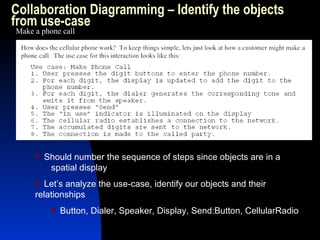
Collaboration Diagramming – Identify the objects from use-case Make a phone call Should number the sequence of steps since objects are in a  spatial display Let’s analyze the use-case, identify our objects and their  relationships Button, Dialer, Speaker, Display, Send:Button, CellularRadio
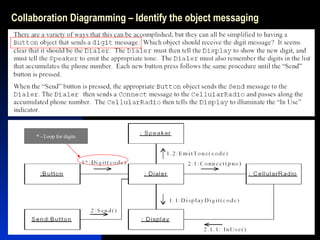
Collaboration Diagramming – Identify the object messaging * - Loop for digits
Lines connecting objects are “links” A “link” represents an instance of an association (aggregation, composition, etc.) Must have a corresponding assoc. on a class diagram Each object has its own intelligence and is not highly coupled with the other objects Try to avoid designing a “god” object Not trying to be “theological” It knows about all others; and all the others know about it Too highly interconnected to other objects, causing a “ripple effect” to other objects, when it changes Collaboration Diagram – Different Angle of Sequence Diagram
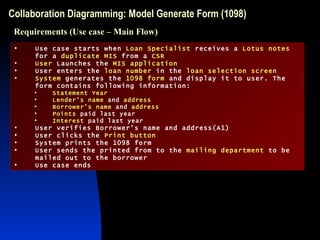
Collaboration Diagramming: Model Generate Form (1098) Use case starts when  Loan Specialist  receives a  Lotus notes  for a  duplicate MIS  from a  CSR User  Launches the  MIS application User enters the  loan number  in the  loan selection screen System  generates the  1098 form  and display it to user. The form contains following information: Statement Year Lender’s name  and  address Borrower’s name  and  address Points  paid last year Interest  paid last year User verifies Borrower’s name and address(A1) User clicks the  Print button System prints the 1098 form User sends the printed from to the  mailing department  to be mailed out to the borrower Use case ends Requirements (Use case – Main Flow)
Collaboration Diagram – Model Generate Form (1098)
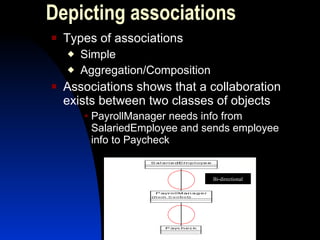
Depicting associations Types of associations Simple Aggregation/Composition Associations shows that a collaboration exists between two classes of objects PayrollManager needs info from SalariedEmployee and sends employee info to Paycheck Bi-directional
Depicting associations Bi-directional (solid line) Both classes “know about” each other Unidirectional (line w/ arrow pointing to the  class that needs to be known Naming a relationship (optional) Active verb or verb phrase describing the relationship Multiple relationships can exist between a pair of classes Separate semantic relationships? Individualized behavior of the same relationship?
Each association has two roles Each role describes how one class relates to the other A role can be labeled (on the association line next to the class) instead of an assoc. name Identify associations by analyzing the sequence or collaboration diagram messages Does the message require an object or return an object? If the object is primitive (e.g., String, Integer) then the association usually is not shown Depicting associations
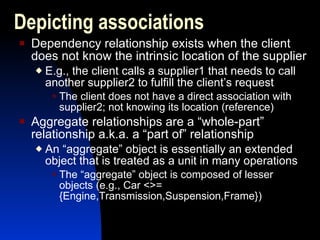
Dependency relationship exists when the client does not know the intrinsic location of the supplier E.g., the client calls a supplier1 that needs to call another supplier2 to fulfill the client’s request The client does not have a direct association with supplier2; not knowing its location (reference) Aggregate relationships are a “whole-part” relationship a.k.a. a “part of” relationship An “aggregate” object is essentially an extended object that is treated as a unit in many operations The “aggregate” object is composed of lesser objects (e.g., Car <>= {Engine,Transmission,Suspension,Frame}) Depicting associations
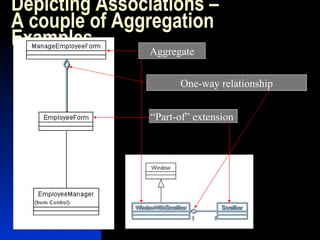
Depicting Associations – A couple of Aggregation Examples Aggregate “ Part-of” extension  One-way relationship
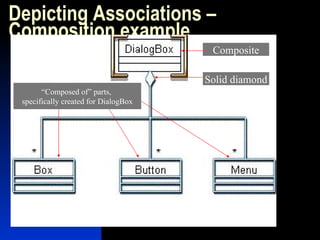
Two types of aggregates (“has a” relationship) Shared Can be parts of other aggregates too Destroying an aggregate does not necessarily destroy the parts Don’t delete the shared aggregate objects, if they can exist on their own (without the aggregate object) “delete” maps to the command to release an object from memory Composition Aggregate is “composed of” the parts (having strong ownership of its parts) Destroying the aggregate, destroys the “composed of” parts The “composed of” parts are not part of other aggregates Depicting Associations – Aggregate Types
Depicting Associations – Composition example Composite Solid diamond “ Composed of” parts,  specifically created for DialogBox
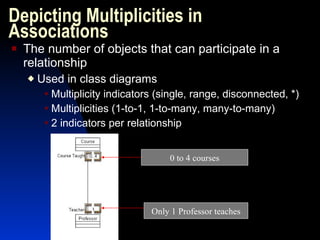
Depicting Multiplicities in Associations The number of objects that can participate in a relationship Used in class diagrams Multiplicity indicators (single, range, disconnected, *) Multiplicities (1-to-1, 1-to-many, many-to-many) 2 indicators per relationship 0 to 4 courses Only 1 Professor teaches
When no multiplicity is depicted, it defaults to one Underestimating multiplicity can restrict the application Not enough objects will be created Overestimating multiplicity causes more overhead Managing more objects becomes more complex Multiplicity decisions are made during analysis and design as well The question of multiplicity is as integral in associations as it is in database design – it is a business rule too Depicting Multiplicities in Associations
Depicting Multiplicities in Associations – Example [0 to 1] InteractionUse to [many] Actions
Documenting Real World Relationships So think about how we describe the real world in terms of objects that we deal with everyday Accurately document the real-world scenarios of the problem domain (a.k.a. requirements) Analyze the scenarios, identify the objects and messages between them Determine the (types of) relationships among the objects and their multiplicities Further refine the interaction diagrams as you move through design Once the modeling is complete, the coding should be a straight-forward process
What Interaction Modeling Means You are modeling real-world scenarios Managing our applications should be easier, since they map directly to how our business processes actually work Our problem domains and solution domains have a direct relationship with each other The interaction modeling is derived from the problem domain (requirements) through the solution domain (detailed design) As Albert Einstein said, “Keep it simple, but not simpler!” Try to keep the model complete and sufficient at the same time Analyze the diagrams, refine them, simplify them, but don’t take away value
Summary  Need to model object relationships in a use-case scenario? Think in terms of how people or things interact as they do in the real-world This is easier than we think, since we are accustomed to it … we don’t apply those same principles in the world of procedural design and development Object Interaction Diagramming is one part of the super-specification of UML UML 2.0 is the Current Official Version http://www.omg.org/technology/documents/formal/uml.htm Get the UML 2.0 specification for free Choose the type of diagramming that suits your needs “ Go for it!”

OOAD with UML (Interaction Diagramming)

  • 1.
    OOAD with theUML: Analyzing the System Dynamic Modeling Aggregation relationships Composition relationships
  • 2.
    Introduction The purposeof the presentation is to explain how to analyze the system using object interaction diagramming and depicting relationships between objects and classes My name is Jerry Myong
  • 3.
    The origin ofUML (now 2.0)
  • 4.
    UML: Bestof the “3 Amigos” OMT (Rumbaugh) was really strong in Analysis, but weaker in design Booch Methodology was stronger in design, weaker in analysis Jacobson’s Objectory was good with user-experience (ala use-cases) The “method war” finally ended when UML came into being
  • 5.
    Topics of DiscussionObject Interaction Diagramming Depicting associations Modeling aggregation/composition Adding multiplicity to relationships
  • 6.
    Sequence Diagramming Foranalysts or designers who want to model dynamic object behavior How to build a sequence diagram Define the components Relate the objects using messages
  • 7.
    Sequence Diagramming Theconstructs Actors Objects Boundary Control Entity Messages Simple (open-arrowhead; object-to-object, self) Synchronous (solid-arrowhead; client/supplier in same thread) Asynchronous (half-arrowhead; client/supplier have separate threads) X-axis (Actors, Objects) Y-axis (Timeline)
  • 8.
    Sequence Diagramming Usea consistent naming convention Underline the Objectname or Objectname:Class Use the “stick-man” figure for an actor and rectangle for objects I prefer to use the “stick-man” for a user, application or system I prefer to use the rectangle (object) for the objects created in the proposed system
  • 9.
    Sequence Diagramming Objectsare related by passing or receiving messages In analysis, the level of abstraction can be just a high-level message The message may be conceptual or a proposed method name In design, the details of the message will usu. be available So the actual method name with parameters may be used
  • 10.
    Sequence Diagramming Analyzethe use-case scenario Identify the candidate objects Realize the objects from the candidate list Analyze the grammar of the scenario and identify the verbs Construct the messages from the verbs Choose level of abstraction If high-level, then conceptual messages If detailed-level, then actual messages with parameters, return values, etc. Level of detail is discretionary
  • 11.
    Sequence Diagramming Identifythe most active objects and place them to the left Numbering of each object-message call is not necessary, since the top-down sequencing implies order In collaboration diagrams, numbering is necessary The diagram will be easier to understand if messaging is to neighboring objects Objects with less messaging can be moved to the right-side Btw, this is an advantage of using the collaboration diagram
  • 12.
    Sequence Diagramming Analyzethe sequence diagram and determine if the messaging is balanced across the objects Identify the objects that have too much responsibility Determine the need to shift responsibility to existing objects or create new objects Use timeline axis to identify the relative time an object needs to perform all responsibilities (focus of control) Too much time for one object could indicate the need to redistribute some responsibility (to existing or new objects)
  • 13.
    Sequence Diagramming –Administer New Employee Actor Lifeline Messages Focus of Control Self-call
  • 14.
    Sequence Diagramming –Report CD Sales Driver Create “CDSalesReport” “ Setter” methods
  • 15.
    Sequence Diagramming –Model Generate Form (1098) Use case starts when Loan Specialist receives a Lotus notes for a duplicate MIS from a CSR User Launches the MIS application User enters the loan number in the loan selection screen System generates the 1098 form and display it to user. The form contains following information: Statement Year Lender’s name and address Borrower’s name and address Points paid last year Interest paid last year User verifies Borrower’s name and address(A1) User clicks the Print button System prints the 1098 form User sends the printed from to the mailing department to be mailed out to the borrower Use case ends Requirements (Use case – Main Flow)
  • 16.
    Sequence Diagram –Model Generate Form (1098)
  • 17.
    Collaboration Diagramming –Different View of Sequence Diagram Focus on the relationships between objects Very useful for visualizing how several objects interact with each other to get a job done Useful for comparing against a class diagram Interplay between the static and dynamic models A different view of the same information Notation differences Link w/o arrowhead is a bi-directional Link w/ arrowhead = unidirectional Self-calls are displayed as “loops” Messages are shown as labels next to the relationship lines Nested messages follow a “decimal” numbering convention (similar to outline numbering) Conditions are in square brackets right before the message Stack objects (multiple-objects) Follow object name with {new}, {destroyed}, {transient-both}
  • 18.
    Collaboration Diagramming –Identify the objects from use-case Make a phone call Should number the sequence of steps since objects are in a spatial display Let’s analyze the use-case, identify our objects and their relationships Button, Dialer, Speaker, Display, Send:Button, CellularRadio
  • 19.
    Collaboration Diagramming –Identify the object messaging * - Loop for digits
  • 20.
    Lines connecting objectsare “links” A “link” represents an instance of an association (aggregation, composition, etc.) Must have a corresponding assoc. on a class diagram Each object has its own intelligence and is not highly coupled with the other objects Try to avoid designing a “god” object Not trying to be “theological” It knows about all others; and all the others know about it Too highly interconnected to other objects, causing a “ripple effect” to other objects, when it changes Collaboration Diagram – Different Angle of Sequence Diagram
  • 21.
    Collaboration Diagramming: ModelGenerate Form (1098) Use case starts when Loan Specialist receives a Lotus notes for a duplicate MIS from a CSR User Launches the MIS application User enters the loan number in the loan selection screen System generates the 1098 form and display it to user. The form contains following information: Statement Year Lender’s name and address Borrower’s name and address Points paid last year Interest paid last year User verifies Borrower’s name and address(A1) User clicks the Print button System prints the 1098 form User sends the printed from to the mailing department to be mailed out to the borrower Use case ends Requirements (Use case – Main Flow)
  • 22.
    Collaboration Diagram –Model Generate Form (1098)
  • 23.
    Depicting associations Typesof associations Simple Aggregation/Composition Associations shows that a collaboration exists between two classes of objects PayrollManager needs info from SalariedEmployee and sends employee info to Paycheck Bi-directional
  • 24.
    Depicting associations Bi-directional(solid line) Both classes “know about” each other Unidirectional (line w/ arrow pointing to the class that needs to be known Naming a relationship (optional) Active verb or verb phrase describing the relationship Multiple relationships can exist between a pair of classes Separate semantic relationships? Individualized behavior of the same relationship?
  • 25.
    Each association hastwo roles Each role describes how one class relates to the other A role can be labeled (on the association line next to the class) instead of an assoc. name Identify associations by analyzing the sequence or collaboration diagram messages Does the message require an object or return an object? If the object is primitive (e.g., String, Integer) then the association usually is not shown Depicting associations
  • 26.
    Dependency relationship existswhen the client does not know the intrinsic location of the supplier E.g., the client calls a supplier1 that needs to call another supplier2 to fulfill the client’s request The client does not have a direct association with supplier2; not knowing its location (reference) Aggregate relationships are a “whole-part” relationship a.k.a. a “part of” relationship An “aggregate” object is essentially an extended object that is treated as a unit in many operations The “aggregate” object is composed of lesser objects (e.g., Car <>= {Engine,Transmission,Suspension,Frame}) Depicting associations
  • 27.
    Depicting Associations –A couple of Aggregation Examples Aggregate “ Part-of” extension One-way relationship
  • 28.
    Two types ofaggregates (“has a” relationship) Shared Can be parts of other aggregates too Destroying an aggregate does not necessarily destroy the parts Don’t delete the shared aggregate objects, if they can exist on their own (without the aggregate object) “delete” maps to the command to release an object from memory Composition Aggregate is “composed of” the parts (having strong ownership of its parts) Destroying the aggregate, destroys the “composed of” parts The “composed of” parts are not part of other aggregates Depicting Associations – Aggregate Types
  • 29.
    Depicting Associations –Composition example Composite Solid diamond “ Composed of” parts, specifically created for DialogBox
  • 30.
    Depicting Multiplicities inAssociations The number of objects that can participate in a relationship Used in class diagrams Multiplicity indicators (single, range, disconnected, *) Multiplicities (1-to-1, 1-to-many, many-to-many) 2 indicators per relationship 0 to 4 courses Only 1 Professor teaches
  • 31.
    When no multiplicityis depicted, it defaults to one Underestimating multiplicity can restrict the application Not enough objects will be created Overestimating multiplicity causes more overhead Managing more objects becomes more complex Multiplicity decisions are made during analysis and design as well The question of multiplicity is as integral in associations as it is in database design – it is a business rule too Depicting Multiplicities in Associations
  • 32.
    Depicting Multiplicities inAssociations – Example [0 to 1] InteractionUse to [many] Actions
  • 33.
    Documenting Real WorldRelationships So think about how we describe the real world in terms of objects that we deal with everyday Accurately document the real-world scenarios of the problem domain (a.k.a. requirements) Analyze the scenarios, identify the objects and messages between them Determine the (types of) relationships among the objects and their multiplicities Further refine the interaction diagrams as you move through design Once the modeling is complete, the coding should be a straight-forward process
  • 34.
    What Interaction ModelingMeans You are modeling real-world scenarios Managing our applications should be easier, since they map directly to how our business processes actually work Our problem domains and solution domains have a direct relationship with each other The interaction modeling is derived from the problem domain (requirements) through the solution domain (detailed design) As Albert Einstein said, “Keep it simple, but not simpler!” Try to keep the model complete and sufficient at the same time Analyze the diagrams, refine them, simplify them, but don’t take away value
  • 35.
    Summary Needto model object relationships in a use-case scenario? Think in terms of how people or things interact as they do in the real-world This is easier than we think, since we are accustomed to it … we don’t apply those same principles in the world of procedural design and development Object Interaction Diagramming is one part of the super-specification of UML UML 2.0 is the Current Official Version http://www.omg.org/technology/documents/formal/uml.htm Get the UML 2.0 specification for free Choose the type of diagramming that suits your needs “ Go for it!”