MUSIC VIDEO
PRODUCTION
PROCESS
LOGELISABETH BANKS
TECHNICAL
What went well:
For my music video I decided I wanted to include lip-syncing. I did this by connecting a
mobile phone to a speaker to play the audio clearly. This allowed me to lip-sync the
song start to finish perfectly in time with the music. I also decided to speed up the audio
playback on my second take for one of the scenes. This meant that I would be lip-
syncing faster than the original audio to later create a slow-motion effect. All of this was
done successfully, and no problems occurred during this. For the filming of the video, I
had a setup of my mobile phone and a small tripod. I used a small tripod, so the camera
work was smoother as the videographer had to walk backwards while filming which was
a bit of a challenge. The tripod meant that the camera wasn’t as shaky as it would have
been if it was just in someone's hand. Unfortunately, I had to use my phone to film due
to covid-19, but the camera quality did turn out to be pretty good in the end which was a
relief.
What went wrong:
On the second day of filming I ran into an issue early on at my first location.
After filming a few clips my phone storage ran out. I was on a time limit as I was filming
the sunrise which was happening very quickly. I had to delete some apps to give myself
some more space to film and just managed to get enough clips before the sun was fully
up. I then had to upload clips onto my onedrive account while on the way to the second
location of the day to make sure I wouldn’t have the same issue when filming the next
scene. Next time I do any sort of filming I need to make sure the device I am using has
enough storage space available to avoid this happening again in the future.
LOGISTICAL
What went well:
My locations were all very local to me which meant I had easy access to them. I had not
issues on the day with any of these, the park was open, the streets were completely
empty, the road was clear in my village. The weather was mostly good and the sun was
out which was exactly what I needed. The locations where all quiet like I needed which
meant that my planning times beforehand helped massively with getting this correct.
What went wrong:
Although my locations were quiet, I still had to stop filming a few times as people were
getting in the way. This mainly happened at the park, it was fairly quiet but while filming
down one of the paths people would walk past in the background or start walking down
the path I was on making me pause the filming. I also had some minor troubles with the
weather at the park because as I was filming the wind picked up making my hair go all
over my face so I couldn’t see and My face wasn’t visible to the camera. This meant I had
to pause the filming until the wind had calmed down which took longer then expected. I
also had another interruption while filming on the road in the village as a horse rider
came down the road meaning I had to pause the filming and wait for them to pass. On
the second day of filming I was out at around 8am and the temperature was about 3
degrees which was an issue as filming in really cold temperatures is difficult to do and
my costume wasn’t very warm. Due to this we had to rush the filming a bit but it still
turned out okay in the end.
PERSONNEL
I used my parents as my crew members for this project as this was
the easiest and safest option for me due to covid-19. I had both of
them working the camera and also providing transport to the
different locations where it was needed. It was easy to organise
days and times to be set aside for the filming and there were no let
downs with this. They both worked well and were very helpful with
the production of this video. I also had my mum be a cast member
for a certain part of the video. This ultimately went well but we did
get distracted a lot throughout the filming meaning it took a lot
longer then it should have to get what I needed.
PLANNING
What went well:
The planning work that I did definitely helped when it came to actually
producing the video. It gave me a much better idea of what I wanted to do
and guided me through this. I had more of a visual idea to how I wanted the
video to look which helped me work out what clips I needed in advance. It
also allowed me to have a proper schedule to work with instead of just
going into it randomly and doing it in an unorganised way. The shot list
helped the most as it allowed me to check what clips I still needed to film.
What went wrong:
I planned out the locations so I knew exactly what I had to work with
however I should have also gone into more detail about which sections of
my locations I was going to use. For example at the park I needed to film on
the swings and I also needed to get some shots of me walking. I knew
where the swings were but when it came to the walking part I didn't know
which section of the park to film this in resulting in me walking around for a
while trying to decide the nicest area. If I had done this in advance, then I
would have saved a lot more time. This is something I definitely need to
think about in the future.
NEXT STEPS…
I do have a section that I need to refilm as the video quality
isn’t the best and I need to have the moon in the video that I
had not managed to get. However this will be difficult to do
as I need a clear night for this and at the moment most nights
are extremely cloudy. Alternatively I could possibly find a
way to edit a moon into the video for the part that I need it for
and if not that then I will just have to settle with the orignal
footage.
WHAT WENT WELL
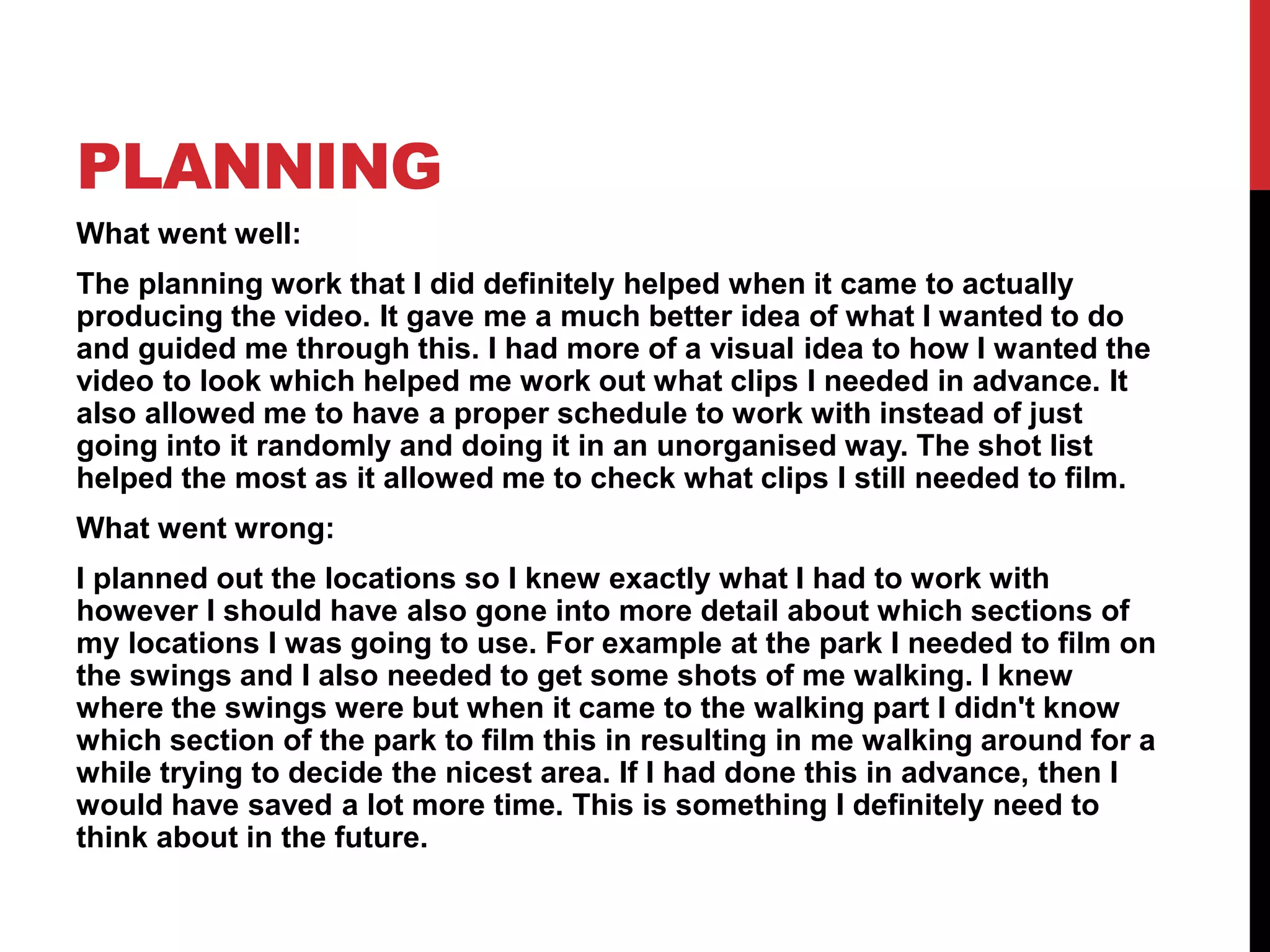
One thing that went well during my editing was my lip syncing. I managed to
fit the clips in time with the audio and got a perfect match with the lyrics.
Because I had filmed the whole or at least half of the song in my video clips
it meant that syncing them up was a lot easier as the timing was pretty much
the same already without me having to cut the clips too much. I also decided
to try a slow motion lip-sync during the swing scene. I had previously
recorded the video with the audio sped up, when it came to editing, I had to
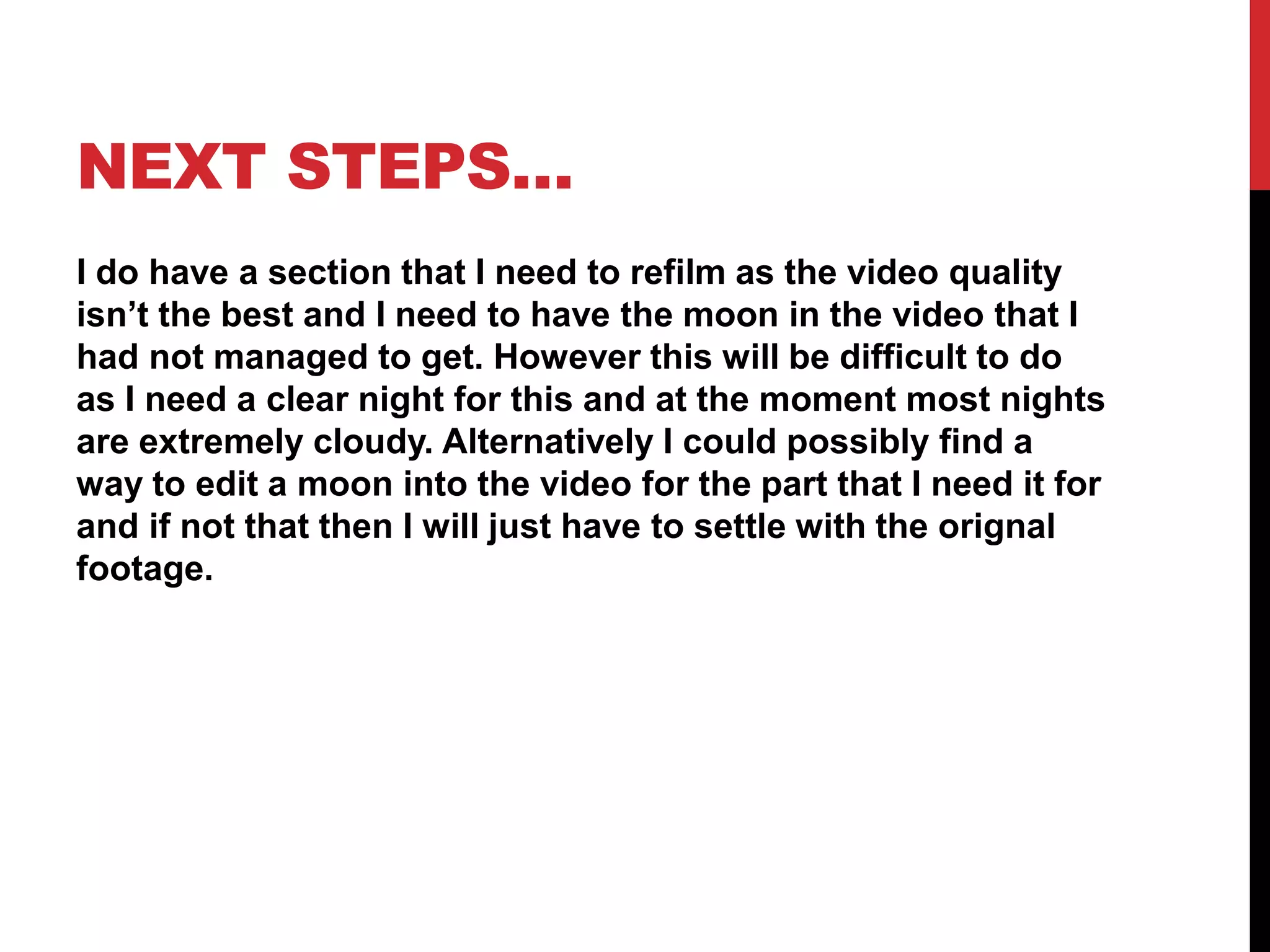
slow the video clip down to try and match it with the original audio. I
gradually slowed the speed down by 10% each time until I found a speed
that worked the best. I went down to 60% and felt that it made the clip look
slow motion like I wanted and the lip-sync matched really well with the
audio.
WHAT WENT WELL
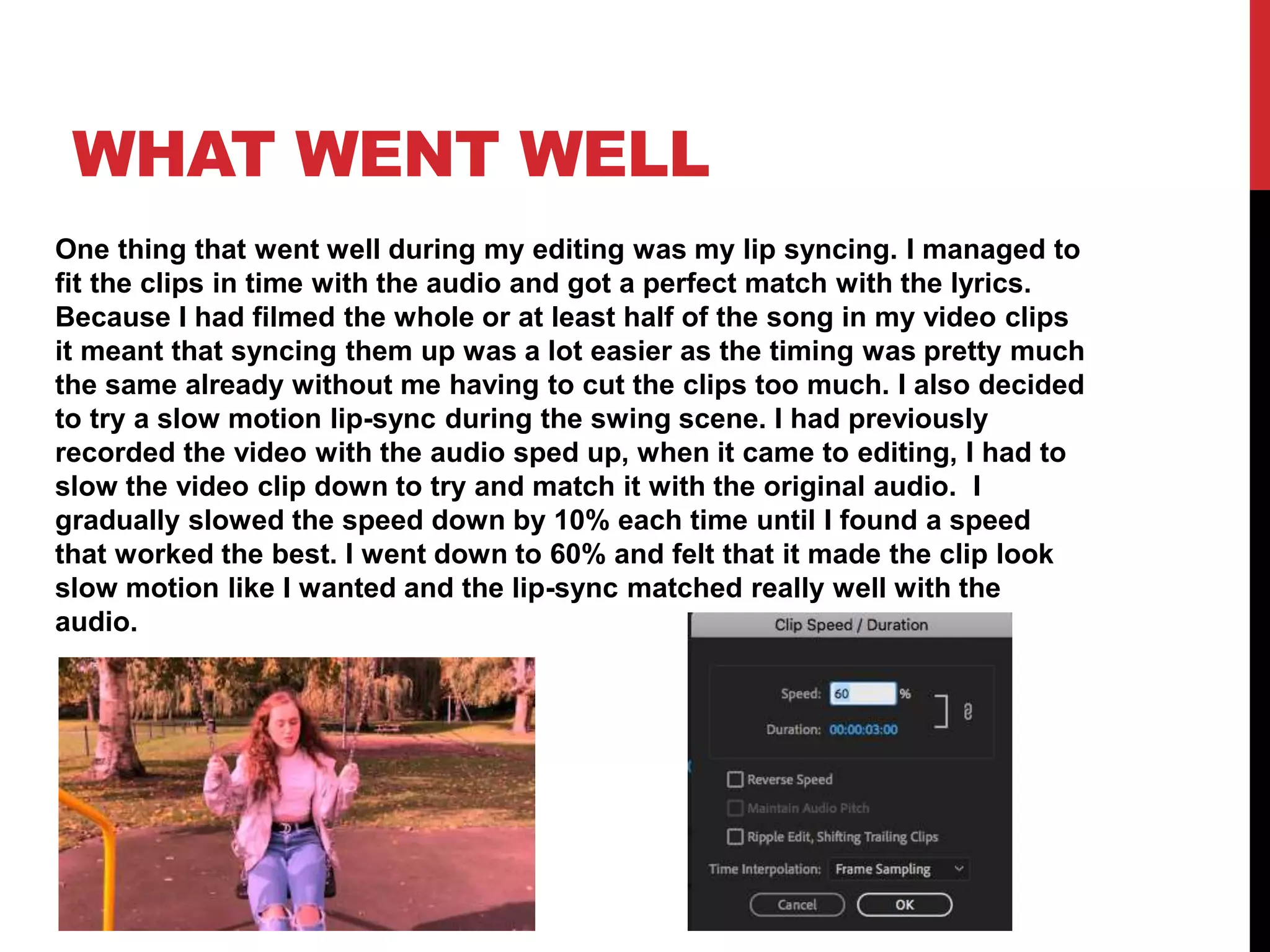
Another bit of editing I found went well was the adding of colour over the
whole video. I created an adjustment layer by clicking the new item button in
the project panel and then clicking adjustment layer.
I then dragged the layer from the project panel into
the timeline section and spread it out across the whole video sequence. Next
I changed to the colour section in the software and made sure the
adjustment layer was selected before making any changes.
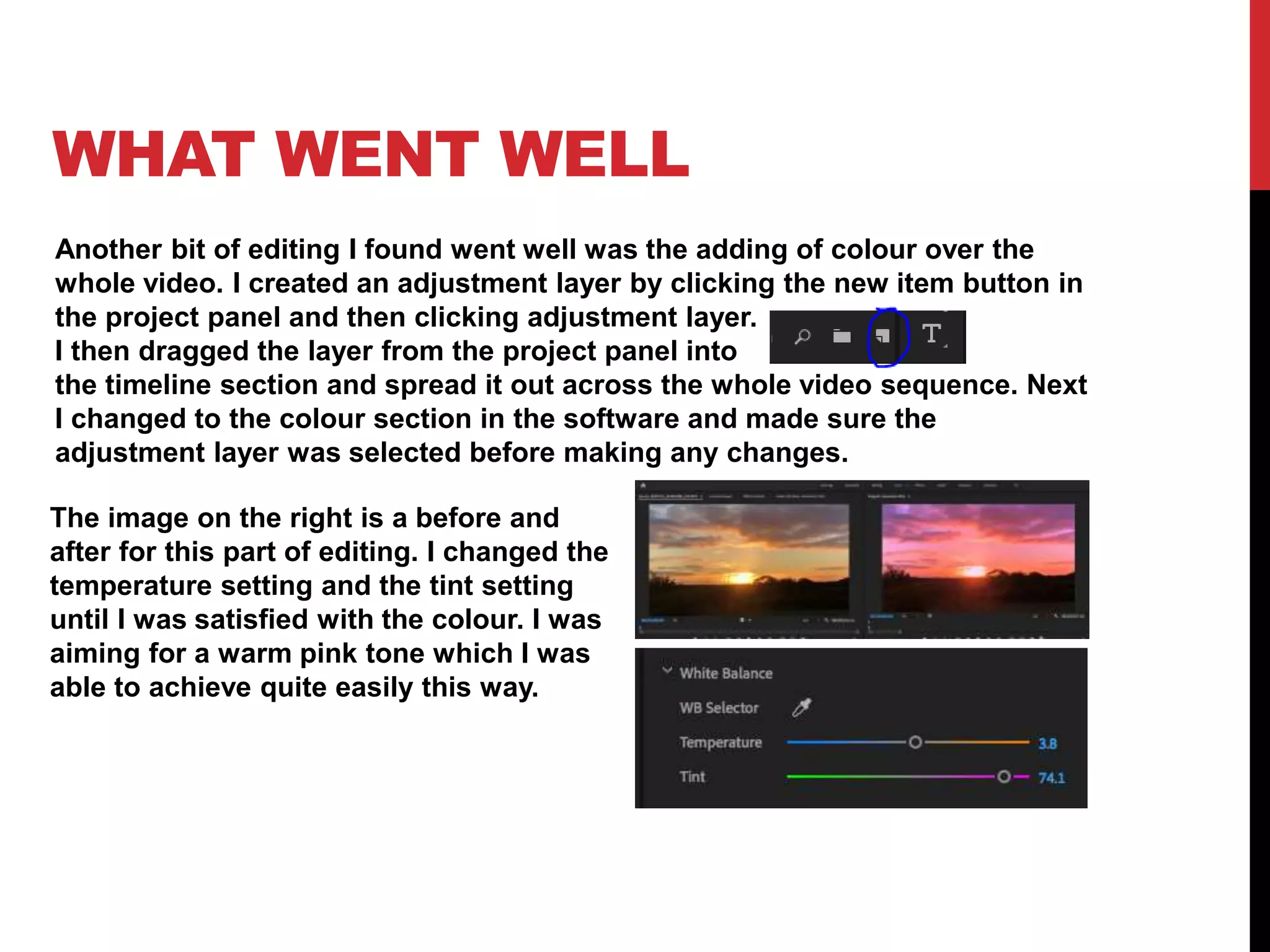
The image on the right is a before and
after for this part of editing. I changed the
temperature setting and the tint setting
until I was satisfied with the colour. I was
aiming for a warm pink tone which I was
able to achieve quite easily this way.
WHAT WENT WELL
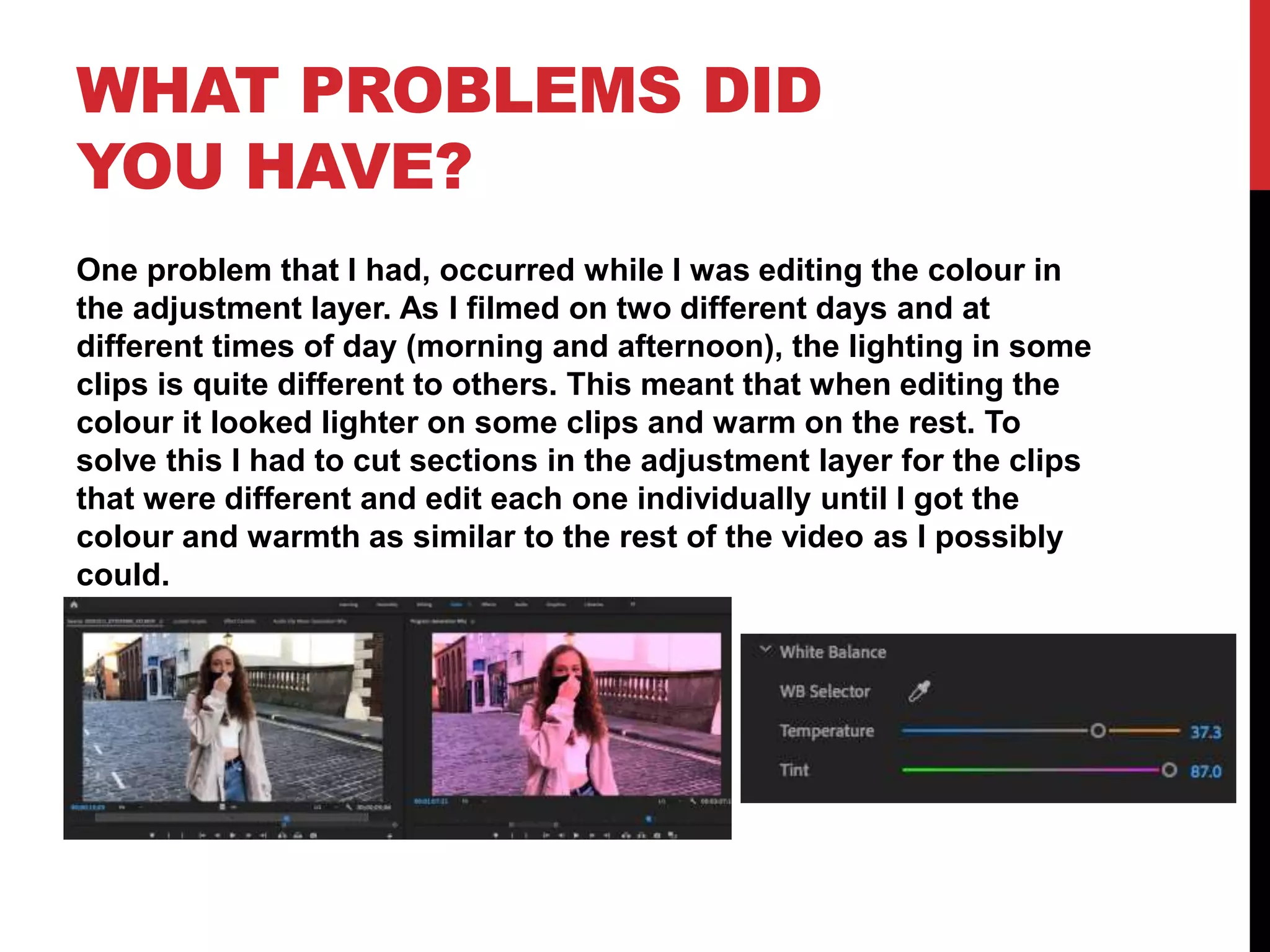
To make the intro of the music video more interesting I decided that I wanted
to add text. I selected the text button and clicked on the first clip to create a
text box. I wanted to have the word “why” pop up every time it was said as it
is repeated a lot in the intro. I added the word in multiple times and then cut
each one to the right length and put it in the right place along the timeline so
each one matched with the audio. I decided that I wanted them to stay on the
screen after the word was said so I extended each one from where it first
comes in to the end of the intro. I then decided to have one big “why”
appear on the screen for the last bit of the intro. For this I had to cut the
other text back a it so they finished just before the final “why” and added the
last “why” in on the end and trimmed it so it finished at the end of the intro.
This part of the editing went really well and turned out exactly how I wanted
it to. I also added text on the end of each chorus for the “generation why”
part of the song. I did this in the same way as I did the intro with one word
appearing and then the next and again it worked out just how I wanted it to.
I have placed some screenshots on the next slide to show this.
WHAT WENT WELL
WHAT PROBLEMS DID
YOU HAVE?
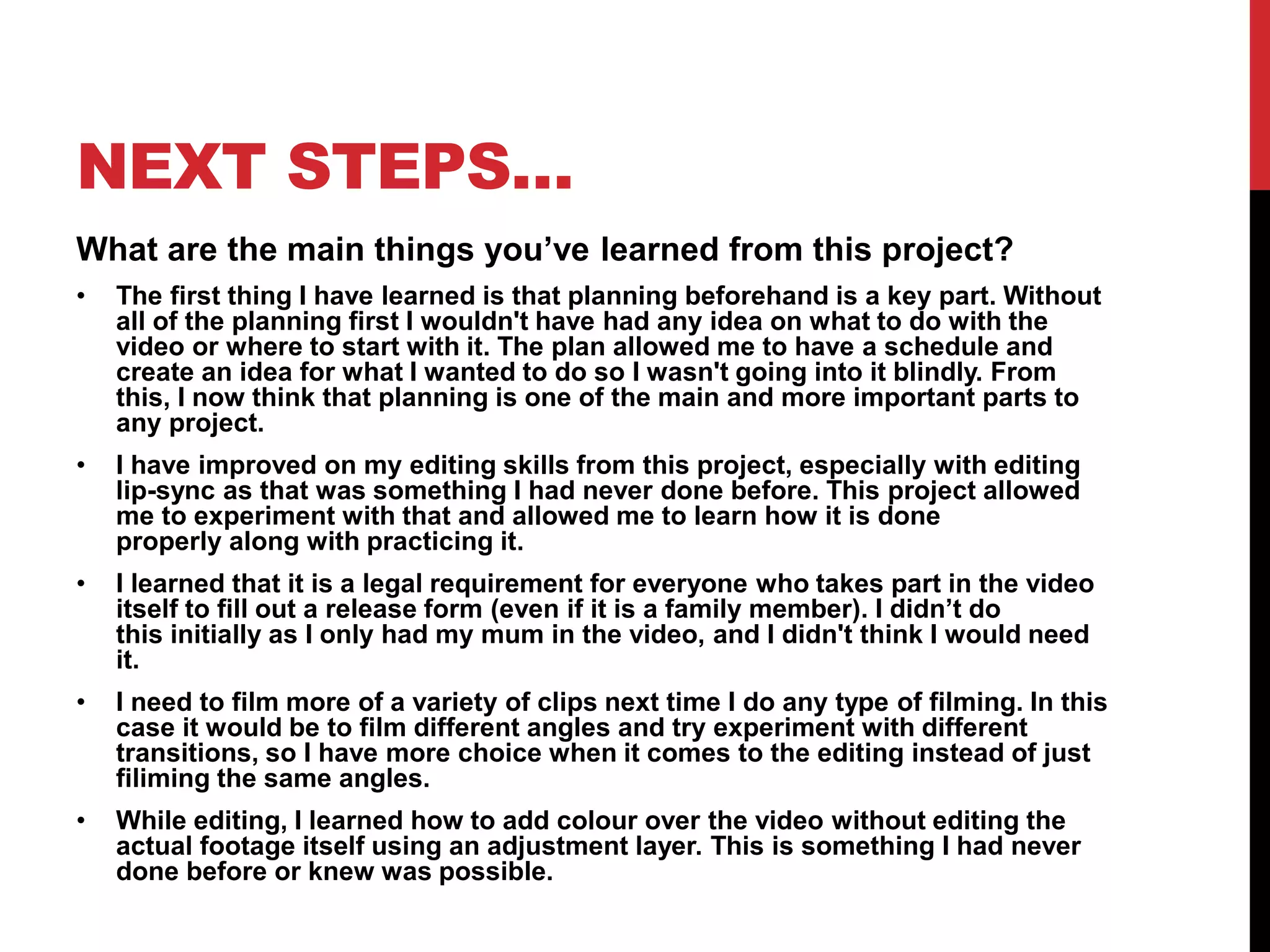
One problem that I had, occurred while I was editing the colour in
the adjustment layer. As I filmed on two different days and at
different times of day (morning and afternoon), the lighting in some
clips is quite different to others. This meant that when editing the
colour it looked lighter on some clips and warm on the rest. To
solve this I had to cut sections in the adjustment layer for the clips
that were different and edit each one individually until I got the
colour and warmth as similar to the rest of the video as I possibly
could.
NEXT STEPS…
What are the main things you’ve learned from this project?
• The first thing I have learned is that planning beforehand is a key part. Without
all of the planning first I wouldn't have had any idea on what to do with the
video or where to start with it. The plan allowed me to have a schedule and
create an idea for what I wanted to do so I wasn't going into it blindly. From
this, I now think that planning is one of the main and more important parts to
any project.
• I have improved on my editing skills from this project, especially with editing
lip-sync as that was something I had never done before. This project allowed
me to experiment with that and allowed me to learn how it is done
properly along with practicing it.
• I learned that it is a legal requirement for everyone who takes part in the video
itself to fill out a release form (even if it is a family member). I didn’t do
this initially as I only had my mum in the video, and I didn't think I would need
it.
• I need to film more of a variety of clips next time I do any type of filming. In this
case it would be to film different angles and try experiment with different
transitions, so I have more choice when it comes to the editing instead of just
filiming the same angles.
• While editing, I learned how to add colour over the video without editing the
actual footage itself using an adjustment layer. This is something I had never
done before or knew was possible.

Mv process log form 2020

  • 1.
  • 2.
    TECHNICAL What went well: Formy music video I decided I wanted to include lip-syncing. I did this by connecting a mobile phone to a speaker to play the audio clearly. This allowed me to lip-sync the song start to finish perfectly in time with the music. I also decided to speed up the audio playback on my second take for one of the scenes. This meant that I would be lip- syncing faster than the original audio to later create a slow-motion effect. All of this was done successfully, and no problems occurred during this. For the filming of the video, I had a setup of my mobile phone and a small tripod. I used a small tripod, so the camera work was smoother as the videographer had to walk backwards while filming which was a bit of a challenge. The tripod meant that the camera wasn’t as shaky as it would have been if it was just in someone's hand. Unfortunately, I had to use my phone to film due to covid-19, but the camera quality did turn out to be pretty good in the end which was a relief. What went wrong: On the second day of filming I ran into an issue early on at my first location. After filming a few clips my phone storage ran out. I was on a time limit as I was filming the sunrise which was happening very quickly. I had to delete some apps to give myself some more space to film and just managed to get enough clips before the sun was fully up. I then had to upload clips onto my onedrive account while on the way to the second location of the day to make sure I wouldn’t have the same issue when filming the next scene. Next time I do any sort of filming I need to make sure the device I am using has enough storage space available to avoid this happening again in the future.
  • 3.
    LOGISTICAL What went well: Mylocations were all very local to me which meant I had easy access to them. I had not issues on the day with any of these, the park was open, the streets were completely empty, the road was clear in my village. The weather was mostly good and the sun was out which was exactly what I needed. The locations where all quiet like I needed which meant that my planning times beforehand helped massively with getting this correct. What went wrong: Although my locations were quiet, I still had to stop filming a few times as people were getting in the way. This mainly happened at the park, it was fairly quiet but while filming down one of the paths people would walk past in the background or start walking down the path I was on making me pause the filming. I also had some minor troubles with the weather at the park because as I was filming the wind picked up making my hair go all over my face so I couldn’t see and My face wasn’t visible to the camera. This meant I had to pause the filming until the wind had calmed down which took longer then expected. I also had another interruption while filming on the road in the village as a horse rider came down the road meaning I had to pause the filming and wait for them to pass. On the second day of filming I was out at around 8am and the temperature was about 3 degrees which was an issue as filming in really cold temperatures is difficult to do and my costume wasn’t very warm. Due to this we had to rush the filming a bit but it still turned out okay in the end.
  • 4.
    PERSONNEL I used myparents as my crew members for this project as this was the easiest and safest option for me due to covid-19. I had both of them working the camera and also providing transport to the different locations where it was needed. It was easy to organise days and times to be set aside for the filming and there were no let downs with this. They both worked well and were very helpful with the production of this video. I also had my mum be a cast member for a certain part of the video. This ultimately went well but we did get distracted a lot throughout the filming meaning it took a lot longer then it should have to get what I needed.
  • 5.
    PLANNING What went well: Theplanning work that I did definitely helped when it came to actually producing the video. It gave me a much better idea of what I wanted to do and guided me through this. I had more of a visual idea to how I wanted the video to look which helped me work out what clips I needed in advance. It also allowed me to have a proper schedule to work with instead of just going into it randomly and doing it in an unorganised way. The shot list helped the most as it allowed me to check what clips I still needed to film. What went wrong: I planned out the locations so I knew exactly what I had to work with however I should have also gone into more detail about which sections of my locations I was going to use. For example at the park I needed to film on the swings and I also needed to get some shots of me walking. I knew where the swings were but when it came to the walking part I didn't know which section of the park to film this in resulting in me walking around for a while trying to decide the nicest area. If I had done this in advance, then I would have saved a lot more time. This is something I definitely need to think about in the future.
  • 6.
    NEXT STEPS… I dohave a section that I need to refilm as the video quality isn’t the best and I need to have the moon in the video that I had not managed to get. However this will be difficult to do as I need a clear night for this and at the moment most nights are extremely cloudy. Alternatively I could possibly find a way to edit a moon into the video for the part that I need it for and if not that then I will just have to settle with the orignal footage.
  • 7.
    WHAT WENT WELL Onething that went well during my editing was my lip syncing. I managed to fit the clips in time with the audio and got a perfect match with the lyrics. Because I had filmed the whole or at least half of the song in my video clips it meant that syncing them up was a lot easier as the timing was pretty much the same already without me having to cut the clips too much. I also decided to try a slow motion lip-sync during the swing scene. I had previously recorded the video with the audio sped up, when it came to editing, I had to slow the video clip down to try and match it with the original audio. I gradually slowed the speed down by 10% each time until I found a speed that worked the best. I went down to 60% and felt that it made the clip look slow motion like I wanted and the lip-sync matched really well with the audio.
  • 8.
    WHAT WENT WELL Anotherbit of editing I found went well was the adding of colour over the whole video. I created an adjustment layer by clicking the new item button in the project panel and then clicking adjustment layer. I then dragged the layer from the project panel into the timeline section and spread it out across the whole video sequence. Next I changed to the colour section in the software and made sure the adjustment layer was selected before making any changes. The image on the right is a before and after for this part of editing. I changed the temperature setting and the tint setting until I was satisfied with the colour. I was aiming for a warm pink tone which I was able to achieve quite easily this way.
  • 9.
    WHAT WENT WELL Tomake the intro of the music video more interesting I decided that I wanted to add text. I selected the text button and clicked on the first clip to create a text box. I wanted to have the word “why” pop up every time it was said as it is repeated a lot in the intro. I added the word in multiple times and then cut each one to the right length and put it in the right place along the timeline so each one matched with the audio. I decided that I wanted them to stay on the screen after the word was said so I extended each one from where it first comes in to the end of the intro. I then decided to have one big “why” appear on the screen for the last bit of the intro. For this I had to cut the other text back a it so they finished just before the final “why” and added the last “why” in on the end and trimmed it so it finished at the end of the intro. This part of the editing went really well and turned out exactly how I wanted it to. I also added text on the end of each chorus for the “generation why” part of the song. I did this in the same way as I did the intro with one word appearing and then the next and again it worked out just how I wanted it to. I have placed some screenshots on the next slide to show this.
  • 10.
  • 11.
    WHAT PROBLEMS DID YOUHAVE? One problem that I had, occurred while I was editing the colour in the adjustment layer. As I filmed on two different days and at different times of day (morning and afternoon), the lighting in some clips is quite different to others. This meant that when editing the colour it looked lighter on some clips and warm on the rest. To solve this I had to cut sections in the adjustment layer for the clips that were different and edit each one individually until I got the colour and warmth as similar to the rest of the video as I possibly could.
  • 12.
    NEXT STEPS… What arethe main things you’ve learned from this project? • The first thing I have learned is that planning beforehand is a key part. Without all of the planning first I wouldn't have had any idea on what to do with the video or where to start with it. The plan allowed me to have a schedule and create an idea for what I wanted to do so I wasn't going into it blindly. From this, I now think that planning is one of the main and more important parts to any project. • I have improved on my editing skills from this project, especially with editing lip-sync as that was something I had never done before. This project allowed me to experiment with that and allowed me to learn how it is done properly along with practicing it. • I learned that it is a legal requirement for everyone who takes part in the video itself to fill out a release form (even if it is a family member). I didn’t do this initially as I only had my mum in the video, and I didn't think I would need it. • I need to film more of a variety of clips next time I do any type of filming. In this case it would be to film different angles and try experiment with different transitions, so I have more choice when it comes to the editing instead of just filiming the same angles. • While editing, I learned how to add colour over the video without editing the actual footage itself using an adjustment layer. This is something I had never done before or knew was possible.