MUSIC VIDEO
PRODUCTION
PROCESS
LOGYOUR NAME
PRODUCTION LOG:
GUIDANCE
• This document is for you to track the progress of your
production – filming, editing and post-production.
• This is so you can track what you did and how you did it,
explaining and amendments and changes you made and
tracking the decisions that have shaped the practical
creation of your music video.
• The more detail you include about how you made your music
video, the better. The document is broken down in to two
sections, Filming and Editing, each of these is then made of
specific elements that occur in both.
• For each slide there is a prompt detailing what you should
include, delete the prompt after you have complete the slide.
• Remember, images often show what you’ve done more
effectively than words. Use text to explain an illustration.
FILMING
Explain what worked and didn’t work about your filming and how you
managed this covering the following areas:
• Technical – using the cameras and any technical equipment; this
could be how you did your lip sync, used the green screen, dealt
with problems with batteries, etc
• Logistical – did your locations work? Did you have any access
problems? Did it rain?
• Personnel – how were your cast/crew? Did anyone let you down?
How did you manage this?
• Planning – did your planning help? Do you think it could have
worked better? How?
• Next steps – do you need to re-film? Film more? Have you
changed your video? How/why?
TECHNICAL
• I found it difficult to keep the camera in focus while filming so I
ended up with lots of short in focus clips rather than long clips
not if in focus. This worked out okay because the music was
really fast paced and any long clips wouldn’t have looked right
with the song.
• I didn’t have any problems with the camera because I kept it
charged up each time I needed recording.
• I had an issue when I accidentally removed the footage from my
camera onto the the mac because I dragged the footage onto the
desktop rather than making a copy of it. This meant I couldn’t
edit my video at home as I did not have the footage to work with.
LOGISTICAL
• I originally planned on filming at the minster but I decided
against it because of corona virus lockdown restrictions. I
decided to film more local to me as it would be easier to
access and more safe.
• The other locations worked well and I managed to film all
of them with good lighting.
PERSONNEL
• My only cast member was my sister so I didn’t have any
problems with lockdown because she lives in the same
household as me, I had access to film her whenever we
were both available. This meant when I needed extra
footage I didn’t have to organise to meet her as she was
already here.
PLANNING
• I think my planning was okay because I drew a lot of it out
visually so it helped me in the filming process.
• However I think it would have helped if I planned out more
and more of a variety of shots.
• If I planned mor shots I wouldn’t have to re-shoot it more
than once because I would have managed to get all of my
footage at once.
EDITING
• Record your edit progress, decisions, problems, etc. in
this section
• Include screenshots with annotations, statements, etc
where possible
• Try to explain how you worked and justify why you chose
to work the way you did.
• Follow the structure and what to include on each slide as
this is necessary for evidence for assessment
• Pick notable moments in the editing process and discuss
them, what worked/didn’t work and why, how you adjusted
to problems. Discuss how you worked and what you
learned from the process
WHAT WENT WELL
[3 EXAMPLES]
Before the first chorus, I cut the
song and timed it with a clip of
my actress blowing out the
candle. So when she blows out
the candle the music goes out
with the flame. I think this went
well because it looks good and
it fits with the chorus fading in.
I did this to make the audio
itself different to the
original because I think it
makes the video more
interesting visually and to
listen to.
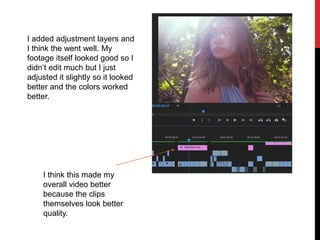
I added adjustment layers and
I think the went well. My
footage itself looked good so I
didn’t edit much but I just
adjusted it slightly so it looked
better and the colors worked
better.
I think this made my
overall video better
because the clips
themselves look better
quality.
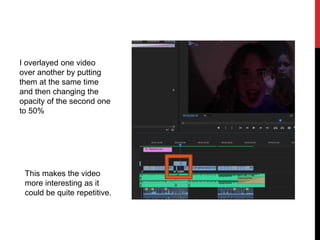
I overlayed one video
over another by putting
them at the same time
and then changing the
opacity of the second one
to 50%
This makes the video
more interesting as it
could be quite repetitive.
WHAT PROBLEMS DID
YOU HAVE? [3
EXAMPLES]
For my video I tried to edit to the beat
of the song, but because the song was
really loud you couldn’t clearly see the
beat of the song using the audio, so I
struggled to edit to the beat.
I also wanted to edit the video so it
sounded muffled when the female
sings. I found this really difficult to do
because I had to mess around with
key frames and watch YouTube
tutorials.
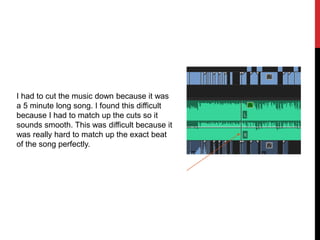
I had to cut the music down because it was
a 5 minute long song. I found this difficult
because I had to match up the cuts so it
sounds smooth. This was difficult because it
was really hard to match up the exact beat
of the song perfectly.
NEXT STEPS…
What are the main things you’ve learned from this project?
Pick a minimum of 5 to discuss…
• I’ve learned how to make an adjustment layer which is helpful
because I can add colours and effects to videos without
changing the clip itself.
• I’ve learned that planning is crucial to having a good final
product. The more you plan the better the end product will be.
• I’ve learned that I work better with visual planning, such as story
boards, are personally more helpful for me
• I’ve learned different audio effects like muffling the sound, to
make the music video interesting rather than just visual effects.
• I’ve also learned the more organised you are in the planning, the
smoother the whole process will go.

Process log form

  • 1.
  • 2.
    PRODUCTION LOG: GUIDANCE • Thisdocument is for you to track the progress of your production – filming, editing and post-production. • This is so you can track what you did and how you did it, explaining and amendments and changes you made and tracking the decisions that have shaped the practical creation of your music video. • The more detail you include about how you made your music video, the better. The document is broken down in to two sections, Filming and Editing, each of these is then made of specific elements that occur in both. • For each slide there is a prompt detailing what you should include, delete the prompt after you have complete the slide. • Remember, images often show what you’ve done more effectively than words. Use text to explain an illustration.
  • 3.
    FILMING Explain what workedand didn’t work about your filming and how you managed this covering the following areas: • Technical – using the cameras and any technical equipment; this could be how you did your lip sync, used the green screen, dealt with problems with batteries, etc • Logistical – did your locations work? Did you have any access problems? Did it rain? • Personnel – how were your cast/crew? Did anyone let you down? How did you manage this? • Planning – did your planning help? Do you think it could have worked better? How? • Next steps – do you need to re-film? Film more? Have you changed your video? How/why?
  • 4.
    TECHNICAL • I foundit difficult to keep the camera in focus while filming so I ended up with lots of short in focus clips rather than long clips not if in focus. This worked out okay because the music was really fast paced and any long clips wouldn’t have looked right with the song. • I didn’t have any problems with the camera because I kept it charged up each time I needed recording. • I had an issue when I accidentally removed the footage from my camera onto the the mac because I dragged the footage onto the desktop rather than making a copy of it. This meant I couldn’t edit my video at home as I did not have the footage to work with.
  • 5.
    LOGISTICAL • I originallyplanned on filming at the minster but I decided against it because of corona virus lockdown restrictions. I decided to film more local to me as it would be easier to access and more safe. • The other locations worked well and I managed to film all of them with good lighting.
  • 6.
    PERSONNEL • My onlycast member was my sister so I didn’t have any problems with lockdown because she lives in the same household as me, I had access to film her whenever we were both available. This meant when I needed extra footage I didn’t have to organise to meet her as she was already here.
  • 7.
    PLANNING • I thinkmy planning was okay because I drew a lot of it out visually so it helped me in the filming process. • However I think it would have helped if I planned out more and more of a variety of shots. • If I planned mor shots I wouldn’t have to re-shoot it more than once because I would have managed to get all of my footage at once.
  • 8.
    EDITING • Record youredit progress, decisions, problems, etc. in this section • Include screenshots with annotations, statements, etc where possible • Try to explain how you worked and justify why you chose to work the way you did. • Follow the structure and what to include on each slide as this is necessary for evidence for assessment • Pick notable moments in the editing process and discuss them, what worked/didn’t work and why, how you adjusted to problems. Discuss how you worked and what you learned from the process
  • 9.
    WHAT WENT WELL [3EXAMPLES] Before the first chorus, I cut the song and timed it with a clip of my actress blowing out the candle. So when she blows out the candle the music goes out with the flame. I think this went well because it looks good and it fits with the chorus fading in. I did this to make the audio itself different to the original because I think it makes the video more interesting visually and to listen to.
  • 10.
    I added adjustmentlayers and I think the went well. My footage itself looked good so I didn’t edit much but I just adjusted it slightly so it looked better and the colors worked better. I think this made my overall video better because the clips themselves look better quality.
  • 11.
    I overlayed onevideo over another by putting them at the same time and then changing the opacity of the second one to 50% This makes the video more interesting as it could be quite repetitive.
  • 12.
    WHAT PROBLEMS DID YOUHAVE? [3 EXAMPLES] For my video I tried to edit to the beat of the song, but because the song was really loud you couldn’t clearly see the beat of the song using the audio, so I struggled to edit to the beat. I also wanted to edit the video so it sounded muffled when the female sings. I found this really difficult to do because I had to mess around with key frames and watch YouTube tutorials.
  • 13.
    I had tocut the music down because it was a 5 minute long song. I found this difficult because I had to match up the cuts so it sounds smooth. This was difficult because it was really hard to match up the exact beat of the song perfectly.
  • 14.
    NEXT STEPS… What arethe main things you’ve learned from this project? Pick a minimum of 5 to discuss… • I’ve learned how to make an adjustment layer which is helpful because I can add colours and effects to videos without changing the clip itself. • I’ve learned that planning is crucial to having a good final product. The more you plan the better the end product will be. • I’ve learned that I work better with visual planning, such as story boards, are personally more helpful for me • I’ve learned different audio effects like muffling the sound, to make the music video interesting rather than just visual effects. • I’ve also learned the more organised you are in the planning, the smoother the whole process will go.