Model Builder in ArcGIS

           By
       Ashok Peddi
What is ModelBuilder?
 What is a Model Builder?
is an application in which you can create, edit, and
modify models!
 “Model” is an ideal representation()
      (Ex. Role model)
 “Builder” building an ideal representation
 Why we need Model Builder?
  reduce the ambiguity and redundancy
 to increase one’s efficiency;
 Optimization
 Visual Programming!
Why Model Builder
• Developing a model for a GIS analysis allows for
  repeat testing of a hypothesis using different
  data.
• The model can be coded into a GIS application, so
  that the steps are performed automatically.
• Easier reproduction of results.
• Simplification of workflow.
• Informs the computer how to conduct a series of
  steps that would be impractical for you to do
  manually.(TT process)
How ModelBuilder Works
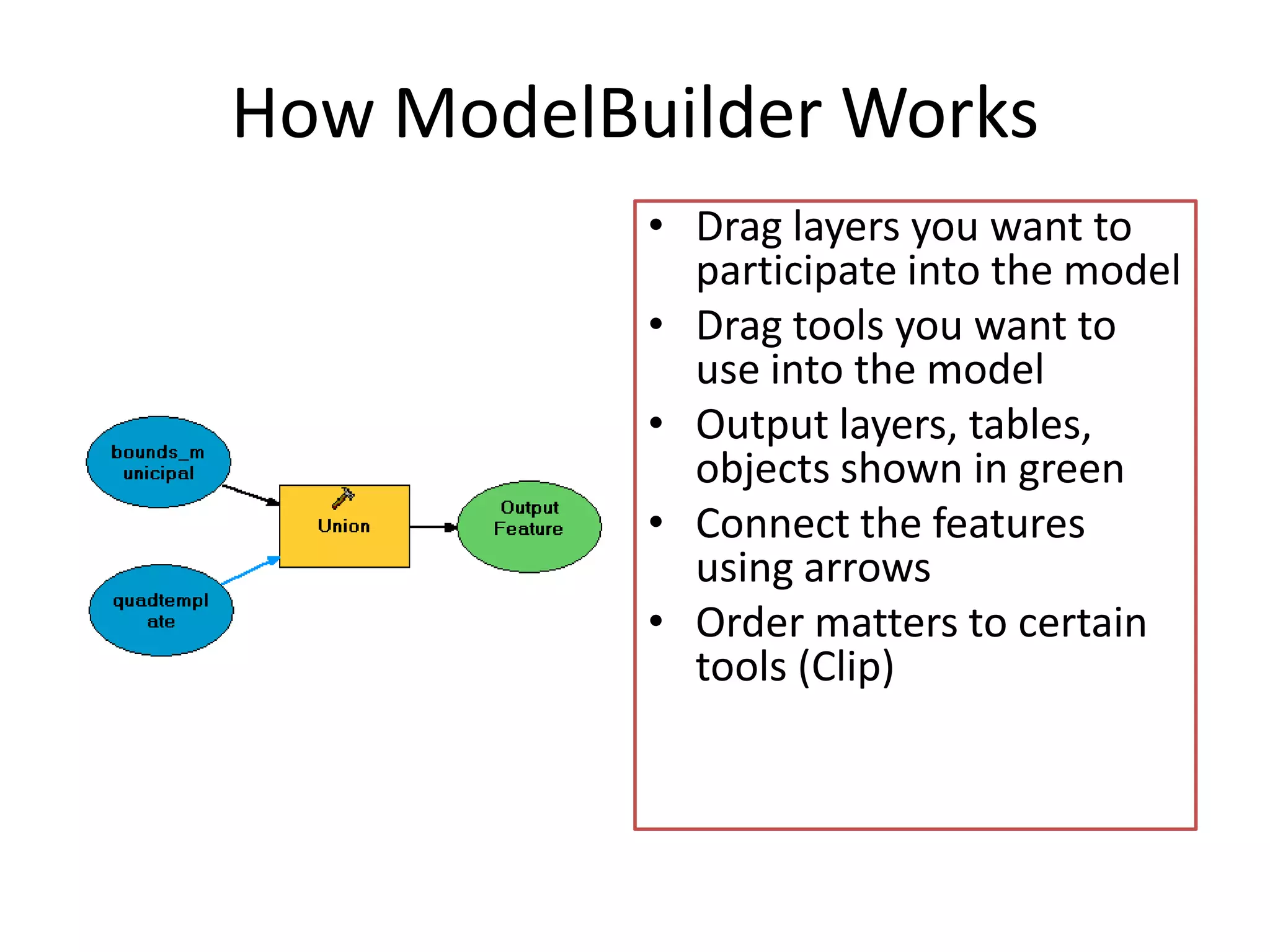
           • Drag layers you want to
             participate into the model
           • Drag tools you want to
             use into the model
           • Output layers, tables,
             objects shown in green
           • Connect the features
             using arrows
           • Order matters to certain
             tools (Clip)
Human inefficiency
• Physically cannot perform the steps as
  fast as Model Builder can produce the
  results.
• Certain steps, such as iteration through a
  feature set would be prohibitively time
  consuming.
   (perform the same steps)
• Minimize the amount of time spent
Efficient Workflow
There are many repetitive steps you will take
 in your daily workflow.
Streamlining the process saves you time.
Types of Model builders
Executing tools Model Builder
  often used method
  Simple & easy
Creating tools with Model Builder
 Use of Elements, connectors and
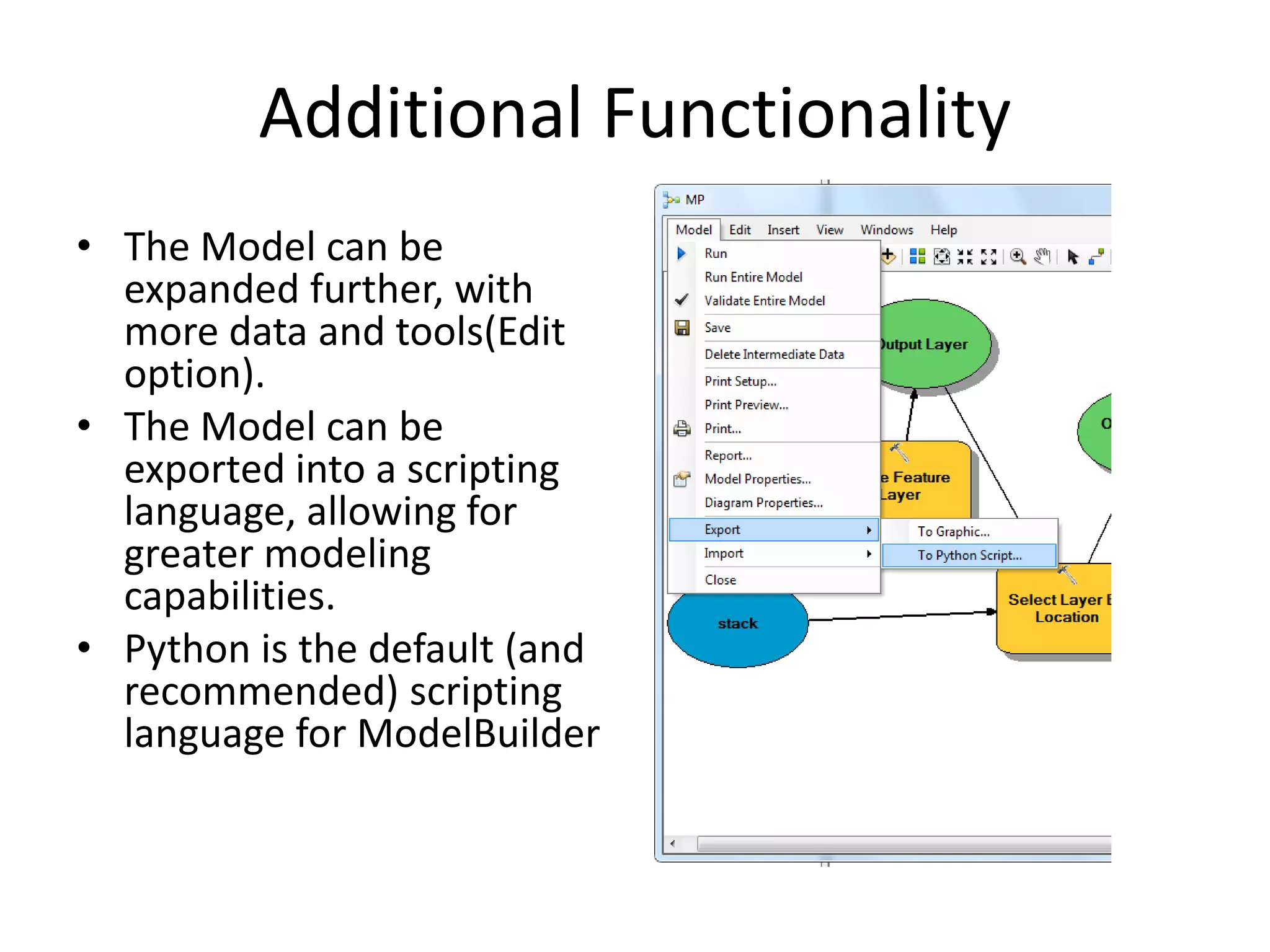
Additional Functionality
• The Model can be
  expanded further, with
  more data and tools(Edit
  option).
• The Model can be
  exported into a scripting
  language, allowing for
  greater modeling
  capabilities.
• Python is the default (and
  recommended) scripting
  language for ModelBuilder
Creating a New Toolbox
• Creating your own Toolbox is not just for
  organizational purposes. It allows you to share
  your models with others.
• If you will be sharing your model and using relative
  addresses, you need to plan the folder location of
  your New Toolbox carefully.
   – Default location for a New Toolbox created inside Create
      a new Toolbox by right clicking in ArcCatalog and
      selecting New Toolbox.
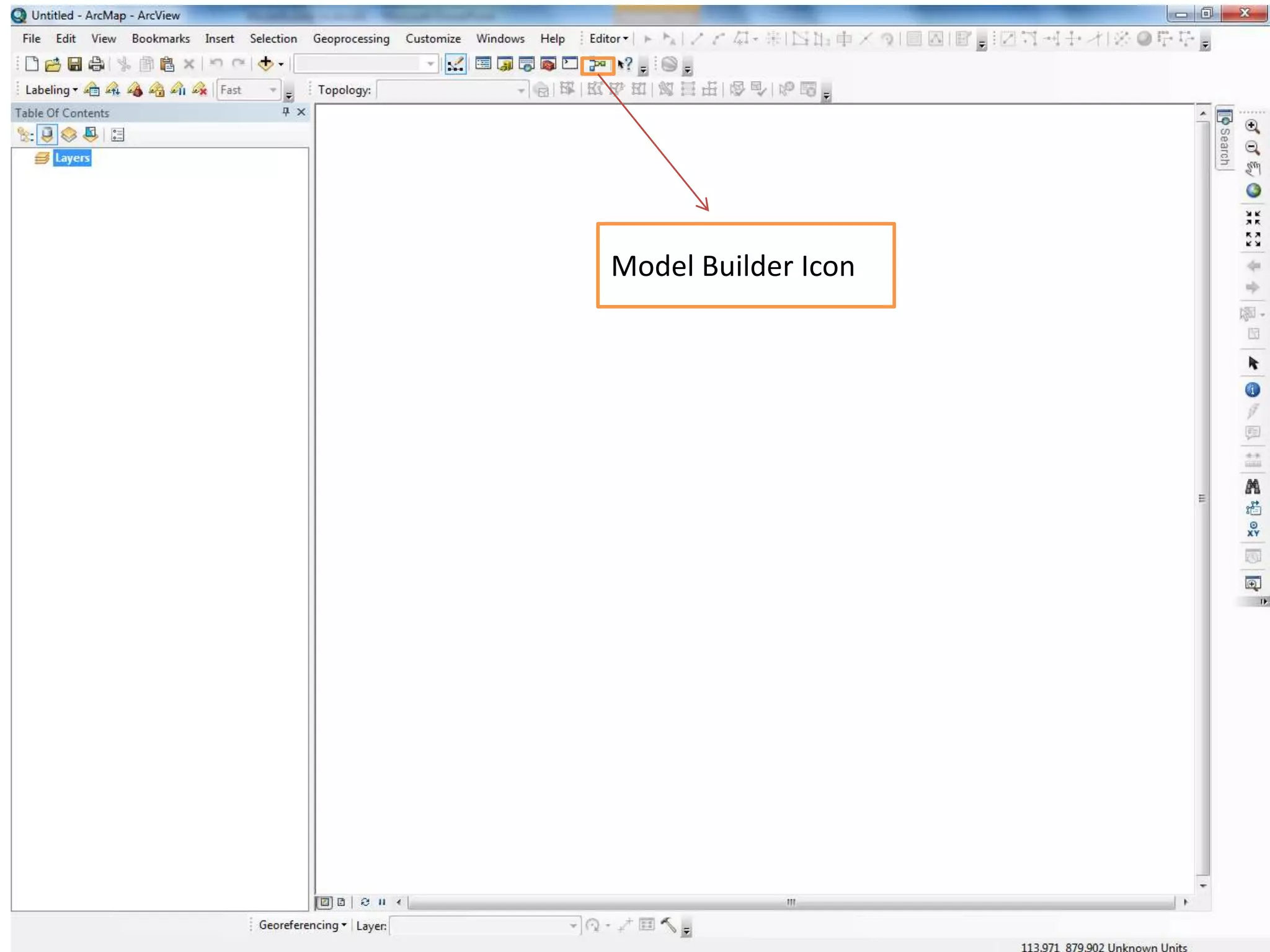
Model Builder Icon
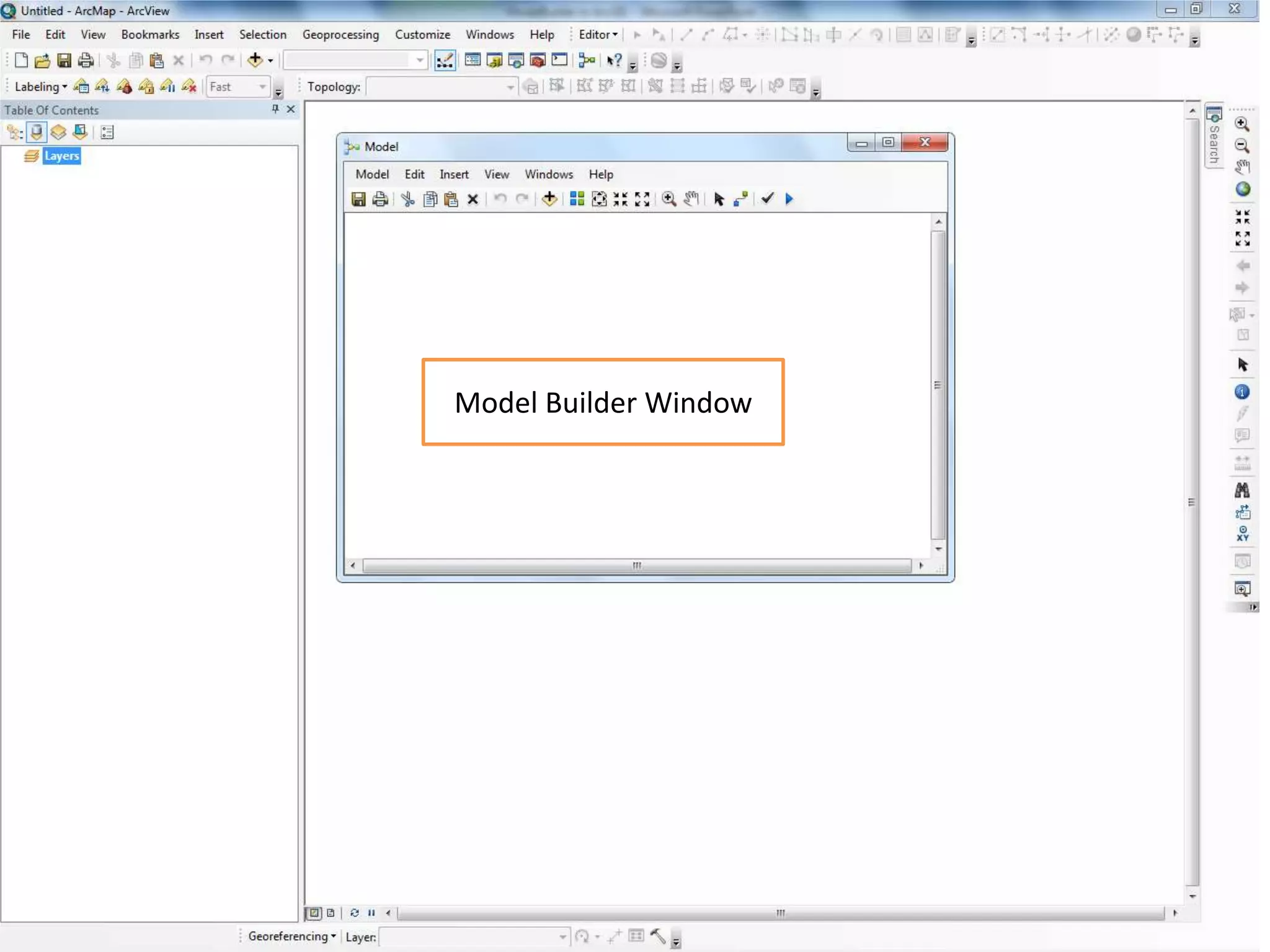
Model Builder Window
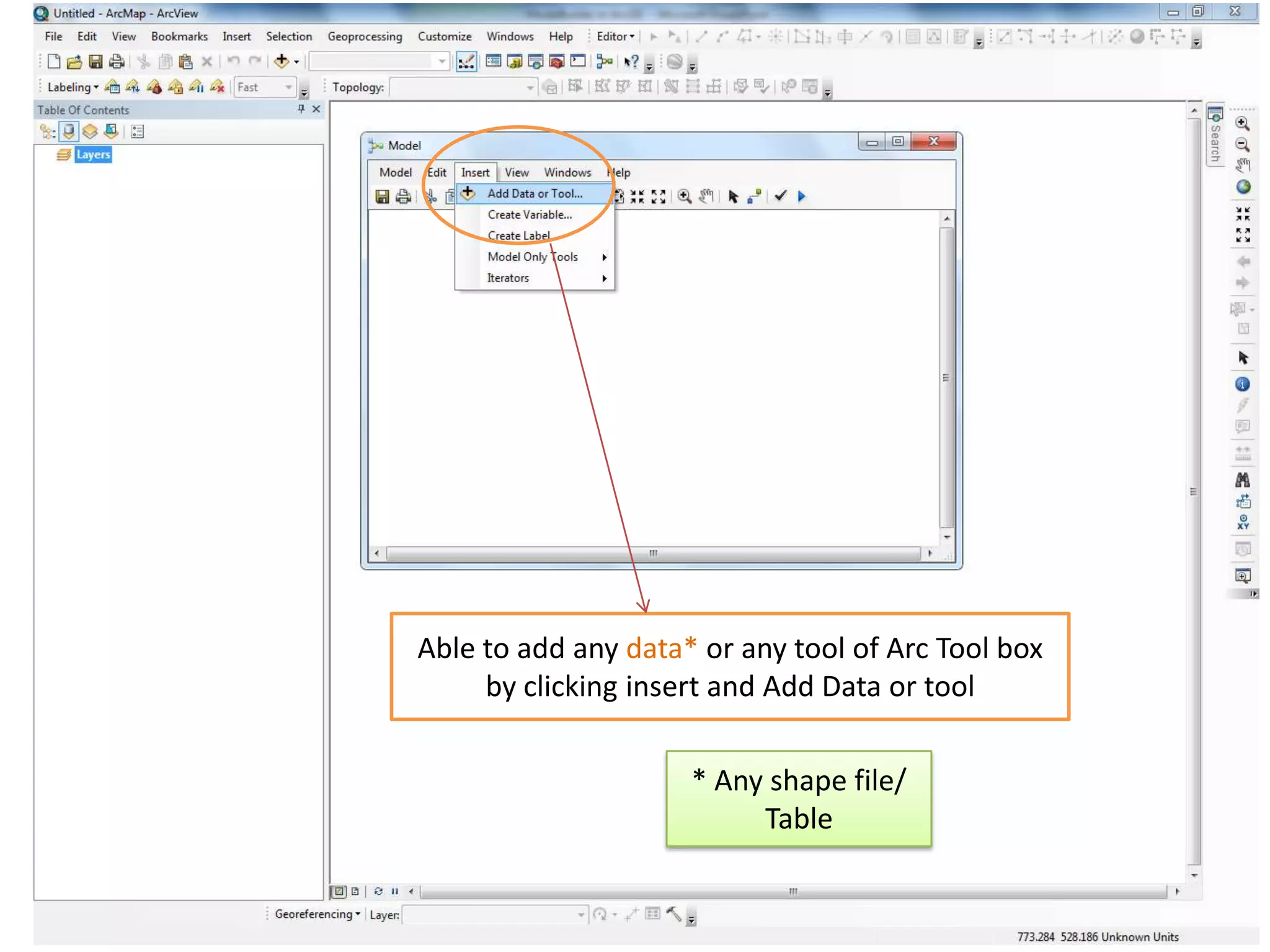
Able to add any data* or any tool of Arc Tool box
     by clicking insert and Add Data or tool

                     * Any shape file/
                          Table
References
• http://help.arcgis.com/en/arcgisdesktop/10.0
  /help/index.html#//002w00000001000000

Model builder in arcgis

  • 1.
    Model Builder inArcGIS By Ashok Peddi
  • 2.
    What is ModelBuilder? What is a Model Builder? is an application in which you can create, edit, and modify models!  “Model” is an ideal representation() (Ex. Role model)  “Builder” building an ideal representation  Why we need Model Builder? reduce the ambiguity and redundancy to increase one’s efficiency;  Optimization  Visual Programming!
  • 3.
    Why Model Builder •Developing a model for a GIS analysis allows for repeat testing of a hypothesis using different data. • The model can be coded into a GIS application, so that the steps are performed automatically. • Easier reproduction of results. • Simplification of workflow. • Informs the computer how to conduct a series of steps that would be impractical for you to do manually.(TT process)
  • 4.
    How ModelBuilder Works • Drag layers you want to participate into the model • Drag tools you want to use into the model • Output layers, tables, objects shown in green • Connect the features using arrows • Order matters to certain tools (Clip)
  • 5.
    Human inefficiency • Physicallycannot perform the steps as fast as Model Builder can produce the results. • Certain steps, such as iteration through a feature set would be prohibitively time consuming. (perform the same steps) • Minimize the amount of time spent
  • 6.
    Efficient Workflow There aremany repetitive steps you will take in your daily workflow. Streamlining the process saves you time.
  • 7.
    Types of Modelbuilders Executing tools Model Builder often used method Simple & easy Creating tools with Model Builder Use of Elements, connectors and
  • 8.
    Additional Functionality • TheModel can be expanded further, with more data and tools(Edit option). • The Model can be exported into a scripting language, allowing for greater modeling capabilities. • Python is the default (and recommended) scripting language for ModelBuilder
  • 9.
    Creating a NewToolbox • Creating your own Toolbox is not just for organizational purposes. It allows you to share your models with others. • If you will be sharing your model and using relative addresses, you need to plan the folder location of your New Toolbox carefully. – Default location for a New Toolbox created inside Create a new Toolbox by right clicking in ArcCatalog and selecting New Toolbox.
  • 10.
  • 11.
  • 12.
    Able to addany data* or any tool of Arc Tool box by clicking insert and Add Data or tool * Any shape file/ Table
  • 14.