Build Your First Coded Agent with LangGraph
+ UiPath SDK |
Hands on-Workshop
Link to the Session’s Artefact:
https://bit.ly/498pQM1
Facilitators
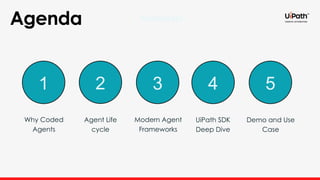
Agenda
1 2 3 4 5
Why Coded
Agents
Agent Life
cycle
Modern Agent
Frameworks
UiPath SDK
Deep Dive
Demo and Use
Case
Why Coded Agents
Are Changing the
Automation Game
Beyond Drag-and-Drop: The Power of Code in
Intelligent Automation
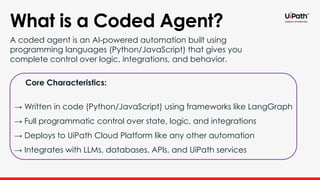
What is a Coded Agent?
A coded agent is an AI-powered automation built using
programming languages (Python/JavaScript) that gives you
complete control over logic, integrations, and behavior.
Core Characteristics:
→ Written in code (Python/JavaScript) using frameworks like LangGraph
→ Full programmatic control over state, logic, and integrations
→ Deploys to UiPath Cloud Platform like any other automation
→ Integrates with LLMs, databases, APIs, and UiPath services
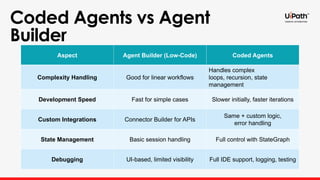
Coded Agents vs Agent
Builder
Aspect Agent Builder (Low-Code) Coded Agents
Complexity Handling Good for linear workflows
Handles complex
loops, recursion, state
management
Development Speed Fast for simple cases Slower initially, faster iterations
Custom Integrations Connector Builder for APIs
Same + custom logic,
error handling
State Management Basic session handling Full control with StateGraph
Debugging UI-based, limited visibility Full IDE support, logging, testing
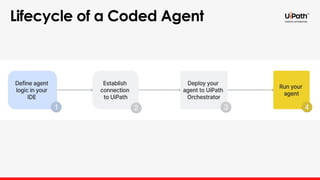
Lifecycle of a Coded Agent
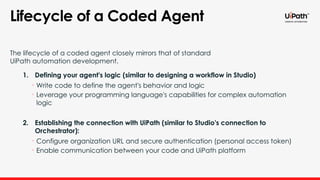
The lifecycle of a coded agent closely mirrors that of standard
UiPath automation development.
1. Defining your agent's logic (similar to designing a workflow in Studio)
• Write code to define the agent's behavior and logic
• Leverage your programming language's capabilities for complex automation
logic
2. Establishing the connection with UiPath (similar to Studio's connection to
Orchestrator):
• Configure organization URL and secure authentication (personal access token)
• Enable communication between your code and UiPath platform
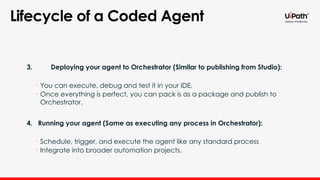
3. Deploying your agent to Orchestrator (Similar to publishing from Studio):
• You can execute, debug and test it in your IDE.
• Once everything is perfect, you can pack is as a package and publish to
Orchestrator.
4. Running your agent (Same as executing any process in Orchestrator):
• Schedule, trigger, and execute the agent like any standard process
• Integrate into broader automation projects.
Lifecycle of a Coded Agent
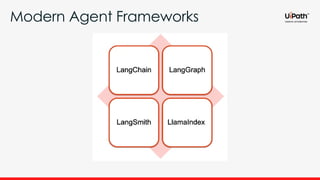
Modern Agent Frameworks
LangChain
• Components for working with LLMs (Large Language Models)
• Tools for chaining these components together
• Memory capabilities for contextual conversations
• Integration with external tools and data sources
LangChain is a framework designed to develop applications
powered by language models.
LangGraph
• Tools for building stateful, multi-actor applications
• Chain-of-thought reasoning capabilities
• Support for complex agent workflows with decision-making abilities
• Ability to create more sophisticated AI agents with planning capabilities
LangGraph extends LangChain by providing:
LangSmith
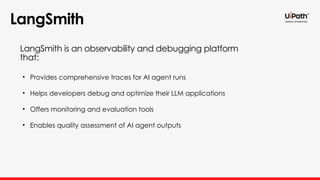
• Provides comprehensive traces for AI agent runs
• Helps developers debug and optimize their LLM applications
• Offers monitoring and evaluation tools
• Enables quality assessment of AI agent outputs
LangSmith is an observability and debugging platform
that:
LlamaIndex
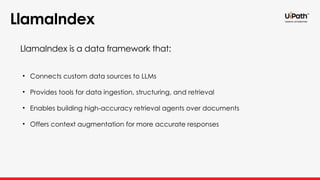
• Connects custom data sources to LLMs
• Provides tools for data ingestion, structuring, and retrieval
• Enables building high-accuracy retrieval agents over documents
• Offers context augmentation for more accurate responses
LlamaIndex is a data framework that:
UiPath SDK
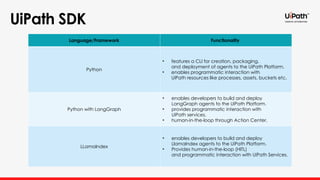
Language/Framework Functionality
Python
• features a CLI for creation, packaging,
and deployment of agents to the UiPath Platform.
• enables programmatic interaction with
UiPath resources like processes, assets, buckets etc.
Python with LangGraph
• enables developers to build and deploy
LangGraph agents to the UiPath Platform.
• provides programmatic interaction with
UiPath services.
• human-in-the-loop through Action Center.
LLamaIndex
• enables developers to build and deploy
LlamaIndex agents to the UiPath Platform.
• Provides human-in-the-loop (HITL)
and programmatic interaction with UiPath Services.
UiPath SDK - Python
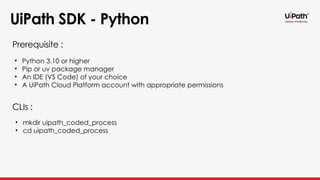
• Python 3.10 or higher
• Pip or uv package manager
• An IDE (VS Code) of your choice
• A UiPath Cloud Platform account with appropriate permissions
Prerequisite :
CLIs :
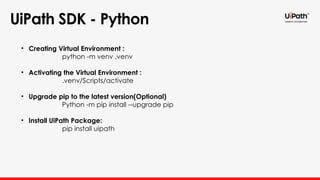
• mkdir uipath_coded_process
• cd uipath_coded_process
UiPath SDK - Python
• Creating Virtual Environment :
python -m venv .venv
• Activating the Virtual Environment :
.venv/Scripts/activate
• Upgrade pip to the latest version(Optional)
Python -m pip install --upgrade pip
• Install UiPath Package:
pip install uipath
UiPath SDK - Python
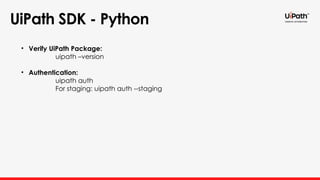
• Verify UiPath Package:
uipath –version
• Authentication:
uipath auth
For staging: uipath auth --staging
UiPath SDK - Python
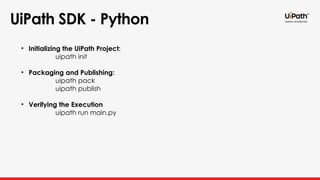
• Initializing the UiPath Project:
uipath init
• Packaging and Publishing:
uipath pack
uipath publish
• Verifying the Execution
uipath run main.py
UiPath SDK - LangChain
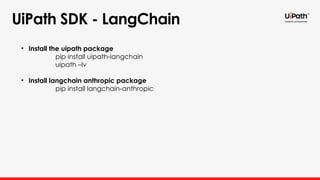
• Install the uipath package
pip install uipath-langchain
uipath –lv
• Install langchain anthropic package
pip install langchain-anthropic
UiPath SDK - LlamaIndex
• Install the uipath package
pip install uipath-llamaindex
DEMO
Thank you

Coded Agents – with UiPath SDK + LangGraph [Virtual Hands-on Workshop]

  • 1.
    Build Your FirstCoded Agent with LangGraph + UiPath SDK | Hands on-Workshop Link to the Session’s Artefact: https://bit.ly/498pQM1
  • 2.
    Facilitators Agenda 1 2 34 5 Why Coded Agents Agent Life cycle Modern Agent Frameworks UiPath SDK Deep Dive Demo and Use Case
  • 3.
    Why Coded Agents AreChanging the Automation Game Beyond Drag-and-Drop: The Power of Code in Intelligent Automation
  • 4.
    What is aCoded Agent? A coded agent is an AI-powered automation built using programming languages (Python/JavaScript) that gives you complete control over logic, integrations, and behavior. Core Characteristics: → Written in code (Python/JavaScript) using frameworks like LangGraph → Full programmatic control over state, logic, and integrations → Deploys to UiPath Cloud Platform like any other automation → Integrates with LLMs, databases, APIs, and UiPath services
  • 5.
    Coded Agents vsAgent Builder Aspect Agent Builder (Low-Code) Coded Agents Complexity Handling Good for linear workflows Handles complex loops, recursion, state management Development Speed Fast for simple cases Slower initially, faster iterations Custom Integrations Connector Builder for APIs Same + custom logic, error handling State Management Basic session handling Full control with StateGraph Debugging UI-based, limited visibility Full IDE support, logging, testing
  • 6.
    Lifecycle of aCoded Agent
  • 7.
    Lifecycle of aCoded Agent The lifecycle of a coded agent closely mirrors that of standard UiPath automation development. 1. Defining your agent's logic (similar to designing a workflow in Studio) • Write code to define the agent's behavior and logic • Leverage your programming language's capabilities for complex automation logic 2. Establishing the connection with UiPath (similar to Studio's connection to Orchestrator): • Configure organization URL and secure authentication (personal access token) • Enable communication between your code and UiPath platform
  • 8.
    3. Deploying youragent to Orchestrator (Similar to publishing from Studio): • You can execute, debug and test it in your IDE. • Once everything is perfect, you can pack is as a package and publish to Orchestrator. 4. Running your agent (Same as executing any process in Orchestrator): • Schedule, trigger, and execute the agent like any standard process • Integrate into broader automation projects. Lifecycle of a Coded Agent
  • 9.
  • 10.
    LangChain • Components forworking with LLMs (Large Language Models) • Tools for chaining these components together • Memory capabilities for contextual conversations • Integration with external tools and data sources LangChain is a framework designed to develop applications powered by language models.
  • 11.
    LangGraph • Tools forbuilding stateful, multi-actor applications • Chain-of-thought reasoning capabilities • Support for complex agent workflows with decision-making abilities • Ability to create more sophisticated AI agents with planning capabilities LangGraph extends LangChain by providing:
  • 12.
    LangSmith • Provides comprehensivetraces for AI agent runs • Helps developers debug and optimize their LLM applications • Offers monitoring and evaluation tools • Enables quality assessment of AI agent outputs LangSmith is an observability and debugging platform that:
  • 13.
    LlamaIndex • Connects customdata sources to LLMs • Provides tools for data ingestion, structuring, and retrieval • Enables building high-accuracy retrieval agents over documents • Offers context augmentation for more accurate responses LlamaIndex is a data framework that:
  • 14.
    UiPath SDK Language/Framework Functionality Python •features a CLI for creation, packaging, and deployment of agents to the UiPath Platform. • enables programmatic interaction with UiPath resources like processes, assets, buckets etc. Python with LangGraph • enables developers to build and deploy LangGraph agents to the UiPath Platform. • provides programmatic interaction with UiPath services. • human-in-the-loop through Action Center. LLamaIndex • enables developers to build and deploy LlamaIndex agents to the UiPath Platform. • Provides human-in-the-loop (HITL) and programmatic interaction with UiPath Services.
  • 15.
    UiPath SDK -Python • Python 3.10 or higher • Pip or uv package manager • An IDE (VS Code) of your choice • A UiPath Cloud Platform account with appropriate permissions Prerequisite : CLIs : • mkdir uipath_coded_process • cd uipath_coded_process
  • 16.
    UiPath SDK -Python • Creating Virtual Environment : python -m venv .venv • Activating the Virtual Environment : .venv/Scripts/activate • Upgrade pip to the latest version(Optional) Python -m pip install --upgrade pip • Install UiPath Package: pip install uipath
  • 17.
    UiPath SDK -Python • Verify UiPath Package: uipath –version • Authentication: uipath auth For staging: uipath auth --staging
  • 18.
    UiPath SDK -Python • Initializing the UiPath Project: uipath init • Packaging and Publishing: uipath pack uipath publish • Verifying the Execution uipath run main.py
  • 19.
    UiPath SDK -LangChain • Install the uipath package pip install uipath-langchain uipath –lv • Install langchain anthropic package pip install langchain-anthropic
  • 20.
    UiPath SDK -LlamaIndex • Install the uipath package pip install uipath-llamaindex
  • 21.
  • 22.

Editor's Notes

  • #2 Coded agents > life cycle > modern frameworks Langchain... basic building blocks for intelligent agents > getting started with UiPath SDK .. We'll wrap up with a demo and use case. But let's get to the big question, why coded agents are changing the automation game?
  • #3 Traditional automation, drag and drop, Native Agents created using agent builder. What exactly are the coded agents?
  • #4 Ai powered intelligent automation, which is developed using programming languages like python To understand the power of coded agents let's understand the diff bw native and coded agents.
  • #5 Coded agents offer better complexity handling and development speed. It lets you integrate with apis, databases etc. Full control over the agents state management. Since it is developed in IDE you get more visibilty to the flow of the execution of agents, which means more space for debugging. To understand how your coded agents come to life, let's walk through their life cycle...
  • #6 Four phases/stages. Let's understand each phase closely..
  • #7 Coded agents life cycle closely mimics standard uipath automation development. In the firs phase,
  • #8 So that's the life cycle, but what what frameworks power coded agents behind the scenes? I'll hand it over to ganesh to continue who'll brief you on the modern agents frameworks
  • #9 Agentic frameworks are tool or libraries which helps to build AI agents. We have modern agentic frameworks Langchain,langgraph,langsmith,llamaindex are widely used in UiPath-coded agent Due to their complementary strengths in building, managing and deploying sophisticated AI agents. Lets see about each frameworks in detail:
  • #10 Lang chain provides a modular framework for building llm-powered agents. Which offers components for prompt management,chain construction like a structured sequences Memory capability where agent can remember the past conversations (buffer memory) Integrations with External data sources like (files,databases,apis) and tools like (web search). We will see about another framework langgraph
  • #11 Langgraph built on top of Langchain that enable to design and execute more complex,multi agent workflows. It is a graph based control where we define nodes(steps) and edges (transitions). Langgraph is a combination of LLM reasoning + workflow orchestration + state management let me give an example  Input -> research agent -> summarize agent -> reviewer agent -> output We will see more about langgraph in demo. We will see about another framework langsmith
  • #12 Langsmith is a platfrom for debugging, evaluating and monitoring agents built with langchain and langgraph. Helps to track and visualize every prompt, input,output and intermediate steps. It can evaluate accuracy and can help in debug issues in multi-step agent workflows. Example like we can see each llm call and agent decisions. We will see aboth llamaindex
  • #13 Llamaindex is a data orchestrtraion framework specializes in connecting llm to data sources like private or enterprise data in a structured way. Core components: Data connectors,loaders and retrivers. Create a searchable structure like index. These are the modern agent frameworks if we look into a high level lang chain -> Reasoning Lang graph -> Workflow lang smith -> Monitoring llama Index -> data source Now will see about Uipath SDk which we will use to bulit agent
  • #14 Uipath sdk library currently supports this language\frameworks and continously increasing;
  • #15 Lets see commands to create a virtal environmnet
  • #16  What is the need to create virtual environment? virtual environment is needed for isolation , reproducibility,easier sharing Once the environment get created we will see a folder .venv folder and contains folders include,Lib,scripts folders. Inside scripts folder we will see activate and deactivate ps1 and bat files. We will use pip package manager to install packages Pip-python package installer We will see command how to check whether package was installed and how to connect to cloud
  • #17 For cloud: uipath auth –cloud After successful connection you will find a env file with access token and orchestrator url. We will see commands to initialize,pack,publish the agent.
  • #18 Once after building the agent in IDE we have to use the Uipath init command to initialize the project which creates uipath.json ->input and output schemas and bindings Uipath pack -> you will find the nupkg in scripts\.uipath We will see how to install langchain
  • #19 Langchain-anthropic (langchain integration package for anthropic models such as claude) similarly langchain- openai and google-genai for gemini
  • #20 Pip install uipath-llamaindex to the install the uipath-llamaIndex Python package