Welcome to WebAuthn workshopWelcome to WebAuthn workshop
While you are waiting, please check that you have
installed LATESTLATEST Nodejs(v6.x), NPM, Git andNodejs(v6.x), NPM, Git and
Firefox Nightly(59 =<)Firefox Nightly(59 =<)
Open slides from
http://bit.ly/2FV5u9rhttp://bit.ly/2FV5u9r
1
2
AuthenticatingAuthenticating
your Webyour Web
3
Yuriy AckermannYuriy Ackermann
Sr. Certification EngineerSr. Certification Engineer
@FIDOAlliance@FIDOAlliance
twitter/github: @herrjemandtwitter/github: @herrjemand
4
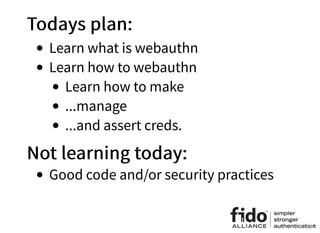
Todays plan:Todays plan:
Learn what is webauthn
Learn how to webauthn
Learn how to make
...manage
...and assert creds.
Not learning today:Not learning today:
Good code and/or security practices
5
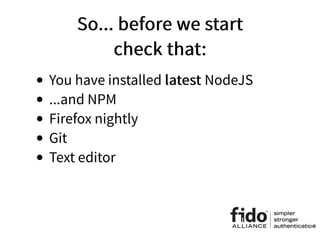
So... before we startSo... before we start
check that:check that:
You have installed latestlatest NodeJS
...and NPM
Firefox nightly
Git
Text editor
6
Short recap ofShort recap of
CredManAPICredManAPI
JS API for credentials management in user management
Official W3C spec
Basically JS API for autofill
Read/watch:
https://www.w3.org/TR/credential-management/
https://developers.google.com/web/fundamentals/security/cre
dential-management/
https://pusher.com/sessions/meetup/js-monthly-
london/building-a-better-login-with-the-credential-
management-api
navigator.credentials.store({
'type': 'password',
'id': 'alice',
'password': 'VeryRandomPassword123456'
})
navigator.credentials
.get({ 'password': true })
.then(credential => {
if (!credential) {
throw new Error('No credentials returned!')
}
let credentials = {
'username': credential.id,
'password': credential.password
}
return fetch('https://example.com/loginEndpoint', {
method: 'POST',
body: JSON.stringify(credentials),
credentials: 'include'
})
})
.then((response) => {
...
})
7
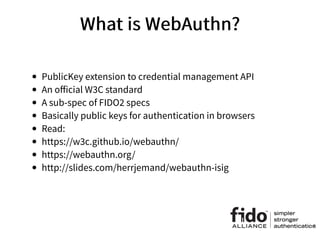
What is WebAuthn?What is WebAuthn?
PublicKey extension to credential management API
An official W3C standard
A sub-spec of FIDO2 specs
Basically public keys for authentication in browsers
Read:
https://w3c.github.io/webauthn/
https://webauthn.org/
http://slides.com/herrjemand/webauthn-isig
8
MakeCredentials requestMakeCredentials request
var publicKey = {
challenge: new Uint8Array([21,31,105, ..., 55]),
rp: {
name: "ACME Corporation"
},
user: {
id: Uint8Array.from(window.atob("MIIBkzCCATigAwIBAjCCAZMwggE4oAMCAQIwggGTMII="), c=>c.charCodeAt(0
name: "alex.p.mueller@example.com",
displayName: "Alex P. Müller"
},
pubKeyCredParams: [
{
type: "public-key", alg: -7 // "ES256" IANA COSE Algorithms registry
},
{
type: "public-key", alg: -257 // "RS256" IANA COSE Algorithms registry
}
]
}
navigator.credentials.create({ publicKey })
.then((newCredentialInfo) => {
/* Public key credential */
}).catch((error) => {
/* Error */
})
Random 32byte challenge buffer
Friendly RP name
User names and userid buffer
Signature algorithm
negotiation
9
Let's try it our selves:Let's try it our selves:
var randomChallengeBuffer = new Uint8Array(32);
window.crypto.getRandomValues(randomChallengeBuffer);
var base64id = 'MIIBkzCCATigAwIBAjCCAZMwggE4oAMCAQIwggGTMII='
var idBuffer = Uint8Array.from(window.atob(base64id), c=>c.charCodeAt(0))
var publicKey = {
challenge: randomChallengeBuffer,
rp: { name: "FIDO Example Corporation" },
user: {
id: idBuffer,
name: "alice@example.com",
displayName: "Alice von Wunderland"
},
pubKeyCredParams: [
{ type: 'public-key', alg: -7 }, // ES256
{ type: 'public-key', alg: -257 } // RS256
]
}
// Note: The following call will cause the authenticator to display UI.
navigator.credentials.create({ publicKey })
.then((newCredentialInfo) => {
console.log('SUCCESS', newCredentialInfo)
})
.catch((error) => {
console.log('FAIL', error)
})
Go to and run in the consolehttps://webauthn.bin.coffee
10
MakeCredentials responseMakeCredentials response
Inner authr id. id == base64url(rawId)
{
"challenge": "HDhbiI5a6F_ndjVmnkCYKM_Mjt5Nv7OQwrYAeI8zX5E",
"hashAlgorithm": "SHA-256",
"origin": "https://webauthn.bin.coffee"
}
Client collected data
Authr assertion
ATTESTATION OBJECT
RP ID hash FLAGS
0 0 0 UV 0ATED UP
COUNTER ATTESTED CRED. DATA EXTENSIONS
32 bytes 1 byte 4 bytes (big-endian uint32) variable length variable length if present (CBOR)
7
“authData“: ... “fmt“: “packed“ “attStmt“: ...
AUTHENTICATOR DATA
“sig“: ...“alg“: ... “x5c“: ...If Basic or Privacy CA:
“ecdaaKeyId“: ...If ECDAA:
AAGUID L CREDENTIAL ID CREDENTIAL PUBLIC KEY
variable length (COSE_Key)LENGTH L
(variable length)
2 bytes16 bytes
0
ATTESTATION STATEMENT (in "packed" attestsion statement format)
“sig“: ...“alg“: ...
11
Okay, hands on deck, lets codeOkay, hands on deck, lets code
Open terminal
git clonegit clone https://github.com/fido-
alliance/webauthn-demo
cd webauthn-demo
npm install
node app.js
In Firefox Nightly http://localhost:3000
12
Request challengeRequest challenge
Process challengeProcess challenge
Return responseReturn response
What are we doing?What are we doing?
13
App architectureApp architecture
Simple Express
app.js + config.json - app config
routes/ - express routers + db
utils.js - help functions + crypto
static/ - static frontend
Frontend architectureFrontend architecture
Simple HTML framework + jQuery
js/password.auth.js - well... you get it
js/helpers.js - help functions
js/view.js - some gui help functions
14
For registration:For registration:
Get username and name(password field is
obsolete, lol)
Send them to the server
Server responds with challenge
MakeCredential
Send response to the server
Check that server likes it
PROFIT!
15
Remove password section from registration form in
index.html
In "password.auth.js" comment #register handler
In "webauthn.auth.js" add:
/* Handle for register form submission */
$('#register').submit(function(event) {
event.preventDefault();
let username = this.username.value;
let name = this.name.value;
if(!username || !name) {
alert('Name or username is missing!')
return
}
})
16
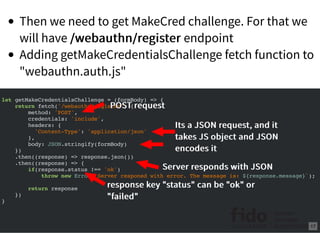
Then we need to get MakeCred challenge. For that we
will have /webauthn/register/webauthn/register endpoint
Adding getMakeCredentialsChallenge fetch function to
"webauthn.auth.js"
let getMakeCredentialsChallenge = (formBody) => {
return fetch('/webauthn/register', {
method: 'POST',
credentials: 'include',
headers: {
'Content-Type': 'application/json'
},
body: JSON.stringify(formBody)
})
.then((response) => response.json())
.then((response) => {
if(response.status !== 'ok')
throw new Error(`Server responed with error. The message is: ${response.message}`);
return response
})
}
POST requestPOST request
Its a JSON request, and itIts a JSON request, and it
takes JS object and JSONtakes JS object and JSON
encodes itencodes it
Server responds with JSONServer responds with JSON
response key "status" can be "ok" orresponse key "status" can be "ok" or
"failed""failed"
17
Adding "getMakeCredentialsChallengegetMakeCredentialsChallenge" to "#register" form
processor in "webauthn.auth.js"
/* Handle for register form submission */
$('#register').submit(function(event) {
event.preventDefault();
let username = this.username.value;
let name = this.name.value;
if(!username || !name) {
alert('Name or username is missing!')
return
}
getMakeCredentialsChallenge({username, name})
.then((response) => {
console.log(response)
})
})
18
It receives name and username
Adds adds them to the DB tagged as not registered
Generates registration request
And sends it back to the browser
Now for the /webauthn/registerNow for the /webauthn/register
endpointendpoint
19
Now lets create /webauthn/register endpoint
In routes/webauthn.js insert this code
router.post('/register', (request, response) => {
if(!request.body || !request.body.username || !request.body.name) {
response.json({
'status': 'failed',
'message': 'Request missing name or username field!'
})
return
}
let username = request.body.username;
let name = request.body.name;
if(database[username] && database[username].registered) {
response.json({
'status': 'failed',
'message': `Username ${username} already exists`
})
return
}
database[username] = {
'name': name,
'registered': false,
'id': utils.randomBase64URLBuffer(),
'authenticators': []
}
})
Check all field. The body is theCheck all field. The body is the
request.bodyrequest.body
Check that user does not exist orCheck that user does not exist or
he is not registeredhe is not registered
Creating userCreating user
Generating user random IDGenerating user random ID
This is where we storeThis is where we store
registered authenticatorsregistered authenticators
20
To generate makeCredential challenge utils have
"generateServerMakeCredRequestgenerateServerMakeCredRequest" method
let generateServerMakeCredRequest = (username, displayName, id) => {
return {
challenge: randomBase64URLBuffer(32),
rp: {
name: "FIDO Examples Corporation"
},
user: {
id: id,
name: username,
displayName: displayName
},
pubKeyCredParams: [
{
type: "public-key", alg: -7 // "ES256" IANA COSE Algorithms registry
}
]
}
}
router.post('/register', (request, response) => {
...
let challengeMakeCred = utils.generateServerMakeCredRequest(username,
name, database[username].id)
challengeMakeCred.status = 'ok'
request.session.challenge = challengeMakeCred.challenge;
request.session.username = username;
response.json(challengeMakeCred)
})
Generate makeCred challenge:Generate makeCred challenge:
passing username, name, and idpassing username, name, and id
Saving username and challengeSaving username and challenge
in session for laterin session for later
Don't forget to let browserDon't forget to let browser
know that you are ok!know that you are ok!
Send responseSend response
In routes/webauthn.js add new block of code
21
Back to the html...
22
Remember this?Remember this?
var randomChallengeBuffer = new Uint8Array(32);
window.crypto.getRandomValues(randomChallengeBuffer);
var base64id = 'MIIBkzCCATigAwIBAjCCAZMwggE4oAMCAQIwggGTMII='
var idBuffer = Uint8Array.from(window.atob(base64id), c=>c.charCodeAt(0))
var publicKey = {
challenge: randomChallengeBuffer,
rp: { name: "FIDO Example Corporation" },
user: {
id: idBuffer,
name: "alice@example.com",
displayName: "Alice von Wunderland"
},
pubKeyCredParams: [
{ type: 'public-key', alg: -7 }, // ES256
{ type: 'public-key', alg: -257 } // RS256
]
}
// Note: The following call will cause the authenticator to display UI.
navigator.credentials.create({ publicKey })
.then((newCredentialInfo) => {
console.log('SUCCESS', newCredentialInfo)
})
.catch((error) => {
console.log('FAIL', error)
})
challenge is a bufferchallenge is a buffer
id is a bufferid is a buffer
23
Here is our server responseHere is our server response
{
"challenge": "IAomGjp6nnS9GvPhdRdd3ATQWdL0PXTOAHDR6pPgeXM",
"rp": {
"name": "ACME Corporation"
},
"user": {
"id": "38cuhE0p0bN5PM9hSp7WEE8oTS08OQE0igXtuBifxfo",
"name": "alice",
"displayName": "Alice"
},
"pubKeyCredParams": [{
"type": "public-key",
"alg": -7
}],
"status": "ok"
}
Oh boy, challenge is not BUFFER!Oh boy, challenge is not BUFFER!
...cause no buffers in JSON...cause no buffers in JSON
...and id as well...and id as well
Good that helpers.js have "Good that helpers.js have "preformatMakeCredReq" methodmethod
var preformatMakeCredReq = (makeCredReq) => {
makeCredReq.challenge = base64url.decode(makeCredReq.challenge);
makeCredReq.user.id = base64url.decode(makeCredReq.user.id);
return makeCredReq
}
/* Handle for register form submission */
$('#register').submit(function(event) {
event.preventDefault();
let username = this.username.value;
let name = this.name.value;
if(!username || !name) {
alert('Name or username is missing!')
return
}
getMakeCredentialsChallenge({username, name})
.then((response) => {
let publicKey = preformatMakeCredReq(response);
return navigator.credentials.create({ publicKey })
})
.then((newCred) => {
console.log(newCred)
})
})
Updating #registration processor in webauthn.auth.js
24
Back to MakeCredentials responseBack to MakeCredentials response
BUFFERBUFFER
BUFFERBUFFER
BUFFERBUFFER
Guess what? JSON does not do buffers *(Guess what? JSON does not do buffers *(
But don't worry, utils haveBut don't worry, utils have publicKeyCredentialToJSONpublicKeyCredentialToJSON
methodmethod
getMakeCredentialsChallenge({username, name})
.then((response) => {
let publicKey = preformatMakeCredReq(response);
return navigator.credentials.create({ publicKey })
})
.then((newCred) => {
let makeCredResponse = publicKeyCredentialToJSON(newCred);
console.log(makeCredResponse)
})
Updating #registration processor in
webauthn.auth.js
{
"rawId": "Gw7nqgWzci8jwIX9yXzYtynmJbQAAAAAAAAAAAAAAAAAAAAAAAAAAAAAAAAAAAAAAAAAAAAAAAAAAAA
"response": {
"attestationObject": "o2NmbXRoZmlkby11MmZnYXR0U3RtdKJjc2lnWEcwRQIhAIdC3J6jt_rxTF3
"clientDataJSON": "eyJjaGFsbGVuZ2UiOiJLMlEwdHdnXzVGNDJRMEtnYll6OXdxaGVEN3ZBbmlFdE
},
"id": "Gw7nqgWzci8jwIX9yXzYtynmJbQAAAAAAAAAAAAAAAAAAAAAAAAAAAAAAAAAAAAAAAAAAAAAAAAAAAAAAA
"type": "public-key"
}
That's better!That's better! 25
For registration:For registration:
Get username and name(password field is
obsolete, lol)
Send them to the server
Server responds with challenge
MakeCredential
Send response to the server
Check that server likes it
PROFIT!
26
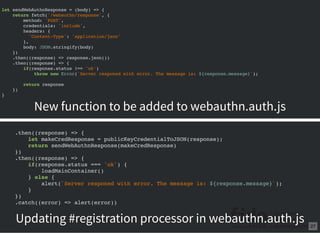
Sending response to the serverSending response to the server
Auth and Reg responses both going to the same
endpoint /webauthn/response/webauthn/response
let sendWebAuthnResponse = (body) => {
return fetch('/webauthn/response', {
method: 'POST',
credentials: 'include',
headers: {
'Content-Type': 'application/json'
},
body: JSON.stringify(body)
})
.then((response) => response.json())
.then((response) => {
if(response.status !== 'ok')
throw new Error(`Server responed with error. The message is: ${response.message}`);
return response
})
}
.then((response) => {
let makeCredResponse = publicKeyCredentialToJSON(response);
return sendWebAuthnResponse(makeCredResponse)
})
.then((response) => {
if(response.status === 'ok') {
loadMainContainer()
} else {
alert(`Server responed with error. The message is: ${response.message}`);
}
})
.catch((error) => alert(error))
New function to be added to webauthn.auth.js
Updating #registration processor in webauthn.auth.js 27
Back to the serverBack to the server
router.post('/response', (request, response) => {
if(!request.body || !request.body.id
|| !request.body.rawId || !request.body.response
|| !request.body.type || request.body.type !== 'public-key' ) {
response.json({
'status': 'failed',
'message': 'Response missing one or more of id/rawId/response/type fields, or type is not public-k
})
return
}
let webauthnResp = request.body
let clientData = JSON.parse(base64url.decode(webauthnResp.response.clientDataJSON));
/* Check challenge... */
if(clientData.challenge !== request.session.challenge) {
response.json({
'status': 'failed',
'message': 'Challenges don't match!'
})
}
/* ...and origin */
if(clientData.origin !== config.origin) {
response.json({
'status': 'failed',
'message': 'Origins don't match!'
})
}
})
Add this code to routes/webauthn.jsroutes/webauthn.js
Checking responseChecking response
Parsing client dataParsing client data
Checking that origin and challenge matchChecking that origin and challenge match
28
Ok, so we got the response. How doOk, so we got the response. How do
we know that it's a reg?we know that it's a reg?
attestationObjectattestationObject
MakeCredentialsMakeCredentials
authenticatorDataauthenticatorData
GetAssertionGetAssertion
router.post('/response', (request, response) => {
...
if(webauthnResp.response.attestationObject !== undefined) {
/* This is create cred */
} else if(webauthnResp.response.authenticatorData !== undefined) {
/* This is get assertion */
} else {
response.json({
'status': 'failed',
'message': 'Can not determine type of response!'
})
}
})
Updating /response endpoint in routes/webauthn.js
29
AttestationVerificationAttestationVerification
In utils.js there is a method
"verifyAuthenticatorAttestationResponse"
let verifyAuthenticatorAttestationResponse = (webAuthnResponse) => {
let attestationBuffer = base64url.toBuffer(webAuthnResponse.response.attestationObject);
let ctapMakeCredResp = cbor.decodeAllSync(attestationBuffer)[0];
let response = {'verified': false};
if(ctapMakeCredResp.fmt === 'fido-u2f') {
let authrDataStruct = parseMakeCredAuthData(ctapMakeCredResp.authData);
if(!(authrDataStruct.flags & U2F_USER_PRESENTED))
throw new Error('User was NOT presented durring authentication!');
let clientDataHash = hash(base64url.toBuffer(webAuthnResponse.response.clientDataJSON))
let reservedByte = Buffer.from([0x00]);
let publicKey = COSEECDHAtoPKCS(authrDataStruct.COSEPublicKey)
let signatureBase = Buffer.concat([reservedByte, authrDataStruct.rpIdHash, clientDataHa
let PEMCertificate = ASN1toPEM(ctapMakeCredResp.attStmt.x5c[0]);
let signature = ctapMakeCredResp.attStmt.sig;
response.verified = verifySignature(signature, signatureBase, PEMCertificate)
if(response.verified) {
response.authrInfo = {
fmt: 'fido-u2f',
publicKey: base64url.encode(publicKey),
counter: authrDataStruct.counter,
credID: base64url.encode(authrDataStruct.credID)
}
}
}
return response
}
Decode base64url encoded assertionDecode base64url encoded assertion
buffer, and CBOR parse itbuffer, and CBOR parse it
It's a U2F statementIt's a U2F statement
Parsing raw authData bufferParsing raw authData buffer
Check that TUP flag is setCheck that TUP flag is set
Generate signature baseGenerate signature base COSE to PKCS conversionCOSE to PKCS conversion
X509 Cert buffer into PEMX509 Cert buffer into PEM
Verify signatureVerify signature
On verification, returnOn verification, return
response with new Authrresponse with new Authr
30
AuthenticatorDataAuthenticatorData
let parseMakeCredAuthData = (buffer) => {
let rpIdHash = buffer.slice(0, 32); buffer = buffer.slice(32);
let flagsBuf = buffer.slice(0, 1); buffer = buffer.slice(1);
let flags = flagsBuf[0];
let counterBuf = buffer.slice(0, 4); buffer = buffer.slice(4);
let counter = counterBuf.readUInt32BE(0);
let aaguid = buffer.slice(0, 16); buffer = buffer.slice(16);
let credIDLenBuf = buffer.slice(0, 2); buffer = buffer.slice(2);
let credIDLen = credIDLenBuf.readUInt16BE(0);
let credID = buffer.slice(0, credIDLen); buffer = buffer.slice(credIDLen);
let COSEPublicKey = buffer;
return {rpIdHash, flagsBuf, flags, counter, counterBuf, aaguid, credID, COSEPublicKey}
}
31
COSE PublicKey to PKCSCOSE PublicKey to PKCS
let COSEECDHAtoPKCS = (COSEPublicKey) => {
/*
+------+-------+-------+---------+----------------------------------+
| name | key | label | type | description |
| | type | | | |
+------+-------+-------+---------+----------------------------------+
| crv | 2 | -1 | int / | EC Curve identifier - Taken from |
| | | | tstr | the COSE Curves registry |
| | | | | |
| x | 2 | -2 | bstr | X Coordinate |
| | | | | |
| y | 2 | -3 | bstr / | Y Coordinate |
| | | | bool | |
| | | | | |
| d | 2 | -4 | bstr | Private key |
+------+-------+-------+---------+----------------------------------+
*/
let coseStruct = cbor.decodeAllSync(COSEPublicKey)[0];
let tag = Buffer.from([0x04]);
let x = coseStruct.get(-2);
let y = coseStruct.get(-3);
return Buffer.concat([tag, x, y])
}
32
Final registration responseFinal registration response
let result;
if(webauthnResp.response.attestationObject !== undefined) {
/* This is create cred */
result = utils.verifyAuthenticatorAttestationResponse(webauthnResp);
if(result.verified) {
database[request.session.username].authenticators.push(result.authrInfo);
database[request.session.username].registered = true
}
} else if(webauthnResp.response.authenticatorData !== undefined) {
/* This is get assertion */
} else {
response.json({
'status': 'failed',
'message': 'Can not determine type of response!'
})
}
if(result.verified) {
request.session.loggedIn = true;
response.json({ 'status': 'ok' })
} else {
response.json({
'status': 'failed',
'message': 'Can not authenticate signature!'
})
}
Updating /response endpoint in routes/webauthn.js 33
For registration:For registration:
Get username and name(password field is
obsolete, lol)
Send them to the server
Server responds with challenge
MakeCredential
Send response to the server
Check that server likes it
PROFIT!
34
DEMO
35
For authentication:For authentication:
Get username(remove password field)
Send to the server
Server responds with challenge
GetAssertion
Send response to the server
Check that server likes it
PROFIT!
36
Take username
Check that it's exits
Generate challenge
Send it to the browser
This time we start with serverThis time we start with server
/webauthn/login endpoint/webauthn/login endpoint
router.post('/login', (request, response) => {
if(!request.body || !request.body.username) {
response.json({
'status': 'failed',
'message': 'Request missing username field!'
})
return
}
let username = request.body.username;
if(!database[username] || !database[username].registered) {
response.json({
'status': 'failed',
'message': `User ${username} does not exist!`
})
return
}
let getAssertion = utils.generateServerGetAssertion(database[username].authenticators)
getAssertion.status = 'ok'
request.session.challenge = getAssertion.challenge;
request.session.username = username;
response.json(getAssertion)
})
Save username and challengeSave username and challenge
Adding new /login endpoint in routes/webauthn.js
37
let generateServerGetAssertion = (authenticators) => {
let allowCredentials = [];
for(let authr of authenticators) {
allowCredentials.push({
type: 'public-key',
id: authr.credID,
transports: ['usb', 'nfc', 'ble']
})
}
return {
challenge: randomBase64URLBuffer(32),
allowCredentials: allowCredentials
}
}
generateServerGetAssertiongenerateServerGetAssertion
38
Back to html...Back to html...
Comment login handler in password.auth.js
Add getAssertionChallenge function to
webauthn.auth.js
let getGetAssertionChallenge = (formBody) => {
return fetch('/webauthn/login', {
method: 'POST',
credentials: 'include',
headers: {
'Content-Type': 'application/json'
},
body: JSON.stringify(formBody)
})
.then((response) => response.json())
.then((response) => {
if(response.status !== 'ok')
throw new Error(`Server responed with error. The message is: ${response.message}`);
return response
})
}
39
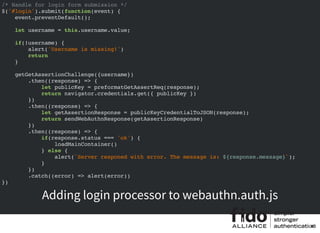
/* Handle for login form submission */
$('#login').submit(function(event) {
event.preventDefault();
let username = this.username.value;
if(!username) {
alert('Username is missing!')
return
}
getGetAssertionChallenge({username})
.then((response) => {
let publicKey = preformatGetAssertReq(response);
return navigator.credentials.get({ publicKey })
})
.then((response) => {
let getAssertionResponse = publicKeyCredentialToJSON(response);
return sendWebAuthnResponse(getAssertionResponse)
})
.then((response) => {
if(response.status === 'ok') {
loadMainContainer()
} else {
alert(`Server responed with error. The message is: ${response.message}`);
}
})
.catch((error) => alert(error))
})
Adding login processor to webauthn.auth.js
40
} else if(webauthnResp.response.authenticatorData !== undefined) {
/* This is get assertion */
} else {
Back to /response processor inBack to /response processor in
routes/webauthn.jsroutes/webauthn.js
41
AssertionVerificationAssertionVerification
In utils.js there is a method
"verifyAuthenticatorAssertionResponse"
let verifyAuthenticatorAssertionResponse = (webAuthnResponse, authenticators) => {
let authr = findAuthr(webAuthnResponse.id, authenticators);
let authenticatorData = base64url.toBuffer(webAuthnResponse.response.authenticatorData);
let response = {'verified': false};
if(authr.fmt === 'fido-u2f') {
let authrDataStruct = parseGetAssertAuthData(authenticatorData);
if(!(authrDataStruct.flags & U2F_USER_PRESENTED))
throw new Error('User was NOT presented durring authentication!');
let clientDataHash = hash(base64url.toBuffer(webAuthnResponse.response.clientDataJSON))
let signatureBase = Buffer.concat([authrDataStruct.rpIdHash, authrDataStruct.flagsBuf,
let publicKey = ASN1toPEM(base64url.toBuffer(authr.publicKey));
let signature = base64url.toBuffer(webAuthnResponse.response.signature);
response.verified = verifySignature(signature, signatureBase, publicKey)
if(response.verified) {
if(response.counter <= authr.counter)
throw new Error('Authr counter did not increase!');
authr.counter = authrDataStruct.counter
}
}
return response
}
Searching for authenticator specified bySearching for authenticator specified by
rawIDrawID
It's a U2F statementIt's a U2F statement
Parsing raw authData bufferParsing raw authData buffer
Check that TUP flag is setCheck that TUP flag is set
Generate signature baseGenerate signature base
PKCS PubKey to PEMPKCS PubKey to PEM
Verify signatureVerify signature
Check that counter increasedCheck that counter increased
Update counterUpdate counter
42
authenticatorData parsingauthenticatorData parsing
let parseGetAssertAuthData = (buffer) => {
let rpIdHash = buffer.slice(0, 32); buffer = buffer.slice(32);
let flagsBuf = buffer.slice(0, 1); buffer = buffer.slice(1);
let flags = flagsBuf[0];
let counterBuf = buffer.slice(0, 4); buffer = buffer.slice(4);
let counter = counterBuf.readUInt32BE(0);
return {rpIdHash, flagsBuf, flags, counter, counterBuf}
}
43
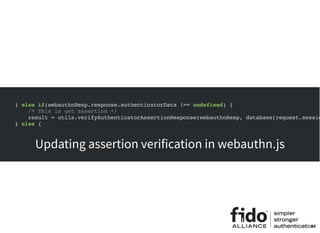
} else if(webauthnResp.response.authenticatorData !== undefined) {
/* This is get assertion */
result = utils.verifyAuthenticatorAssertionResponse(webauthnResp, database[request.sessio
} else {
New function to be added to webauthn.auth.js
Updating assertion verification in webauthn.js
44
DEMO
45

Webauthn Tutorial

  • 1.
    Welcome to WebAuthnworkshopWelcome to WebAuthn workshop While you are waiting, please check that you have installed LATESTLATEST Nodejs(v6.x), NPM, Git andNodejs(v6.x), NPM, Git and Firefox Nightly(59 =<)Firefox Nightly(59 =<) Open slides from http://bit.ly/2FV5u9rhttp://bit.ly/2FV5u9r 1
  • 2.
  • 3.
  • 4.
    Yuriy AckermannYuriy Ackermann Sr.Certification EngineerSr. Certification Engineer @FIDOAlliance@FIDOAlliance twitter/github: @herrjemandtwitter/github: @herrjemand 4
  • 5.
    Todays plan:Todays plan: Learnwhat is webauthn Learn how to webauthn Learn how to make ...manage ...and assert creds. Not learning today:Not learning today: Good code and/or security practices 5
  • 6.
    So... before westartSo... before we start check that:check that: You have installed latestlatest NodeJS ...and NPM Firefox nightly Git Text editor 6
  • 7.
    Short recap ofShortrecap of CredManAPICredManAPI JS API for credentials management in user management Official W3C spec Basically JS API for autofill Read/watch: https://www.w3.org/TR/credential-management/ https://developers.google.com/web/fundamentals/security/cre dential-management/ https://pusher.com/sessions/meetup/js-monthly- london/building-a-better-login-with-the-credential- management-api navigator.credentials.store({ 'type': 'password', 'id': 'alice', 'password': 'VeryRandomPassword123456' }) navigator.credentials .get({ 'password': true }) .then(credential => { if (!credential) { throw new Error('No credentials returned!') } let credentials = { 'username': credential.id, 'password': credential.password } return fetch('https://example.com/loginEndpoint', { method: 'POST', body: JSON.stringify(credentials), credentials: 'include' }) }) .then((response) => { ... }) 7
  • 8.
    What is WebAuthn?Whatis WebAuthn? PublicKey extension to credential management API An official W3C standard A sub-spec of FIDO2 specs Basically public keys for authentication in browsers Read: https://w3c.github.io/webauthn/ https://webauthn.org/ http://slides.com/herrjemand/webauthn-isig 8
  • 9.
    MakeCredentials requestMakeCredentials request varpublicKey = { challenge: new Uint8Array([21,31,105, ..., 55]), rp: { name: "ACME Corporation" }, user: { id: Uint8Array.from(window.atob("MIIBkzCCATigAwIBAjCCAZMwggE4oAMCAQIwggGTMII="), c=>c.charCodeAt(0 name: "alex.p.mueller@example.com", displayName: "Alex P. Müller" }, pubKeyCredParams: [ { type: "public-key", alg: -7 // "ES256" IANA COSE Algorithms registry }, { type: "public-key", alg: -257 // "RS256" IANA COSE Algorithms registry } ] } navigator.credentials.create({ publicKey }) .then((newCredentialInfo) => { /* Public key credential */ }).catch((error) => { /* Error */ }) Random 32byte challenge buffer Friendly RP name User names and userid buffer Signature algorithm negotiation 9
  • 10.
    Let's try itour selves:Let's try it our selves: var randomChallengeBuffer = new Uint8Array(32); window.crypto.getRandomValues(randomChallengeBuffer); var base64id = 'MIIBkzCCATigAwIBAjCCAZMwggE4oAMCAQIwggGTMII=' var idBuffer = Uint8Array.from(window.atob(base64id), c=>c.charCodeAt(0)) var publicKey = { challenge: randomChallengeBuffer, rp: { name: "FIDO Example Corporation" }, user: { id: idBuffer, name: "alice@example.com", displayName: "Alice von Wunderland" }, pubKeyCredParams: [ { type: 'public-key', alg: -7 }, // ES256 { type: 'public-key', alg: -257 } // RS256 ] } // Note: The following call will cause the authenticator to display UI. navigator.credentials.create({ publicKey }) .then((newCredentialInfo) => { console.log('SUCCESS', newCredentialInfo) }) .catch((error) => { console.log('FAIL', error) }) Go to and run in the consolehttps://webauthn.bin.coffee 10
  • 11.
    MakeCredentials responseMakeCredentials response Innerauthr id. id == base64url(rawId) { "challenge": "HDhbiI5a6F_ndjVmnkCYKM_Mjt5Nv7OQwrYAeI8zX5E", "hashAlgorithm": "SHA-256", "origin": "https://webauthn.bin.coffee" } Client collected data Authr assertion ATTESTATION OBJECT RP ID hash FLAGS 0 0 0 UV 0ATED UP COUNTER ATTESTED CRED. DATA EXTENSIONS 32 bytes 1 byte 4 bytes (big-endian uint32) variable length variable length if present (CBOR) 7 “authData“: ... “fmt“: “packed“ “attStmt“: ... AUTHENTICATOR DATA “sig“: ...“alg“: ... “x5c“: ...If Basic or Privacy CA: “ecdaaKeyId“: ...If ECDAA: AAGUID L CREDENTIAL ID CREDENTIAL PUBLIC KEY variable length (COSE_Key)LENGTH L (variable length) 2 bytes16 bytes 0 ATTESTATION STATEMENT (in "packed" attestsion statement format) “sig“: ...“alg“: ... 11
  • 12.
    Okay, hands ondeck, lets codeOkay, hands on deck, lets code Open terminal git clonegit clone https://github.com/fido- alliance/webauthn-demo cd webauthn-demo npm install node app.js In Firefox Nightly http://localhost:3000 12
  • 13.
    Request challengeRequest challenge ProcesschallengeProcess challenge Return responseReturn response What are we doing?What are we doing? 13
  • 14.
    App architectureApp architecture SimpleExpress app.js + config.json - app config routes/ - express routers + db utils.js - help functions + crypto static/ - static frontend Frontend architectureFrontend architecture Simple HTML framework + jQuery js/password.auth.js - well... you get it js/helpers.js - help functions js/view.js - some gui help functions 14
  • 15.
    For registration:For registration: Getusername and name(password field is obsolete, lol) Send them to the server Server responds with challenge MakeCredential Send response to the server Check that server likes it PROFIT! 15
  • 16.
    Remove password sectionfrom registration form in index.html In "password.auth.js" comment #register handler In "webauthn.auth.js" add: /* Handle for register form submission */ $('#register').submit(function(event) { event.preventDefault(); let username = this.username.value; let name = this.name.value; if(!username || !name) { alert('Name or username is missing!') return } }) 16
  • 17.
    Then we needto get MakeCred challenge. For that we will have /webauthn/register/webauthn/register endpoint Adding getMakeCredentialsChallenge fetch function to "webauthn.auth.js" let getMakeCredentialsChallenge = (formBody) => { return fetch('/webauthn/register', { method: 'POST', credentials: 'include', headers: { 'Content-Type': 'application/json' }, body: JSON.stringify(formBody) }) .then((response) => response.json()) .then((response) => { if(response.status !== 'ok') throw new Error(`Server responed with error. The message is: ${response.message}`); return response }) } POST requestPOST request Its a JSON request, and itIts a JSON request, and it takes JS object and JSONtakes JS object and JSON encodes itencodes it Server responds with JSONServer responds with JSON response key "status" can be "ok" orresponse key "status" can be "ok" or "failed""failed" 17
  • 18.
    Adding "getMakeCredentialsChallengegetMakeCredentialsChallenge" to"#register" form processor in "webauthn.auth.js" /* Handle for register form submission */ $('#register').submit(function(event) { event.preventDefault(); let username = this.username.value; let name = this.name.value; if(!username || !name) { alert('Name or username is missing!') return } getMakeCredentialsChallenge({username, name}) .then((response) => { console.log(response) }) }) 18
  • 19.
    It receives nameand username Adds adds them to the DB tagged as not registered Generates registration request And sends it back to the browser Now for the /webauthn/registerNow for the /webauthn/register endpointendpoint 19
  • 20.
    Now lets create/webauthn/register endpoint In routes/webauthn.js insert this code router.post('/register', (request, response) => { if(!request.body || !request.body.username || !request.body.name) { response.json({ 'status': 'failed', 'message': 'Request missing name or username field!' }) return } let username = request.body.username; let name = request.body.name; if(database[username] && database[username].registered) { response.json({ 'status': 'failed', 'message': `Username ${username} already exists` }) return } database[username] = { 'name': name, 'registered': false, 'id': utils.randomBase64URLBuffer(), 'authenticators': [] } }) Check all field. The body is theCheck all field. The body is the request.bodyrequest.body Check that user does not exist orCheck that user does not exist or he is not registeredhe is not registered Creating userCreating user Generating user random IDGenerating user random ID This is where we storeThis is where we store registered authenticatorsregistered authenticators 20
  • 21.
    To generate makeCredentialchallenge utils have "generateServerMakeCredRequestgenerateServerMakeCredRequest" method let generateServerMakeCredRequest = (username, displayName, id) => { return { challenge: randomBase64URLBuffer(32), rp: { name: "FIDO Examples Corporation" }, user: { id: id, name: username, displayName: displayName }, pubKeyCredParams: [ { type: "public-key", alg: -7 // "ES256" IANA COSE Algorithms registry } ] } } router.post('/register', (request, response) => { ... let challengeMakeCred = utils.generateServerMakeCredRequest(username, name, database[username].id) challengeMakeCred.status = 'ok' request.session.challenge = challengeMakeCred.challenge; request.session.username = username; response.json(challengeMakeCred) }) Generate makeCred challenge:Generate makeCred challenge: passing username, name, and idpassing username, name, and id Saving username and challengeSaving username and challenge in session for laterin session for later Don't forget to let browserDon't forget to let browser know that you are ok!know that you are ok! Send responseSend response In routes/webauthn.js add new block of code 21
  • 22.
    Back to thehtml... 22
  • 23.
    Remember this?Remember this? varrandomChallengeBuffer = new Uint8Array(32); window.crypto.getRandomValues(randomChallengeBuffer); var base64id = 'MIIBkzCCATigAwIBAjCCAZMwggE4oAMCAQIwggGTMII=' var idBuffer = Uint8Array.from(window.atob(base64id), c=>c.charCodeAt(0)) var publicKey = { challenge: randomChallengeBuffer, rp: { name: "FIDO Example Corporation" }, user: { id: idBuffer, name: "alice@example.com", displayName: "Alice von Wunderland" }, pubKeyCredParams: [ { type: 'public-key', alg: -7 }, // ES256 { type: 'public-key', alg: -257 } // RS256 ] } // Note: The following call will cause the authenticator to display UI. navigator.credentials.create({ publicKey }) .then((newCredentialInfo) => { console.log('SUCCESS', newCredentialInfo) }) .catch((error) => { console.log('FAIL', error) }) challenge is a bufferchallenge is a buffer id is a bufferid is a buffer 23
  • 24.
    Here is ourserver responseHere is our server response { "challenge": "IAomGjp6nnS9GvPhdRdd3ATQWdL0PXTOAHDR6pPgeXM", "rp": { "name": "ACME Corporation" }, "user": { "id": "38cuhE0p0bN5PM9hSp7WEE8oTS08OQE0igXtuBifxfo", "name": "alice", "displayName": "Alice" }, "pubKeyCredParams": [{ "type": "public-key", "alg": -7 }], "status": "ok" } Oh boy, challenge is not BUFFER!Oh boy, challenge is not BUFFER! ...cause no buffers in JSON...cause no buffers in JSON ...and id as well...and id as well Good that helpers.js have "Good that helpers.js have "preformatMakeCredReq" methodmethod var preformatMakeCredReq = (makeCredReq) => { makeCredReq.challenge = base64url.decode(makeCredReq.challenge); makeCredReq.user.id = base64url.decode(makeCredReq.user.id); return makeCredReq } /* Handle for register form submission */ $('#register').submit(function(event) { event.preventDefault(); let username = this.username.value; let name = this.name.value; if(!username || !name) { alert('Name or username is missing!') return } getMakeCredentialsChallenge({username, name}) .then((response) => { let publicKey = preformatMakeCredReq(response); return navigator.credentials.create({ publicKey }) }) .then((newCred) => { console.log(newCred) }) }) Updating #registration processor in webauthn.auth.js 24
  • 25.
    Back to MakeCredentialsresponseBack to MakeCredentials response BUFFERBUFFER BUFFERBUFFER BUFFERBUFFER Guess what? JSON does not do buffers *(Guess what? JSON does not do buffers *( But don't worry, utils haveBut don't worry, utils have publicKeyCredentialToJSONpublicKeyCredentialToJSON methodmethod getMakeCredentialsChallenge({username, name}) .then((response) => { let publicKey = preformatMakeCredReq(response); return navigator.credentials.create({ publicKey }) }) .then((newCred) => { let makeCredResponse = publicKeyCredentialToJSON(newCred); console.log(makeCredResponse) }) Updating #registration processor in webauthn.auth.js { "rawId": "Gw7nqgWzci8jwIX9yXzYtynmJbQAAAAAAAAAAAAAAAAAAAAAAAAAAAAAAAAAAAAAAAAAAAAAAAAAAAA "response": { "attestationObject": "o2NmbXRoZmlkby11MmZnYXR0U3RtdKJjc2lnWEcwRQIhAIdC3J6jt_rxTF3 "clientDataJSON": "eyJjaGFsbGVuZ2UiOiJLMlEwdHdnXzVGNDJRMEtnYll6OXdxaGVEN3ZBbmlFdE }, "id": "Gw7nqgWzci8jwIX9yXzYtynmJbQAAAAAAAAAAAAAAAAAAAAAAAAAAAAAAAAAAAAAAAAAAAAAAAAAAAAAAA "type": "public-key" } That's better!That's better! 25
  • 26.
    For registration:For registration: Getusername and name(password field is obsolete, lol) Send them to the server Server responds with challenge MakeCredential Send response to the server Check that server likes it PROFIT! 26
  • 27.
    Sending response tothe serverSending response to the server Auth and Reg responses both going to the same endpoint /webauthn/response/webauthn/response let sendWebAuthnResponse = (body) => { return fetch('/webauthn/response', { method: 'POST', credentials: 'include', headers: { 'Content-Type': 'application/json' }, body: JSON.stringify(body) }) .then((response) => response.json()) .then((response) => { if(response.status !== 'ok') throw new Error(`Server responed with error. The message is: ${response.message}`); return response }) } .then((response) => { let makeCredResponse = publicKeyCredentialToJSON(response); return sendWebAuthnResponse(makeCredResponse) }) .then((response) => { if(response.status === 'ok') { loadMainContainer() } else { alert(`Server responed with error. The message is: ${response.message}`); } }) .catch((error) => alert(error)) New function to be added to webauthn.auth.js Updating #registration processor in webauthn.auth.js 27
  • 28.
    Back to theserverBack to the server router.post('/response', (request, response) => { if(!request.body || !request.body.id || !request.body.rawId || !request.body.response || !request.body.type || request.body.type !== 'public-key' ) { response.json({ 'status': 'failed', 'message': 'Response missing one or more of id/rawId/response/type fields, or type is not public-k }) return } let webauthnResp = request.body let clientData = JSON.parse(base64url.decode(webauthnResp.response.clientDataJSON)); /* Check challenge... */ if(clientData.challenge !== request.session.challenge) { response.json({ 'status': 'failed', 'message': 'Challenges don't match!' }) } /* ...and origin */ if(clientData.origin !== config.origin) { response.json({ 'status': 'failed', 'message': 'Origins don't match!' }) } }) Add this code to routes/webauthn.jsroutes/webauthn.js Checking responseChecking response Parsing client dataParsing client data Checking that origin and challenge matchChecking that origin and challenge match 28
  • 29.
    Ok, so wegot the response. How doOk, so we got the response. How do we know that it's a reg?we know that it's a reg? attestationObjectattestationObject MakeCredentialsMakeCredentials authenticatorDataauthenticatorData GetAssertionGetAssertion router.post('/response', (request, response) => { ... if(webauthnResp.response.attestationObject !== undefined) { /* This is create cred */ } else if(webauthnResp.response.authenticatorData !== undefined) { /* This is get assertion */ } else { response.json({ 'status': 'failed', 'message': 'Can not determine type of response!' }) } }) Updating /response endpoint in routes/webauthn.js 29
  • 30.
    AttestationVerificationAttestationVerification In utils.js thereis a method "verifyAuthenticatorAttestationResponse" let verifyAuthenticatorAttestationResponse = (webAuthnResponse) => { let attestationBuffer = base64url.toBuffer(webAuthnResponse.response.attestationObject); let ctapMakeCredResp = cbor.decodeAllSync(attestationBuffer)[0]; let response = {'verified': false}; if(ctapMakeCredResp.fmt === 'fido-u2f') { let authrDataStruct = parseMakeCredAuthData(ctapMakeCredResp.authData); if(!(authrDataStruct.flags & U2F_USER_PRESENTED)) throw new Error('User was NOT presented durring authentication!'); let clientDataHash = hash(base64url.toBuffer(webAuthnResponse.response.clientDataJSON)) let reservedByte = Buffer.from([0x00]); let publicKey = COSEECDHAtoPKCS(authrDataStruct.COSEPublicKey) let signatureBase = Buffer.concat([reservedByte, authrDataStruct.rpIdHash, clientDataHa let PEMCertificate = ASN1toPEM(ctapMakeCredResp.attStmt.x5c[0]); let signature = ctapMakeCredResp.attStmt.sig; response.verified = verifySignature(signature, signatureBase, PEMCertificate) if(response.verified) { response.authrInfo = { fmt: 'fido-u2f', publicKey: base64url.encode(publicKey), counter: authrDataStruct.counter, credID: base64url.encode(authrDataStruct.credID) } } } return response } Decode base64url encoded assertionDecode base64url encoded assertion buffer, and CBOR parse itbuffer, and CBOR parse it It's a U2F statementIt's a U2F statement Parsing raw authData bufferParsing raw authData buffer Check that TUP flag is setCheck that TUP flag is set Generate signature baseGenerate signature base COSE to PKCS conversionCOSE to PKCS conversion X509 Cert buffer into PEMX509 Cert buffer into PEM Verify signatureVerify signature On verification, returnOn verification, return response with new Authrresponse with new Authr 30
  • 31.
    AuthenticatorDataAuthenticatorData let parseMakeCredAuthData =(buffer) => { let rpIdHash = buffer.slice(0, 32); buffer = buffer.slice(32); let flagsBuf = buffer.slice(0, 1); buffer = buffer.slice(1); let flags = flagsBuf[0]; let counterBuf = buffer.slice(0, 4); buffer = buffer.slice(4); let counter = counterBuf.readUInt32BE(0); let aaguid = buffer.slice(0, 16); buffer = buffer.slice(16); let credIDLenBuf = buffer.slice(0, 2); buffer = buffer.slice(2); let credIDLen = credIDLenBuf.readUInt16BE(0); let credID = buffer.slice(0, credIDLen); buffer = buffer.slice(credIDLen); let COSEPublicKey = buffer; return {rpIdHash, flagsBuf, flags, counter, counterBuf, aaguid, credID, COSEPublicKey} } 31
  • 32.
    COSE PublicKey toPKCSCOSE PublicKey to PKCS let COSEECDHAtoPKCS = (COSEPublicKey) => { /* +------+-------+-------+---------+----------------------------------+ | name | key | label | type | description | | | type | | | | +------+-------+-------+---------+----------------------------------+ | crv | 2 | -1 | int / | EC Curve identifier - Taken from | | | | | tstr | the COSE Curves registry | | | | | | | | x | 2 | -2 | bstr | X Coordinate | | | | | | | | y | 2 | -3 | bstr / | Y Coordinate | | | | | bool | | | | | | | | | d | 2 | -4 | bstr | Private key | +------+-------+-------+---------+----------------------------------+ */ let coseStruct = cbor.decodeAllSync(COSEPublicKey)[0]; let tag = Buffer.from([0x04]); let x = coseStruct.get(-2); let y = coseStruct.get(-3); return Buffer.concat([tag, x, y]) } 32
  • 33.
    Final registration responseFinalregistration response let result; if(webauthnResp.response.attestationObject !== undefined) { /* This is create cred */ result = utils.verifyAuthenticatorAttestationResponse(webauthnResp); if(result.verified) { database[request.session.username].authenticators.push(result.authrInfo); database[request.session.username].registered = true } } else if(webauthnResp.response.authenticatorData !== undefined) { /* This is get assertion */ } else { response.json({ 'status': 'failed', 'message': 'Can not determine type of response!' }) } if(result.verified) { request.session.loggedIn = true; response.json({ 'status': 'ok' }) } else { response.json({ 'status': 'failed', 'message': 'Can not authenticate signature!' }) } Updating /response endpoint in routes/webauthn.js 33
  • 34.
    For registration:For registration: Getusername and name(password field is obsolete, lol) Send them to the server Server responds with challenge MakeCredential Send response to the server Check that server likes it PROFIT! 34
  • 35.
  • 36.
    For authentication:For authentication: Getusername(remove password field) Send to the server Server responds with challenge GetAssertion Send response to the server Check that server likes it PROFIT! 36
  • 37.
    Take username Check thatit's exits Generate challenge Send it to the browser This time we start with serverThis time we start with server /webauthn/login endpoint/webauthn/login endpoint router.post('/login', (request, response) => { if(!request.body || !request.body.username) { response.json({ 'status': 'failed', 'message': 'Request missing username field!' }) return } let username = request.body.username; if(!database[username] || !database[username].registered) { response.json({ 'status': 'failed', 'message': `User ${username} does not exist!` }) return } let getAssertion = utils.generateServerGetAssertion(database[username].authenticators) getAssertion.status = 'ok' request.session.challenge = getAssertion.challenge; request.session.username = username; response.json(getAssertion) }) Save username and challengeSave username and challenge Adding new /login endpoint in routes/webauthn.js 37
  • 38.
    let generateServerGetAssertion =(authenticators) => { let allowCredentials = []; for(let authr of authenticators) { allowCredentials.push({ type: 'public-key', id: authr.credID, transports: ['usb', 'nfc', 'ble'] }) } return { challenge: randomBase64URLBuffer(32), allowCredentials: allowCredentials } } generateServerGetAssertiongenerateServerGetAssertion 38
  • 39.
    Back to html...Backto html... Comment login handler in password.auth.js Add getAssertionChallenge function to webauthn.auth.js let getGetAssertionChallenge = (formBody) => { return fetch('/webauthn/login', { method: 'POST', credentials: 'include', headers: { 'Content-Type': 'application/json' }, body: JSON.stringify(formBody) }) .then((response) => response.json()) .then((response) => { if(response.status !== 'ok') throw new Error(`Server responed with error. The message is: ${response.message}`); return response }) } 39
  • 40.
    /* Handle forlogin form submission */ $('#login').submit(function(event) { event.preventDefault(); let username = this.username.value; if(!username) { alert('Username is missing!') return } getGetAssertionChallenge({username}) .then((response) => { let publicKey = preformatGetAssertReq(response); return navigator.credentials.get({ publicKey }) }) .then((response) => { let getAssertionResponse = publicKeyCredentialToJSON(response); return sendWebAuthnResponse(getAssertionResponse) }) .then((response) => { if(response.status === 'ok') { loadMainContainer() } else { alert(`Server responed with error. The message is: ${response.message}`); } }) .catch((error) => alert(error)) }) Adding login processor to webauthn.auth.js 40
  • 41.
    } else if(webauthnResp.response.authenticatorData!== undefined) { /* This is get assertion */ } else { Back to /response processor inBack to /response processor in routes/webauthn.jsroutes/webauthn.js 41
  • 42.
    AssertionVerificationAssertionVerification In utils.js thereis a method "verifyAuthenticatorAssertionResponse" let verifyAuthenticatorAssertionResponse = (webAuthnResponse, authenticators) => { let authr = findAuthr(webAuthnResponse.id, authenticators); let authenticatorData = base64url.toBuffer(webAuthnResponse.response.authenticatorData); let response = {'verified': false}; if(authr.fmt === 'fido-u2f') { let authrDataStruct = parseGetAssertAuthData(authenticatorData); if(!(authrDataStruct.flags & U2F_USER_PRESENTED)) throw new Error('User was NOT presented durring authentication!'); let clientDataHash = hash(base64url.toBuffer(webAuthnResponse.response.clientDataJSON)) let signatureBase = Buffer.concat([authrDataStruct.rpIdHash, authrDataStruct.flagsBuf, let publicKey = ASN1toPEM(base64url.toBuffer(authr.publicKey)); let signature = base64url.toBuffer(webAuthnResponse.response.signature); response.verified = verifySignature(signature, signatureBase, publicKey) if(response.verified) { if(response.counter <= authr.counter) throw new Error('Authr counter did not increase!'); authr.counter = authrDataStruct.counter } } return response } Searching for authenticator specified bySearching for authenticator specified by rawIDrawID It's a U2F statementIt's a U2F statement Parsing raw authData bufferParsing raw authData buffer Check that TUP flag is setCheck that TUP flag is set Generate signature baseGenerate signature base PKCS PubKey to PEMPKCS PubKey to PEM Verify signatureVerify signature Check that counter increasedCheck that counter increased Update counterUpdate counter 42
  • 43.
    authenticatorData parsingauthenticatorData parsing letparseGetAssertAuthData = (buffer) => { let rpIdHash = buffer.slice(0, 32); buffer = buffer.slice(32); let flagsBuf = buffer.slice(0, 1); buffer = buffer.slice(1); let flags = flagsBuf[0]; let counterBuf = buffer.slice(0, 4); buffer = buffer.slice(4); let counter = counterBuf.readUInt32BE(0); return {rpIdHash, flagsBuf, flags, counter, counterBuf} } 43
  • 44.
    } else if(webauthnResp.response.authenticatorData!== undefined) { /* This is get assertion */ result = utils.verifyAuthenticatorAssertionResponse(webauthnResp, database[request.sessio } else { New function to be added to webauthn.auth.js Updating assertion verification in webauthn.js 44
  • 45.