4.5:  Linear Approximations, Differentials and Newton’s Method Greg Kelly, Hanford High School, Richland, Washington
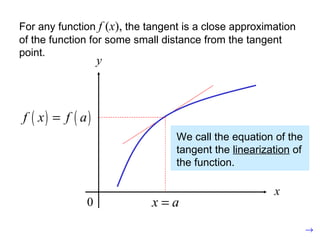
For any function  f  ( x ),  the tangent is a close approximation of the function for some small distance from the tangent point. We call the equation of the tangent the  linearization  of the function.
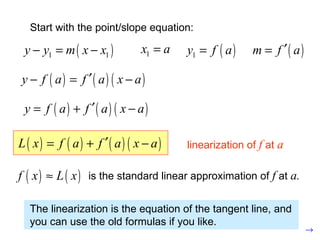
The linearization is the equation of the tangent line, and you can use the old formulas if you like. Start with the point/slope equation: linearization of  f  at  a is the standard linear approximation of  f  at  a.
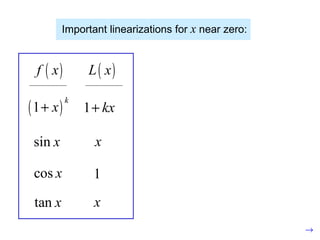
Important linearizations for  x  near zero: This formula also leads to non-linear approximations:
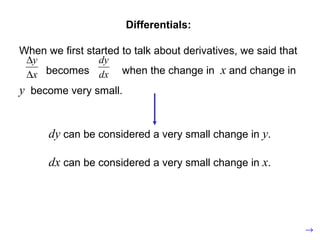
Differentials: When we first started to talk about derivatives, we said that becomes  when the change in  x  and change in  y   become very small. dy  can be considered a very small change in  y . dx  can be considered a very small change in  x .
Let  be a differentiable function. The differential  is an independent variable. The differential  is:
Example:  Consider a circle of radius 10.  If the radius increases by 0.1, approximately how much will the area change? very small change in  A very small change in  r (approximate change in area)
(approximate change in area) Compare to actual change: New area: Old area:
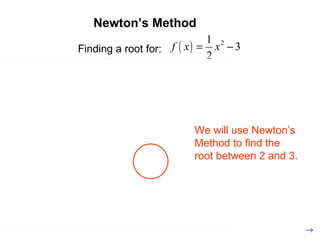
Newton’s Method Finding a root for: We will use Newton’s Method to find the root between 2 and 3.
Guess: (not drawn to scale) (new guess)
Guess: (new guess)
Guess: (new guess)
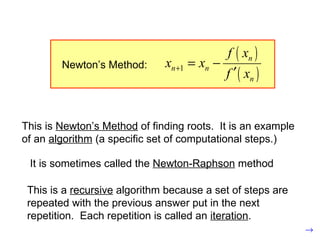
Guess: Amazingly close to zero! This is  Newton’s Method  of finding roots.  It is an example of an  algorithm  (a specific set of computational steps.) It is sometimes called the  Newton-Raphson  method This is a  recursive  algorithm because a set of steps are repeated with the previous answer put in the next repetition.  Each repetition is called an  iteration .
This is  Newton’s Method  of finding roots.  It is an example of an  algorithm  (a specific set of computational steps.) It is sometimes called the  Newton-Raphson  method Guess: Amazingly close to zero! This is a  recursive  algorithm because a set of steps are repeated with the previous answer put in the next repetition.  Each repetition is called an  iteration . Newton’s Method:
Find where  crosses  .
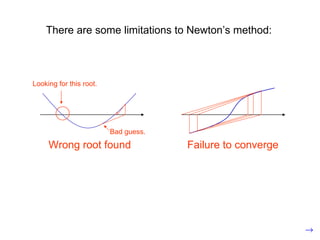
There are some limitations to Newton’s method: Wrong root found Looking for this root. Bad guess. Failure to converge
Newton’s method is built in to the Calculus Tools application on the TI-89. Of course if you have a TI-89, you could just use the root finder to answer the problem. The only reason to use the calculator for Newton’s Method is to help your understanding or to check your work.  It would not be allowed in a college course, on the AP exam or on one of my tests.
Now let’s do one on the TI-89: APPS Select  and press  .  Calculus Tools ENTER If you see this screen, press , change the mode settings as necessary, and press again. ENTER APPS Approximate the positive root of:
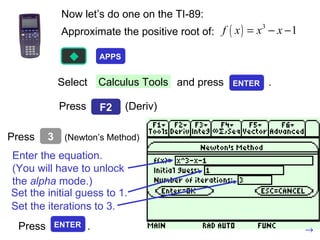
Now let’s do one on the TI-89: Select  and press  .  Calculus Tools Press  (Deriv) Enter the equation. (You will have to unlock the  alpha  mode.) Set the initial guess to 1. Approximate the positive root of: Set the iterations to 3. APPS ENTER F2 Press  (Newton’s Method) 3 Press  . ENTER
Press  to see the summary screen. ESC Press  to see each iteration. ENTER
 Press  and then to return your calculator  to normal. ESC HOME

Linear Approx, Differentials, Newton S Method

  • 1.
    4.5: LinearApproximations, Differentials and Newton’s Method Greg Kelly, Hanford High School, Richland, Washington
  • 2.
    For any function f ( x ), the tangent is a close approximation of the function for some small distance from the tangent point. We call the equation of the tangent the linearization of the function.
  • 3.
    The linearization isthe equation of the tangent line, and you can use the old formulas if you like. Start with the point/slope equation: linearization of f at a is the standard linear approximation of f at a.
  • 4.
    Important linearizations for x near zero: This formula also leads to non-linear approximations:
  • 5.
    Differentials: When wefirst started to talk about derivatives, we said that becomes when the change in x and change in y become very small. dy can be considered a very small change in y . dx can be considered a very small change in x .
  • 6.
    Let bea differentiable function. The differential is an independent variable. The differential is:
  • 7.
    Example: Considera circle of radius 10. If the radius increases by 0.1, approximately how much will the area change? very small change in A very small change in r (approximate change in area)
  • 8.
    (approximate change inarea) Compare to actual change: New area: Old area:
  • 9.
    Newton’s Method Findinga root for: We will use Newton’s Method to find the root between 2 and 3.
  • 10.
    Guess: (not drawnto scale) (new guess)
  • 11.
  • 12.
  • 13.
    Guess: Amazingly closeto zero! This is Newton’s Method of finding roots. It is an example of an algorithm (a specific set of computational steps.) It is sometimes called the Newton-Raphson method This is a recursive algorithm because a set of steps are repeated with the previous answer put in the next repetition. Each repetition is called an iteration .
  • 14.
    This is Newton’s Method of finding roots. It is an example of an algorithm (a specific set of computational steps.) It is sometimes called the Newton-Raphson method Guess: Amazingly close to zero! This is a recursive algorithm because a set of steps are repeated with the previous answer put in the next repetition. Each repetition is called an iteration . Newton’s Method:
  • 15.
    Find where crosses .
  • 16.
    There are somelimitations to Newton’s method: Wrong root found Looking for this root. Bad guess. Failure to converge
  • 17.
    Newton’s method isbuilt in to the Calculus Tools application on the TI-89. Of course if you have a TI-89, you could just use the root finder to answer the problem. The only reason to use the calculator for Newton’s Method is to help your understanding or to check your work. It would not be allowed in a college course, on the AP exam or on one of my tests.
  • 18.
    Now let’s doone on the TI-89: APPS Select and press . Calculus Tools ENTER If you see this screen, press , change the mode settings as necessary, and press again. ENTER APPS Approximate the positive root of:
  • 19.
    Now let’s doone on the TI-89: Select and press . Calculus Tools Press (Deriv) Enter the equation. (You will have to unlock the alpha mode.) Set the initial guess to 1. Approximate the positive root of: Set the iterations to 3. APPS ENTER F2 Press (Newton’s Method) 3 Press . ENTER
  • 20.
    Press tosee the summary screen. ESC Press to see each iteration. ENTER
  • 21.
     Press and then to return your calculator to normal. ESC HOME