Lin ZHANG, SSE, 2013
Lecture 6
Geometric Transformations and
Image Registration
Lin ZHANG, PhD
School of Software Engineering 
Tongji University
Spring 2013
Lin ZHANG, SSE, 2013
Contents
• Transforming points
• Hierarchy of geometric transformations
• Applying geometric transformations to images
• Image registration
Lin ZHANG, SSE, 2013
• Geometric transformations modify the spatial 
relationship between pixels in an image
• The images can be shifted, rotated, or stretched in a 
variety of ways
• Geometric transformations can be used to 
• create thumbnail views
• change digital video resolution
• correct distortions caused by viewing geometry
• align multiple images of the same scene
Transforming Points
Lin ZHANG, SSE, 2013
Transforming Points
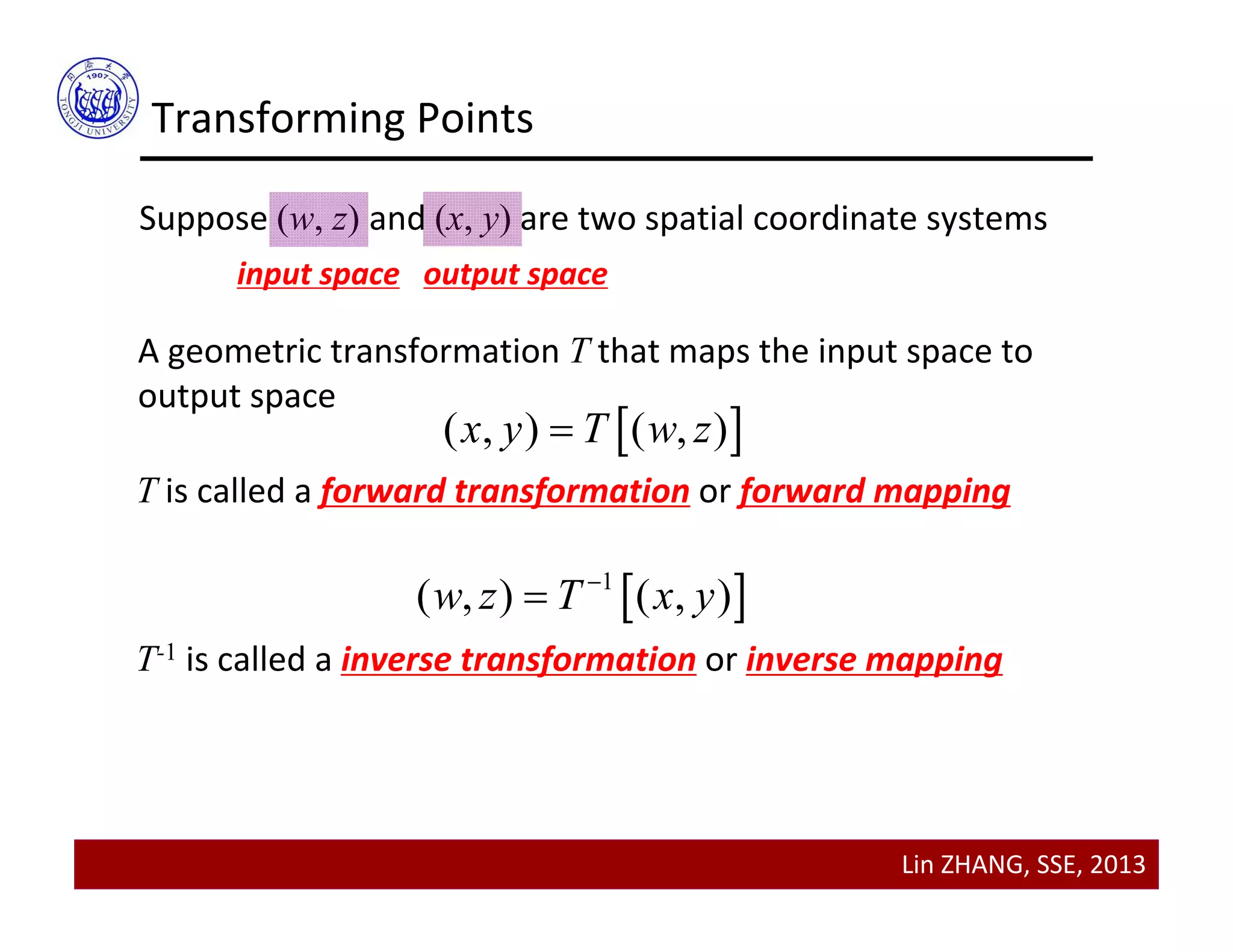
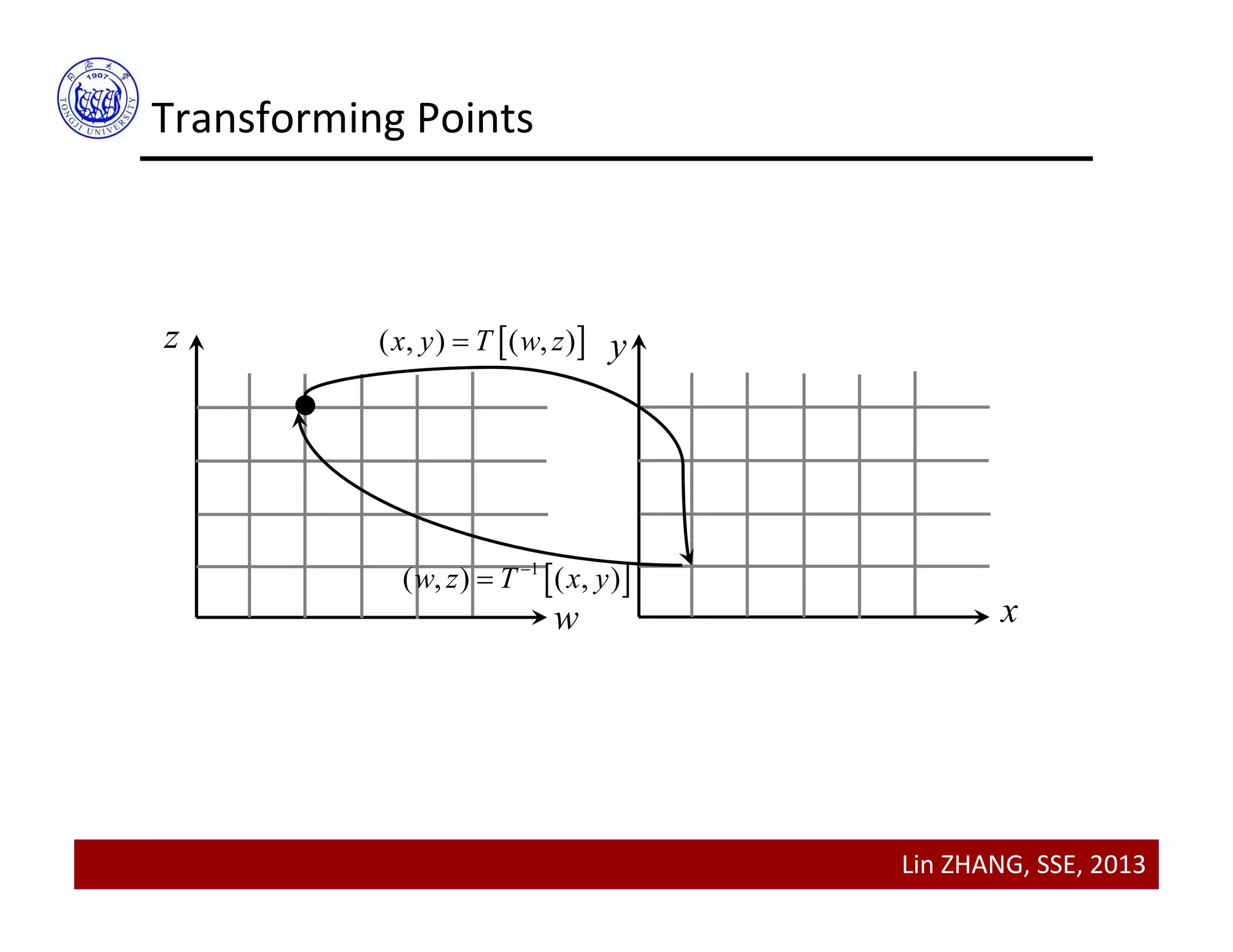
Suppose (w, z) and (x, y) are two spatial coordinate systems
input space output space
A geometric transformation T that maps the input space to 
output space 
 ( , ) ( , )x y T w z
T is called a forward transformation or forward mapping
 1
( , ) ( , )w z T x y

T-1 is called a inverse transformation or inverse mapping
Lin ZHANG, SSE, 2013
Transforming Points
w
z y
x
 ( , ) ( , )x y T w z
 1
( , ) ( , )w z T x y

Lin ZHANG, SSE, 2013
Transforming Points
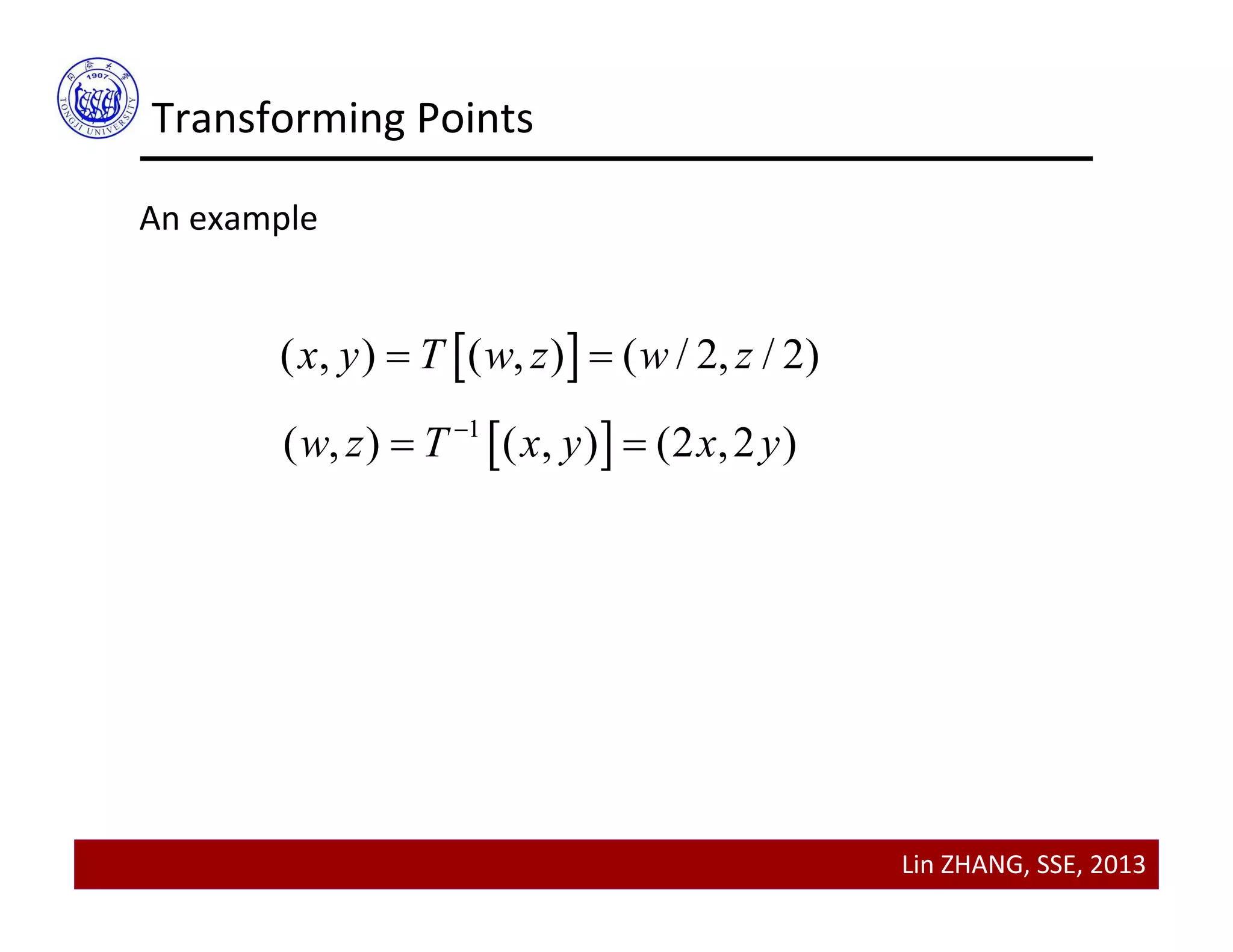
An example
 ( , ) ( , ) ( / 2, / 2)x y T w z w z 
 1
( , ) ( , ) (2 ,2 )w z T x y x y
 
Lin ZHANG, SSE, 2013
Contents
• Transforming points
• Hierarchy of geometric transformations
• Applying geometric transformations to images
• Image Registration
Lin ZHANG, SSE, 2013
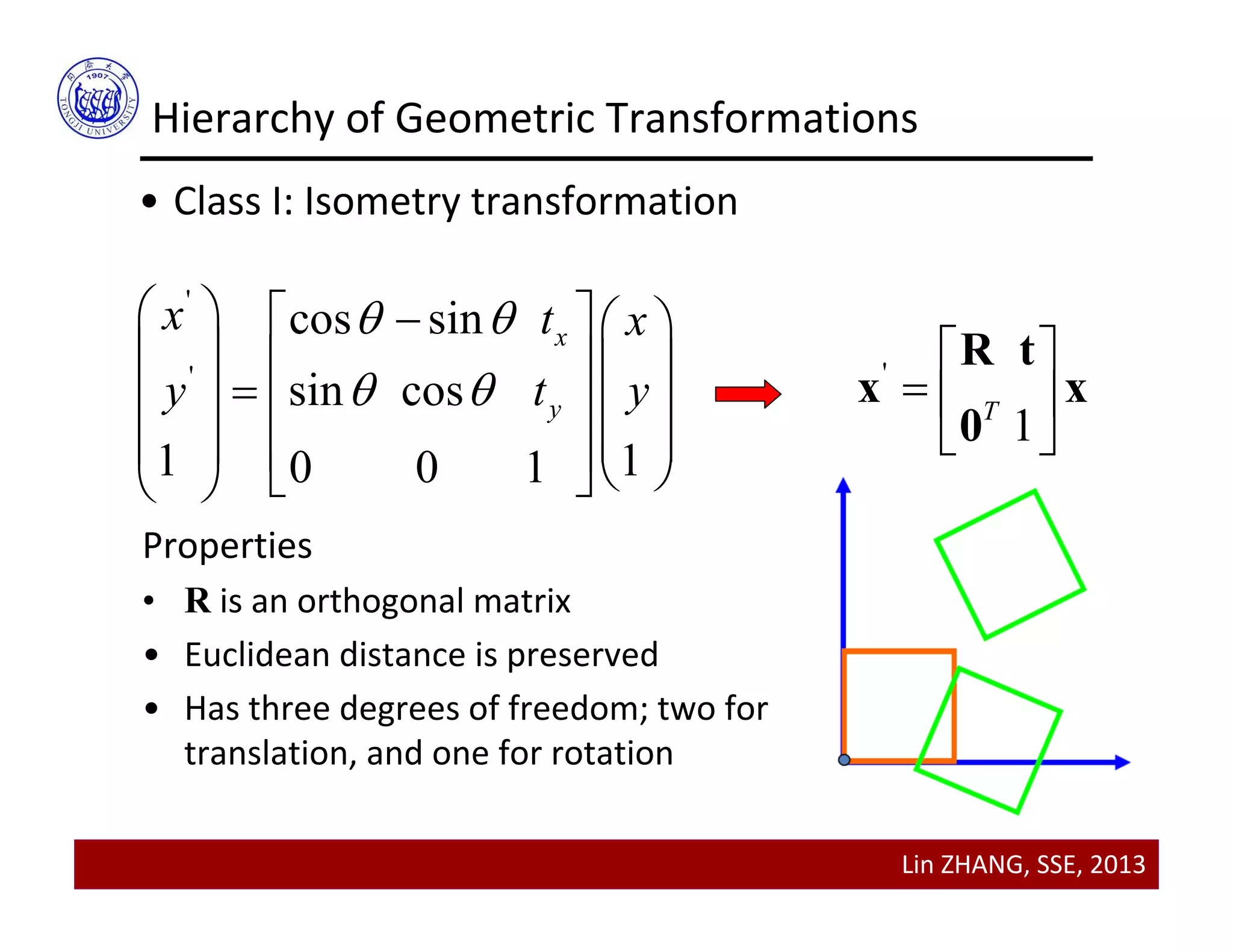
Hierarchy of Geometric Transformations
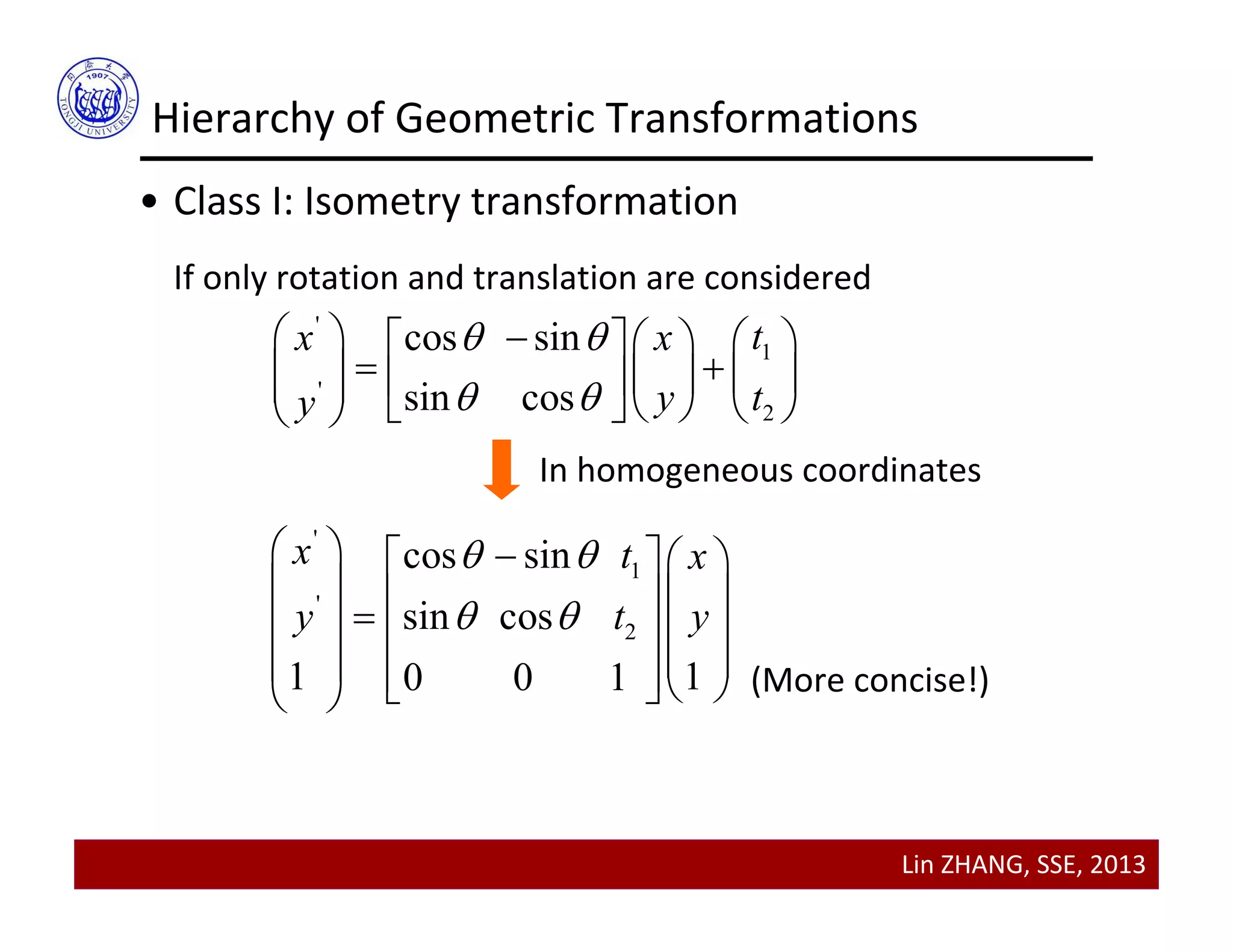
• Class I: Isometry transformation
If only rotation and translation are considered
'
1
'
2
cos sin
sin cos
tx x
y ty
 
 
      
       
     
'
1
'
2
cos sin
sin cos
1 10 0 1
x t x
y t y
 
 
    
        
       
In homogeneous coordinates
(More concise!)
Lin ZHANG, SSE, 2013
Hierarchy of Geometric Transformations
• Class I: Isometry transformation
'
'
cos sin
sin cos
1 10 0 1
x
y
x t x
y t y
 
 
     
    
    
       
'
1T
 
  
 
R t
x x
0
Properties
• R is an orthogonal matrix
• Euclidean distance is preserved
• Has three degrees of freedom; two for 
translation, and one for rotation
Lin ZHANG, SSE, 2013
Hierarchy of Geometric Transformations
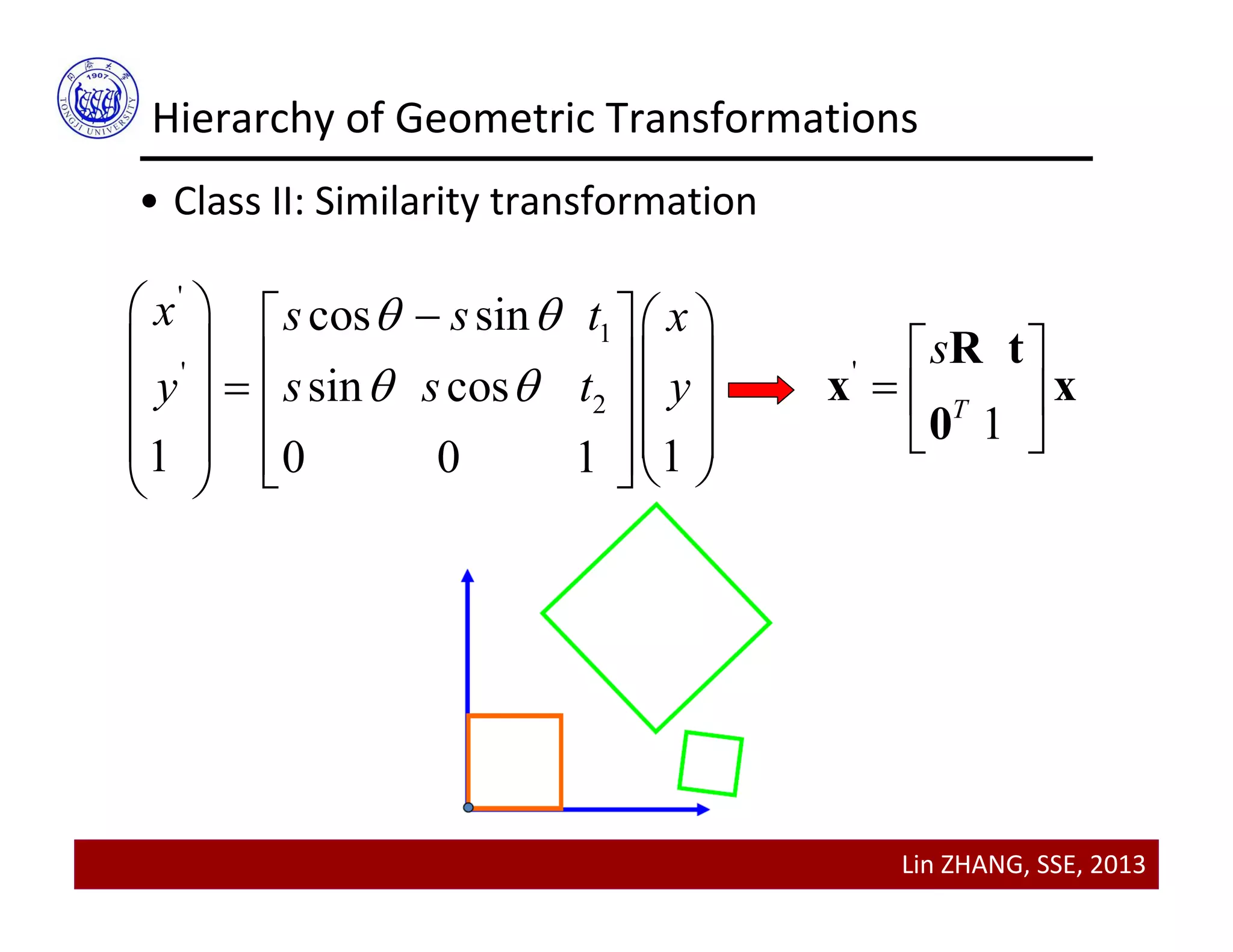
• Class II: Similarity transformation
'
1
'
2
cos sin
sin cos
1 10 0 1
x s s t x
y s s t y
 
 
    
        
       
'
1T
s 
  
 
R t
x x
0
Lin ZHANG, SSE, 2013
Hierarchy of Geometric Transformations
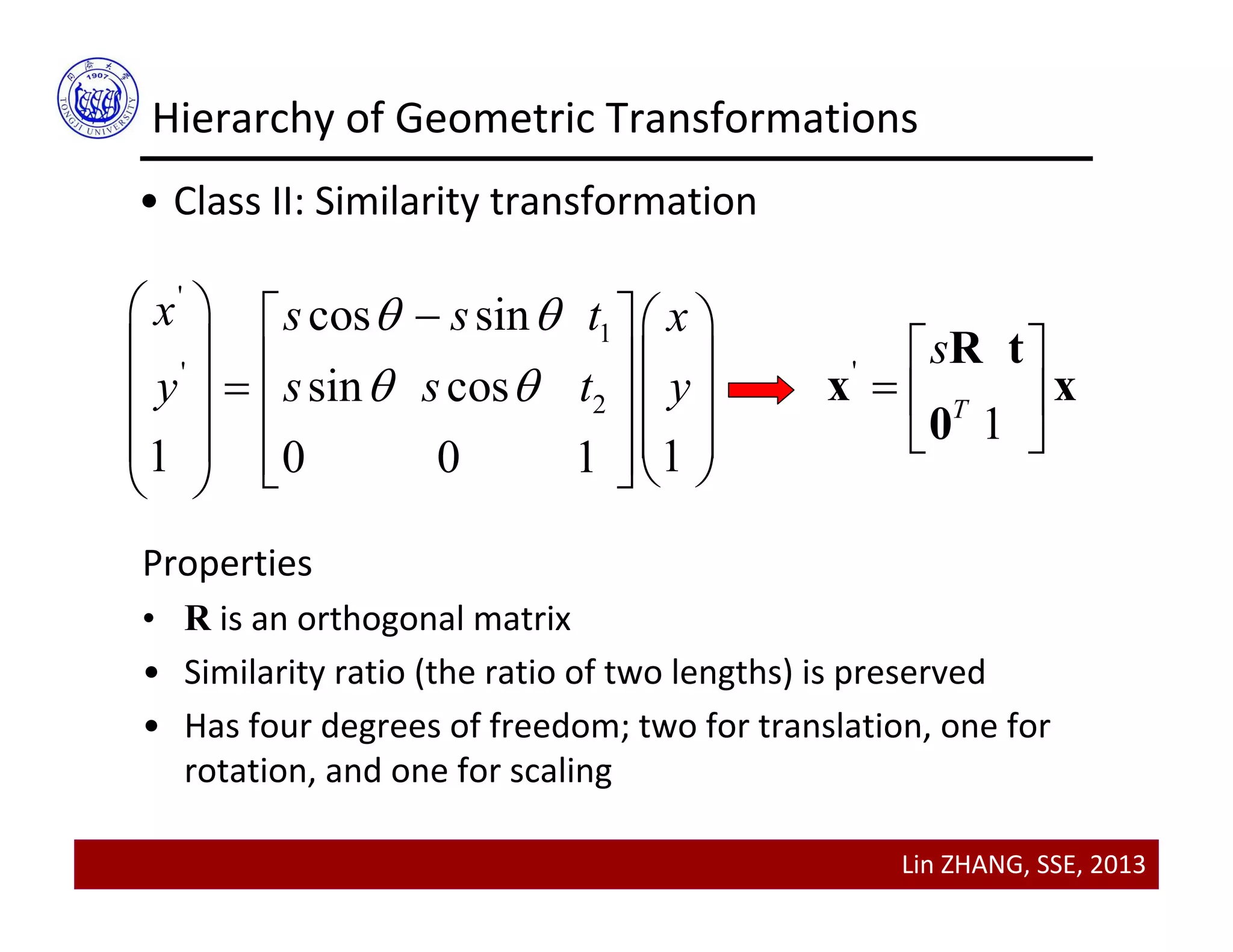
• Class II: Similarity transformation
'
1
'
2
cos sin
sin cos
1 10 0 1
x s s t x
y s s t y
 
 
    
        
       
'
1T
s 
  
 
R t
x x
0
Properties
• R is an orthogonal matrix
• Similarity ratio (the ratio of two lengths) is preserved
• Has four degrees of freedom; two for translation, one for 
rotation, and one for scaling
Lin ZHANG, SSE, 2013
Hierarchy of Geometric Transformations
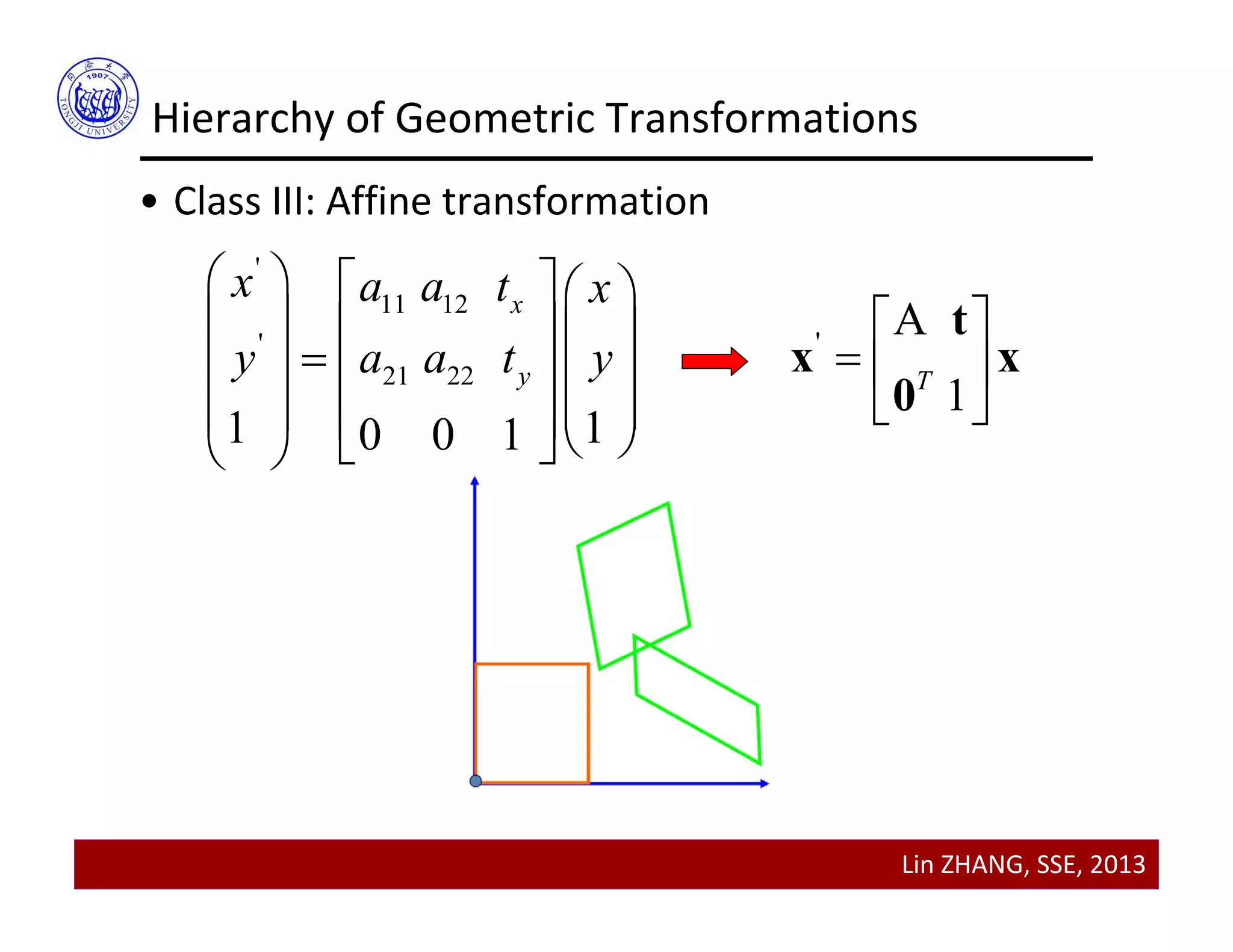
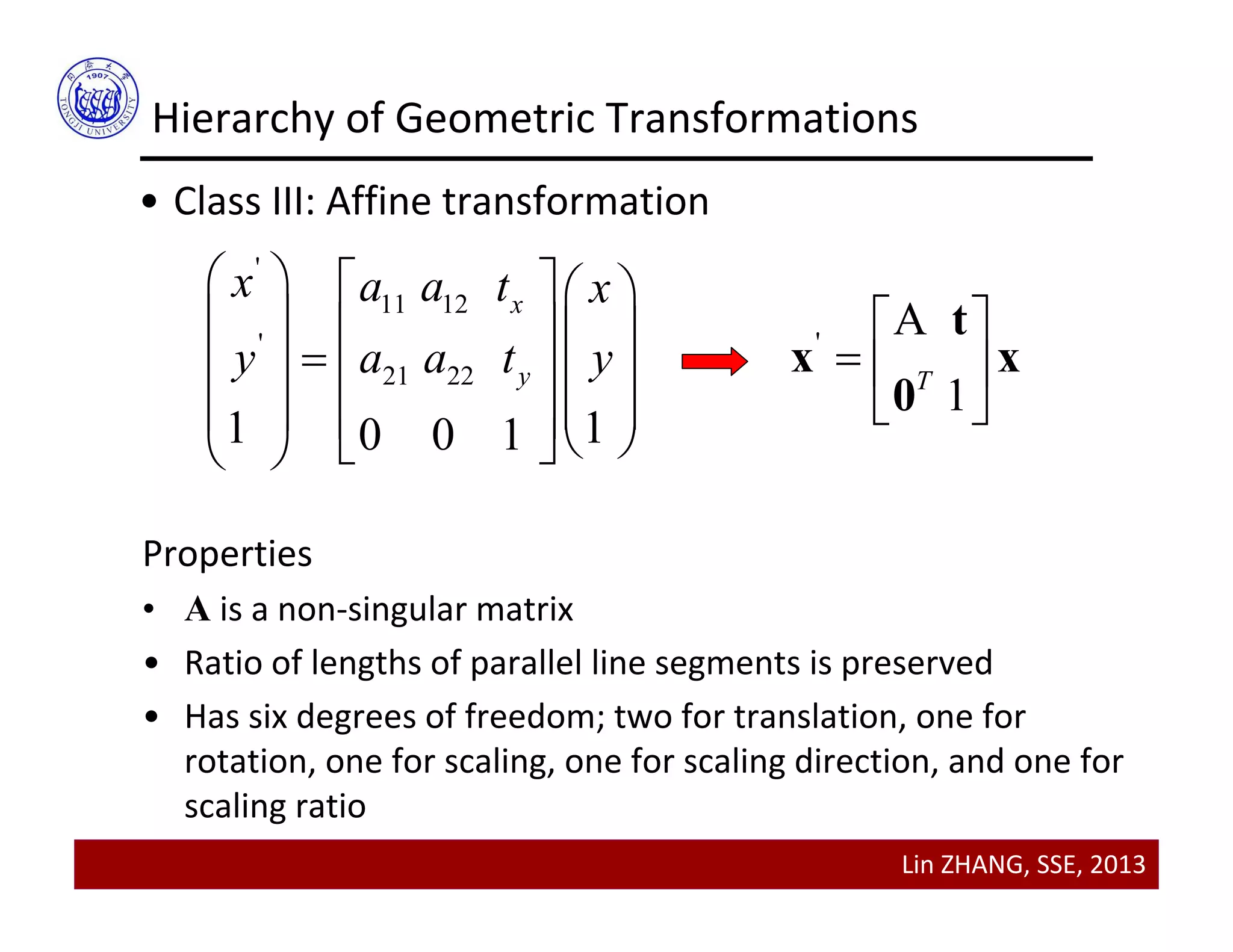
• Class III: Affine transformation
'
11 12
'
21 22
1 10 0 1
x
y
x a a t x
y a a t y
    
    
    
       
'
A
1T
 
  
 
t
x x
0
Lin ZHANG, SSE, 2013
Hierarchy of Geometric Transformations
• Class III: Affine transformation
'
11 12
'
21 22
1 10 0 1
x
y
x a a t x
y a a t y
    
    
    
       
'
A
1T
 
  
 
t
x x
0
Properties
• A is a non‐singular matrix
• Ratio of lengths of parallel line segments is preserved
• Has six degrees of freedom; two for translation, one for 
rotation, one for scaling, one for scaling direction, and one for 
scaling ratio
Lin ZHANG, SSE, 2013
Hierarchy of Geometric Transformations
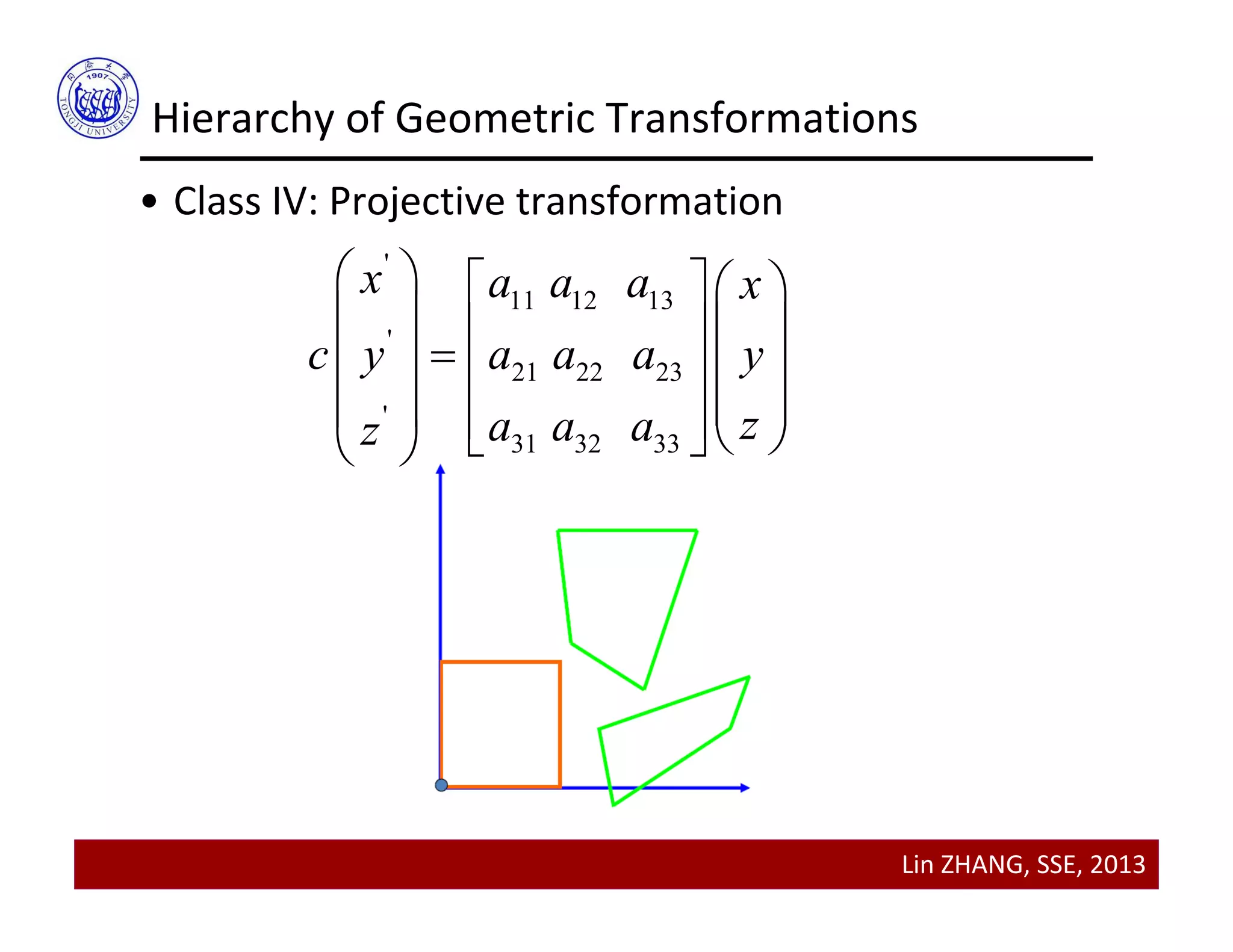
• Class IV: Projective transformation
'
11 12 13
'
21 22 23
'
31 32 33
x a a a x
c y a a a y
za a az
    
        
       
Lin ZHANG, SSE, 2013
Hierarchy of Geometric Transformations
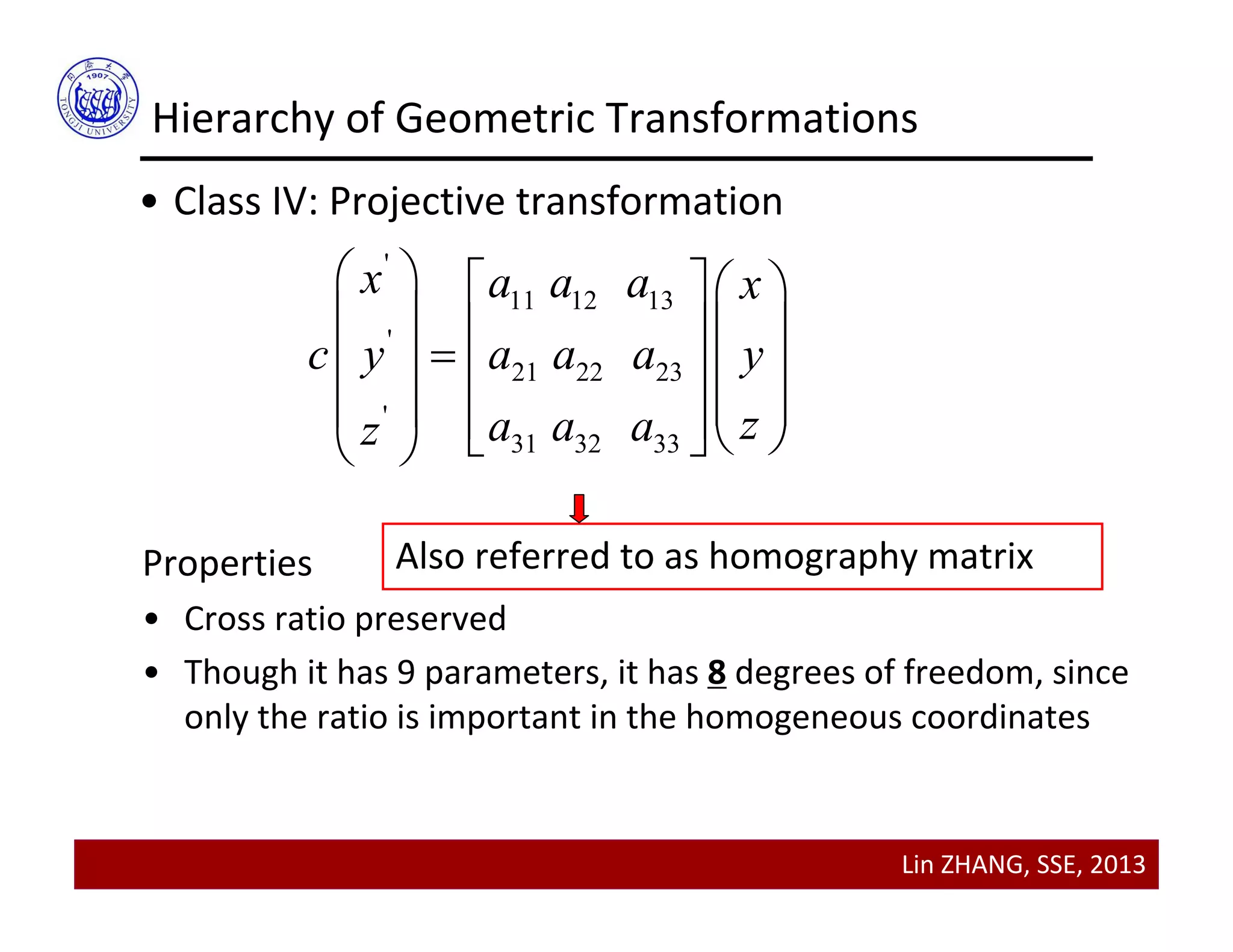
• Class IV: Projective transformation
'
11 12 13
'
21 22 23
'
31 32 33
x a a a x
c y a a a y
za a az
    
        
       
Properties
• Cross ratio preserved
• Though it has 9 parameters, it has 8 degrees of freedom, since 
only the ratio is important in the homogeneous coordinates
Also referred to as homography matrix
Lin ZHANG, SSE, 2013
Contents
• Transforming points
• Hierarchy of geometric transformations
• Applying geometric transformations to images
• Image Registration
Lin ZHANG, SSE, 2013
Applying Geometric Transformations to Images
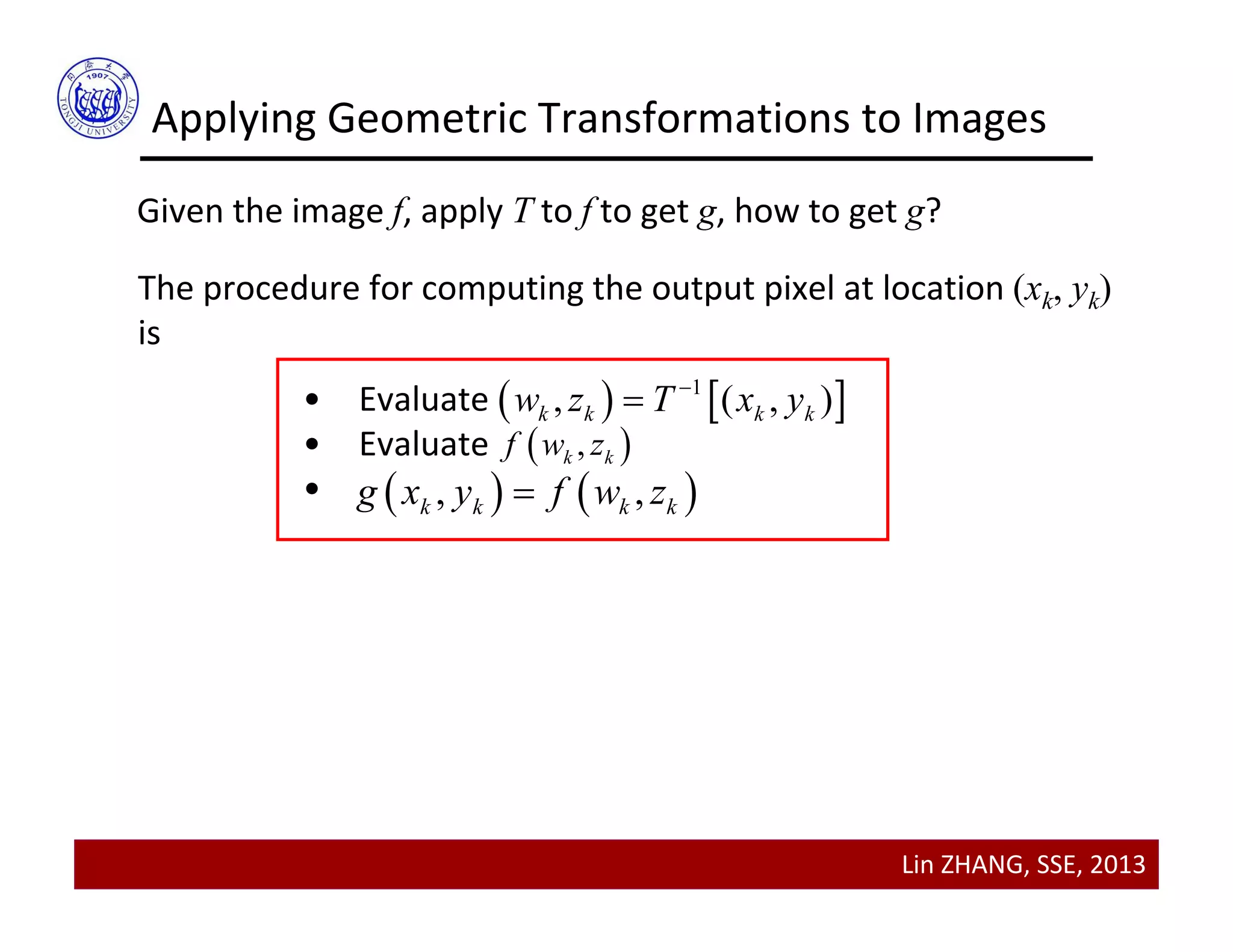
Given the image f, apply T to f to get g, how to get g?
The procedure for computing the output pixel at location (xk, yk)
is
• Evaluate 
• Evaluate
•
   1
, ( , )k k k kw z T x y

 ,k kf w z
   , ,k k k kg x y f w z
Lin ZHANG, SSE, 2013
Applying Geometric Transformations to Images
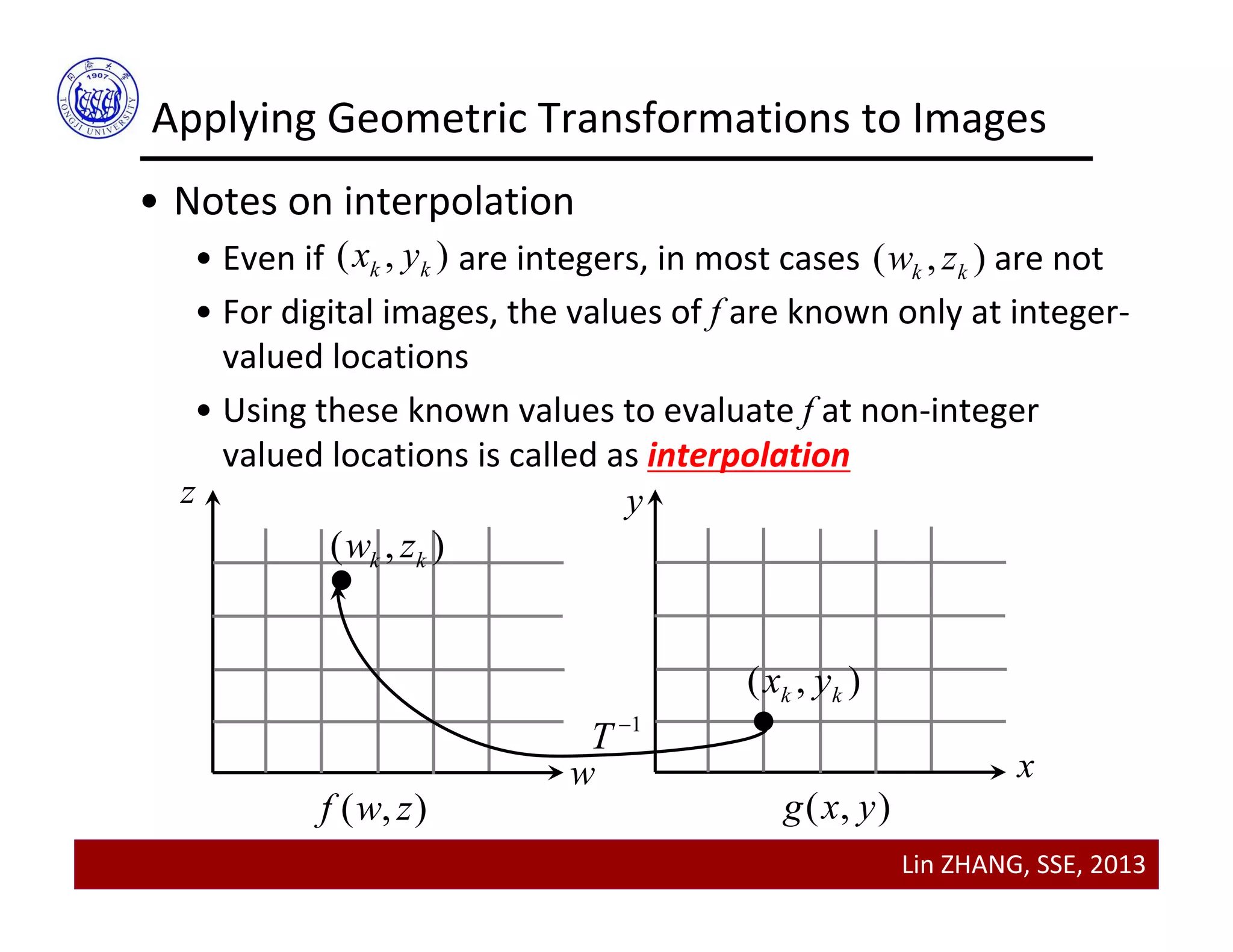
( , )k kx y ( , )k kw z
• Notes on interpolation
• Even if                are integers, in most cases               are not
• For digital images, the values of f are known only at integer‐
valued locations
• Using these known values to evaluate f at non‐integer 
valued locations is called as interpolation
w
z y
x
( , )f w z ( , )g x y
( , )k kx y
( , )k kw z
1
T 
Lin ZHANG, SSE, 2013
• Notes on interpolation
• In Matlab, three commonly used interpolation schemes are 
built‐in, including nearest neighborhood, bilinear, and 
bicubic
• For most Matlab routines where interpolation is required, 
“bilinear” is the default  
Applying Geometric Transformations to Images
Lin ZHANG, SSE, 2013
Applying Geometric Transformations to Images
• Matlab implementation
• “Maketform” is used to construct a geometric transformation 
structure
• “imtransform” transforms the image according to the 2‐D 
spatial transformation defined by tform
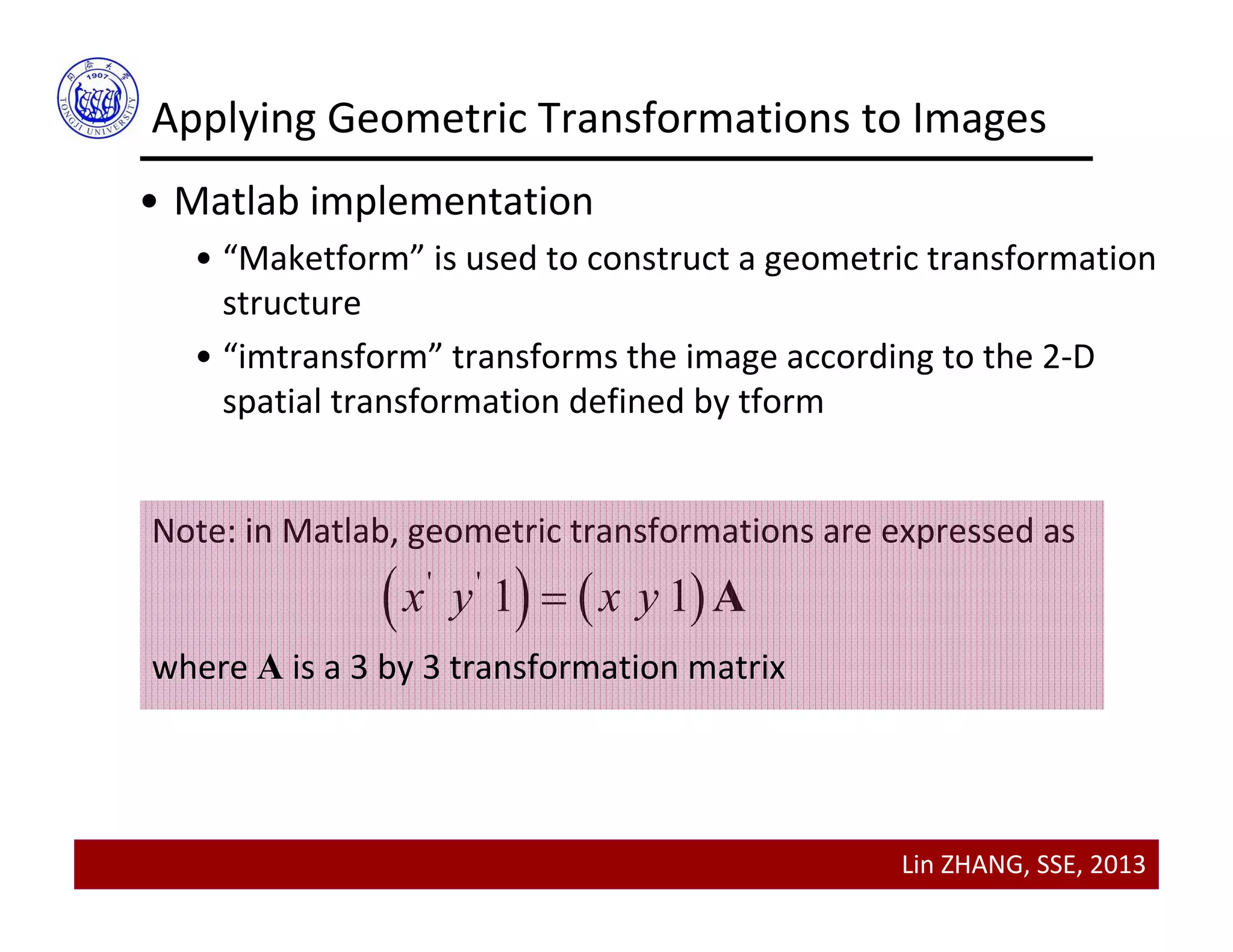
Note: in Matlab, geometric transformations are expressed as
   ' '
1 1x y x y A
where A is a 3 by 3 transformation matrix
Lin ZHANG, SSE, 2013
Applying Geometric Transformations to Images
• Matlab implementation
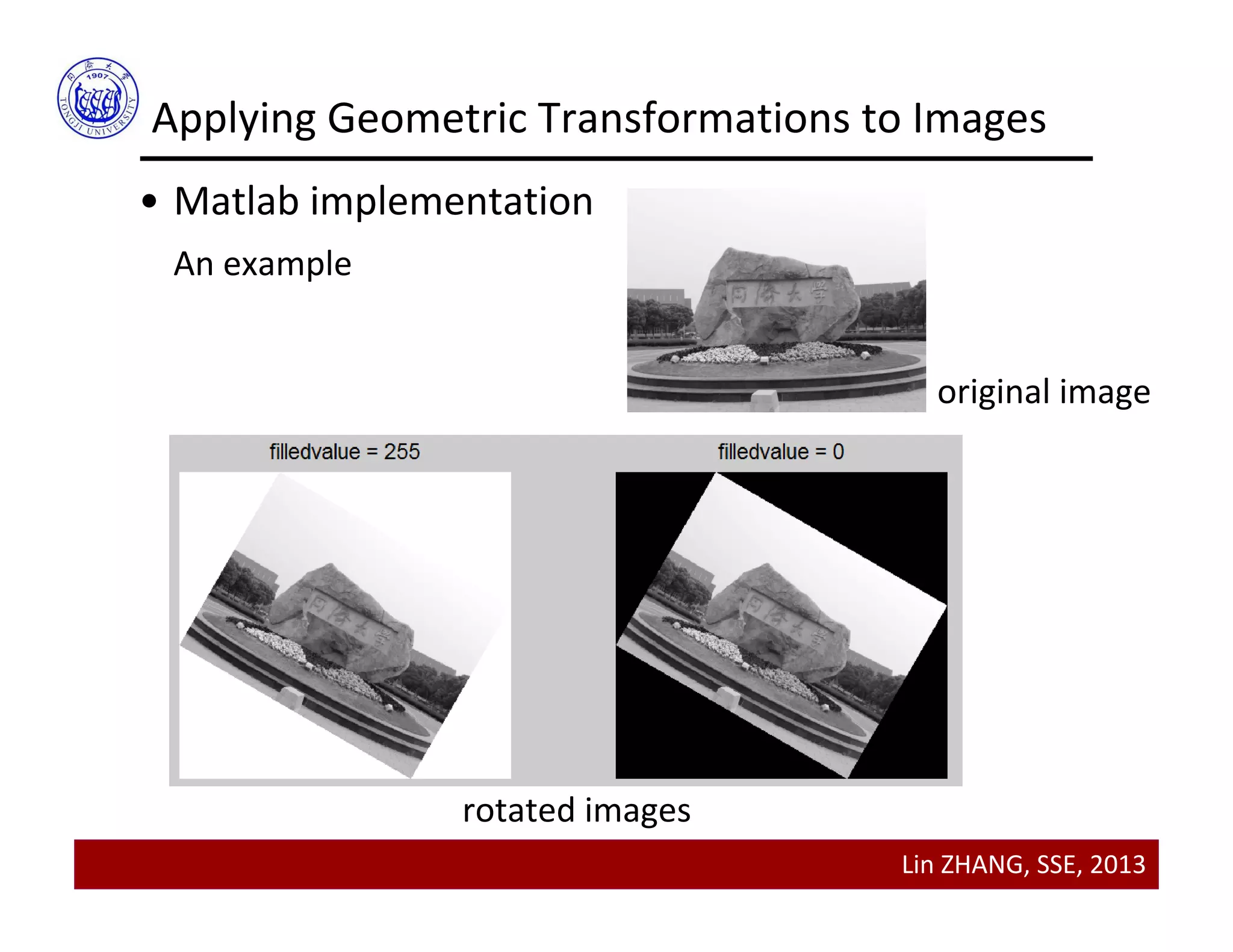
An example
im = imread('tongji.bmp');
theta = pi/6;
rotationMatrix = [cos(theta) sin(theta) 0;-sin(theta) cos(theta) 0;0 0 1];
tformRotation = maketform('affine',rotationMatrix);
rotatedIm = imtransform(im, tformRotation,'FillValues',255);
figure;
subplot(1,2,1); imshow(rotatedIm,[]);
rotatedIm = imtransform(im, tformRotation,'FillValues',0);
subplot(1,2,2); imshow(rotatedIm,[]);
Lin ZHANG, SSE, 2013
Applying Geometric Transformations to Images
• Matlab implementation
An example
original image
rotated images
Lin ZHANG, SSE, 2013
Applying Geometric Transformations to Images
• Matlab implementation
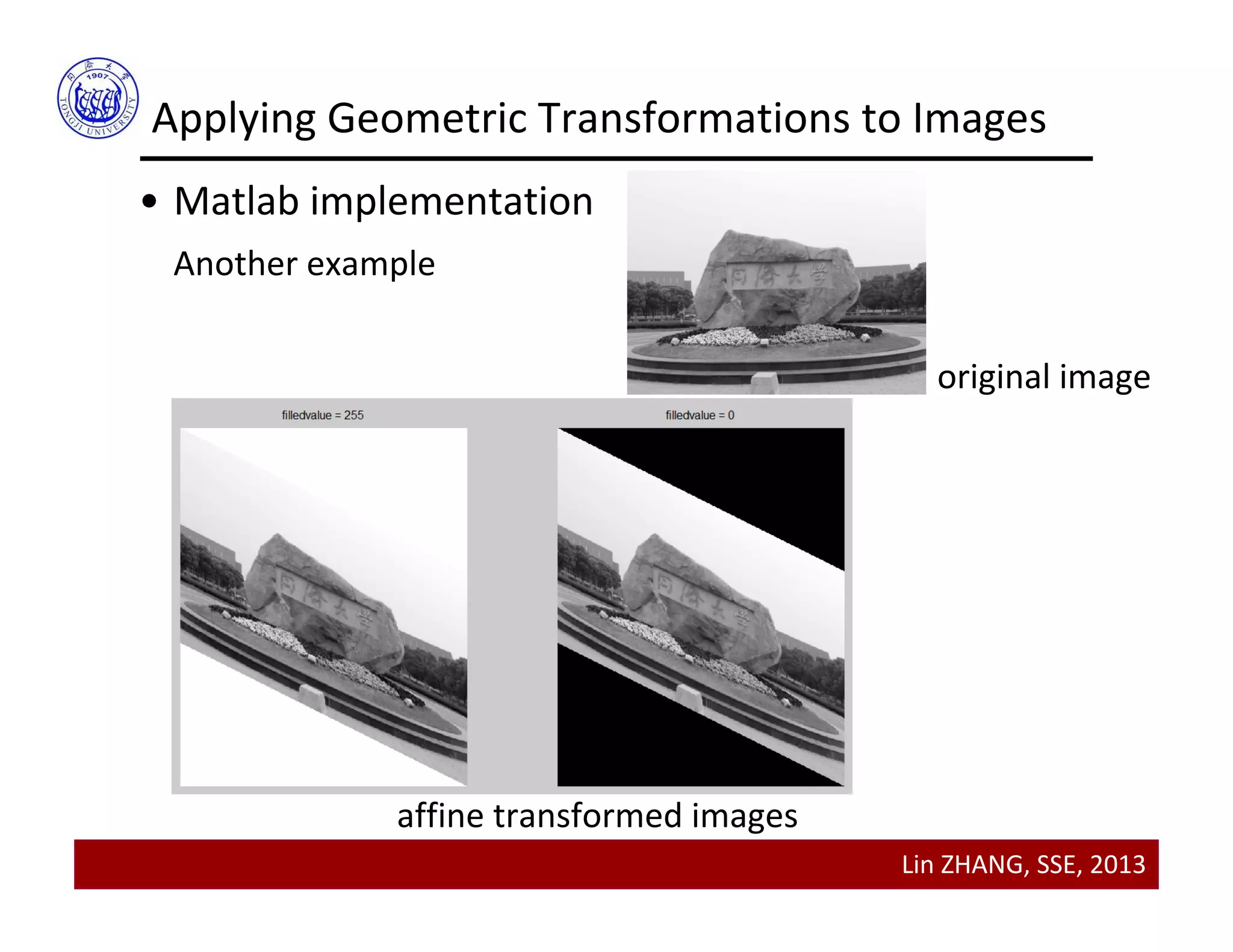
Another example
original image
affine transformed images
Lin ZHANG, SSE, 2013
Applying Geometric Transformations to Images
• Output image with location specified
• This is useful when we want to display the original image and 
the transformed image on the same figure
In Matlab, this is accomplished by
imshow(image, ‘XData’, xVector, ‘YData’, yVector)
‘XData’ and ‘YData’ can be obtained by imtransform
Lin ZHANG, SSE, 2013
Applying Geometric Transformations to Images
• Output image with location specified
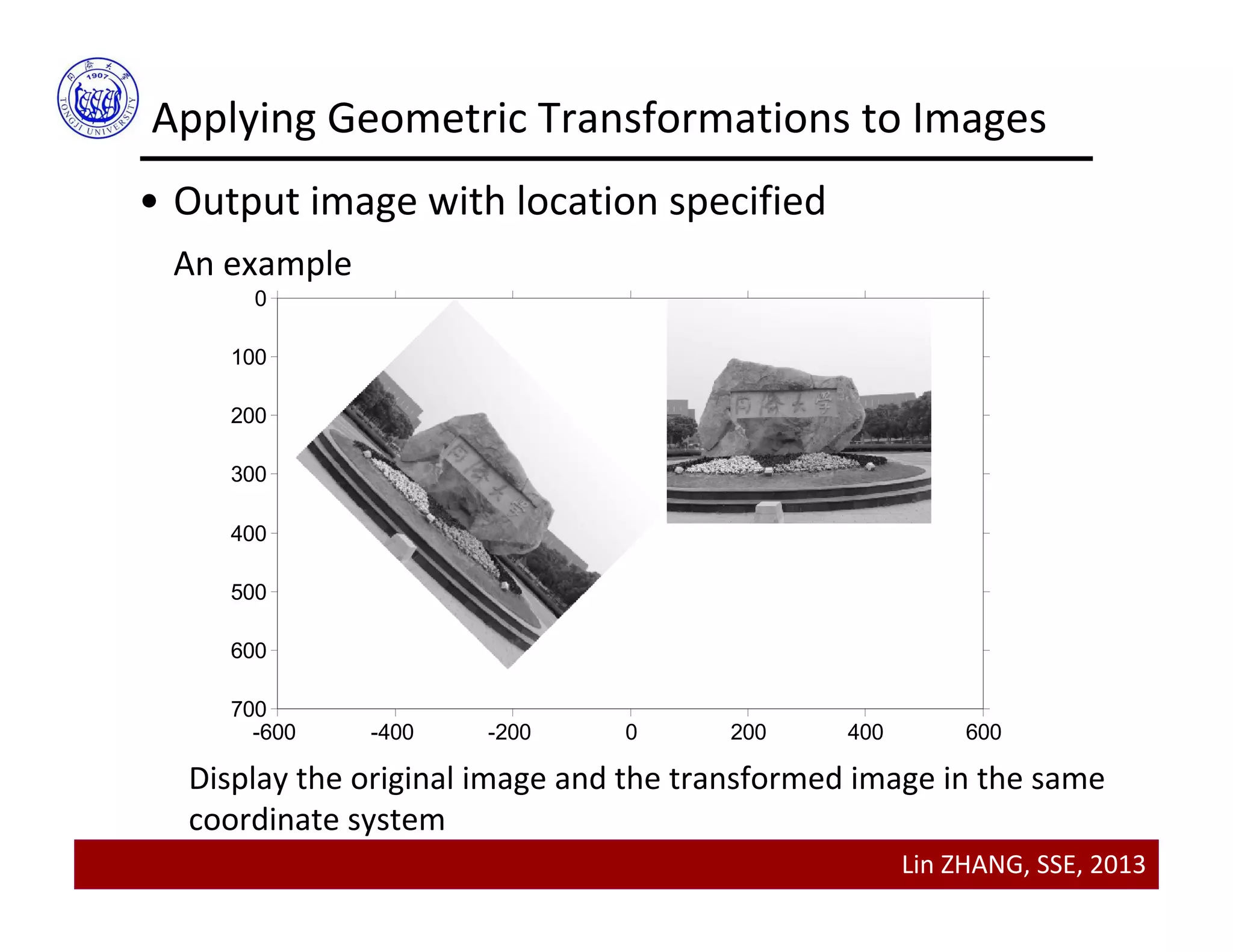
An example
im = imread('tongji.bmp');
theta = pi/4;
affineMatrix = [cos(theta) sin(theta) 0;-sin(theta) cos(theta) 0;-300 0 1];
tformAffine = maketform('affine',affineMatrix);
[affineIm, XData, YData] = imtransform(im, tformAffine,'FillValues',255);
figure; imshow(im,[]);
hold on
imshow(affineIm,[],'XData',XData,'YData',YData);
axis auto
axis on
Lin ZHANG, SSE, 2013
Applying Geometric Transformations to Images
• Output image with location specified
An example
-600 -400 -200 0 200 400 600
0
100
200
300
400
500
600
700
Display the original image and the transformed image in the same
coordinate system
Lin ZHANG, SSE, 2013
Contents
• Transforming points
• Hierarchy of geometric transformations
• Applying geometric transformations to images
• Image Registration
•Background
•A manual method
Lin ZHANG, SSE, 2013
Background
• One of the most important applications of geometric 
transformations is image registration
• Image registration seeks to align images taken in 
different times, or taken from different modalities
• Image registration has applications especially in
•Medicine
•Remote sensing
•Entertainment
Lin ZHANG, SSE, 2013
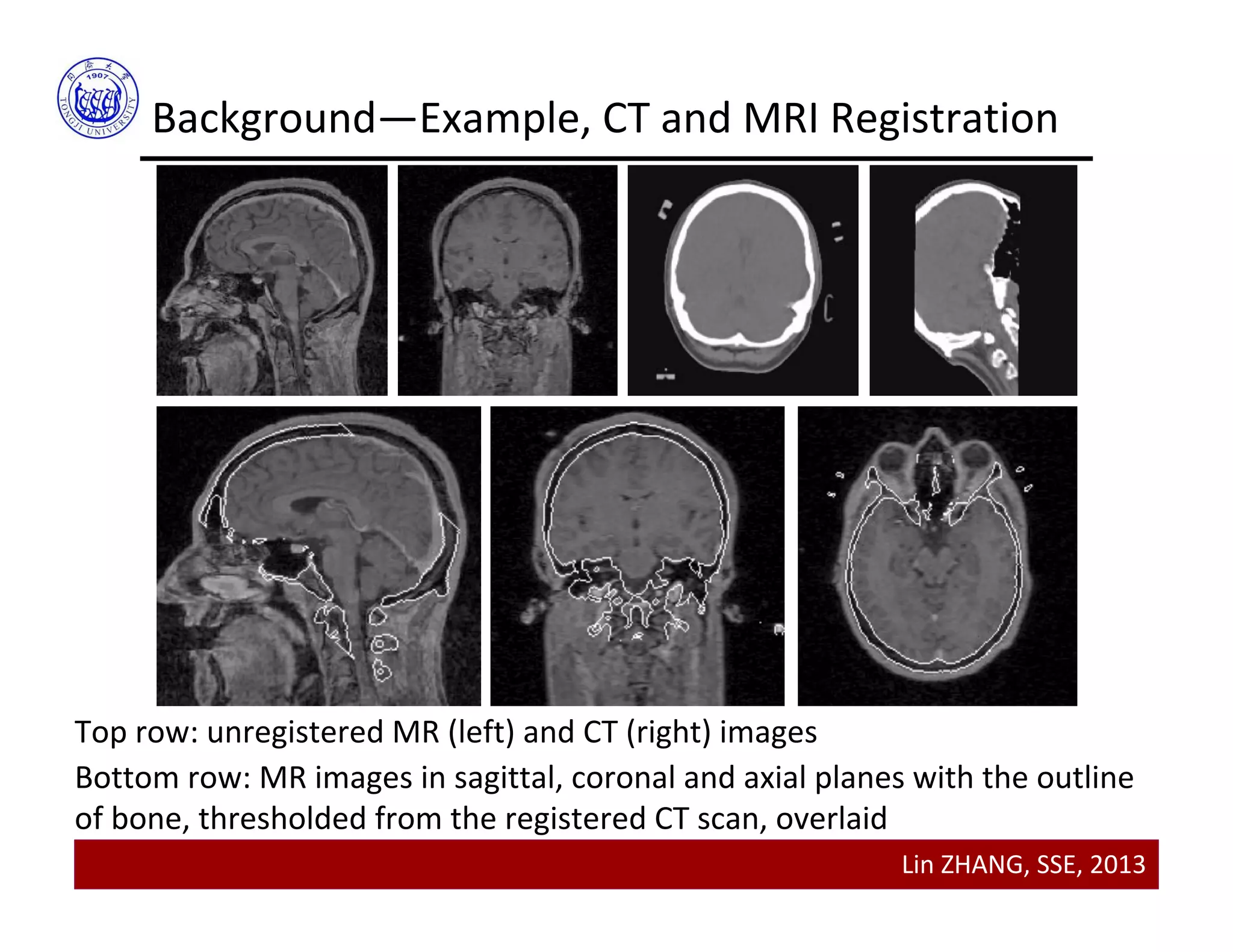
Background—Example, CT and MRI Registration
Top row: unregistered MR (left) and CT (right) images 
Bottom row: MR images in sagittal, coronal and axial planes with the outline 
of bone, thresholded from the registered CT scan, overlaid
Lin ZHANG, SSE, 2013
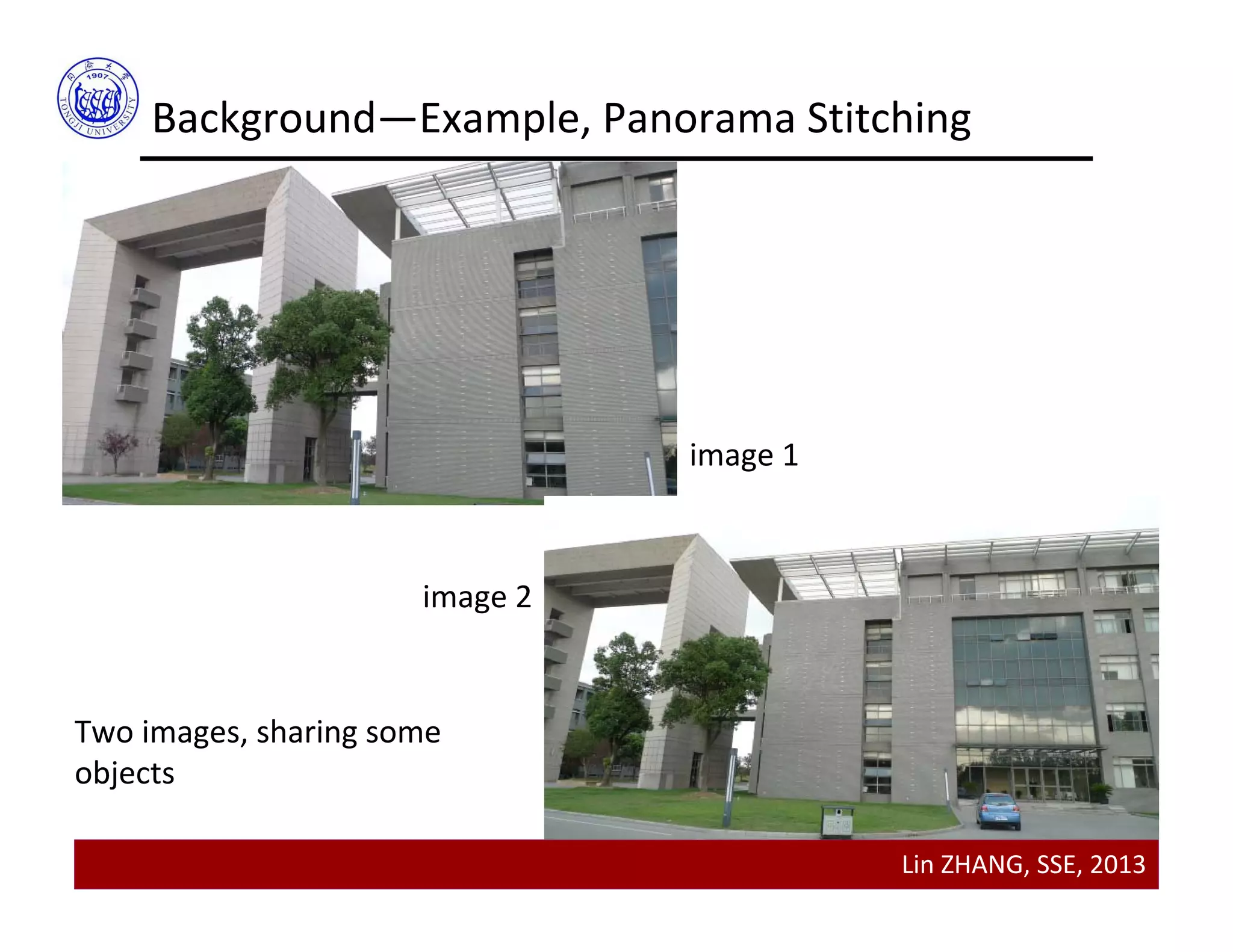
Background—Example, Panorama Stitching
Two images, sharing some 
objects
image 1
image 2
Lin ZHANG, SSE, 2013
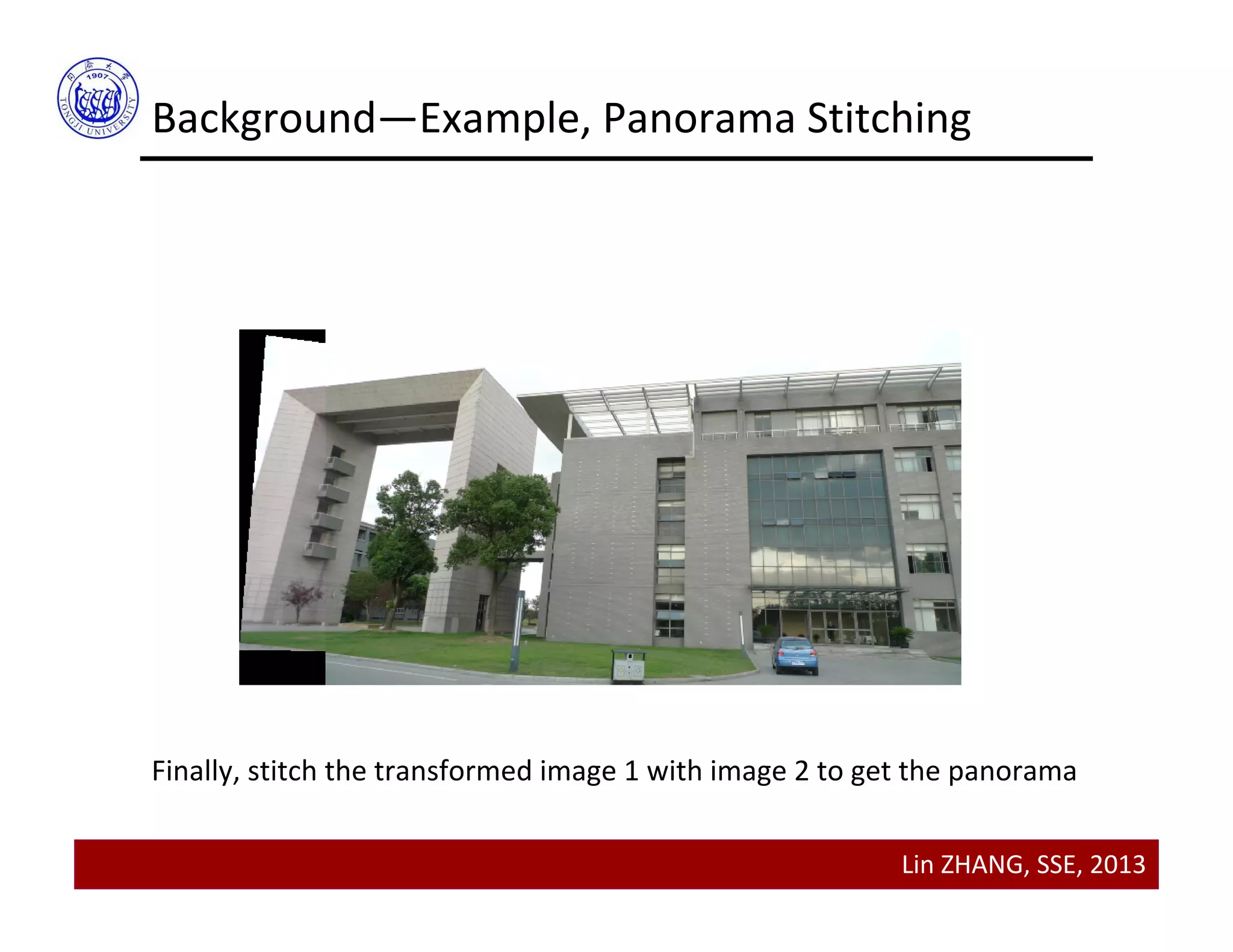
Background—Example, Panorama Stitching
Transform image 1 into the same coordinate system of image 2
Lin ZHANG, SSE, 2013
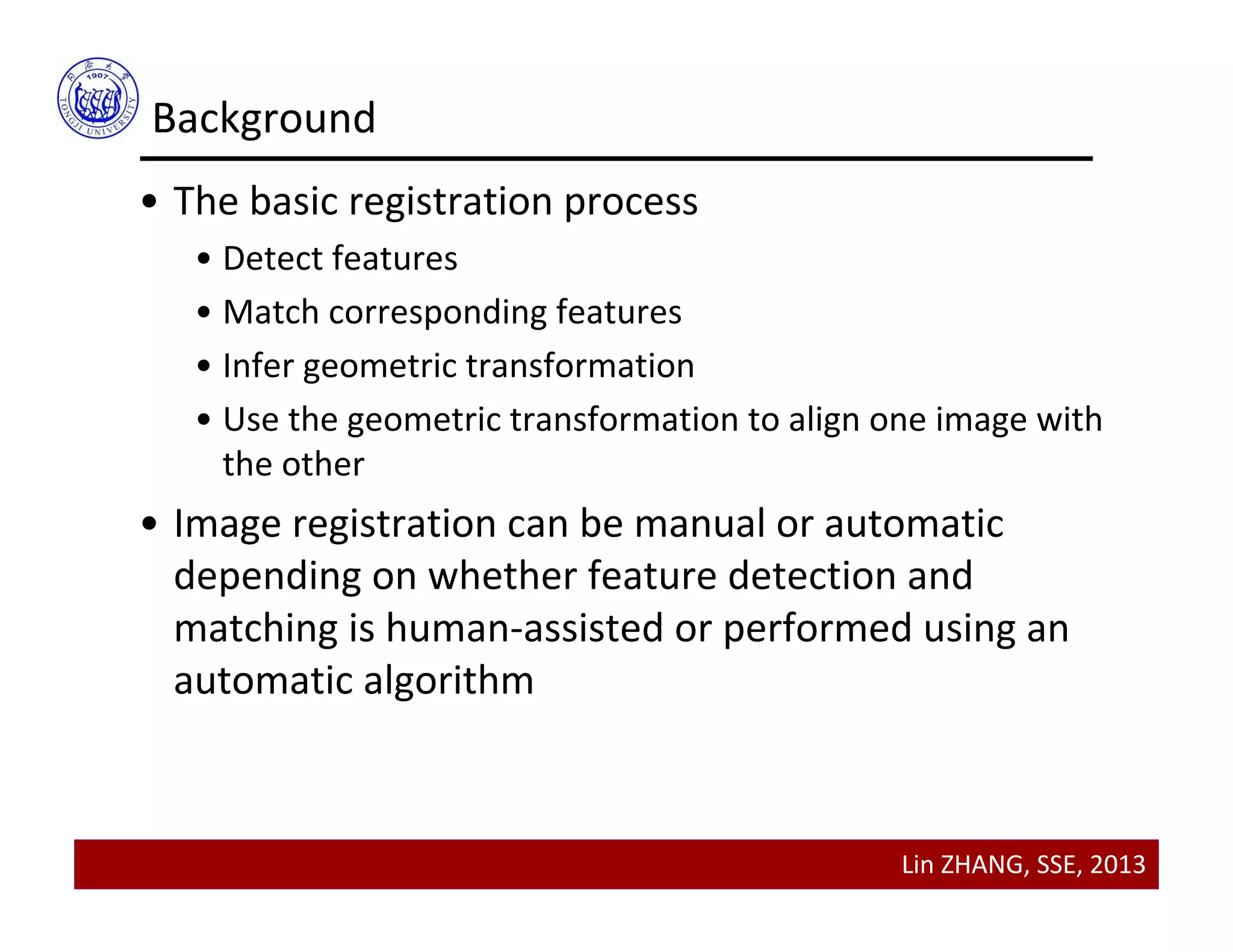
Background—Example, Panorama Stitching
Finally, stitch the transformed image 1 with image 2 to get the panorama
Lin ZHANG, SSE, 2013
Background
• The basic registration process
• Detect features
• Match corresponding features
• Infer geometric transformation
• Use the geometric transformation to align one image with 
the other
• Image registration can be manual or automatic 
depending on whether feature detection and 
matching is human‐assisted or performed using an 
automatic algorithm
Lin ZHANG, SSE, 2013
Contents
• Transforming points
• Hierarchy of geometric transformations
• Applying geometric transformations to images
• Image Registration
•Background
•A manual method
•Other methods
Lin ZHANG, SSE, 2013
A Manual Method
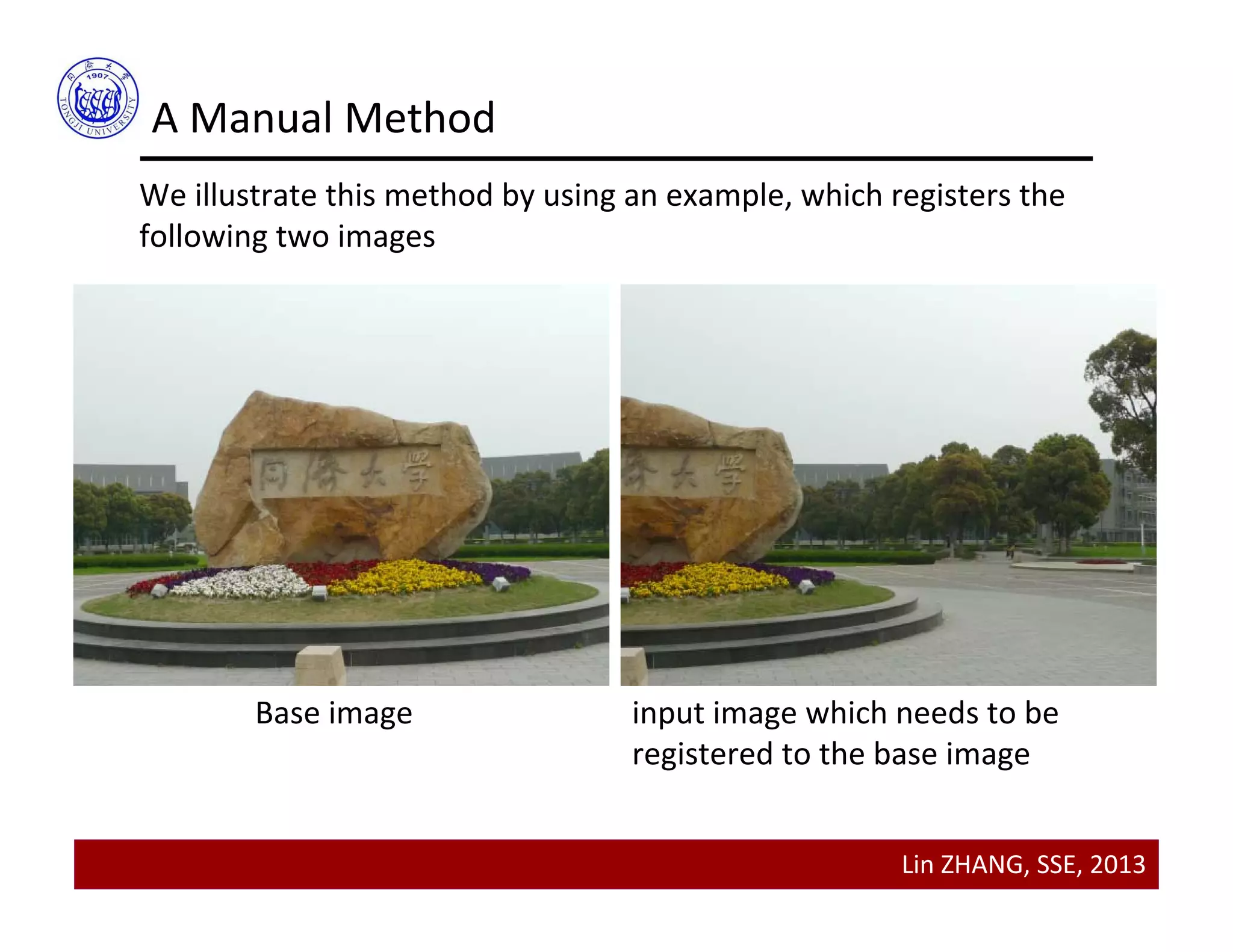
We illustrate this method by using an example, which registers the 
following two images
Base image input image which needs to be 
registered to the base image
Lin ZHANG, SSE, 2013
A Manual Method
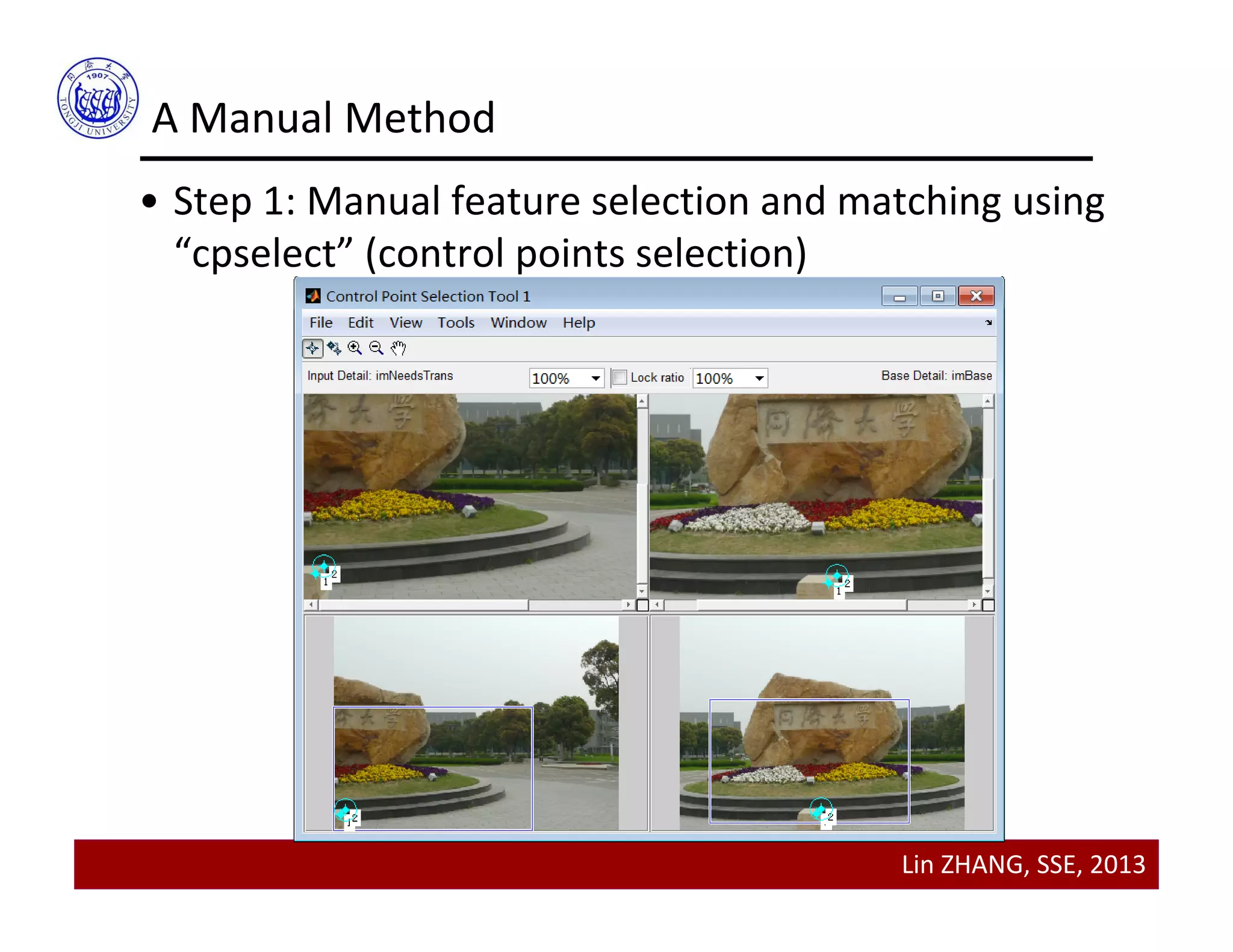
• Step 1: Manual feature selection and matching using 
“cpselect” (control points selection)
• “cpselect” is a GUI tool for manually selecting and matching 
corresponding control points in a pair of images to be 
registered
Lin ZHANG, SSE, 2013
A Manual Method
• Step 1: Manual feature selection and matching using 
“cpselect” (control points selection)
Lin ZHANG, SSE, 2013
A Manual Method
• Step 2: Inferring transformation parameters using 
“cp2tform”
• “cp2tform” can infer geometric transformation parameters 
from set of feature pairs
tform = cp2tform(input_points, base_points, transformtype)
The arguments input_points and base_points are both       
matrices containing correponding feature locations
2P 
Lin ZHANG, SSE, 2013
A Manual Method
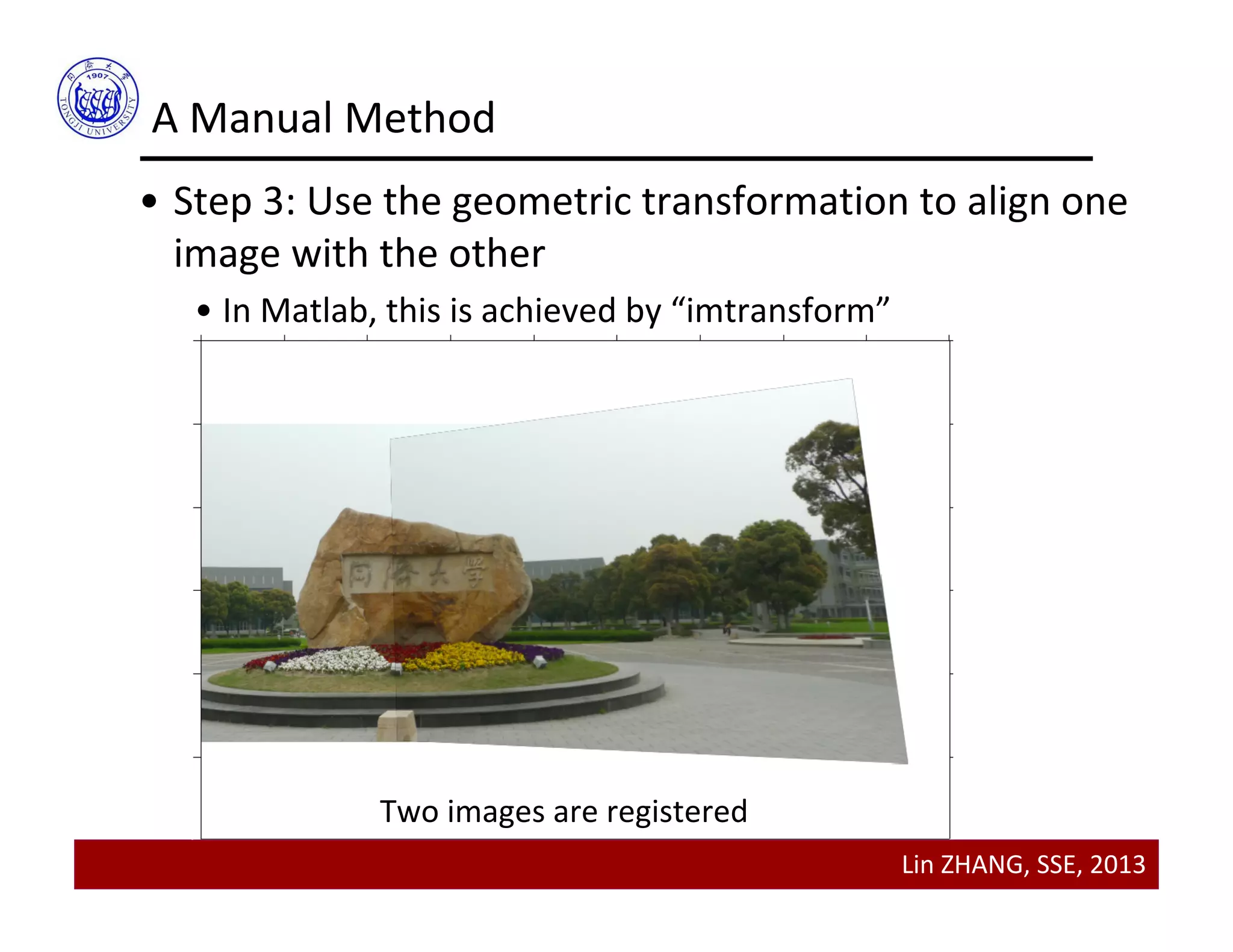
• Step 3: Use the geometric transformation to align one 
image with the other
• In Matlab, this is achieved by “imtransform”
Two images are registered
Lin ZHANG, SSE, 2013
Contents
• Transforming points
• Hierarchy of geometric transformations
• Applying geometric transformations to images
• Image Registration
•Background
•A manual method
•Other methods
Lin ZHANG, SSE, 2013
Area‐based Registration
• Area‐based registration
• A “template image” is shifted to cover each location in the 
base image
• At each location, an area‐based similarity is computed
• The template is said to be a match at a particular position in 
the base image if a distinct peak in the similarity metric is 
found at that position
Lin ZHANG, SSE, 2013
Area‐based Registration
• Area‐based registration
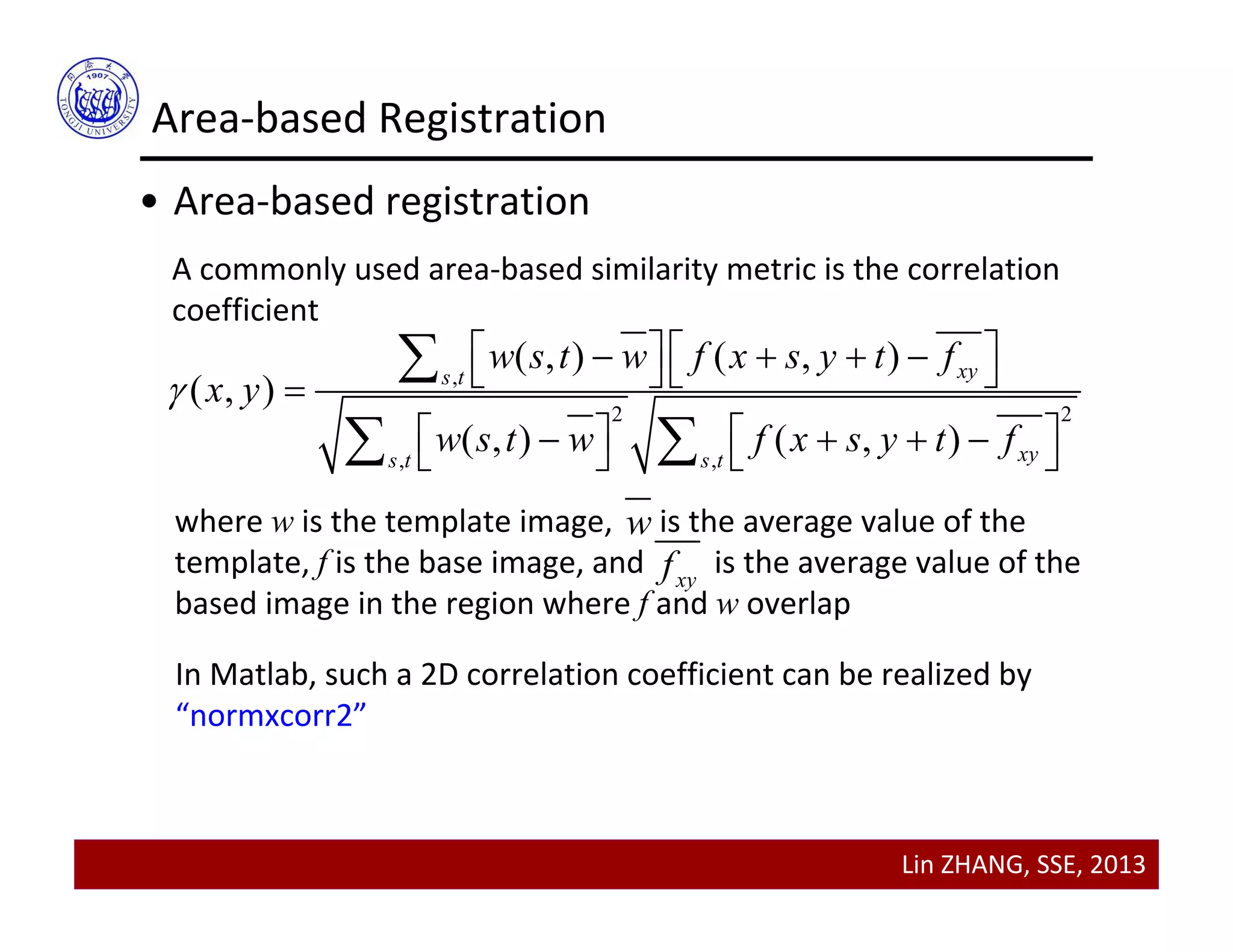
A commonly used area‐based similarity metric is the correlation 
coefficient
,
2 2
, ,
( , ) ( , )
( , )
( , ) ( , )
xys t
xys t s t
w s t w f x s y t f
x y
w s t w f x s y t f

         
         

 
where w is the template image,      is the average value of the 
template, f is the base image, and         is the average value of the 
based image in the region where f and w overlap 
w
xyf
In Matlab, such a 2D correlation coefficient can be realized by 
“normxcorr2”
Lin ZHANG, SSE, 2013
Area‐based Registration
• Limitations of area‐based registration
• Classical area‐based registration method can only deal with 
translation transformation between two images;
• It will fail if rotation, scaling, or affine transformations exist 
between the two images
Lin ZHANG, SSE, 2013
Automatic Feature‐based Registration
• Feature points (sometimes referred as key points or 
interest points) can be detected automatically 
• Harris corner detector
• Extrema of LoG
• Feature points descriptors can be performed 
automatically 
• SIFT (scale invariant feature transform)
• Feature matching can be performed automatically
To know more, come to our another course “Computer Vision”!
Lin ZHANG, SSE, 2013
Thanks for your attention

Lecture 06 geometric transformations and image registration