DIGITAL IMAGE PROCESSING
SPATIAL FILTERING
by
Dr. K. M. Bhurchandi
Fundamentals of Spatial Filtering
• Filtering refers to accepting(passing) or rejecting certain
frequency components. This effectively smoothens or
sharpens the image.
• E.g. Low pass filter, high pass filter, etc.
• Such operations can be directly carried out on image in spatial
domain also by using spatial filters (kernels, spatial masks,
templates, & windows).
• Spatial filters are more versatile as they are used in linear as
well as non-linear filtering (Difficult in frequency domain).
Fundamentals of Spatial Filtering
• Types of Spatial Filtering
• 1) Point to point (pixel to pixel) operation (discussed so far)
• 2) Mask based (Neighborhood) operations
i) Operation with 3x3 filter (E.g. Mean, max, min, etc)
ii) Correlation or Convolution
• Linear vs Non-Linear Filter
If the operation performed on the image pixels is linear, then the
filter is called a linear spatial filter, otherwise nonlinear.
Operation with 3x3 Filter
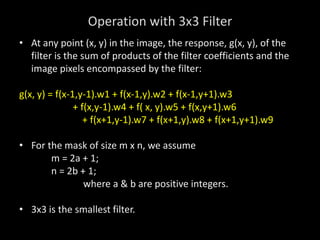
• At any point (x, y) in the image, the response, g(x, y), of the
filter is the sum of products of the filter coefficients and the
image pixels encompassed by the filter:
g(x, y) = f(x-1,y-1).w1 + f(x-1,y).w2 + f(x-1,y+1).w3
+ f(x,y-1).w4 + f( x, y).w5 + f(x,y+1).w6
+ f(x+1,y-1).w7 + f(x+1,y).w8 + f(x+1,y+1).w9
• For the mask of size m x n, we assume
m = 2a + 1;
n = 2b + 1;
where a & b are positive integers.
• 3x3 is the smallest filter.
Operation with 3x3 Filter
• Generalized equation:
a b
• g(x, y) = Σ Σ w(s, t) f(x + s, y + t)
s = -a t = -b
where,
x & y are varied so that each pixel in w visits every pixel in f.
Operation with 3x3 Filter
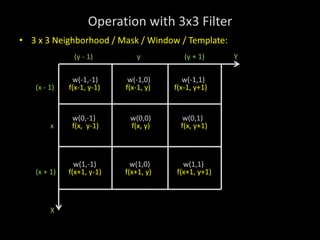
• 3 x 3 Neighborhood / Mask / Window / Template:
(y - 1) y (y + 1) Y
w(-1,-1) w(-1,0) w(-1,1)
(x - 1) f(x-1, y-1) f(x-1, y) f(x-1, y+1)
w(0,-1) w(0,0) w(0,1)
x f(x, y-1) f(x, y) f(x, y+1)
w(1,-1) w(1,0) w(1,1)
(x + 1) f(x+1, y-1) f(x+1, y) f(x+1, y+1)
X
Correlation & Convolution
• Correlation & Convolution are two closely related concepts
used in linear spatial filtering.
• Correlation: It is a process of moving a filter mask over an
image & computing the sum of products at each location.
• Convolution: Here, the mechanics are same, except that the
filter is first rotated by 180˚.
• Correlation & Convolution are function of displacement.
Correlation & Convolution are exactly same if the filter mask is
symmetric.
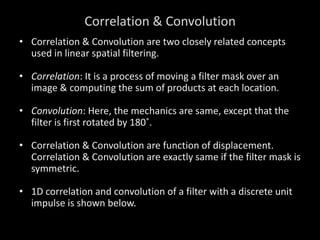
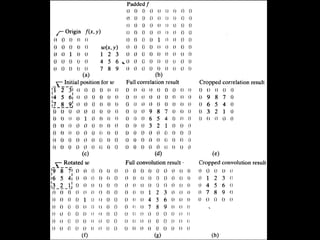
• 1D correlation and convolution of a filter with a discrete unit
impulse is shown below.
Correlation & Convolution
• Correlation is a function of displacement of the filter.
• Correlating a filter w with a function that contains all ‘0’ &
single ‘1’ yields a 180˚ rotated copy of w.
• Correlating a function with discrete unit impulse yields a
rotated (time inverted) version of the function.
• Convolving a function with a unit impulse yields the same
function.
• Thus, to perform convolution all we have to do is rotate one
function by 180˚ & perform same operation as in correlation.
Correlation & Convolution
• Summarizing in equation form, we have that
• The Correlation of a filter w(x, y) of size mxn with an image
f(x, y)is given by:
• The Convolution of w(x, y) and f(x, y) is given by:
Vector representation of Linear Filtering
R = w1z1 + w2z2 + ….+w9z9
= 𝑤𝑘𝑧𝑘
9
𝑘=1
= wTz
Where, w & z are 9-dimensional vectors formed from
coefficients of the mask & image intensities encompassed by the
mask, resp.
Generating Spatial Filter Masks
1) Average Mean Filter
• The average value at any location (x, y) in the image is the
sum of the nine intensity values in the 3 x 3 neighborhood
centered on (x, y) divided by 9.
• If zi, i = 1, 2, …, 9 denote these intensities, then the average is:
Generating Spatial Filter Masks
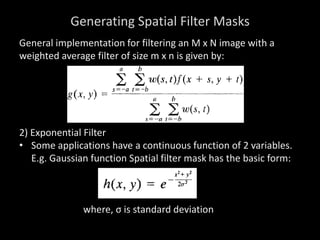
General implementation for filtering an M x N image with a
weighted average filter of size m x n is given by:
2) Exponential Filter
• Some applications have a continuous function of 2 variables.
E.g. Gaussian function Spatial filter mask has the basic form:
where, σ is standard deviation
Generating Spatial Filter Masks
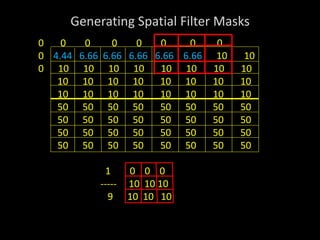
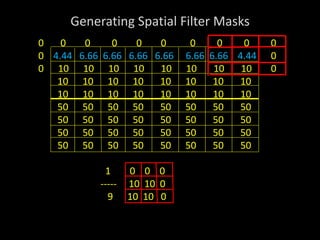
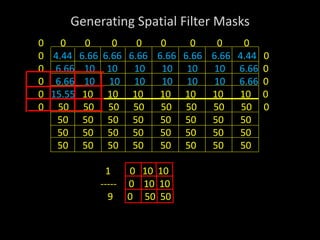
Ex. 1) 8x8 Pseudo image with a single edge (High Frequency) of
10 & 50. Remove using a 3x3 size averaging mask.
10 10 10 10 10 10 10 10
10 10 10 10 10 10 10 10
10 10 10 10 10 10 10 10
10 10 10 10 10 10 10 10
50 50 50 50 50 50 50 50
50 50 50 50 50 50 50 50
50 50 50 50 50 50 50 50
50 50 50 50 50 50 50 50
8x8 Image
Generating Spatial Filter Masks
10 10 10 10 10 10 10 10
10 10 10 10 10 10 10 10
10 10 10 10 10 10 10 10
10 10 10 10 10 10 10 10
50 50 50 50 50 50 50 50
50 50 50 50 50 50 50 50
50 50 50 50 50 50 50 50
50 50 50 50 50 50 50 50
1 1 1 1
----- 1 1 1
9 1 1 1
Generating Spatial Filter Masks
0 0 0
0 10 10 10 10 10 10 10 10
0 10 10 10 10 10 10 10 10
10 10 10 10 10 10 10 10
10 10 10 10 10 10 10 10
50 50 50 50 50 50 50 50
50 50 50 50 50 50 50 50
50 50 50 50 50 50 50 50
50 50 50 50 50 50 50 50
1 1 1 1 Yellow – Input Image pixels
----- 1 1 1 Red – Current pixel
9 1 1 1
Generating Spatial Filter Masks
0 0 0
0 4.44 10 10 10 10 10 10 10
0 10 10 10 10 10 10 10 10
10 10 10 10 10 10 10 10
10 10 10 10 10 10 10 10
50 50 50 50 50 50 50 50
50 50 50 50 50 50 50 50
50 50 50 50 50 50 50 50
50 50 50 50 50 50 50 50
1 0 0 0
----- 0 10 10
9 0 10 10 Blue – Output Image pixels
Generating Spatial Filter Masks
0 0 0 0
0 4.44 6.66 10 10 10 10 10 10
0 10 10 10 10 10 10 10 10
10 10 10 10 10 10 10 10
10 10 10 10 10 10 10 10
50 50 50 50 50 50 50 50
50 50 50 50 50 50 50 50
50 50 50 50 50 50 50 50
50 50 50 50 50 50 50 50
1 0 0 0
----- 10 10 10
9 10 10 10
Generating Spatial Filter Masks
0 0 0 0 0
0 4.44 6.66 6.66 10 10 10 10 10
0 10 10 10 10 10 10 10 10
10 10 10 10 10 10 10 10
10 10 10 10 10 10 10 10
50 50 50 50 50 50 50 50
50 50 50 50 50 50 50 50
50 50 50 50 50 50 50 50
50 50 50 50 50 50 50 50
1 0 0 0
----- 10 10 10
9 10 10 10
Generating Spatial Filter Masks
0 0 0 0 0 0
0 4.44 6.66 6.66 6.66 10 10 10 10
0 10 10 10 10 10 10 10 10
10 10 10 10 10 10 10 10
10 10 10 10 10 10 10 10
50 50 50 50 50 50 50 50
50 50 50 50 50 50 50 50
50 50 50 50 50 50 50 50
50 50 50 50 50 50 50 50
1 0 0 0
----- 10 10 10
9 10 10 10
Generating Spatial Filter Masks
0 0 0 0 0 0 0
0 4.44 6.66 6.66 6.66 6.66 10 10 10
0 10 10 10 10 10 10 10 10
10 10 10 10 10 10 10 10
10 10 10 10 10 10 10 10
50 50 50 50 50 50 50 50
50 50 50 50 50 50 50 50
50 50 50 50 50 50 50 50
50 50 50 50 50 50 50 50
1 0 0 0
----- 10 10 10
9 10 10 10
Generating Spatial Filter Masks
0 0 0 0 0 0 0 0
0 4.44 6.66 6.66 6.66 6.66 6.66 10 10
0 10 10 10 10 10 10 10 10
10 10 10 10 10 10 10 10
10 10 10 10 10 10 10 10
50 50 50 50 50 50 50 50
50 50 50 50 50 50 50 50
50 50 50 50 50 50 50 50
50 50 50 50 50 50 50 50
1 0 0 0
----- 10 10 10
9 10 10 10
Generating Spatial Filter Masks
0 0 0 0 0 0 0 0 0
0 4.44 6.66 6.66 6.66 6.66 6.66 6.66 10
0 10 10 10 10 10 10 10 10
10 10 10 10 10 10 10 10
10 10 10 10 10 10 10 10
50 50 50 50 50 50 50 50
50 50 50 50 50 50 50 50
50 50 50 50 50 50 50 50
50 50 50 50 50 50 50 50
1 0 0 0
----- 10 10 10
9 10 10 10
Generating Spatial Filter Masks
0 0 0 0 0 0 0 0 0 0
0 4.44 6.66 6.66 6.66 6.66 6.66 6.66 4.44 0
0 10 10 10 10 10 10 10 10 0
10 10 10 10 10 10 10 10
10 10 10 10 10 10 10 10
50 50 50 50 50 50 50 50
50 50 50 50 50 50 50 50
50 50 50 50 50 50 50 50
50 50 50 50 50 50 50 50
1 0 0 0
----- 10 10 0
9 10 10 0
Generating Spatial Filter Masks
0 0 0 0 0 0 0 0 0 0
0 4.44 6.66 6.66 6.66 6.66 6.66 6.66 4.44 0
0 6.66 10 10 10 10 10 10 10 0
0 10 10 10 10 10 10 10 10
10 10 10 10 10 10 10 10
50 50 50 50 50 50 50 50
50 50 50 50 50 50 50 50
50 50 50 50 50 50 50 50
50 50 50 50 50 50 50 50
1 0 10 10
----- 0 10 10
9 0 10 10
Generating Spatial Filter Masks
0 0 0 0 0 0 0 0 0
0 4.44 6.66 6.66 6.66 6.66 6.66 6.66 4.44 0
0 6.66 10 10 10 10 10 10 10 0
0 10 10 10 10 10 10 10 10
10 10 10 10 10 10 10 10
50 50 50 50 50 50 50 50
50 50 50 50 50 50 50 50
50 50 50 50 50 50 50 50
50 50 50 50 50 50 50 50
1 10 10 10
----- 10 10 10
9 10 10 10
Generating Spatial Filter Masks
0 0 0 0 0 0 0 0 0
0 4.44 6.66 6.66 6.66 6.66 6.66 6.66 4.44 0
0 6.66 10 10 10 10 10 10 10 0
0 10 10 10 10 10 10 10 10
10 10 10 10 10 10 10 10
50 50 50 50 50 50 50 50
50 50 50 50 50 50 50 50
50 50 50 50 50 50 50 50
50 50 50 50 50 50 50 50
1 10 10 10
----- 10 10 10
9 10 10 10
Generating Spatial Filter Masks
0 0 0 0 0 0 0 0 0
0 4.44 6.66 6.66 6.66 6.66 6.66 6.66 4.44 0
0 6.66 10 10 10 10 10 10 6.66 0
0 6.66 10 10 10 10 10 10 6.66 0
0 15.55 10 10 10 10 10 10 10 0
0 50 50 50 50 50 50 50 50 0
50 50 50 50 50 50 50 50
50 50 50 50 50 50 50 50
50 50 50 50 50 50 50 50
1 0 10 10
----- 0 10 10
9 0 50 50
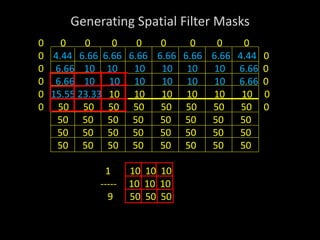
Generating Spatial Filter Masks
0 0 0 0 0 0 0 0 0
0 4.44 6.66 6.66 6.66 6.66 6.66 6.66 4.44 0
0 6.66 10 10 10 10 10 10 6.66 0
0 6.66 10 10 10 10 10 10 6.66 0
0 15.55 23.33 10 10 10 10 10 10 0
0 50 50 50 50 50 50 50 50 0
50 50 50 50 50 50 50 50
50 50 50 50 50 50 50 50
50 50 50 50 50 50 50 50
1 10 10 10
----- 10 10 10
9 50 50 50
Generating Spatial Filter Masks
0 0 0 0 0 0 0 0 0
0 4.44 6.66 6.66 6.66 6.66 6.66 6.66 4.44 0
0 6.66 10 10 10 10 10 10 6.66 0
0 6.66 10 10 10 10 10 10 6.66 0
0 15.55 23.3323.3323.33 23.33 23.33 23.33 15.55 0
0 24.44 36.66 50 50 50 50 50 50 0
50 50 50 50 50 50 50 50
50 50 50 50 50 50 50 50
50 50 50 50 50 50 50 50
1 10 10 10
----- 50 50 50
9 50 50 50
Generating Spatial Filter Masks
0 0 0 0 0 0 0 0 0
0 4.44 6.66 6.66 6.66 6.66 6.66 6.66 4.44 0
0 6.66 10 10 10 10 10 10 6.66 0
0 6.66 10 10 10 10 10 10 6.66 0
0 15.55 23.3323.3323.33 23.33 23.33 23.33 15.55 0
0 24.44 36.6636.66 36.66 36.66 36.66 36.66 24.44 0
0 33.33 50 50 50 50 50 50 50
50 50 50 50 50 50 50 50
50 50 50 50 50 50 50 50
1 50 50 50
----- 50 50 50
9 50 50 50
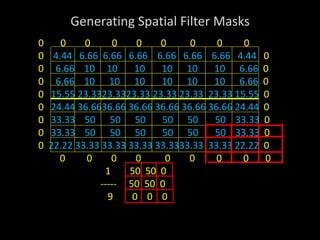
Generating Spatial Filter Masks
0 0 0 0 0 0 0 0 0
0 4.44 6.66 6.66 6.66 6.66 6.66 6.66 4.44 0
0 6.66 10 10 10 10 10 10 6.66 0
0 6.66 10 10 10 10 10 10 6.66 0
0 15.55 23.3323.3323.33 23.33 23.33 23.33 15.55 0
0 24.44 36.6636.66 36.66 36.66 36.66 36.66 24.44 0
0 33.33 50 50 50 50 50 50 33.33 0
0 33.33 50 50 50 50 50 50 33.33 0
0 22.22 33.33 33.33 33.33 33.3333.33 33.33 22.22 0
0 0 0 0 0 0 0 0 0
1 50 50 0
----- 50 50 0
9 0 0 0
Generating Spatial Filter Masks
10 10 10 10 10 10 10 10
10 10 10 10 10 10 10 10
10 10 10 10 10 10 10 10
10 23.33 23.3323.33 23.33 23.33 23.33 10
50 36.66 36.66 36.66 36.66 36.66 36.66 50
50 50 50 50 50 50 50 50
50 50 50 50 50 50 50 50
50 50 50 50 50 50 50 50
1 1 1 1
----- 1 1 1
9 1 1 1
Generating Spatial Filter Masks
 In the resultant image the Low frequency region has remained
unchanged.
 Sharp transition between 10 & 50 has changed from 10 to
23.33 to 36.66 and finally to 50.
 Thus, Sharp edges has become blurred.
 Best result when used over image corrupted by Gaussian
noise.
 Other types of low pass averaging mask are:
1 0 1 0 1 1 1 1
---- 1 2 1 ---- 1 2 1
6 0 1 0 10 1 1 1
Order-Statistic Filters
• These are non-linear spatial filters whose response is based
on ordering (increasing / decreasing) the pixels contained in
the image area encompassed by the filter.
• Then replacing the value of the center with the middle value
determined by ranking result.
• E.g. Median filter, Max filter, Min Filter
• i) Median Filter:
• Popular with certain random noise and impulse noise (Salt &
Pepper noise).
– They provide excellent noise reduction
– Comparatively less blurring than linear smoothing filter of same
size.
Order-Statistic Filters
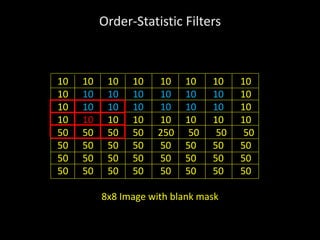
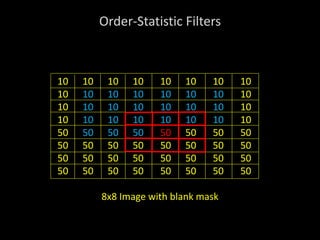
Ex. 2) 8x8 Pseudo image with a single edge (High Frequency) of
10 & 50. Remove using a 3x3 size median filter mask.
10 10 10 10 10 10 10 10
10 10 10 10 10 10 10 10
10 250 10 10 10 10 10 10
10 10 10 10 10 10 10 10
50 50 50 50 250 50 50 50
50 50 50 50 50 50 50 50
50 50 50 50 50 50 50 50
50 50 50 50 50 50 50 50
8x8 Image
Order-Statistic Filters
10 10 10 10 10 10 10 10
10 10 10 10 10 10 10 10
10 250 10 10 10 10 10 10
10 10 10 10 10 10 10 10
50 50 50 50 250 50 50 50
50 50 50 50 50 50 50 50
50 50 50 50 50 50 50 50
50 50 50 50 50 50 50 50
8x8 Image with blank mask
Order-Statistic Filters
10 10 10 10 10 10 10 10
10 10 10 10 10 10 10 10
10 250 10 10 10 10 10 10
10 10 10 10 10 10 10 10
50 50 50 50 250 50 50 50
50 50 50 50 50 50 50 50
50 50 50 50 50 50 50 50
50 50 50 50 50 50 50 50
8x8 Image with blank mask
Order-Statistic Filters
10 10 10 10 10 10 10 10
10 10 10 10 10 10 10 10
10 10 10 10 10 10 10 10
10 10 10 10 10 10 10 10
50 50 50 50 250 50 50 50
50 50 50 50 50 50 50 50
50 50 50 50 50 50 50 50
50 50 50 50 50 50 50 50
8x8 Image with blank mask
Order-Statistic Filters
10 10 10 10 10 10 10 10
10 10 10 10 10 10 10 10
10 10 10 10 10 10 10 10
10 10 10 10 10 10 10 10
50 50 50 50 250 50 50 50
50 50 50 50 50 50 50 50
50 50 50 50 50 50 50 50
50 50 50 50 50 50 50 50
8x8 Image with blank mask
Order-Statistic Filters
10 10 10 10 10 10 10 10
10 10 10 10 10 10 10 10
10 10 10 10 10 10 10 10
10 10 10 10 10 10 10 10
50 50 50 50 250 50 50 50
50 50 50 50 50 50 50 50
50 50 50 50 50 50 50 50
50 50 50 50 50 50 50 50
8x8 Image with blank mask
Order-Statistic Filters
10 10 10 10 10 10 10 10
10 10 10 10 10 10 10 10
10 10 10 10 10 10 10 10
10 10 10 10 10 10 10 10
50 50 50 50 50 50 50 50
50 50 50 50 50 50 50 50
50 50 50 50 50 50 50 50
50 50 50 50 50 50 50 50
8x8 Image with blank mask
Order-Statistic Filters
10 10 10 10 10 10 10 10
10 10 10 10 10 10 10 10
10 10 10 10 10 10 10 10
10 10 10 10 10 10 10 10
50 50 50 50 50 50 50 50
50 50 50 50 50 50 50 50
50 50 50 50 50 50 50 50
50 50 50 50 50 50 50 50
Output Image
Order-Statistic Filters
• ii) Max Filter:
• It is used to find the brightest points in an image.
– Response of a 3 x 3 max filter is given by
• iii) Min Filter:
– Used to find the darkest points in an image.
Sharpening Spatial Filter
• The principal objective of sharpening is to highlight transitions
in intensity.
• Applications: Electronics Printing, Medical Imaging, Industrial
Inspection, Autonomous guidance in military systems, etc.
• Derivatives of a digital function are defined in terms of
differences:
• First Derivative:
i) must be zero in areas of constant intensity.
ii) must be nonzero at the onset of an intensity step / ramp.
iii) Must be nonzero along ramps.
• First order derivative of 1D function f(x) is difference:
Sharpening Spatial Filter
• Second derivative:
i) must be zero in constant areas
ii) Must be nonzero at the onset and end of an intensity step /
ramp
iii) Must be zero along ramps of constant slope.
• Second order derivative of f(x) as the difference:
The Laplacian
• Isotropic Filter: They are rotation invariant.
• Laplacian is simplest Isotropic derivative operator. It is defined
as:
• Laplacian is a linear operator.
The Laplacian
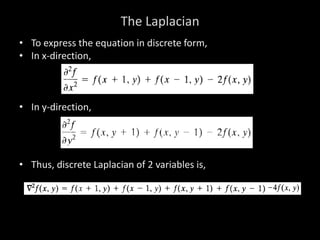
• To express the equation in discrete form,
• In x-direction,
• In y-direction,
• Thus, discrete Laplacian of 2 variables is,
The Laplacian
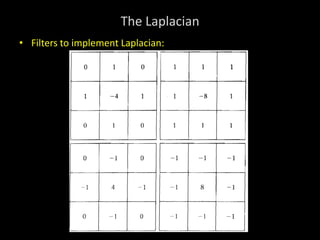
• Filters to implement Laplacian:
The Laplacian
• If background features need to be recovered by still
preserving the sharpening effect of the Laplacian, then
• The basic way to use the Laplacian for image sharpening is:
Where,
f(x, y) – input image
g(x, y) – sharpened image
c – (-1) or (+1) for filters with negative & positive center resp.
Unsharp Masking & Highboost Filtering
• The process of subtracting an unsharp (smoothed) version of
an image from the original image is called unsharp masking.
• It consists of three steps:
• i) Blur the original image.
• ii) Subtract the blurred image from the original (results in
mask).
• iii) Add the mask to the original.
where if, k = 1, unsharp masking, k > 1, highboost filtering,
k < 1, de-emphasizes the contribution of unsharp mask.
Unsharp Masking & Highboost Filtering
• Mechanics of unsharp masking
Using First-Order Derivative (Gradient)
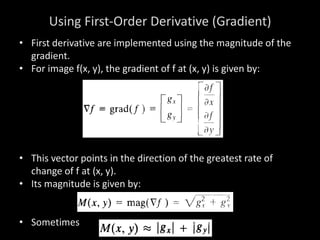
• First derivative are implemented using the magnitude of the
gradient.
• For image f(x, y), the gradient of f at (x, y) is given by:
• This vector points in the direction of the greatest rate of
change of f at (x, y).
• Its magnitude is given by:
• Sometimes
Using First-Order Derivative (Gradient)
• Roberts
operators
• Sobel
operators
Miscellaneous content
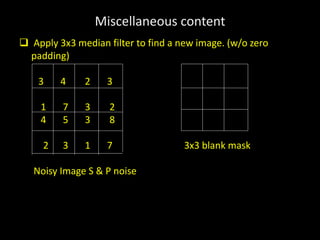
Low Pass Median Filtering:
 Averaging Filter removes the noise by blurring till it is no
longer seen.
 It blurs the edges too.
 Bigger the averaging mass more the blurring.
 Sometimes the image contains ‘salt & pepper noise’.
 If averaging filter is used then it will remove the noise at the
cost of ruined edges.
 Thus a nonlinear filter Median filter is required.
 They are also called as order statistics filter since their
response is based on ordering or ranking of pixels contained
within the mask.
 Here we use a blank mask.
Miscellaneous content
 Apply 3x3 median filter to find a new image. (w/o zero
padding)
3 4 2 3
1 7 3 2
4 5 3 8
2 3 1 7 3x3 blank mask
Noisy Image S & P noise
Miscellaneous content
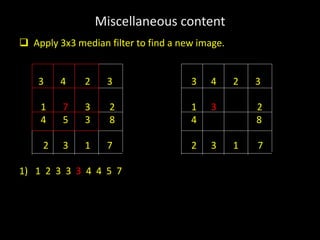
 Apply 3x3 median filter to find a new image.
3 4 2 3 3 4 2 3
1 7 3 2 1 3 2
4 5 3 8 4 8
2 3 1 7 2 3 1 7
1) 1 2 3 3 3 4 4 5 7
Miscellaneous content
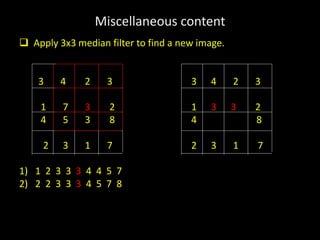
 Apply 3x3 median filter to find a new image.
3 4 2 3 3 4 2 3
1 7 3 2 1 3 3 2
4 5 3 8 4 8
2 3 1 7 2 3 1 7
1) 1 2 3 3 3 4 4 5 7
2) 2 2 3 3 3 4 5 7 8
Miscellaneous content
 Apply 3x3 median filter to find a new image.
3 4 2 3 3 4 2 3
1 7 3 2 1 3 3 2
4 5 3 8 4 3 8
2 3 1 7 2 3 1 7
1) 1 2 3 3 3 4 4 5 7
2) 2 2 3 3 3 4 5 7 8
3) 1 1 2 3 3 3 4 5 7
Miscellaneous content
 Apply 3x3 median filter to find a new image.
3 4 2 3 3 4 2 3
1 7 3 2 1 3 3 2
4 5 3 8 4 3 3 8
2 3 1 7 2 3 1 7
1) 1 2 3 3 3 4 4 5 7
2) 2 2 3 3 3 4 5 7 8
3) 1 1 2 3 3 3 4 5 7
4) 1 2 3 3 3 5 7 7 8
Miscellaneous content
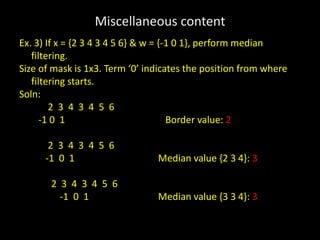
Ex. 3) If x = {2 3 4 3 4 5 6} & w = {-1 0 1}, perform median
filtering.
Size of mask is 1x3. Term ‘0’ indicates the position from where
filtering starts.
Soln:
2 3 4 3 4 5 6
-1 0 1 Border value: 2
2 3 4 3 4 5 6
-1 0 1 Median value {2 3 4}: 3
2 3 4 3 4 5 6
-1 0 1 Median value {3 3 4}: 3
Miscellaneous content
2 3 4 3 4 5 6
-1 0 1 Median value {3 4 4}: 4
2 3 4 3 4 5 6
-1 0 1 Median value {3 4 5}: 4
2 3 4 3 4 5 6
-1 0 1 Median value {4 5 6}: 5
2 3 4 3 4 5 6
-1 0 1 Border value: 6
Result: {2 3 3 4 4 5 6}
Miscellaneous content
Ex 4). Find the median filtered image by 3x3 mask for the given
image.
2 4 15 0
3 5 2 6
11 0 2 10
6 16 0 2
Miscellaneous content
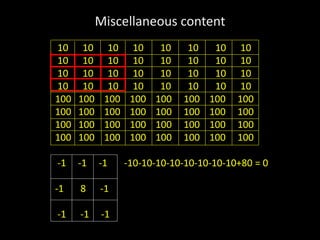
High Pass Filtering:
 Retains HF component while eliminates LF components.
 High passed image will have no background(Low freq region).
 It will have enhanced edges.
 Used to sharpen blurred images.
 Process of mask moving on image is same only the mask
coefficients change.
 Mask coefficients should have positive value at centre and
negative values elsewhere.
 Sum of coefficients must be zero.
 Since, it should give Zero after being placed on LP region.
Miscellaneous content
High Pass Masks:
3x3 High pass masks
-1 -1 -1
-1 8 -1
-1 -1 -1
0 -1 0 -1 -2 -1
-1 4 -1 -2 12 -2
0 -1 0 -1 -2 -1
Miscellaneous content
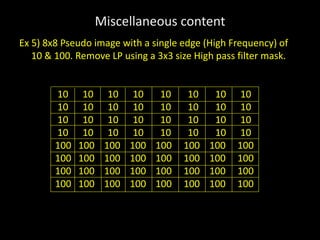
Ex 5) 8x8 Pseudo image with a single edge (High Frequency) of
10 & 100. Remove LP using a 3x3 size High pass filter mask.
10 10 10 10 10 10 10 10
10 10 10 10 10 10 10 10
10 10 10 10 10 10 10 10
10 10 10 10 10 10 10 10
100 100 100 100 100 100 100 100
100 100 100 100 100 100 100 100
100 100 100 100 100 100 100 100
100 100 100 100 100 100 100 100
Miscellaneous content
10 10 10 10 10 10 10 10
10 10 10 10 10 10 10 10
10 10 10 10 10 10 10 10
10 10 10 10 10 10 10 10
100 100 100 100 100 100 100 100
100 100 100 100 100 100 100 100
100 100 100 100 100 100 100 100
100 100 100 100 100 100 100 100
-1 -1 -1 -10-10-10-10-10-10-10-10+80 = 0
-1 8 -1
-1 -1 -1
Miscellaneous content
10 10 10 10 10 10 10 10
10 10 10 10 10 10 10 10
10 10 10 10 10 10 10 10
10 10 10 10 10 10 10 10
100 100 100 100 100 100 100 100
100 100 100 100 100 100 100 100
100 100 100 100 100 100 100 100
100 100 100 100 100 100 100 100
-1 -1 -1 -10-10-10-10-10-10-10-10+80 = 0
-1 8 -1
-1 -1 -1
Miscellaneous content
10 10 10 10 10 10 10 10
10 10 10 10 10 10 10 10
10 10 10 10 10 10 10 10
10 10 10 10 10 10 10 10
100 100 100 100 100 100 100 100
100 100 100 100 100 100 100 100
100 100 100 100 100 100 100 100
100 100 100 100 100 100 100 100
-1 -1 -1 -10-10-10-10-10-100-100-100+80 = -270
-1 8 -1
-1 -1 -1
Miscellaneous content
10 10 10 10 10 10 10 10
10 10 10 10 10 10 10 10
10 10 10 10 10 10 10 10
10 10 10 10 10 10 10 10
100 100 100 100 100 100 100 100
100 100 100 100 100 100 100 100
100 100 100 100 100 100 100 100
100 100 100 100 100 100 100 100
-1 -1 -1 -10-10-10-100-100-100-100-100+800 = +270
-1 8 -1
-1 -1 -1
Miscellaneous content
10 10 10 10 10 10 10 10
10 10 10 10 10 10 10 10
10 10 10 10 10 10 10 10
10 10 10 10 10 10 10 10
100 100 100 100 100 100 100 100
100 100 100 100 100 100 100 100
100 100 100 100 100 100 100 100
100 100 100 100 100 100 100 100
-1 -1 -1 -100-100-100-100-100-100-100-100+800 = 0
-1 8 -1
-1 -1 -1
Miscellaneous content
0 0 0 0 0 0 0 0
0 0 0 0 0 0 0 0
0 0 0 0 0 0 0 0
-270 -270 -270 -270 -270 -270 -270 -270
270 270 270 270 270 270 270 270
0 0 0 0 0 0 0 0
0 0 0 0 0 0 0 0
0 0 0 0 0 0 0 0
Note: -270 is replaced by 0.
Miscellaneous content
Ex. 6) Obtain the digital negative of the following 8 bits per pixel
image of fig.1.
121 205 217 156 151 2 1 2 2 1
139 127 157 117 125 2 3 4 5 2
252 117 236 138 142 6 2 7 6 0
227 182 178 197 242 2 6 6 5 1
201 106 119 251 240 0 3 2 2 1
fig. 1 fig. 2
Ex. 7) Perform intensity level (gray level) slicing on a 3 bpp image
of fig. 2 . Let r1 = 3 & r2 = 5. Draw the modified image using
with background & without background transformation.
Miscellaneous content
Ex. 8) The image shown below has 8 different gray levels. Plot
this image using only 4 gray levels.
0 1 1 1 1 4
1 1 2 3 2 2
1 1 2 2 3 3
1 2 4 6 2 3
1 2 4 2 4 4
1 2 3 7 2 5
Miscellaneous content
8 gray levels:
0 0
1 0 0
2 2
3 2 1
4 4
5 4 2
6 6 0 0 0 0 0 4
7 6 3 0 0 2 2 2 2
0 0 2 2 2 2
0 2 4 6 2 2
0 2 4 2 4 4
0 2 2 6 2 4

Spatial filtering

  • 1.
    DIGITAL IMAGE PROCESSING SPATIALFILTERING by Dr. K. M. Bhurchandi
  • 2.
    Fundamentals of SpatialFiltering • Filtering refers to accepting(passing) or rejecting certain frequency components. This effectively smoothens or sharpens the image. • E.g. Low pass filter, high pass filter, etc. • Such operations can be directly carried out on image in spatial domain also by using spatial filters (kernels, spatial masks, templates, & windows). • Spatial filters are more versatile as they are used in linear as well as non-linear filtering (Difficult in frequency domain).
  • 3.
    Fundamentals of SpatialFiltering • Types of Spatial Filtering • 1) Point to point (pixel to pixel) operation (discussed so far) • 2) Mask based (Neighborhood) operations i) Operation with 3x3 filter (E.g. Mean, max, min, etc) ii) Correlation or Convolution • Linear vs Non-Linear Filter If the operation performed on the image pixels is linear, then the filter is called a linear spatial filter, otherwise nonlinear.
  • 4.
    Operation with 3x3Filter • At any point (x, y) in the image, the response, g(x, y), of the filter is the sum of products of the filter coefficients and the image pixels encompassed by the filter: g(x, y) = f(x-1,y-1).w1 + f(x-1,y).w2 + f(x-1,y+1).w3 + f(x,y-1).w4 + f( x, y).w5 + f(x,y+1).w6 + f(x+1,y-1).w7 + f(x+1,y).w8 + f(x+1,y+1).w9 • For the mask of size m x n, we assume m = 2a + 1; n = 2b + 1; where a & b are positive integers. • 3x3 is the smallest filter.
  • 5.
    Operation with 3x3Filter • Generalized equation: a b • g(x, y) = Σ Σ w(s, t) f(x + s, y + t) s = -a t = -b where, x & y are varied so that each pixel in w visits every pixel in f.
  • 6.
    Operation with 3x3Filter • 3 x 3 Neighborhood / Mask / Window / Template: (y - 1) y (y + 1) Y w(-1,-1) w(-1,0) w(-1,1) (x - 1) f(x-1, y-1) f(x-1, y) f(x-1, y+1) w(0,-1) w(0,0) w(0,1) x f(x, y-1) f(x, y) f(x, y+1) w(1,-1) w(1,0) w(1,1) (x + 1) f(x+1, y-1) f(x+1, y) f(x+1, y+1) X
  • 7.
    Correlation & Convolution •Correlation & Convolution are two closely related concepts used in linear spatial filtering. • Correlation: It is a process of moving a filter mask over an image & computing the sum of products at each location. • Convolution: Here, the mechanics are same, except that the filter is first rotated by 180˚. • Correlation & Convolution are function of displacement. Correlation & Convolution are exactly same if the filter mask is symmetric. • 1D correlation and convolution of a filter with a discrete unit impulse is shown below.
  • 9.
    Correlation & Convolution •Correlation is a function of displacement of the filter. • Correlating a filter w with a function that contains all ‘0’ & single ‘1’ yields a 180˚ rotated copy of w. • Correlating a function with discrete unit impulse yields a rotated (time inverted) version of the function. • Convolving a function with a unit impulse yields the same function. • Thus, to perform convolution all we have to do is rotate one function by 180˚ & perform same operation as in correlation.
  • 11.
    Correlation & Convolution •Summarizing in equation form, we have that • The Correlation of a filter w(x, y) of size mxn with an image f(x, y)is given by: • The Convolution of w(x, y) and f(x, y) is given by:
  • 12.
    Vector representation ofLinear Filtering R = w1z1 + w2z2 + ….+w9z9 = 𝑤𝑘𝑧𝑘 9 𝑘=1 = wTz Where, w & z are 9-dimensional vectors formed from coefficients of the mask & image intensities encompassed by the mask, resp.
  • 13.
    Generating Spatial FilterMasks 1) Average Mean Filter • The average value at any location (x, y) in the image is the sum of the nine intensity values in the 3 x 3 neighborhood centered on (x, y) divided by 9. • If zi, i = 1, 2, …, 9 denote these intensities, then the average is:
  • 14.
    Generating Spatial FilterMasks General implementation for filtering an M x N image with a weighted average filter of size m x n is given by: 2) Exponential Filter • Some applications have a continuous function of 2 variables. E.g. Gaussian function Spatial filter mask has the basic form: where, σ is standard deviation
  • 15.
    Generating Spatial FilterMasks Ex. 1) 8x8 Pseudo image with a single edge (High Frequency) of 10 & 50. Remove using a 3x3 size averaging mask. 10 10 10 10 10 10 10 10 10 10 10 10 10 10 10 10 10 10 10 10 10 10 10 10 10 10 10 10 10 10 10 10 50 50 50 50 50 50 50 50 50 50 50 50 50 50 50 50 50 50 50 50 50 50 50 50 50 50 50 50 50 50 50 50 8x8 Image
  • 16.
    Generating Spatial FilterMasks 10 10 10 10 10 10 10 10 10 10 10 10 10 10 10 10 10 10 10 10 10 10 10 10 10 10 10 10 10 10 10 10 50 50 50 50 50 50 50 50 50 50 50 50 50 50 50 50 50 50 50 50 50 50 50 50 50 50 50 50 50 50 50 50 1 1 1 1 ----- 1 1 1 9 1 1 1
  • 17.
    Generating Spatial FilterMasks 0 0 0 0 10 10 10 10 10 10 10 10 0 10 10 10 10 10 10 10 10 10 10 10 10 10 10 10 10 10 10 10 10 10 10 10 10 50 50 50 50 50 50 50 50 50 50 50 50 50 50 50 50 50 50 50 50 50 50 50 50 50 50 50 50 50 50 50 50 1 1 1 1 Yellow – Input Image pixels ----- 1 1 1 Red – Current pixel 9 1 1 1
  • 18.
    Generating Spatial FilterMasks 0 0 0 0 4.44 10 10 10 10 10 10 10 0 10 10 10 10 10 10 10 10 10 10 10 10 10 10 10 10 10 10 10 10 10 10 10 10 50 50 50 50 50 50 50 50 50 50 50 50 50 50 50 50 50 50 50 50 50 50 50 50 50 50 50 50 50 50 50 50 1 0 0 0 ----- 0 10 10 9 0 10 10 Blue – Output Image pixels
  • 19.
    Generating Spatial FilterMasks 0 0 0 0 0 4.44 6.66 10 10 10 10 10 10 0 10 10 10 10 10 10 10 10 10 10 10 10 10 10 10 10 10 10 10 10 10 10 10 10 50 50 50 50 50 50 50 50 50 50 50 50 50 50 50 50 50 50 50 50 50 50 50 50 50 50 50 50 50 50 50 50 1 0 0 0 ----- 10 10 10 9 10 10 10
  • 20.
    Generating Spatial FilterMasks 0 0 0 0 0 0 4.44 6.66 6.66 10 10 10 10 10 0 10 10 10 10 10 10 10 10 10 10 10 10 10 10 10 10 10 10 10 10 10 10 10 10 50 50 50 50 50 50 50 50 50 50 50 50 50 50 50 50 50 50 50 50 50 50 50 50 50 50 50 50 50 50 50 50 1 0 0 0 ----- 10 10 10 9 10 10 10
  • 21.
    Generating Spatial FilterMasks 0 0 0 0 0 0 0 4.44 6.66 6.66 6.66 10 10 10 10 0 10 10 10 10 10 10 10 10 10 10 10 10 10 10 10 10 10 10 10 10 10 10 10 10 50 50 50 50 50 50 50 50 50 50 50 50 50 50 50 50 50 50 50 50 50 50 50 50 50 50 50 50 50 50 50 50 1 0 0 0 ----- 10 10 10 9 10 10 10
  • 22.
    Generating Spatial FilterMasks 0 0 0 0 0 0 0 0 4.44 6.66 6.66 6.66 6.66 10 10 10 0 10 10 10 10 10 10 10 10 10 10 10 10 10 10 10 10 10 10 10 10 10 10 10 10 50 50 50 50 50 50 50 50 50 50 50 50 50 50 50 50 50 50 50 50 50 50 50 50 50 50 50 50 50 50 50 50 1 0 0 0 ----- 10 10 10 9 10 10 10
  • 23.
    Generating Spatial FilterMasks 0 0 0 0 0 0 0 0 0 4.44 6.66 6.66 6.66 6.66 6.66 10 10 0 10 10 10 10 10 10 10 10 10 10 10 10 10 10 10 10 10 10 10 10 10 10 10 10 50 50 50 50 50 50 50 50 50 50 50 50 50 50 50 50 50 50 50 50 50 50 50 50 50 50 50 50 50 50 50 50 1 0 0 0 ----- 10 10 10 9 10 10 10
  • 24.
    Generating Spatial FilterMasks 0 0 0 0 0 0 0 0 0 0 4.44 6.66 6.66 6.66 6.66 6.66 6.66 10 0 10 10 10 10 10 10 10 10 10 10 10 10 10 10 10 10 10 10 10 10 10 10 10 10 50 50 50 50 50 50 50 50 50 50 50 50 50 50 50 50 50 50 50 50 50 50 50 50 50 50 50 50 50 50 50 50 1 0 0 0 ----- 10 10 10 9 10 10 10
  • 25.
    Generating Spatial FilterMasks 0 0 0 0 0 0 0 0 0 0 0 4.44 6.66 6.66 6.66 6.66 6.66 6.66 4.44 0 0 10 10 10 10 10 10 10 10 0 10 10 10 10 10 10 10 10 10 10 10 10 10 10 10 10 50 50 50 50 50 50 50 50 50 50 50 50 50 50 50 50 50 50 50 50 50 50 50 50 50 50 50 50 50 50 50 50 1 0 0 0 ----- 10 10 0 9 10 10 0
  • 26.
    Generating Spatial FilterMasks 0 0 0 0 0 0 0 0 0 0 0 4.44 6.66 6.66 6.66 6.66 6.66 6.66 4.44 0 0 6.66 10 10 10 10 10 10 10 0 0 10 10 10 10 10 10 10 10 10 10 10 10 10 10 10 10 50 50 50 50 50 50 50 50 50 50 50 50 50 50 50 50 50 50 50 50 50 50 50 50 50 50 50 50 50 50 50 50 1 0 10 10 ----- 0 10 10 9 0 10 10
  • 27.
    Generating Spatial FilterMasks 0 0 0 0 0 0 0 0 0 0 4.44 6.66 6.66 6.66 6.66 6.66 6.66 4.44 0 0 6.66 10 10 10 10 10 10 10 0 0 10 10 10 10 10 10 10 10 10 10 10 10 10 10 10 10 50 50 50 50 50 50 50 50 50 50 50 50 50 50 50 50 50 50 50 50 50 50 50 50 50 50 50 50 50 50 50 50 1 10 10 10 ----- 10 10 10 9 10 10 10
  • 28.
    Generating Spatial FilterMasks 0 0 0 0 0 0 0 0 0 0 4.44 6.66 6.66 6.66 6.66 6.66 6.66 4.44 0 0 6.66 10 10 10 10 10 10 10 0 0 10 10 10 10 10 10 10 10 10 10 10 10 10 10 10 10 50 50 50 50 50 50 50 50 50 50 50 50 50 50 50 50 50 50 50 50 50 50 50 50 50 50 50 50 50 50 50 50 1 10 10 10 ----- 10 10 10 9 10 10 10
  • 29.
    Generating Spatial FilterMasks 0 0 0 0 0 0 0 0 0 0 4.44 6.66 6.66 6.66 6.66 6.66 6.66 4.44 0 0 6.66 10 10 10 10 10 10 6.66 0 0 6.66 10 10 10 10 10 10 6.66 0 0 15.55 10 10 10 10 10 10 10 0 0 50 50 50 50 50 50 50 50 0 50 50 50 50 50 50 50 50 50 50 50 50 50 50 50 50 50 50 50 50 50 50 50 50 1 0 10 10 ----- 0 10 10 9 0 50 50
  • 30.
    Generating Spatial FilterMasks 0 0 0 0 0 0 0 0 0 0 4.44 6.66 6.66 6.66 6.66 6.66 6.66 4.44 0 0 6.66 10 10 10 10 10 10 6.66 0 0 6.66 10 10 10 10 10 10 6.66 0 0 15.55 23.33 10 10 10 10 10 10 0 0 50 50 50 50 50 50 50 50 0 50 50 50 50 50 50 50 50 50 50 50 50 50 50 50 50 50 50 50 50 50 50 50 50 1 10 10 10 ----- 10 10 10 9 50 50 50
  • 31.
    Generating Spatial FilterMasks 0 0 0 0 0 0 0 0 0 0 4.44 6.66 6.66 6.66 6.66 6.66 6.66 4.44 0 0 6.66 10 10 10 10 10 10 6.66 0 0 6.66 10 10 10 10 10 10 6.66 0 0 15.55 23.3323.3323.33 23.33 23.33 23.33 15.55 0 0 24.44 36.66 50 50 50 50 50 50 0 50 50 50 50 50 50 50 50 50 50 50 50 50 50 50 50 50 50 50 50 50 50 50 50 1 10 10 10 ----- 50 50 50 9 50 50 50
  • 32.
    Generating Spatial FilterMasks 0 0 0 0 0 0 0 0 0 0 4.44 6.66 6.66 6.66 6.66 6.66 6.66 4.44 0 0 6.66 10 10 10 10 10 10 6.66 0 0 6.66 10 10 10 10 10 10 6.66 0 0 15.55 23.3323.3323.33 23.33 23.33 23.33 15.55 0 0 24.44 36.6636.66 36.66 36.66 36.66 36.66 24.44 0 0 33.33 50 50 50 50 50 50 50 50 50 50 50 50 50 50 50 50 50 50 50 50 50 50 50 1 50 50 50 ----- 50 50 50 9 50 50 50
  • 33.
    Generating Spatial FilterMasks 0 0 0 0 0 0 0 0 0 0 4.44 6.66 6.66 6.66 6.66 6.66 6.66 4.44 0 0 6.66 10 10 10 10 10 10 6.66 0 0 6.66 10 10 10 10 10 10 6.66 0 0 15.55 23.3323.3323.33 23.33 23.33 23.33 15.55 0 0 24.44 36.6636.66 36.66 36.66 36.66 36.66 24.44 0 0 33.33 50 50 50 50 50 50 33.33 0 0 33.33 50 50 50 50 50 50 33.33 0 0 22.22 33.33 33.33 33.33 33.3333.33 33.33 22.22 0 0 0 0 0 0 0 0 0 0 1 50 50 0 ----- 50 50 0 9 0 0 0
  • 34.
    Generating Spatial FilterMasks 10 10 10 10 10 10 10 10 10 10 10 10 10 10 10 10 10 10 10 10 10 10 10 10 10 23.33 23.3323.33 23.33 23.33 23.33 10 50 36.66 36.66 36.66 36.66 36.66 36.66 50 50 50 50 50 50 50 50 50 50 50 50 50 50 50 50 50 50 50 50 50 50 50 50 50 1 1 1 1 ----- 1 1 1 9 1 1 1
  • 35.
    Generating Spatial FilterMasks  In the resultant image the Low frequency region has remained unchanged.  Sharp transition between 10 & 50 has changed from 10 to 23.33 to 36.66 and finally to 50.  Thus, Sharp edges has become blurred.  Best result when used over image corrupted by Gaussian noise.  Other types of low pass averaging mask are: 1 0 1 0 1 1 1 1 ---- 1 2 1 ---- 1 2 1 6 0 1 0 10 1 1 1
  • 36.
    Order-Statistic Filters • Theseare non-linear spatial filters whose response is based on ordering (increasing / decreasing) the pixels contained in the image area encompassed by the filter. • Then replacing the value of the center with the middle value determined by ranking result. • E.g. Median filter, Max filter, Min Filter • i) Median Filter: • Popular with certain random noise and impulse noise (Salt & Pepper noise). – They provide excellent noise reduction – Comparatively less blurring than linear smoothing filter of same size.
  • 37.
    Order-Statistic Filters Ex. 2)8x8 Pseudo image with a single edge (High Frequency) of 10 & 50. Remove using a 3x3 size median filter mask. 10 10 10 10 10 10 10 10 10 10 10 10 10 10 10 10 10 250 10 10 10 10 10 10 10 10 10 10 10 10 10 10 50 50 50 50 250 50 50 50 50 50 50 50 50 50 50 50 50 50 50 50 50 50 50 50 50 50 50 50 50 50 50 50 8x8 Image
  • 38.
    Order-Statistic Filters 10 1010 10 10 10 10 10 10 10 10 10 10 10 10 10 10 250 10 10 10 10 10 10 10 10 10 10 10 10 10 10 50 50 50 50 250 50 50 50 50 50 50 50 50 50 50 50 50 50 50 50 50 50 50 50 50 50 50 50 50 50 50 50 8x8 Image with blank mask
  • 39.
    Order-Statistic Filters 10 1010 10 10 10 10 10 10 10 10 10 10 10 10 10 10 250 10 10 10 10 10 10 10 10 10 10 10 10 10 10 50 50 50 50 250 50 50 50 50 50 50 50 50 50 50 50 50 50 50 50 50 50 50 50 50 50 50 50 50 50 50 50 8x8 Image with blank mask
  • 40.
    Order-Statistic Filters 10 1010 10 10 10 10 10 10 10 10 10 10 10 10 10 10 10 10 10 10 10 10 10 10 10 10 10 10 10 10 10 50 50 50 50 250 50 50 50 50 50 50 50 50 50 50 50 50 50 50 50 50 50 50 50 50 50 50 50 50 50 50 50 8x8 Image with blank mask
  • 41.
    Order-Statistic Filters 10 1010 10 10 10 10 10 10 10 10 10 10 10 10 10 10 10 10 10 10 10 10 10 10 10 10 10 10 10 10 10 50 50 50 50 250 50 50 50 50 50 50 50 50 50 50 50 50 50 50 50 50 50 50 50 50 50 50 50 50 50 50 50 8x8 Image with blank mask
  • 42.
    Order-Statistic Filters 10 1010 10 10 10 10 10 10 10 10 10 10 10 10 10 10 10 10 10 10 10 10 10 10 10 10 10 10 10 10 10 50 50 50 50 250 50 50 50 50 50 50 50 50 50 50 50 50 50 50 50 50 50 50 50 50 50 50 50 50 50 50 50 8x8 Image with blank mask
  • 43.
    Order-Statistic Filters 10 1010 10 10 10 10 10 10 10 10 10 10 10 10 10 10 10 10 10 10 10 10 10 10 10 10 10 10 10 10 10 50 50 50 50 50 50 50 50 50 50 50 50 50 50 50 50 50 50 50 50 50 50 50 50 50 50 50 50 50 50 50 50 8x8 Image with blank mask
  • 44.
    Order-Statistic Filters 10 1010 10 10 10 10 10 10 10 10 10 10 10 10 10 10 10 10 10 10 10 10 10 10 10 10 10 10 10 10 10 50 50 50 50 50 50 50 50 50 50 50 50 50 50 50 50 50 50 50 50 50 50 50 50 50 50 50 50 50 50 50 50 Output Image
  • 45.
    Order-Statistic Filters • ii)Max Filter: • It is used to find the brightest points in an image. – Response of a 3 x 3 max filter is given by • iii) Min Filter: – Used to find the darkest points in an image.
  • 46.
    Sharpening Spatial Filter •The principal objective of sharpening is to highlight transitions in intensity. • Applications: Electronics Printing, Medical Imaging, Industrial Inspection, Autonomous guidance in military systems, etc. • Derivatives of a digital function are defined in terms of differences: • First Derivative: i) must be zero in areas of constant intensity. ii) must be nonzero at the onset of an intensity step / ramp. iii) Must be nonzero along ramps. • First order derivative of 1D function f(x) is difference:
  • 47.
    Sharpening Spatial Filter •Second derivative: i) must be zero in constant areas ii) Must be nonzero at the onset and end of an intensity step / ramp iii) Must be zero along ramps of constant slope. • Second order derivative of f(x) as the difference:
  • 49.
    The Laplacian • IsotropicFilter: They are rotation invariant. • Laplacian is simplest Isotropic derivative operator. It is defined as: • Laplacian is a linear operator.
  • 50.
    The Laplacian • Toexpress the equation in discrete form, • In x-direction, • In y-direction, • Thus, discrete Laplacian of 2 variables is,
  • 51.
    The Laplacian • Filtersto implement Laplacian:
  • 52.
    The Laplacian • Ifbackground features need to be recovered by still preserving the sharpening effect of the Laplacian, then • The basic way to use the Laplacian for image sharpening is: Where, f(x, y) – input image g(x, y) – sharpened image c – (-1) or (+1) for filters with negative & positive center resp.
  • 53.
    Unsharp Masking &Highboost Filtering • The process of subtracting an unsharp (smoothed) version of an image from the original image is called unsharp masking. • It consists of three steps: • i) Blur the original image. • ii) Subtract the blurred image from the original (results in mask). • iii) Add the mask to the original. where if, k = 1, unsharp masking, k > 1, highboost filtering, k < 1, de-emphasizes the contribution of unsharp mask.
  • 54.
    Unsharp Masking &Highboost Filtering • Mechanics of unsharp masking
  • 55.
    Using First-Order Derivative(Gradient) • First derivative are implemented using the magnitude of the gradient. • For image f(x, y), the gradient of f at (x, y) is given by: • This vector points in the direction of the greatest rate of change of f at (x, y). • Its magnitude is given by: • Sometimes
  • 56.
    Using First-Order Derivative(Gradient) • Roberts operators • Sobel operators
  • 57.
    Miscellaneous content Low PassMedian Filtering:  Averaging Filter removes the noise by blurring till it is no longer seen.  It blurs the edges too.  Bigger the averaging mass more the blurring.  Sometimes the image contains ‘salt & pepper noise’.  If averaging filter is used then it will remove the noise at the cost of ruined edges.  Thus a nonlinear filter Median filter is required.  They are also called as order statistics filter since their response is based on ordering or ranking of pixels contained within the mask.  Here we use a blank mask.
  • 58.
    Miscellaneous content  Apply3x3 median filter to find a new image. (w/o zero padding) 3 4 2 3 1 7 3 2 4 5 3 8 2 3 1 7 3x3 blank mask Noisy Image S & P noise
  • 59.
    Miscellaneous content  Apply3x3 median filter to find a new image. 3 4 2 3 3 4 2 3 1 7 3 2 1 3 2 4 5 3 8 4 8 2 3 1 7 2 3 1 7 1) 1 2 3 3 3 4 4 5 7
  • 60.
    Miscellaneous content  Apply3x3 median filter to find a new image. 3 4 2 3 3 4 2 3 1 7 3 2 1 3 3 2 4 5 3 8 4 8 2 3 1 7 2 3 1 7 1) 1 2 3 3 3 4 4 5 7 2) 2 2 3 3 3 4 5 7 8
  • 61.
    Miscellaneous content  Apply3x3 median filter to find a new image. 3 4 2 3 3 4 2 3 1 7 3 2 1 3 3 2 4 5 3 8 4 3 8 2 3 1 7 2 3 1 7 1) 1 2 3 3 3 4 4 5 7 2) 2 2 3 3 3 4 5 7 8 3) 1 1 2 3 3 3 4 5 7
  • 62.
    Miscellaneous content  Apply3x3 median filter to find a new image. 3 4 2 3 3 4 2 3 1 7 3 2 1 3 3 2 4 5 3 8 4 3 3 8 2 3 1 7 2 3 1 7 1) 1 2 3 3 3 4 4 5 7 2) 2 2 3 3 3 4 5 7 8 3) 1 1 2 3 3 3 4 5 7 4) 1 2 3 3 3 5 7 7 8
  • 63.
    Miscellaneous content Ex. 3)If x = {2 3 4 3 4 5 6} & w = {-1 0 1}, perform median filtering. Size of mask is 1x3. Term ‘0’ indicates the position from where filtering starts. Soln: 2 3 4 3 4 5 6 -1 0 1 Border value: 2 2 3 4 3 4 5 6 -1 0 1 Median value {2 3 4}: 3 2 3 4 3 4 5 6 -1 0 1 Median value {3 3 4}: 3
  • 64.
    Miscellaneous content 2 34 3 4 5 6 -1 0 1 Median value {3 4 4}: 4 2 3 4 3 4 5 6 -1 0 1 Median value {3 4 5}: 4 2 3 4 3 4 5 6 -1 0 1 Median value {4 5 6}: 5 2 3 4 3 4 5 6 -1 0 1 Border value: 6 Result: {2 3 3 4 4 5 6}
  • 65.
    Miscellaneous content Ex 4).Find the median filtered image by 3x3 mask for the given image. 2 4 15 0 3 5 2 6 11 0 2 10 6 16 0 2
  • 66.
    Miscellaneous content High PassFiltering:  Retains HF component while eliminates LF components.  High passed image will have no background(Low freq region).  It will have enhanced edges.  Used to sharpen blurred images.  Process of mask moving on image is same only the mask coefficients change.  Mask coefficients should have positive value at centre and negative values elsewhere.  Sum of coefficients must be zero.  Since, it should give Zero after being placed on LP region.
  • 67.
    Miscellaneous content High PassMasks: 3x3 High pass masks -1 -1 -1 -1 8 -1 -1 -1 -1 0 -1 0 -1 -2 -1 -1 4 -1 -2 12 -2 0 -1 0 -1 -2 -1
  • 68.
    Miscellaneous content Ex 5)8x8 Pseudo image with a single edge (High Frequency) of 10 & 100. Remove LP using a 3x3 size High pass filter mask. 10 10 10 10 10 10 10 10 10 10 10 10 10 10 10 10 10 10 10 10 10 10 10 10 10 10 10 10 10 10 10 10 100 100 100 100 100 100 100 100 100 100 100 100 100 100 100 100 100 100 100 100 100 100 100 100 100 100 100 100 100 100 100 100
  • 69.
    Miscellaneous content 10 1010 10 10 10 10 10 10 10 10 10 10 10 10 10 10 10 10 10 10 10 10 10 10 10 10 10 10 10 10 10 100 100 100 100 100 100 100 100 100 100 100 100 100 100 100 100 100 100 100 100 100 100 100 100 100 100 100 100 100 100 100 100 -1 -1 -1 -10-10-10-10-10-10-10-10+80 = 0 -1 8 -1 -1 -1 -1
  • 70.
    Miscellaneous content 10 1010 10 10 10 10 10 10 10 10 10 10 10 10 10 10 10 10 10 10 10 10 10 10 10 10 10 10 10 10 10 100 100 100 100 100 100 100 100 100 100 100 100 100 100 100 100 100 100 100 100 100 100 100 100 100 100 100 100 100 100 100 100 -1 -1 -1 -10-10-10-10-10-10-10-10+80 = 0 -1 8 -1 -1 -1 -1
  • 71.
    Miscellaneous content 10 1010 10 10 10 10 10 10 10 10 10 10 10 10 10 10 10 10 10 10 10 10 10 10 10 10 10 10 10 10 10 100 100 100 100 100 100 100 100 100 100 100 100 100 100 100 100 100 100 100 100 100 100 100 100 100 100 100 100 100 100 100 100 -1 -1 -1 -10-10-10-10-10-100-100-100+80 = -270 -1 8 -1 -1 -1 -1
  • 72.
    Miscellaneous content 10 1010 10 10 10 10 10 10 10 10 10 10 10 10 10 10 10 10 10 10 10 10 10 10 10 10 10 10 10 10 10 100 100 100 100 100 100 100 100 100 100 100 100 100 100 100 100 100 100 100 100 100 100 100 100 100 100 100 100 100 100 100 100 -1 -1 -1 -10-10-10-100-100-100-100-100+800 = +270 -1 8 -1 -1 -1 -1
  • 73.
    Miscellaneous content 10 1010 10 10 10 10 10 10 10 10 10 10 10 10 10 10 10 10 10 10 10 10 10 10 10 10 10 10 10 10 10 100 100 100 100 100 100 100 100 100 100 100 100 100 100 100 100 100 100 100 100 100 100 100 100 100 100 100 100 100 100 100 100 -1 -1 -1 -100-100-100-100-100-100-100-100+800 = 0 -1 8 -1 -1 -1 -1
  • 74.
    Miscellaneous content 0 00 0 0 0 0 0 0 0 0 0 0 0 0 0 0 0 0 0 0 0 0 0 -270 -270 -270 -270 -270 -270 -270 -270 270 270 270 270 270 270 270 270 0 0 0 0 0 0 0 0 0 0 0 0 0 0 0 0 0 0 0 0 0 0 0 0 Note: -270 is replaced by 0.
  • 75.
    Miscellaneous content Ex. 6)Obtain the digital negative of the following 8 bits per pixel image of fig.1. 121 205 217 156 151 2 1 2 2 1 139 127 157 117 125 2 3 4 5 2 252 117 236 138 142 6 2 7 6 0 227 182 178 197 242 2 6 6 5 1 201 106 119 251 240 0 3 2 2 1 fig. 1 fig. 2 Ex. 7) Perform intensity level (gray level) slicing on a 3 bpp image of fig. 2 . Let r1 = 3 & r2 = 5. Draw the modified image using with background & without background transformation.
  • 76.
    Miscellaneous content Ex. 8)The image shown below has 8 different gray levels. Plot this image using only 4 gray levels. 0 1 1 1 1 4 1 1 2 3 2 2 1 1 2 2 3 3 1 2 4 6 2 3 1 2 4 2 4 4 1 2 3 7 2 5
  • 77.
    Miscellaneous content 8 graylevels: 0 0 1 0 0 2 2 3 2 1 4 4 5 4 2 6 6 0 0 0 0 0 4 7 6 3 0 0 2 2 2 2 0 0 2 2 2 2 0 2 4 6 2 2 0 2 4 2 4 4 0 2 2 6 2 4