IPS
[Intrusion Prevention System]


                        Vishwanath Badiger
                               Avaya India
Introduction
• Intrusion prevention systems are network
  security devices that monitor network and/or
  system activities for malicious activity (intrusion)
• Main functions of Intrusion Prevention System
  (IPS) are,
   –   Identify intrusion
   –   Log information about intrusion
   –   Attempt to block/stop intrusion and
   –   Report intrusion
• Intrusion Detection System (IDS) only detect
  intrusions
Terminology
• False positive – Incorrectly identifying benign
  activity as being malicious
• False negative – Failing to identify malicious
  activity has occurred
• Many organizations choose to decrease false
  negatives at the cost of increasing false
  positives. Altering the configuration of an IPS
  to improve its detection accuracy is known as
  tuning
Detection Methods
• Signature based detection
  – This method uses preconfigured and
    predetermined attack patterns (signatures) to
    detect attacks
  – Monitors network traffic for matches to signatures
    and takes appropriate action if match is found
  – Very effective at detecting known threats
  – Largely ineffective at detecting unknown threats
    and many variants of known threats
Detection Methods
• Anomaly based detection
  – Creates baseline of average network traffic
  – Intermittently samples network traffic to compare
    the sample to the set baseline
  – If the sample is outside the baseline then
    appropriate action will be taken
  – Requires much more overhead and processing
    capacity than signature based detection
  – May generate many false positives
Detection Methods
• Stateful Protocol Analysis detection
  – Can natively decode application layer network
    protocols like HTTP, FTP, etc
  – Once protocols are fully decoded, the IPS analysis
    engine can evaluate different parts of protocol for
    anomalous behavior or exploits against
    predetermined profiles of generally accepted
    definitions of benign protocol activity for each
    protocol state
  – very difficult or impossible to develop completely
    accurate models of protocols
Classifications
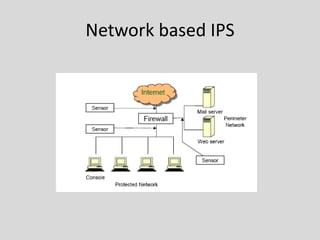
• Network based IPS [NIPS]
  – Perform packet sniffing and analyze network traffic to
    identify and stop suspicious activity
  – They are typically deployed inline like a network
    firewall
  – They receive packets, analyze them, decide whether
    they should be permitted, and allow acceptable
    packets to pass through
  – Most products use a combination of attack signatures
    and analysis of network and application protocols
  – Some products allow administrators to create and
    deploy attack signatures
Network based IPS
Classifications
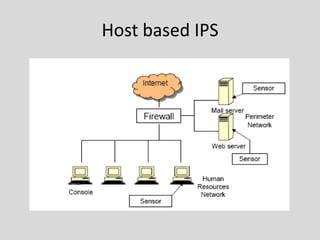
• Host based IPS [HIPS]
  – HIPS are similar in principle and purpose to network-
    based , except that a host-based product monitors the
    characteristics of a single host and the events
    occurring within that host, such as monitoring
    network traffic (only for that host), system logs,
    running processes, file access and modification, and
    system and application configuration changes
  – Host-based IDPSs are most commonly deployed on
    critical hosts such as publicly accessible servers and
    servers containing sensitive information
Host based IPS
Classifications
• Network Behavior Analysis [NBA]
  – Examines network traffic to identify threats that
    generate unusual traffic flows, such as denial of
    service (DoS) and distributed denial of service (DDoS)
    attacks, certain forms of malware and policy violations
  – NBA systems are most often deployed to monitor
    flows on an organization’s internal networks and flows
    between an organization’s networks and external
    networks
Classifications
• Wireless IPS [WIPS]
  – Monitors wireless network traffic and analyzes its
    wireless networking protocols to identify suspicious
    activity involving the protocols themselves
  – It cannot identify suspicious activity in the application
    or higher-layer network protocols (e.g., TCP, UDP) that
    the wireless network traffic is transferring
Case Study: Snort
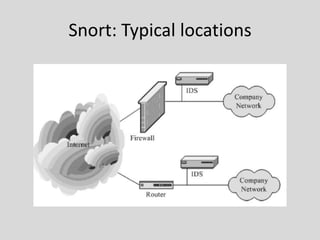
• Snort is an open source
  network intrusion prevention
  and detection system
• It uses a rule-based language
  combining signature, protocol
  and anomaly inspection
  methods
• Snort is the most widely
  deployed intrusion detection
  and prevention technology
  and it has become the de facto
  standard technology
  worldwide in the industry
• Rules-based detection engine
Snort: Typical locations
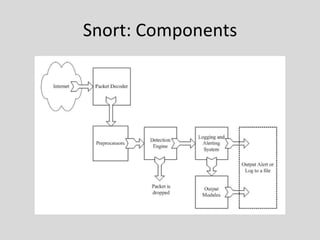
Snort: Components
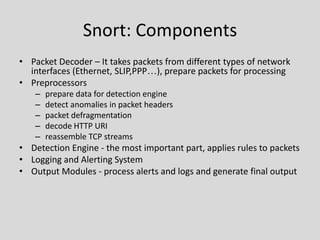
Snort: Components
• Packet Decoder – It takes packets from different types of network
  interfaces (Ethernet, SLIP,PPP…), prepare packets for processing
• Preprocessors
   –   prepare data for detection engine
   –   detect anomalies in packet headers
   –   packet defragmentation
   –   decode HTTP URI
   –   reassemble TCP streams
• Detection Engine - the most important part, applies rules to packets
• Logging and Alerting System
• Output Modules - process alerts and logs and generate final output
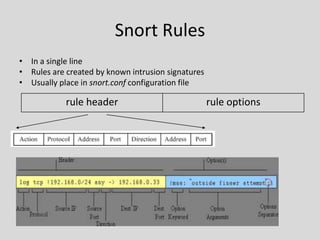
Snort Rules
• In a single line
• Rules are created by known intrusion signatures
• Usually place in snort.conf configuration file

            rule header                             rule options
Snort Rules
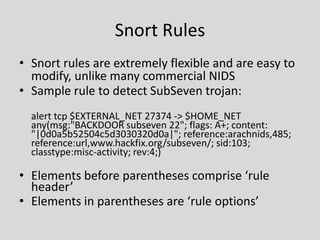
• Snort rules are extremely flexible and are easy to
  modify, unlike many commercial NIDS
• Sample rule to detect SubSeven trojan:
  alert tcp $EXTERNAL_NET 27374 -> $HOME_NET
  any(msg:"BACKDOOR subseven 22"; flags: A+; content:
  "|0d0a5b52504c5d3030320d0a|"; reference:arachnids,485;
  reference:url,www.hackfix.org/subseven/; sid:103;
  classtype:misc-activity; rev:4;)

• Elements before parentheses comprise ‘rule
  header’
• Elements in parentheses are ‘rule options’
Snort Rules
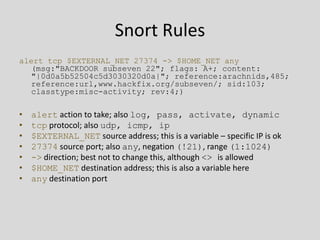
alert tcp $EXTERNAL_NET 27374 -> $HOME_NET any
   (msg:"BACKDOOR subseven 22"; flags: A+; content:
   "|0d0a5b52504c5d3030320d0a|"; reference:arachnids,485;
   reference:url,www.hackfix.org/subseven/; sid:103;
   classtype:misc-activity; rev:4;)

•   alert action to take; also log, pass, activate, dynamic
•   tcp protocol; also udp, icmp, ip
•   $EXTERNAL_NET source address; this is a variable – specific IP is ok
•   27374 source port; also any, negation (!21), range (1:1024)
•   -> direction; best not to change this, although <> is allowed
•   $HOME_NET destination address; this is also a variable here
•   any destination port
Snort Rules
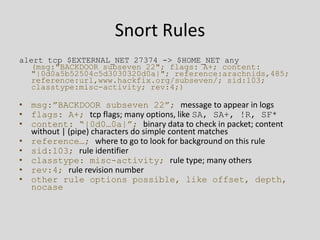
alert tcp $EXTERNAL_NET 27374 -> $HOME_NET any
   (msg:"BACKDOOR subseven 22"; flags: A+; content:
   "|0d0a5b52504c5d3030320d0a|"; reference:arachnids,485;
   reference:url,www.hackfix.org/subseven/; sid:103;
   classtype:misc-activity; rev:4;)

• msg:”BACKDOOR subseven 22”; message to appear in logs
• flags: A+; tcp flags; many options, like SA, SA+, !R, SF*
• content: “|0d0…0a|”; binary data to check in packet; content
  without | (pipe) characters do simple content matches
• reference…; where to go to look for background on this rule
• sid:103; rule identifier
• classtype: misc-activity; rule type; many others
• rev:4; rule revision number
• other rule options possible, like offset, depth,
  nocase
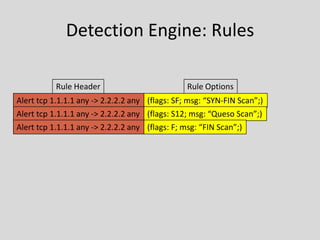
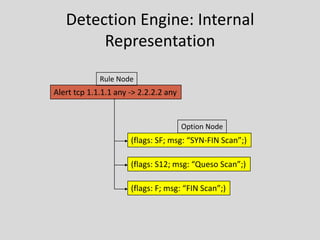
Detection Engine: Rules

           Rule Header                          Rule Options
Alert tcp 1.1.1.1 any -> 2.2.2.2 any (flags: SF; msg: “SYN-FIN Scan”;)
Alert tcp 1.1.1.1 any -> 2.2.2.2 any (flags: S12; msg: “Queso Scan”;)
Alert tcp 1.1.1.1 any -> 2.2.2.2 any (flags: F; msg: “FIN Scan”;)
Detection Engine: Internal
        Representation
             Rule Node
Alert tcp 1.1.1.1 any -> 2.2.2.2 any


                                       Option Node
                      (flags: SF; msg: “SYN-FIN Scan”;)

                      (flags: S12; msg: “Queso Scan”;)

                      (flags: F; msg: “FIN Scan”;)
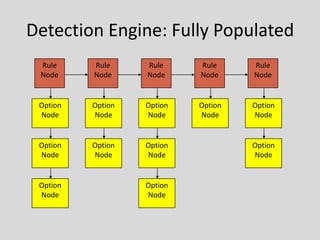
Detection Engine: Fully Populated
 Rule     Rule     Rule     Rule     Rule
 Node     Node     Node     Node     Node


 Option   Option   Option   Option   Option
 Node     Node     Node     Node     Node


 Option   Option   Option            Option
 Node     Node     Node              Node


 Option            Option
 Node              Node
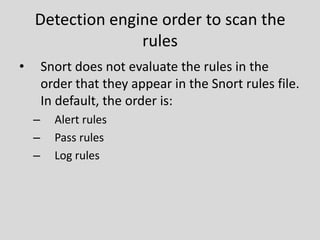
Detection engine order to scan the
                  rules
•       Snort does not evaluate the rules in the
        order that they appear in the Snort rules file.
        In default, the order is:
    –     Alert rules
    –     Pass rules
    –     Log rules
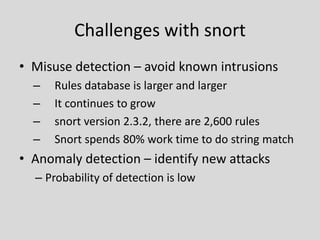
Challenges with snort
• Misuse detection – avoid known intrusions
  –   Rules database is larger and larger
  –   It continues to grow
  –   snort version 2.3.2, there are 2,600 rules
  –   Snort spends 80% work time to do string match
• Anomaly detection – identify new attacks
  – Probability of detection is low
Attempts to improve
• Using hardware to reduce workload : a hybrid
  architecture
  – software has more flexibility, hardware has
    relatively higher throughput
• Better detection algorithm
• Migrating it to multi core platforms to take
  better use of underlying hardware
Thank You !


              Vishwanath Badiger
                     Avaya India

Intrusion Prevention System

  • 1.
    IPS [Intrusion Prevention System] Vishwanath Badiger Avaya India
  • 2.
    Introduction • Intrusion preventionsystems are network security devices that monitor network and/or system activities for malicious activity (intrusion) • Main functions of Intrusion Prevention System (IPS) are, – Identify intrusion – Log information about intrusion – Attempt to block/stop intrusion and – Report intrusion • Intrusion Detection System (IDS) only detect intrusions
  • 3.
    Terminology • False positive– Incorrectly identifying benign activity as being malicious • False negative – Failing to identify malicious activity has occurred • Many organizations choose to decrease false negatives at the cost of increasing false positives. Altering the configuration of an IPS to improve its detection accuracy is known as tuning
  • 4.
    Detection Methods • Signaturebased detection – This method uses preconfigured and predetermined attack patterns (signatures) to detect attacks – Monitors network traffic for matches to signatures and takes appropriate action if match is found – Very effective at detecting known threats – Largely ineffective at detecting unknown threats and many variants of known threats
  • 5.
    Detection Methods • Anomalybased detection – Creates baseline of average network traffic – Intermittently samples network traffic to compare the sample to the set baseline – If the sample is outside the baseline then appropriate action will be taken – Requires much more overhead and processing capacity than signature based detection – May generate many false positives
  • 6.
    Detection Methods • StatefulProtocol Analysis detection – Can natively decode application layer network protocols like HTTP, FTP, etc – Once protocols are fully decoded, the IPS analysis engine can evaluate different parts of protocol for anomalous behavior or exploits against predetermined profiles of generally accepted definitions of benign protocol activity for each protocol state – very difficult or impossible to develop completely accurate models of protocols
  • 7.
    Classifications • Network basedIPS [NIPS] – Perform packet sniffing and analyze network traffic to identify and stop suspicious activity – They are typically deployed inline like a network firewall – They receive packets, analyze them, decide whether they should be permitted, and allow acceptable packets to pass through – Most products use a combination of attack signatures and analysis of network and application protocols – Some products allow administrators to create and deploy attack signatures
  • 8.
  • 9.
    Classifications • Host basedIPS [HIPS] – HIPS are similar in principle and purpose to network- based , except that a host-based product monitors the characteristics of a single host and the events occurring within that host, such as monitoring network traffic (only for that host), system logs, running processes, file access and modification, and system and application configuration changes – Host-based IDPSs are most commonly deployed on critical hosts such as publicly accessible servers and servers containing sensitive information
  • 10.
  • 11.
    Classifications • Network BehaviorAnalysis [NBA] – Examines network traffic to identify threats that generate unusual traffic flows, such as denial of service (DoS) and distributed denial of service (DDoS) attacks, certain forms of malware and policy violations – NBA systems are most often deployed to monitor flows on an organization’s internal networks and flows between an organization’s networks and external networks
  • 12.
    Classifications • Wireless IPS[WIPS] – Monitors wireless network traffic and analyzes its wireless networking protocols to identify suspicious activity involving the protocols themselves – It cannot identify suspicious activity in the application or higher-layer network protocols (e.g., TCP, UDP) that the wireless network traffic is transferring
  • 13.
    Case Study: Snort •Snort is an open source network intrusion prevention and detection system • It uses a rule-based language combining signature, protocol and anomaly inspection methods • Snort is the most widely deployed intrusion detection and prevention technology and it has become the de facto standard technology worldwide in the industry • Rules-based detection engine
  • 14.
  • 15.
  • 16.
    Snort: Components • PacketDecoder – It takes packets from different types of network interfaces (Ethernet, SLIP,PPP…), prepare packets for processing • Preprocessors – prepare data for detection engine – detect anomalies in packet headers – packet defragmentation – decode HTTP URI – reassemble TCP streams • Detection Engine - the most important part, applies rules to packets • Logging and Alerting System • Output Modules - process alerts and logs and generate final output
  • 17.
    Snort Rules • Ina single line • Rules are created by known intrusion signatures • Usually place in snort.conf configuration file rule header rule options
  • 18.
    Snort Rules • Snortrules are extremely flexible and are easy to modify, unlike many commercial NIDS • Sample rule to detect SubSeven trojan: alert tcp $EXTERNAL_NET 27374 -> $HOME_NET any(msg:"BACKDOOR subseven 22"; flags: A+; content: "|0d0a5b52504c5d3030320d0a|"; reference:arachnids,485; reference:url,www.hackfix.org/subseven/; sid:103; classtype:misc-activity; rev:4;) • Elements before parentheses comprise ‘rule header’ • Elements in parentheses are ‘rule options’
  • 19.
    Snort Rules alert tcp$EXTERNAL_NET 27374 -> $HOME_NET any (msg:"BACKDOOR subseven 22"; flags: A+; content: "|0d0a5b52504c5d3030320d0a|"; reference:arachnids,485; reference:url,www.hackfix.org/subseven/; sid:103; classtype:misc-activity; rev:4;) • alert action to take; also log, pass, activate, dynamic • tcp protocol; also udp, icmp, ip • $EXTERNAL_NET source address; this is a variable – specific IP is ok • 27374 source port; also any, negation (!21), range (1:1024) • -> direction; best not to change this, although <> is allowed • $HOME_NET destination address; this is also a variable here • any destination port
  • 20.
    Snort Rules alert tcp$EXTERNAL_NET 27374 -> $HOME_NET any (msg:"BACKDOOR subseven 22"; flags: A+; content: "|0d0a5b52504c5d3030320d0a|"; reference:arachnids,485; reference:url,www.hackfix.org/subseven/; sid:103; classtype:misc-activity; rev:4;) • msg:”BACKDOOR subseven 22”; message to appear in logs • flags: A+; tcp flags; many options, like SA, SA+, !R, SF* • content: “|0d0…0a|”; binary data to check in packet; content without | (pipe) characters do simple content matches • reference…; where to go to look for background on this rule • sid:103; rule identifier • classtype: misc-activity; rule type; many others • rev:4; rule revision number • other rule options possible, like offset, depth, nocase
  • 21.
    Detection Engine: Rules Rule Header Rule Options Alert tcp 1.1.1.1 any -> 2.2.2.2 any (flags: SF; msg: “SYN-FIN Scan”;) Alert tcp 1.1.1.1 any -> 2.2.2.2 any (flags: S12; msg: “Queso Scan”;) Alert tcp 1.1.1.1 any -> 2.2.2.2 any (flags: F; msg: “FIN Scan”;)
  • 22.
    Detection Engine: Internal Representation Rule Node Alert tcp 1.1.1.1 any -> 2.2.2.2 any Option Node (flags: SF; msg: “SYN-FIN Scan”;) (flags: S12; msg: “Queso Scan”;) (flags: F; msg: “FIN Scan”;)
  • 23.
    Detection Engine: FullyPopulated Rule Rule Rule Rule Rule Node Node Node Node Node Option Option Option Option Option Node Node Node Node Node Option Option Option Option Node Node Node Node Option Option Node Node
  • 24.
    Detection engine orderto scan the rules • Snort does not evaluate the rules in the order that they appear in the Snort rules file. In default, the order is: – Alert rules – Pass rules – Log rules
  • 25.
    Challenges with snort •Misuse detection – avoid known intrusions – Rules database is larger and larger – It continues to grow – snort version 2.3.2, there are 2,600 rules – Snort spends 80% work time to do string match • Anomaly detection – identify new attacks – Probability of detection is low
  • 26.
    Attempts to improve •Using hardware to reduce workload : a hybrid architecture – software has more flexibility, hardware has relatively higher throughput • Better detection algorithm • Migrating it to multi core platforms to take better use of underlying hardware
  • 27.
    Thank You ! Vishwanath Badiger Avaya India