The document discusses database firewalls, specifically focusing on snort as an open-source solution for protecting databases from specific attacks. It outlines the functionality of database firewalls, including access control, auditing, and performance monitoring, while also detailing the capabilities and configurations of snort. Additionally, it provides examples of rulesets to block unauthorized SQL commands and addresses concerns regarding implementation and compatibility.
Presentation by Narudom Roongsiriwong begins. Discusses the agenda covering Database Firewalls and Snort implementation.
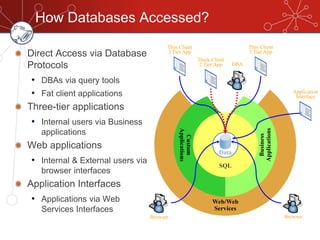
Describes how databases are accessed through various protocols: direct access, business apps, web applications, and application interfaces.
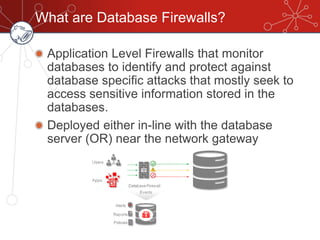
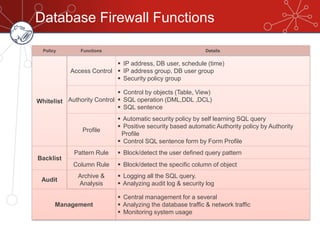
Defines database firewalls as application level firewalls that protect databases from attacks, outlining functions like access control and auditing.
Introduces GreenSQL as an open-source solution for MySQL that allows rapid deployment and is user-friendly.
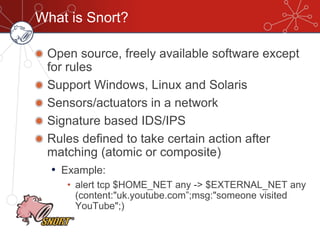
Defines Snort as an open-source IDS/IPS software with abilities for network detection and prevention with low implementation costs.
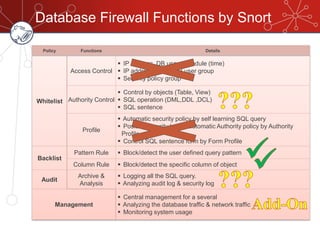
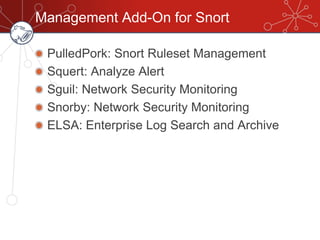
Details Snort's capabilities in firewall functions and the management add-ons like PulledPork and Snorby for analytics.
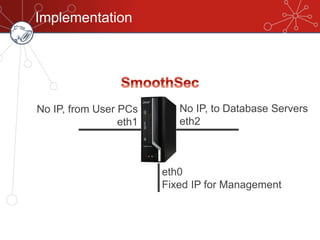
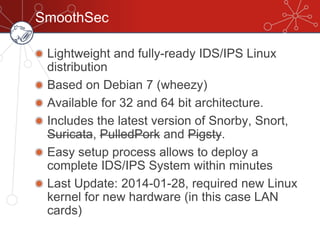
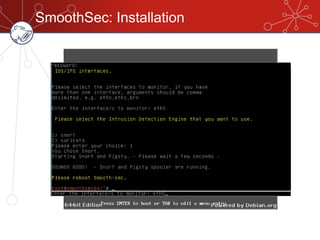
Describes the setup for Snort in a network environment, with a focus on the SmoothSec platform for easy IDS/IPS deployment.
Explains a specific security scenario for developers with rules blocking DDL, DCL, and DML statements to prevent unauthorized access.
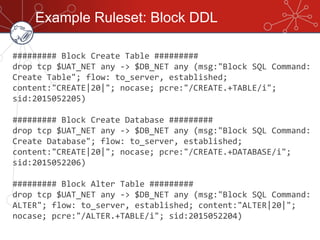
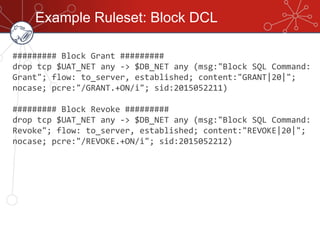
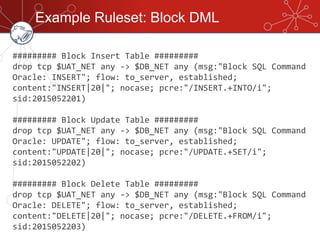
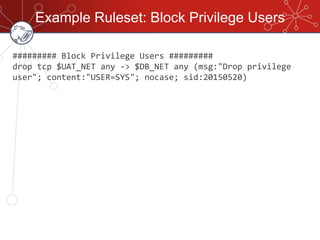
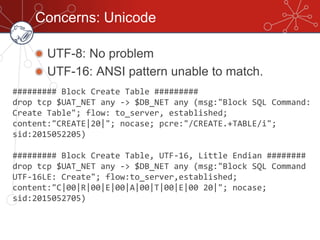
Provides examples for blocking DDL, DML, and privilege user actions in Snort, showcasing how to configure rules for database security.Addresses concerns such as Unicode issues and connection drops due to IPS drops, suggesting hardware adaptations and rule management.
Special thanks to contributors including Amornsak Ruangtang from Kiatnakin Bank PLC.
WhoAmI
Lazy Blogger
• Japan,Security, FOSS, Politics, Christian
• http://narudomr.blogspot.com
Food Lover
• Steak, Yakiniku, BBQ
• Sushi (especially Otoro)
• All Kinds of Noodle (Spaghetti, Ramen, Udon,
Kanomjean)
Head of IT Security, Kiatnakin Bank PLC
(KKP)
3.
Agenda
What Are DatabaseFirewalls?
Are there Open Source DB Firewalls?
What & Why Snort?
Implementation
Concerns
Q&A
4.
Web/Web
Services
Custom
Applications
Business
Applications
How Databases Accessed?
DirectAccess via Database
Protocols
• DBAs via query tools
• Fat client applications
Three-tier applications
• Internal users via Business
applications
Web applications
• Internal & External users via
browser interfaces
Application Interfaces
• Applications via Web
Services Interfaces
Browser Browser
DBA
SQL
Data
Thin Client
3 Tier App
Thick Client
2 Tier App
Thin Client
3 Tier App
Application
Interface
5.
What are DatabaseFirewalls?
Application Level Firewalls that monitor
databases to identify and protect against
database specific attacks that mostly seek to
access sensitive information stored in the
databases.
Deployed either in-line with the database
server (OR) near the network gateway
6.
Database Firewall Functions
PolicyFunctions Details
Whitelist
Access Control
IP address, DB user, schedule (time)
IP address group, DB user group
Security policy group
Authority Control
Control by objects (Table, View)
SQL operation (DML,DDL ,DCL)
SQL sentence
Profile
Automatic security policy by self learning SQL query
Positive security based automatic Authority policy by Authority
Profile
Control SQL sentence form by Form Profile
Backlist
Pattern Rule Block/detect the user defined query pattern
Column Rule Block/detect the specific column of object
Audit
Archive &
Analysis
Logging all the SQL query.
Analyzing audit log & security log
Management
Central management for a several
Analyzing the database traffic & network traffic
Monitoring system usage
7.
Are there OpenSource DB Firewalls?
GreenSQL
• Cross Platform
• Rapid Deployment
• Well established
• Web application independent
• The only free security solution for MySQL
• User Friendly WEB GUI/Management tool
8.
What is Snort?
Opensource, freely available software except
for rules
Support Windows, Linux and Solaris
Sensors/actuators in a network
Signature based IDS/IPS
Rules defined to take certain action after
matching (atomic or composite)
• Example:
• alert tcp $HOME_NET any -> $EXTERNAL_NET any
(content:"uk.youtube.com”;msg:"someone visited
YouTube";)
9.
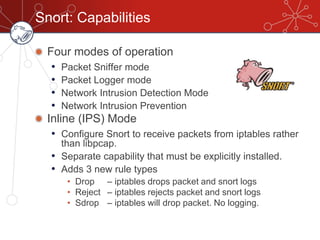
Snort: Capabilities
Four modesof operation
• Packet Sniffer mode
• Packet Logger mode
• Network Intrusion Detection Mode
• Network Intrusion Prevention
Inline (IPS) Mode
• Configure Snort to receive packets from iptables rather
than libpcap.
• Separate capability that must be explicitly installed.
• Adds 3 new rule types
• Drop – iptables drops packet and snort logs
• Reject – iptables rejects packet and snort logs
• Sdrop – iptables will drop packet. No logging.
10.
Why Snort?
Open Source
Lowcost hardware implementation
Ready to use Linux distribution out there
• SmoothSec
• Security Onion
Partial DB Firewall function implementation
11.
Database Firewall Functionsby Snort
Policy Functions Details
Whitelist
Access Control
IP address, DB user, schedule (time)
IP address group, DB user group
Security policy group
Authority Control
Control by objects (Table, View)
SQL operation (DML,DDL ,DCL)
SQL sentence
Profile
Automatic security policy by self learning SQL query
Positive security based automatic Authority policy by Authority
Profile
Control SQL sentence form by Form Profile
Backlist
Pattern Rule Block/detect the user defined query pattern
Column Rule Block/detect the specific column of object
Audit
Archive &
Analysis
Logging all the SQL query.
Analyzing audit log & security log
Management
Central management for a several
Analyzing the database traffic & network traffic
Monitoring system usage
SmoothSec
Lightweight and fully-readyIDS/IPS Linux
distribution
Based on Debian 7 (wheezy)
Available for 32 and 64 bit architecture.
Includes the latest version of Snorby, Snort,
Suricata, PulledPork and Pigsty.
Easy setup process allows to deploy a
complete IDS/IPS System within minutes
Last Update: 2014-01-28, required new Linux
kernel for new hardware (in this case LAN
cards)
Scenario: Read onlyfor Developers
Cause: Developers knows database privilege
usernames and passwords on legacy systems
Environment: UAT
Settings: Blacklist DDL, DCL and all DML
except“SELECT”
17.
Explanation
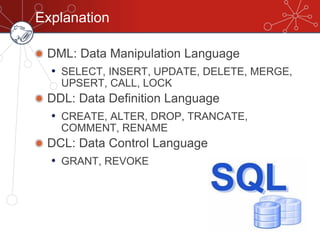
DML: Data ManipulationLanguage
• SELECT, INSERT, UPDATE, DELETE, MERGE,
UPSERT, CALL, LOCK
DDL: Data Definition Language
• CREATE, ALTER, DROP, TRANCATE,
COMMENT, RENAME
DCL: Data Control Language
• GRANT, REVOKE
18.
Example Ruleset: BlockDDL
######### Block Create Table #########
drop tcp $UAT_NET any -> $DB_NET any (msg:"Block SQL Command:
Create Table"; flow: to_server, established;
content:"CREATE|20|"; nocase; pcre:"/CREATE.+TABLE/i";
sid:2015052205)
######### Block Create Database #########
drop tcp $UAT_NET any -> $DB_NET any (msg:"Block SQL Command:
Create Database"; flow: to_server, established;
content:"CREATE|20|"; nocase; pcre:"/CREATE.+DATABASE/i";
sid:2015052206)
######### Block Alter Table #########
drop tcp $UAT_NET any -> $DB_NET any (msg:"Block SQL Command:
ALTER"; flow: to_server, established; content:"ALTER|20|";
nocase; pcre:"/ALTER.+TABLE/i"; sid:2015052204)
19.
Example Ruleset: BlockDCL
######### Block Grant #########
drop tcp $UAT_NET any -> $DB_NET any (msg:"Block SQL Command:
Grant"; flow: to_server, established; content:"GRANT|20|";
nocase; pcre:"/GRANT.+ON/i"; sid:2015052211)
######### Block Revoke #########
drop tcp $UAT_NET any -> $DB_NET any (msg:"Block SQL Command:
Revoke"; flow: to_server, established; content:"REVOKE|20|";
nocase; pcre:"/REVOKE.+ON/i"; sid:2015052212)
20.
Example Ruleset: BlockDML
######### Block Insert Table #########
drop tcp $UAT_NET any -> $DB_NET any (msg:"Block SQL Command
Oracle: INSERT"; flow: to_server, established;
content:"INSERT|20|"; nocase; pcre:"/INSERT.+INTO/i";
sid:2015052201)
######### Block Update Table #########
drop tcp $UAT_NET any -> $DB_NET any (msg:"Block SQL Command
Oracle: UPDATE"; flow: to_server, established;
content:"UPDATE|20|"; nocase; pcre:"/UPDATE.+SET/i";
sid:2015052202)
######### Block Delete Table #########
drop tcp $UAT_NET any -> $DB_NET any (msg:"Block SQL Command
Oracle: DELETE"; flow: to_server, established;
content:"DELETE|20|"; nocase; pcre:"/DELETE.+FROM/i";
sid:2015052203)
21.
Example Ruleset: BlockPrivilege Users
######### Block Privilege Users #########
drop tcp $UAT_NET any -> $DB_NET any (msg:"Drop privilege
user"; content:"USER=SYS"; nocase; sid:20150520)
22.
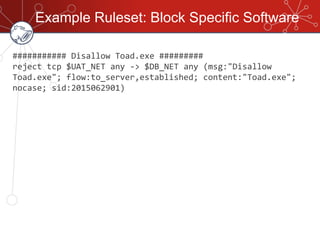
Example Ruleset: BlockSpecific Software
########### Disallow Toad.exe #########
reject tcp $UAT_NET any -> $DB_NET any (msg:"Disallow
Toad.exe"; flow:to_server,established; content:"Toad.exe";
nocase; sid:2015062901)
23.
Concerns: Unicode
UTF-8: Noproblem
UTF-16: ANSI pattern unable to match.
######### Block Create Table #########
drop tcp $UAT_NET any -> $DB_NET any (msg:"Block SQL Command:
Create Table"; flow: to_server, established;
content:"CREATE|20|"; nocase; pcre:"/CREATE.+TABLE/i";
sid:2015052205)
######### Block Create Table, UTF-16, Little Endian ########
drop tcp $UAT_NET any -> $DB_NET any (msg:"Block SQL Command
UTF-16LE: Create"; flow:to_server,established;
content:"C|00|R|00|E|00|A|00|T|00|E|00 20|"; nocase;
sid:2015052705)
24.
Other Concerns
No returnresult on IPS drop, causes
disconnection on some software
Dual-Port Ethernet adapter with bypass
function may be required (with expensive cost)
Implement ruleset rotation to cover scheduling
feature.