Futurex Solutions Overview
SKI9000
Direct Key Injection Solution
Agenda
• About Futurex
• SKI Series Overview
• Security Features
• Regulatory Compliance
• DUKPT Key Injection Overview
• Contact Details
Futurex. An Innovative Leader in
Encryption Solutions.
• For over 30 years, more than 15,000 customers worldwide have
trusted Futurex solutions to protect their highly sensitive data
• Hardware-based solutions with diverse applications in
electronic payments and general-purpose data security
• Entrepreneurial culture, fostering agility and innovation in the
development of hardware encryption solutions with cross-
platform, multidimensional applications
• Results-oriented engineering team based entirely out of our
U.S. Technology Campus, with significant experience
delivering First-to-Market Customer Initiatives
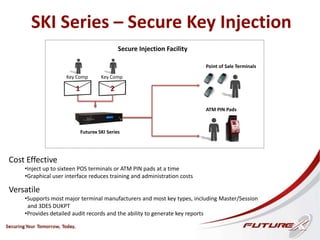
SKI Series – Secure Key Injection
Futurex SKI Series
ATM PIN Pads
Key Comp
2
Point of Sale Terminals
Secure Injection Facility
Cost Effective
•Inject up to sixteen POS terminals or ATM PIN pads at a time
•Graphical user interface reduces training and administration costs
Versatile
•Supports most major terminal manufacturers and most key types, including Master/Session
and 3DES DUKPT
•Provides detailed audit records and the ability to generate key reports
Key Comp
1
Why Did Futurex
Develop the SKI Series?
• Adoption of ASC X9.24 - Part 1, which mandates the use of
hardware-based encryption devices, by the major card brands has
made it no longer acceptable to use software-based encryption to
protect payment keys.
• Existing key injection solutions are limited in capability and are
outdated, often lacking support for multiple terminal
manufacturers and a graphical user interface.
• Storing keys as cryptograms or in a Tamper-Resistant Security
Module (TRSM) dramatically reduces the risk of key exposure.
• As key usage expands, the complexity of managing and tracking
keys increases.
SKI Series Features
• Eliminates the costly manual process of loading
multiple keys
• Supports all major key types
• Prints labels with device ID and key serial number for
convenient tracking
• Scalable to perform up to sixteen injections at once
• Easy-to-use GUI significantly reduces training and
administration costs
• Keys exportable to the Futurex RKMS Series
Remote Key Management Server
Security Features
Physical Security
• Two independent front panel locks
protected by individual barrel keys
that are highly resistant to picking
and/or duplication
• CD-ROM drive hidden behind front
panel
• “Puzzle Box” design with hardened
steel casing and interlocking
components
• TRSM with epoxy barrier and sensor
wires to protect processor and
system memory
• Serial ports connected directly to
TRSM
Logical Security
• Dual logins required to access
application
• User group permissions control
privileges within application
• Keys stored as cryptograms under
MFK or KEK
• Key component entry occurs in
separate steps, each with
individual check digit display
• Complete, authenticated audit log
files of all activity and access
• Standard reports and
customizable queries from
audit log files
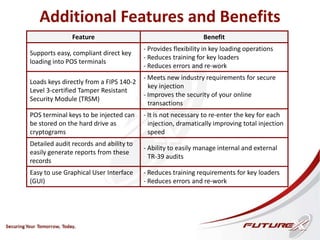
Additional Features and Benefits
Feature Benefit
Supports easy, compliant direct key
loading into POS terminals
- Provides flexibility in key loading operations
- Reduces training for key loaders
- Reduces errors and re-work
Loads keys directly from a FIPS 140-2
Level 3-certified Tamper Resistant
Security Module (TRSM)
- Meets new industry requirements for secure
key injection
- Improves the security of your online
transactions
POS terminal keys to be injected can
be stored on the hard drive as
cryptograms
- It is not necessary to re-enter the key for each
injection, dramatically improving total injection
speed
Detailed audit records and ability to
easily generate reports from these
records
- Ability to easily manage internal and external
TR-39 audits
Easy to use Graphical User Interface
(GUI)
- Reduces training requirements for key loaders
- Reduces errors and re-work
Regulatory Compliance – Secure Room
• Required for any organization that must undergo a TR-39 audit
• Secure room requirements:
o Mandatory dual access
o No connection to outside networks
o Auditable use and visitor logs
o Access restricted to authorized personnel
• How does the secure room apply to Point of Sale terminal
manufacturers?
o Clear keys must be loaded within a secure room
o Certificate authorities must be generated, stored, and managed
within a secure room
• Futurex’s CTGA-certified Solutions Architects have secure
room expertise and can provide training assistance
in the design and implementation process
Overview – DUKPT Key Injection
DUKPT Features
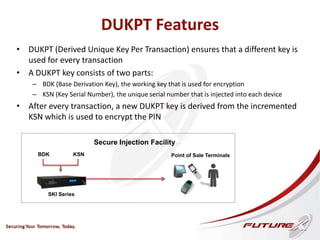
• DUKPT (Derived Unique Key Per Transaction) ensures that a different key is
used for every transaction
• A DUKPT key consists of two parts:
– BDK (Base Derivation Key), the working key that is used for encryption
– KSN (Key Serial Number), the unique serial number that is injected into each device
• After every transaction, a new DUKPT key is derived from the incremented
KSN which is used to encrypt the PIN
SKI Series
Point of Sale Terminals
Secure Injection Facility
BDK KSN
Overview – DUKPT Key Injection
SKI Series
POS
Terminal
Secure Room
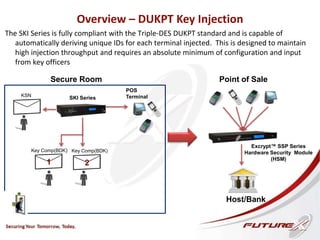
The SKI Series is fully compliant with the Triple-DES DUKPT standard and is capable of
automatically deriving unique IDs for each terminal injected. This is designed to maintain
high injection throughput and requires an absolute minimum of configuration and input
from key officers
Key Comp(BDK)
2
Key Comp(BDK)
1
KSN
Point of Sale
Host/Bank
Excrypt™ SSP Series
Hardware Security Module
(HSM)
Key Serial Number
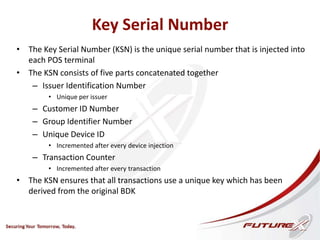
• The Key Serial Number (KSN) is the unique serial number that is injected into
each POS terminal
• The KSN consists of five parts concatenated together
– Issuer Identification Number
• Unique per issuer
– Customer ID Number
– Group Identifier Number
– Unique Device ID
• Incremented after every device injection
– Transaction Counter
• Incremented after every transaction
• The KSN ensures that all transactions use a unique key which has been
derived from the original BDK
Overview – DUKPT Key Injection
SKI Series
POS
Terminal
Secure
Room
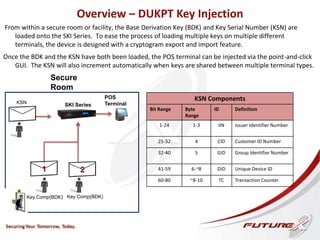
From within a secure room or facility, the Base Derivation Key (BDK) and Key Serial Number (KSN) are
loaded onto the SKI Series. To ease the process of loading multiple keys on multiple different
terminals, the device is designed with a cryptogram export and import feature.
Key Comp(BDK)
2
Key Comp(BDK)
1
KSN
Once the BDK and the KSN have both been loaded, the POS terminal can be injected via the point-and-click
GUI. The KSN will also increment automatically when keys are shared between multiple terminal types.
KSN Components
Bit Range Byte
Range
ID Definition
1-24 1-3 IIN Issuer Identifier Number
25-32 4 CID Customer ID Number
32-40 5 GID Group Identifier Number
41-59 6-~8 DID Unique Device ID
60-80 ~8-10 TC Transaction Counter
Overview – DUKPT Key Injection
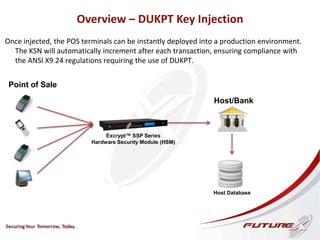
Once injected, the POS terminals can be instantly deployed into a production environment.
The KSN will automatically increment after each transaction, ensuring compliance with
the ANSI X9.24 regulations requiring the use of DUKPT.
Point of Sale
Host/Bank
Excrypt™ SSP Series
Hardware Security Module (HSM)
Host Database
Futurex SKI9000 – Key Exchange
Process Flow Diagram
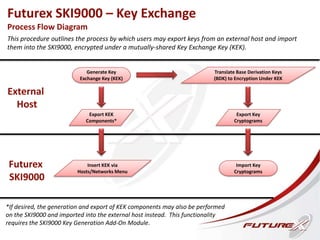
This procedure outlines the process by which users may export keys from an external host and import
them into the SKI9000, encrypted under a mutually-shared Key Exchange Key (KEK).
Futurex
SKI9000
External
Host
Generate Key
Exchange Key (KEK)
Export KEK
Components*
*If desired, the generation and export of KEK components may also be performed
on the SKI9000 and imported into the external host instead. This functionality
requires the SKI9000 Key Generation Add-On Module.
Insert KEK via
Hosts/Networks Menu
Translate Base Derivation Keys
(BDK) to Encryption Under KEK
Export Key
Cryptograms
Import Key
Cryptograms
Contact Us
Visit http://www.futurex.com
for more information
Greg Stone
Sr. Product Marketing Engineer, Enterprise Sales and Virtual Markets
Direct: +1 830-980-9782 x1316
Mobile: +1 210-287-2729
gstone@futurex.com

Futurex Secure Key Injection Solution

  • 1.
  • 2.
    Agenda • About Futurex •SKI Series Overview • Security Features • Regulatory Compliance • DUKPT Key Injection Overview • Contact Details
  • 3.
    Futurex. An InnovativeLeader in Encryption Solutions. • For over 30 years, more than 15,000 customers worldwide have trusted Futurex solutions to protect their highly sensitive data • Hardware-based solutions with diverse applications in electronic payments and general-purpose data security • Entrepreneurial culture, fostering agility and innovation in the development of hardware encryption solutions with cross- platform, multidimensional applications • Results-oriented engineering team based entirely out of our U.S. Technology Campus, with significant experience delivering First-to-Market Customer Initiatives
  • 4.
    SKI Series –Secure Key Injection Futurex SKI Series ATM PIN Pads Key Comp 2 Point of Sale Terminals Secure Injection Facility Cost Effective •Inject up to sixteen POS terminals or ATM PIN pads at a time •Graphical user interface reduces training and administration costs Versatile •Supports most major terminal manufacturers and most key types, including Master/Session and 3DES DUKPT •Provides detailed audit records and the ability to generate key reports Key Comp 1
  • 5.
    Why Did Futurex Developthe SKI Series? • Adoption of ASC X9.24 - Part 1, which mandates the use of hardware-based encryption devices, by the major card brands has made it no longer acceptable to use software-based encryption to protect payment keys. • Existing key injection solutions are limited in capability and are outdated, often lacking support for multiple terminal manufacturers and a graphical user interface. • Storing keys as cryptograms or in a Tamper-Resistant Security Module (TRSM) dramatically reduces the risk of key exposure. • As key usage expands, the complexity of managing and tracking keys increases.
  • 6.
    SKI Series Features •Eliminates the costly manual process of loading multiple keys • Supports all major key types • Prints labels with device ID and key serial number for convenient tracking • Scalable to perform up to sixteen injections at once • Easy-to-use GUI significantly reduces training and administration costs • Keys exportable to the Futurex RKMS Series Remote Key Management Server
  • 7.
    Security Features Physical Security •Two independent front panel locks protected by individual barrel keys that are highly resistant to picking and/or duplication • CD-ROM drive hidden behind front panel • “Puzzle Box” design with hardened steel casing and interlocking components • TRSM with epoxy barrier and sensor wires to protect processor and system memory • Serial ports connected directly to TRSM Logical Security • Dual logins required to access application • User group permissions control privileges within application • Keys stored as cryptograms under MFK or KEK • Key component entry occurs in separate steps, each with individual check digit display • Complete, authenticated audit log files of all activity and access • Standard reports and customizable queries from audit log files
  • 8.
    Additional Features andBenefits Feature Benefit Supports easy, compliant direct key loading into POS terminals - Provides flexibility in key loading operations - Reduces training for key loaders - Reduces errors and re-work Loads keys directly from a FIPS 140-2 Level 3-certified Tamper Resistant Security Module (TRSM) - Meets new industry requirements for secure key injection - Improves the security of your online transactions POS terminal keys to be injected can be stored on the hard drive as cryptograms - It is not necessary to re-enter the key for each injection, dramatically improving total injection speed Detailed audit records and ability to easily generate reports from these records - Ability to easily manage internal and external TR-39 audits Easy to use Graphical User Interface (GUI) - Reduces training requirements for key loaders - Reduces errors and re-work
  • 9.
    Regulatory Compliance –Secure Room • Required for any organization that must undergo a TR-39 audit • Secure room requirements: o Mandatory dual access o No connection to outside networks o Auditable use and visitor logs o Access restricted to authorized personnel • How does the secure room apply to Point of Sale terminal manufacturers? o Clear keys must be loaded within a secure room o Certificate authorities must be generated, stored, and managed within a secure room • Futurex’s CTGA-certified Solutions Architects have secure room expertise and can provide training assistance in the design and implementation process
  • 10.
    Overview – DUKPTKey Injection
  • 11.
    DUKPT Features • DUKPT(Derived Unique Key Per Transaction) ensures that a different key is used for every transaction • A DUKPT key consists of two parts: – BDK (Base Derivation Key), the working key that is used for encryption – KSN (Key Serial Number), the unique serial number that is injected into each device • After every transaction, a new DUKPT key is derived from the incremented KSN which is used to encrypt the PIN SKI Series Point of Sale Terminals Secure Injection Facility BDK KSN
  • 12.
    Overview – DUKPTKey Injection SKI Series POS Terminal Secure Room The SKI Series is fully compliant with the Triple-DES DUKPT standard and is capable of automatically deriving unique IDs for each terminal injected. This is designed to maintain high injection throughput and requires an absolute minimum of configuration and input from key officers Key Comp(BDK) 2 Key Comp(BDK) 1 KSN Point of Sale Host/Bank Excrypt™ SSP Series Hardware Security Module (HSM)
  • 13.
    Key Serial Number •The Key Serial Number (KSN) is the unique serial number that is injected into each POS terminal • The KSN consists of five parts concatenated together – Issuer Identification Number • Unique per issuer – Customer ID Number – Group Identifier Number – Unique Device ID • Incremented after every device injection – Transaction Counter • Incremented after every transaction • The KSN ensures that all transactions use a unique key which has been derived from the original BDK
  • 14.
    Overview – DUKPTKey Injection SKI Series POS Terminal Secure Room From within a secure room or facility, the Base Derivation Key (BDK) and Key Serial Number (KSN) are loaded onto the SKI Series. To ease the process of loading multiple keys on multiple different terminals, the device is designed with a cryptogram export and import feature. Key Comp(BDK) 2 Key Comp(BDK) 1 KSN Once the BDK and the KSN have both been loaded, the POS terminal can be injected via the point-and-click GUI. The KSN will also increment automatically when keys are shared between multiple terminal types. KSN Components Bit Range Byte Range ID Definition 1-24 1-3 IIN Issuer Identifier Number 25-32 4 CID Customer ID Number 32-40 5 GID Group Identifier Number 41-59 6-~8 DID Unique Device ID 60-80 ~8-10 TC Transaction Counter
  • 15.
    Overview – DUKPTKey Injection Once injected, the POS terminals can be instantly deployed into a production environment. The KSN will automatically increment after each transaction, ensuring compliance with the ANSI X9.24 regulations requiring the use of DUKPT. Point of Sale Host/Bank Excrypt™ SSP Series Hardware Security Module (HSM) Host Database
  • 16.
    Futurex SKI9000 –Key Exchange Process Flow Diagram This procedure outlines the process by which users may export keys from an external host and import them into the SKI9000, encrypted under a mutually-shared Key Exchange Key (KEK). Futurex SKI9000 External Host Generate Key Exchange Key (KEK) Export KEK Components* *If desired, the generation and export of KEK components may also be performed on the SKI9000 and imported into the external host instead. This functionality requires the SKI9000 Key Generation Add-On Module. Insert KEK via Hosts/Networks Menu Translate Base Derivation Keys (BDK) to Encryption Under KEK Export Key Cryptograms Import Key Cryptograms
  • 17.
    Contact Us Visit http://www.futurex.com formore information Greg Stone Sr. Product Marketing Engineer, Enterprise Sales and Virtual Markets Direct: +1 830-980-9782 x1316 Mobile: +1 210-287-2729 gstone@futurex.com